Guide · AI search
Search Console AI performance report: how to read and use it
What Search Console's generative AI report counts, what it hides, how to estimate the clicks AI answers cost you, and when the AI opt-out control makes sense.

On this page (10 sections)
- 1What the generative AI report shows and when an impression counts
- 2What it does not show: clicks, queries and link position
- 3Find the report, check eligibility and set a baseline
- 4Reading the report by page, country, device and date
- 5Pair AI impressions with clicks to estimate what AI answers cost you
- 6Data anomalies: why a sudden drop may not be real
- 7Should you use the Search generative AI control? A decision table
- 8Fill the gaps with Bing AI Performance, GA4 and prompt tracking
- 9A monthly AI reporting routine with a template
- 10Sources
Since 31 August 2026, the Search Console AI performance report has shown every property how often its links appear inside Google's AI answers. This generative AI performance report is the first data Google has given site owners specifically about AI Overviews and AI Mode, and it is easy to misread: it counts impressions, not clicks, and says nothing about which questions produced them.
This guide explains what the report counts, what it leaves out, and how to turn it into a monthly routine that ends in decisions. Every fact about the report links to Google's documentation or to trade press coverage, and dates matter, because the report has changed several times since June.
Who this is for: small-business owners and in-house marketers who have found the report and want to use it properly. What you will be able to do:
- Explain what an AI impression is, and why the totals do not add up.
- Set a page-level baseline and estimate the clicks AI answers cost you, using only your own data.
- Spot fake drops caused by logging errors before you report them.
- Decide whether to use the Search generative AI control, and what to use instead.
If your traffic has already fallen and you need the cause first, our post on whether AI Overviews took your clicks covers that diagnosis. This guide picks up where it stops.
What the generative AI report shows and when an impression counts
The generative AI performance report shows how many times links to your site were shown to users inside Google's generative AI features. The Search version covers AI Overviews and AI Mode, a separate Discover version covers Discover's generative features, and the only metric is impressions, broken down by page, country, device and date.
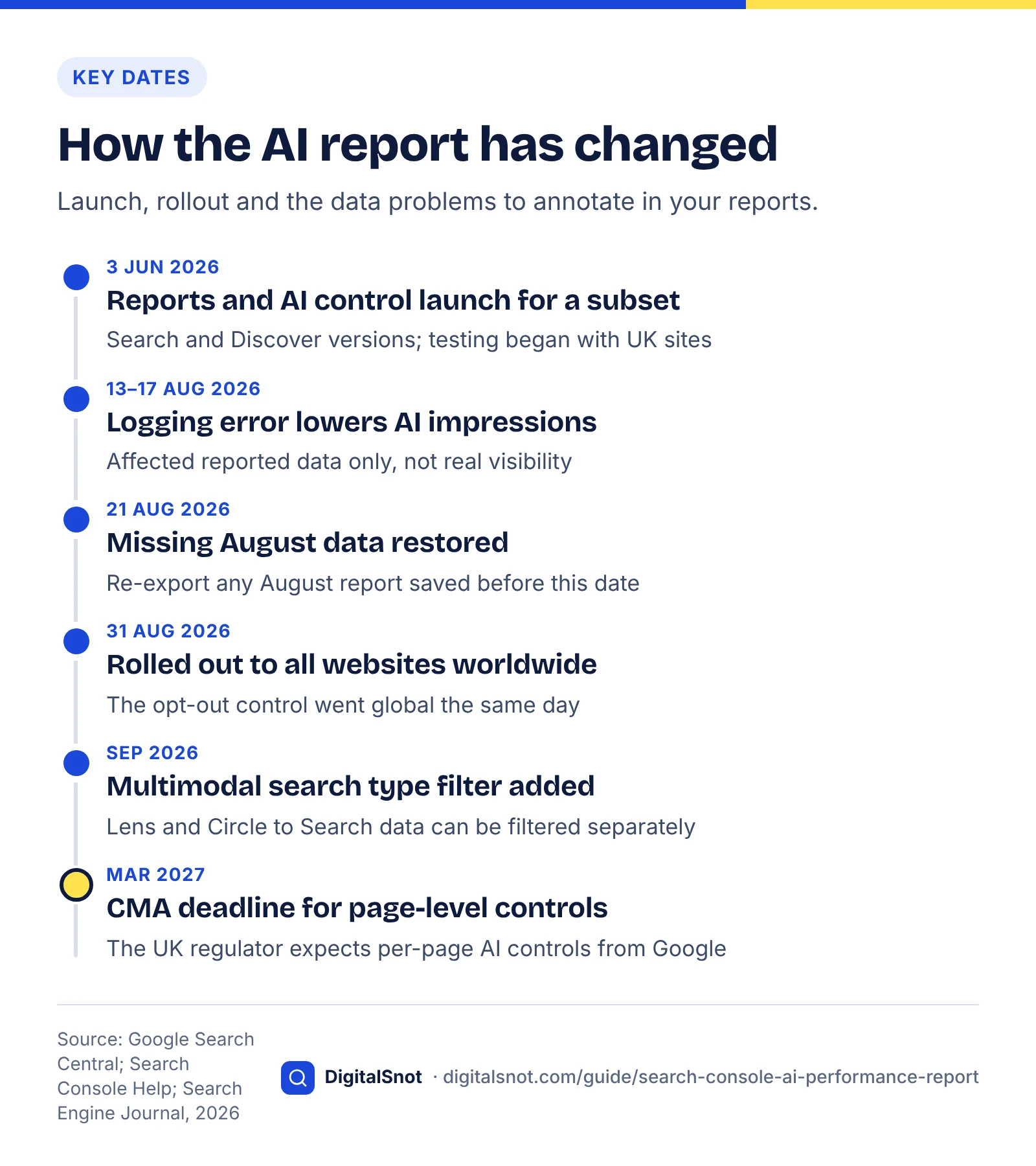
Google announced the reports on the Search Central Blog on 3 June 2026 for a subset of sites; Search Engine Journal reported that testing began with UK website owners. A note added to Google's post says the reports reached all websites worldwide on 31 August 2026.
The data itself is not new. Google's AI features documentation says AI feature appearances are already included in the Performance report under the Web search type, and they stay there. What is new is a view that isolates the AI part, so guides claiming Search Console cannot separate AI data are now out of date.
The definition, in Google's terms
Google's help page for the Search version defines impressions as the number of times a link to your site was shown to a user in a generative AI feature on Google Search. Four counting rules follow:
- Standard impression rules apply to AI Overviews. Google's page on impressions, position and clicks says a link generally counts when it appears in the results served, even below the fold, but items in carousels or expanding sections must be scrolled into view or expanded first.
- Hidden links count only once opened. Google's John Mueller explained on Bluesky, as reported by Search Engine Journal, that a link behind an expansion counts only after someone opens it. He was unsure whether a favicon alone counts.
- Each AI Mode follow-up is a new query. Google counts impressions, position and clicks in the new response as coming from the follow-up question.
- Chart totals are counted once per property. Two of your pages in the same AI answer make one impression in the chart total. Add a URL filter and the chart counts by URL instead.
The Discover version counts differently
The Discover generative AI report aggregates by page, not by property, so separate results from your site in one Discover list each count, with one impression per result per session. Never add Discover and Search figures together.
What it does not show: clicks, queries and link position
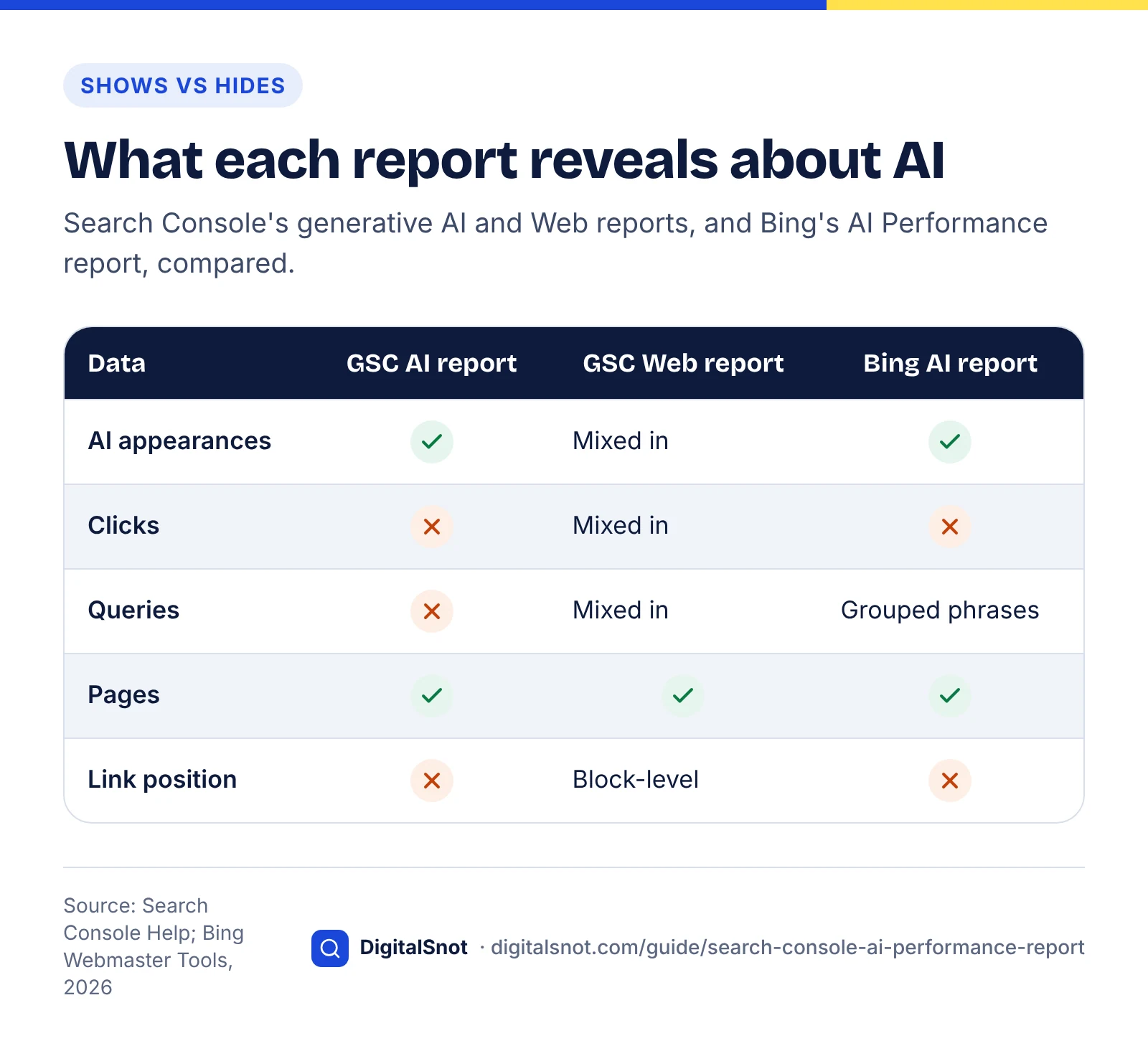
The report does not show clicks, click-through rate, search queries or where your link sat inside an AI answer. Each gap has a partial workaround, but none is exact.
Clicks are in the Web report, mixed with everything else
Google's impressions page says clicking a link to an external page in an AI Overview or AI Mode counts as a click. Those clicks sit in the Performance report's Web totals alongside ordinary result clicks, with no filter to separate them (checked October 2026).
Queries are missing entirely
You can see that a page earned AI impressions, not which questions produced them. The nearest substitutes are the page's Web queries, which mix AI and non-AI searches, and Bing's grounding queries, covered later.
Position is block-level at best
The report has no position metric. In the Performance report, Google says an AI Overview occupies a single position and every link inside it gets that position, so the first and last links look identical. AI Mode follows the normal results-page method. Google notes these rules are subject to change.
We also found no Google documentation offering API or bulk-export access to this data (checked October 2026), so export it by hand each month and keep every file.
Where each missing number lives: our comparison
Method: in October 2026 we read the help pages for Search Console's generative AI and Performance reports and Bing's AI Performance report, and recorded where each piece of data actually appears.
| Data you want | In the generative AI report? | Best substitute | Main caveat |
|---|---|---|---|
| Clicks from AI answers | No | Web clicks in the Performance report | Mixed with ordinary result clicks |
| Queries behind AI impressions | No | Web queries for the same page; Bing grounding queries | Neither is Google's AI query list |
| Link position in the answer | No | Web position (AI Overview counted as one block) | Every link in an overview gets the same position |
| Share of AI citations | No | Bing Citation Share (preview) | Bing and Copilot only |
| Visits from chat assistants | No | GA4 AI Assistant channel | Excludes Google's AI Overviews and AI Mode |
Find the report, check eligibility and set a baseline
Open the report from the Performance section of your property: there is a Search version and, if your site gets Discover traffic, a Discover version. If it is missing, the usual reasons are too few AI impressions or an opted-out site, and both take minutes to check.
Five checks before you trust the numbers
- Pick the right property. A Domain property covers every subdomain and protocol; a URL-prefix property covers only its prefix, so totals differ. The opt-out can differ too: Google's help page for the Search generative AI control says a child property can follow its parent's setting or use its own.
- Open the report. If it does not appear, Google says the site usually has not had enough impressions in generative AI features.
- Check the opt-out. Go to Settings, then Search generative AI, and confirm the property is included. In its June 2026 announcement of the control, Google said sites that opt out "will not receive traffic or impressions" from these features.
- Check your key pages are eligible. Google says a page must be indexed and eligible to show with a snippet to appear as a link in AI Overviews or AI Mode, with no extra technical requirements. Use URL Inspection, and our technical SEO audit checklist if indexing looks shaky.
- Note the search type filter. Since September 2026 the reports can be filtered by a multimodal search type, so record which filter you used.
Set a page-level baseline
A baseline is a saved export of one fixed period that every later month is compared against. The report's history is short, so start now.
- Choose the first full month after 31 August 2026 with no entries for your report on Google's data anomalies page. For most sites that is September 2026.
- Export the Pages table from the generative AI report (Search) for that month.
- Export the Pages table from the Performance report (Web) for the same dates, with clicks, impressions, CTR and position.
- Combine both in one spreadsheet, matched by URL, with a column for page type: service, product, location, blog post or guide.
- Save it with the month in the file name, and never overwrite it.
One warning about older data: Google's data anomalies page records a logging error that prevented accurate impression reporting from 13 May 2025 until 27 April 2026. Impressions, CTR and average position were affected; clicks were not. Before 27 April 2026, compare clicks only.
Reading the report by page, country, device and date
Read the report by page first, then use country, device and date to explain what the page view shows. Pages tell you which content Google's AI features draw on; the other dimensions tell you where and when.
Pages: find your AI-facing content
List your top 20 pages by AI impressions and compare them with your top 20 by Web clicks. Where the lists differ, AI answers and classic results value your content differently, so look there first.
Then compare the page rows with the chart total. The chart counts once per property and the Pages table counts each URL, so the rows can add up to more. Our reading of Google's aggregation rule: a page sum well above the chart total means several of your pages often appear in the same answer. That can mean strong topic coverage, or overlapping pages competing for the same questions.
Countries: check the mix, not just the totals
Compare each country's share of your AI impressions with its share of your Web impressions. A country with a much larger AI share is one where AI answers do more of the work of showing your pages. If you do not serve that country, the impressions are worth little.
Devices: Search only
Device data exists only in the Search version. A page with most of its AI impressions on mobile but most of its Web clicks on desktop may be one where mobile searchers get their answer without visiting.
Dates: weekly for trends, hourly for checks
The report offers hourly, daily, weekly and monthly views. Report weekly or monthly, because daily AI impressions swing with news and weekdays, and use hourly only to confirm a change has started to show. Ignore the dotted end of the line: Google marks the newest data as preliminary and says it can change within hours.
What counts as an AI impression
Pair AI impressions with clicks to estimate what AI answers cost you
You cannot see AI clicks directly, but you can estimate their effect by comparing pages with heavy AI exposure against similar pages with little, before and after. The gap between their click trends is a rough, honest estimate of what AI answers cost you.
This is our own method, built only from the two Search Console reports. It needs no third-party data and takes about an hour in a spreadsheet.
The method, step by step
- Pick two periods of equal length. A baseline and a current period, both after 27 April 2026 if you use impressions or CTR. For year-on-year, use clicks only.
- Calculate AI exposure for each page. Divide the page's AI impressions by its Web impressions for the current period. Web totals already include AI appearances, so the result is a rough share of the page's Search visibility that came with an AI answer. Treat it as an index, not an exact percentage, because the reports count slightly differently.
- Split pages into groups. High exposure: 30% or more. Low exposure: under 10%. Leave the middle out, and compare only pages of the same type. These cut-offs are our starting suggestion; adjust them so each group has at least five pages and about 100 baseline clicks.
- Compare click change. Add up each group's clicks in both periods and work out the percentage change.
- Estimate the AI effect. Subtract the low-exposure group's change from the high-exposure group's change, and multiply the gap by the high-exposure group's baseline clicks. That is the estimated number of clicks lost, or gained, per period.
Worked example
Example (hypothetical): a physiotherapy clinic in Leeds has 34 blog posts. It compares June 2026 with September 2026. Four posts fall in the middle exposure band and are left out.
| Group | Posts | AI exposure (Sept) | Clicks, June | Clicks, Sept | Change |
|---|---|---|---|---|---|
| High exposure | 8 | 46% | 1,240 | 1,010 | −18.5% |
| Low exposure | 22 | 6% | 2,100 | 2,016 | −4.0% |
| Gap | −14.5 points |
Both groups lost clicks, which points to something affecting the whole blog, such as seasonality. The high-exposure group lost 14.5 percentage points more: applied to its 1,240 baseline clicks, roughly 180 clicks a month that AI answers are likely absorbing (1,240 × 0.145 ≈ 180). If about 3% of blog visitors book an assessment, around five bookings a month are at stake (180 × 0.03 ≈ 5.4).
To run the same sum with your own conversion rate and customer value, the free AI Visibility to Pipeline Estimator turns visibility and visits into estimated leads and revenue. Treat its output as a planning figure, not a forecast.
Limits of the estimate
- It is a comparison, not proof. High-exposure pages tend to answer informational questions, which may behave differently for other reasons. Same-type comparisons reduce that bias but do not remove it.
- Rankings must be stable. If average position moved more than about one place in either group, the gap mixes ranking change with the AI effect.
- Small numbers mislead. Below about 100 baseline clicks per group, use longer periods.
Decision table: what to do with each page
| If the page has… | It probably means… | Do this |
|---|---|---|
| High AI exposure, clicks falling faster than similar pages | AI answers satisfy many searchers | Add what an answer cannot give (tools, prices, examples, local detail) and rewrite the title to earn the visit. |
| High AI exposure, clicks steady or rising | Used in answers and still earns visits | Protect it: keep facts current and use it as a model. |
| Low AI exposure, strong Web impressions | Ranks but rarely appears in AI answers | Open sections with direct answers and specific, quotable facts. |
| Low AI exposure, weak Web impressions | Little visibility anywhere | Treat it as a normal SEO problem: intent, quality, internal links. |
| AI impressions fell to near zero | Opt-out, new nosnippet rule, lost indexing or a logging error | Run the anomaly checks below before touching the content. |
For the third row, the free AI Answer Snippet Extractor scores every paragraph out of 100 as a quotable snippet, showing which sections need a clearer opening sentence, and the AI Extractability Checker scores the whole page on qualities such as answer-first sections and paragraph length. For the first row, our list of common title tag mistakes helps you write titles that earn the click.
Data anomalies: why a sudden drop may not be real
Before you report a fall in AI impressions, check Google's data anomalies page and your own change log. Logging errors have already hit this report and its neighbours in 2026, and some apparent drops are really filter or setting changes.
Known anomalies (checked October 2026)
- 13–17 August 2026, Search generative AI report. Google says a logging error decreased impressions for these dates, affecting data logging only, not actual performance. The data was restored in an update dated 21 August, so re-export any August data saved before then.
- 13 August and 24 June 2026, Discover. Two separate logging errors reduced Discover figures for those days, including impressions in the Discover generative AI report.
- 13 May 2025 to 27 April 2026, Performance report impressions. The long-running error described in the baseline section. It ended before the generative AI report launched, but it distorts any Web impressions or CTR from that window that you pair with AI data.
Changes that look like drops but are not
- Filters. In September 2026 Google added multimodal search reporting (Lens, Circle to Search on Android, image uploads and Chrome's "Search this image") to the Search results and generative AI reports, with a new multimodal search type filter. Compare periods with the same filter.
- Preliminary data. The newest part of the line can change within hours.
- Aggregation. A URL filter counts impressions differently from the property total, so the two will not match.
Drops that are real
If none of that explains it, check in order: the Search generative AI setting, robots meta tags on affected pages (a new nosnippet or max-snippet rule), page indexing, and the Google Search Status Dashboard for a core or spam update that week. Our guide to recovering from a Google core update covers that last case. For a single page that has vanished from AI answers, the free AI Citation Loss Analyzer works through the usual causes so you can rule each in or out before changing anything.
Should you use the Search generative AI control? A decision table
For most small businesses, no. The control removes your whole property from AI Overviews, AI Mode and Discover's generative features, and Google says opted-out sites receive no traffic or impressions from them. It fits only a few situations, and narrower tools often do the job better.
What the control does
The Search generative AI control is a property-level setting under Settings, then Search generative AI. Google announced it on 3 June 2026, and its help page says it reached all websites worldwide on 31 August 2026. Inclusion is the default. Exclude a site and, Google says, its content "won't be eligible to be used as an input to generate an AI response or preview" in these features. Four further details from the help page matter:
- Content from other sites will still appear in AI answers, and may look similar to yours.
- It does not affect AI training; Google points to Google-Extended for that.
- It is not a way to leave Search; Google points to noindex for that.
- Most content is excluded within one to two days, though some takes longer because of caching.
Google also says the control "will not be used as a ranking signal for search results outside of these generative AI Search features". That is Google's commitment; we know of no independent test of it yet.
Why this control exists
In June 2026 the UK's Competition and Markets Authority said Google must let publishers opt out of their content powering AI features in search, such as AI Overviews, and must attribute publisher content in AI results with clear links. Search Engine Journal reported that the CMA has given Google until March 2027 to add page-level controls and also expects click-through data. Either would change this decision, which is another reason not to rush it.
The controls compared
Method: in October 2026 we read Google's help page for the control, its AI features documentation and its common crawlers documentation, and recorded the same facts for each control.
| Control | Where you set it | Scope | Effect on AI Overviews and AI Mode | Effect on regular results |
|---|---|---|---|---|
| Search generative AI control | Search Console settings | Whole property (child properties can differ) | Not used as input or shown as a link; covers Discover's AI features too | Google says it is not a ranking signal outside AI features |
| nosnippet | Robots meta tag or X-Robots-Tag header | One page | Text cannot be used as a direct input | No text snippet in any result |
| max-snippet | Robots meta tag or header | One page | Limits how much text can be used as input | Shorter snippets everywhere |
| data-nosnippet | HTML attribute | Part of a page | Marked text kept out of snippets | Same text kept out of ordinary snippets |
| Google-Extended | robots.txt token | Site or paths | No effect on whether you appear; it covers Gemini model training and grounding in Gemini Apps and Vertex AI | None: not a ranking signal, says Google |
| noindex | Robots meta tag or header | One page | Removed with the rest of Search | Page leaves Google Search |
Decision table: opt out or stay in?
| If this describes you | Then | Why |
|---|---|---|
| You sell services or products, and AI answers mention or link to you | Stay in | Answers reach buyers early; opting out hands that space to competitors. |
| You have not run the click-cost estimate yet | Stay in and measure for three months | Opting out also removes the data you need to judge the effect. |
| A few pages give away value, such as premium content previews | Use nosnippet, max-snippet or data-nosnippet on those pages | Limits the loss without removing the whole site. |
| You only object to AI training | Use Google-Extended, not this control | The control does not affect training; Google-Extended does not affect Search. |
| AI answers misstate your facts | Fix the facts on your pages and listings | Other sites still appear if you opt out, so you remove your correction, not the error. |
| Revenue depends on people reading pages (ads, subscriptions) and your estimate shows a large, sustained loss | Consider opting out, starting with one section on its own child property | The case the control was built for. Test one section, then re-check when page-level controls arrive. |
Opt out of Google's AI answers or stay in?
If your concern is AI crawlers more broadly, including those run by OpenAI, Anthropic and Perplexity, our guide to blocking AI crawlers covers those decisions.
Fill the gaps with Bing AI Performance, GA4 and prompt tracking
No single report covers AI visibility, so pair Search Console with three other sources: Bing Webmaster Tools for citations and the queries behind them, Google Analytics 4 for visits from AI assistants, and a small prompt test for the questions that matter most to you.
Monthly results report
Bing AI Performance: the queries Google does not show
Bing's AI Performance report shows which of your pages are cited in AI answers across Microsoft Copilot and partner experiences, with the grounding queries the AI used to retrieve them. Bing says citation counts show how often a page is cited, not its importance or rank, and that the data is an aggregated sample with no clicks or traffic. Grounding queries are generalised phrases, not exactly what people typed.
In June 2026 Bing added four preview features: Intents (query types such as informational or commercial), Topics (clusters of related queries), Citation Share (the percentage of all citations shown for a grounding query that go to your site) and Compare (an earlier period overlaid). Bing calls Citation Share observational, not a ranking, and it hides competitor domains.
A practical use: look up your top pages from Google's generative AI report in Bing. Their grounding queries are a reasonable guide to the kinds of questions behind your Google impressions, though the engines will never match exactly.
GA4: AI assistants in, Google's AI features out
Google Analytics 4 now has an AI Assistant default channel. Google's default channel group documentation names ChatGPT, Gemini, Deepseek, Copilot and Grok as examples and explicitly excludes Google's AI Overviews and AI Mode, which stay in Organic Search. So GA4 cannot separate clicks from Google's AI answers either.
Join the two instead: check Organic Search sessions and conversions in GA4 for your high-exposure landing pages. If they still convert well, a fall in clicks may matter less than it looks; if they never converted, it may not matter at all.
Prompt tracking: a small, repeatable test
Search Console tells you your link was shown, not what the answer said. A monthly prompt test fills that gap: run 15 to 25 customer questions several times each in AI Mode, ChatGPT search and Copilot, and record whether you are named, whether you are linked and who else appears. Answers vary between runs, so count how often you appear rather than trusting one result. Our guide to getting cited in AI search sets out a scoring method you can reuse.
A monthly AI reporting routine with a template
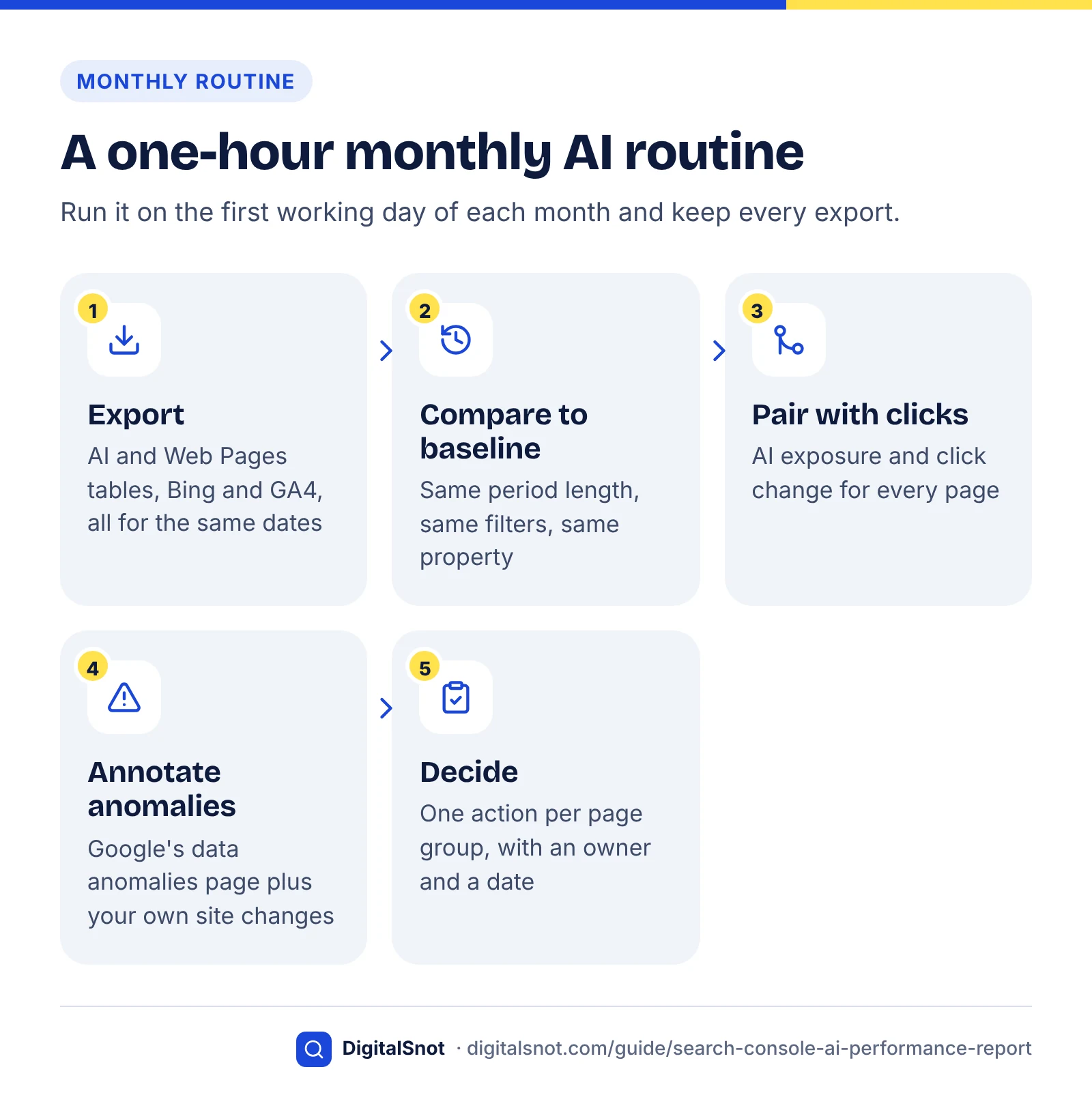
Run the same five steps on the first working day of each month, record the results in one sheet, and finish with a decision for each page group. Once the baseline exists, it takes about an hour.
- Export. Both Search Console Pages tables (generative AI and Web), Bing AI Performance pages and grounding queries, and GA4 AI Assistant and Organic Search landing pages, all for the same dates.
- Compare with the baseline. Same period length, filters and property. Note pages entering or leaving your top 20 by AI impressions.
- Pair with clicks. Update each page's AI exposure and click change, and re-run the group comparison.
- Annotate anomalies. Check Google's data anomalies page and the Search Status Dashboard, and log your own page edits and setting changes.
- Decide. Pick one action per page group from the decision table, with an owner and a date.
Template
Copy these rows into a spreadsheet, one tab per month. The example column is hypothetical.
| Field | Source | Example entry |
|---|---|---|
| Month and comparison period | Your choice | October 2026 vs September 2026 baseline |
| AI impressions, property total | Generative AI report (Search), chart | 18,400 (+9%) |
| Top 10 pages by AI impressions | Generative AI report, Pages table | 3 new entries, 1 dropped out |
| AI exposure by page | AI impressions ÷ Web impressions | High-exposure group: 8 pages |
| Click change, high vs low exposure | Performance report (Web) | −6% vs −1%, a gap of 5 points |
| Bing citations and Citation Share | Bing AI Performance | 212 citations; top grounding query noted |
| AI assistant sessions and conversions | GA4 AI Assistant channel | 140 sessions, 4 enquiries |
| Anomalies and site changes | Data anomalies page; your change log | None logged; two service pages rewritten |
| Decision and owner | Decision tables above | Add worked pricing examples to 3 high-exposure posts by 15 November |
When you share this with a manager or client, lead with the decision and the click-cost estimate, not the impressions total, which is easy to over-celebrate. Our post on what to look for in a monthly SEO report explains how to present numbers like these honestly.
What not to do
- Do not report AI impressions as traffic. They are views of a link, not visits.
- Do not divide Web clicks by AI impressions and call it an "AI click-through rate". The clicks are mixed, and the reports count differently.
- Do not opt out after one bad month. Wait for at least three months of paired data.
- Do not chase AI impressions on pages that never convert.
The generative AI report is a partial view, but it is Google's own data, and a partial view read carefully every month beats a complete-looking dashboard built on guesses. If you would rather have this set up for you, our AI search optimisation service covers this kind of reporting, and our content SEO work covers the page improvements it points to. See how they fit with our other SEO services, or contact us to talk through your report.
Free tools in this guide
- AI Visibility to Pipeline Estimator Estimate the visits, leads and pipeline your AI visibility can bring.
- AI Answer Snippet Extractor Score every paragraph as an AI answer snippet and fix the near misses.
- AI Extractability Checker Score how easily AI answers can quote each section of your page.
- AI Citation Loss Analyzer Find the likely reason AI answers stopped citing a page.
By the numbers
- Google announces generative AI performance reports for Search and Discover, rolled out first to a subset of sites
- 3 Jun 2026
- Source: Google Search Central Blog
- date the generative AI performance reports were rolled out to all websites worldwide
- 31 Aug 2026
- Source: Google Search Central Blog
- days in 2026 when a logging error cut Search generative AI impressions; Google restored the data on 21 August
- 13–17 Aug
- Source: Search Console Help
- for most content to be excluded from Google's generative AI features after a site opts out; some takes longer
- 1–2 days
- Source: Search Console Help
Frequently asked questions
Does Search Console show clicks from AI Overviews and AI Mode?
Not separately. Google counts clicks on external links in AI Overviews and AI Mode in the Performance report under the Web search type, mixed with ordinary result clicks. The generative AI performance report shows impressions only, with no clicks or click-through rate. To estimate the effect of AI answers on clicks, compare pages with high AI impressions against similar pages with low AI impressions over the same periods.
What counts as an impression in the generative AI report?
An impression is counted each time a link to your site is shown to a user in an AI Overview or AI Mode response. Standard Search Console rules apply, so links hidden behind an expansion count only once someone opens them, and each AI Mode follow-up counts as a new query. In the chart, two of your links in the same answer count as one impression for the property.
Why can't I see the generative AI report in Search Console?
The report reached all websites on 31 August 2026, so a missing report usually means your property has had too few impressions in AI Overviews and AI Mode. Also check Settings, then Search generative AI, because an opted-out site receives no impressions from these features. Finally, confirm you are in the right property and that your key pages are indexed and eligible to show a snippet.
Does the generative AI report include Discover?
Yes, as a separate report. Google launched Search and Discover versions together in June 2026. The Search version covers AI Overviews and AI Mode, while the Discover version covers generative AI features in Discover and counts impressions by page rather than by property. Device data is only available in the Search version. Keep the two apart, because they measure different surfaces with different counting rules.
Why don't my page impressions add up to the chart total?
Because the chart counts impressions once per property. If two of your pages appear in the same AI answer, the chart records one impression, while the Pages table records one for each URL. Adding a URL filter switches the chart to URL-level counting. A page sum well above the property total suggests several of your pages often appear in the same answers.
Why did my AI impressions drop in mid-August 2026?
Probably because of a logging error. Google's data anomalies page says an error reduced impressions in the Search generative AI report for 13 to 17 August 2026, affecting reporting only, not real visibility. Google restored the missing data in an update dated 21 August. If you exported August figures before then, export them again before comparing months.
Will opting out of AI Overviews hurt my normal Google rankings?
Google says no. It states that the Search generative AI control will not be used as a ranking signal for search results outside its generative AI features. The cost is elsewhere: opted-out sites receive no traffic or impressions from AI Overviews, AI Mode or Discover's generative features, and their content cannot be used as an input or linked source. That is Google's commitment rather than an independently tested result.
Is the Search generative AI control the same as Google-Extended?
No. The Search generative AI control in Search Console decides whether your site can appear in AI Overviews, AI Mode and Discover's generative features, and it does not affect AI training. Google-Extended is a robots.txt token that controls use of your content for training Gemini models and for grounding in Gemini Apps and Vertex AI. Google says it does not affect inclusion or ranking in Google Search.
Can I opt out of AI Overviews for individual pages?
Not with the Search generative AI control, which works at property level, although a child property can follow its parent or use its own setting. For single pages, use nosnippet or max-snippet, which limit how much text can feed AI Overviews and AI Mode but also affect normal snippets. Search Engine Journal reports the UK regulator has given Google until March 2027 to add page-level controls.
How often should I check the generative AI report?
Check it weekly for problems and analyse it monthly. Weekly checks catch sudden falls, such as an accidental opt-out or a logging error, early. Monthly analysis, using the same period length, filters and property each time, is what supports decisions, because daily AI impressions swing with news and weekdays. Export the Pages table every month, as the report's history is short and you will want your own record.
Sources
Every figure and claim in this guide comes from the sources below. We checked each one when writing and link to the original so you can read it yourself. Credit belongs to the authors and publishers listed. How we write and check our articles.
-
1
Introducing Search Generative AI performance reports in Search Console
Google Search Central Blog · Launch on 3 June 2026, Search and Discover versions, dimensions, hourly to monthly dates, worldwide on 31 Aug 2026.
-
2
Google Search Console AI Reports Rolled Out Worldwide
Search Engine Journal · UK-first testing, global rollout, CMA deadline of March 2027 for page-level controls and click data.
-
3
AI features and your website
Google Search Central · AI traffic counted under Web; eligibility; nosnippet, max-snippet and data-nosnippet controls.
-
4
Generative AI performance report (Search)
Search Console Help · Impression definition, property vs URL aggregation, preliminary data, why the report may be missing.
-
5
What are impressions, position, and clicks?
Search Console Help · Standard impression rules, AI Overview single position, AI Mode follow-ups and clicks.
-
6
Google's Mueller Explains How AI Search Impressions Get Counted
Search Engine Journal · Links behind an expansion count only once opened; favicon case unclear.
-
7
Generative AI performance report (Discover)
Search Console Help · Discover version aggregates by page; one impression per result per session.
-
8
Search generative AI control
Search Console Help · Where the control lives, scope, child properties, no training effect, 1–2 days to take effect.
-
9
New opportunities, control and insights for website owners
Google (The Keyword) · Opted-out sites get no AI traffic or impressions; control not a ranking signal outside AI features.
-
10
Data anomalies in Search Console
Search Console Help · 13–17 Aug 2026 AI impressions error (restored 21 Aug); Discover errors; May 2025–Apr 2026 impressions error.
-
11
Announcing web multimodal Search performance reporting in Search Console
Google Search Central Blog · September 2026 multimodal search type filter in the Search and generative AI reports.
-
12
CMA secures fairer deal for publishers and improves Google search services in UK
GOV.UK (Competition and Markets Authority) · June 2026 requirement for publisher opt-out from AI features and clear attribution links.
-
13
Google's common crawlers
Google for Developers · Google-Extended scope (Gemini training, grounding) and no effect on Search inclusion or ranking.
-
14
Introducing AI Performance in Bing Webmaster Tools (public preview)
Bing Webmaster Blog · Copilot citations, grounding queries, sampled data with no clicks or traffic.
-
15
New AI Visibility Insights in Bing Webmaster Tools: Intents, Topics, Citation Share, Compare
Bing Blogs · June 2026 preview features and the Citation Share definition.
-
16
Default channel group
Google Analytics Help · AI Assistant channel examples; AI Overviews and AI Mode stay in Organic Search.