Guide · Technical SEO
How to block AI crawlers without disappearing from AI search
Which AI bots to allow or block, bot by bot: training vs search vs user-triggered crawlers, three ready-made robots.txt policies and the Cloudflare setting that can block Googlebot.

On this page (11 sections)
- 1Three kinds of AI bot: training, search and user-triggered
- 2The AI crawler directory: every major bot and what blocking it costs
- 3Your control levers, and what each one actually switches off
- 4Cloudflare and CDN settings that can block Googlebot by accident
- 5Which policy fits your site: a decision table
- 6Three ready-made policies with their robots.txt
- 7What blocking costs you in AI visibility
- 8Verify bots and catch spoofed or stealth crawlers
- 9Test, monitor and review every quarter
- 10Mistakes to avoid
- 11Sources
Whether to block AI crawlers is no longer one decision. Each AI company now runs separate bots to train its models, to power its search answers and to fetch pages when a person asks, and each bot has its own switch. Block the wrong one and you vanish from ChatGPT search or, on Cloudflare, even from Google, while the training you meant to stop carries on through a bot you never named.
This guide is for small-business owners, in-house marketers and developers who want to decide, bot by bot, what to allow. You will be able to tell the three kinds of bot apart, look up the exact token each operator documents, copy one of three ready-made robots.txt policies, check your CDN settings and confirm that the bots in your logs are real. Every operator rule was checked against the operator's own documentation in October 2026.
Three kinds of AI bot: training, search and user-triggered
AI bots fall into three groups, and the group decides what blocking costs you. Training crawlers collect pages to build future models, search crawlers index pages so an AI answer can retrieve and cite them, and user-triggered fetchers load a page because a person asked an assistant about it.
| Type | What it does | Examples (exact tokens) | Follows robots.txt? | Cost of blocking |
|---|---|---|---|---|
| Training crawler | Collects content that may be used to train future models | GPTBot, ClaudeBot, Meta-ExternalAgent, CCBot | Yes | Little or no lost traffic; your future pages leave training sets |
| Training control token | A robots.txt name with no crawler of its own; it tells an existing crawler not to use your content for AI training | Google-Extended, Applebot-Extended | Yes | No effect on Google or Apple search results |
| Search crawler | Indexes pages so answers can retrieve and cite them | OAI-SearchBot, Claude-SearchBot, PerplexityBot, Googlebot, Bingbot, Applebot | Yes | You disappear from that engine's answers |
| User-triggered fetcher or agent | Loads a page when a user asks, or acts on their behalf | ChatGPT-User, Claude-User, Perplexity-User, Google-Agent, Meta-ExternalFetcher | Often not | The assistant cannot read your page for the person asking |
Two terms come up throughout. A user-agent token is the name a bot answers to in robots.txt, such as GPTBot. A mixed-use crawler is one bot that serves several purposes: Googlebot, Bingbot and Applebot crawl for search, and their operators handle AI training through separate controls.
The working rule is simple. Training is a business decision, search is a visibility decision, and user-triggered fetchers are mostly a security decision, because robots.txt often does not bind them.
The AI crawler directory: every major bot and what blocking it costs
The table lists the AI-related bots most sites see, with each token spelled exactly as its operator documents it. Read the last column before you block anything, because it states what you lose.
How we built it: in October 2026 we read each operator's own crawler page (linked in the first column) and recorded the token, its stated purpose, what the operator says about robots.txt, and the stated effect of blocking it. Where an operator says nothing, the table says so. These pages change often, so check them again before a big change.
| Operator | Token | Type | What the operator says it does | robots.txt | What blocking costs |
|---|---|---|---|---|---|
| OpenAI | GPTBot | Training | Crawls content that may be used to train its generative AI foundation models | Followed | Nothing in ChatGPT search; your content is flagged as not for training |
| OpenAI | OAI-SearchBot | Search | Surfaces websites in ChatGPT search | Followed; about 24 hours to take effect | You drop out of ChatGPT search answers, though you may still show as a navigational link |
| OpenAI | ChatGPT-User | User-triggered | Visits a page when a ChatGPT user asks; not used to decide search inclusion | "May not apply" | Only a firewall block works, and it stops ChatGPT reading your pages for users |
| OpenAI | OAI-AdsBot | Ads | Checks landing pages submitted as ChatGPT ads; its data is not used for training | Visits only submitted ad pages | Only matters if you advertise in ChatGPT |
| Anthropic | ClaudeBot | Training | Collects web content that could contribute to model training | Followed | Your future content is excluded from training |
| Anthropic | Claude-SearchBot | Search | Indexes content to improve the quality of search results | Followed | Anthropic says it may reduce your visibility and accuracy in Claude's search results |
| Anthropic | Claude-User | User-triggered | Fetches pages when a Claude user asks a question | Followed (Anthropic says its bots honour robots.txt) | Claude cannot retrieve your pages for those users |
Googlebot | Search (mixed-use) | Crawls for Google Search, the index behind AI Overviews and AI Mode | Followed | You leave Google Search and its AI features. Never block it | |
Google-Extended | Control token | Manages whether content Google crawls trains future Gemini models and grounds Gemini Apps and Vertex AI | Followed; no separate crawler | No effect on Search inclusion or ranking; may reduce use of your pages in Gemini app answers | |
Google-Agent | User-triggered agent | Used by agents on Google's infrastructure that browse and act on a user's request | User-triggered fetchers generally ignore it | A firewall block stops Google's agents completing tasks on your site | |
| Microsoft | Bingbot | Search (mixed-use) | Crawls for Bing, which grounds Copilot answers | Followed | You leave Bing and Copilot. Use NOARCHIVE or NOCACHE tags to limit Copilot instead |
| Perplexity | PerplexityBot | Search | Surfaces and links websites in Perplexity's search results | Followed | Your text is not indexed for Perplexity answers |
| Perplexity | Perplexity-User | User-triggered | Fetches a page when a user asks | Generally ignored | Only a firewall block works |
| Apple | Applebot | Search (mixed-use) | Powers search in Spotlight, Siri and Safari | Followed | You leave Apple's search features |
| Apple | Applebot-Extended | Control token | Opts content out of training Apple's foundation models, including Apple Intelligence | Followed; it does not crawl | None for Apple search; such pages can still appear in results |
| Meta | Meta-ExternalAgent | Training and indexing | Crawls for uses such as training AI models or improving products by indexing content directly | Followed | Out of Meta's training crawls; Meta's product indexing may lose you too |
| Meta | Meta-ExternalFetcher | User-triggered | Fetches individual links at a user's request | May bypass it | Only a firewall block works |
| Common Crawl | CCBot | Training (open archive) | Builds a free public web archive that many AI models have been trained on | Followed; also honours Crawl-delay | Your future pages leave the archive many AI datasets start from |
On scale, Common Crawl's own About page cites a 2024 Mozilla Foundation study that found at least 64% of 47 large language models published between 2019 and 2023 were trained on filtered versions of its data. That is why CCBot belongs on a training block list even though no AI company runs it.
What the directory shows
- The big operators now split training from search. OpenAI, Anthropic, Google and Apple each give you a training switch that leaves their search product alone. OpenAI says each of its robots.txt settings is independent of the others.
- Google and Apple use tokens, not crawlers, for training. Google-Extended and Applebot-Extended never show up in your logs. Googlebot and Applebot read the rule and apply it.
- User-triggered fetchers are the weak spot. OpenAI, Perplexity, Google and Meta all say their user-triggered fetchers may not follow robots.txt. Anthropic is the exception: it says its bots, Claude-User included, honour it.
- Logs can mislead. OpenAI says that if you allow both GPTBot and OAI-SearchBot, it may use the results of one crawl for both purposes. Seeing only one of them in your logs tells you little about how your content is used.
GPTBot vs OAI-SearchBot: block one, keep the other
If you remember one pair from the table, make it GPTBot and OAI-SearchBot: most businesses want the first blocked and the second allowed.
Your control levers, and what each one actually switches off
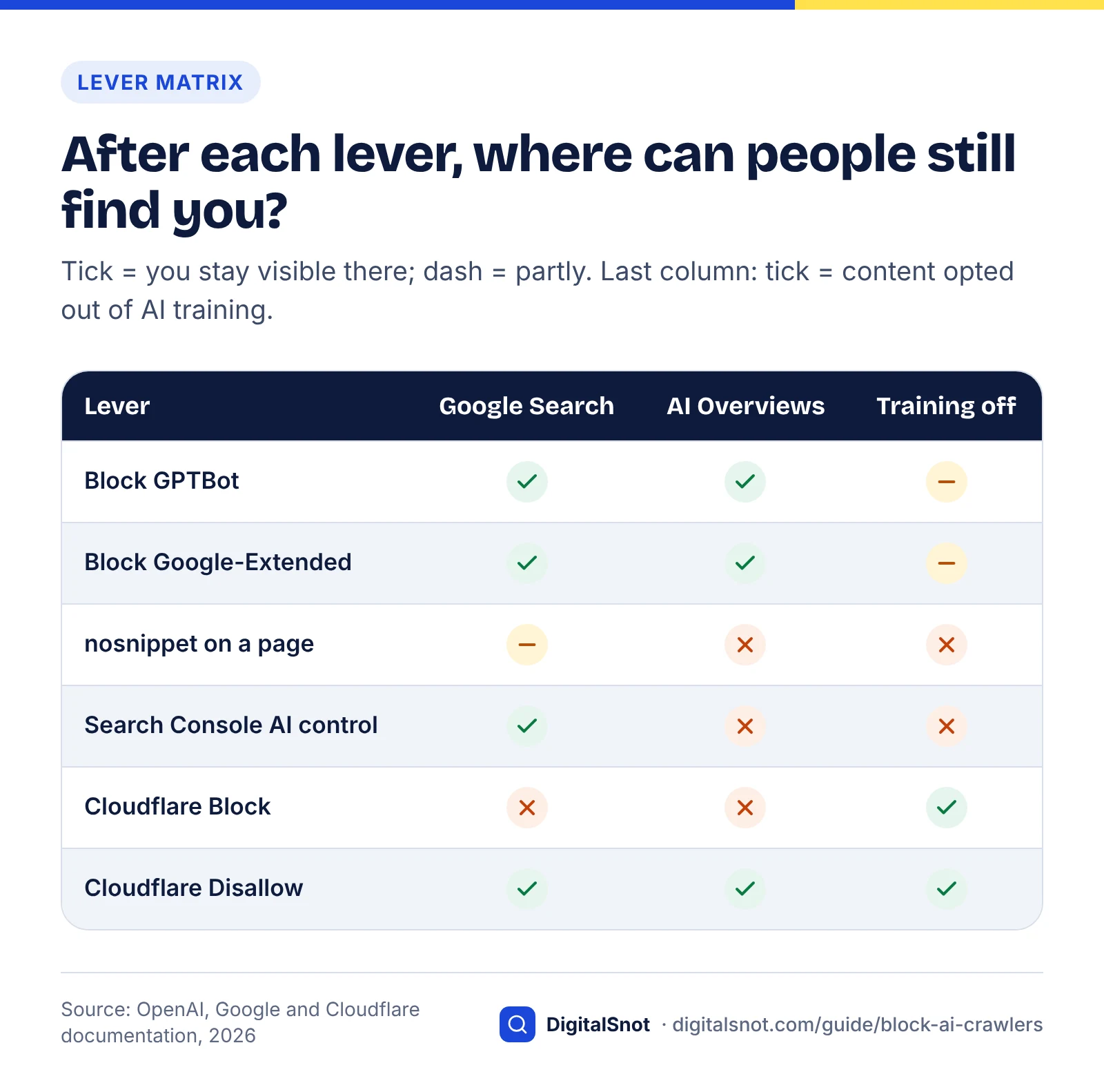
Robots.txt is only one of six levers, and each switches off something different. Match the lever to the surface you care about: Google's AI features, Gemini training, ChatGPT search or Copilot.
| Lever | What it switches off | What it leaves alone | Scope and timing |
|---|---|---|---|
| Robots.txt rule for a named bot | That bot's crawling, if it follows robots.txt | Every bot you did not name; fetchers that ignore the file | Per host and subdomain. OpenAI says about 24 hours; Meta says its crawlers may cache the file for up to 24 hours |
Google-Extended disallow | Training future Gemini models, and grounding in Gemini Apps and Vertex AI | Google Search inclusion and ranking, AI Overviews and AI Mode | Whole site or chosen paths |
| nosnippet, data-nosnippet, max-snippet | Use of the page's text as direct input to AI Overviews and AI Mode; nosnippet also removes the normal snippet | Indexing and ranking | Per page (or per section with data-nosnippet) |
| Search Console "Search generative AI" control | Your links and content in AI Overviews, AI Mode and generative features in Discover | AI training (Google points to Google-Extended for that) | Whole property; one to two days, sometimes longer |
| Bing NOARCHIVE and NOCACHE tags | NOARCHIVE keeps content out of Copilot answers and grounding; NOCACHE limits Copilot to URL, title and snippet | Bing web results | Per page |
| CDN or firewall rule | Any request that matches, whatever robots.txt says | Nothing, if the rule is broad: it can catch Googlebot | Immediate; the only lever that enforces |
The matrix below turns that table into a quick test: after you pull each lever, where can people still find you?
Google: three switches for three jobs
Google causes the most confusion because Googlebot does several jobs. Google's common crawlers documentation describes Google-Extended as a standalone product token with no user-agent string of its own, and says it does not affect a site's inclusion in Google Search and is not used as a ranking signal. Blocking it does not take you out of AI Overviews.
To leave AI Overviews and AI Mode while staying in normal results, Google offers a page route and a site route. Google's AI features documentation says nosnippet, data-nosnippet and max-snippet limit what can be used as direct input for AI Overviews and AI Mode, and that the more restrictive rule wins when rules conflict. The site route is the Search generative AI control under Settings in Search Console, which Google says reached all websites worldwide on 31 August 2026 (checked October 2026). Google says excluded content drops out within one to two days, though caching can delay some of it, and that the control does not affect AI training.
Count the cost before you switch. nosnippet also strips the snippet from your classic listing, which usually means fewer clicks. Our explainer on what AI Overviews do to your traffic helps you weigh it, and the Search Console AI performance report guide shows how to see your AI Overview impressions before you decide.
Bing and Copilot
Bing does not document a separate AI crawler; its AI controls are page-level tags. Its Webmaster Guidelines say the NOARCHIVE tag keeps content out of Copilot responses and grounding, while NOCACHE limits Copilot to the URL, title and snippet, and they advise against NOCACHE on content you want Copilot to use. Blocking Bingbot itself takes you out of Bing and Copilot together.
Robots.txt rules that trip people up
- Named groups replace the general group. Under the Robots Exclusion Protocol standard (RFC 9309), a crawler that finds a group with its own name follows that group and only falls back to
User-agent: *when no group matches it, so repeat any shared rules inside named groups. - Each host needs its own file. Anthropic notes that you must add rules for every subdomain you want to opt out.
- Disallow looks forward, not back. Anthropic describes a ClaudeBot block as excluding your future material from training. It does not pull content out of models already trained.
- Disallow is not noindex. Anthropic says Claude's web search results come partly through search partners, and recommends the noindex tag to keep a page out of them.
- Slowing is an option. Anthropic supports the non-standard
Crawl-delayrule if you only want ClaudeBot to visit less often.
Cloudflare and CDN settings that can block Googlebot by accident
If your site sits behind Cloudflare, check its AI settings today. Since September 2026 its Block options for training also stop Googlebot, Bingbot and Applebot, search included (checked October 2026); the newer Disallow AI Training setting is the safe choice for most sites.
What changed, and when
- 1 July 2026. Cloudflare's AI traffic announcement gave every customer, Free plan included, separate controls for Search, Agent and Training bots. It said that from 15 September 2026 new domains would by default block Training and Agent bots on pages that display ads, with Search allowed. It added that mixed-use crawlers are judged on all their behaviours, so customers who block Training also block Googlebot, Applebot and Bingbot.
- 15 September 2026. Cloudflare shipped Disallow AI Training. It keeps what Cloudflare calls accountable mixed-use crawlers allowed for search and sends each operator its own no-training signal, such as a Google-Extended or Applebot-Extended disallow. Training-only crawlers, including those run by Amazon, Anthropic, Meta and OpenAI, are blocked. The same post says Block and Block on pages with ads now apply to mixed-use crawlers, Googlebot, Bingbot and Applebot included.
- Retired features. The older Block AI Bots toggle is being deprecated in favour of the three categories, and Managed robots.txt is being replaced by Bot Preference Sync.
Cloudflare says Apple, Google and Microsoft honour the Disallow AI Training preference or have committed to within a set time frame. If Copilot matters to you, check that Bing support is live before you rely on it.
The Cloudflare setting that can hide you from Google
Check your Cloudflare settings in five minutes
- Open the AI traffic settings for each zone in your Cloudflare dashboard and note the Search, Agent and Training values. Menu names move, so search the dashboard for "AI" if you cannot see them.
- If Training shows Block or Block on pages with ads and you want Google or Bing traffic, change it to Disallow AI Training.
- Leave Search allowed unless you have decided to leave AI search on purpose.
- Decide on Agent deliberately. Blocking it stops assistants fetching your pages for people who ask about you.
- Check the result from both sides. The free AI Crawler Checker reads your live robots.txt, including lines Cloudflare writes for you, and shows bot by bot whether ChatGPT search, Perplexity, Claude, Google, Bing and training crawlers may fetch a page. An edge block never appears in robots.txt, so also run Search Console's URL Inspection live test on a key page to confirm Googlebot gets through.
The same risk exists outside Cloudflare. Other CDNs, firewalls and security plugins have bot-fighting modes, and a challenge page stops a crawler as surely as a 403 error, so test after every security change.
Which policy fits your site: a decision table
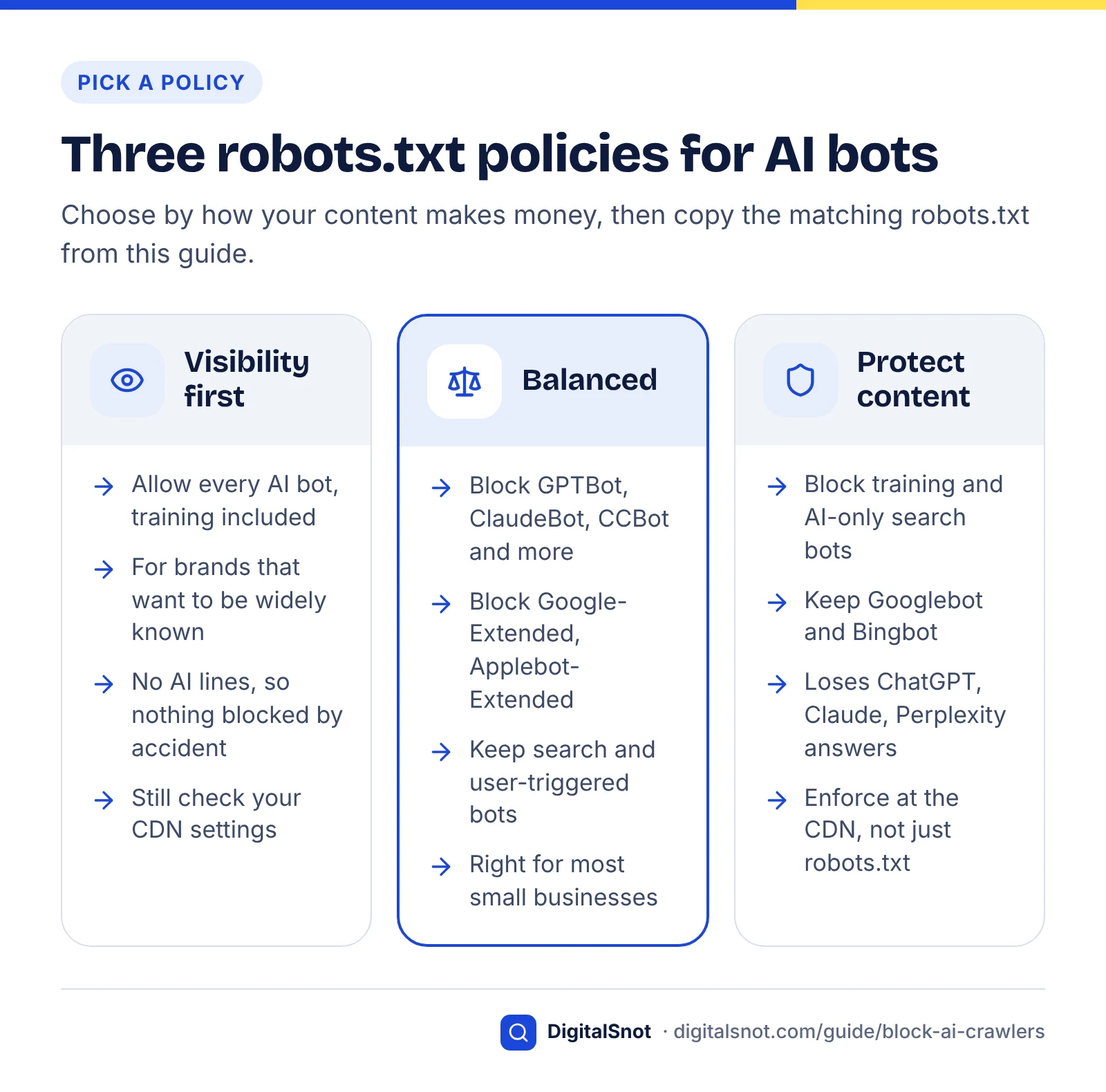
Choose your policy from how your content earns money. If people find you through answers and then buy from you, protect visibility; if the content itself is the product, protect the content and accept the visibility cost.
| If this describes you | Do this | Why |
|---|---|---|
| A local or service business that wants to be recommended | Balanced policy | Training adds little for you; ChatGPT search, Claude, Perplexity and AI Overviews can send customers |
| A brand that wants AI models to know its products as widely as possible | Visibility first | You would rather models learn about you from your own pages than from others |
| A publisher, course seller or paid-research site whose content is the product | Protect content | An answer that summarises your work can replace the visit |
| You want out of AI Overviews but not Google Search | Search Console generative AI control, or nosnippet on chosen pages | Googlebot keeps crawling for normal results |
| You want out of Gemini training but still in AI Overviews | Disallow Google-Extended | It does not affect Search inclusion or ranking |
| You are on Cloudflare and Training is set to Block | Switch to Disallow AI Training | Block stops Googlebot, Bingbot and Applebot as well |
| A user-triggered fetcher can reach pages that must stay private | Put those pages behind a login | Robots.txt may not apply to these fetchers |
| Bots are slowing your server | Verify them, rate-limit the real ones and block the fakes at the firewall | Anyone can fake a bot's name, and impostors ignore robots.txt |
| You run ads in ChatGPT | Allow OAI-AdsBot on landing pages | It checks the pages you submit as ads |
If you serve a local area, our guide to local SEO in AI search covers what AI answers to "near me" questions draw on.
Worked example: choosing a policy
Example: a dental clinic in Pune sells appointments, not articles. Its blog posts exist to win patients, so being cited by ChatGPT search or an AI Overview is a gain and a training opt-out costs it nothing measurable. It picks the balanced policy: training bots blocked, search and user-triggered bots allowed. Its site runs on Cloudflare's Free plan, so it also opens the dashboard and checks the Training setting: if it shows Block or Block on pages with ads, the clinic switches it to Disallow AI Training so Googlebot is never turned away.
Three ready-made policies with their robots.txt
Each policy below is a complete starting robots.txt. Replace the example /admin/ path and sitemap address with your own, keep any rules you already rely on, and test before you upload.
Policy 1: visibility first
Use this when you want every AI system, training included, to be able to read your public pages. It contains no AI-specific lines at all, which is the point: nothing is blocked by accident.
# Policy 1: visibility firstUser-agent: *Disallow: /admin/Sitemap: https://www.example.com/sitemap.xml
What it costs: nothing in visibility. Your content may be used to train future models from OpenAI, Anthropic, Google, Apple, Meta and anyone using Common Crawl.
Policy 2: balanced (block training, keep AI search)
This suits most small businesses. It disallows the training crawlers and tokens, and leaves search crawlers and user-triggered fetchers to the general group, so you stay eligible for ChatGPT search, Claude, Perplexity, Copilot and Google's AI features.
# Training crawlers and tokens: opt outUser-agent: GPTBotUser-agent: ClaudeBotUser-agent: Google-ExtendedUser-agent: Applebot-ExtendedUser-agent: Meta-ExternalAgentUser-agent: CCBotDisallow: /# Everyone else, including AI search and user-triggered botsUser-agent: *Disallow: /admin/Sitemap: https://www.example.com/sitemap.xml
What it costs: very little. Blocking Google-Extended may reduce how often Gemini app answers ground on your pages, and Meta says Meta-ExternalAgent also indexes content to improve its products, so remove that line if visibility in Meta's AI features matters to you.
Policy 3: protect content
Use this when summaries of your content compete with your own product. It blocks training crawlers and the AI-only search and user bots, and keeps Googlebot and Bingbot so you stay in classic search.
# AI training, AI search and AI user bots: noUser-agent: GPTBotUser-agent: OAI-SearchBotUser-agent: ChatGPT-UserUser-agent: ClaudeBotUser-agent: Claude-SearchBotUser-agent: Claude-UserUser-agent: PerplexityBotUser-agent: Perplexity-UserUser-agent: Google-ExtendedUser-agent: Applebot-ExtendedUser-agent: Meta-ExternalAgentUser-agent: Meta-ExternalFetcherUser-agent: CCBotDisallow: /# Classic search crawlers and everyone elseUser-agent: *Disallow: /admin/Sitemap: https://www.example.com/sitemap.xml
Robots.txt alone does not finish this policy. Add the Search Console generative AI control to leave AI Overviews and AI Mode, NOARCHIVE on pages to keep out of Copilot, and CDN rules for fetchers that may ignore robots.txt. What it costs: your presence in ChatGPT search, Claude and Perplexity, and in Google's AI features if you use the control.
Before you upload any policy
- Paste the file into the free Robots.txt Tester and test a real page for each bot you care about. It shows whether that crawler may fetch the path and which line decides, which catches typos in token names.
- Save a dated copy of the old file so you can roll back.
- Upload it to the root of every host and subdomain you want covered.
- Wait a day, then check your logs: OpenAI says changes take about 24 hours to register.
What blocking costs you in AI visibility
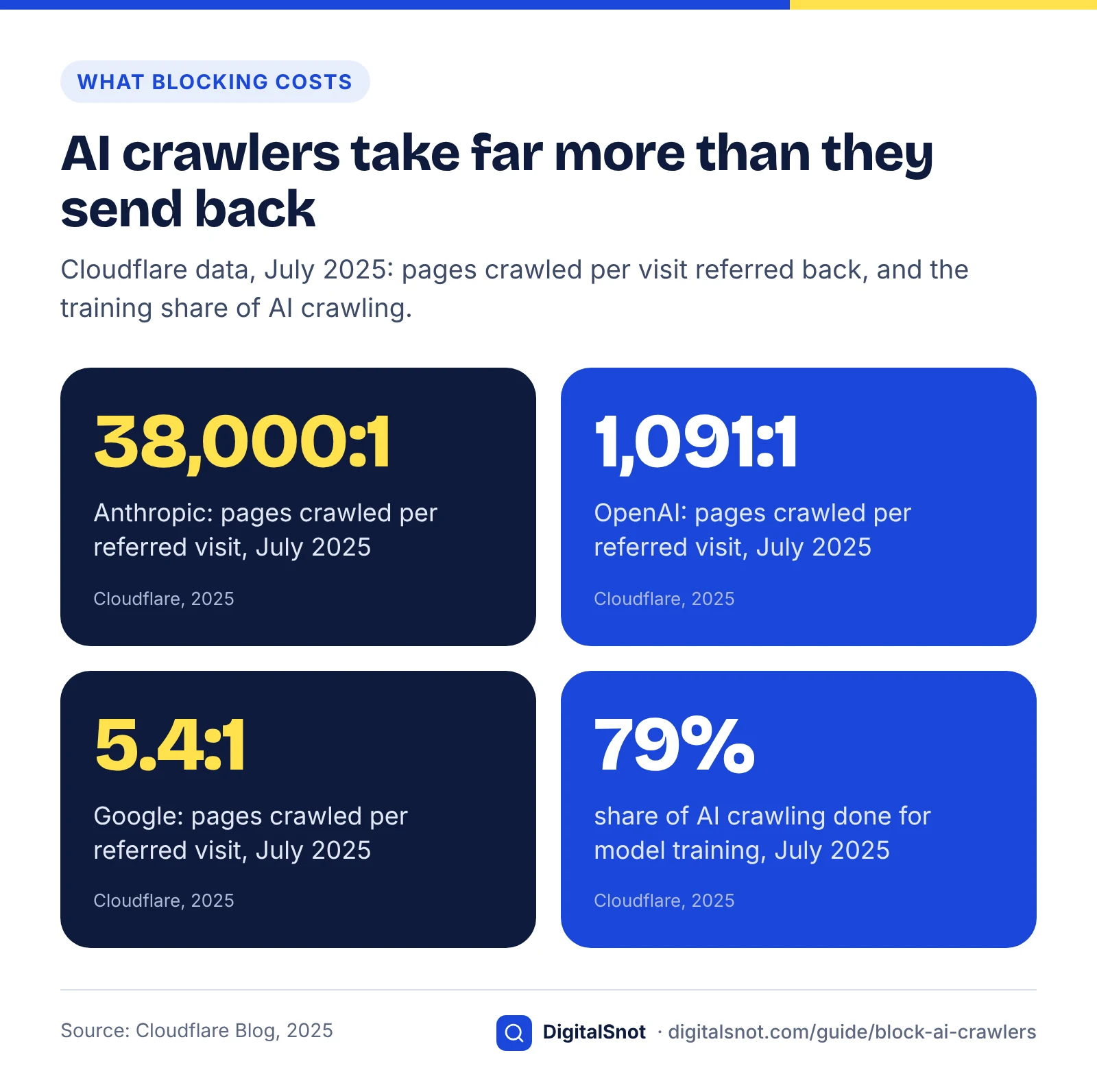
Blocking training crawlers costs almost no traffic, because they were never designed to send visitors. Blocking search crawlers costs citations and the clicks that come with them, and an accidental Googlebot block costs the most of all.
Cloudflare's 2025 crawl-to-click analysis shows the imbalance. In July 2025 Anthropic crawled about 38,000 pages for every visit it referred, OpenAI 1,091 and Perplexity about 195, against 5.4 for Google, and training made up 79% of AI crawling. Cloudflare notes that it only counted referrals from the operators' web tools, so the ratios may be overstated, but the direction is clear.
The cost ladder, cheapest first
- Training crawlers and tokens (GPTBot, ClaudeBot, Google-Extended, Applebot-Extended, CCBot). Almost no lost referrals. Our assessment of the indirect cost: when a model answers from memory rather than searching, it will know less about you from your own site.
- User-triggered fetchers (ChatGPT-User, Claude-User, Perplexity-User). Assistants cannot read your page when someone asks about it. The volume is small, but each fetch is a person actively asking about you or a page you shared.
- AI search crawlers (OAI-SearchBot, Claude-SearchBot, PerplexityBot). You lose that engine's citations and the referrals they bring.
- Google's AI switches (the Search Console control, nosnippet). You lose AI Overview and AI Mode visibility, and nosnippet also weakens your classic listing.
- Googlebot or Bingbot, including through a CDN rule. You lose search itself, and every AI feature built on it.
A worked calculation
Example: a consultancy gets 20,000 organic search sessions and 300 sessions from chatgpt.com and perplexity.ai a month. The balanced policy puts close to none of those at risk, because it only touches training. The protect-content policy puts the 300 AI referrals at risk, plus AI Overview clicks if it uses the Search Console control. A Cloudflare Training setting left on Block puts all 20,000 search sessions at risk while Googlebot is turned away. Run the same sums with your own analytics.
Being cited is worth protecting for most businesses, and it takes more than access. Our guide on how to get cited in AI search covers the content side, and how ChatGPT recommends businesses explains what happens after OAI-SearchBot has read your pages.
Verify bots and catch spoofed or stealth crawlers
A user-agent string is only a claim, so anyone can call their scraper GPTBot or Googlebot. Verify a bot by its IP address or DNS before you trust it, block it or blame it for load.
A five-step verification routine
- Find the visits. Export a week of Apache or Nginx access logs and run them through the free AI Bot Log Analyzer. It finds AI crawler visits and lists the pages each bot fetched, so you can see whether search bots reach your money pages.
- Check IPs against the operator's list. OpenAI publishes IP ranges for each of its bots, and Perplexity publishes JSON lists for PerplexityBot and Perplexity-User and says they are the source of truth for firewall rules.
- Use DNS for Google. Google's verification guide says to run a reverse DNS lookup on the IP, confirm the host ends in googlebot.com, google.com or googleusercontent.com, then run a forward lookup on that host and check it returns the same IP. Google also publishes its ranges as JSON files in CIDR format.
- Do not IP-block Anthropic. Anthropic says blocking its IP addresses may not reliably opt you out, because it stops its bots reading your robots.txt. Use robots.txt for its bots.
- Block fakes at the firewall. An impostor ignores robots.txt, so a Disallow line does nothing. Block requests that claim a bot name but fail the check.
Stealth crawlers
Some crawling never declares itself. In August 2025 Cloudflare reported tests in which new, unindexed domains disallowed all crawling, yet Perplexity still answered detailed questions about their content. Cloudflare said that when Perplexity's declared crawlers were blocked, requests arrived with a generic Chrome-on-macOS user agent from IPs outside Perplexity's published ranges, rotating networks, across tens of thousands of domains and millions of requests a day. It de-listed Perplexity as a verified bot. These are Cloudflare's findings from its own tests; in the same tests, ChatGPT-User fetched robots.txt and stopped when disallowed.
Patterns worth watching in your own logs are the ones Cloudflare describes: content requests with generic browser user agents from unexpected networks, IPs outside published ranges, and requests that ignore robots.txt. Robots.txt cannot stop these, so use your CDN's bot management and rate limits.
Verification is getting easier. Google says it is experimenting with the Web Bot Auth protocol for Google-Agent, using the identity agent.bot.goog. Authenticated requests should let you trust an agent without maintaining IP lists.
Test, monitor and review every quarter
Test after every change, read your logs monthly and review the whole policy each quarter. New bots appear, tokens change and CDN defaults move, as 2026 has shown.
| When | What to check | How |
|---|---|---|
| After any robots.txt or CDN change | Each bot is allowed or blocked as intended, and Googlebot is not challenged | Robots.txt Tester, AI Crawler Checker, Search Console URL Inspection live test |
| Weekly for the first month | AI bot visits, 403 errors and challenge pages served to crawlers | Server logs and AI Bot Log Analyzer |
| Monthly | AI Overview and AI Mode impressions; AI referral sessions | Search Console generative AI report; analytics |
| Quarterly | New bots or tokens in operator documentation | The crawler pages linked in this guide's sources |
| Quarterly | Overall AI search readiness | AI Search Readiness Checker |
For the quarterly check, the free AI Search Readiness Checker runs more than 15 checks, crawler access and indexing among them, so a bot policy change that hurt visibility shows up next to everything else. Add your AI bot policy to the crawl section of your regular technical SEO audit so it is reviewed alongside redirects and indexing.
Mistakes to avoid
Most AI-blocking damage comes from a handful of repeated mistakes, each covered above.
- Copying a "block every AI bot" list. If it includes OAI-SearchBot, Claude-SearchBot or PerplexityBot, it removes you from AI search, not just training.
- Blocking Google-Extended to leave AI Overviews, or Googlebot to stop Google's AI. The first does nothing for AI Overviews; the second removes you from Google Search.
- Treating robots.txt as privacy. User-triggered fetchers may ignore it and impostors always do. Private pages need a login.
- Leaving Cloudflare's Training setting on Block. It stops Googlebot, Bingbot and Applebot as well.
- Setting it once. Operators keep adding bots, such as OAI-AdsBot and Google-Agent, and CDN defaults change.
Getting crawler access right is part of our technical SEO work, and deciding what to let AI systems read is the first step of our AI search optimisation service. You can see how they fit with our other SEO services, and if you would like a second pair of eyes on your robots.txt and CDN settings, get in touch.
Free tools in this guide
- AI Crawler Checker See which AI crawlers can read your page, and what they see without JavaScript.
- Robots.txt Tester Test a URL against robots.txt and see which rule blocks or allows it.
- AI Bot Log Analyzer See how AI crawlers crawl your site from your server access log.
- AI Search Readiness Checker Score a page on what helps ChatGPT, Gemini and AI Overviews cite it.
By the numbers
- Cloudflare ships Disallow AI Training; its Block settings now also apply to Googlebot, Bingbot and Applebot
- 15 Sep 2026
- Source: Cloudflare Blog
- Search Console's Search generative AI control available to all websites worldwide
- 31 Aug 2026
- Source: Search Console Help
- pages Anthropic crawled per referred visit in July 2025, against 5.4:1 for Google (Cloudflare data)
- 38,000:1
- Source: Cloudflare Blog
Frequently asked questions
Does blocking GPTBot remove my site from ChatGPT search?
No. OpenAI documents GPTBot and OAI-SearchBot as separate crawlers with independent robots.txt settings. GPTBot collects content that may be used to train OpenAI's models, while OAI-SearchBot decides whether your pages can appear in ChatGPT search answers. You can disallow GPTBot and still allow OAI-SearchBot. OpenAI says robots.txt changes take about 24 hours to register.
What is the difference between ClaudeBot, Claude-SearchBot and Claude-User?
They are three Anthropic bots with different jobs. ClaudeBot collects content that may be used for training, Claude-SearchBot indexes pages for Claude's search results, and Claude-User fetches pages when a Claude user asks a question. Anthropic says all of its bots honour robots.txt, so you can block ClaudeBot for training while leaving Claude-SearchBot and Claude-User allowed to keep your search visibility.
Does blocking Google-Extended remove me from AI Overviews?
No. Google says Google-Extended does not affect inclusion in Google Search and is not a ranking signal. It controls whether content Google crawls is used to train future Gemini models and to ground Gemini Apps and Vertex AI. To leave AI Overviews and AI Mode, use the Search generative AI control in Search Console or the nosnippet, data-nosnippet and max-snippet rules on specific pages.
How do I stay in Google Search but leave AI Overviews and AI Mode?
Use the Search generative AI control under Settings in Search Console, which Google made available to all websites worldwide on 31 August 2026. Google says excluded content drops out within one to two days, though caching can delay some. For individual pages, the nosnippet, data-nosnippet or max-snippet rules limit what AI Overviews and AI Mode can use, but nosnippet also removes your normal snippet.
Can Cloudflare block Googlebot?
Yes. Cloudflare says its Block and Block on pages with ads options for AI training now apply to mixed-use crawlers, including Googlebot, Bingbot and Applebot, which stops search crawling too. Its Disallow AI Training setting, shipped on 15 September 2026, keeps those crawlers allowed for search while sending a no-training signal. Check the Training setting for every zone in your dashboard.
Do AI crawlers have to obey robots.txt?
Robots.txt is a request, not an enforcement tool. Most declared crawlers say they follow it, including GPTBot, OAI-SearchBot, ClaudeBot and PerplexityBot. User-triggered fetchers are different: OpenAI says robots.txt may not apply to ChatGPT-User, and Perplexity, Google and Meta say similar things about their user fetchers. Anthropic says its bots honour it. To truly block something, use a firewall or a login.
How can I tell if a bot claiming to be GPTBot is real?
Check the request's IP address against the ranges the operator publishes. OpenAI publishes IP ranges for each of its bots, Perplexity publishes JSON lists for its two agents, and Google supports a reverse and forward DNS check alongside its published ranges. If a request uses a bot's name but fails the check, treat it as an impostor and block it at the firewall.
Should a small business block AI crawlers?
Usually only the training ones. For most local and service businesses, being cited in ChatGPT search, Claude, Perplexity or AI Overviews can bring customers, while training crawlers send almost no visits. A balanced robots.txt that disallows GPTBot, ClaudeBot, Google-Extended, Applebot-Extended and CCBot, and leaves search and user-triggered bots allowed, keeps visibility while opting out of training.
Does blocking an AI crawler remove content it already collected?
No. A robots.txt block stops future crawling and signals your preference from then on. Anthropic, for example, describes blocking ClaudeBot as excluding your future material from training datasets. Content already used to train existing models is not removed by a robots.txt change, so make your decision early and keep it consistent.
Sources
Every figure and claim in this guide comes from the sources below. We checked each one when writing and link to the original so you can read it yourself. Credit belongs to the authors and publishers listed. How we write and check our articles.
-
1
Overview of OpenAI Crawlers
OpenAI · GPTBot, OAI-SearchBot, ChatGPT-User and OAI-AdsBot roles; independent settings; ~24 hours; IP ranges.
-
2
Does Anthropic crawl data from the web, and how can site owners block the crawler?
Anthropic (Claude Help Center) · ClaudeBot, Claude-SearchBot, Claude-User; robots.txt, subdomains, Crawl-delay, IP blocking, noindex.
-
3
Google's common crawlers
Google for Developers · Googlebot; Google-Extended scope (Gemini training and grounding) and no effect on Search.
-
4
Google User-Triggered Fetchers
Google for Developers · Google-Agent purpose; user-triggered fetchers generally ignore robots.txt; Web Bot Auth.
-
5
Webmaster Guidelines
Bing Webmaster Tools · Bingbot and Copilot grounding; NOARCHIVE and NOCACHE effects on Copilot.
-
6
RFC 9309: Robots Exclusion Protocol
IETF / RFC Editor · How crawlers choose their robots.txt group and fall back to User-agent: *
-
7
Perplexity Crawlers
Perplexity · PerplexityBot vs Perplexity-User, robots.txt behaviour and published IP lists.
-
8
About Applebot
Apple Support · Applebot powers Spotlight, Siri and Safari search; Applebot-Extended training opt-out.
-
9
Meta Web Crawlers
Meta for Developers · Meta-ExternalAgent and Meta-ExternalFetcher purposes; robots.txt caching up to 24 hours.
-
10
FAQ
Common Crawl · CCBot as the robots.txt token; robots.txt opt-out and Crawl-delay support.
-
11
About
Common Crawl · CCBot; 2024 Mozilla Foundation finding that at least 64% of 47 LLMs used Common Crawl data.
-
12
AI features and your website
Google Search Central · nosnippet, data-nosnippet and max-snippet as controls for AI Overviews and AI Mode.
-
13
Search generative AI control
Search Console Help · Scope, 31 Aug 2026 worldwide rollout, 1–2 day exclusion, no effect on training.
-
14
Your site, your rules: new AI traffic options for all customers
Cloudflare Blog · Search, Agent and Training controls; 15 Sep 2026 defaults; mixed-use crawlers and Googlebot.
-
15
Have it both ways: stay discoverable in search while disallowing AI training
Cloudflare Blog · Disallow AI Training (15 Sep 2026); Block now applies to Googlebot, Bingbot, Applebot.
-
16
The crawl-to-click gap: Cloudflare data on AI bots, training, and referrals
Cloudflare Blog · July 2025 crawl-to-referral ratios by operator; 79% of AI crawling for training.
-
17
Verify requests from Google crawlers and fetchers
Google for Developers · Reverse and forward DNS check; published IP ranges in CIDR format.
-
18
Perplexity is using stealth, undeclared crawlers to evade website no-crawl directives
Cloudflare Blog · August 2025 tests of undeclared crawling; ChatGPT-User respected robots.txt.