Guide · Technical SEO
Website migration SEO: a checklist to keep rankings and traffic
A before, during and after checklist for moving domain, platform or URLs without losing rankings, with a redirect map template, Change of Address rules and a 30-day watch list.

On this page (12 sections)
- 1What a website migration is, and why rankings drop
- 2Types of migration and their risk level
- 3The migration plan: who does what, and when
- 4Build the redirect map (template included)
- 5Redirect rules that keep rankings
- 6What Google and Bing say: our comparison
- 7Staging checks before you go live
- 8Launch day, step by step
- 9Change of Address tool, sitemaps and listing updates
- 10The first 30 days: normal versus alarming signals
- 11Keeping AI citations and backlinks on the right URLs
- 12Sources
A website migration is any change that alters where your pages live or how search engines reach them: a new domain, platform, URL structure, host or a move to HTTPS. Done carefully, with website migration SEO in the plan, most sites see a short wobble in rankings and then settle. Done carelessly, a migration can wipe out years of search traffic in a week.
This guide is for small-business owners and in-house marketers moving a site, for example from WordPress to Shopify or Wix, to a rebranded domain, or to a new agency-built site. You will be able to judge how risky your move is, build a redirect map, run launch day from a checklist, use Google's Change of Address tool correctly and tell normal turbulence from a real problem. The rules come from Google's and Bing's documentation, checked in October 2026. The risk ratings, templates and thresholds are our own method, labelled as such.
What a website migration is, and why rankings drop
For SEO, a website migration is a change to a site's URLs, domain, platform or hosting that makes search engines recrawl it and re-associate everything they know with the new version. Rankings drop when that re-association breaks: old URLs return errors, signals split between two versions, or crawlers are kept out.
Some movement is expected. Google's site moves and migrations guide says rankings fluctuate while Google recrawls and reindexes a moved site, and that for a medium-sized website it can take a few weeks or more before the new URLs gradually replace the old ones. A loss that keeps growing is different, and it almost always comes from one of five causes:
- Missing or wrong redirects, so old URLs return 404s and their links and history don't carry over.
- Temporary redirects on a permanent move. A 302 tells Google the old URL may come back.
- Staging blocks carried into production, such as
Disallow: /in robots.txt or a sitewide noindex tag. - Content losses, when new templates drop titles, headings, copy, structured data or internal links.
- Too many changes at once, so nobody can tell which one caused a drop.
Types of migration and their risk level
A migration's risk depends on how many signals change at once. Moving to HTTPS on the same domain is low risk; a new domain combined with a redesign and new URLs is the riskiest move a small business is likely to make.
Method: we rated each type by counting how many of five things change (URLs, domain, templates and content, internal links, server) and noted whether Google offers a dedicated tool. The ratings are our assessment, not Google's.
| Migration type | What changes | Change of Address tool? | Risk | Main danger |
|---|---|---|---|---|
| HTTP to HTTPS, same domain | Protocol in every URL | No: use redirects | Low | HTTP URLs left in canonicals, sitemaps and links |
| New host or CDN, same URLs | Server, DNS, firewall rules | No | Low | Bot protection blocking Googlebot |
| New platform, URLs kept | Templates, code, often content | No | Medium | Lost titles, structured data and internal links |
| Redesign or replatform with new URLs | URLs, templates, internal links | No (same domain) | High | An incomplete redirect map |
| New domain, same site (rebrand) | Domain in every URL | Yes | Medium | Missed subdomain variants; old domain lapsing |
| New domain plus redesign and new URLs | Almost everything | Yes | Highest | Impossible to isolate the cause of a drop |
| Merging two sites | One site's URLs; content combined | Yes, for the retired domain | High | Pages with no real equivalent |

Decision: one launch or two?
- If your site is small or medium and URLs map cleanly, move everything at once. Google recommends this for small and medium sites because it helps its systems detect the move and update the index faster.
- If you are changing domain, URLs and design together, consider two launches: the domain first with identical paths, the redesign a few months later. Each step is easier to diagnose, at the cost of two rounds of turbulence.
- If your site is large, Google suggests moving one section first to test the effect on traffic and indexing, then the rest.
- If your busiest season starts within about six weeks, wait (our rule of thumb). A dip during peak demand costs the most.
- If Google is rolling out a core update, launch afterwards if you can, or you won't be able to tell the two effects apart. Our core update recovery guide explains the difference.
The migration plan: who does what, and when
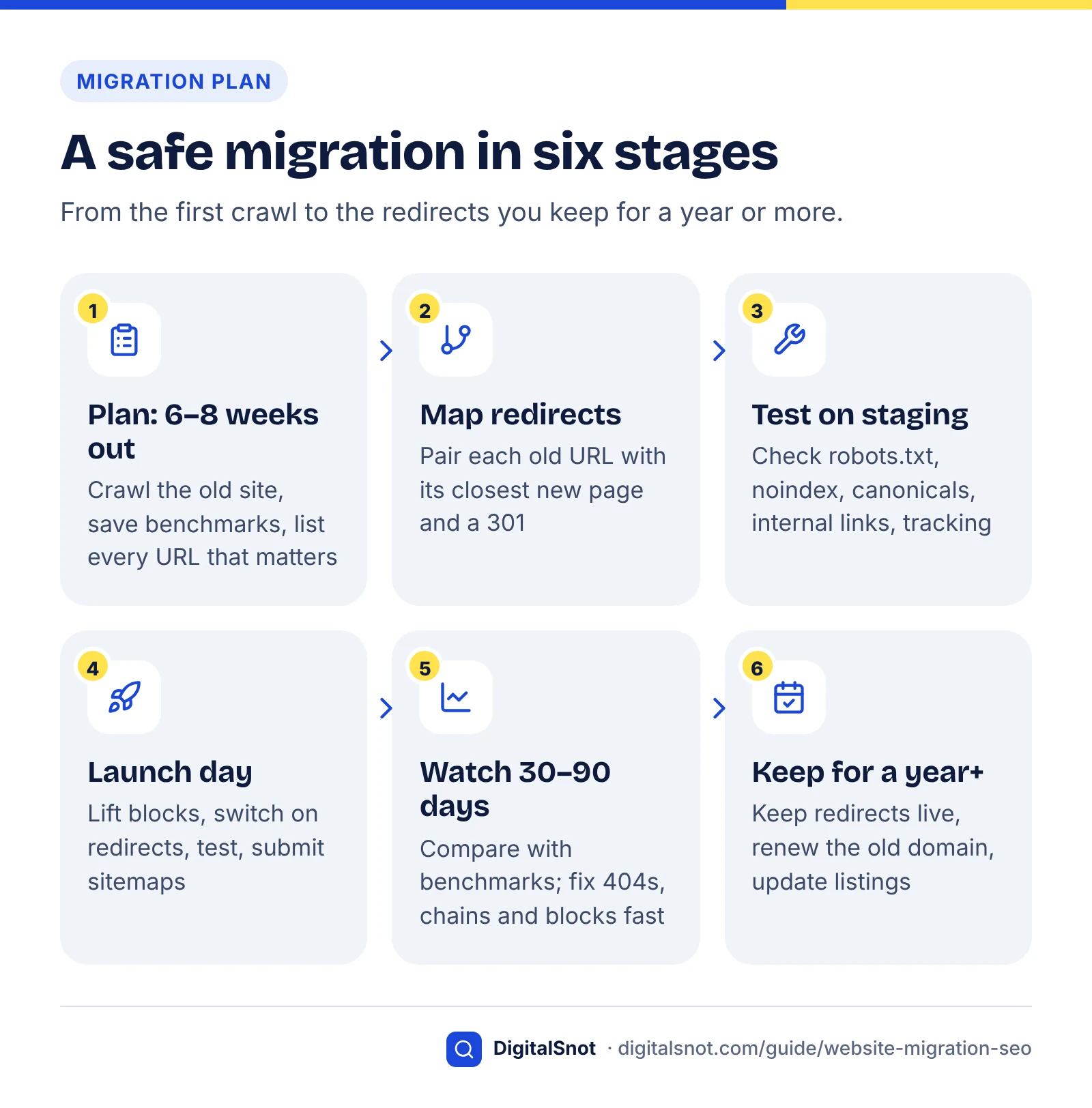
A migration plan is a dated checklist with one named owner per task. As a rule of thumb, a small site can run it in six to eight weeks; only the volume of URLs changes with size. Write a name against every row, even if one person holds several roles.
| When | Task | Owner | Done when |
|---|---|---|---|
| 6–8 weeks before | Write down what is changing: domain, platform, URLs, design, content | Business owner | One-page scope signed off |
| 6–8 weeks before | Crawl the old site; build the URL inventory; export benchmarks | SEO | Dated exports saved in a shared folder |
| 4–6 weeks before | Build the redirect map | SEO and content editor | Every URL with traffic, links or conversions has a destination |
| 4–6 weeks before | Carry over titles, descriptions, headings, copy, structured data, alt text | Content editor, developer | Key pages compared side by side |
| 1–3 weeks before | Prepare production robots.txt, sitemap and tracking; crawl staging | Developer, SEO | No stray noindex; no internal links to old URLs |
| 1 week before | Lower DNS TTL; verify new site in Search Console and Bing | Developer, SEO | TTL a few hours; all variants verified |
| Launch day | Go live, switch on redirects, lift blocks, test, submit sitemaps | Developer, SEO | Launch-day list complete |
| Days 1–30 | Daily, then twice-weekly checks; update listings and top backlinks | SEO, business owner | No alarming signals in the 30-day table |
| Days 31–365 | Weekly, then monthly checks; keep redirects; renew old domain | Business owner | Redirects live a year on |
Build the URL inventory from several sources
No single source lists every URL that matters. Combine a crawl of the live site, your XML sitemaps, Search Console's Performance report exported by page, analytics landing pages, and the pages other sites link to (Google's guide suggests saving a list of sites linking to your old URLs). Add PDFs and any URLs printed on brochures or QR codes, because print can't be updated.
For a small site, the free Website SEO Audit crawls up to 50 pages the way a search engine does, reading your sitemap and robots.txt. Save its health score and issues as your "before" snapshot. Larger sites need a desktop crawler.
Benchmarks to save before anything changes
Benchmarks are how you tell, three weeks after launch, whether a dip is normal. Export Search Console clicks and impressions by page and query, analytics sessions and conversions by landing page, positions for your 20 to 50 most valuable queries, and page-speed results for your main templates (our website speed checks post covers which numbers to record). List existing problems with the technical SEO audit checklist so they aren't blamed on the move later.
Build the redirect map (template included)
A redirect map is a spreadsheet that pairs each old URL that matters with the single new URL that best replaces it, plus the status code to use. Finish and test it before launch day, not during it.
Example (hypothetical): a garden-supplies shop in Leeds is moving to a new e-commerce platform and domain, and its product URLs follow a new pattern. Its map starts like this:
| Old URL | New URL | Code | Priority | Match | Tested |
|---|---|---|---|---|---|
| /shop/rose-food-1kg.html | /products/rose-food-1kg | 301 | High | Exact | 1 hop, ends in 200 |
| /shop/category.php?id=12 | /collections/fertiliser | 301 | High | Same category | 1 hop, ends in 200 |
| /shop/rose-food-500g.html (discontinued) | /products/rose-food-1kg | 301 | Medium | Closest replacement | 1 hop, ends in 200 |
| /blog/2019/winter-pruning-tips | /guides/winter-pruning | 301 | Medium | Exact | 1 hop, ends in 200 |
| /spring-sale-2024 | None | 410 | Low | Removed | Returns 410 |
| Any other old path | Same path, new domain | 301 | Pattern rule | Domain only | Sample of 20 checked |
Copy the columns into a spreadsheet and add two of your own: each old URL's clicks over 12 months and its number of linking domains. Sort by those to set priority, and test the high-priority rows one by one.
How to choose each destination: a decision flow
- If an exact equivalent exists, 301 to it, even if the wording changed.
- If the content was merged, 301 to the page that now covers it.
- If a product was discontinued and a close replacement exists, 301 to it or its category, but only if a visitor would find what they wanted there.
- If there is no useful equivalent, let the URL return 404 or 410. Google's documentation on HTTP status codes says every 4xx code except 429 signals that the content doesn't exist, and indexed URLs are removed.
- If the move is temporary, such as maintenance, use a 302 or 307.
Don't send hundreds of old URLs to the homepage to "keep link value". Google's site move guide warns that redirecting many old URLs to one unrelated page, such as the homepage, can confuse users and may be treated as a soft 404, in other words as an error.
Use pattern rules for predictable changes (every /blog/ slug kept on the new domain) and one-to-one rows for important pages. Make sure the one-to-one rows take priority and that no pattern sends a URL to another redirect.
Redirect rules that keep rankings
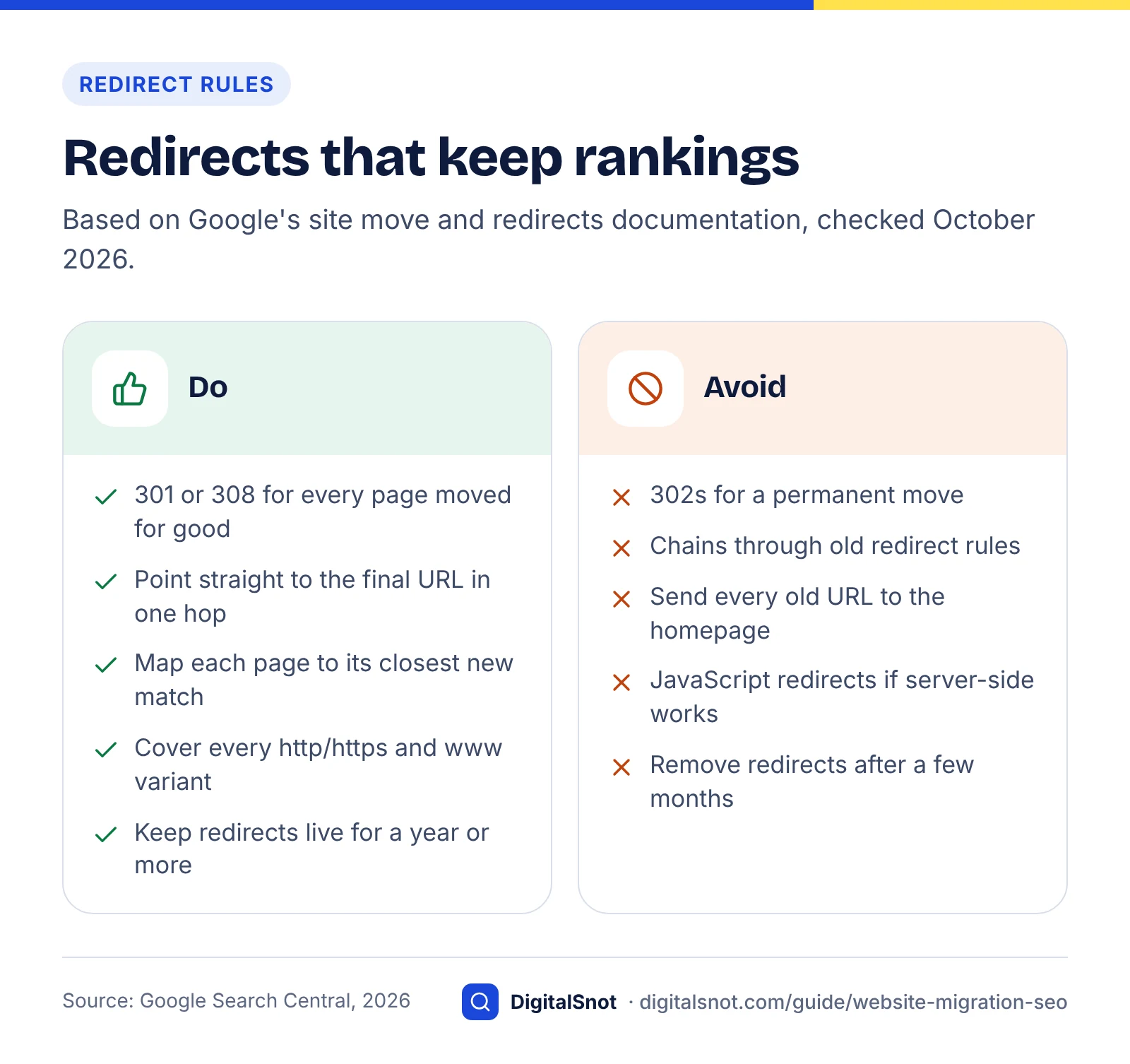
Use server-side permanent redirects (301 or 308), send each old URL straight to its final destination in one hop, and keep the redirects for at least a year. These three rules come from Google's documentation and prevent most migration losses.
Permanent versus temporary redirects
Google's redirects documentation says permanent redirects (301, 308, an instant meta refresh or a JavaScript location change) tell Google the target should become canonical. Temporary redirects (302, 303, 307 or a delayed meta refresh) are followed but don't carry that signal. Google recommends server-side redirects, and JavaScript ones only when nothing else is possible.
Google's canonicalisation documentation lists redirects and rel="canonical" as strong signals and sitemap inclusion as a weak one. Make all three agree: old URL redirects to new, the new page's canonical points to itself, and the sitemap lists only new URLs.
Keep chains to one hop
A redirect chain is a series of hops, such as HTTP to HTTPS to www to the new path. Google's site move guide advises redirecting straight to the final destination or, failing that, keeping chains ideally to no more than 3 hops and fewer than 5, because each hop adds delay. Googlebot can follow up to 10 hops, but that is a limit, not a target. Update redirects left over from past redesigns so they point at the new final URL too.
Test URLs with the free Redirect Checker, which lists every hop with its status code and tests the http, https, www and non-www versions. You want a single 301 or 308 ending in a 200. Two or more hops, a 302 on a permanent move, or a final 404 means the rule needs fixing.
How long to keep redirects
Google's site move guide says to keep redirects as long as possible, generally at least one year, so signals such as links from other sites can move to the new URLs. If you use the Change of Address tool, Google's Change of Address help page sets a minimum of 180 days, longer if old URLs still get search traffic. After that, Google no longer recognises a relationship between the two sites.
Our advice: never remove redirects for URLs with backlinks, print references or visits, and keep renewing the old domain. If it lapses and someone else registers it, every link to it points at their site.
Three redirect mistakes that cost rankings
What Google and Bing say: our comparison
Google and Bing agree on permanent redirects kept for a long time and on submitting a sitemap of the new URLs. They differ on duration, on the tools each offers for a domain move, and on how recently their guidance was updated.
Method: in October 2026 we read Google's site move guide, Change of Address help and documentation changelog, plus Bing's 2020 migration post and its content removal help, and recorded what each says on the same five points.
| Topic | Bing | What to do | |
|---|---|---|---|
| Redirect type | Server-side 301 or 308 | 301 | Use 301 |
| How long to keep | Generally at least 1 year; 180 days minimum after Change of Address | At least 1 to 2 years, preferably longer (2020) | Plan for 2 years or more |
| Domain move notice | Change of Address tool for every variant of the old domain | The 2020 post names a Site Move tool; its help page is no longer live | Change of Address once redirects are live; for Bing, redirects plus IndexNow |
| Speeding things up | Submit a sitemap of new URLs | Update sitemaps; submit moved URLs via IndexNow | Do both |
| Chains and timing | Ideally 3 hops or fewer; a few weeks or more for medium sites | Not covered in the pages we read | One hop; judge results after 4 to 8 weeks |
What this shows: following Bing's 2020 migration post on duration (one to two years at least) satisfies both engines. Google's guidance is fresher: its documentation changelog records that on 17 June 2026 the site move guide began saying to use Change of Address for all subdomain variants, including www and non-www, during domain migrations. Bing offers a faster nudge than Google: its content removal help says to submit deleted, moved or updated URLs through IndexNow so Bing and Copilot refresh results sooner.
Staging checks before you go live
Staging is the private copy of the new site where you test before launch. Check it for the four things behind most launch-day disasters: crawl blocks, noindex tags, canonicals pointing to the wrong host, and internal links to old URLs.
Plan how staging blocks come off
Password protection keeps people and crawlers out of staging more reliably than robots.txt, which only asks crawlers to stay away and is the file most often copied to production by mistake. Google's guide to changing your hosting says to remove temporary robots.txt disallow rules and noindex tags before the switch. Put that on the launch list with a name against it.
Write the production robots.txt as its own file
Carry across the deliberate rules from your old robots.txt, including AI crawler rules, and update the sitemap line. If you allowed OpenAI's search crawler before, allow it again: OpenAI's crawler documentation says sites that opt out of OAI-SearchBot won't appear in ChatGPT search answers, and changes take about 24 hours to apply. Our guide to blocking AI crawlers explains which bots to allow.
Paste the new file into the free Robots.txt Tester and test key paths for Googlebot, Bingbot and OAI-SearchBot. It shows whether each may fetch a path and which line decides. A "blocked" result on a page you want found stops the launch.
Check noindex, canonicals and on-page parity
Crawl staging and list every page with a noindex meta tag or X-Robots-Tag header. Every canonical should point to the final production URL on HTTPS, never the staging host or old domain; hreflang tags need the same check. Then compare your 20 to 50 most valuable pages old against new: title, meta description, H1, copy, alt text, structured data and internal links. The on-page SEO checklist lists what to compare, the schema markup guide covers structured data that themes often drop, and the Google SERP Preview shows whether rewritten titles will be cut off.
Internal links, server and firewall
Internal links should point straight at new URLs. Google's site move guide says redirects slow visitors down and asks you to update your own links. Replace the old domain in menus, footers, copy and image paths, then crawl again.
Google's hosting guide also says to check that firewalls and denial-of-service protection don't block Googlebot. Since 15 September 2026 this matters more: Cloudflare's Block settings now cover mixed-use crawlers, including Googlebot, Bingbot and Applebot. To opt out of AI training on Cloudflare, choose Disallow AI Training rather than Block. Plan for load too: Google says it crawls a newly moved site more heavily than usual.
Launch day, step by step
Launch day is switching things on in the right order and testing each one straight away. Pick a quiet weekday morning when your developer is free all day, never a Friday evening.
For domain or hosting changes, Google's hosting guide suggests lowering the DNS TTL to a low value, such as a few hours, at least a week before the move. Then, on the day:
- Save a final crawl of the old site as your last record of every URL and title.
- Go live and lift every staging block: password, robots.txt disallow, noindex tags and headers.
- Switch on the redirects or point DNS at the new host, in the order your developer rehearsed.
- Test the top 50 to 100 mapped URLs within the first hour. Each should give one 301 ending in a 200. Spot-check with the Redirect Checker, then run the whole map through a crawler in list mode.
- Open the live robots.txt on the new domain. If a block slipped through, fix it and use Request a recrawl in Search Console's robots.txt report; Google's guide to updating robots.txt says crawlers otherwise refresh their cached copy every 24 hours.
- Inspect key pages with the URL Inspection tool in the new Search Console property, which Google's hosting guide recommends to confirm Googlebot can reach the new setup.
- Submit the new XML sitemap in Search Console and Bing Webmaster Tools.
- For domain moves, submit the Change of Address for every verified variant of the old domain. Bing's 2020 post named a Site Move tool, but its help page is no longer live, so for Bing also submit the moved URLs through IndexNow if your platform supports it.
- Check analytics in real time and complete one test enquiry or purchase.
- Run the Website SEO Audit on the live site, compare it with your "before" snapshot, and note the launch time in your benchmark sheet.
Launch day in 15 seconds
Change of Address tool, sitemaps and listing updates
The Change of Address tool in Search Console tells Google that a whole domain or subdomain has moved. Use it only for domain-level moves, only after redirects are live, and keep those redirects for at least 180 days.
The Change of Address rules
From Google's help page and site move guide (checked October 2026):
- Own both old and new properties in Search Console, under the same Google account.
- Domain level only: you can't move a folder such as
/shop/, and it isn't for HTTP to HTTPS or www to non-www changes. - Subdomains don't move automatically. Submit for every variant of the old domain, including www, non-www and unused ones, and verify each.
- The old homepage must 301 to the new homepage; Google recommends 301s for canonical pages too.
- After moving A to B, you can't immediately move B to C. To cancel, remove the 301s as well.
Sitemaps during the move
Google's site move guide recommends submitting a sitemap of the new URLs once the move starts. Warnings that old-sitemap URLs redirect are normal and can be ignored. In the Sitemaps report, the new sitemap starts at zero indexed pages and should climb while the old one falls, one of the clearest progress signals you have.
Listings and profiles that link to you
Update these in the first week, busiest first: your Google Business Profile website and booking links (the Google Business Profile guide shows where each lives); Bing Places, Apple Maps, directories and review sites; social profiles and YouTube descriptions; Google Ads final URLs and shopping feeds; booking and payment tools; the url and sameAs values in your Organization structured data; and email signatures. Keep the redirects anyway, because old copies and print keep sending visits for years.
The first 30 days: normal versus alarming signals
In the first month, spot real problems fast without panicking at normal turbulence. Check daily in week one, twice weekly to day 30, then weekly to day 90, always against your benchmarks.
Method: the "normal" column reflects what Google's documentation says to expect; the "alarming" thresholds are our rules of thumb for small sites.
| Signal | Where to look | Normal | Alarming | What to do |
|---|---|---|---|---|
| Organic clicks | Search Console, both properties | A dip and daily swings, easing back over a few weeks | A drop that deepens week on week after week two | Check redirects and indexing for the pages that lost most |
| Old URLs | Page indexing, old property | Many listed as redirecting, for months | Listed as not found or soft 404 | Fix or add redirect map rows |
| New URLs indexed | Page indexing and Sitemaps, new property | A steady climb | Flat after a week, or excluded by noindex or robots.txt | Remove the block; request a robots.txt recrawl |
| Crawl responses | Crawl Stats report | More 301s than usual | Spikes in 404s, 5xx or redirect errors | Fix the rules; add server capacity |
| Rankings | Rank checks; Search Console queries | Old and new URLs swapping places | Both versions indexed weeks later | Check the redirect and the canonical |
| Conversions | Analytics, CRM | In line with traffic | Traffic fine, conversions near zero | Tracking is broken: check tags |
Two normal signals worry people most, and Google has addressed both. Its redirects documentation notes that after a domain change Google may still occasionally show old URLs even when the new ones are indexed. And in its July 2023 office hours, Google told a site owner still seeing about a million "pages with redirect" a year after a migration that this can be perfectly normal: old URLs stay in its systems for a long time and drop out gradually.
The Crawl Stats report is your early warning for server trouble. A higher share of 301 responses is normal during a move; what to look for are the redirect errors, such as loops or too many redirects, that Google's help page lists among the bad responses. Its status code documentation adds that 5xx and 429 errors slow crawling, and URLs that keep returning them for days can drop out of the index.
Monthly results report
Days 31 to 90, and when to roll back
By around day 60 to 90, most small sites should be near their benchmark for pages whose content didn't change. Merged or rewritten pages may settle at a different level, which is a content question, not a migration fault. After that, fold the checks into your monthly SEO report and set a month-12 reminder so nobody removes redirects or lets the old domain lapse.
- If robots.txt or noindex blocks the new site, fix it in place within the hour; rolling back would start a second move.
- If redirects are broken sitewide, fix the rules. It is a configuration problem.
- If the new site is down or very slow and can't be fixed within a day, roll back if the old site is intact, reversing the redirects.
- If traffic is down but every check passes, wait four to eight weeks before drawing conclusions.
Keeping AI citations and backlinks on the right URLs
AI answers draw on the same indexes as search, so a migration that breaks indexing also costs citations in AI Overviews, AI Mode and ChatGPT search. Keep redirects permanent, keep AI search crawlers allowed, and update the links you control.
Google's AI features follow the index
Google's AI features documentation says a page must be indexed and eligible to show with a snippet to appear in AI Overviews or AI Mode, with no extra technical requirements. A new URL that isn't indexed can't be cited, and an old one returning 404 drops out. Watch the new property's AI impressions with the Search Console AI performance report.
AI crawlers keep requesting old URLs
In Vercel's December 2024 analysis of its network, 34.82% of ChatGPT's crawler fetches hit 404 pages and another 14.36% followed redirects; Claude's crawler hit 404s on 34.16% of fetches, against 8.22% for Googlebot. Vercel found that, apart from robots.txt, many of these requests were for outdated files, and suggested the crawlers need better URL selection. Either way, these crawlers keep asking for old URLs, so a missing redirect is a dead end for AI systems as well as people.
Move your best backlinks, then check AI answers
Google's site move guide also suggests updating high-volume external links. Sort your saved list of linking sites by visits and relevance, and email the top 10 to 20 with the exact old and new URL. Two to four weeks after launch, ask ChatGPT, Perplexity, Gemini and AI Mode a few questions about your business. Note any answer linking your old domain or a dead URL and confirm it redirects; where facts are outdated, fix your own pages and listings first. Our guide to getting cited in AI search covers the wider method.
If you would like a second pair of eyes on your redirect map or launch plan, our technical SEO service covers migrations, and you can contact us to talk it through.
Free tools in this guide
- Website SEO Audit Crawl up to 50 pages and get a health score, every issue and a 30-day plan.
- Redirect Checker Trace 301/302 redirects, chains and loops to the final URL.
- Robots.txt Tester Test a URL against robots.txt and see which rule blocks or allows it.
- Google SERP Preview Preview titles and descriptions as they may appear in Google.
By the numbers
- the minimum time Google generally advises keeping site-move redirects live; longer is better (checked October 2026)
- 1 year
- Source: Google Search Central
- minimum to keep redirects after a Change of Address; after that Google treats the old and new sites as unrelated
- 180 days
- Source: Search Console Help
- Google's ideal maximum for a redirect chain during a move (and fewer than 5); Googlebot follows up to 10
- 3 hops
- Source: Google Search Central
- of ChatGPT crawler fetches hit 404 pages in Vercel's 2024 network data, against 8.22% for Googlebot
- 34.82%
- Source: Vercel
Frequently asked questions
Will I lose rankings when I migrate my website?
Some short-term movement is normal. Google says rankings fluctuate during a move while it recrawls and reindexes the site. Lasting losses usually come from avoidable mistakes: missing or temporary redirects, staging blocks left live, or content and titles dropped by the new templates. Google says a medium-sized site can take a few weeks or more to be fully processed, so judge the result after four to eight weeks, against benchmarks saved before launch.
How long does it take Google to process a site migration?
Google says a medium-sized website can take a few weeks or more before Google gradually shows the new URLs instead of the old ones. Larger sites take longer, and the pace depends on how many URLs there are and how fast your server responds. Old URLs can keep appearing in Search Console as redirecting for many months, which Google says is normal.
How long should I keep 301 redirects after a migration?
Google advises keeping redirects for as long as possible, generally at least one year. If you used the Change of Address tool, keep them for at least 180 days, after which Google no longer links the two sites. Bing's 2020 migration post asks for one to two years at least. Keep redirects indefinitely for URLs with backlinks or printed references.
When should I use the Change of Address tool?
Use the Change of Address tool in Search Console only when moving a whole domain or subdomain to another, such as a rebrand to a new domain. Do not use it for HTTP to HTTPS moves, www to non-www changes or folder moves on the same domain. Use it after redirects are live, submit it for every variant of the old domain, and verify both sites under one Google account.
Should I use 301 or 302 redirects for a site migration?
Use 301 redirects, or 308 where your server supports it, for every page that has moved for good. Google treats permanent redirects as a sign the new URL should be canonical, while temporary 302 and 307 redirects are followed but do not carry that signal. Keep 302 or 307 for short-term moves such as maintenance pages, and redirect server-side rather than with JavaScript where you can.
Should I redirect all old pages to the homepage?
No. Redirect each old URL to the single new page that best replaces it. Google warns that sending many old URLs to one unrelated page, such as the homepage, can confuse users and may be treated as a soft 404, which means those redirects can be treated as errors. If a page has no sensible equivalent, letting it return 404 or 410 is better than a misleading redirect.
What should I do with old pages that have no equivalent on the new site?
If a page has no useful replacement and no meaningful traffic or backlinks, let it return a 404 or 410 status. Google treats 4xx codes other than 429 as a sign the content no longer exists and removes previously indexed URLs. If the page has valuable backlinks, consider redirecting it to the closest relevant category, or recreating its content on the new site.
Does changing platform affect SEO if the URLs stay the same?
It can. Keeping URLs removes the redirect risk, but a new platform changes templates, code and often content. Titles, meta descriptions, headings, structured data, internal links and page speed can all shift without anyone noticing. Crawl the old and new versions, compare your key pages side by side before launch, and check that firewalls on the new host do not block Googlebot.
Should I keep my old domain after migrating?
Yes. Keep the old domain registered and its redirects live for at least a year, and ideally for good. Backlinks, bookmarks, printed materials and old listings keep sending visits for years. If the domain lapses and someone else registers it, those links and visits go to them, and the redirects that passed signals to your new site stop working.
How do I keep AI assistants citing my site after a migration?
Keep old URLs redirecting to their new equivalents, and keep OAI-SearchBot, Googlebot and Bingbot allowed in the new robots.txt. Google's AI Overviews and AI Mode only cite pages that are indexed and snippet-eligible, and OpenAI says sites that block OAI-SearchBot will not appear in ChatGPT search answers. Update the profiles and listings you control, then check a few assistants for old URLs.
Sources
Every figure and claim in this guide comes from the sources below. We checked each one when writing and link to the original so you can read it yourself. Credit belongs to the authors and publishers listed. How we write and check our articles.
-
1
Site moves and migrations
Google Search Central · Fluctuation, timing, 301/308, chains (3, 5, 10 hops), 1-year redirects, soft 404 warning, sitemaps.
-
2
How HTTP status codes affect Google's crawlers
Google for Developers · 4xx (except 429) treated as missing content; 5xx and 429 slow crawling.
-
3
Redirects and Google Search
Google Search Central · Permanent vs temporary redirects; server-side preferred; old URLs may still show after a move.
-
4
How to specify a canonical with rel="canonical" and other methods
Google Search Central · Redirects and rel=canonical are strong signals; sitemap inclusion is weak.
-
5
Change of Address tool
Search Console Help · Requirements, domain-level only, all variants, 180-day minimum, cancelling a move.
-
6
Website Migration with Bing
Bing Webmaster Blog · 2020 guidance: 301s, redirects live at least 1–2 years; names a Site Move tool whose help page is no longer live.
-
7
Latest Google Search documentation updates
Google Search Central · 17 June 2026: Change of Address for all subdomain variants in domain migrations.
-
8
Content Removal
Bing Webmaster Tools · Submit deleted, moved or updated URLs via IndexNow so Bing and Copilot refresh sooner.
-
9
Changing your web hosting and SEO
Google Search Central · Remove temporary blocks, lower DNS TTL a week ahead, check firewalls, URL Inspection.
-
10
Overview of OpenAI crawlers
OpenAI · OAI-SearchBot controls ChatGPT search inclusion; robots.txt changes take about 24 hours.
-
11
Have it both ways: stay discoverable in search while disallowing AI training
Cloudflare Blog · From 15 Sep 2026, Block settings cover Googlebot, Bingbot and Applebot; Disallow AI Training option.
-
12
Updating your robots.txt file
Google for Developers · Cached robots.txt refreshed every 24 hours; Request a recrawl in the robots.txt report.
-
13
July 2023 Google SEO office hours transcript
Google Search Central · Old URLs reported as redirecting a year after a migration can be normal.
-
14
Crawl Stats report
Search Console Help · Response types by group; redirect errors and server errors to watch.
-
15
AI features and your website
Google Search Central · AI Overviews and AI Mode need indexed, snippet-eligible pages; no extra requirements.
-
16
The rise of the AI crawler
Vercel · 2024 data: ChatGPT crawler 34.82% 404s, 14.36% redirects; Claude 34.16%; Googlebot 8.22%.