Guide · Local SEO
Google Business Profile optimisation: a complete guide
How to set up, optimise and maintain a Google Business Profile within Google's rules, mapped to the relevance, distance and prominence factors that drive local ranking.

On this page (12 sections)
- 1How Google ranks local businesses
- 2Claim and verify your profile
- 3Business name, address and service areas
- 4Categories, hours, description and services
- 5Photos, videos and posts
- 6Reviews, Q&A and customer interactions
- 7Website consistency, LocalBusiness schema and citations
- 8Field-by-field ranking map and 30-day setup plan
- 9Tracking performance with insights and UTM tags
- 10Common suspension causes and how to fix them
- 11Monthly maintenance routine
- 12Sources
Your Google Business Profile is the panel people see when they search for a business like yours on Google Search or Maps. For most local businesses it gets more views than the website, and it is where people decide whether to call, ask for directions or move on to a competitor.
This guide covers Google Business Profile optimisation from start to finish. You will see how Google ranks local results, how to fill in each field within Google's rules, how to earn reviews without breaking policy, how to measure results and how to avoid a suspension. Every rule here comes from Google's own help pages, which are linked in each section. The guide ends with a field-by-field ranking map, a 30-day setup plan and a monthly maintenance routine.
How Google ranks local businesses
Google ranks local results on three main factors: relevance, distance and prominence. Google's help page Tips to improve your local ranking on Google explains each one, and it also says you cannot request or pay for a better local ranking.
Relevance
Relevance is how well your profile matches what someone searched for. Google judges it from the information you give it: your categories, services, description and other details. Google's advice is to enter complete, detailed information so it can understand what you do and match you to the right searches.
Distance
Distance is how far each possible result is from the location used in the search. If someone searches "plumber in Leeds", Leeds is the reference point. If they just search "plumber", Google uses what it knows about where they are. Google says a business further away can still outrank a closer one if it is a better match for the search.
Prominence
Prominence is how well known your business is. Google draws on information from across the web, such as links, articles and directories. Google's page also says your Google review count and review score are part of local ranking, so more reviews and positive ratings can help. Your position in ordinary web search results counts too, which means your website matters as well as your profile.
How Google ranks local businesses
The practical point is that you control most of relevance and a good part of prominence, but not distance. Optimisation is about making those two factors as strong as possible within Google's rules. If you want help with this across several locations, our local SEO service covers profile setup and ongoing management.
Claim and verify your profile
Verification proves to Google that you have the right to manage the business, and an unverified profile cannot use most features. Google's local ranking page also says verified businesses are more likely to show up in results.
- Search for your business first. Look on Google Maps for an existing profile. Customers or Google may have created one already, and claiming it is better than making a duplicate.
- Claim or create the profile. Sign in with a Google Account the business owns, not a personal account of a staff member who might leave. Add other people as managers rather than sharing the login.
- Complete the core details. Enter the name, primary category, address or service area, phone number and website before you start verification.
- Use the verification method Google offers. Verify your business on Google lists phone or text, email, video recording, live video call and postcard. Google chooses which options you see, so you may only get one.
Video verification is now common. Google's page on verifying with a video recording asks for a video captured live on a phone, not a pre-recorded upload. It should show your location (for example the street and signage), proof the business exists (equipment, stock or branded vehicles) and proof you manage it (opening the till, a staff-only room or unlocking the door). Plan the shot before you press record.
Business name, address and service areas
Your business name must match the name you use in the real world, and your address settings must reflect how you actually serve customers. Getting these wrong is the fastest way to have your profile suspended.
Business name rules
Google's Guidelines for representing your business on Google say your name should match what appears on your signage, website and stationery. Adding unnecessary information is not allowed and can lead to suspension. That rules out:
- keywords or service descriptions ("Smith & Co Emergency Plumber 24/7")
- location details that are not part of your legal or trading name ("Smith & Co Leeds")
- marketing taglines, phone numbers, URLs or opening hours
- special characters or irrelevant legal terms
Keyword-stuffed names may seem to work for a while, but they are easy for competitors to report and for Google to spot. If your real trading name includes a keyword because that is what is on your sign and invoices, you can use it. Inventing a new name for the profile is not allowed.
Storefront, service-area and hybrid businesses
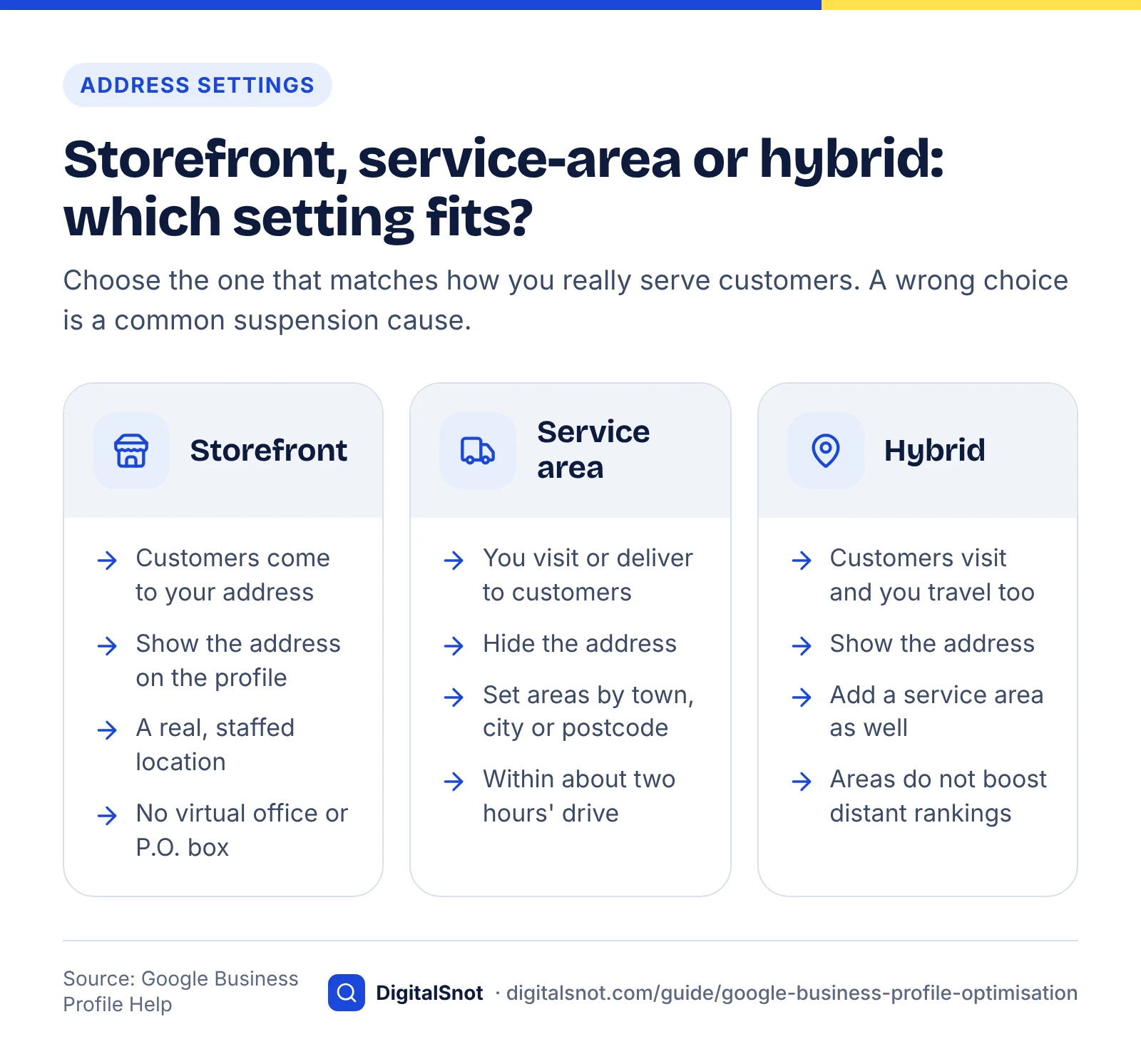
Google treats businesses differently depending on whether customers come to you. Choose the setting that matches reality:
- Storefront business: customers visit your address during opening hours. Show the address.
- Service-area business: you visit or deliver to customers and do not serve them at your address, such as many trades and cleaning companies. Google says these businesses should hide their address and set a service area instead.
- Hybrid business: you serve customers at your address and also travel to them. You can show the address and set a service area.
Google's page on managing service areas says your service area should not reach further than about two hours' driving time from where you are based. Set areas by town, city or postcode district. Remember that a service area is not a ranking boost: Google still uses distance from your real location, so listing distant towns will not make you appear there.
Do not use a virtual office, a P.O. box or a co-working desk you do not staff as your address. Address lines should hold only your location details, with no keywords or URLs.
Categories, hours, description and services
These fields tell Google what you do and when you are available, so they shape relevance directly. Your primary category matters most.
Primary and secondary categories
Google's guidelines say to use as few categories as possible to describe your core business, and to choose the most specific one that fits. According to Manage your business category, the first category you enter is your primary category. If there is no exact match, choose a more general one; you cannot create your own.
- Choose "Family law attorney" over "Lawyer" if family law is the core of your business.
- Add secondary categories only for real parts of the business, such as a "Bakery" that is also a "Coffee shop".
- Do not use categories as keywords or to describe amenities, and do not add a category for a different business that shares your building.
Categories also unlock features. Restaurants get menu fields, hotels get amenities, and some service categories get booking links. If a feature you expect is missing, check your primary category first.
Hours and special hours
Wrong hours cost you customers and trust. Set regular hours for every day you open, and use special hours for bank holidays and temporary changes. Google's page on how to set special hours says they cover temporary changes or closures of up to six days in a row. It also suggests confirming your hours for official holidays even if they do not change, as Google may otherwise show a warning that hours might differ. Use "More hours" for things like delivery or takeaway times. For longer closures, mark the business as temporarily closed instead.
Business description
Google's page Edit your Business Profile says the description must be under 750 characters and must not contain URLs or HTML. Focus on what the business does, who it serves and what makes it different, not on special offers or prices. Put the most useful sentence first, because the start is often all people read. Write for customers. Repeating keywords in the description does not override the relevance signals from your categories and services.
Services, products and attributes
Add every service you offer, using Google's suggested services for your category where they fit, and custom services where they do not. Give each one a short, plain description. Retailers can show products, and in some countries in-store stock through a connected point-of-sale system. Fill in attributes that apply, such as wheelchair access or free Wi-Fi; they help Google match you to searches with those needs and help customers decide.
Photos, videos and posts
Photos help people recognise and choose your business, and posts keep the profile up to date. Neither is named as a ranking factor in Google's local ranking page, but both feed the completeness and engagement that profiles depend on.
Local map results
Photos and videos
Google's tips for business-specific photos recommend at least three exterior photos, taken from each direction customers might approach from and at different times of day, so people can find the entrance. Then add:
- interior photos that show the space as customers see it
- photos of your products, finished work or menu items
- team photos, if staff are part of the service
- a logo and a cover photo that crops well on mobile
- short videos of the space or the service in action
Use real, well-lit photos taken at the business. Stock images, heavy filters and photos with large text overlays do not help customers. Photos and videos only appear once the profile is verified, and new uploads can take a day or two to show. Customers can also add photos, so check them now and then and report any that break Google's content policy.
Many articles repeat specific percentages about how much photos increase clicks or direction requests. We could not trace a current, verifiable source for those figures, so they are left out here. The safe rule is the one Google states: real, varied photos help customers recognise your business.
Posts
Google's page on creating and managing posts lists three post types: updates, offers and events. Each can include text, a photo or video and a button linking to your site. Use them for news people can act on: a new service, a seasonal offer, an event date, or a change to how you work. A useful rhythm is one or two posts a month. Point the button at a relevant page and add a UTM tag so you can measure clicks (see the tracking section).
Reviews, Q&A and customer interactions
Reviews are one of the prominence signals Google names, and they strongly affect whether people choose you. The rule is simple: ask every customer, never pay or reward them for a review, and reply to what they write. Q&A and chat, the other ways customers used to interact with profiles, have changed and are covered at the end of this section.
The consumer data shows why this matters. BrightLocal's Local Consumer Review Survey 2026 found that 97% of consumers read reviews for local businesses and 74% look for reviews written in the last three months. It also found that 31% of consumers will only use a business rated 4.5 stars or higher, up from 17% the year before. A steady flow of recent reviews matters more than a large total collected years ago.
How to ask for reviews
Google's page Tips to get more reviews suggests asking customers to use a Google review link or QR code, which you can create from your profile on a desktop browser. Our free Google Review Link & QR Generator also builds the link, a QR code and ready-to-send messages from your profile. Put it where customers already are:
- in the thank-you or invoice email after a job
- on receipts and printed cards at the till
- in follow-up text messages, with one short sentence and the link
- on a sign near the exit or the payment point
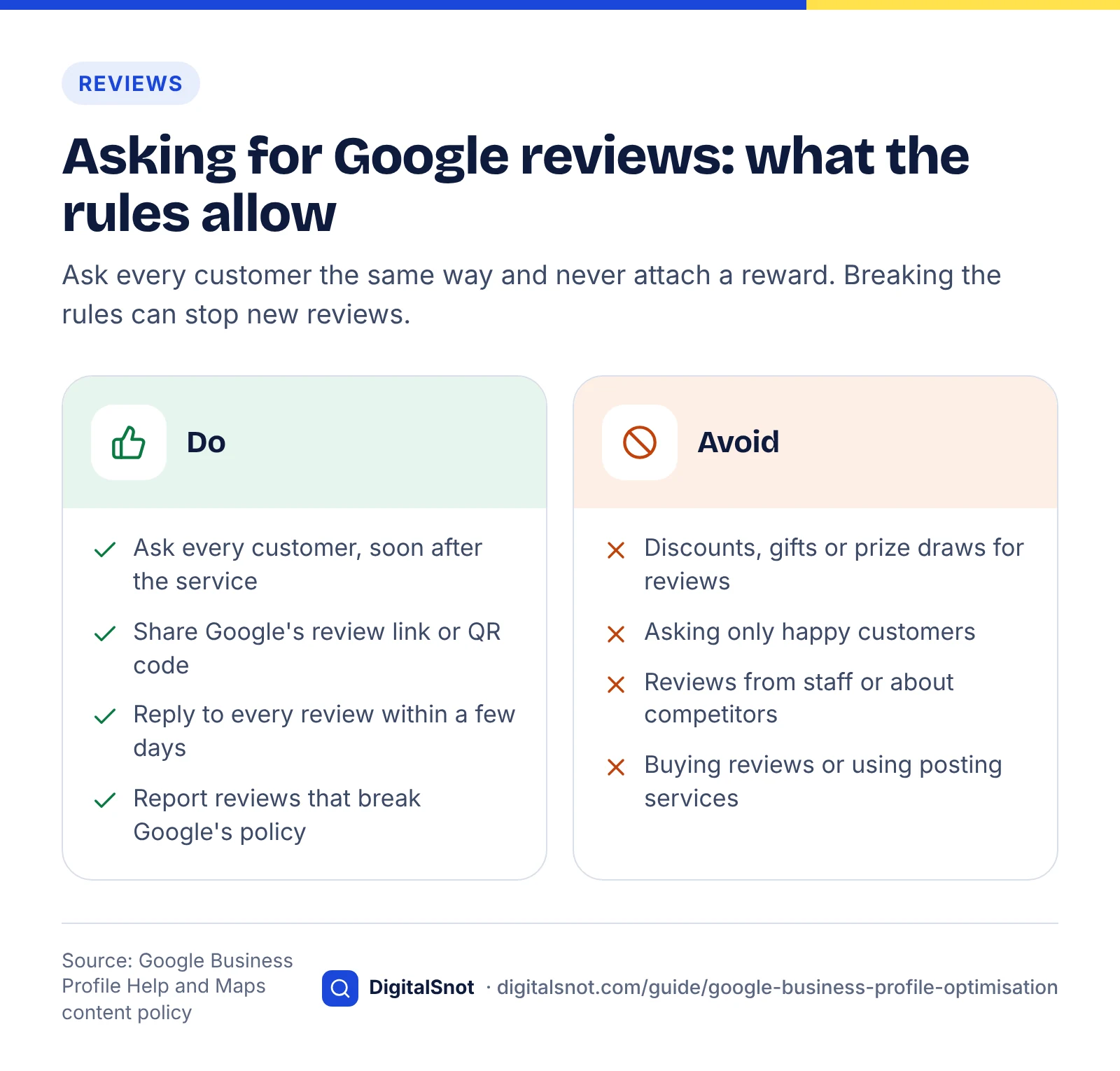
Ask soon after the service while the experience is fresh, and make it a standard step for every customer, not something staff do only when a job went well.
What is not allowed
Google's Maps prohibited and restricted content policy sets the limits. Businesses must not:
- offer money, discounts, free products or entry into a prize draw in exchange for a review, or for changing or removing a negative one
- discourage negative reviews or ask only happy customers for reviews (often called review gating)
- write reviews for themselves or competitors, or post them from staff accounts
- buy reviews or use services that post them
Google can remove the reviews and may stop your profile from receiving new reviews for a period.
How to reply
Google's page on managing customer reviews explains that you can reply once the profile is verified, and the customer is notified. Replies matter to customers: in BrightLocal's 2026 survey, 80% of consumers said they are likely to use a business that responds to all of its reviews, and half were put off by generic or templated replies.
- Reply to every review, positive and negative, ideally within a few days.
- Thank the reviewer and mention something specific from what they wrote.
- For negative reviews, stay calm, acknowledge the problem, apologise where it is deserved and offer a way to continue the conversation privately.
- Never share personal details about the customer or argue about facts in public.
- If a review breaks Google's policy (spam, abuse, a conflict of interest), report it rather than replying angrily.
Profile optimisation checklist
Q&A, messaging and booking links
Several interactive features have changed recently, so check what your profile actually offers before you plan around them. Chat has gone, Q&A is being replaced, and booking links depend on your category.
Questions and answers
Google's Q&A API change log shows that the My Business Q&A API was discontinued on 3 November 2025, with Google saying it was updating Q&A features. Since then the public Q&A section has been disappearing from many profiles. Search Engine Journal reported that Google is rolling out an AI feature in Google Maps, Ask Maps, which answers questions from your profile, your reviews and your website. At the time of that report it was only available for some US locations and categories.
What this means in practice: you can no longer rely on posting and answering your own questions. Instead, make sure the answers to common questions (parking, accessibility, payment methods, areas covered, booking) are in your profile fields, your description and an FAQ page on your website. That is the material AI answers draw on. Our guide on how to get cited in AI search covers the same principle for AI search more broadly. For local searches in AI Mode and Ask Maps specifically, our guide to local SEO for AI search explains what to update on your profile and website.
Messaging and calls
Google ended chat and call history in Business Profile on 31 July 2024, as explained in Changes to Google Business Profile chat and call history. Old guides that tell you to turn on messaging are out of date. Make sure your phone number is answered during your listed hours and add a contact form or booking page on your website.
Booking, ordering and appointment links
Depending on your category, you can add links for appointments, reservations, online ordering or menus. Link straight to the page where the action happens, not your home page, and add a UTM tag so you can see how many people use it.
Website consistency, LocalBusiness schema and citations
Your website and other listings should confirm what your profile says. Matching details help Google trust the information, and your website's own ranking feeds prominence.
Keep your website consistent
Your name, address and phone number (NAP) should be the same on your profile, in your website footer and on your contact page. Each location of a multi-site business should have its own page with its address, hours, services and directions, and that page should be the one your profile links to. The basics of good local pages, such as clear titles, headings and internal links, are covered in our on-page SEO checklist, and our on-page SEO service can handle them for you.
Add LocalBusiness structured data
Google's LocalBusiness structured data documentation explains how to describe your business in code. Use the most specific subtype available (for example Dentist or Electrician rather than LocalBusiness). Include the name, address, telephone with country code, URL, and openingHoursSpecification that matches your profile hours. Google recommends adding as many relevant properties as you can. Structured data does not replace your profile, but it gives Google a consistent, machine-readable version of the same facts. Our schema markup guide covers the core set of types for a small business website and how to test them. If your site has crawl or indexing problems, fix those first using our technical SEO audit checklist.
Structured data (JSON-LD) code
Citations
Citations are mentions of your business name, address and phone number on other sites: directories, trade bodies, local chambers of commerce, review sites and local news. Google's local ranking page mentions links, articles and directories as information it uses for prominence. Focus on quality and accuracy rather than volume:
- Fix the big general directories and data sources first, then the ones specific to your industry and town.
- Use exactly the same name, address and phone number everywhere, including how you write "Street" or "St".
- When you move or change number, update your profile first, then your website, then citations.
- Remove or merge duplicate listings you find.
Links and mentions from local organisations, sponsorships and press coverage do double duty: they build prominence and send real visitors. Our content SEO service can help create local content worth linking to.
Field-by-field ranking map and 30-day setup plan
This is our own analysis. We went through each profile field and checked whether Google's help documentation links it to local ranking, then mapped it to the factor it most plausibly affects.
Method: we compared every field against Google's local ranking page and the related help pages cited in this guide. "Documented" means a Google page states a ranking or visibility effect. "Not stated" means Google describes the field but does not say it affects ranking, so any effect is our reasoning, not Google's claim. Anyone can repeat this by reading the same pages.
| Profile field | Main factor | What Google documents | Priority |
|---|---|---|---|
| Verification | All three | Documented: verified businesses are more likely to show in results | Essential |
| Business name | Relevance | Rules documented; keyword stuffing can lead to suspension | Essential |
| Primary and secondary categories | Relevance | Documented: complete information helps Google match searches; most specific category advised | Essential |
| Address or service area | Distance | Documented: distance is measured from the location; service areas must reflect reality | Essential |
| Hours and special hours | Relevance | Documented as part of complete, accurate information | High |
| Phone and website | Relevance, prominence | Documented: web position counts toward prominence | High |
| Description | Relevance | Not stated as a ranking factor; character and content rules documented | Medium |
| Services, products, attributes | Relevance | Covered by "complete information" advice | High |
| Reviews (count, rating, replies) | Prominence | Documented: review count and score factor into ranking | Essential |
| Photos and videos | Prominence (indirect) | Not stated as a ranking factor on the ranking page; recommended for customers | Medium |
| Posts | None stated | Not stated as a ranking factor | Low to medium |
| Citations and links | Prominence | Documented: links, articles and directories inform prominence | High |
| LocalBusiness schema | Relevance (indirect) | Documented for search features; not stated as a local pack factor | Medium |
Two points stand out. First, the fields Google documents most clearly (verification, categories, accurate information and reviews) are also the cheapest to get right, so they should come first. Second, popular tactics such as frequent posting have no documented ranking effect. They are still worth doing for customers, but they should not take time away from reviews and accurate data.
A 30-day setup plan
| Days | Focus | Tasks |
|---|---|---|
| 1–3 | Ownership | Find or create the profile, claim it with a business-owned account, add managers, start verification |
| 4–7 | Core data | Real business name, primary and secondary categories, address or service area, phone, website with UTM tags, regular hours |
| 8–12 | Detail | Description, services or products, attributes, special hours for the next three months, booking links |
| 13–17 | Visuals | Logo, cover, three or more exterior photos, interior, team and work photos, one short video |
| 18–22 | Reviews | Create review link and QR code, add to emails and receipts, brief staff, reply to all existing reviews |
| 23–26 | Website | Match NAP on the site, build or improve location page, add LocalBusiness schema, add FAQ content |
| 27–30 | Citations and tracking | Fix the main directories, remove duplicates, publish a first post, record baseline Performance figures |
If you are doing this alongside wider keyword work, our keyword research guide helps you choose which services and towns to prioritise on your location pages.
Tracking performance with insights and UTM tags
Measure results in two places: Performance insights inside your profile, and your website analytics using UTM-tagged links. Together they show what people do on the profile and what happens after they click through.
Performance insights
Google's page Understand your Business Profile performance explains the main metrics:
- Views: how many people viewed your profile on Search and Maps.
- Searches: the search terms that showed your profile, updated monthly.
- Calls: taps on the call button.
- Directions: direction requests, filtered for repeat taps and spam.
- Website clicks: taps on your website link.
- Bookings and other interactions, where your category supports them.
Export the data monthly so you can compare like with like. The Searches report is especially useful: if people find you for terms that match your services, your categories and services are working. If important services never appear, add them.
UTM-tagged links
Without tags, visits from your profile often appear as plain organic Google traffic. Google Analytics' guide to URL builders explains how to add campaign parameters to a link. A simple pattern for your profile website link is:
https://example.co.uk/leeds/?utm_source=google&utm_medium=organic&utm_campaign=gbp-listing
Use a different utm_campaign value for booking links and post buttons so you can tell them apart. Keep the values consistent from month to month, or your reports will split. Then set up conversion tracking on the website so you can see enquiries, not just visits.
Monthly results report
Common suspension causes and how to fix them
Most suspensions come from breaking the representation guidelines, especially the name and address rules. Fix the cause first, then appeal with evidence.
Google's page on fixing suspended or disabled profiles says profiles that break the guidelines can be suspended or disabled. Common causes include:
- keywords, locations or taglines added to the business name
- a virtual office, P.O. box or unstaffed address
- a service-area business showing an address customers cannot visit
- duplicate profiles for the same location
- a service area far beyond what the business can reach
- many large edits to core details in a short time, such as name, address and category together
- a business type that is not eligible, such as an online-only business with no in-person contact
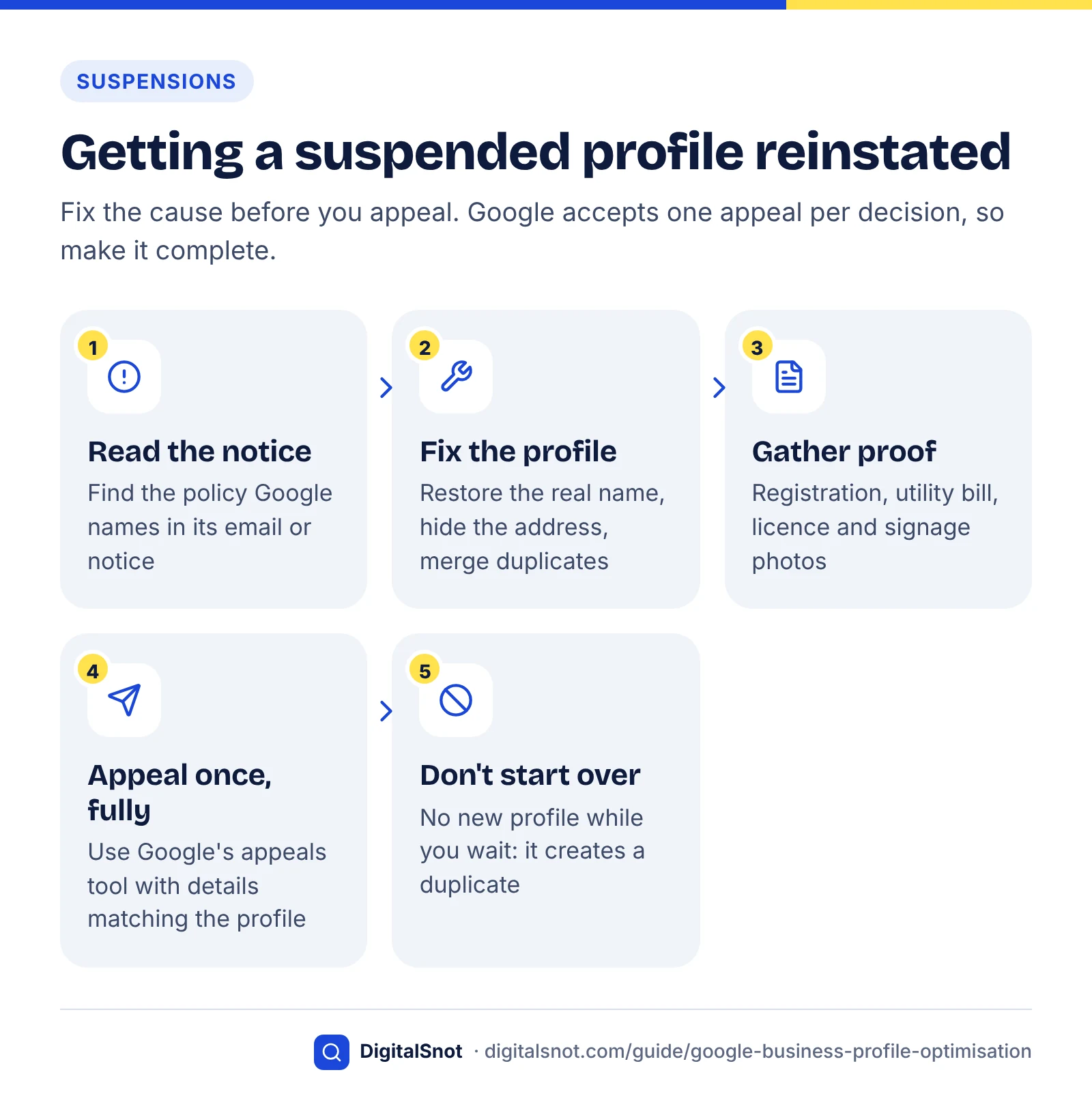
To get reinstated:
- Read the email or notice from Google and identify the policy named.
- Fix the profile so it follows the guidelines: restore the real name, hide the address if you are a service-area business, merge duplicates.
- Gather proof that the name and address are real: business registration, a utility bill, a business licence, and photos of signage. The details should match the profile exactly.
- Submit an appeal using the tool described in Google's page on appealing profile restrictions. It shows the reason, the policy and the appeal status. Google says appeals can only be submitted once per decision, so make the first one complete.
- Do not create a new profile while you wait. That usually creates a duplicate and makes things worse.
Monthly maintenance routine
A profile that is set up once and then left alone slowly falls out of date. Spending about an hour a month on the routine below keeps it accurate and active.
Answer-ready page checklist
| Task | How often | What to check |
|---|---|---|
| Reply to reviews | Weekly | Every new review answered; policy-breaking reviews reported |
| Review requests | Weekly | Link still in emails and receipts; staff still asking every customer |
| Suggested edits | Monthly | Google or users may change your details; accept correct edits and reject wrong ones |
| Hours and special hours | Monthly | Special hours set for upcoming bank holidays and closures |
| Photos | Monthly | Add new photos of recent work; check customer photos |
| Posts | Monthly | One or two posts with tagged links to relevant pages |
| Services and description | Quarterly | New services added, old ones removed, description still accurate |
| Performance insights | Monthly | Export data; compare calls, directions, clicks and search terms with last month |
| Website and schema | Quarterly | NAP, hours and schema match the profile; location page up to date |
| Citations | Quarterly | Main directories accurate; no new duplicates |
The "suggested edits" check is easy to miss. Google can update your profile from user suggestions or other data sources, and wrong hours or a changed category can go unnoticed for weeks. Logging in monthly catches this early.
Google Business Profile optimisation works best as part of a wider local strategy, with a strong website and content behind it. You can see all our SEO services, including AI search optimisation for the AI answers that now draw on your profile. If you would like a review of your profile and local pages, get in touch.
Free tools in this guide
By the numbers
- of consumers read online reviews for local businesses (Local Consumer Review Survey 2026)
- 97%
- Source: BrightLocal
- of consumers say they are likely to use a business that responds to all of its reviews (2026)
- 80%
- Source: BrightLocal
- of consumers will only use a business rated 4.5 stars or higher, up from 17% the year before (2026)
- 31%
- Source: BrightLocal
Frequently asked questions
How long does Google Business Profile optimisation take to show results?
Changes to profile details can take up to a few days to appear on Google. Ranking changes from better categories, reviews and citations usually build over several weeks or months, because prominence grows gradually. Track calls, direction requests and website clicks monthly in Performance insights, and compare each month with the same period before you made changes, rather than judging after a few days.
Can I add keywords to my Google Business Profile name?
No. Google's guidelines say your profile name must match the name you use in the real world on signs, your website and stationery. Adding keywords, locations, taglines or phone numbers is not allowed and can lead to suspension. If a keyword is genuinely part of your registered trading name and appears on your signage, you can use it.
Should a service-area business show its address?
No. Google says businesses that visit or deliver to customers, and do not serve customers at their address, should hide the address and set a service area instead. Hybrid businesses that serve customers on site and also travel can show the address and add a service area. Showing an address customers cannot visit is a common suspension cause.
How many categories should I choose?
As few as possible. Google advises choosing the most specific category that describes your core business as your primary category, then adding secondary categories only for real parts of the business. Do not use categories as keywords or to describe amenities. Your primary category is the first one you enter and has the biggest effect on which searches you appear for.
Is it allowed to offer a discount for a Google review?
No. Google's Maps content policy prohibits offering money, discounts, free goods or services in exchange for reviews, or for changing or removing negative reviews. You also must not ask only happy customers. You can ask every customer for an honest review using Google's review link or QR code, as long as there is no reward attached.
Do Google Business Profile posts help ranking?
Google does not list posts as a local ranking factor. Posts are still useful because they show customers current offers, events and news, and they can link to pages on your website. Treat them as a way to keep the profile fresh and drive clicks, publishing one or two a month, rather than as a ranking tactic.
What happened to Q&A on Google Business Profile?
Google discontinued the Q&A API on 3 November 2025 and said it was updating Q&A features. The public Q&A section has since disappeared from many profiles, and Google has been testing an AI feature in Maps, Ask Maps, that answers questions from profile information, reviews and websites. Put answers to common questions in your profile fields and on your website.
Does LocalBusiness schema improve local rankings?
Google does not say that LocalBusiness structured data is a local pack ranking factor. It does help Google read your business details accurately and consistently from your website. Use the most specific business subtype, include your name, address, phone and opening hours, and make sure every detail matches your Google Business Profile exactly.
Why was my Google Business Profile suspended?
Most suspensions come from breaking Google's representation guidelines: keywords in the name, a virtual office or unstaffed address, a service-area business showing its address, duplicate listings or many large edits at once. Fix the issue, collect documents that prove your name and address, then submit one complete appeal through Google's appeals tool. Avoid creating a new profile meanwhile.
Sources
Every figure and claim in this guide comes from the sources below. We checked each one when writing and link to the original so you can read it yourself. Credit belongs to the authors and publishers listed. How we write and check our articles.
-
1
Tips to improve your local ranking on Google
Google Business Profile Help · Relevance, distance and prominence; reviews and verification in local ranking; no paid ranking
-
2
Verify your business on Google
Google Business Profile Help · Available verification methods
-
3
Verify your business with a video recording
Google Business Profile Help · What a verification video must show
-
4
Guidelines for representing your business on Google
Google Business Profile Help · Business name rules, service-area businesses, categories and addresses
-
5
Manage your service areas for service-area & hybrid businesses
Google Business Profile Help · Service area limit of about two hours' driving time
-
6
Manage your business category
Google Business Profile Help · Primary category is the first one entered; choosing specific categories
-
7
How to set Special hours
Google Business Profile Help · Special hours for temporary changes and holidays
-
8
Edit your Business Profile
Google Business Profile Help · Description limit of 750 characters and content rules
-
9
Tips for business-specific photos on your Business Profile
Google Business Profile Help · Recommendation of at least three exterior photos
-
10
Create & manage posts on your Business Profile
Google Business Profile Help · Post types: updates, offers and events
-
11
Local Consumer Review Survey 2026
BrightLocal · Review reading, recency, star rating and response statistics (2026)
-
12
Tips to get more reviews
Google Business Profile Help · Review link and QR code; incentive ban
-
13
Prohibited & restricted content
Maps User Contributed Content Policy Help · Bans on incentivised reviews, review gating and fake engagement
-
14
Manage customer reviews
Google Business Profile Help · How to reply to reviews
-
15
Q&A API change log
Google for Developers · Q&A API discontinued on 3 November 2025
-
16
Ask Maps Is Google Q&A's AI Replacement: Here's What It Means For Marketers
Search Engine Journal · Reporting on Ask Maps replacing profile Q&A
-
17
Changes to Google Business Profile chat and call history
Google Business Profile Help · End of chat and call history on 31 July 2024
-
18
Local Business (LocalBusiness) Structured Data
Google Search Central · LocalBusiness properties and subtype advice
-
19
Understand your Business Profile performance & insights
Google Business Profile Help · Performance metrics definitions
-
20
URL builders: Collect campaign data with custom URLs
Google Analytics Help · How to add UTM parameters to links
-
21
Fix suspended or disabled profiles
Google Business Profile Help · Why profiles are suspended and how to fix them
-
22
Appeal Business Profile content & profile restrictions
Google Business Profile Help · Appeals tool and evidence


