Guide · Keyword research and content
Keyword research for SEO: a practical guide
How to do keyword research that leads to pages people actually want: seed terms, free sources, search intent, metrics, clustering and a scoring model for priorities.

On this page (12 sections)
- 1What keyword research means now
- 2Start with seed keywords from your customers
- 3Expand your list with free keyword sources
- 4Search intent and reading the SERP
- 5Keyword metrics: what they tell you and what they do not
- 6Long-tail keywords
- 7Group keywords into topics and map one per page
- 8Prioritise keywords with a scoring model
- 9Keyword research for AI search
- 10Build the content plan
- 11Track results and refresh the research
- 12Sources
Keyword research is how you find out what your customers type (or say) into search engines, what they expect to see when they do, and which of those searches are worth building a page for. Done well, it decides your site structure, your content plan and the wording on every important page. Done badly, it produces a spreadsheet of high-volume phrases that never turn into enquiries.
This guide walks through a method you can repeat: collect seed terms from real customers, expand them with free and paid tools, check intent on the results page, read the metrics with healthy suspicion, group terms into topics, map them to pages and score them so you know what to build first. It finishes with how keyword research changes for AI search and how to track the results.
What keyword research means now
Keyword research today is topic and intent research. You are no longer hunting for one exact phrase per page; you are finding the needs behind groups of related searches and making sure one strong page answers each need.
Search engines understand language far better than they did a decade ago. When Google introduced BERT in 2019, it explained that it sees billions of searches every day and that 15 percent of those queries are ones it has never seen before. No tool can list queries that have not happened yet. What you can do is understand the problem, the vocabulary and the stage of the decision well enough that your page fits new variations too.
In practice, that changes three things:
- The unit of work is the topic. "Boiler service cost", "how much is a boiler service" and "annual boiler check price" are one topic with one intent. They belong on one page.
- Intent matters more than volume. A phrase searched 50 times a month by people ready to buy can be worth more than one searched 5,000 times by students.
- Questions carry more weight. Longer, conversational queries in AI-driven search make question research part of the core job, not an extra.
Keyword research table
Start with seed keywords from your customers
Seed keywords are the short starting phrases you feed into tools. The best ones come from the people who buy from you, because they use their own words rather than your internal jargon.
Before opening any tool, spend an hour collecting language from these places:
- Sales calls and enquiry forms. Note the exact phrases prospects use to describe their problem. "Our website isn't showing up" is a seed; "organic visibility" probably is not.
- Support tickets and live chat logs. These reveal the questions people ask after buying, which often become how-to and troubleshooting content.
- Reviews of your business and competitors. Customers describe outcomes, comparisons and objections in plain language.
- Your own product and service list. Write down every service, product category and use case, including the names customers use if they differ from yours.
- Forums and communities. Reddit threads, trade forums and Q&A sites show how people phrase problems when nobody is selling to them.
Aim for 20 to 50 seed terms grouped loosely by service or product. Keep a column for where each seed came from. When you later have to choose between two similar phrases, knowing that one came straight from a sales call is a useful tiebreaker.
Separate your vocabulary from theirs
Most businesses describe themselves differently from how customers search. A firm might call its offer "facilities management" while customers search "office cleaning company". Flag any seed that only you use. You may still target it, but it should not drive the plan.
Expand your list with free keyword sources
Free sources cover most of what a small or medium site needs. Each one is good at a different job, so use several rather than relying on one.
The table below is our own comparison. We reviewed the official documentation for each Google tool and noted what each source reveals, its main limit and when to use it. You can repeat the method for any tool by reading its help pages for how the data is collected and what is filtered out.
| Source | What it is good for | Main limitation | Best used when |
|---|---|---|---|
| Google autocomplete | Real query phrasing and modifiers ("near me", "for beginners", "vs") | No volumes; filtered and influenced by location, language and trends | Expanding each seed into natural variations |
| People also ask | Questions related to a topic, useful for FAQs and section headings | No volumes; boxes vary by query and location | Planning the subheadings and FAQs of a page |
| Google Search Console | Queries that already bring impressions and clicks to your site | Only shows queries you already appear for; rare queries are anonymised | Finding quick wins and pages that rank on page two |
| Google Keyword Planner | Volume estimates, related ideas, a rough commercial signal from bid ranges | Built for advertisers; needs a Google Ads account; volumes are averaged estimates | Sizing topics and comparing options |
| Google Trends | Seasonality, rising topics and regional differences | Relative 0–100 index, not search counts; low-volume terms show as zero | Timing content and choosing between synonyms |
| Competitor pages and site search | Topics competitors cover and how they structure them | Shows what they built, not what performs | Spotting gaps in your own coverage |
Google autocomplete and People also ask
Type each seed into Google and note the predictions. Google says that autocomplete predictions reflect real searches that have been done on Google, though they are adjusted for language, location and trending interest and filtered by policy. Add letters after your seed ("boiler service a", "boiler service b") to surface more. Then open the results and record the People also ask questions; clicking one usually loads more.
Google Search Console
If your site already gets impressions, the Performance report is the most honest keyword source you have, because it shows queries real people used to find you. Filter for queries where your average position is between about 8 and 20: these are pages Google already considers relevant and may only need better content or internal links. Be aware that Search Console omits anonymised queries; Google explains that these are queries not issued by more than a few dozen users over a two-to-three month period, so the long tail you see is always incomplete.
Google Keyword Planner
Keyword Planner lets you start from words or a website and returns related ideas with average monthly searches and competition data. According to Google Ads Help, you need a Google Ads account to use it, and historical volume is reported for exact-match keywords. Remember who it is built for: advertisers. Grouping of close variants and rounding mean it is better for comparing terms than for precise forecasting.
Google Trends
Trends answers "when" and "which wording" rather than "how many". Its help centre explains that each data point is divided by total searches for that place and time, then scaled from 0 to 100, and that searches made by very few people appear as zero. Use it to check whether a topic is seasonal, growing or fading, and to compare two phrasings for the same thing.
Paid tools
Commercial platforms such as Ahrefs, Semrush, Moz and similar tools add larger keyword databases, keyword difficulty scores, competitor keyword lists and SERP feature data. They speed up research and make competitor analysis much easier, but their volumes are modelled estimates and different tools often disagree. Pick one, learn how it calculates its metrics, and use it consistently so your comparisons are like for like.
Search intent and reading the SERP
Search intent is the goal behind a query. You confirm it by looking at what already ranks, because the results page shows you what Google has learned satisfies people.
Google's own Search Quality Rater Guidelines (September 2025 edition) group user intent into Know (including Know Simple), Do, Website and Visit-in-person queries. Most SEO teams use a similar four-way split:
| Intent | What the searcher wants | Typical modifiers | Page type that usually fits |
|---|---|---|---|
| Informational (Know) | To learn or understand something | how, what, why, guide, examples | Guide, explainer, how-to article |
| Commercial investigation | To compare options before buying | best, vs, review, alternatives, cost | Comparison page, buyer's guide, pricing explainer |
| Transactional (Do) | To buy, book, download or sign up | buy, book, hire, quote, near me | Service page, product or category page |
| Navigational (Website / Visit-in-person) | To reach a specific site, brand or location | brand names, login, opening hours, directions | Home page, contact page, Google Business Profile |
How to read a results page
For every keyword you are serious about, search it in a private window from the right country and check:
- Page types. Are the top results guides, product pages, category pages, tools or videos? If nine of ten are guides, a service page is unlikely to rank.
- Format and angle. Lists, step-by-step guides, comparisons, calculators? Fresh or evergreen? The dominant format is the minimum you need to match.
- SERP features. AI Overviews, featured snippets, local packs, shopping results and video carousels push organic links down and change how many clicks are available.
- Who ranks. Big brands and government sites throughout the top ten suggest a hard term. Forums and small sites suggest an opening.
- Mixed intent. If results are split between guides and product pages, Google is unsure. Pick the intent that suits your business and build the best page for it.
Two keywords that look different but return mostly the same URLs share an intent and belong on one page. Two that look similar but return different results need separate pages. This SERP overlap check is the most reliable clustering test there is.
Search result citing the client
Keyword metrics: what they tell you and what they do not
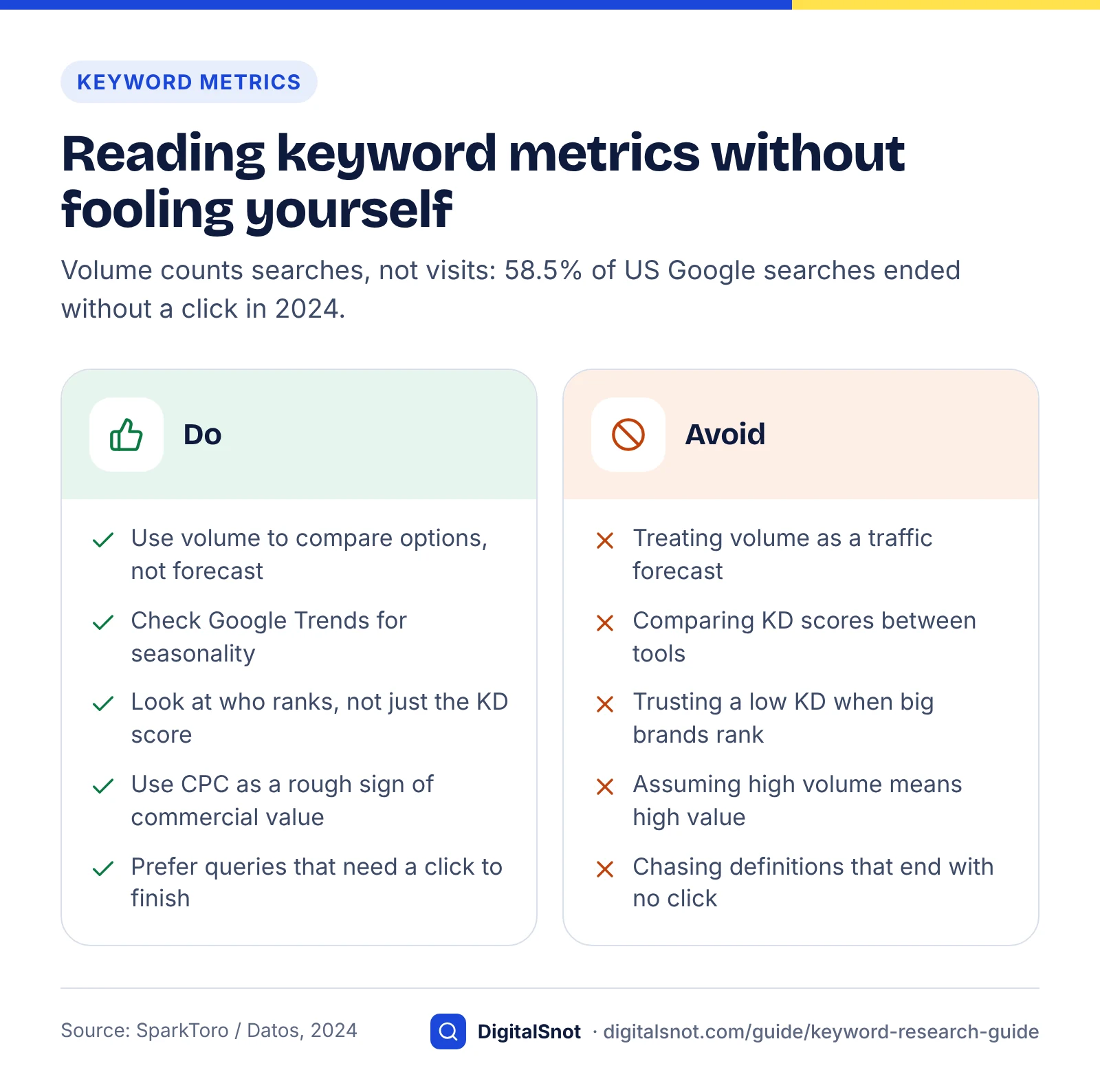
Keyword metrics are useful for comparing options, not for predicting traffic. Read each one as a signal with known blind spots.
Search volume
Volume is an average monthly estimate. Tools group close variants, round numbers into buckets and smooth out seasonality, so a keyword showing 1,000 searches might be 400 one month and 2,500 the next. Use volume to rank options against each other and to size a topic, then check Trends for seasonality.
Keyword difficulty
Keyword difficulty (KD) is a tool's estimate of how hard it is to reach the top results, usually based on the links pointing at pages that already rank. Each tool calculates it differently, so a KD of 30 in one tool is not the same as 30 in another. Treat it as a first filter, then look at the actual results page. A low score with forums ranking is a better bet than a low score with three national brands.
Difficulty is also relative to your site. A new site with few links should favour lower-difficulty topics where it can show real expertise, then work up to harder terms once it has a body of content and earned links.
Cost per click
CPC is what advertisers pay for a click. You are not buying ads, but CPC is a handy proxy for commercial value: if businesses pay several pounds a click, the searchers tend to convert. A high-volume keyword with almost no CPC is often informational. Use CPC to separate "interesting" from "valuable", not as a precise value.
Clicks versus volume
Volume counts searches, not visits. Many searches end without any click, because the answer appears on the results page or the searcher refines the query. The 2024 SparkToro and Datos study found that 58.5% of US Google searches and 59.7% of EU searches ended with no click, and that only 360 (US) and 374 (EU) of every 1,000 searches sent a click to the open web. The study used clickstream panel data from 2022 to 2024.
The practical lesson: definitions, conversions, weather and simple facts lose most of their clicks to on-page answers. Keywords that need comparison, judgement, local choice or a transaction keep more of their clicks. When two keywords have similar volume, prefer the one where the searcher has to visit a page to finish the job.
Long-tail keywords
Long-tail keywords are specific, lower-volume searches, usually longer phrases. Individually they are small; together they make up most of search, and they tend to be clearer about intent.
Ahrefs reports that keywords with fewer than 10 searches per month account for almost 93% of its US keyword database, around 2.3 billion keywords. Ahrefs also notes there is no official volume threshold that makes a keyword "long-tail". Combine that with Google's figure on new daily queries and the picture is clear: most of the searches that could bring you customers will never show up as a big number in a tool.
There are two kinds of long-tail keyword, and they need different treatment:
- Supporting long-tail is a more specific version of a broader topic, such as "how often should a combi boiler be serviced" under "boiler servicing". These usually belong on the parent page as a section or FAQ, not on their own page.
- Topical long-tail is a distinct need with its own results page, such as "boiler service for landlords gas safety certificate". If the results differ from the parent topic, it may deserve its own page.
Use the SERP overlap check to decide which is which. For small businesses, topical long-tail is often where the first rankings come from: lower competition, clearer intent and searchers further along in their decision.
Group keywords into topics and map one per page
Clustering means grouping keywords that share an intent so one page can answer all of them. Mapping means assigning each cluster to exactly one URL, with one primary keyword that sets the page's focus.
Seed, expand, group, map
How to cluster
- Sort by meaning first. Put obvious synonyms and reworded questions together.
- Check SERP overlap. For borderline pairs, search both. If several of the top ten URLs are the same, merge them. If few overlap, split them.
- Pick a primary keyword. Usually the term with the clearest intent and the most demand in the cluster. It guides the title, H1 and URL.
- List secondary keywords. These become subheadings, FAQ questions and natural phrasing in the copy.
- Group clusters into hubs. A broad hub page (for example, "boiler servicing") links to the narrower cluster pages beneath it, and they link back.
Map, and avoid cannibalisation
Keyword cannibalisation happens when two or more of your pages target the same intent, so they compete and neither ranks as well as one strong page would. Prevent it with a simple keyword map: one row per URL, listing the primary keyword, secondary keywords, intent, page type and status (live, to update, to create).
Check the map before writing anything new. If a cluster already belongs to a page, improve that page instead of creating a second one. If Search Console shows two of your URLs swapping places for the same query, consolidate them and redirect the weaker one. Our on-page SEO checklist covers how to apply the primary keyword to titles, headings and copy once the map is set, and our on-page SEO service can do this across a whole site.
Content plan and article outline
Prioritise keywords with a scoring model
Prioritise by multiplying three scores: business value, intent fit and ranking feasibility. The highest totals are the pages to build or improve first.
This is a framework we built for this guide to make prioritisation repeatable. It deliberately uses a small 1–3 scale so two people scoring the same keyword usually agree. Multiplying rather than adding means a keyword that scores 1 on any factor drops sharply, which is what you want: a page that cannot rank, or that brings visitors with no reason to buy, should not top the list however good the other scores look.
| Factor | Score 1 | Score 2 | Score 3 |
|---|---|---|---|
| Business value | Loosely related to what you sell | Supports a product or service indirectly | Your product or service is the direct answer |
| Intent fit | Early research, little buying intent | Comparing options or building a shortlist | Ready to buy, book or enquire |
| Ranking feasibility | Results dominated by big brands; high difficulty for your site | Mixed results; some sites like yours rank | Weak or outdated results; sites like yours rank well |
Priority score = value × intent × feasibility (range 1–27). As a guide: 18–27 means build now, 8–12 means plan for the next quarter, and 6 or below means park it unless it supports a priority page.
Worked example (hypothetical business)
The business below is hypothetical, invented for illustration. Imagine a small heating engineer in Leeds that installs and services boilers. The volumes are illustrative placeholders, not real data; use your own tool's figures.
| Keyword (cluster primary) | Illustrative volume | Value | Intent | Feasibility | Score | Decision |
|---|---|---|---|---|---|---|
| boiler service leeds | Medium | 3 | 3 | 3 | 27 | Build now: service page |
| new boiler cost uk | High | 3 | 2 | 1 | 6 | Park; national brands dominate |
| combi vs system boiler | Medium | 2 | 2 | 2 | 8 | Next quarter: comparison guide |
| boiler losing pressure | High | 2 | 1 | 2 | 4 | Park; most fix it themselves |
| landlord gas safety certificate leeds | Low | 3 | 3 | 2 | 18 | Build now: landlord page |
| how often should a boiler be serviced | Medium | 2 | 2 | 3 | 12 | FAQ section on service page |
Notice what the model does. The highest-volume terms ("new boiler cost uk" and "boiler losing pressure") end up near the bottom, because one is unwinnable for a small local firm and the other attracts DIY readers. The low-volume landlord term scores highly because every searcher is a likely customer and the results are winnable. That is the pattern you should expect: volume alone is a poor guide to value.

Adjusting the model
Two optional tweaks work well. Add a fourth factor, effort (3 = update an existing page, 1 = new page needing original research), if your capacity is tight. And add a zero-click flag for queries where the results page answers the question outright; drop the intent score by one for those. Keep the scale small whatever you add, or the scores turn into false precision.
How to prioritise keywords
Keyword research for AI search
For AI search, research the questions and follow-ups people ask, not just short keywords. AI assistants and Google's AI features handle longer, conversational prompts, so your pages need to answer complete questions clearly.
The shift in query length is measurable. Google reported in 2025 that AI Mode queries were on average twice as long as traditional Search queries. People describe their situation, add constraints and ask follow-ups, such as "what size boiler do I need for a three-bedroom semi with one bathroom", rather than "boiler size".
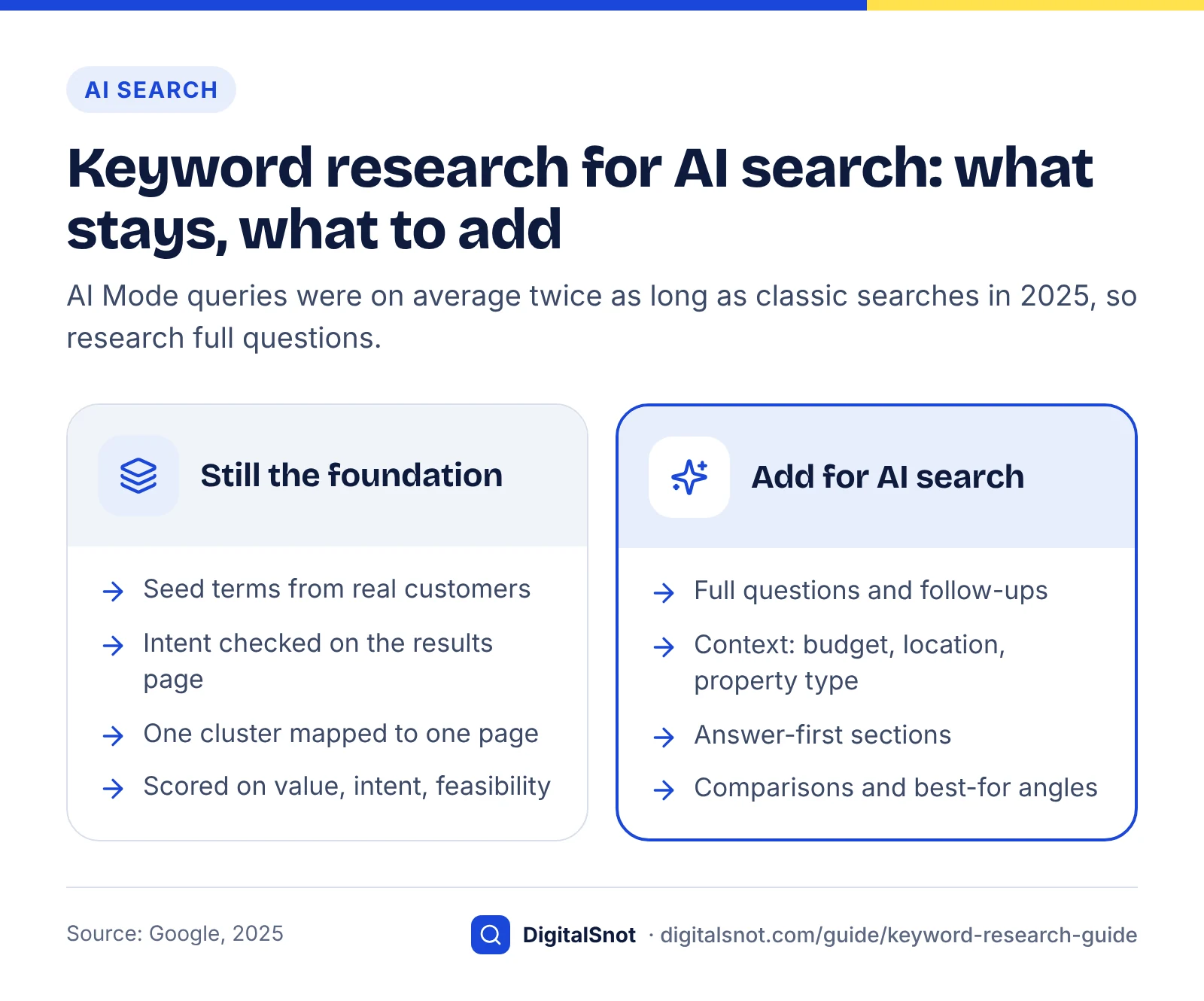
The good news is that the research method barely changes. Google's guidance on AI features and your website says there are no additional technical requirements to appear in AI Overviews or AI Mode beyond being indexed and eligible for a snippet, and no special markup to add. Good keyword research and helpful pages remain the foundation. What changes is the emphasis:
- Collect full questions. People also ask, support tickets, sales calls and forum threads are your best source of conversational phrasing.
- Map follow-up questions. For each primary topic, list the next three things someone would ask. Answer them on the same page where they share intent.
- Include context modifiers. Budget, location, property type, team size, experience level. AI prompts carry these details, and pages that address them are easier to match.
- Write answer-first sections. Open each section with a direct one or two sentence answer, then the detail. This helps both featured snippets and AI summaries.
- Cover comparisons and "best for" angles. AI answers frequently compare options, so clear comparison content is often what gets cited.
Keyword tools still show few of these long prompts, for the same reasons they miss most of the long tail. Once you have a list of real questions, the free AI Prompt Intent Classifier sorts up to 50 of them by intent, separating learning questions from buying ones. Our guide to getting cited in AI search goes deeper on structuring pages for AI answers, and our AI search optimisation service covers visibility across Google's AI features and assistants.
AI assistant answer with citations
Build the content plan
A content plan turns your scored keyword map into a schedule of pages to create or improve, in priority order, with a clear brief for each one.
- Start with existing pages. Improving a page that already ranks on page two is usually faster than publishing a new one. Pull these from Search Console first.
- Fill commercial gaps next. Any high-scoring transactional cluster without a dedicated service or product page goes straight into the plan.
- Add supporting content. Guides and comparisons that answer informational and commercial-investigation clusters, each linking to the relevant service page.
- Write a brief for each page. Include the primary keyword, secondary keywords, intent, the page type the SERP rewards, questions to answer, internal links to add and what would make this page better than what ranks now.
- Set a realistic cadence. A few thorough pages a month that you can maintain beats a burst of thin ones.
Two checks keep the plan healthy. First, every new page must link to and from related pages in its hub, so search engines and readers can follow the topic. Second, the content must be something you are qualified to write: original detail, real process knowledge and clear answers matter more than word count. If you also need the technical foundation checked before you publish at scale, our technical SEO audit checklist covers crawling, indexing and site speed. Local businesses should pair this plan with Google Business Profile optimisation, because visit-in-person searches are often answered by the local pack before any website. For local questions asked in AI Mode or Ask Maps, our guide to local SEO for AI search covers the service and location pages AI tools can quote.
If you would rather hand the research and planning to specialists, our content SEO service builds keyword maps and briefs, and you can see everything we offer on the services page.
Track results and refresh the research
Track keyword research by page and by topic, not by single rankings. The questions to answer are whether each mapped page is gaining impressions, clicks and conversions for its cluster, and whether new queries are appearing.
A simple tracking routine:
- Monthly: in Search Console, filter the Performance report by page and review the queries each priority page appears for. New queries that fit the cluster are ideas for sections or FAQs; queries that do not fit may point to a missing page. Our guide to reading the Search Console generative AI report shows how to check how often the same pages appear in AI Overviews and AI Mode.
- Monthly: check a short list of priority keywords in a rank tracker or manually, from the correct location. Watch the trend, not daily movements.
- Quarterly: compare conversions from organic search by landing page in your analytics tool. A page with rising traffic and no enquiries may have the wrong intent.
- Quarterly: re-read the results pages for your top clusters. If the dominant format has shifted, for example from lists to video or to an AI Overview, update your page to match.
- Twice a year: repeat the seed step with fresh sales and support data, rescore the keyword map and retire or merge pages that no longer earn their place.
Keyword research is never finished, because customers change how they search and search engines change how they answer. A keyword map you revisit regularly keeps the whole site pointed at what people actually want. If you would like help setting up the map and the tracking, you can get in touch with us.
Monthly results report
Free tools in this guide
By the numbers
- of the queries Google sees every day are ones it has never seen before (Google, 2019)
- 15%
- Source: Google
- of US Google searches ended without a click in 2024 (59.7% in the EU)
- 58.5%
- Source: SparkToro / Datos
- AI Mode queries were on average twice as long as traditional Google Search queries (Google, 2025)
- 2x
- Source: Google
Frequently asked questions
What is keyword research in SEO?
Keyword research is the process of finding the words and questions people use in search engines when looking for what you offer, understanding the intent behind them and deciding which pages to create or improve. It shapes your site structure, content plan and on-page wording, and it works best when you research topics and needs rather than single phrases.
How do I do keyword research for free?
Start with seed terms from customers, sales calls and support tickets. Expand them with Google autocomplete and People also ask, check queries you already appear for in Google Search Console, size topics with Google Keyword Planner and check seasonality in Google Trends. Then search each important term to confirm intent from the results page before adding it to your plan.
What is search intent?
Search intent is the goal behind a query. Most SEO teams use four types: informational (learning), commercial investigation (comparing options), transactional (buying or booking) and navigational (reaching a specific site or place). The quickest way to confirm intent is to look at the pages that already rank, because they show what Google has found satisfies searchers.
How accurate is keyword search volume?
Search volume is an estimate, not a count. Tools average searches over months, group close variants and round figures into buckets, and different tools often disagree. Use volume to compare keywords against each other and to size a topic, check Google Trends for seasonality, and judge real potential with Search Console data once your page is live.
What is keyword difficulty?
Keyword difficulty is a tool's estimate of how hard it would be to rank in the top results for a keyword, usually based on the links pointing at pages that already rank. Each tool calculates it differently, so scores are not comparable across tools. Treat it as a first filter and always look at who actually ranks before deciding.
Are long-tail keywords worth targeting?
Yes. Long-tail keywords are specific, lower-volume searches, and together they make up most of search. Ahrefs reports almost 93% of the keywords in its US database get fewer than 10 searches a month. They usually have clearer intent and less competition, which makes them a realistic starting point for newer or smaller sites.
How many keywords should one page target?
Give each page one primary keyword and a cluster of closely related secondary keywords that share the same intent. A well-made page can rank for dozens or hundreds of variations. If two keywords return largely different results pages, they usually need separate pages. Never target the same primary keyword with two pages, or they may compete with each other.
What is keyword cannibalisation?
It happens when several pages on your site target the same search term. They compete with each other and none ranks as well as one strong page would. We fix it by giving each page a clear focus and merging or redirecting where needed.
How is keyword research different for AI search?
AI search tools handle longer, conversational prompts, so research the full questions, follow-ups and context people include, such as budget, location or experience level. Google reported in 2025 that AI Mode queries were on average twice as long as traditional searches. The method is the same; the emphasis shifts towards questions and answer-first content.
How often should I redo keyword research?
Review Search Console queries for priority pages monthly, re-check results pages for your main topics each quarter and repeat the full process, including fresh seed terms from sales and support, about twice a year. Also revisit it whenever you launch a new service, enter a new location or notice a page losing clicks.
Sources
Every figure and claim in this guide comes from the sources below. We checked each one when writing and link to the original so you can read it yourself. Credit belongs to the authors and publishers listed. How we write and check our articles.
-
1
Understanding searches better than ever before
Google · Google's 2019 statement that 15% of daily queries have never been seen before
-
2
Long-tail Keywords: What They Are and How to Get Search Traffic From Them
Ahrefs · Share of US keywords with fewer than 10 monthly searches (almost 93%, about 2.3 billion)
-
3
2024 Zero-Click Search Study: For every 1,000 EU Google Searches, only 374 clicks go to the Open Web. In the US, it's 360.
SparkToro · Zero-click rates for US and EU Google searches in 2024 (Datos clickstream data)
-
4
AI Mode in Google Search adds multimodal search
Google · AI Mode queries on average twice as long as traditional Search queries (2025)
-
5
How Google autocomplete predictions work
Google Search Help · Autocomplete predictions reflect real searches, adjusted and filtered
-
6
A deep dive into Search Console performance data filtering and limits
Google Search Central · How anonymised queries are defined and omitted from Search Console
-
7
Use Keyword Planner
Google Ads Help · How Keyword Planner generates ideas and reports search volume
-
8
FAQ about Google Trends data
Google Trends Help · How Trends normalises data to a 0-100 scale and filters low-volume terms
-
9
Search Quality Rater Guidelines (General Guidelines, September 2025)
Google · User intent categories: Know, Do, Website and Visit-in-person
-
10
AI features and your website
Google Search Central · No additional technical requirements to appear in AI Overviews or AI Mode