YouTube thumbnail size, safe areas and text people can read
YouTube's thumbnail sizes and file limits, how small thumbnails really appear, how to make text readable on a phone, and how to keep thumbnails within YouTube's rules.

On this page (9 sections)
A thumbnail is the first thing most people see of your video, and they usually see it small: in a phone feed, in a list of search results or beside another video. This post gives you the YouTube thumbnail size and other specifications YouTube sets, shows how small a thumbnail can appear, and explains how to make text people can read and a thumbnail that stays within YouTube's rules. You will also see how a made-up cooking class in Bengaluru fixed a thumbnail that looked fine on a laptop and was unreadable on a phone.
The sizes and limits YouTube sets
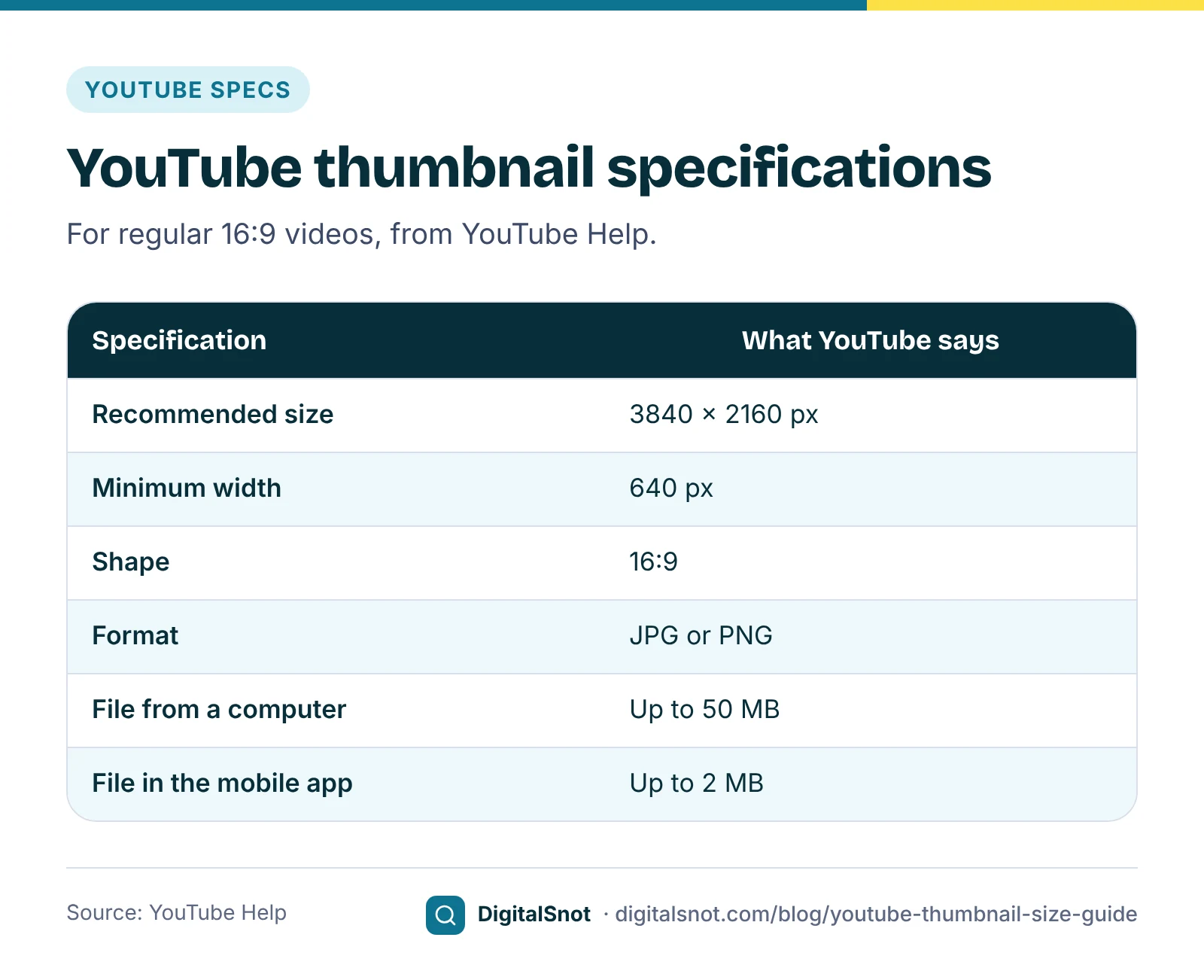
YouTube's help page on adding custom thumbnails gives the specifications. Older guides often quote 1280 × 720 pixels and a 2 MB limit, which was YouTube's earlier advice, so check the page itself before you rely on a number you found elsewhere.
| Specification | What YouTube says |
|---|---|
| Recommended size | 3840 × 2160 pixels |
| Minimum width | 640 pixels |
| Shape | 16:9, the shape most used in YouTube's players and previews |
| Format | JPG or PNG |
| File size | Up to 50 MB from a computer, 2 MB in the mobile app |
Two practical points follow. First, a full-size PNG can easily be larger than the 2 MB the app allows, so if you sometimes upload from your phone, keep a JPG copy under 2 MB. Second, you cannot upload a custom thumbnail at all until your channel has intermediate features, which you get by verifying the channel with a phone number in YouTube Studio. Until then, you choose from the stills YouTube suggests from the video.
Before you upload, open the file in our YouTube Image Size Checker and choose Video thumbnail. It reads the pixel size, shape, format and file size in your browser, compares them with YouTube's specifications and shows the image at small sizes. The file never leaves your device. It checks the file, not the design, so it cannot tell you whether your words are readable. That is the next step.
How small your thumbnail really is
You design a thumbnail on a laptop, often at full size. Your viewers mostly see it far smaller. YouTube's thumbnail and title tips advise an uncluttered design and, if you add text, a font that is easy to read. The question is how large "easy to read" has to be.
To give you a feel for the sizes, our YouTube Title and Thumbnail Preview draws simple mock-ups of four common layouts. In them, a thumbnail is 360 pixels wide in a phone home feed and in computer search results, 168 pixels wide in the suggested videos list on a computer, and 160 pixels wide in a small list on a phone. These widths are our approximation, not a layout YouTube publishes, because YouTube's apps differ by device and change over time. They still show the problem: at 160 pixels wide, a 3840-pixel image is shown at a twenty-fourth of its width.
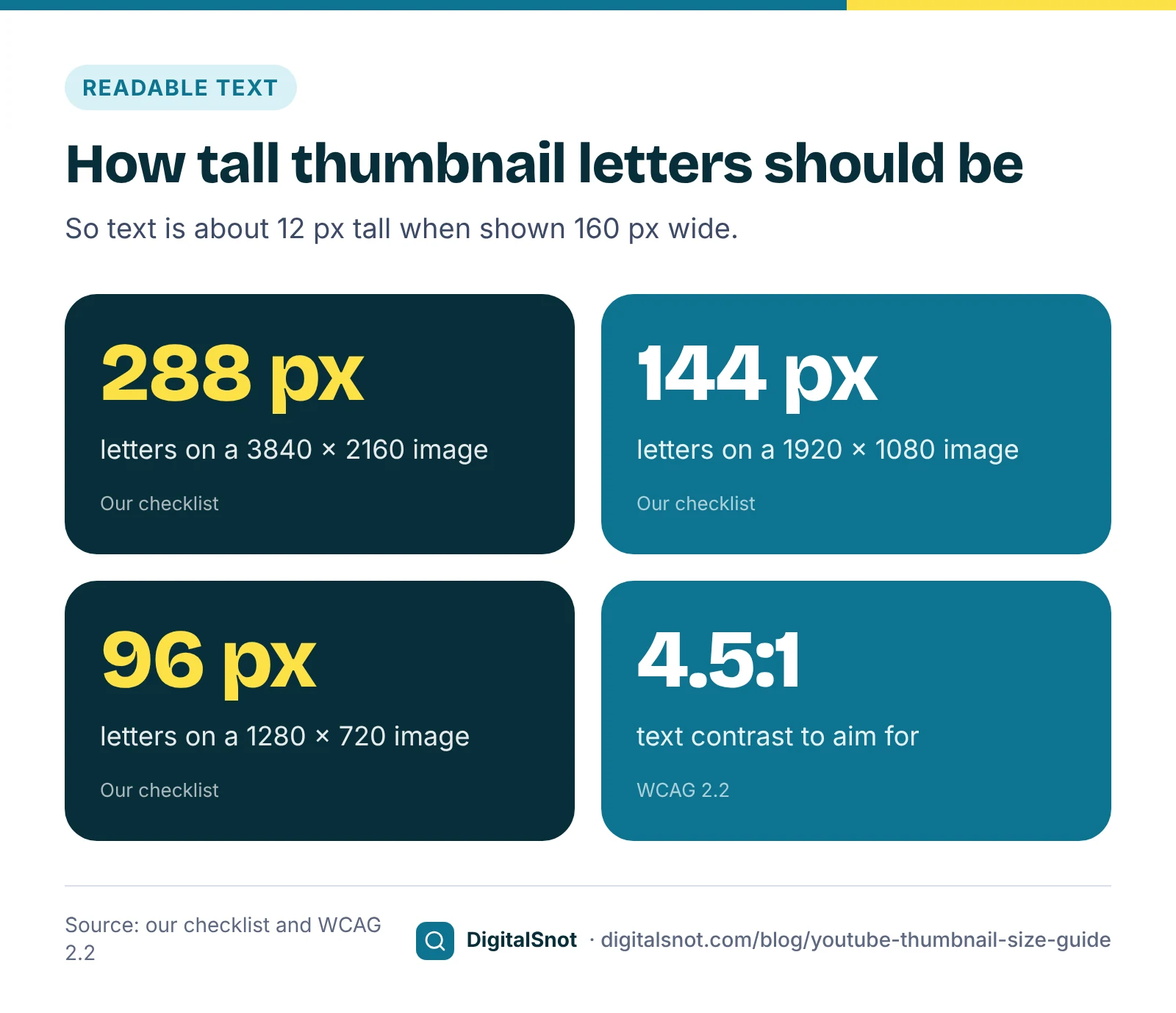
That gives a simple rule of thumb. Our suggestion is that the smallest line of text should still be about 12 pixels tall at that smallest size. Working backwards, the letters on your full image need to be about 13% of its height:
- On a 3840 × 2160 thumbnail: letters at least about 288 pixels tall.
- On a 1920 × 1080 thumbnail: about 144 pixels.
- On a 1280 × 720 thumbnail: about 96 pixels.
In practice that means three or four words, not a sentence. If a word does not fit at that height, it probably belongs in the title instead.
Safe areas: keep clear of the corner
In our mock-ups, as in most YouTube layouts we have seen, the video's length is shown over the bottom-right corner of the thumbnail. Our suggestion is to treat that corner as off limits for words, faces and logos, and to leave a little space along every edge so nothing important touches the frame. These safe areas are ours, not YouTube rules, but they cost nothing and avoid the most common clash.
Text people can read: contrast and clutter
Size is only half of readability. The other half is contrast: how different the letters are from what sits behind them. White text over a pale photo of food, or yellow text over a bright sky, fades away when the image is small.
YouTube does not publish a contrast target for thumbnails, so we borrow one from web accessibility. The WCAG 2.2 contrast guideline asks for a contrast ratio of at least 4.5:1 for normal text and 3:1 for large text. Thumbnail text is large, but it is seen small and in passing, so our suggestion is to aim for 4.5:1 or more. A dark outline, a shadow or a solid band behind the words usually gets you there.
Our YouTube Thumbnail Analyzer measures this in your browser. Open your thumbnail and draw a box round the words, and it works out the contrast between the text and its background with WCAG's formula, and how tall the smallest line is when the thumbnail is 168 pixels wide. It also measures overall brightness and contrast, the five main colours and how busy the image is, and puts your thumbnail beside up to four competitors' thumbnails at feed size, in greyscale and small. These are our measures. They describe the image; they cannot predict clicks or views.
The greyscale view is worth a minute on its own. If the words and the main subject still stand out without colour, the contrast is doing its job.
A worked example: Rasoi Ready Cooking Classes
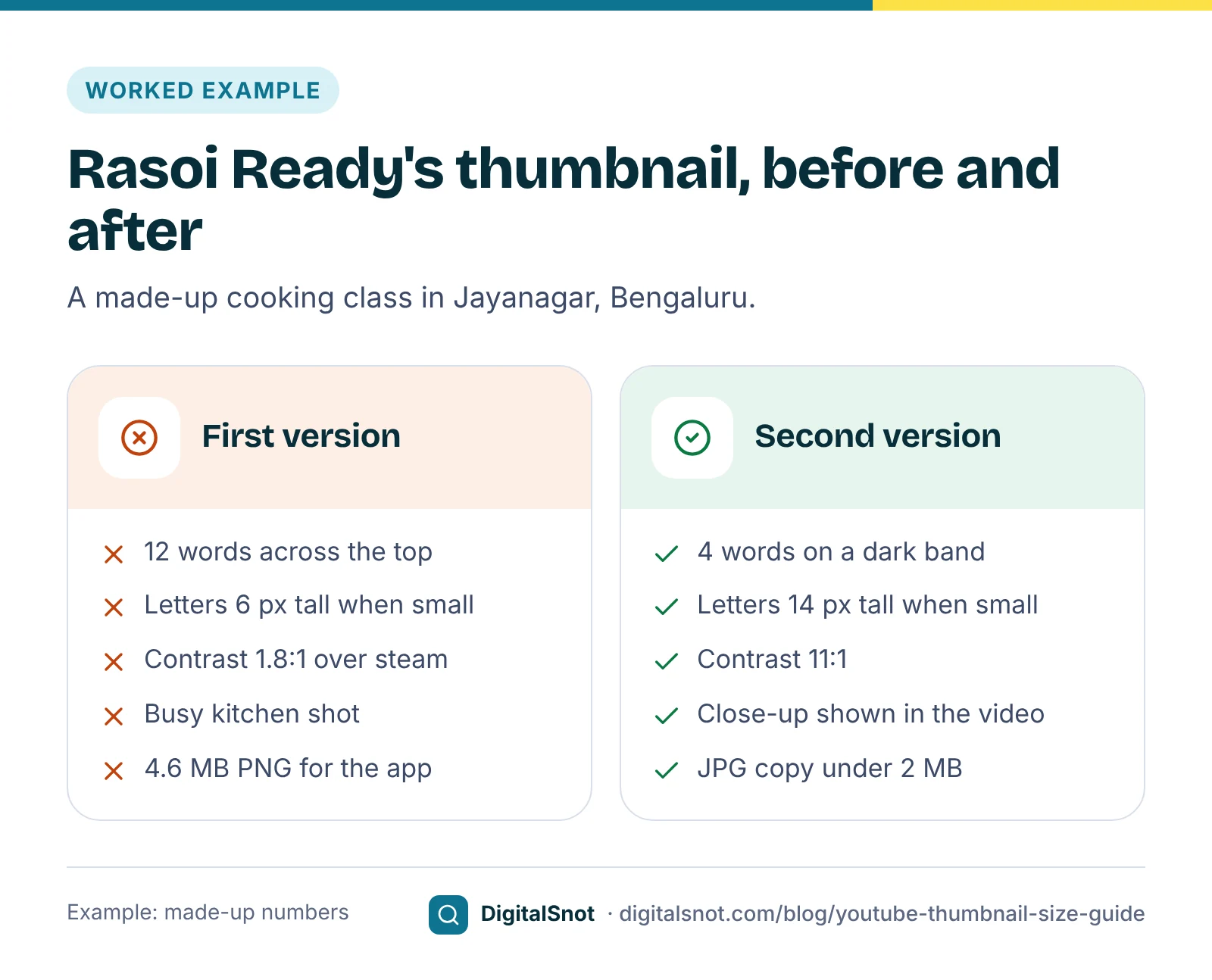
Rasoi Ready, a made-up cooking class in Jayanagar, Bengaluru, posts a video called "Why your idlis turn hard: 5 batter mistakes". The first thumbnail was a wide shot of the kitchen with "5 mistakes that make your idli hard and how to fix them" in white capitals across the top. The owner ran it through our three tools. The numbers are made up for this example:
- Image Size Checker: 1920 × 1080, 16:9, PNG, 4.6 MB. Fine from a computer, but over the 2 MB the app allows, so she saved a JPG copy for her phone.
- Thumbnail Analyzer: 12 words in letters 70 pixels tall, which show about 6 pixels tall at 168 pixels wide. White text over steam and a pale wall gave a contrast of 1.8:1, and the shot of pots, shelves and people measured as busy.
- Title and Thumbnail Preview: in the small phone list, the words were a grey smudge.
The second version used a close-up of a flat, hard idli next to a soft one, the four words "Why idlis go hard" in 160-pixel letters on a dark band, and nothing in the bottom-right corner. The analyzer now showed a contrast of 11:1, with the smallest line about 14 pixels tall at 168 pixels wide. The title carried the rest of the message. And the side-by-side comparison appears in the video itself, so the thumbnail promises nothing the video does not show.
Honest thumbnails: what YouTube's policies say
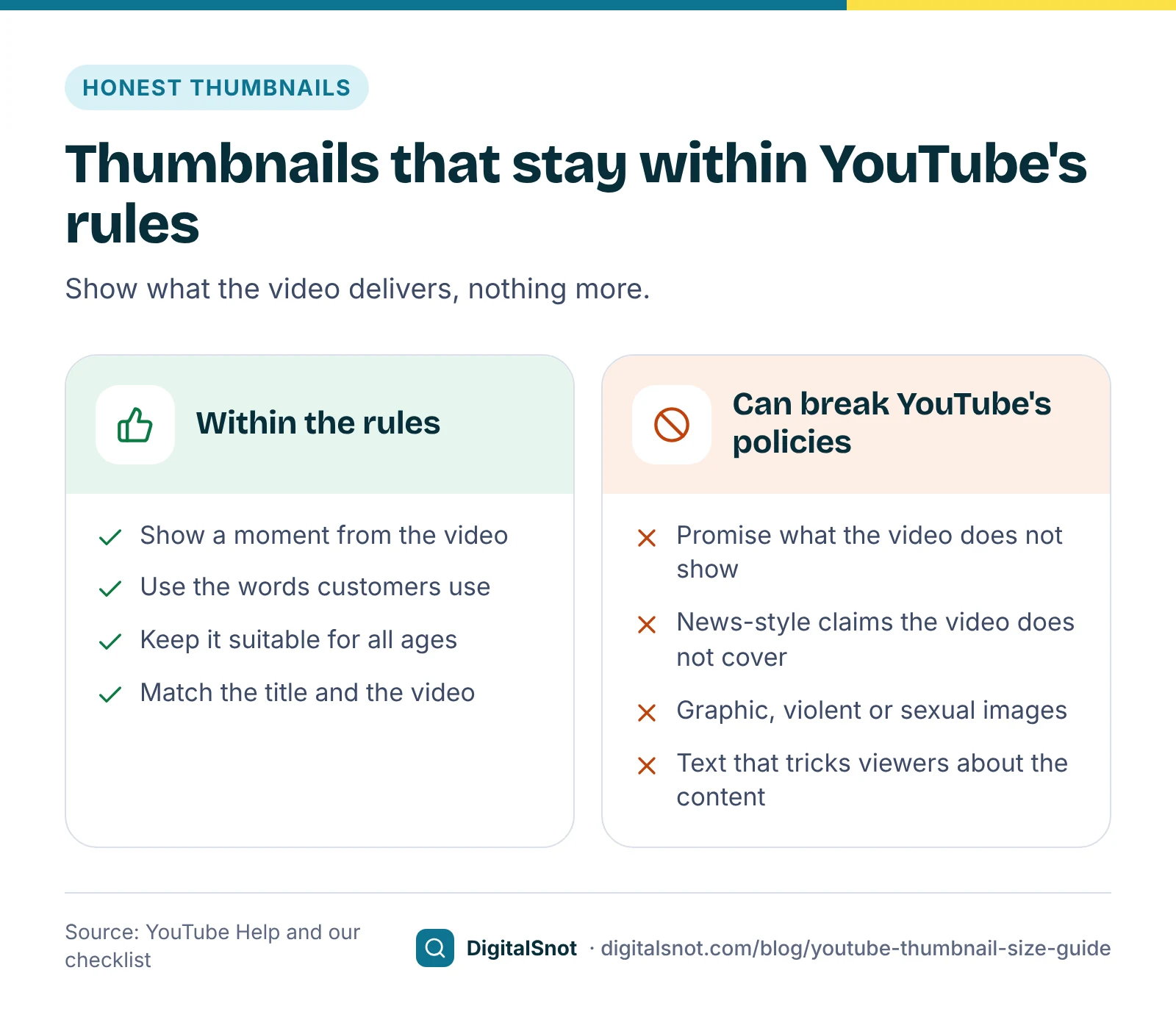
A thumbnail that oversells may win a click, but YouTube's rules set clear limits.
- Misleading metadata or thumbnails. YouTube's spam, deceptive practices and scams policies do not allow using the title, thumbnail or description to trick viewers into believing the content is something it is not, including leading them to expect something the video then does not include.
- Egregious clickbait. In December 2024 YouTube announced stronger enforcement in India against videos whose title or thumbnail makes promises or claims the video does not deliver, especially about breaking news or current events.
- The thumbnails policy. YouTube's thumbnails policy says thumbnails that break the Community Guidelines are not allowed; YouTube removes them and may issue a strike. A thumbnail that does not break the guidelines but is not suitable for all audiences may lead to an age restriction, or to the thumbnail being removed without a strike.
- Ads. The advertiser-friendly content guidelines apply to the thumbnail as well as the video, so a shocking or graphic thumbnail can mean limited or no ads.
There is a practical cost as well. YouTube's Community Guidelines strike basics list creating custom thumbnails among the things you cannot do for a week after a first strike. For a business, our suggestion is simpler than any policy: show something that happens in the video, in the words your customers would use for it.
Test two or three versions
If you cannot decide between designs, let viewers decide. YouTube's A/B test for titles and thumbnails, called Test & compare in YouTube Studio, can test up to three titles, three thumbnails or three title and thumbnail pairs on one video. At the end, YouTube shows the version with the highest watch time to all viewers. The test runs in YouTube Studio on a computer and needs advanced features, and Shorts, scheduled live streams and Premieres cannot be tested. YouTube's page on testing thumbnails says results can take up to two weeks.
Choose the candidates first. In the Title and Thumbnail Preview, type up to three titles and pick up to three thumbnails, and see them side by side in a phone feed, search results, suggested videos and a small phone list, in light and dark mode. It checks each title against YouTube's 100-character limit and each thumbnail's size, shape, format and file size. It cannot predict which version will win; the test in YouTube Studio does that with real viewers.
Our suggestion: change one thing at a time, such as the photo or the words, so you know what made the difference. And remember that YouTube picks the winner on watch time, not on clicks.
Mistakes to avoid
- Judging the design at full size only. Look at it at phone-list size before you upload.
- A sentence on the thumbnail. Use three or four words and let the title do the rest.
- Words in the corner with the video length. Keep that corner clear.
- Uploading a large PNG from your phone. The app takes 2 MB at most, so keep a smaller JPG.
- The wrong shape. YouTube asks for 16:9. Crop to it yourself, so you decide what is cut.
- A promise the video does not keep. It can break YouTube's policies, and it disappoints the viewer you just won.
Your next step
Take your last three thumbnails and run each through the Image Size Checker and the Thumbnail Analyzer, then look at them in the preview's small phone list. Fix the one that reads worst first. If your channel is new, our post on your first 10 YouTube videos as a local business covers titles, descriptions and Shorts too, and our post on YouTube Partner Program eligibility explains what YouTube reviews if you want to earn from the channel. All our YouTube tools run in your browser, and none of them signs in to your channel. If you would like a second opinion on your channel, get in touch.
Free tools in this article
- YouTube Image Size Checker Check thumbnails, banners, profile pictures and watermarks against YouTube's sizes, with previews.
- YouTube Title and Thumbnail Preview See titles and thumbnails in mock feeds and search results, and compare up to 3 variants side by side.
- YouTube Thumbnail Analyzer Measure contrast, colours, busyness and text size, and compare your thumbnail with up to 4 competitors.
Frequently asked questions
What is the best size for a YouTube thumbnail?
YouTube recommends 3840 × 2160 pixels in a 16:9 shape, and accepts thumbnails at least 640 pixels wide. Save it as JPG or PNG. The file can be up to 50 MB from a computer, but only 2 MB in the mobile app, so keep a smaller copy if you upload from your phone.
Why can I not upload a custom thumbnail?
Custom thumbnails are an intermediate feature, which you get by verifying your channel with a phone number in YouTube Studio. Once that is done, check the file is JPG or PNG and within the size limit: 50 MB from a computer or 2 MB in the mobile app.
How big should the text on a YouTube thumbnail be?
YouTube asks for a font that is easy to read but gives no size. Our suggestion is letters about 13% of the image height, which is about 288 pixels on a 3840 × 2160 thumbnail, so they still read when the thumbnail is shown 160 pixels wide. That usually means three or four words.
Are clickbait thumbnails against YouTube's rules?
A thumbnail that tricks viewers into expecting something the video does not include falls under YouTube's misleading metadata or thumbnails rules. In December 2024 YouTube also announced stronger enforcement in India against egregious clickbait, where the title or thumbnail makes promises the video does not deliver.
How do I A/B test YouTube thumbnails?
In YouTube Studio on a computer, with advanced features, Test & compare can test up to three thumbnails, three titles or three pairs on one video, and then shows the version with the highest watch time to everyone. Shorts, scheduled live streams and Premieres cannot be tested, and results can take up to two weeks.
Can the Thumbnail Analyzer tell me which thumbnail will get more clicks?
No. It measures the image, such as contrast, colours, busyness and how tall the text is when small, using our own measures. It cannot predict clicks, views or ranking. To compare thumbnails on real viewers, use Test & compare in YouTube Studio.
Sources
Every figure and claim in this article comes from the sources below. We checked each one when writing and link to the original so you can read it yourself. Credit belongs to the authors and publishers listed. How we write and check our articles.
-
1
Add custom thumbnails on YouTube
YouTube Help · 3840 × 2160 recommended, at least 640 pixels wide, 16:9, JPG or PNG, 50 MB from a computer and 2 MB in the mobile app
-
2
Get access to intermediate and advanced features
YouTube Help · Custom thumbnails are an intermediate feature unlocked by phone verification
-
3
Thumbnail & title tips
YouTube Help · An uncluttered design and an easy-to-read font for any text
-
4
Spam, deceptive practices & scams policies
YouTube Help · Misleading metadata or thumbnails: tricking viewers into believing the content is something it is not
-
5
Strengthening enforcement against egregious clickbait on YouTube
Google India Blog · December 2024: stronger enforcement in India against titles or thumbnails that promise what the video does not deliver
-
6
Thumbnails policy
YouTube Help · Thumbnails that break the Community Guidelines are removed and may bring a strike; others may be age-restricted or removed without a strike
-
7
Advertiser-friendly content guidelines
YouTube Help · The guidelines apply to the thumbnail as well as the video
-
8
Community Guidelines strike basics on YouTube
YouTube Help · After a first strike, custom thumbnails are among the features restricted for one week
-
9
A/B test titles & thumbnails
YouTube Help · Up to 3 titles, thumbnails or pairs; winner by watch time; computer only, advanced features; Shorts, scheduled live streams and Premieres excluded
-
10
Test & compare thumbnails
YouTube Help · Results can take up to two weeks to be final
-
11
Web Content Accessibility Guidelines (WCAG) 2.2: Contrast (Minimum)
W3C · Contrast ratio of at least 4.5:1 for normal text and 3:1 for large text, used here as our measure