YouTube videos for local business: a simple plan for your first 10
Ten video ideas taken from your customers' own questions, with a plan for each: outline, length, chapters, title, thumbnail and where to share it.
On this page (9 sections)
- 1Start with the questions customers already ask
- 2Ten video ideas for a home bakery
- 3Plan each video: outline, length and chapters
- 4Titles, descriptions and thumbnails
- 5Shorts or long videos?
- 6Connect the channel to your website and Business Profile
- 7A monthly rhythm you can keep
- 8Mistakes to avoid, and your next step
- 9Sources
A YouTube channel for a local business does not need a studio, a presenter or a viral idea. It needs videos that answer the questions your customers already ask. In this post on YouTube videos for local business owners, you will plan your first ten videos from those questions, decide which should be Shorts and which should be longer, write titles and descriptions within YouTube's limits, link the channel to your website and Business Profile, and set a monthly rhythm you can keep.
The example is a made-up business, Butter Box Home Bakery in Aundh, Pune, but the same method works for a clinic, a salon or a coaching centre.
Start with the questions customers already ask
Every local business answers the same questions again and again. A home bakery hears "Do you make eggless cakes?" and "How early should I order?" every week. Those questions are your first video ideas: you already know people want the answers, and each video becomes something you can send the next time someone asks.
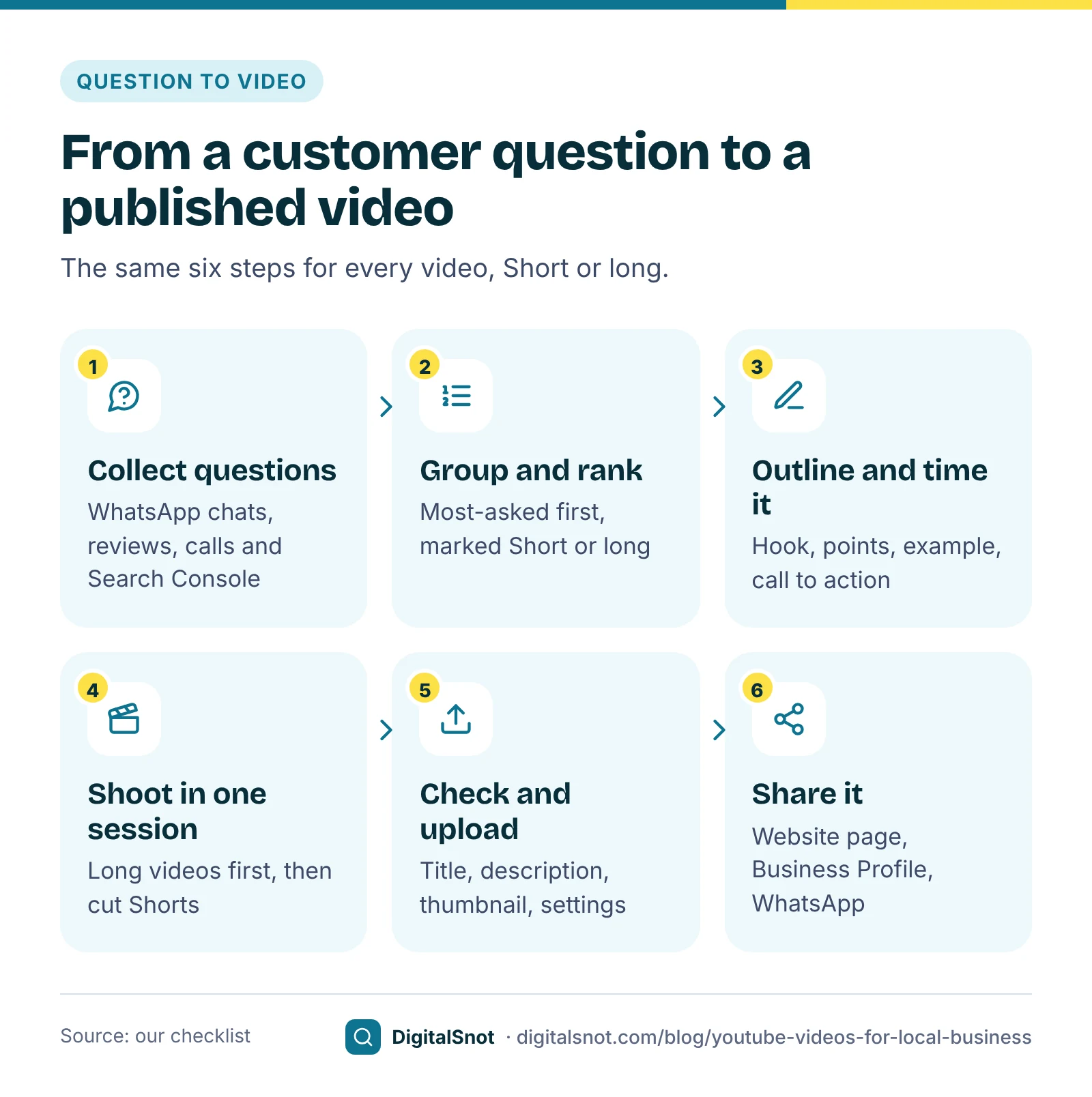
Collect 30 to 50 questions from places you already have:
- WhatsApp chats with customers. The ideas tool below can also read a WhatsApp chat export.
- Your Google reviews, and the questions people ask on calls or at the counter.
- The queries in Search Console's Performance report, if you have a website.
- The "People also ask" box when you search Google for your main products.
Paste them into our YouTube Video Ideas from Customer Questions tool. It groups questions asked in different words, in English, Hinglish or Hindi, counts how often each one came up, and turns each group into an idea with a working title, a suggested format, an opening line and a chapter outline. It runs in your browser, so the questions are not uploaded, uses templates rather than AI, and can hide phone numbers and emails.
Ten video ideas for a home bakery
Here is how Butter Box's WhatsApp questions became ten videos. The format follows a simple rule of thumb: quick facts become Shorts, and anything that needs showing or explaining becomes a longer video. The lengths are our suggestion, not a YouTube rule.
| # | Customer question | Format | Our suggested length |
|---|---|---|---|
| 1 | Is an eggless cake as soft as a regular one? | Long video | 5 to 7 minutes |
| 2 | How many days before should I order? | Short | Under 60 seconds |
| 3 | Do you deliver to Baner and Wakad? | Short | Under 60 seconds |
| 4 | Whipped cream or fondant: which lasts in summer? | Long video | 5 to 7 minutes |
| 5 | How do I order and pay on WhatsApp? | Short | Under 60 seconds |
| 6 | How long does a cream cake stay fresh in the fridge? | Short | Under 60 seconds |
| 7 | How is a theme cake made, start to finish? | Long video | 8 to 10 minutes |
| 8 | How is the price of a cake worked out? | Short | Under 90 seconds |
| 9 | What goes into your sugar-free cakes? | Long video | 4 to 6 minutes |
| 10 | Which photo works best on a photo cake? | Short | Under 60 seconds |
Four long videos and six Shorts is a realistic first batch for one person with a phone. Notice what is missing: no "top cake trends" and no recipes copied from elsewhere. Every video answers a question that a paying customer asked.
Plan each video: outline, length and chapters
A plan stops you rambling on camera. Put each long-video idea into our YouTube Script Outline Builder: choose the type of video, add the topic, who it is for, your key points and a call to action, and set the length. You get a timed outline with the start time and approximate number of words for each part, a chapter list that starts at 00:00, and a Shorts version you can cut from the same shoot. The words come from your speaking pace. The default, 140 words a minute, is our estimate, so time yourself reading a paragraph aloud and enter your own.
For Butter Box's "whipped cream or fondant" video, a 6-minute plan looks like this:
- Hook (0:00 to 0:20): show two cakes after an hour on the counter, one of them drooping.
- What you will learn (0:20 to 0:40): which finish suits an outdoor party, a long car journey and a small party at home.
- Key points (0:40 to 4:30): how each finish behaves in heat, how far ahead to order each one, and how to keep each cool.
- Example (4:30 to 5:20): a recent birthday order and why the customer chose the finish they did.
- Call to action (5:20 to 6:00): how to order on WhatsApp, with the last seconds kept free for the end screen.
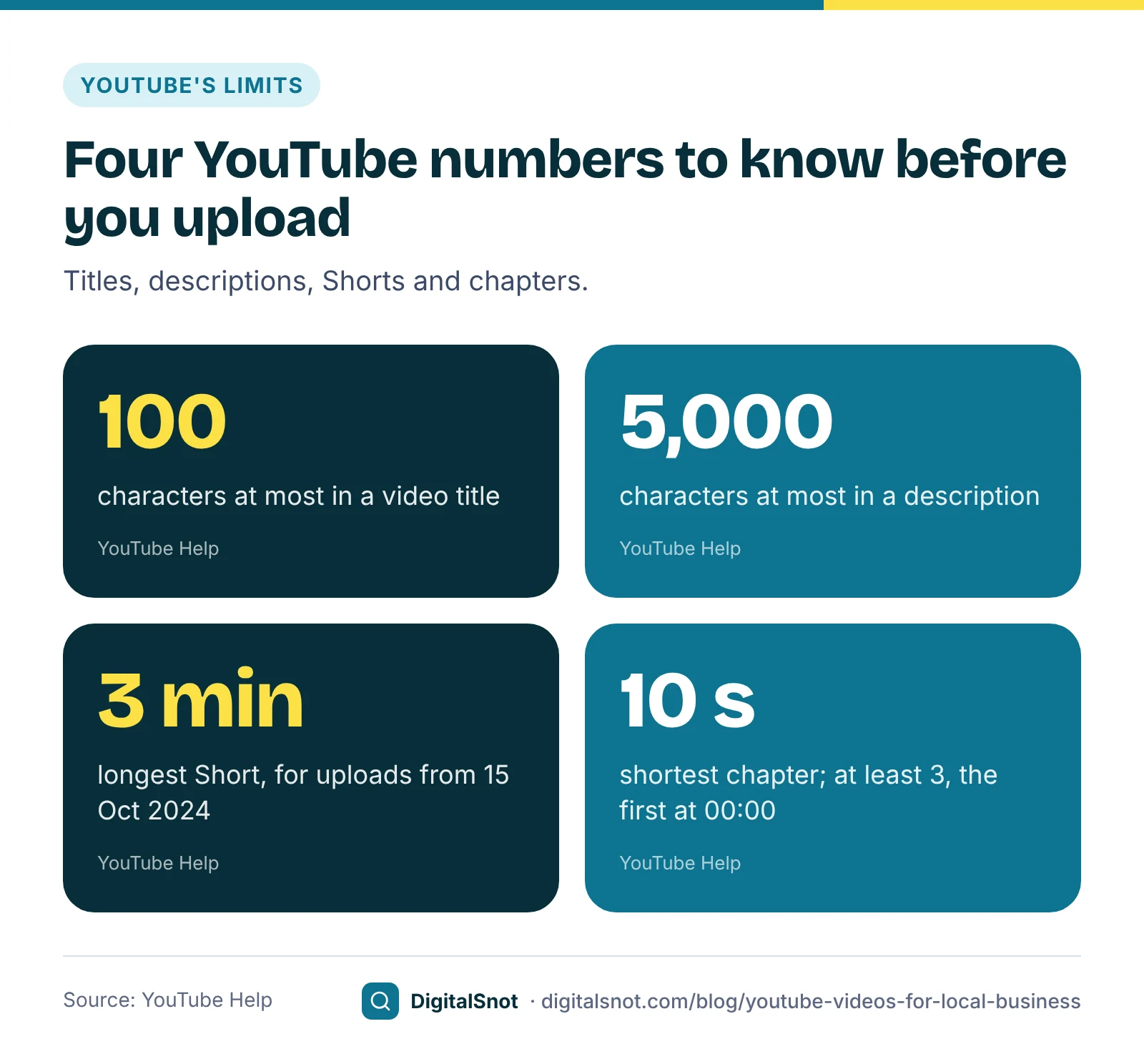
Turn the plan into chapters after you edit. YouTube shows video chapters when the description lists at least three timestamps in ascending order, the first at 00:00, and every chapter is at least 10 seconds long. Keep the end of the video for an end screen: YouTube lets you add end screens in the last 5 to 20 seconds of a video that is at least 25 seconds long, with up to four elements, such as your next video or a subscribe button.
Titles, descriptions and thumbnails
YouTube's help on editing video settings sets the limits: a title can be up to 100 characters and a description up to 5,000, and neither can include invalid characters. You will rarely need all of it. YouTube's thumbnail and title tips say viewers may see only part of a title, so keep it short with the most important words near the beginning, and make sure it describes the video accurately.
For Butter Box, "Whipped cream or fondant: which cake survives a Pune summer?" is 60 characters, says what the video answers and puts the comparison first. The description should open with a sentence or two on what the video covers, then list the chapters, then say how to order: the WhatsApp link, phone number and area. YouTube's tips for video descriptions also ask you to write a unique description for each video.
Before you publish, paste the title, description and tags into our YouTube Video SEO Checker. It counts characters against YouTube's limits, flags angled brackets, checks your hashtags and reads your chapter timestamps to see whether YouTube will show them. It checks your text against YouTube's published rules and our checklist; it cannot see how YouTube will rank the video.
For thumbnails, YouTube's help on adding custom thumbnails recommends a 16:9 image at 3840 × 2160 pixels, with a minimum width of 640 pixels, saved as JPG or PNG. The file can be up to 50 MB from a computer but only 2 MB in the mobile app, so keep a smaller copy if you upload from your phone. Use one clear photo of the cake or your face, a few words in an easy-to-read font, and nothing the video does not deliver.
Custom thumbnails, and videos longer than 15 minutes, are intermediate features that need phone verification. Verify the channel with a phone number in YouTube Studio before your first upload, so the first video goes out with the thumbnail you designed.
Shorts or long videos?
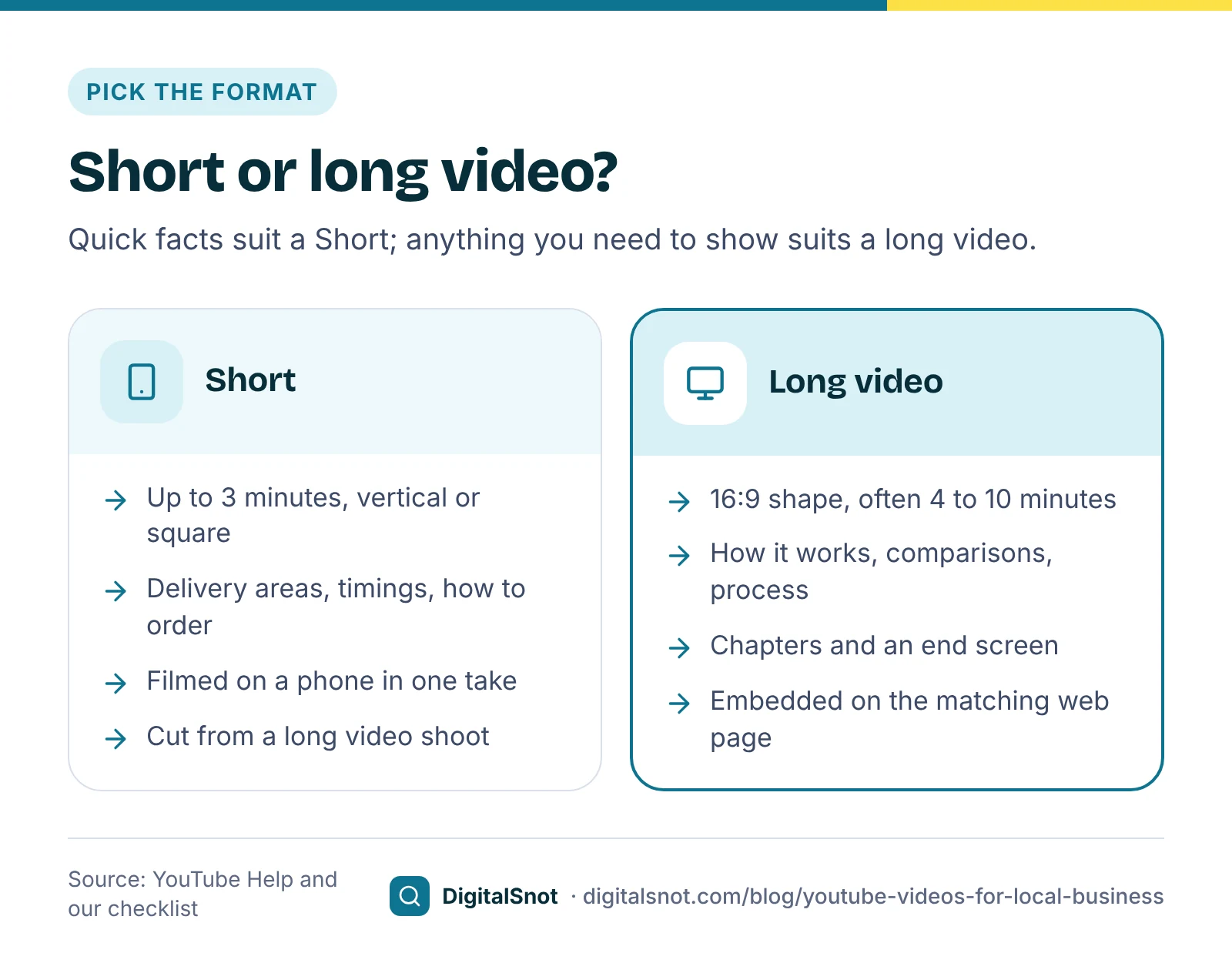
For videos uploaded since 15 October 2024, YouTube treats square or vertical videos of up to three minutes as Shorts, according to its page on three-minute Shorts. A video in a wider shape, such as 16:9, stays a regular long video.
Each format does a different job. Shorts are quick to make and suit facts people want in seconds: your delivery areas, how far ahead to order, how to pay. Long videos suit questions that need showing and explaining, and they carry chapters and end screens. Our suggestion for a first batch: film the long videos first, then cut one or two Shorts from each shoot, so a single afternoon of filming gives you three or four uploads.
Before each upload, go through our YouTube Upload Checklist. It follows the order of the steps in YouTube Studio, from the file and thumbnail to the audience setting, the AI disclosure, captions and the end screen, and gives YouTube's rule for each step. Your ticks stay in your browser, so you can use the same list for every video.
Connect the channel to your website and Business Profile
A video that lives only on YouTube misses the people who find you on Google Search and Maps. Link the three together.
- From the channel to you: YouTube lets you add up to 14 links to your channel profile. The first one shows near the subscribe button, so make it your website or your WhatsApp ordering link.
- From your Business Profile to the channel: Google Business Profile lets you add social media links, including YouTube, in the regions where the option is available. You can also add videos to your Business Profile; the help page lists clips of up to 30 seconds and 75 MB, so a short clip from your shoot can go there too.
- On your website: embed each long video on the page it relates to, such as the eggless cake video on your eggless cakes page. Google's video SEO best practices suggest a dedicated watch page for each video where that makes sense for your business, with a title and description unique to that video, and note that when you embed a YouTube video, Google may index both your page and the YouTube page.
Our guide to YouTube SEO for AI answers goes further on descriptions, chapters and captions. If your Business Profile itself needs work first, start with our Business Profile optimisation guide.
A monthly rhythm you can keep
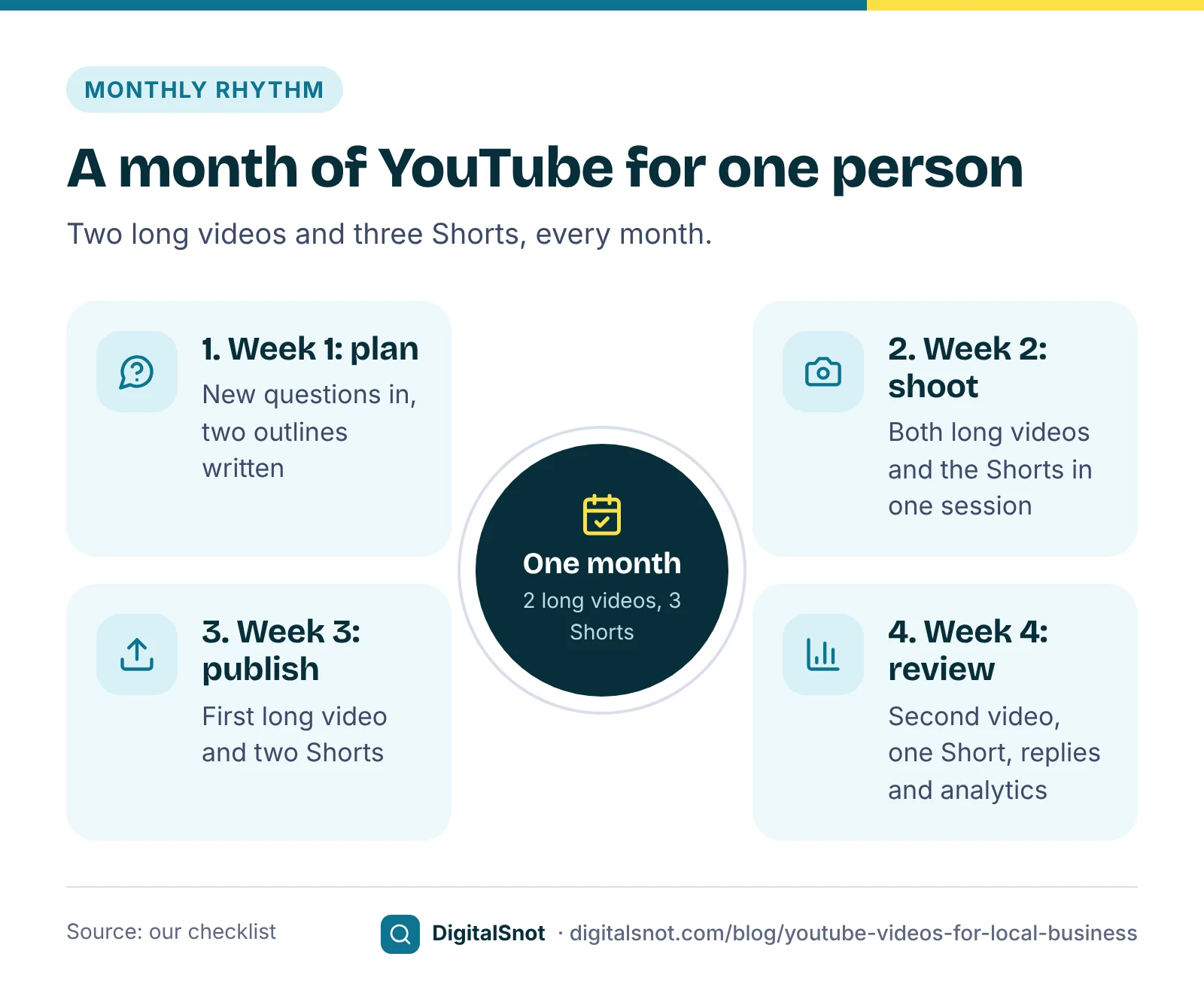
YouTube does not set a number of uploads. What matters for a small business is a pace you can keep for months, rather than a burst in the first week followed by silence. Our suggestion for one person is two long videos and three Shorts a month. At that pace, the first ten videos take two months.
- Week 1, plan: add new questions from WhatsApp and reviews, pick two long-video ideas and outline both.
- Week 2, shoot: film both long videos and the Shorts in one session, while the kitchen is set up and the light is good.
- Week 3, publish: publish the first long video and two Shorts, with titles, descriptions and chapters checked.
- Week 4, review: publish the second long video and one Short, reply to comments, and note which videos people watched and which new questions came in.
Share every video where your customers already are. Send the link when the question comes up on WhatsApp, add it to the matching page of your website, and put it in your WhatsApp Status on the day it goes live.
Mistakes to avoid, and your next step
- Making videos nobody asked for. Generic trend videos compete with millions of others; answers to your own customers' questions compete with almost nobody.
- Titles and thumbnails that oversell. YouTube's tips warn that if a title does not represent the video, viewers may stop watching, which can affect how the video is found.
- Health claims you cannot support. A sugar-free cake video should say what goes into the cake, not promise that it suits every diabetic. Check health, legal and money advice before you publish.
- Uploading before the channel is verified. Without phone verification you cannot add a custom thumbnail or upload a video longer than 15 minutes.
- Leaving the description empty. Say what the video covers in the first lines, then add the chapters and how to reach you.
Your next step: spend 20 minutes collecting customer questions this week, run them through the video ideas tool and outline your first long video. Every tool used here is in our YouTube tools, and none of them signs in to your channel. If you would like help planning video alongside your website and local search, talk to us.
Free tools in this article
- YouTube Video Ideas from Customer Questions Turn the questions customers ask into video ideas, with titles, formats, chapters and Shorts.
- YouTube Script Outline Builder Build a timed outline for a business video or YouTube ad, with word counts, chapters and a Shorts version.
- YouTube Video SEO Checker Check a video's title, description, tags, hashtags and chapters against YouTube's limits and rules.
- YouTube Upload Checklist Tick through every step of a YouTube upload, from file and thumbnail to audience, captions and end screen.
Frequently asked questions
What YouTube videos should a local business make first?
Answers to the questions customers already ask you on WhatsApp, on calls and at the counter. You know people want those answers, and each video becomes something you can send the next time the question comes up. Start with the question you hear most often.
Should my first videos be Shorts or long videos?
Both, for different jobs. Quick facts such as delivery areas, timings and how to order suit Shorts, which can be up to 3 minutes in a vertical or square shape. Questions that need showing and explaining suit a 16:9 video with chapters. Our suggestion is to film the long videos first and cut Shorts from the same shoot.
How long can a YouTube title and description be?
A title can be up to 100 characters and a description up to 5,000, and neither can contain invalid characters. Viewers may see only the start of a title, so put the most important words first.
Why can I not add a custom thumbnail?
Custom thumbnails are an intermediate feature, which needs phone verification. Verify your channel with a phone number in YouTube Studio, then upload a JPG or PNG thumbnail, ideally 16:9, of up to 50 MB from a computer or 2 MB in the mobile app.
How do I add my YouTube channel to my Google Business Profile?
Edit your Business Profile and add the channel address under social media links, where Google offers the option in your region. You can also upload short videos to the profile; Business Profile Help lists clips of up to 30 seconds.
How often should a small business upload to YouTube?
YouTube does not set a number. Choose a pace you can keep for months, such as two long videos and three Shorts a month, which is our suggestion for one person. A steady pace is easier to keep up than a burst followed by weeks of silence.
Sources
Every figure and claim in this article comes from the sources below. We checked each one when writing and link to the original so you can read it yourself. Credit belongs to the authors and publishers listed. How we write and check our articles.
-
1
Edit video settings
YouTube Help · Titles up to 100 characters and descriptions up to 5,000, without invalid characters
-
2
Thumbnail & title tips
YouTube Help · Accurate titles, the most important words near the start, easy-to-read thumbnail text
-
3
Tips for video descriptions
YouTube Help · Unique descriptions for each video and what to put in the first lines
-
4
Add custom thumbnails on YouTube
YouTube Help · 3840 × 2160 recommended, 640 pixels minimum width, 16:9, JPG or PNG, 50 MB on a computer and 2 MB in the mobile app
-
5
Get access to intermediate and advanced features
YouTube Help · Custom thumbnails and videos longer than 15 minutes are intermediate features that need phone verification
-
6
Understand three-minute YouTube Shorts
YouTube Help · Square or vertical videos of up to three minutes uploaded from 15 October 2024 are Shorts; wider shapes stay long-form
-
7
Video Chapters
YouTube Help · At least three timestamps, the first at 00:00, in ascending order, each chapter at least 10 seconds
-
8
Add end screens to videos
YouTube Help · End screens in the last 5 to 20 seconds of videos at least 25 seconds long, up to four elements
-
9
Manage your YouTube channel's profile
YouTube Help · Up to 14 channel links, the first shown near the subscribe button
-
10
Manage your social media links
Google Business Profile Help · Adding a YouTube link to a Business Profile, available in select regions
-
11
Manage your Business Profile photos & videos
Google Business Profile Help · Business Profile videos of up to 30 seconds and 75 MB
-
12
Video SEO best practices
Google Search Central · Dedicated watch pages with a unique title and description; embedded YouTube videos may be indexed on both pages