Guide · Local SEO
Location pages that rank without becoming doorway pages
How to decide which towns and branches deserve a page, what to put on each one, and how to stay clear of Google's doorway and scaled content policies.

On this page (12 sections)
- 1When a location page helps and when it is a doorway
- 2Service-area businesses vs storefronts: different rules
- 3Decide: one page per place, an areas page, or nothing
- 4Plan pages across services and locations without duplication
- 5The unique value scorecard: a pass/fail test for every location page
- 6Worked example: a doorway-style page vs a strong page
- 7What to put on a location page: a template built on local proof
- 8LocalBusiness markup and NAP for each location
- 9Linking services, locations and your Business Profile
- 10Scaling location pages with AI without breaking spam policies
- 11Measure each page's local performance
- 12Sources
Location pages are the pages on your website about each place you serve: a branch, a clinic, a shop or a town your team works in. Done well, a location page answers the questions a customer in that place actually has. Done badly, it is a copy of every other town page with the name swapped, and Google's spam policies have a name for that: doorway abuse.
The line between the two is not word count. It is whether the page gives someone in that place information they could not get from your other pages. This guide draws that line using Google's own policy wording, the Google Business Profile rules, and a pass/fail scorecard you can run on any page before it goes live.
Who this is for: service-area businesses (trades, cleaners, pest control, mobile services) that want a page per town, and multi-location brands (clinics, gyms, restaurants, retailers) that need a page per branch. What you will be able to do: decide which places and services deserve a page, build each one around local proof, mark it up, link it to your Business Profile and measure it.
When a location page helps and when it is a doorway
A location page helps when it serves a real place you operate in and carries facts specific to that place. It becomes a doorway when it exists mainly to rank for "[service] in [town]" and simply funnels the visitor to the same generic contact form as every other town page.
Google's spam policies for Google web search put it plainly: "Doorway abuse is when sites or pages are created to rank for specific, similar search queries." The policy adds that such pages lead users to "intermediate pages that are not as useful as the final destination." Two of its listed examples describe the classic city-page pattern almost word for word:
- "multiple domain names or pages targeted at specific regions or cities that funnel users to one page"
- "Substantially similar pages that are closer to search results than a clearly defined, browseable hierarchy"
The policy does not ban location pages. A dental group with five clinics should have five clinic pages. The problem is pages that are interchangeable, made in bulk and only there to catch a search.
Google's older self-check still works
When Google announced a ranking adjustment for doorway pages in its March 2015 post, "An update on doorway pages", it gave site owners a short list of questions. Two are especially useful for location pages today: whether the pages are intended to rank on generic terms while the content on the page is very specific, and whether they exist as an "island" that is hard or impossible to reach from the rest of the site. The post also asked whether links to such pages were created just for search engines. Those questions map directly onto the checks later in this guide.
Why it matters more now
Google's guidance on creating helpful, reliable, people-first content lists this as a warning sign: "Are you producing lots of content on many different topics in hopes that some of it might perform well in search results?" It also asks whether you are using extensive automation to produce content on many topics. Template city pages, especially ones written by AI, tick both boxes.
At the same time, AI search tools quote business websites heavily. BrightLocal's analysis of 1,967,762 AI citations for local searches found business websites made up 42% of them (checked October 2026). A strong location page is now a source that AI Overviews, AI Mode and ChatGPT search can quote, not only a ranking asset.
Service-area businesses vs storefronts: different rules
Storefront businesses get one Business Profile and one location page per staffed location. Service-area businesses get one Business Profile for their real base with a list of service areas, and any town pages they build are service-area pages without an address. Mixing up the two models is where most location-page problems start.
Local map results
Storefronts and multi-location brands
Google's Guidelines for representing your business on Google say not to create more than one profile for each location, and ask chains to keep names and categories consistent across all their locations. The same guidelines ask for a phone number that connects to the individual location, or a website that represents it, and prefer a local number to a central call-centre line wherever possible.
Google's business links policies go further: for businesses with multiple locations, action links must lead to a page for that specific location, not a general landing page or another branch's page. So every storefront location needs its own page, and those pages are legitimate by design: each has its own address, hours, team and reviews.
Service-area businesses
A service-area business visits or delivers to customers instead of serving them at its address. Google's guidelines say these businesses should have one profile for their central office or location with a designated service area, and should hide the address if customers are not served there. A virtual office counts only if it is staffed during business hours; a rented mailing address does not.
Google's help page on managing service areas sets two limits worth knowing (checked October 2026):
- A profile can list up to 20 service areas, set by city, postcode or other area.
- The overall area should not reach more than about two hours' driving time from where the business is based, although the guidelines accept that larger areas may suit some businesses.
What this means for your pages
- Your service-area list is a natural ceiling. If a town is not among the areas you would list on your profile, it rarely deserves a page.
- Never invent an address. A town page for a service-area business should not show a street address, a virtual office or a "local" phone number that does not ring there.
- Do not expect a town page to win the map pack. Google's tips to improve your local ranking name relevance, distance and how well known a business is as the main factors, and measure distance from the place named in the search, or from the searcher's location when no place is named. A page about a town 40 km away can help you in organic results for that town; it does not move your profile's location.
Decide: one page per place, an areas page, or nothing
Give a place its own page only when you have a real presence there and enough local proof to make the page useful on its own. Otherwise cover it on a single "areas we cover" page, or leave it out. The table below covers the common situations.
Method: we built this table by applying Google's doorway and scaled content definitions and the Business Profile rules above to each situation, then added the local-proof threshold from the scorecard later in this guide.
| If your situation is… | Then build… | Why |
|---|---|---|
| A staffed branch, clinic or shop that customers visit | One location page per branch, linked from that branch's Business Profile | Each branch has its own address, hours, team and reviews, and Google wants multi-location profile links to go to a specific location's page |
| A service area with regular jobs, named staff and local reviews, inside your profile's service area | A service-area page for that place, with no address | You can show proof no other page has, so it can pass the scorecard |
| A place where you take occasional jobs but have little proof | A line or short section on one "areas we cover" page | A thin page per town is the pattern the doorway policy describes; one page still answers "do you cover X?" |
| A service that is genuinely different in one place (price, permits, response time, equipment) | A section on that place's page, or a service-in-location page if demand and proof exist | The difference is real information a customer needs |
| A chain with many branches selling the same things | One page per branch with branch-only facts, plus a crawlable hub listing them all | Branch pages are legitimate when each is distinct and reachable through a browseable hierarchy |
| A town more than about two hours' drive away, or one you will not travel to | Nothing | It falls outside Google's service-area guidance, and you cannot serve those customers well |
| A town you want to rank in only because competitors do, with no customers there yet | Nothing yet: win jobs and reviews first, then score the page | Without proof, the page can only be a template |
Three quick rules if you are unsure
- If you would be embarrassed to show the page to a customer in that town, do not publish it.
- If the only difference between two pages is the town name, merge them.
- If you cannot name a recent job, a staff member or a review from the place, the page is not ready.
City-swap pages vs real local pages
Clinics and other regulated businesses have an extra layer, because what a page may say about treatments and outcomes is often restricted. Our post on local SEO for clinics covers it.
Plan pages across services and locations without duplication
Build one page per core service and one page per real location first. Then add a service-in-location page only where a cell passes three tests: people search for it, you have proof for it, and something about the service is genuinely different there. Most businesses end up with far fewer pages than the full grid.
The temptation is to fill every cell: 6 services and 25 towns become 150 pages. Google's guide to optimising for generative AI features warns against separate pages for every search variation, noting that a large number of pages does not by itself make a site higher quality or more relevant to users, and that its AI systems can understand relevance without an exact match between query and page. You do not need a page for every phrasing.
The three-test grid
- Demand. Do people search for this service in this place, or for it "near me" while there? Check your Search Console queries for place names and use the methods in our keyword research guide.
- Proof. Can you fill the page with jobs, people, reviews and facts from this place? The scorecard in the next section makes this measurable.
- Difference. Does the service change here: a different price, response time, regulation, equipment or building type?
All three answers yes: give the cell its own page. Demand and some proof but no real difference: add a section to the location page or the service page. No demand or no proof: no page yet.
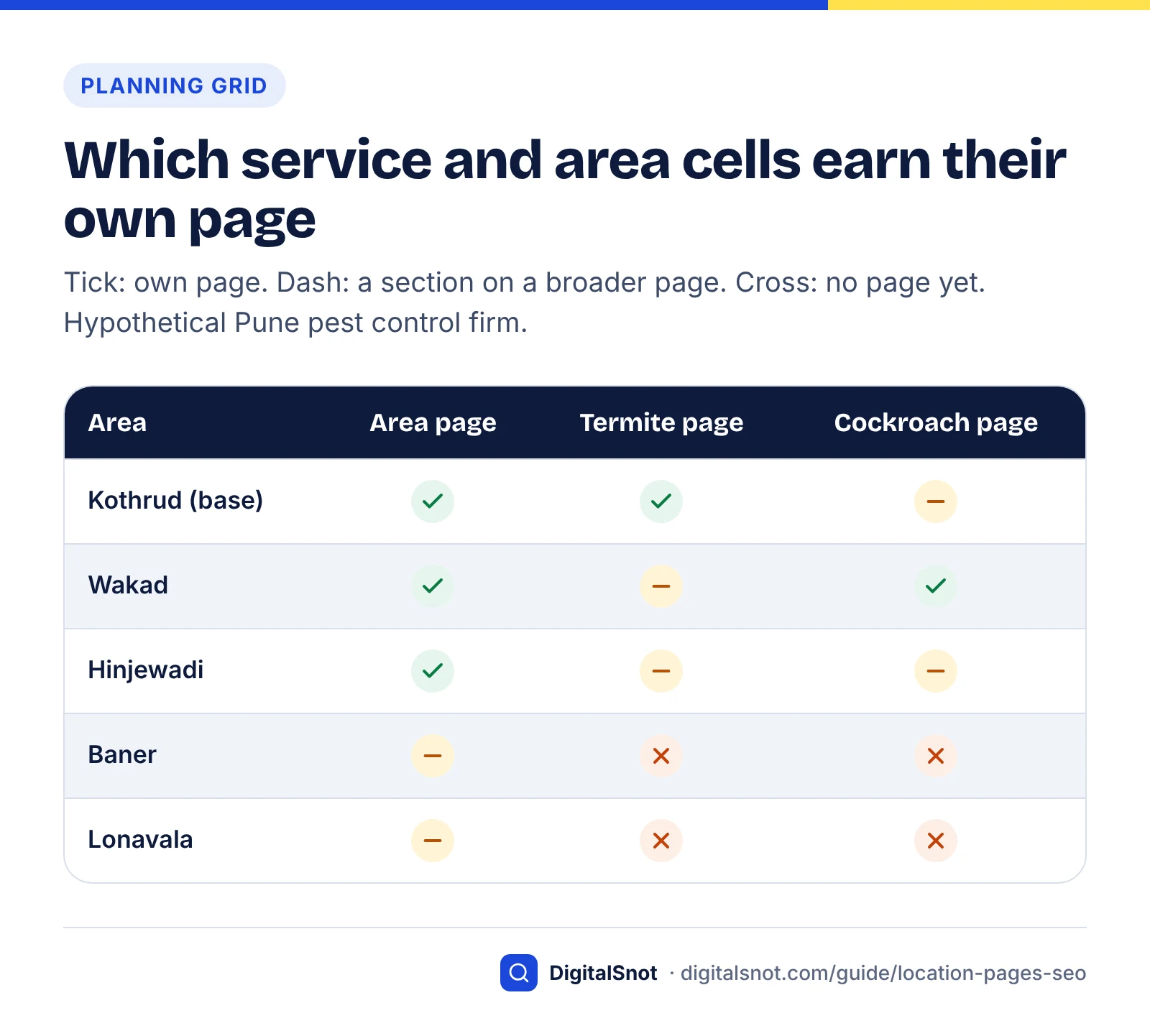
Example (hypothetical): a pest control firm in Pune
A pest control company based in Kothrud, Pune, offers termite control and cockroach control and covers five areas. Filling every cell of its grid would mean 17 pages: two service pages, five area pages and ten service-in-area pages. Applying the three tests gives eight:
- Two core service pages, for termite control and cockroach control, each linking to the areas where it is offered.
- Area pages for Kothrud, Wakad and Hinjewadi, where it has technicians, regular jobs and reviews.
- A termite control page for Kothrud, where most of its termite work happens, and a cockroach control page for Wakad, where most jobs are building-wide treatments in apartment societies with their own booking process.
- One "areas we cover" page that lists Baner and Lonavala with response times, because jobs there are occasional.
A URL structure that stays tidy
- Service pages:
/termite-control/ - Locations hub:
/areas/, listing every area or branch - Location pages:
/areas/wakad/ - Service-in-location pages, only where earned:
/areas/wakad/cockroach-control/
Nesting service-in-location pages under the location gives visitors the "clearly defined, browseable hierarchy" that Google's doorway policy contrasts with doorway pages. If a service page and a location page start competing for the same search, our post on service pages versus blog posts explains how to give each page one clear job.
The unique value scorecard: a pass/fail test for every location page
A location page passes when it clears three gate tests and scores at least 12 out of 20 on local proof, with at least four items at full marks. A page that fails any gate should not be published on its own, whatever its score.
Method: we turned each part of Google's doorway abuse definition, the 2015 doorway questions, the scaled content abuse examples and the Business Profile rules into a check a business owner can make by reading the page. Google publishes no numeric threshold. The cut-offs below are our editorial judgement, set so that a passing page must contain several facts that no other page on your site could.
Gate tests (all three must pass)
- Real presence. You have staffed premises in the place, or you have done paid work there in the last 12 months and take bookings there now, and the place sits inside the service area you would list on your Business Profile.
- The swap test. Copy the main content (leave out the header, footer and contact block) and replace the place name with another town you serve. If half or more of the sentences are still true, the page fails.
- Not an island. A visitor can reach the page from your main navigation or locations hub within two clicks, not only from an XML sitemap or a footer list of dozens of towns.
Local proof items (score 0, 1 or 2 each)
Score 0 if the item is missing, 1 if it is present but generic, and 2 if it is specific to this place and could be checked.
| # | Item | What earns 2 points |
|---|---|---|
| 1 | People | Named staff who serve this place, with role and a real photo |
| 2 | Recent work | At least three jobs from the last 12 months, with neighbourhood, problem and outcome |
| 3 | Local reviews | Reviews from customers in this place, quoted exactly, with a link to the full review profile |
| 4 | Practical details | Address, hours, parking and directions (branch), or response times and coverage boundaries (service area) |
| 5 | Price facts | Prices or price ranges for this place, or what changes the price here |
| 6 | Local conditions | Facts that change the service here: building types, permits, access, seasonal issues, languages spoken |
| 7 | Local questions | Questions customers in this place actually asked, answered directly |
| 8 | Original photos | Photos taken in this place of your team, jobs or premises |
| 9 | Local ties | Real accreditations, suppliers, partners or community work tied to this place |
| 10 | Consistent details | Name, address and phone match the location's Business Profile (or your central details on a service-area page), in text and markup |
Reading the result
- Pass: all three gates passed, 12 points or more, and at least four items scoring 2. Publish it and link it from the hub.
- Merge for now: gates passed but 8 to 11 points. Add the material as a section on a broader area page until you have more proof.
- Do not publish: a failed gate, or fewer than 8 points. If the page is already live, improve it, merge it into a broader page with a 301 redirect, or remove it.
What makes a location page unique, in 15 seconds
Rerun the scorecard every quarter: as jobs and reviews build up, a "merge for now" page can graduate to its own page.
Worked example: a doorway-style page vs a strong page
The same business can publish a page that fails every test or one that clears them easily, and the difference lies in the material, not the template. Here is one hypothetical page written both ways and scored.
Example (hypothetical): the Pune pest control firm from earlier writes a "Cockroach control in Wakad" page. The business, staff names and figures are invented for illustration.
The doorway-style version
Looking for the best cockroach control in Wakad? [Brand] provides professional pest control services in Wakad at affordable prices. Our experienced technicians use safe, effective treatments for homes and offices in Wakad. We serve all areas of Wakad and nearby. Contact us today for a free quote.
Swap "Wakad" for "Baner" and all five sentences remain true, so 100% survive and the page fails the swap test. On this hypothetical site it is linked only from a footer list of 40 towns, so it fails the island test as well.
The strong version (opening section)
Most of our Wakad jobs are in apartment societies, so we treat flat by flat and agree common-area treatments with the society office first. Our two Wakad technicians, Sachin and Priya, completed 180 cockroach treatments here in the last 12 months. In March 2026 they treated 22 flats and the shared ducts of one 40-flat society in a single day. Book before 1 pm and we can usually visit the same day. A 2BHK treatment usually takes about an hour. The question Wakad customers ask most is whether the society office must approve the visit, so we check with the office for you.
Swap "Wakad" for "Baner" here and only the fourth and fifth sentences stay true. The society process, the named technicians, the March job and the local question all belong to Wakad. Two of six sentences survive (33%), under the 50% gate.
The scores
| Check | Doorway-style page | Strong page |
|---|---|---|
| Gate: real presence | Pass | Pass |
| Gate: swap test | Fail (5 of 5 sentences survive) | Pass (2 of 6 survive) |
| Gate: not an island | Fail (footer link only) | Pass (hub and menu) |
| People | 0 | 2 |
| Recent work | 0 | 2 |
| Local reviews | 0 | 2 |
| Practical details | 1 | 2 |
| Price facts | 0 | 1 |
| Local conditions | 0 | 2 |
| Local questions | 0 | 1 |
| Original photos | 0 | 1 |
| Local ties | 0 | 0 |
| Consistent details | 2 | 2 |
| Result | 3/20, two gates failed: do not publish | 15/20, six items at 2: pass |

What the comparison shows
- The strong page is not longer for the sake of it; it is denser in facts a Wakad customer cares about.
- Most of its points come from material the business already holds: job records, staff rotas and reviews.
- Its gaps (local ties, original photos) tell the owner what to collect next.
What to put on a location page: a template built on local proof
Build each page in the order a customer needs it: can you help me here, who will turn up, what have you done nearby, what will it cost and how do I book. The template below turns the scorecard into a page structure.
- An answer-first opening. One or two sentences naming the service, the place and the key fact, such as "We treat cockroaches in Wakad apartment societies, usually the same day if you book before 1 pm."
- Coverage and practical details. For a branch: address, hours, parking, accessibility and directions from known landmarks. For a service area: neighbourhoods covered, response times and any call-out charge.
- The people. Who serves this place, with photos, roles and relevant qualifications or registrations.
- Recent work. Three to six short job notes: neighbourhood, problem, what you did and when. Get the customer's permission before naming a building or street.
- Local conditions. What is different here: building types, local rules or permits, seasonal problems, the languages your staff speak.
- Prices or price factors for this place.
- Reviews from local customers, quoted accurately with a link to the full profile. Our post on how to get more Google reviews covers asking customers in a way that builds a steady flow from every area you serve.
- Local questions, each answered in the first sentence.
- Booking and contact details, with the phone number that actually serves this location.

What to leave out
- Paragraphs about the town's history or attractions that have nothing to do with your service.
- Lists of nearby suburbs or postcodes stuffed into the text.
- Stock photos of the town presented as if they show your work.
- Reviews from other areas relabelled as local, or reviews you wrote yourself.
- An embedded map as the only "local" content on the page.
LocalBusiness markup and NAP for each location
Each storefront location page should carry LocalBusiness structured data describing that one location, with values that match its Business Profile exactly. Service-area pages should not carry markup with invented addresses: describe the area in visible text, and keep one LocalBusiness block for your real base.
What Google's documentation asks for
Google's LocalBusiness structured data documentation describes address as the physical location of the business and lists properties including geo, openingHoursSpecification, telephone and url. A few details catch people out (checked October 2026):
geocoordinates need at least five decimal places.telephoneshould be the primary customer number, including the country and area codes.- Departments, such as a pharmacy inside a store, can be nested with
department, named in the format "{store name} {department name}". - Review and rating properties are recommended only for sites that capture reviews about other local businesses, so marking up your own star rating on your own location pages is not a route to review stars.
Use the most specific type that fits (Dentist rather than LocalBusiness, for example) and set url to the location page itself. The free Schema Markup Generator builds LocalBusiness JSON-LD from a short form; test the result in Google's Rich Results Test and check every value against the location's Business Profile. Our schema markup guide explains which types still produce rich results in 2026.
Local FAQs are for people now. Google stopped showing FAQ rich results in Search from 7 May 2026, according to its documentation updates. Leftover FAQPage markup is still valid, but it no longer produces anything visible in Google.
Keep name, address and phone identical
Every location's name, address and phone number (NAP) should match across the location page, its markup, its Business Profile and its directory listings. Conflicts creep in after a move, a new phone system or a rebrand, and AI assistants can repeat the wrong version. The free AI Answer Consistency Checker finds conflicting numbers, phone numbers and addresses across your pages and listings; fix each conflict at its source.
Listings matter for AI answers too. Whitespark's 2026 Local Search Ranking Factors report (47 experts, 187 factors) scored AI search visibility for the first time and found that three of the top five AI visibility factors were citation factors. For a multi-location brand, that means consistent listings for every branch, not just the head office.
Linking services, locations and your Business Profile
Link every location page from a locations hub in your main navigation, link locations and services to each other where the service is really offered, and point each storefront's Business Profile at its own location page. That gives visitors and crawlers a clear hierarchy and keeps every page off the island.
Internal links
- A hub page (
/areas/or/locations/) listing every location as plain HTML links, not only inside a map widget or a JavaScript store finder. - Location to service: each location page links to the services offered there.
- Service to location: each service page links to the places where it is offered, in a short "where we offer this" list.
- Breadcrumbs: Home › Areas › Wakad, so each page shows where it sits.
- No footer link farms. A block of 80 "plumber in [town]" links in the footer is exactly what Google's 2015 questions meant by links created just for search engines.
Business Profile links
- Storefronts: set each profile's website link to that location's page, as Google's business links policy requires for multi-location businesses.
- Service-area businesses: point the single profile at your home page or main service page. Area pages support the profile; they do not replace it.
- Tracking: add UTM parameters to the profile's website link (for example
?utm_source=google&utm_medium=organic&utm_campaign=gbp-wakad) so profile visits show separately in analytics. Our Google Business Profile optimisation guide covers the other profile fields.
Titles, headings and canonicals
Put the service and place at the front of the title tag ("Cockroach control in Wakad, Pune | Brand") and make the H1 match the page's promise. Give each location page a self-referencing canonical: pointing every location page's canonical at one master page tells Google you consider them duplicates. Run each page through the free On-Page SEO Checker with its target phrase to catch missing titles, heading problems and canonical errors, and use the Google SERP Preview to see whether the place name survives truncation on mobile.
Scaling location pages with AI without breaking spam policies
AI can help you turn your own job records, staff notes and reviews into well-structured pages faster. It cannot supply the local proof, and using it to generate hundreds of town pages from a template is the pattern Google's scaled content abuse policy describes.
The spam policies define it: "Scaled content abuse is when many pages are generated for the primary purpose of manipulating search rankings and not helping users." The policy applies "no matter how it's created", and its examples include "Using generative AI tools or other similar tools to generate many pages without adding value for users." Google's guidance on generative AI content repeats that this may violate the scaled content abuse policy and tells publishers to fact-check AI output before it goes live. Google's generative AI features guide adds that creating separate pages for every query variation, including the fan-out queries AI Mode and AI Overviews run behind the scenes, mainly to manipulate rankings or AI responses, violates the same policy.
| Task | Safe use of AI | Risky use of AI |
|---|---|---|
| Drafting | Turn your job log, staff list and reviews for one place into a draft you then check | Generate a full page per town from one prompt with only the town name changed |
| Local facts | Summarise facts you supplied and verified | Ask for "local landmarks" or "common problems in [town]" and publish the output |
| Reviews | Pick representative quotes from real reviews, quoted exactly | Paraphrase, merge or invent reviews |
| Translation | Translate a finished page for customers who read another language, checked by a fluent speaker | Machine-translate hundreds of town pages to multiply them |
| Titles and metadata | Suggest options that you edit | Publish generated titles, meta descriptions and markup unchecked |
A safe workflow for a multi-location rollout
- Score every planned page with the scorecard before anyone writes. Only pages that can pass get drafted.
- Collect the inputs for each place first: staff, jobs, reviews, prices, photos and questions.
- Let AI draft from those inputs only, with an instruction not to add facts.
- Have someone who knows the place check every fact, name and number, including the title, meta description, markup and image alt text.
- Publish a few pages at a time, check they are indexed and earning impressions, then continue.
Spam enforcement is active. Google's September 2026 spam update ran from 24 September to 8 October 2026, 13 days and 16 hours in all, and Google did not say which practices it targeted, Search Engine Journal reported. So do not read a traffic change in that window as proof of anything specific. If you saw a drop, our guide to recovering from Google updates explains how to diagnose it, starting with the Manual actions report in Search Console.
Measure each page's local performance
Judge each location page on three things: impressions and clicks for searches about its place, the calls, bookings or direction requests it produces, and whether AI answers mention the business for that place. Review every quarter, and merge pages that stay empty.
Search Console, Business Profile and leads
- In Search Console's Performance report, filter by page (the location URL) and read the queries. A healthy location page earns impressions for the place name, neighbourhood names and service phrases, not only your brand.
- Compare click-through rates across location pages of the same type. One with plenty of impressions but few clicks usually needs a better title and opening.
- Check AI-surface data too; our guide to Search Console's AI performance report explains what it shows and leaves out.
- Use each Business Profile's performance view for calls, website clicks and direction requests, and record which location page each enquiry came from in your form or call tracking.
- Count bookings per location page each month. That is the number that justifies a page.
AI answers: test the wording customers use
Query wording changes local AI results. In a Local SEO Data study of 1,120 searches across seven service types and 13 US cities, collected on 20–22 May 2026, 28.5% of businesses in the local pack were missing from AI Mode for the same query. For the bare query "divorce lawyer", AI Mode showed no business listings at all; adding "near me" brought listings back in every test.
So test each place with three phrasings: "[service] in [place]", "[service] near me" from a device in that area, and a natural question such as "who does same-day cockroach control in Wakad?" Run each several times, because AI answers vary between runs. Our guide to local SEO for AI search sets out a fuller testing routine.
A quarterly review
| What you see after six months | What to do |
|---|---|
| Impressions for place queries and regular enquiries | Keep the page; add new jobs, photos and reviews each quarter |
| Impressions but few clicks | Rewrite the title and opening, then check them in a SERP preview |
| A passing score but almost no impressions | Check indexing with URL Inspection, links from the hub, and whether anyone searches for the place |
| No impressions and a score still under 12 | Merge the content into the hub or a broader area page and 301 redirect the URL |
| You no longer serve the area | Remove it from the hub, redirect it to the areas page and update your profile's service areas |
Location pages reward the same thing at every step: real presence, written down. If you would like help planning and building pages that pass these tests, that is part of our local SEO service, and our content SEO work covers turning job records and reviews into pages customers trust.
Free tools in this guide
- Schema Markup Generator Create JSON-LD for 10 schema types, with live checks for missing fields.
- AI Answer Consistency Checker Find brand facts that differ between your pages and listings.
- On-Page SEO Checker Check titles, headings, images, links, schema and indexing for any page.
- Google SERP Preview Preview titles and descriptions as they may appear in Google.
By the numbers
- service areas is the maximum a Google Business Profile can list, by city, postcode or other area (checked October 2026)
- 20
- Source: Google Business Profile Help
- of driving time from your base is the rough outer limit Google gives for a service area
- ~2 hours
- Source: Google Business Profile Help
- of local-pack businesses were missing from AI Mode for the same query in 1,120 searches across 13 US cities (May 2026)
- 28.5%
- Source: Local SEO Data via PRWeb
- of 1,967,762 local AI citations analysed by BrightLocal pointed to business websites (checked October 2026)
- 42%
- Source: BrightLocal
Frequently asked questions
Are location pages bad for SEO?
No. Location pages are fine when each one serves a real place you operate in and carries facts specific to that place, such as the team, recent jobs, local reviews and practical details. Google's spam policies target doorway pages: similar pages created to rank for similar searches that funnel users to one destination. The risk comes from interchangeable city pages, not from having a page per branch or genuine service area.
How many location pages should a service-area business have?
As many as you can fill with genuine local proof, which is usually far fewer than the towns you could list. Google lets a Business Profile list up to 20 service areas within roughly two hours' drive of your base, which is a sensible ceiling. Within that, give a town its own page only when you have regular jobs, staff and reviews there, and cover the rest on one areas page.
Can I make a location page for a city where I have no office?
Yes, if you genuinely serve customers there and the page shows it. A service-area page should describe your coverage, response times, recent local jobs and reviews, without inventing an address or a local phone number that does not ring there. Google says service-area businesses should have one Business Profile for their real base, so the page supports that profile rather than pretending to be a branch.
Do I need a separate Google Business Profile for each location?
Only for real, staffed places where you serve customers. Google's guidelines say not to create more than one profile per location, and service-area businesses should have one profile for their central office with a list of service areas. Each storefront profile should link to its own location page, because Google's business links policy requires multi-location businesses to send action links to a specific location.
How much unique content does a location page need?
Google sets no word count, so measure uniqueness by facts rather than length. A practical check is the swap test: replace the town name with another, and if half or more of the sentences would still be true, the page is not unique enough. Our scorecard also asks for at least 12 out of 20 points across ten local-proof items, such as named staff, recent jobs and local reviews.
Is it safe to use AI to write location pages?
It is safe when AI drafts from facts you supply and a person who knows the place checks every detail. It is risky when AI generates many near-identical town pages from a template, because Google's scaled content abuse policy lists using generative AI to create many pages without adding value as an example. Never let AI invent local landmarks, problems, statistics or reviews.
Should each location page have LocalBusiness schema?
Storefront location pages should, with one LocalBusiness block per page describing that location and matching its Business Profile exactly: name, address, coordinates, phone with country code, hours and the page URL. Service-area pages should not carry markup with invented addresses. Markup clarifies details but does not make a thin page useful, and FAQ markup has not produced rich results in Google Search since May 2026.
What should I do with thin location pages that are already live?
Score them first. Rewrite the pages you can improve with real local proof. Merge the ones you cannot improve into a broader area page or hub and redirect them with a 301, so links and visitors land somewhere useful. Remove pages for areas you no longer serve, and update your Business Profile service areas at the same time so the two stay consistent.
Will a location page help me appear in the map pack in another town?
Usually not. Google says local results depend mainly on relevance, distance and how well known a business is, with distance measured from the searcher to the business. A strong page about a nearby town can earn organic rankings and AI mentions for searches about that town, but it does not move your Business Profile closer to the people searching there.
What URL structure works best for location pages?
Use a simple nested structure: a hub such as /areas/ listing every location, one page per location such as /areas/wakad/, and service-in-location pages only where they are earned, such as /areas/wakad/cockroach-control/. Link the hub from your main navigation and add breadcrumbs. Avoid flat URLs generated for every service and town combination, which tend to produce near-identical pages.
Sources
Every figure and claim in this guide comes from the sources below. We checked each one when writing and link to the original so you can read it yourself. Credit belongs to the authors and publishers listed. How we write and check our articles.
-
1
Spam Policies for Google Web Search
Google Search Central · Doorway abuse and scaled content abuse definitions and examples, quoted directly.
-
2
An update on doorway pages
Google Search Central Blog · March 2015 self-check questions: generic terms vs specific content, island pages, links made for search engines.
-
3
Creating Helpful, Reliable, People-First Content
Google Search Central · Self-assessment questions on mass-produced content and extensive automation.
-
4
Where to get local citations for AI search
BrightLocal · Business websites were 42% of 1,967,762 local AI citations analysed.
-
5
Guidelines for representing your business on Google
Google Business Profile Help · One profile per location; chain consistency; service-area and virtual office rules; local phone or website.
-
6
Business links policies and guidelines
Google Business Profile Help · Multi-location action links must lead to a page for a specific location.
-
7
Manage your service areas for service-area & hybrid businesses
Google Business Profile Help · Up to 20 service areas; overall area about two hours' driving time from the base.
-
8
Tips to improve your local ranking on Google
Google Business Profile Help · Local results depend mainly on relevance, distance and prominence; distance from the searched place or the searcher.
-
9
Optimizing your website for generative AI features on Google Search
Google Search Central · Pages for every query variation violate scaled content abuse; page quantity is not quality (May 2026).
-
10
Local Business (LocalBusiness) Structured Data
Google Search Central · Address, geo precision, telephone format, department naming and review property guidance.
-
11
Latest Google Search Documentation Updates
Google Search Central · FAQ rich results no longer shown in Search from 7 May 2026.
-
12
Whitespark's Official 2026 Local Search Ranking Factors Report
Whitespark · 47 experts, 187 factors; first AI visibility scores; 3 of top 5 AI factors are citation factors.
-
13
Google Search's Guidance on Generative AI Content on Your Website
Google Search Central · Many AI pages without added value may violate scaled content abuse; fact-check before publishing.
-
14
Google Completes September 2026 Spam Update After Nearly 14 Days
Search Engine Journal · Spam update ran 24 Sep to 8 Oct 2026 (13 days 16 hours); targets not disclosed.
-
15
Local SEO Data Study Finds 28.5% of Local Pack Businesses Are Invisible in Google AI Mode
Local SEO Data via PRWeb · 1,120 searches, 13 US cities (May 2026): 28.5% missing from AI Mode; "near me" restored listings.


