Local SEO for clinics and doctors: a practical checklist
A step-by-step local SEO checklist for clinics and doctors: Business Profile rules for practices and practitioners, reviews, schema and location pages.
On this page (10 sections)
- 1How Google ranks local clinics
- 2Practice or practitioner: get the listing structure right
- 3Complete the Business Profile properly
- 4Keep name, address and phone consistent
- 5Reviews: ask fairly, and protect patient privacy
- 6Add medical schema to your website
- 7Build a page for every location and key service
- 8The clinic local SEO checklist
- 9Beyond Google Maps: AI answers
- 10Sources
When someone searches "dermatologist near me" or "child specialist in Andheri", Google shows a map with a handful of clinics. Local SEO for clinics is the work that decides whether your clinic is one of them, and whether the listing gives patients enough confidence to call or book.
Healthcare has a few rules that other businesses do not, especially around practitioner listings and patient privacy. This checklist covers them in the order most clinics should work through them.
How Google ranks local clinics
Google ranks local results on three factors: relevance, distance and prominence. You control relevance and prominence; distance depends on where the patient is searching from.
Google's page on improving your local ranking explains that relevance is how well a profile matches the search, distance is how far the business is from the searcher, and prominence is how well known the business is, based on signals such as links and reviews. It also states that there is no way to pay for a better local ranking.
For a clinic, that means three jobs: describe your services completely, earn genuine reviews and mentions, and keep every detail accurate.
Practice or practitioner: get the listing structure right
Create one Business Profile for the clinic, and add separate profiles only for doctors who see patients directly and meet Google's practitioner rules. Getting this wrong is the most common healthcare listing problem.
Google's guidelines for representing your business define individual practitioners as public-facing professionals such as doctors and dentists. The key rules are:
- Public-facing only: practitioners can have their own profile if they are directly contactable at the verified location during stated hours. Support staff should not create profiles.
- One profile per practitioner: a doctor should not have several profiles to cover different specialities.
- Several doctors at one clinic: the clinic gets its own profile, separate from the doctors, and each practitioner's profile title should include only the practitioner's name.
- A solo doctor at a branded clinic: Google recommends a single shared profile named in the format "[brand]: [practitioner name]".
Practitioner profiles may also include a title or degree, which helps patients recognise the right doctor.
Which set-up fits your clinic?
We mapped Google's listing rules against the matching schema.org types so the website and the Business Profile describe the same structure. The method is simple: take each scenario in Google's guidelines and find the schema.org type whose definition covers it.
| Your situation | Business Profile set-up | Website schema type |
|---|---|---|
| Clinic with several doctors | One clinic profile, plus optional profiles for public-facing doctors (name only) | MedicalClinic for the clinic; Physician or IndividualPhysician on doctor pages |
| One doctor practising under a clinic brand | One shared profile: "[brand]: [doctor name]" | MedicalClinic or Physician, with the doctor named on the page |
| Doctor practising under their own name | One practitioner profile | IndividualPhysician |
| Clinic with several branches | One profile per branch | MedicalClinic on each location page |
Local map results
Complete the Business Profile properly
A complete, accurate profile is the foundation of local visibility. Our full Google Business Profile optimisation guide covers every field; these are the ones that matter most for clinics.
Categories
Google's category guidance says to choose a primary category that describes the business as a whole, be specific, and use as few categories as possible. Pick categories that complete the sentence "this business is a", not "this business has a". A skin clinic should pick its specialist category rather than listing every treatment as a category; treatments belong in services.
Appointment link
Add a booking or appointment link so patients can book from the listing. Google's help page on managing local business links notes that the business must be verified first and that link edits go live once approved.
Hours, services and attributes
Keep opening hours current, including holiday hours. List services in plain language patients use, such as "root canal treatment" or "diabetes check-up".
Keep name, address and phone consistent
Your clinic's name, address and phone number (NAP) should be identical on your Business Profile, website, and every directory and health platform where you appear.
Inconsistent details confuse patients and make it harder for Google to be confident which information is correct. Common causes are a moved clinic, a changed phone number, or a doctor's personal mobile listed on one platform and the reception number on another.
- Decide the exact official format of your clinic name, address and main phone number.
- Update your Business Profile and website footer first.
- Search for your clinic name and old phone numbers to find outdated listings.
- Correct or claim each one, starting with the platforms patients use most.
For a quick check, our free AI Answer Consistency Checker compares the name, phone and address on up to six pages, such as your website and directory listings, and shows every mismatch with the value to use.
Reviews: ask fairly, and protect patient privacy
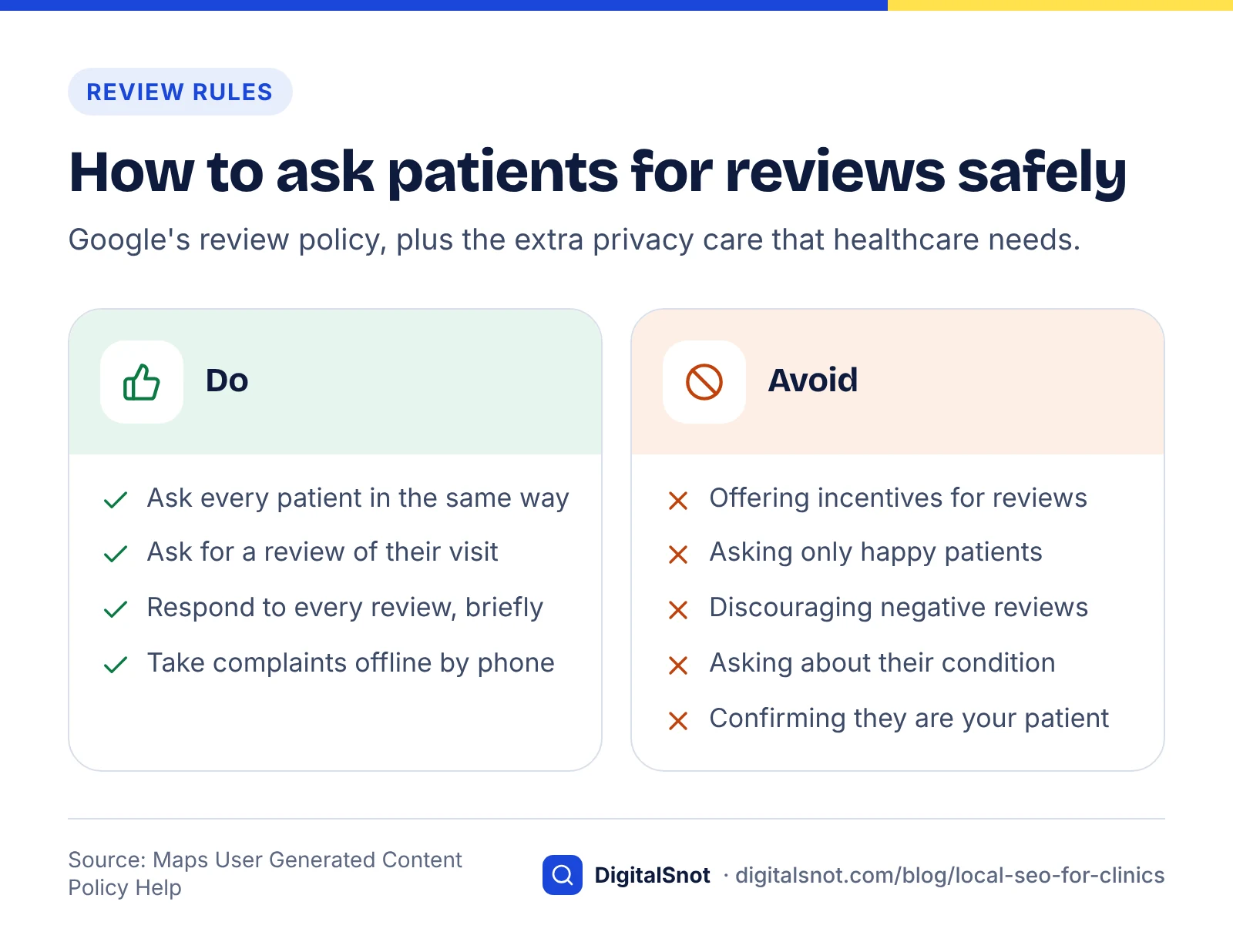
Reviews influence both ranking and patient choice, but healthcare needs extra care. Ask every patient in the same way, never offer incentives, and never ask anyone to describe their condition or treatment.
Patients look closely at reviews. BrightLocal's Local Consumer Review Survey 2026, based on 1,002 US adults, found that 47% of consumers won't use a business with fewer than 20 reviews, and 80% say they are likely to use a business that responds to all of its reviews. These are US figures rather than Indian ones, but the direction is useful.
Google's prohibited and restricted content policy bans incentives for reviews, discouraging negative reviews and selectively asking only happy patients. The same policy restricts posting medical information about yourself or others. In practice:
- Ask for "a review of your visit" rather than about a diagnosis or treatment outcome.
- Never confirm in a reply that the reviewer is your patient or mention any clinical detail, even if they did.
- Move complaints offline: thank them, and invite them to call the clinic directly.
For the mechanics of replying, see Google's own guide to managing customer reviews.
Customer reviews
Add medical schema to your website
Structured data helps search engines understand that your page is about a clinic or a doctor, with a specific address, phone number and hours.
Schema.org's MedicalClinic type sits under LocalBusiness and MedicalBusiness and suits a clinic focused on diagnosis and treatment. The Physician type covers a doctor or a physician's office, and IndividualPhysician is a more specific subtype for a single practitioner. Both MedicalClinic and Physician accept properties such as address, telephone, openingHours and availableService.
Make sure the name, address, phone and hours in your schema match your Business Profile exactly. Our schema markup guide explains which other types still earn a Google feature in 2026 and how to test your markup. If you are unsure how to implement it, our technical SEO service includes structured data.
Structured data (JSON-LD) code
Build a page for every location and key service
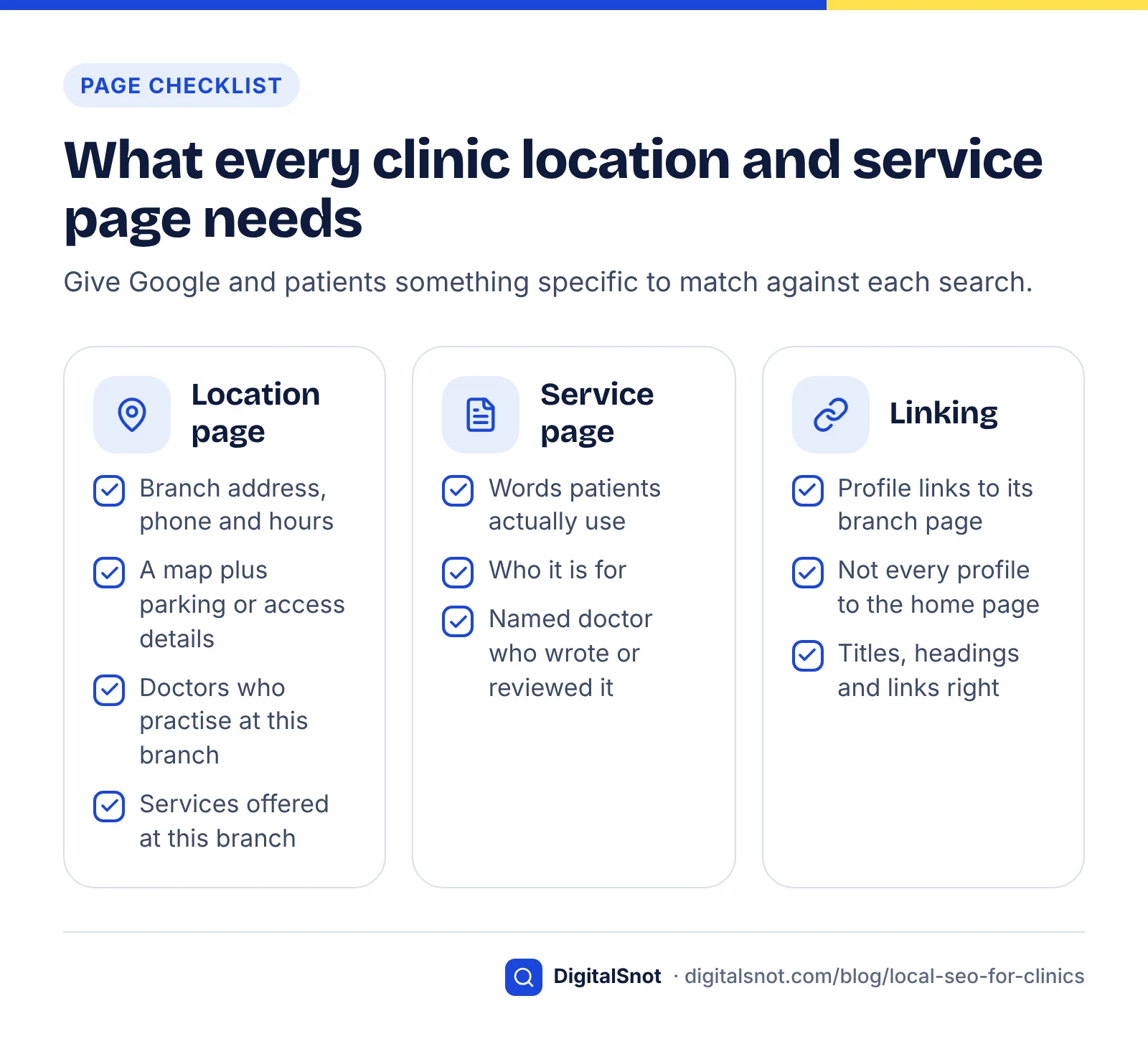
Each clinic branch should have its own page on your website, and each major service should have a page that explains it clearly. These pages give Google and patients something specific to match against searches.
A good location page includes the branch address, phone, hours, a map, the doctors who practise there, parking or access details, and the services offered at that branch. Link each Business Profile to its matching location page, not the home page. Use our on-page SEO checklist to get titles, headings and internal links right.
Write service pages in plain language, explain who the service is for, and say who wrote or reviewed the page. Health content is judged carefully, so name the qualified doctor responsible.
The clinic local SEO checklist
Work through this list in order. The first four items usually make the biggest difference.
Local SEO checklist for clinics
| Step | Task | Done when |
|---|---|---|
| 1 | Claim and verify the clinic profile | Profile verified and owned by the clinic, not an individual employee |
| 2 | Fix practitioner listings | Each listing follows Google's practice and practitioner rules |
| 3 | Set categories and services | Specific primary category; services listed in patient language |
| 4 | Add appointment link and hours | Booking link live; hours include holidays |
| 5 | Clean up NAP | Identical details everywhere you are listed |
| 6 | Start a review routine | Every patient asked the same way, no medical details requested |
| 7 | Add schema | MedicalClinic or Physician markup matching the profile |
| 8 | Publish location and service pages | Each profile links to its own location page |
Beyond Google Maps: AI answers
Patients increasingly ask AI assistants for recommendations, and those tools draw on many of the same signals: consistent details, reviews and clear service pages. Our guide on getting cited in AI search and our post on how ChatGPT recommends businesses explain how to prepare. For local searches in particular, our guide to local SEO for AI Mode, Ask Maps and AI Overviews explains what those answers rely on when they name a business.
If you would rather have the whole checklist handled for you, our local SEO service covers profiles, reviews, schema and location pages.
Free tools in this article
By the numbers
- of consumers won't use a business with fewer than 20 reviews (BrightLocal 2026, 1,002 US adults)
- 47%
- Source: BrightLocal
- of consumers say they are likely to use a business that responds to all of its reviews (BrightLocal 2026, US)
- 80%
- Source: BrightLocal
Frequently asked questions
Can a doctor have a separate Google Business Profile from the clinic?
Yes, if the doctor is public-facing and can be contacted directly at the verified location during stated hours. Google says the clinic should then have its own separate profile, and the practitioner profile title should include only the doctor's name. If a single doctor practises under a clinic brand, Google recommends one shared profile named brand followed by the doctor's name.
Which Google Business Profile category should a clinic choose?
Choose the most specific primary category that describes what the clinic is as a whole, and use as few extra categories as possible. Google suggests picking categories that complete the sentence "this business is a" rather than "this business has a". Individual treatments and procedures belong in the services section, not in categories.
Is it allowed to ask patients for Google reviews?
Yes. Google allows businesses to ask for reviews that reflect a genuine experience. What is not allowed is offering incentives, discouraging negative reviews or asking only patients you expect to be happy. For clinics, ask about the visit in general and never ask patients to mention their condition, diagnosis or treatment.
How should a clinic reply to a negative review?
Reply politely and briefly, thank the reviewer, and invite them to contact the clinic directly to discuss it. Do not confirm that the person is a patient or mention any clinical details, even if the reviewer shared them. Google's guidance also warns against sharing a reviewer's private information in replies.
What schema should a medical clinic use?
Use the schema.org MedicalClinic type for a clinic and Physician or its subtype IndividualPhysician for a doctor. Include the name, address, telephone, opening hours and services, and make sure these match your Google Business Profile exactly. Add the markup to each location page if you have several branches.
Do clinics with several branches need separate profiles?
Yes. Each branch that patients can visit during stated hours should have its own Business Profile with its own address and phone number. Link each profile to a dedicated location page on your website that lists the doctors, services and hours for that branch rather than linking every profile to the home page.
Sources
Every figure and claim in this article comes from the sources below. We checked each one when writing and link to the original so you can read it yourself. Credit belongs to the authors and publishers listed. How we write and check our articles.
-
1
Tips to improve your local ranking on Google
Google Business Profile Help · Relevance, distance and prominence; no paid local ranking.
-
2
Guidelines for representing your business on Google
Google Business Profile Help · Rules for individual practitioner and practice listings.
-
3
Manage your business category
Google Business Profile Help · Choose a specific primary category and as few categories as possible.
-
4
Manage your local business links
Google Business Profile Help · Adding appointment and booking links to a verified profile.
-
5
Local Consumer Review Survey 2026
BrightLocal · 47% avoid businesses with under 20 reviews; 80% favour businesses replying to all.
-
6
Prohibited and restricted content
Maps User Generated Content Policy Help · No incentives or selective solicitation; restricts medical information.
-
7
Manage customer reviews
Google Business Profile Help · How to read and reply to reviews; avoid sharing private information.
-
8
MedicalClinic
Schema.org · Schema type for clinics, under LocalBusiness and MedicalBusiness.
-
9
Physician
Schema.org · Schema type for a doctor or physician's office; IndividualPhysician subtype.