Reply to Google reviews: what to say to happy, unhappy and fake reviewers
Google's guidance on review replies, a simple shape for every reply, worked examples for 5-star, 3-star, angry and suspected fake reviews, and when to report instead.
On this page (9 sections)
Every review on your Google Business Profile is read by two kinds of people: the reviewer, and every future customer who scrolls past it. When you reply to Google reviews, a good answer thanks the first and reassures the second. A bad one, written in anger or giving away private details, can do more harm than the review itself.
This post gives you Google's own guidance on replies, a simple shape for every reply, worked examples for happy, mixed, angry and suspected fake reviews, the extra care clinics and advisers need, and when to report a review instead of replying.
What Google says about replies
Google's help page on managing customer reviews sets out the basics:
- You must verify your business before you can reply, and the reply shows under your business name, not your personal name.
- The reviewer is notified when you reply.
- Replies follow the same content policies as reviews. Google checks them before they appear, usually within 10 minutes, though it can take up to 30 days. If a reply is not approved, you are asked to edit it.
- Keep replies clear, helpful and polite, and short: if a reply is too long, people may stop reading before the main point.
- Do not use replies to offer deals or promotions.
- Do not share private or confidential information, personal or business, in this public space.
Google also suggests apologising where appropriate, without taking responsibility for things outside your control. To reply, follow its steps for reading and replying to reviews: open your Business Profile, select "Read reviews" and choose reply on the review you want.
Customers notice replies. BrightLocal's Local Consumer Review Survey 2026, a survey of 1,002 US adults, found that 80% of consumers are likely to use a business that responds to all of its reviews, and 81% expect a reply within a week. The survey is from the US, but the lesson travels: reply to every review, and soon.
A simple shape for every reply
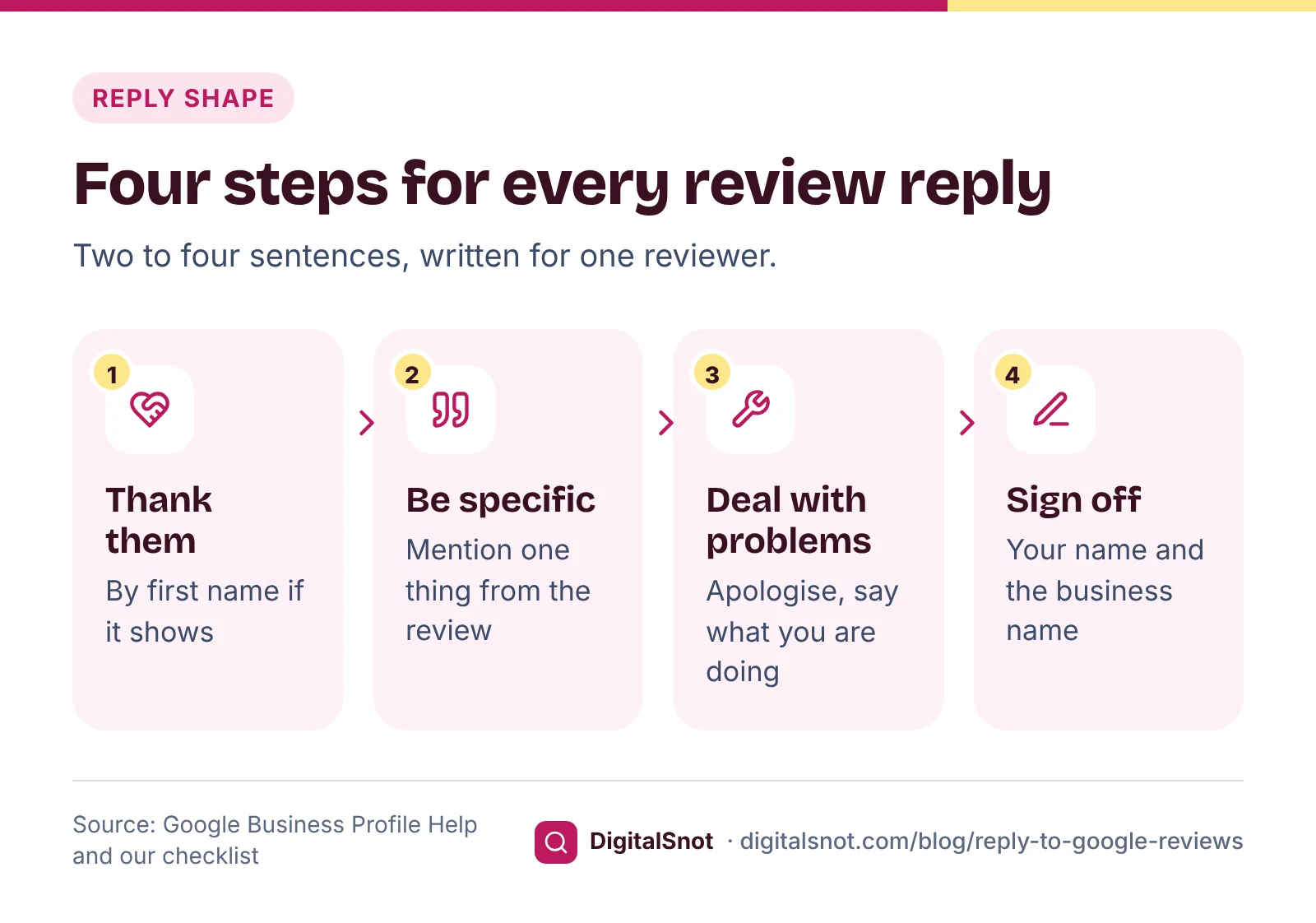
Most good replies follow the same four steps, in two to four sentences:
- Thank them, by first name if their profile shows one.
- Mention one specific thing from their review, so it reads as written for them.
- Deal with any problem: apologise for their experience, say what you are doing about it, and invite them to call the number on your profile.
- Sign off with a name, such as "Ritu, Kurti Corner".
Examples for a made-up shop: Kurti Corner, Jaipur
A happy 5-star review
Review: "Lovely cotton kurtis, and the staff helped me find my size quickly. Will come back before Diwali."
Reply: "Thank you, Neha. We're glad Pooja could find your size so quickly. See you before Diwali. Ritu, Kurti Corner"
Many customers in India review in Hinglish or Hindi, and it is fine to reply the same way: "Thank you Neha ji, Pooja ko aapki madad karke achha laga. Diwali se pehle milte hain. Ritu, Kurti Corner"
A mixed 3-star review
Review: "Good designs, but the trial room queue on Saturday was very long."
Reply: "Thank you for the honest feedback, Arjun. We're sorry about the wait on Saturday. We have opened a second trial room at weekends from this month. Ritu, Kurti Corner"
Say what changed only if it really did. A promise you do not keep is worse than no promise.
An angry 1-star review
Review: "Worst service. Gave a kurta set for alteration, got it back late with uneven sleeves, and the staff were rude when I complained."
Reply: "Arti, we're sorry. A late alteration with uneven sleeves is not the standard we aim for, and you should have been listened to when you raised it. Please call the number on this profile and ask for me, so we can look at the set together and put it right. Ritu, Kurti Corner"
Notice what is missing: no argument about who said what, no order details and no offer tied to the review. You can fix the sleeves, but never make a refund or discount depend on the customer changing or removing the review. Google's prohibited and restricted content policy treats that as an incentive.
A review you think is fake
Review: "Terrible quality, colours ran after one wash. Never buying again." The name matches no bill, no exchange request and no visit you can trace.
Check your records first. If you still cannot find the person, reply calmly without accusing anyone:
Reply: "We take quality seriously and we're sorry to read this. We could not find this purchase in our records, so please call the number on this profile with your bill details and we will look into it straight away. Ritu, Kurti Corner"
Future customers see a business that answers complaints, not one that fights with reviewers. If the review breaks a policy, report it as well; the next section explains when that applies.
Clinics, lawyers and advisers: never confirm someone is a client
Google asks you not to share private or confidential information in replies. For a clinic, law firm or financial adviser, the reply itself can do exactly that. "Glad your root canal went well, see you on Monday" tells everyone that this person is a patient, what treatment they had and when they will be back.
Our advice is to reply as if you cannot confirm the person was ever a client, even when they say so themselves. Take Smile Studio Dental in Kothrud, Pune, a made-up clinic, and this 1-star review: "Waited 40 minutes past my appointment and the dentist rushed my treatment."
Risky reply: "Mr Kulkarni, your appointment was delayed because the patient before you needed an extraction, and your filling was done correctly." It confirms he is a patient, names his treatment and discusses someone else's care.

Safer reply: "Thank you for your feedback. We're sorry to hear about this experience. We aim to see everyone on time and to explain every step. Please call the clinic on the number on this profile and ask for the practice manager, so we can understand what happened. Smile Studio Dental"
Our Google Review Reply Templates have a privacy mode for clinics, lawyers and advisers that leaves out such details. Check your own professional body's rules on confidentiality too.
When to report a review instead
Google removes reviews that break its policies, not reviews that are simply negative or feel unfair. The prohibited and restricted content policy covers content such as spam, off-topic reviews, conflicts of interest, harassment and hate speech, and Google's fake engagement policy covers reviews that do not reflect a genuine experience.
Google's page on reporting inappropriate reviews explains the steps: report from your Business Profile or the Reviews Management Tool, where you can follow its status. A check usually takes several days, and if Google finds no violation, you can appeal once. If someone threatens bad reviews unless you pay, do not pay: Google has a separate page on reporting negative review extortion scams.
You can reply and report at the same time. A calm reply protects you while the report is checked. Our guide on removing fake Google reviews covers the process in detail.

What not to do
- Argue or accuse in public. Even when you are right, readers remember the tone.
- Share details. No names beyond a first name, no bills, dates, order numbers or treatment.
- Trade for the review. No refund, discount or gift in return for changing or removing it.
- Paste the same reply everywhere. Identical replies read as if no one read the review.
- Advertise. Google asks you not to put deals or promotions in replies.
- Bury a bad review. Asking staff or friends to post good reviews breaks the conflict of interest and fake engagement rules.

A weekly reply routine with our tools
Set aside 20 minutes once a week. Copy your new reviews from your Business Profile and paste them into the Google Review Inbox. It shows your count, average rating and monthly trend, the themes customers mention (such as staff, price and waiting time) and a reply-first list with 1 and 2 star reviews and mentions of safety, refunds or legal action at the top (our order, not Google's). Each review gets a suggested reply in English, Hinglish or Hindi, and reviews that may break a policy are flagged for you to look at again. It runs in your browser and hides phone numbers and email addresses.
For a single review, open the Review Reply Templates, pick the star rating and what the review is about, or paste the review, and choose from a short, a standard and a personal reply. They are written templates, not AI, so edit them to mention something specific before you copy them into your profile.
"Call the number on this profile" only works if that number is right everywhere, so check it with our post on keeping your name, address and phone the same online. To see what each new review does to your average, use the Google Rating Calculator and read how many 5-star reviews you need to raise your rating.
Your next step
Open your reviews today and reply to every one from the last month that has no answer, starting with the lowest ratings. Then make it a weekly habit. If you would like help with reviews, replies and your profile as a whole, see our local SEO service or get in touch.
Free tools in this article
- Google Review Reply Templates Replies to good and bad Google reviews in English, Hinglish and Hindi, by rating and topic.
- Google Review Inbox Paste your Google reviews to see themes, what to answer first, suggested replies and possible policy breaks.
- Google Rating Calculator How many 5-star reviews you need to reach a target Google rating, and what one bad review does.
By the numbers
- of consumers are likely to use a business that responds to all of its reviews (BrightLocal 2026, 1,002 US adults)
- 80%
- Source: BrightLocal
- of consumers expect a business to respond to their review within a week (BrightLocal 2026, US)
- 81%
- Source: BrightLocal
Frequently asked questions
Should I reply to every Google review?
Replying to as many reviews as you can is a good habit. BrightLocal's 2026 US survey found 80% of consumers are likely to use a business that responds to all of its reviews. Keep replies short, polite and specific, avoid copy-and-paste responses, and leave out promotions or private customer details.
How long does it take for my reply to a Google review to appear?
Google checks replies against its content policies before they appear. It says this usually takes up to 10 minutes but can take up to 30 days. If a reply is not approved, you are asked to edit it. The reviewer is notified once you reply.
How should I reply to a negative Google review?
Wait until you are calm. Thank the reviewer, apologise for their experience without arguing, say what you are doing about it, and invite them to call the number on your profile so you can sort it out privately. Keep it short, and leave out order details and any offer tied to the review.
Can I offer a refund if the customer removes their bad review?
No. Google's policy does not allow offering payment, discounts, free goods or services in exchange for changing or removing a negative review. You can still fix the customer's problem, as long as the fix does not depend on what they do with the review.
What should a clinic avoid in replies to Google reviews?
Anything that confirms the reviewer is a patient: names, treatments, appointment dates or results. Google asks businesses not to share private or confidential information in replies. Thank the reviewer, apologise where needed and invite them to call the clinic, without any details of their care.
How do I get a fake Google review removed?
You cannot delete reviews yourself. If a review breaks Google's policies, for example fake engagement or a conflict of interest, report it from your Business Profile or the Reviews Management Tool. A check usually takes several days, and if no violation is found you can appeal once.
Sources
Every figure and claim in this article comes from the sources below. We checked each one when writing and link to the original so you can read it yourself. Credit belongs to the authors and publishers listed. How we write and check our articles.
-
1
Manage customer reviews
Google Business Profile Help · Verify first; replies under the business name; reviewer notified; checks up to 30 days; clear, polite, short, no promotions or private information.
-
2
Read & reply to reviews
Google Business Profile Help · Steps to reply from Read reviews on a verified profile.
-
3
Prohibited & restricted content
Maps User Generated Content Policy Help · Incentives for changing or removing reviews, spam, off-topic, conflicts of interest, harassment and hate speech.
-
4
Fake engagement
Maps User Generated Content Policy Help · Content that does not reflect a genuine experience is removed.
-
5
Report inappropriate reviews on your Business Profile
Google Business Profile Help · Report routes, Reviews Management Tool statuses, several days to check, one-time appeal.
-
6
Report negative review extortion scams on your Business Profile
Google Business Profile Help · Do not pay; how to report threats of negative reviews.
-
7
Local Consumer Review Survey 2026
BrightLocal · 1,002 US adults: 80% likely to use a business that responds to all reviews; 81% expect a reply within a week.