Business address consistency: the same name, address and phone everywhere
List every place your business details appear, compare name, address and phone word by word, fix them in the right order, and clear out old addresses after a move.

On this page (9 sections)
A customer finds your number on Justdial, calls, and reaches a line you closed two years ago. Another follows the address on your Facebook Page to a shop you left after a move. Neither complains. They simply go to someone else. A NAP consistency check, which tests business address consistency by comparing your name, address and phone wherever they appear, finds these gaps before customers do.
This post shows you how to list every place your business details appear, compare them word by word, fix them in the right order, and clean up properly after a move.
Why matching details matter
The first reason is plain: customers act on what they read. A wrong phone number or an old address costs you the visit, whichever site it came from.
The second is that Google gathers business details from many places. Google's page on how it sources information for Business Profiles says profile information is compiled from a variety of sources, including content on the web, licensed data from third parties and contributions from users. Its page on Google updates to your profile adds that when someone suggests an edit, you may have 4 days to accept or reject it, and that Google may publish a change other public sources support if you do not respond. So an old address left on a directory is not harmless. It is one more source saying something different from your profile.
AI assistants work in a similar way: they build answers from the pages and listings they read, so an old listing can be repeated back to a customer. Our guide to entity SEO covers that side.
A word on terms. People in SEO call this "NAP consistency", for name, address and phone. It is an industry term, not Google's. Google does not publish a rule that every directory must match your Business Profile, and its page on local ranking says local results are based mainly on relevance, distance and prominence. Keeping every listing the same is our checklist: it removes contradictions, but it is not a ranking promise.
Start with what Google asks of your profile
Your Google Business Profile is usually the main version that everything else copies, so get it right first. Google's guidelines for representing your business ask for:
- Your real-world name. The name as used consistently on your storefront, website and stationery, and as known to customers, with no added keywords, locations, phone numbers or taglines. "Smile Studio Dental" is fine; "Smile Studio Dental - Best Dentist in Kothrud" is not, and Google says adding such details can lead to suspension.
- An accurate, precise address. Add cross-streets or landmarks only where the official street address does not pinpoint the business, which is common in India.
- A phone number for that location. Google asks for a number that reaches the business as directly as possible, rather than a central call-centre helpline.
If you go to customers rather than serving them at your address, as a plumber or home tutor does, Google's page on service areas says to set service areas instead: up to 20, by city, postal code or area, with the overall area no more than about 2 hours' drive from where you are based. Then keep your home address off directories too, and make the name, phone and areas served match instead.
Step 1: list every place your details appear
Before you compare anything, make a list. For most Indian local businesses it includes your website, Google Business Profile, Bing Places, Apple Business, Justdial, a Facebook Page and an Instagram professional account, plus the sites that fit your trade, such as Practo for clinics or IndiaMART for suppliers.
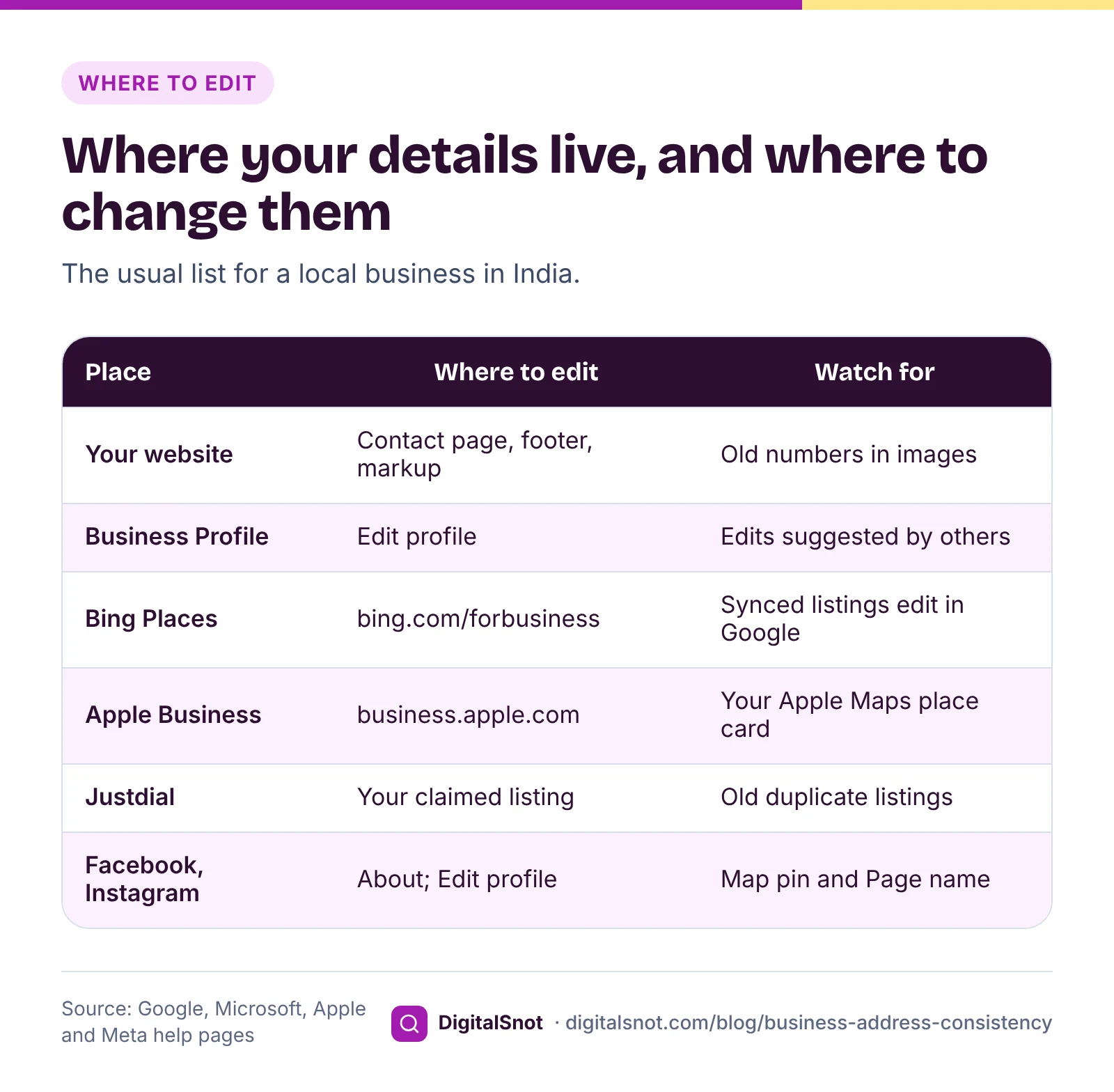
A few notes from the platforms' own help pages:
- Bing Places. Microsoft's help on syncing your Google Business Profile says imported listings typically take 7 to 12 days to publish, and that a listing synced from Google is edited in Google, not in Bing.
- Apple Business. Apple Business replaced Apple Business Connect on 14 April 2026, and Apple said existing place card details would move across automatically. Check your place card there if you claimed it under the old name.
- Facebook. The help page on adding or editing a Page's address asks you to drag the map pin to the right spot, and says the change also updates the location on a linked Instagram account.
- Instagram. Business contact details sit under Edit profile, then Public business information.
Keep the list in our Local Citation Tracker. Pick your business type and it suggests the places a business like yours is often listed. For each one you mark the status, save the link and note whether the name, address and phone match. It saves in your browser and downloads as a CSV; it never visits the sites or signs in for you.
Step 2: compare them word by word
Open each listing and copy the name, address and phone exactly as shown, typos and all. Then paste them into our NAP Consistency Checker, one row per listing, and tick your main version, usually the Business Profile.
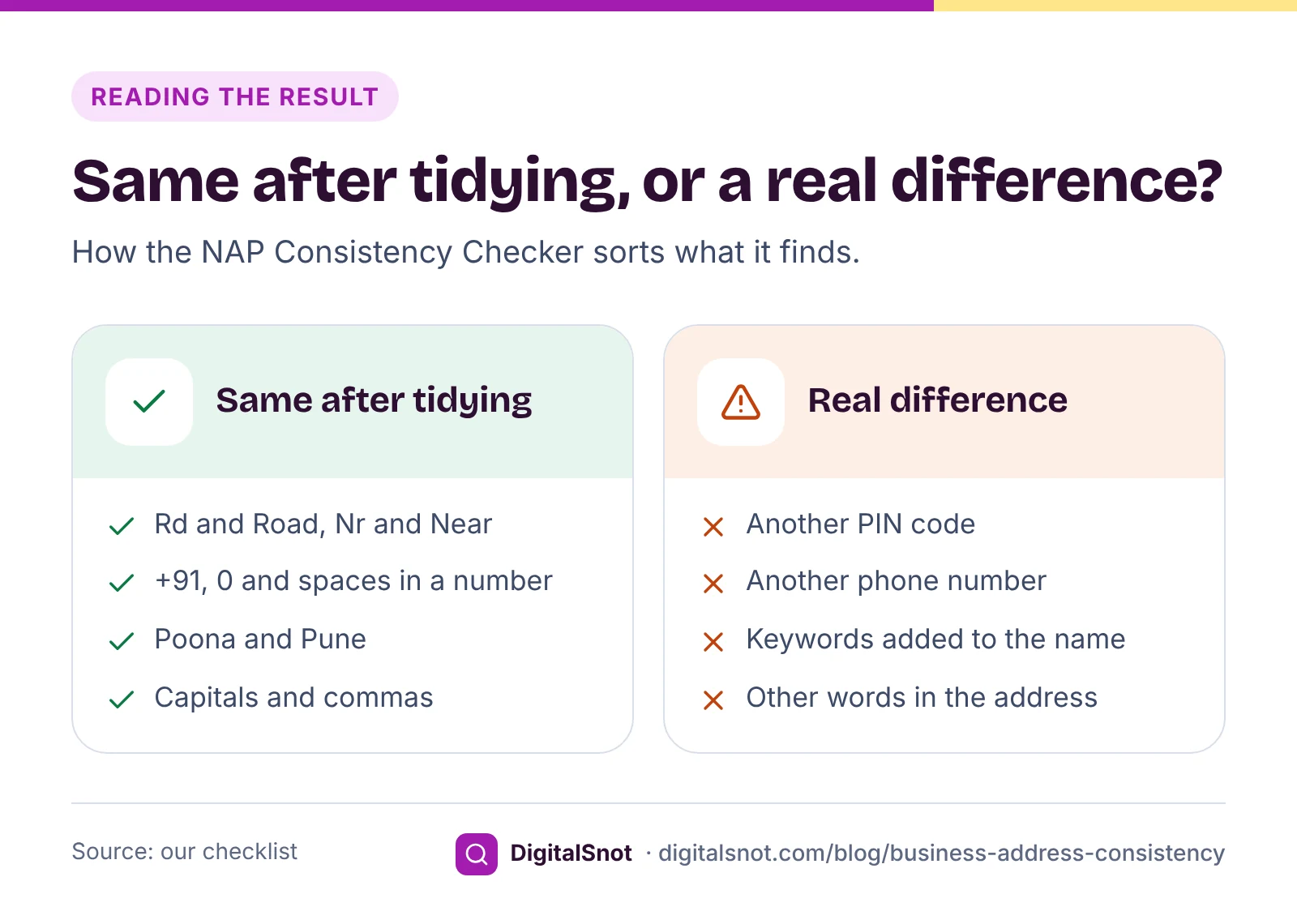
The checker tidies each field before comparing, so harmless differences do not hide real ones. It writes out short forms such as Rd, Nr and Opp, ignores capitals and punctuation, compares the six-digit PIN code on its own, and compares phone numbers by their last 10 digits, so +91, a leading 0 and spaces do not count. It then shows, field by field, which listings differ, with a consistency score (our measure, not Google's) and a fix list in order.
Here is how that looks for Smile Studio Dental, a made-up clinic whose address on Google is "Shop 4, Lotus Plaza, Karve Road, Near Kothrud Bus Depot, Kothrud, Pune 411038":
- Website footer: "Shop No. 4, Lotus Plaza, Karve Rd, Nr Kothrud Bus Depot" and "098765 43210". Same after tidying.
- Instagram: "Kothrud, Poona 411038". Same after tidying, because the checker knows old city names such as Poona and Bombay.
- Justdial: phone "98765 12345", an old number. A real difference.
- Practo: PIN code 411029. A real difference, and the kind that sends a patient to the wrong part of the city.
- Facebook: name "Smile Studio Dental - Best Dentist in Kothrud". A real difference, and a name Google would not accept on the Business Profile.
Step 3: fix in the right order
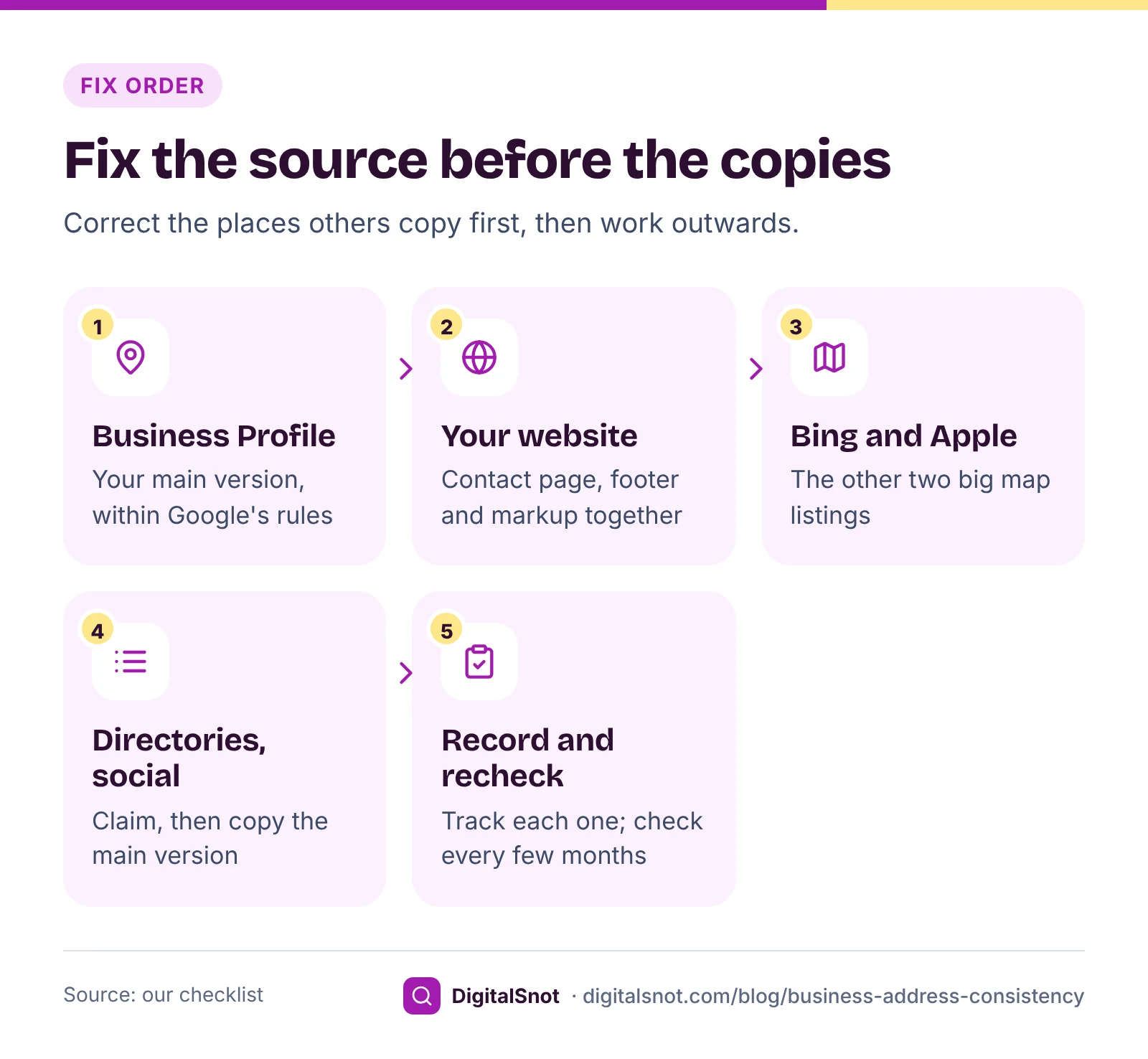
Fix the places that others copy before the places that copy them:
- Your main version. Correct the Business Profile first, within Google's guidelines.
- Your website. You control it fully, and web content is one of the sources Google reads. Update the contact page, the footer and any LocalBusiness markup together.
- Bing Places and Apple Business. The other two big map listings, and both are free.
- Directories and social profiles. Justdial, Practo, IndiaMART, Facebook, Instagram and the rest. If someone else created a listing, claim it before you edit it.
- Record and recheck. Mark each one live and matching in the tracker, and check again every few months.
Before you sign off, go through the profile itself with our Google Business Profile Audit Checklist. It checks your name and description against Google's rules as you type, then walks through address, service areas, hours, photos, posts and reviews item by item.
After a move: clearing out old addresses
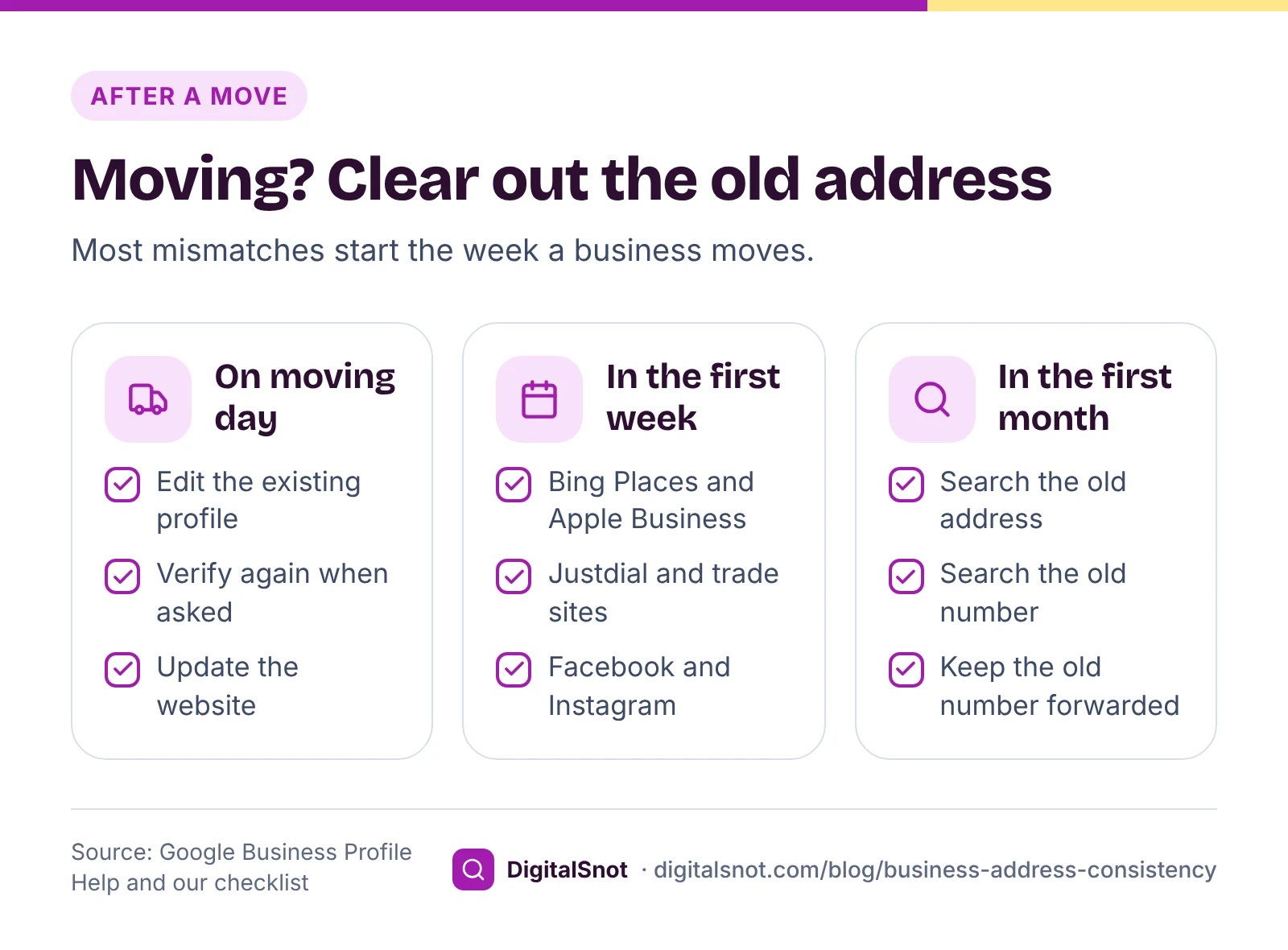
A move is when most mismatches start, because the new address goes on the profile and the old one stays everywhere else. Work through it in this order:
- Edit the existing Business Profile; do not create a new one. Google's help on moving reviews across profiles advises against a new profile after a change of location, and says that if you move and keep the same business name, your reviews move with you, though not always for places such as hotels. Its page on editing your profile says a verified business that moves must verify again.
- Change your website the same day: contact page, footer, markup, map embed and any PDF menus or price lists.
- Update every listing on your tracker, starting with the ones customers use most.
- Hunt for the ones you forgot. Search your old address and old phone number in quotes. Old directory pages, supplier lists and news stories often turn up.
- Keep the old number working for a while, forwarded to the new one, so calls from listings you have not fixed yet still reach you.
If a second profile already exists for your old address, Google's page on duplicate profiles explains how to resolve it, so you do not end up with two profiles showing different addresses.
Mistakes to avoid
- Adding the area or a keyword to your name on one site but not another.
- Using a different phone number on each platform, so no two listings match.
- Using a landmark on some listings and not others. Pick one and use it everywhere.
- Letting a staff member's mobile number become the business number on a directory.
- Fixing the website text but leaving the old details in image banners and PDFs.
Your next step
Set aside an hour this week. List your places in the Local Citation Tracker, paste each listing into the NAP Consistency Checker, and fix what it flags, main version first. Once your details match, turn to reviews: read how many 5-star reviews you need to raise your Google rating. For which listings still matter, see our local citations guide. If you would rather hand the clean-up over, see our local SEO service or start with a free SEO audit.
Free tools in this article
- Local Citation Tracker Track your listings on Google, Bing, Apple, Justdial and more, with status, links and a to-do list.
- NAP Consistency Checker Compare your name, address and phone across Google, your website and directories, and fix what differs.
- Google Business Profile Audit Checklist Go through your Business Profile item by item, and check your name and description against Google's rules.
Frequently asked questions
What is NAP consistency?
NAP stands for name, address and phone number. Consistency means every place your business is listed, from your Google Business Profile and website to Justdial, Facebook and Practo, shows the same details. It is an industry term, not Google's, and keeping every listing the same is our checklist rather than a Google rule.
Does Google require my other listings to match my Business Profile?
Google does not publish such a rule. It says profile information is compiled from web content, licensed third-party data and user contributions, and that it may publish a suggested edit other public sources support if you do not respond within 4 days. Matching listings keep those sources from contradicting you.
Can I add my area or keywords to my business name on Google?
No, unless they are part of your real-world name as used on your storefront, website and stationery. Google's guidelines do not allow added keywords, locations, phone numbers or taglines, and say doing so can lead to suspension. Use the same plain name on every other listing too.
Should my address include a landmark?
Google says to add cross-streets or landmarks only where the official street address does not pinpoint the business, which is common in India. If you use one, use the same landmark on every listing, so customers and the sites that copy your details see one version.
I have moved. Should I create a new Google Business Profile?
No. Edit the address on your existing profile. Google says a verified business that moves must verify again, and that if you keep the same business name your reviews move with you, though not always for places such as hotels. Then update your website and every other listing.
How long does Bing Places take to show a listing imported from Google?
Microsoft's help says imported listings typically take 7 to 12 days to publish. A listing synced from Google is edited in Google, not in Bing, so correct your Business Profile first and check the Bing listing once it is live.
Sources
Every figure and claim in this article comes from the sources below. We checked each one when writing and link to the original so you can read it yourself. Credit belongs to the authors and publishers listed. How we write and check our articles.
-
1
Understand how Google sources & uses info in Business Profiles & local search results
Google Business Profile Help · Profile information is compiled from web content, licensed third-party data and user contributions.
-
2
Understand Google updates on your Business Profile
Google Business Profile Help · 4 days to accept or reject suggested edits; Google may publish changes other sources support.
-
3
Tips to improve your local ranking on Google
Google Business Profile Help · Local results are based mainly on relevance, distance and prominence.
-
4
Guidelines for representing your business on Google
Google Business Profile Help · Real-world name used consistently, no keywords or locations, precise address, landmarks only where needed.
-
5
Manage your service areas for service-area & hybrid businesses
Google Business Profile Help · Up to 20 service areas, no more than about 2 hours' drive from your base.
-
6
Sync your Google Business Profile
Bing Places for Business Help · Import from Google, 7 to 12 days to publish, synced listings edited in Google.
-
7
Introducing Apple Business: a new all-in-one platform for businesses of all sizes
Apple Newsroom · Apple Business from 14 April 2026 replaces Apple Business Connect; existing data moves across.
-
8
Add or edit an address for your Facebook Page
Facebook Help Center · Drag the map pin to the right spot; the change also updates a linked Instagram location.
-
9
How to edit your business information on Instagram
Instagram Help Center · Edit profile, then Public business information, for business contact details.
-
10
Move your reviews across Business Profiles
Google Business Profile Help · Do not create a new profile after a move; reviews move when the name stays the same.
-
11
Edit your Business Profile
Google Business Profile Help · A verified business that moves to a new address must verify again.
-
12
Resolve duplicate profiles & ownership issues
Google Business Profile Help · How to deal with duplicate profiles, including after a move.