Google Business Profile suspended? What to check before you ask for reinstatement
Work out which restriction you have, find the cause Google is pointing at, fix it, gather matching documents and send one complete appeal through the appeals tool.
On this page (9 sections)
The email says your Business Profile has been suspended, or customers tell you they cannot find you on Maps any more. With your Google Business Profile suspended, the first reaction is to click the appeal button at once. Wait. An appeal for a profile that still breaks Google's rules gives Google nothing new to approve.
This post shows you how to work out which restriction you have, find the cause, fix it, gather the right documents and send one complete appeal.
First, work out what kind of restriction you have
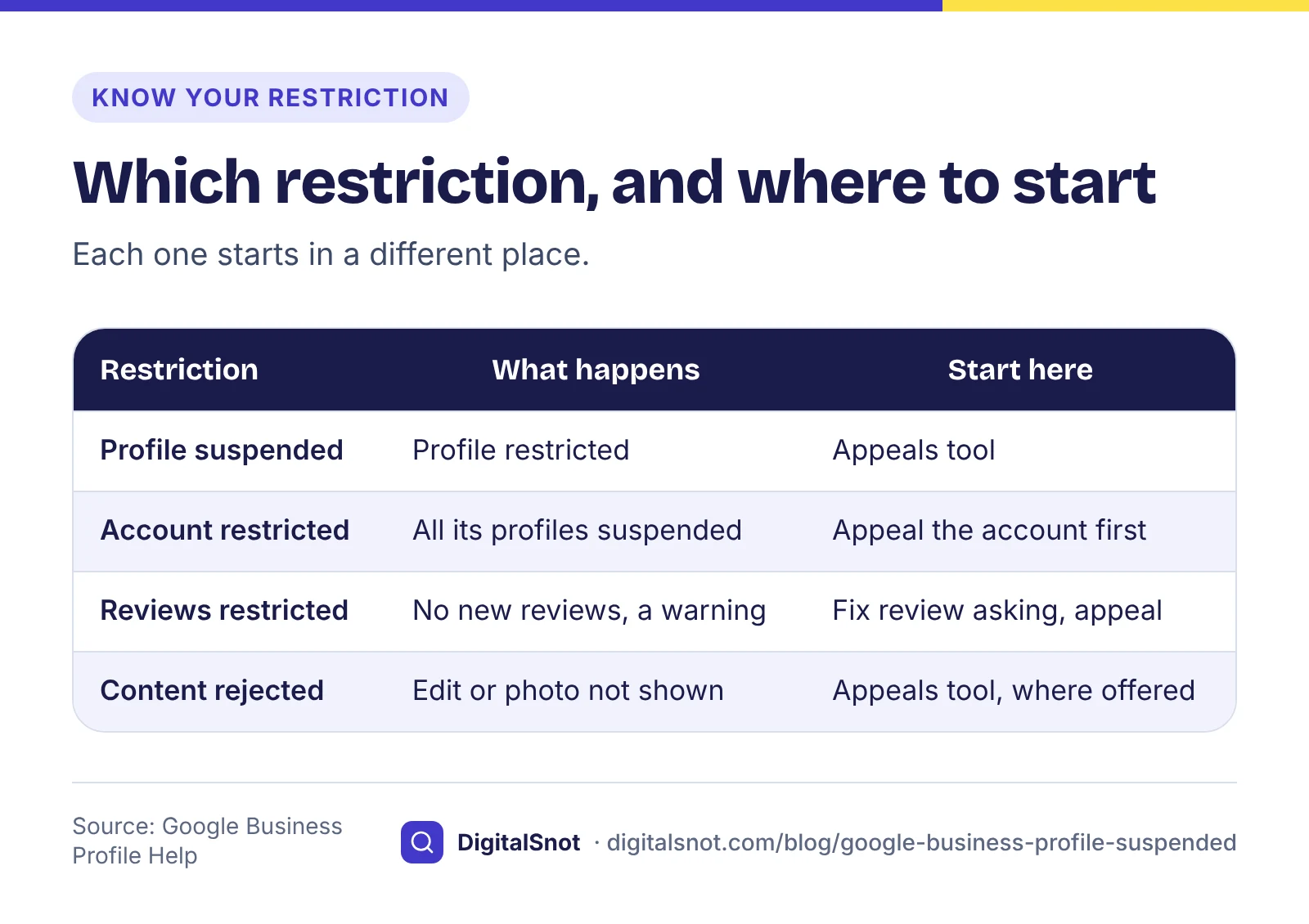
Google uses a few different words, and each one starts in a different place:
- Profile suspended or disabled. Google's page on fixing suspended or disabled profiles says it may suspend or disable profiles that do not follow its guidelines, and that you can appeal if you believe the profile should be reinstated.
- Google Account restricted. The same page says that when the account itself is restricted, every profile it manages is suspended and you cannot create or claim other profiles. Appeal the account first, as that page explains, then the profiles.
- Reviews restricted. Google's page on Business Profile restrictions says a profile found breaking its fake engagement policy can be stopped from getting new reviews for a set period, have existing reviews unpublished, and show customers a warning that fake reviews were removed. Google says it emails the owner, and the decision can be appealed.
- An edit or photo rejected. Google's page on appealing profile restrictions says some content decisions, including rejected content, can be appealed too, and that a restricted account or profile must be reinstated before you can appeal content decisions.
Open the appeals tool before anything else. Google says it shows the restricted profile, the reason for the decision and a link to the policy involved. That link is your starting point.
The common causes for Indian businesses
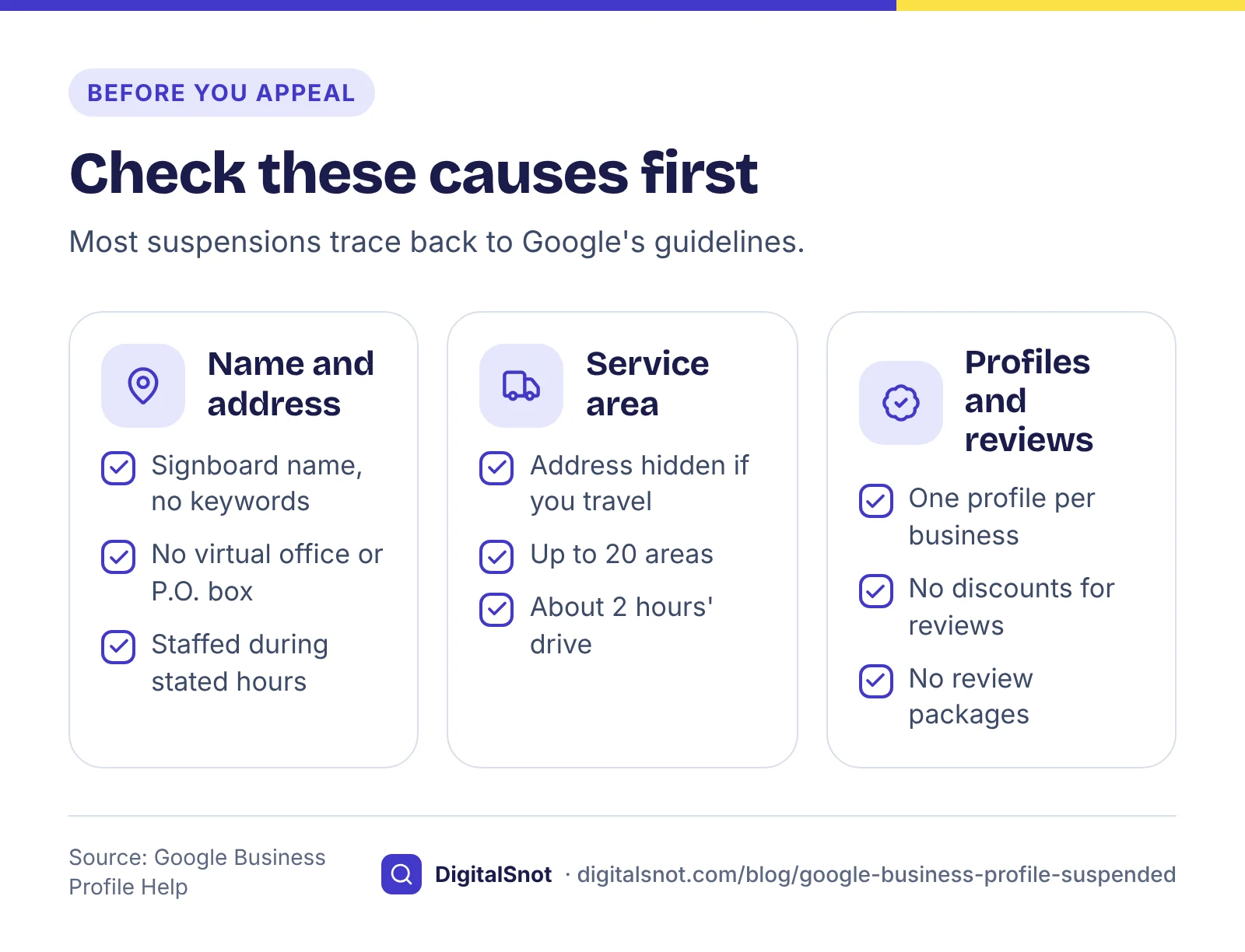
Most suspensions trace back to Google's guidelines for representing your business. Check these causes one by one:
A name with keywords added
Your profile name must be your real-world name, as used on your signboard, website and stationery. Google says adding unnecessary information, such as service or location details, is not permitted and could lead to suspension. "Nirmal Packers and Movers" is fine. "Nirmal Packers and Movers Thane - Best Packers Movers Mumbai" is not, unless that is genuinely what your signboard says.
A virtual office or an address nobody works at
Google says a rented mailing address that you do not operate from, a virtual office, is not eligible for a profile, and a P.O. box is not acceptable. An office in a co-working space needs clear signage, customers received there and your own staff present during business hours. If you took a virtual office for your GST registration, that address does not belong on your Business Profile.
A service-area business showing its address
Plumbers, movers, home tutors and caterers usually go to the customer. Google's page on service areas says that if you do not serve customers at your address, you should remove it from the profile and set service areas instead: up to 20, by city, postal code or area, with the overall area no more than about 2 hours' drive from your base. Google also says a business without permanent signage at its location is not eligible to show as a storefront.
Duplicate profiles
Google's page on duplicate profiles says you can have only one profile for each business, and that several profiles for the same business are against its policies. Do not create separate profiles for each service or each area you cover. After a move, edit the address on the existing profile instead of making a new one.
Not eligible at all
The guidelines say a business must make in-person contact with customers during its stated hours. An online-only shop with no place customers can visit, and no visits to customers, does not qualify.
Rewarded reviews
Google's prohibited content policy does not allow offering payment, discounts or free goods for reviews, asking only happy customers, or pressuring customers at your premises. Buying a "review package" breaks this policy and can lead to the review restrictions described above. Our post on getting more Google reviews without breaking the rules shows what you can do instead.
Fix the cause first
Go through the profile with our Google Business Profile Audit Checklist. Type your business name and description, and it checks them against Google's rules as you type, flagging added keywords, areas, phone numbers and words such as "best". Its last group, rules to avoid suspension, covers eligibility, duplicate profiles, closures and the appeal path, and each item says where its rule comes from. It does not sign in to Google or see your profile, so you tick each item yourself.
Then make the name, address and phone match everywhere that counts. Copy them from your profile, website, GST certificate, licence and main listings into our NAP Consistency Checker, tick the profile as the main version, and it shows field by field what differs: another PIN code, another phone number or extra words in the name. Google asks for documents whose name and address match the profile, so a mismatch you could have caught weakens your appeal. Our post on keeping your business details the same everywhere covers the wider clean-up.
Here is a made-up example. Nirmal Packers and Movers in Thane had "Best Packers Movers Mumbai" in its profile name, showed the address of a virtual office in Vashi, and had a second profile called "Nirmal Movers Navi Mumbai". The fix: rename the profile to the signboard name, change the address to the staffed Thane office and hide it, because the team goes to customers, set service areas for Thane, Navi Mumbai and nearby areas, and remove the second profile.
The evidence to gather
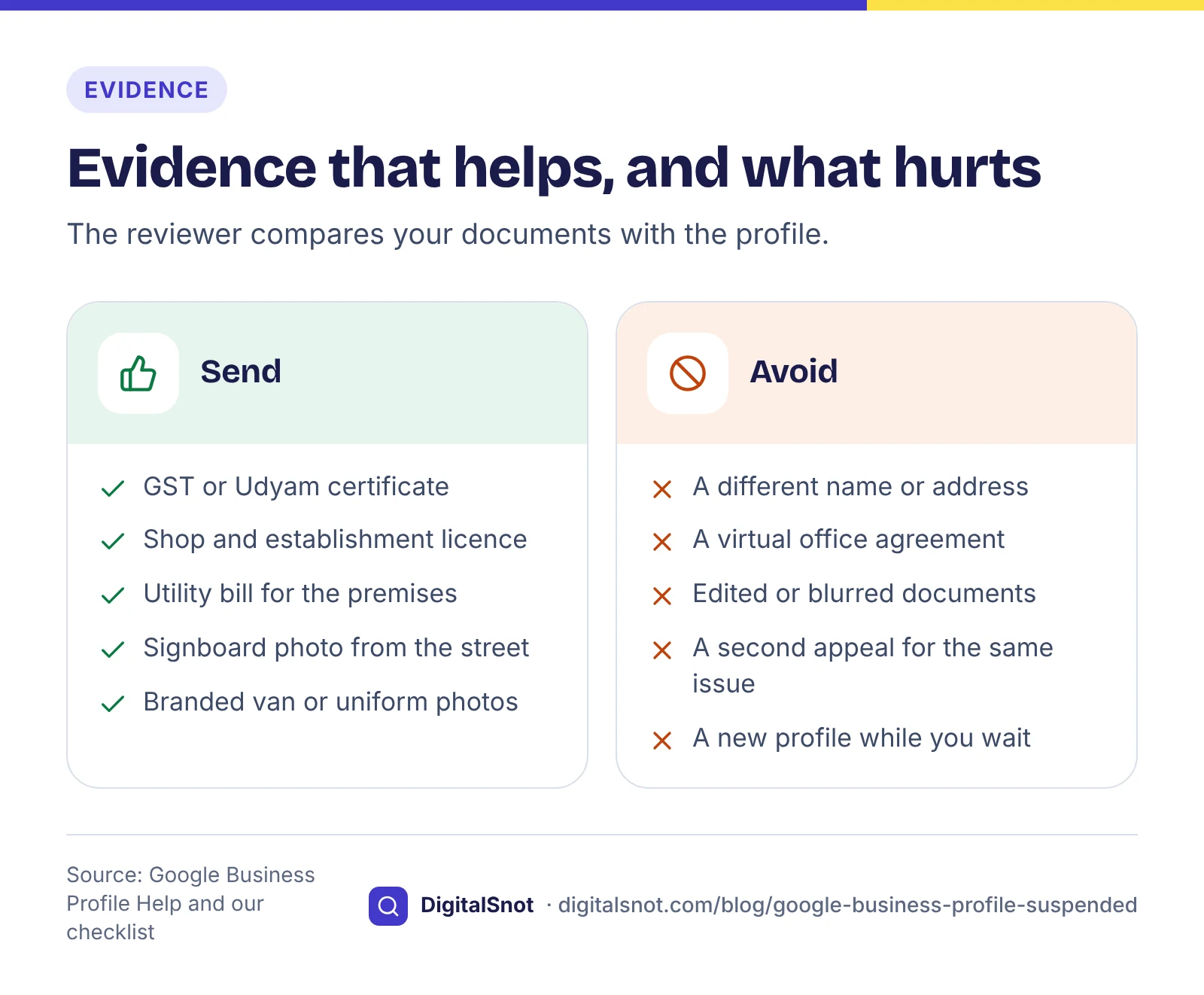
Google's suspension page lists the kinds of evidence that help an appeal: an official business registration, a business licence, tax certificates and utility bills, with the business name and address matching the profile. For an Indian business, that can mean:
- your GST registration certificate or Udyam registration certificate;
- a shop and establishment registration or trade licence;
- an electricity or landline bill for the premises in the business name;
- photos of your permanent signboard, and of the entrance from the street;
- for a service-area business, photos of branded vehicles, uniforms or equipment.
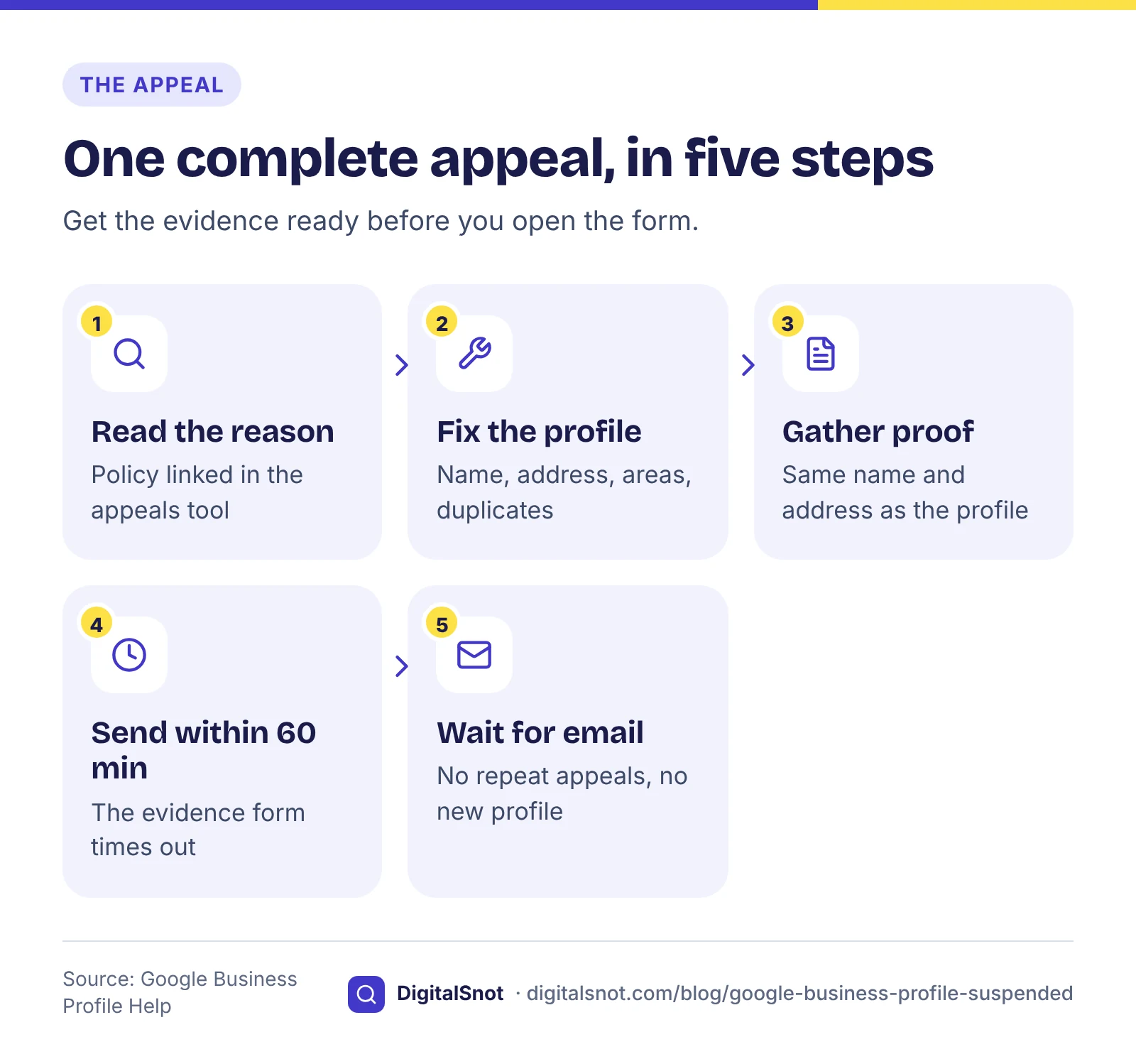
Gather all of it before you open the appeal. Google says that once you open the evidence form, you have 60 minutes to submit it, or the evidence is not attached. Name the files clearly and check every document shows the same name and address as the profile.
Sending the appeal
- Open the appeals tool and choose the restricted profile.
- Read the reason and the policy linked to it, and check your fix covers it.
- Where the tool asks for details, say briefly and factually what was wrong and what you changed.
- Upload the evidence within the 60 minutes.
- Wait for Google's email. The appeals page says a decision can take up to 5 business days, and you can see the status in the same tool.
Google advises against sending more than one appeal for the same issue while the first is open, because repeats only slow things down. Make the first appeal complete.
While you wait, and after the decision
- Do not create a new profile. It is a duplicate of the business, and duplicates are against Google's policies.
- Keep customers reaching you. Make sure your website, WhatsApp number and other listings show the right details, so people searching for you by name still find a way to call.
- If the answer is yes, check every field once the profile is back. Google's suspension page also links a form for problems that remain after reinstatement.
- If the answer is no, read the reason again. The cause is often one you did not fix, such as a second profile you forgot about or a document with an old address.
Mistakes to avoid
- Appealing before you have changed anything.
- Sending documents with a different name or address from the profile.
- Opening the evidence form before the files are ready.
- Filing a second and third appeal for the same issue.
- Making a fresh profile "just for now".
- Paying anyone who promises a reinstatement: only Google decides.
Your next step
Read the reason in the appeals tool, work through the audit checklist, compare your details in the NAP Consistency Checker, and gather your documents before you open the form. Once you are back, keep the profile healthy: our Google Business Profile optimisation guide covers every field, and why your competitor shows above you on Google Maps explains what to work on next. If you want help with the clean-up, see our local SEO service or contact us.
Free tools in this article
Frequently asked questions
Why was my Google Business Profile suspended?
Most suspensions come from breaking Google's representation guidelines: keywords in the name, a virtual office or unstaffed address, a service-area business showing its address, duplicate listings or many large edits at once. Fix the issue, collect documents that prove your name and address, then submit one complete appeal through Google's appeals tool. Avoid creating a new profile meanwhile.
What documents should I send with my appeal?
Google lists an official business registration, a business licence, tax certificates and utility bills, with the name and address matching the profile. In India that can be a GST or Udyam registration certificate, a shop and establishment registration and an electricity bill, plus photos of your permanent signboard.
How long do I have to upload evidence?
Google says that once you open the evidence form, you have 60 minutes to submit it, or it will not be attached to your appeal. Gather and check every document before you open the form.
How long does a Business Profile appeal take?
Google's appeals page says a decision can take up to 5 business days, and you can check the status in the appeals tool. Google advises against sending more than one appeal for the same issue, because repeats slow things down.
Can I create a new profile while my profile is suspended?
No. Google allows only one profile for each business, and several profiles for the same business are against its policies. A new profile is a duplicate and can make the situation worse. Fix the cause and appeal the existing profile instead.
Can I use a virtual office address on my Business Profile?
No. Google says a rented mailing address that you do not operate from is not eligible for a Business Profile. An office in a co-working space needs clear signage, customers received there and your own staff present during business hours.
Sources
Every figure and claim in this article comes from the sources below. We checked each one when writing and link to the original so you can read it yourself. Credit belongs to the authors and publishers listed. How we write and check our articles.
-
1
Fix suspended or disabled profiles
Google Business Profile Help · Suspended or disabled profiles; account restrictions; evidence types with matching name and address; 60 minutes to submit evidence; form for problems after reinstatement.
-
2
Appeal Business Profile content & profile restrictions
Google Business Profile Help · Appeals tool with reason and policy; up to 5 business days; no repeat appeals; content decisions appealable once the profile is reinstated.
-
3
Business Profile restrictions for policy violations
Google Business Profile Help · Fake engagement restrictions: new reviews blocked, reviews unpublished, a warning to customers; email notice and appeal.
-
4
Guidelines for representing your business on Google
Google Business Profile Help · Real-world name; virtual office, P.O. box and co-working rules; in-person contact during stated hours.
-
5
Manage your service areas for service-area & hybrid businesses
Google Business Profile Help · Remove the address if customers are not served there; up to 20 areas; about 2 hours' drive; signage for storefronts.
-
6
Resolve duplicate profiles & ownership issues
Google Business Profile Help · One profile per business; no separate profiles for services; edit the address after a move.
-
7
Prohibited & restricted content
Maps User Generated Content Policy Help · No incentives, selective asking or pressure at the premises for reviews.