Why your competitor ranks higher than you on Google Maps
See what Google says decides the order on Maps, which parts you can change, what never helps, and how to compare your profile with a competitor fairly.
On this page (10 sections)
- 1What Google says decides the order
- 2Distance: the part you cannot change
- 3Relevance: categories, services and details
- 4Prominence: reviews, links and your website
- 5What does not help, and what can cost you the profile
- 6How to compare fairly
- 7A 30-day plan
- 8Mistakes to avoid
- 9Your next step
- 10Sources
You search "opticians near me" from your own shop, and a competitor two lanes away shows first on Google Maps. Your shop has been there longer and your prices are fair. So why is it that this competitor ranks higher?
This post explains what Google says decides the order of local results, which parts you can change and which you cannot, what never helps, and how to compare your profile with a competitor's fairly, so you spend the next month on the gaps that matter.
What Google says decides the order
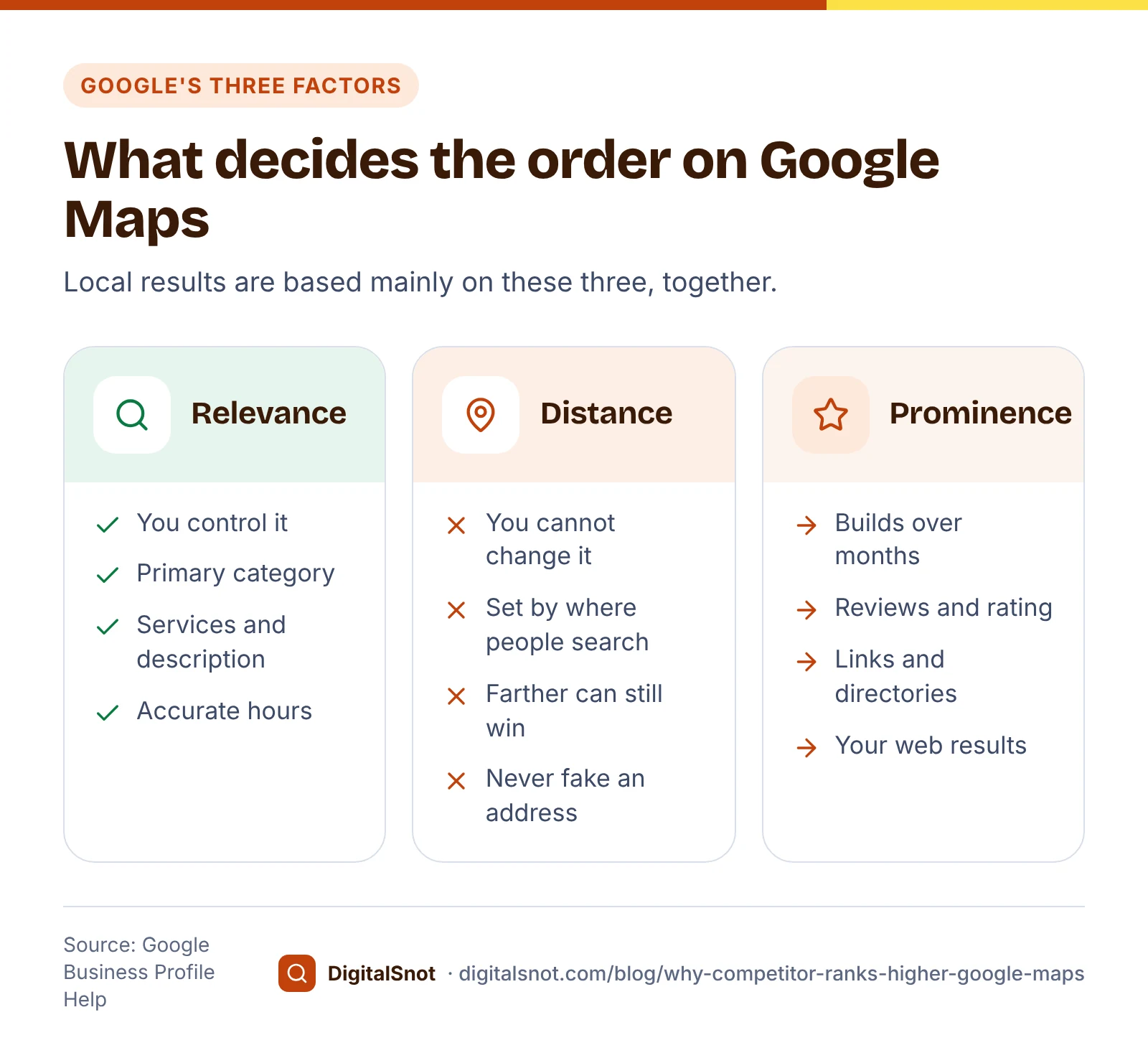
Google's Business Profile Help page on improving your local ranking says local results are based mainly on three things:
- Relevance: how well a profile matches what someone searched for. Google says complete, detailed business information helps it match your profile to the right searches.
- Distance: how far each business is from the location used in the search. If the person does not name a place, Google uses what it knows about where they are.
- Prominence: how well known a business is. Google says this draws on information from across the web, such as links, articles and directories, and that review count and review score are factors too. Your position in ordinary web results also counts, so normal SEO work applies.
The same page makes two more points worth reading twice. Google may rank a business that is farther away above a closer one if it looks more likely to have what the person wants. And there is no way to request or pay for a better local ranking. Anyone who promises a fixed top-three spot on Maps is promising something Google says it does not sell.
Distance: the part you cannot change
Distance explains more "why them?" moments than anything else. When you search from your shop, the business nearest your phone has an advantage you cannot copy. A customer searching from three kilometres away may see a different order.
So search the way a customer would before you worry: on a phone, from the area your customers come from, with the words they use. Ask a staff member or a friend who lives there to check for you. If the same competitor still shows above you from your customers' own area, distance is not the whole story.
Do not try to fix distance with a second address. Google's guidelines for representing your business say a virtual office you rent but do not work from is not eligible for a profile, and an office in a co-working space needs clear signage, customers received there and your own staff present during business hours. Google's page on duplicate profiles says you can have only one profile for each business, and that a duplicate will not show on Search or Maps.
Relevance: categories, services and details
Relevance is where most small businesses can gain quickly, because it depends on details you control.
- Primary category. Google's page on business categories says the categories you choose affect your local ranking. Pick a primary category that describes the business as a whole, as specifically as the list allows. Google's test is whether the category completes "this business is a", not "this business has a".
- Additional categories. Use as few as possible, and only ones that are true. Google does not want categories used as keywords or to describe features of the business.
- Services. Add each service you offer on your profile's services list, with a short description, so the profile names what people search for in plain words.
- Description. Google's page on editing your profile allows up to 750 characters, with no links. Say what you offer and who it is for, and keep offers and prices for posts.
- Hours. Google's ranking tips ask you to keep your hours accurate. Set regular hours, then special hours for festivals and holidays.
Look at the competitor's categories too, but treat them as ideas to check, not to copy. If they chose a category for eye tests and you only sell frames, that category is not true for you.
Prominence: reviews, links and your website
Prominence builds slowly, but it is the gap most owners notice first: the business above you often has many more reviews.
- Reviews. Google says more reviews and positive ratings can improve your local ranking. Ask every customer, not only the happy ones, using the review link from your profile.
- Replies. Google's tips suggest replying to the reviews customers leave, which shows you value their feedback. Read how to reply to happy, unhappy and fake reviewers for the wording.
- Photos. Google's tips also suggest adding photos that show your goods and services. Real photos of the shop front, the inside and your team help a first-time visitor too.
- Your website. Because web position counts, the page your profile links to matters. Run it through our Local Landing Page Checker. It reads the page once and checks LocalBusiness markup, a phone number people can tap to call, the address, opening hours, the area named in the title, heading and text, and a way to get in touch. The score is our checklist, not a Google measure.
- Mentions elsewhere. Links, articles and directory listings feed prominence. Keep those listings correct: our post on keeping your name, address and phone the same everywhere shows how.
What does not help, and what can cost you the profile
Some competitors sit above you for reasons you should not copy.
- Keywords in the name. "Nayan Opticals - Best Spectacles Shop Aliganj" breaks Google's guidelines. The name must be your real-world name as used on your signboard, website and stationery, and Google says adding unnecessary information, such as service or location details, could lead to suspension.
- Categories as keywords. Ten categories that stretch the truth do not make a profile more relevant. They make it less accurate.
- Bought or rewarded reviews. Google's prohibited content policy does not allow offering payment, discounts or free goods for reviews, or asking only happy customers. Its page on Business Profile restrictions says a profile caught doing this can be blocked from new reviews for a set period, have existing reviews unpublished and show customers a warning.
- Extra addresses and profiles. As above, a virtual office or a duplicate profile is not allowed, and a duplicate does not show.
If a competitor's name is stuffed with keywords, Google Maps Help on reporting a business points to the Business Redressal Complaint form for suspicious business names. Report it once, with the facts, then get back to your own gaps. The decision is Google's.

How to compare fairly
A fair comparison looks at the same searches, from the same place, row by row:
- Write down three searches your customers really use, such as "opticians in Aliganj" or "spectacles shop near me".
- Search on a phone from your customers' area, and note the three businesses that show most often.
- Open each profile, including yours, and note what you can see: primary category, rating, number of reviews, new reviews in the last 30 days, whether the owner replies, photos, posts, hours, website and booking links, and roughly how far each one is from where you searched.
- Type it all into our Local Competitor Comparison. You get a side-by-side table with the leader in each row, the gaps ranked by what you can change (our measure), how many 5-star reviews it would take to match or pass each rating, and a 30-day plan. It never reads Google Maps and works only from what you type, and your check stays in your browser for next month.
Here is how that looks for Nayan Opticals, a made-up shop in Aliganj, Lucknow, against a made-up rival that shows first for "opticians in Aliganj":
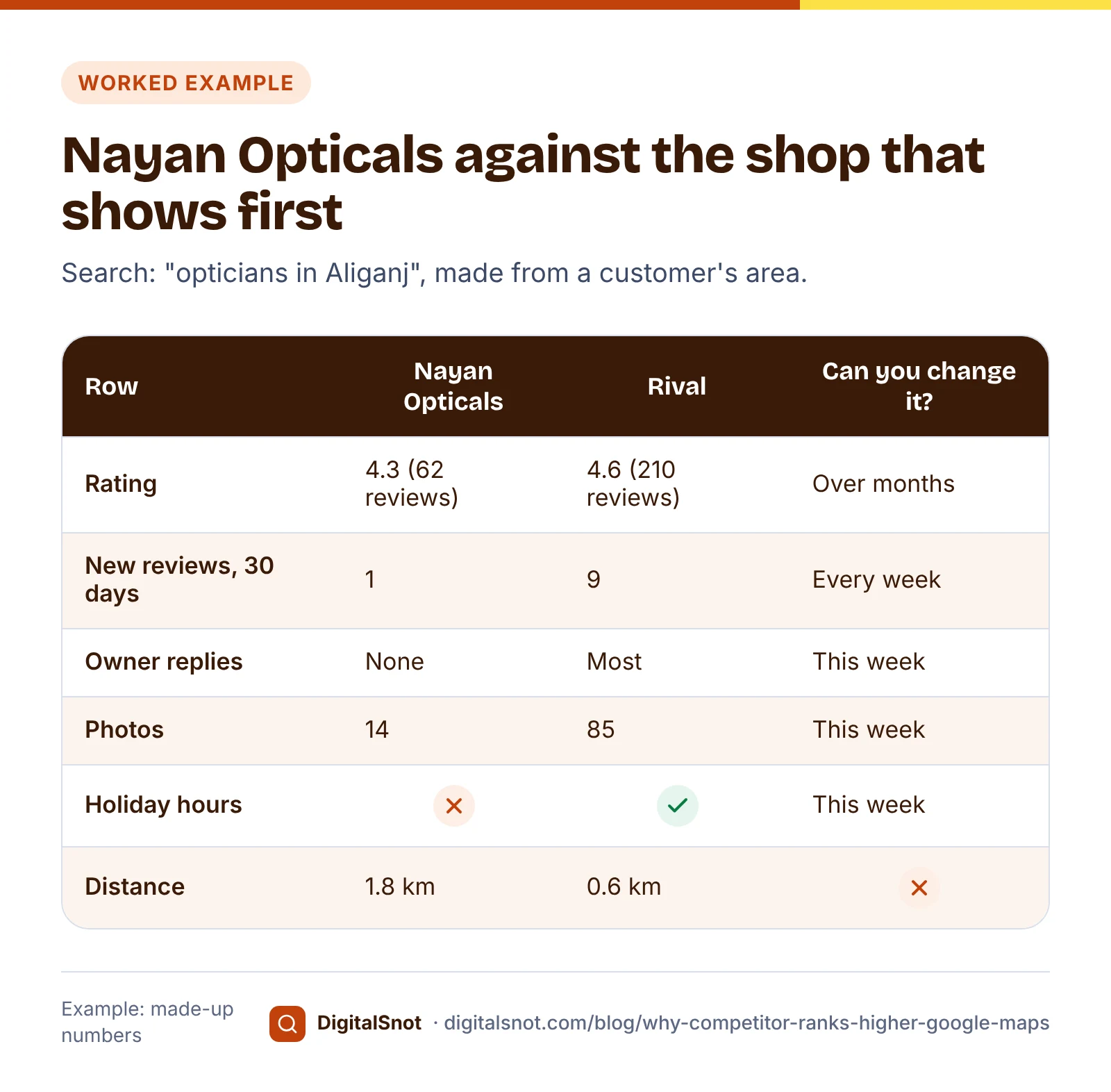
The rating gap looks small, but simple maths says Nayan Opticals needs about 47 more reviews in a row, every one of them 5 stars, to match 4.6 from 4.3 on 62 reviews. That is months of steady asking, not a weekend task. The quick wins are elsewhere: replying to every review, setting holiday hours, adding real photos and posting each week. Distance is shown but cannot be changed, so the tool does not score it.
For the review maths in detail, read how many 5-star reviews you need to raise your Google rating.
A 30-day plan
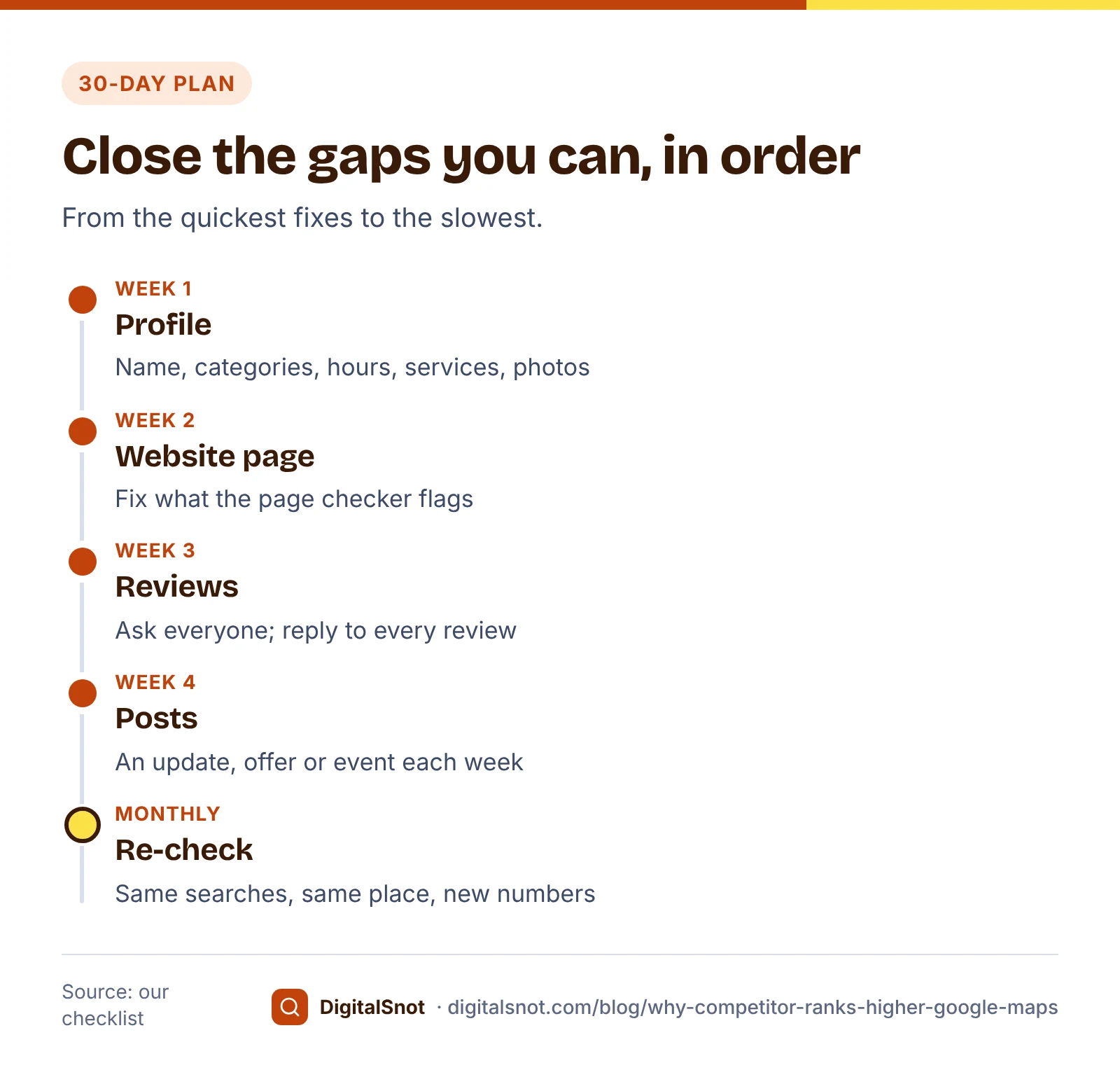
Work through the gaps in this order, from the quickest to the slowest:
- Week 1: the profile. Go through our Google Business Profile Audit Checklist. It checks your name and description against Google's rules as you type, then walks through categories, address, hours, services, photos, posts, reviews and the rules that help avoid suspension.
- Week 2: the website page. Fix what the Local Landing Page Checker flags, and make the name, address and phone match your profile.
- Week 3: reviews. Start asking every customer, and reply to every review, old ones included.
- Week 4: posts. Post an update, offer or event each week. Our post on what to post on your Business Profile every week has ideas.
- Every month. Search again from the same place, update the numbers in the comparison and see what changed.
Mistakes to avoid
- Judging your position from your own shop, where distance favours whoever is nearest.
- Copying a rival's categories without checking they are true for you.
- Adding the area or "best" to your name because a competitor did.
- Offering a discount for reviews, or asking only the customers you know are happy.
- Paying anyone who promises a fixed Maps position.
Your next step
Pick your three searches today, compare yourself with the three businesses that show above you, and start with the gaps marked "this week". For the full set-up, read our Google Business Profile optimisation guide. If you would rather have someone work through it with you, see our local SEO service or start with a free SEO audit.
Free tools in this article
- Local Landing Page Checker Check a branch or area page: LocalBusiness markup, phone, address, hours and the area it names.
- Local Competitor Comparison Put your Business Profile next to 3 competitors, see who leads each row and get a 30-day plan for the gaps.
- Google Business Profile Audit Checklist Go through your Business Profile item by item, and check your name and description against Google's rules.
Frequently asked questions
Why does a competitor with fewer reviews show above me on Google Maps?
Google says local results are based mainly on relevance, distance and prominence, and reviews are only part of prominence. A competitor closer to the person searching, or one that matches the search better through its category, services and details, can show first with fewer reviews.
Can I pay Google to rank higher on Google Maps?
No. Google's Business Profile Help says there is no way to request or pay for a better local ranking. Be wary of anyone who promises a fixed position in the local results.
Should I add my area or keywords to my business name?
No, unless they are part of your real-world name as shown on your signboard, website and stationery. Google's guidelines say adding unnecessary information, such as service or location details, is not allowed and could lead to suspension.
Does the primary category affect my ranking?
Yes. Google says the categories you choose affect your local ranking. Choose a primary category that describes your business as a whole, as specifically as the list allows, and add as few extra categories as possible, only ones that are true.
Why do I see different results when I search from another area?
Distance is one of the three main factors, and Google measures it from the location used in the search or, when no place is named, from where the person is. Compare yourself with competitors by searching from your customers' area, not from your own shop.
What can I do about a competitor with keywords in its name?
Google Maps Help points to the Business Redressal Complaint form for suspicious business names. Report it once with the facts, then spend your time on your own profile, reviews and website, which you control.
Sources
Every figure and claim in this article comes from the sources below. We checked each one when writing and link to the original so you can read it yourself. Credit belongs to the authors and publishers listed. How we write and check our articles.
-
1
Tips to improve your local ranking on Google
Google Business Profile Help · Relevance, distance and prominence; a farther business can rank higher; review count and score; web position; no paid ranking.
-
2
Guidelines for representing your business on Google
Google Business Profile Help · Real-world name with no added information; virtual office and co-working rules.
-
3
Resolve duplicate profiles & ownership issues
Google Business Profile Help · One profile per business; duplicates do not show on Search or Maps.
-
4
Manage your business category
Google Business Profile Help · Categories affect local ranking; specific primary category; as few as possible; not used as keywords.
-
5
Manage your services on your Business Profile
Google Business Profile Help · Adding services with descriptions to a profile.
-
6
Edit your Business Profile
Google Business Profile Help · Description of up to 750 characters, no links.
-
7
Prohibited & restricted content
Maps User Generated Content Policy Help · No incentives for reviews and no selective asking for positive reviews.
-
8
Business Profile restrictions for policy violations
Google Business Profile Help · Fake engagement restrictions: new reviews blocked, reviews unpublished, a warning shown.
-
9
Report a business on Google Maps
Google Maps Help · Business Redressal Complaint form for suspicious business names, phone numbers or links.