How many 5-star reviews do you need to raise your Google rating?
Work out how many 5-star reviews lift your Google rating to your target, what one bad review really does, and how to get reviews within Google's rules.
On this page (10 sections)
If your Google rating sits at 4.1 and a competitor down the road shows 4.6, the obvious question is how many 5-star reviews it would take to raise yours and catch up. The answer is simple arithmetic. Once you see it, you can set a realistic target, work out how long it will take, and stop worrying about every single review.
This post shows how Google describes your rating, the one formula behind the number you need, what a single bad review really does, and how to collect reviews within Google's rules.
How Google works out your rating
Google's help page on review scores says the score is the average of all ratings published on Google for the place or business, on a scale of 1 to 5 stars. It also says that after someone leaves a new review, it can take up to 2 weeks for the score to update.
Two things follow. First, only published reviews count, so a review Google has removed is not part of the average. Second, Google does not publish how it rounds the figure on your profile, or any more detail of the sum. So treat any calculator as a close estimate. Our Google Rating Calculator uses a simple average of the numbers you type.
The formula: how many 5-star reviews you need
To lift an average, each new review has to sit above your target. When every new review is 5 stars, the sum is:
Reviews needed = (target − current average) × number of reviews ÷ (5 − target), rounded up.
Take Smile Studio Dental in Kothrud, Pune, a made-up clinic with a 4.1 rating from 80 reviews that wants to reach 4.5:
- The gap is 4.5 − 4.1 = 0.4 stars, across 80 reviews: 0.4 × 80 = 32 stars short.
- Each new 5-star review sits 5 − 4.5 = 0.5 stars above the target, so it closes 0.5 of that gap.
- 32 ÷ 0.5 = 64. The clinic needs 64 more 5-star reviews, which takes it to 144 reviews at exactly 4.5.
Real life is less tidy, because not every new review will be 5 stars. If new reviews average 4.8, the clinic needs 107 of them, because each one now sits only 0.3 above the target. If new reviews average 4.5 or less, the average never reaches 4.5, however many arrive.
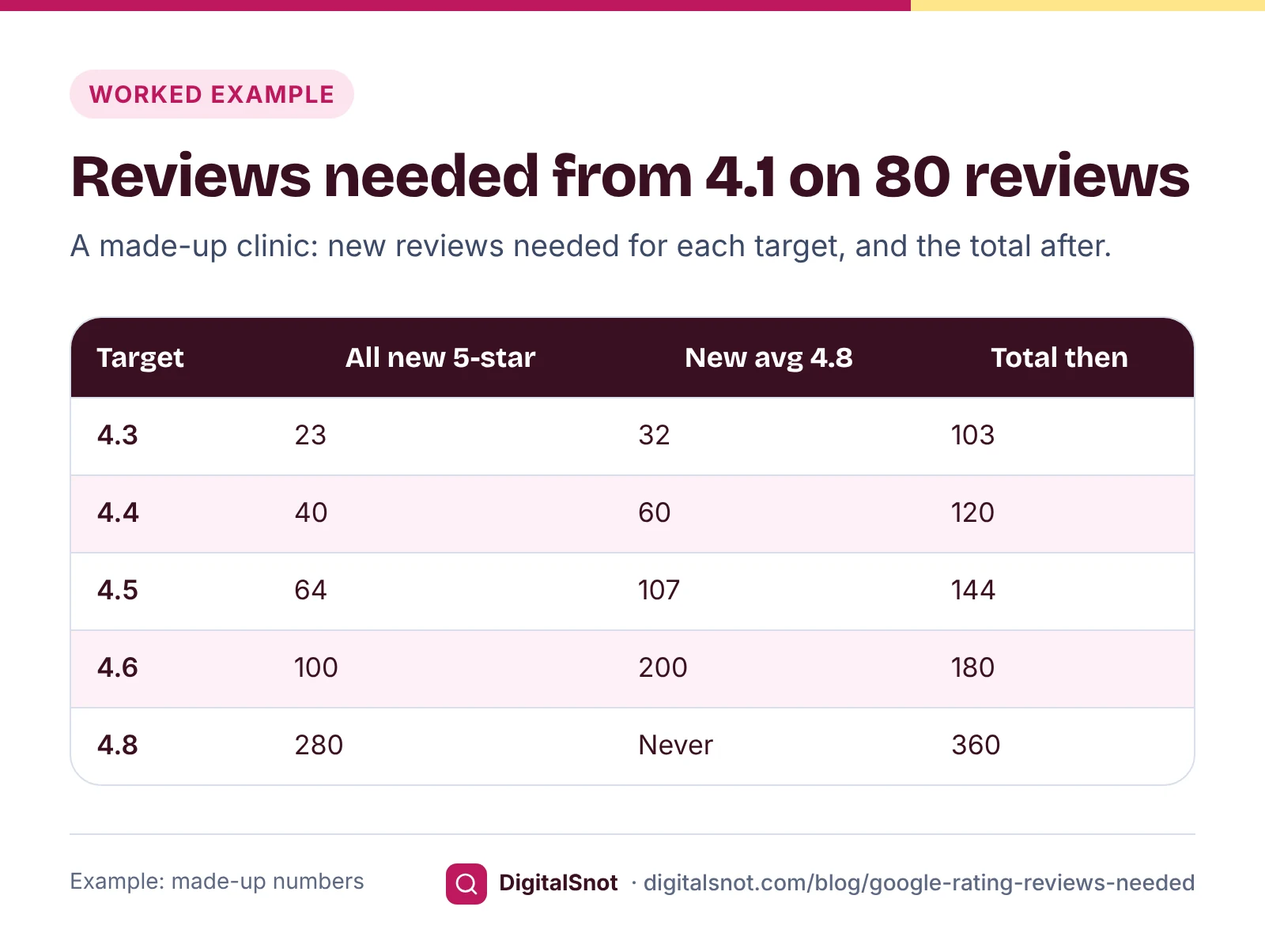
The table shows why each step up costs more than the last. Going from 4.1 to 4.3 takes 23 five-star reviews; going from 4.4 to 4.6 takes another 60. Near the top, the gap between 5 and your target is small, so each review does little. That is also why 5.0 cannot be reached once any review is lower: every new 5-star review brings the average closer to 5.0, but never all the way.
What one bad review does
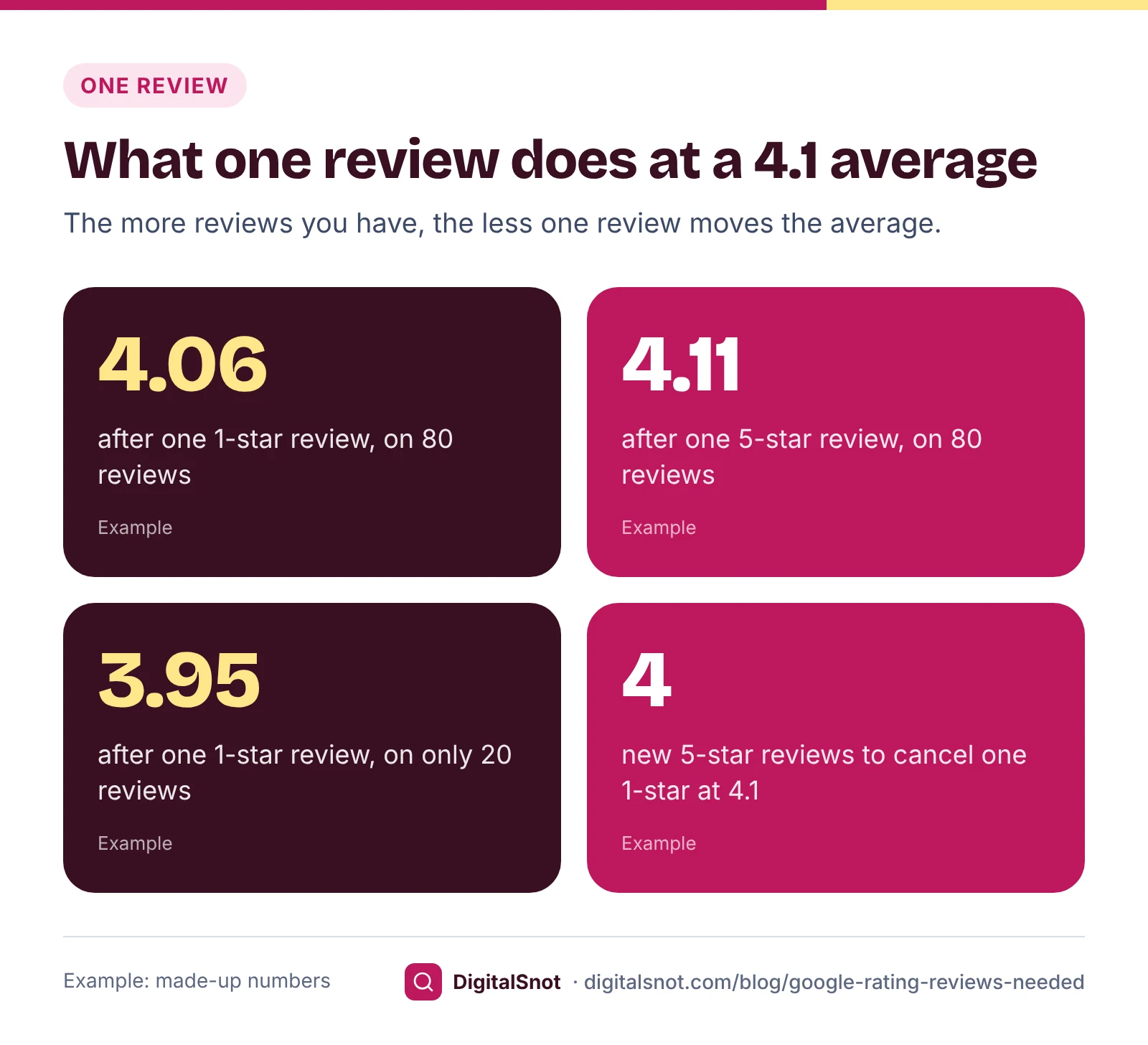
A 1-star review feels like a disaster, but its effect depends on how many reviews you already have. For the clinic at 4.1 from 80 reviews:
- One new 1-star review takes the average to about 4.06.
- One new 5-star review takes it to about 4.11.
- If the clinic had only 20 reviews at 4.1, the same 1-star review would drop it to about 3.95.
There is a useful rule hidden in the maths. The number of 5-star reviews needed to cancel one 1-star review depends only on your average, not on how many reviews you have. At 4.1 it takes 4. At 4.5 it takes 7, because each 5-star review sits only 0.5 above your average. A business with a high rating has more to protect, which is one more reason to reply calmly to unhappy customers and fix what went wrong.
The rating you copy may be rounded
Google does not say whether or how it rounds the score on your profile. If the 4.1 you see is rounded to the nearest tenth, the exact average behind it could be anywhere from 4.05 to just under 4.15. For the clinic, that moves the answer from 64 to anywhere between 57 and 72 reviews.
For the exact figure, count your reviews at each star and enter those counts in the calculator instead. Suppose the clinic has 45 five-star, 16 four-star, 8 three-star, 4 two-star and 7 one-star reviews. That is 80 reviews and an exact average of 4.1, so 64 holds. If counting by hand is slow, paste your reviews into the Google Review Inbox, which shows the count, the average, the spread of ratings and a monthly trend from the reviews you paste.
Why newer reviews matter to customers
The rating is only part of what a customer reads. Each review on Google shows when it was written, and people notice whether the praise is recent. BrightLocal's Local Consumer Review Survey 2026, a survey of 1,002 US adults, found that 74% of consumers look for reviews written in the last three months, and 31% will only use a business rated 4.5 stars or higher, up from 17% the year before. The figures are from the US, not India, but the habit of checking recent reviews before choosing a clinic or a shop is common everywhere.
So your pace matters as much as your target. If the clinic gets 8 new reviews a month, 64 reviews take 8 months. Enter your monthly pace in the calculator and it shows the time each target takes. A steady flow also means a reader always finds recent reviews, which a burst followed by months of silence does not.
Getting reviews the allowed way
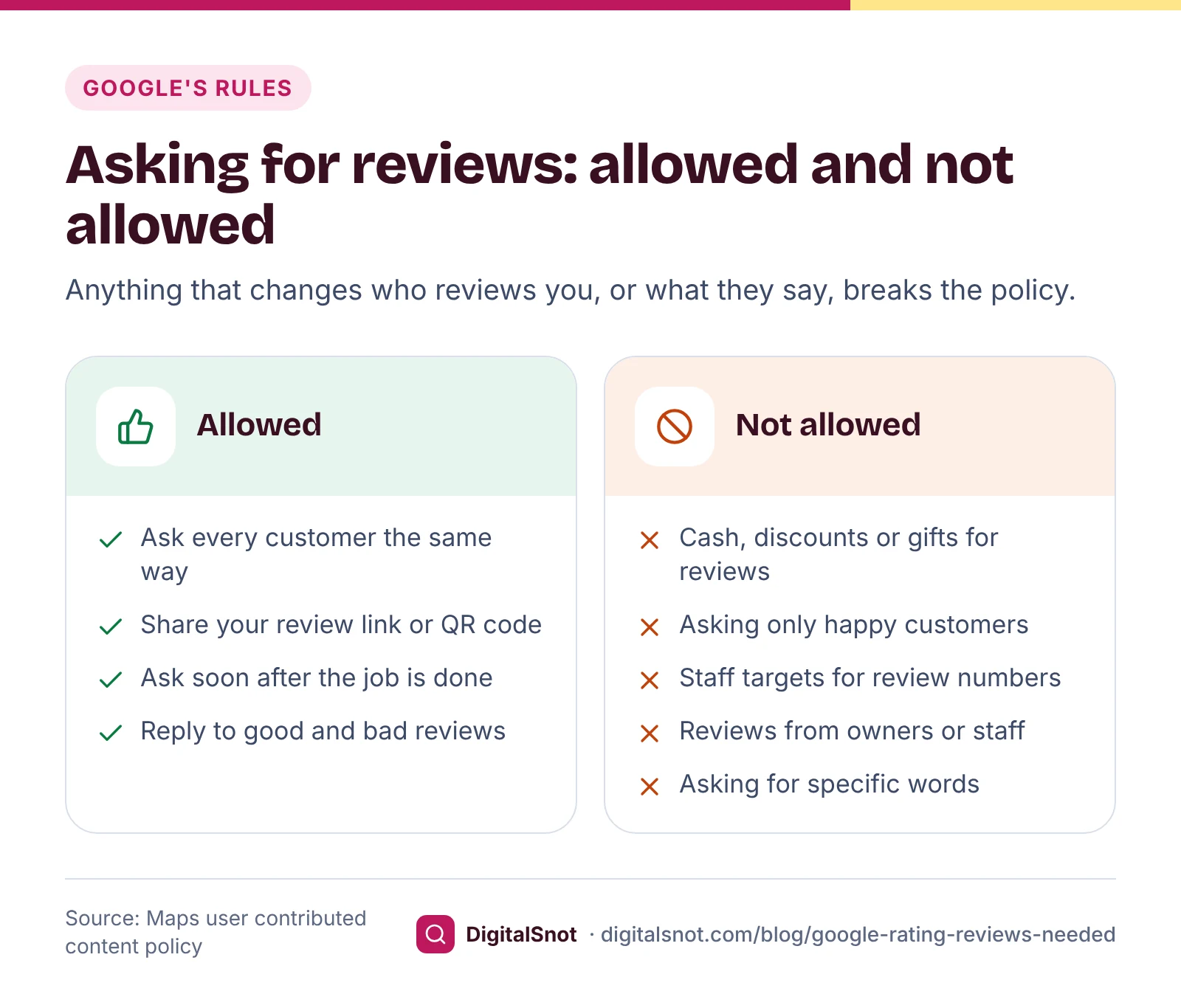
You may ask customers for reviews. Google's prohibited and restricted content policy for Maps sets out what you may not do:
- No incentives. No payment, discount, free goods or services in exchange for a review, or for changing or removing a negative one.
- No review gating. Do not discourage negative reviews, or ask only the customers you expect to be happy.
- No staff targets or scripts. Do not ask staff to collect a set number of reviews, or ask customers to include specific content.
- No conflicts of interest. Owners and staff should not review their own business.
Reviews must reflect a genuine experience, and Google's fake engagement policy covers reviews that have been paid for, directly or in kind. Breaking these rules can cost more than the reviews themselves. Google's page on Business Profile restrictions says that, as well as removing the reviews, it may stop a profile receiving new reviews for a period, unpublish existing reviews or show customers a warning. Our post on getting more Google reviews without breaking the rules covers each tactic in detail.
Your review link and QR code
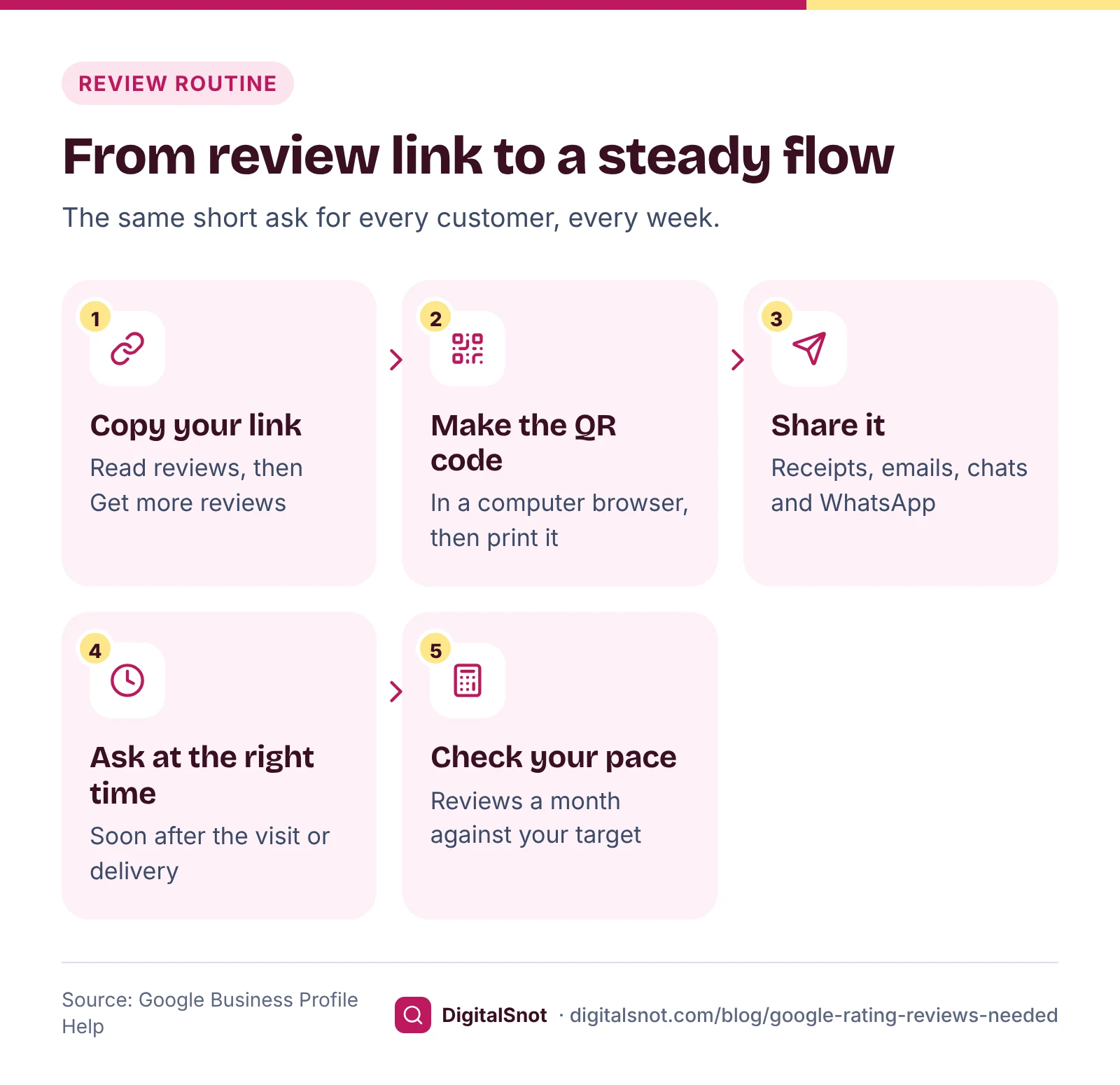
The easiest way to get more reviews is to make leaving one take a minute. Google's help page on creating a review link or QR code says to open your Business Profile, select "Read reviews", then "Get more reviews". You can copy a short link, download a QR code, or share straight to email, WhatsApp or Facebook. The QR code can be made only in a computer browser, not on a phone, and customers need to be signed in to a Google Account to leave a review.
Google suggests putting the link on receipts and in thank-you emails, adding it at the end of a chat, and printing the QR code for your shop. If you want a printable card or ready messages, paste your link or Place ID into our Google Review Link & QR Generator. It draws the QR code as a PNG, writes short WhatsApp, SMS and email requests in English, Hinglish or Hindi, and gives you cards, posters, table tents and stickers to print.
When the reviews arrive, reply to them. Our Google Review Reply Templates give you three replies for any star rating and topic, in English, Hinglish or Hindi, to edit before you post.
Mistakes that slow you down
- Chasing 5.0. Once any review is below 5 stars, 5.0 is out of reach. Pick a target such as 4.5 or 4.6 and a monthly pace.
- Asking in bursts. A push for reviews one month and nothing for six leaves your newest review looking old.
- Asking only the customers you know are happy. That is review gating. Ask every customer in the same way.
- Trying to delete honest bad reviews. Google removes reviews that break its policies, not ones that are simply negative. Our guide on removing fake Google reviews explains what qualifies.
- Ignoring the cause. If several reviews mention the same problem, fixing it does more for your average than any request for reviews.
Your next step
Open the Google Rating Calculator, enter your rating, review count and target, and add how many reviews you get a month. You will see the number you need, what one new review of each star does, and how long each target takes at your pace. It works only from what you type: it does not sign in to Google or read your profile.
Then set up your review link, ask every customer, and reply to every review. For the rest of your profile, work through our Google Business Profile optimisation guide. If you want a hand with reviews and local search, see our local SEO service or start with a free SEO audit.
Free tools in this article
- Google Rating Calculator How many 5-star reviews you need to reach a target Google rating, and what one bad review does.
- Google Review Inbox Paste your Google reviews to see themes, what to answer first, suggested replies and possible policy breaks.
- Google Review Link & QR Generator Make a QR code and printable card for your Google review link.
- Google Review Reply Templates Replies to good and bad Google reviews in English, Hinglish and Hindi, by rating and topic.
By the numbers
- of consumers look for reviews written in the last three months (BrightLocal 2026, 1,002 US adults)
- 74%
- Source: BrightLocal
- of consumers will only use a business rated 4.5 stars or higher, up from 17% the year before (BrightLocal 2026, US)
- 31%
- Source: BrightLocal
Frequently asked questions
How many 5-star reviews do I need to get a 4.5 rating on Google?
Use: reviews needed = (target − current average) × number of reviews ÷ (5 − target), rounded up. From 4.1 on 80 reviews, that is 0.4 × 80 ÷ 0.5 = 64 more 5-star reviews. If not every new review will be 5 stars, you need more: 107 if new reviews average 4.8.
How does Google calculate my star rating?
Google says the review score is the average of all ratings published on Google for your business, on a scale of 1 to 5 stars. Removed reviews are not published, so they do not count. Google does not publish how it rounds the figure shown on your profile.
Why has my Google rating not changed after new reviews?
Google says it can take up to 2 weeks for the score to update after someone leaves a review. Also, one review moves a large average only a little: with 80 reviews at 4.1, one new 5-star review lifts the average by about 0.01, which may not change the figure you see.
Can my Google rating ever reach 5.0 again?
Only if every review is 5 stars. Once any review is lower, each new 5-star review brings the average closer to 5.0 but never all the way. Choose a target such as 4.5 or 4.6 instead, and work out how many reviews it takes.
Can I offer a discount or gift for a 5-star review?
No. Google's policy does not allow payment, discounts, free goods or services in exchange for a review, or for changing or removing a negative one. It also bans asking only happy customers. Google may remove such reviews and restrict the profile, for example by stopping new reviews for a period.
How do I get a link customers can use to leave a Google review?
In your Business Profile, select "Read reviews", then "Get more reviews". Copy the short link, download the QR code or share it by email, WhatsApp or Facebook. Google says the QR code can be made only in a computer browser, and reviewers must be signed in to a Google Account.
Sources
Every figure and claim in this article comes from the sources below. We checked each one when writing and link to the original so you can read it yourself. Credit belongs to the authors and publishers listed. How we write and check our articles.
-
1
Understand review scores for local places & businesses
Google Business Profile Help · The score is the average of all ratings published on Google; it can take up to 2 weeks to update.
-
2
Create a Google link or QR code to request reviews
Google Business Profile Help · Read reviews, then Get more reviews; QR code only in a computer browser; where to share; sign-in needed.
-
3
Prohibited & restricted content
Maps User Generated Content Policy Help · Bans incentives, selective solicitation, discouraging negative reviews, staff quotas and requested content.
-
4
Fake engagement
Maps User Generated Content Policy Help · Content must reflect a genuine experience; paid reviews, directly or in kind, are fake engagement.
-
5
Business Profile restrictions for policy violations
Google Business Profile Help · Restrictions for fake engagement: no new reviews for a period, unpublished reviews, consumer warnings.
-
6
Local Consumer Review Survey 2026
BrightLocal · 1,002 US adults: 74% look for reviews from the last three months; 31% only use businesses rated 4.5 or higher.