Google Business Profile posts: what to post every week
The three post types Google offers, the rules a post must pass, a four-week rota with Diwali 2026 dates for a sample shop, and what to measure each month.
On this page (9 sections)
Most Business Profiles have one post from the day they were set up and nothing since. Google Business Profile posts are a free way to show customers on Google Search and Maps what is new, what is on offer and what is coming up, but only if you keep them going, and a list of post ideas makes that easier.
This post explains the three post types Google offers and what each needs, the rules a post must pass, a four-week rota you can repeat all year, a worked plan for November 2026, and what to measure.
The three post types and what each needs
Google's help page on creating posts on your Business Profile lists three types:
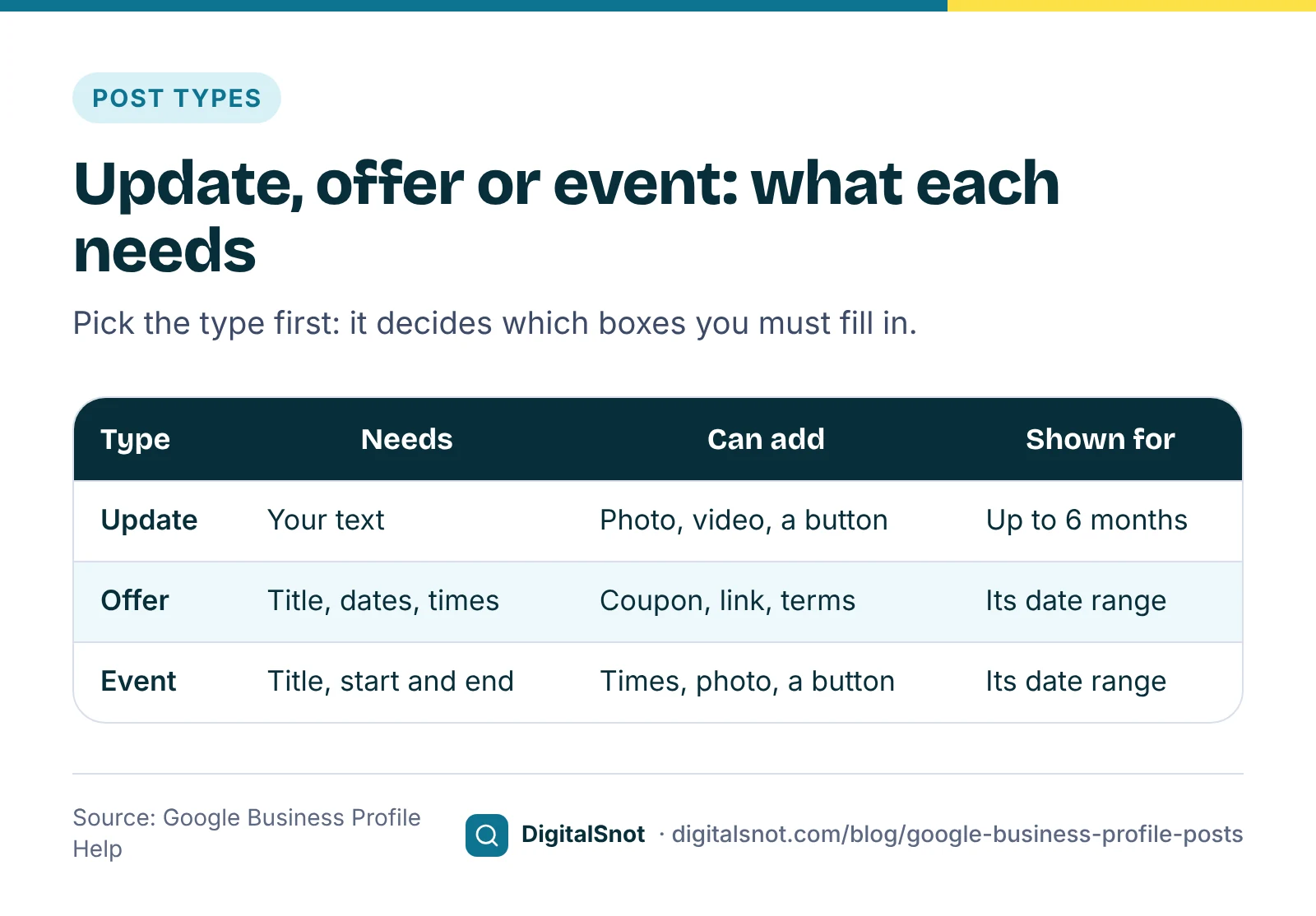
- Update. News, a service, a new product or recent work. It can carry a description, a photo or video and a button, such as Book, Order online, Learn more or Call now.
- Offer. It needs a title, dates and times. Google adds a "View offer" button by itself, and you can add a coupon code, a link and terms and conditions.
- Event. It needs a title and start and end dates. If you leave out the times, the event shows as lasting 24 hours on its dates.
Three more details from the same page shape a weekly plan. Posts older than 6 months are archived unless they have a date range. You can turn on "Schedule this post" to publish at a set date and time. And the "Repeats" menu can show a post again weekly, monthly or on a custom schedule.
The rules a post must pass
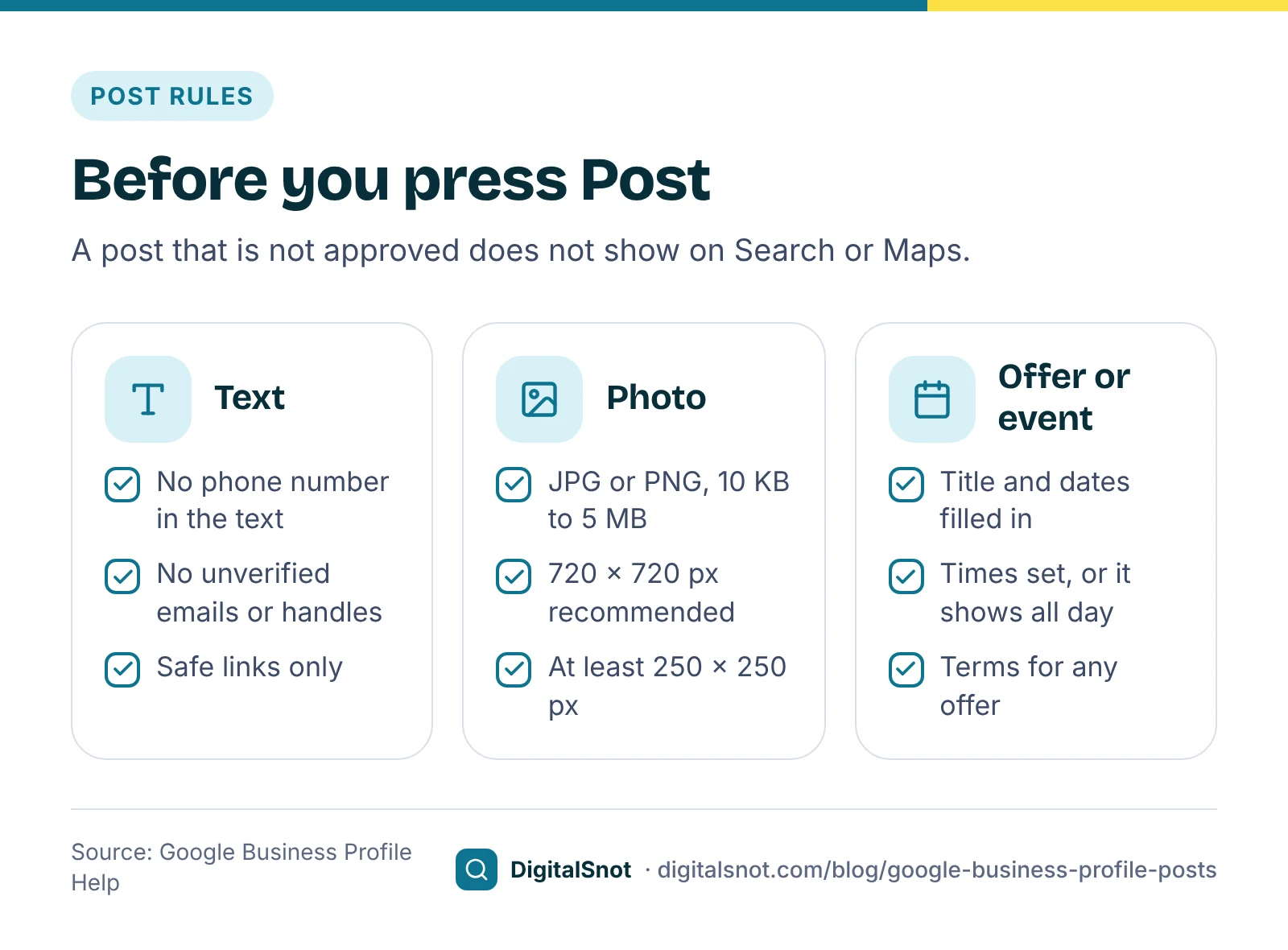
Google reviews posts after you publish them, and a post that is not approved does not show on Search or Maps. Most rejections come from a few rules in Google's photos, videos and posts content policy:
- No phone number in the text. Google calls this "phone stuffing" and does not allow a phone number in post content. Add a Call now button instead: it uses the verified phone number on your profile.
- Care with other contact details. Google may remove posts with email addresses or social media handles it cannot verify as yours.
- Safe links only. Links to malware or phishing are not allowed, and the button should lead to a page where the customer can do what it says.
- Regulated products. Businesses in regulated industries, such as alcohol, tobacco or fireworks, can post, but not about those products.
For images, Google's Business Profile photo guidelines ask for JPG or PNG files between 10 KB and 5 MB, with 720 × 720 px recommended and 250 × 250 px the minimum. Use a real photo of your shop, product or team, in focus and well lit, without heavy filters. Google gives no length limit for post text, so a few short lines that make sense on a phone are enough.
A four-week rota you can repeat
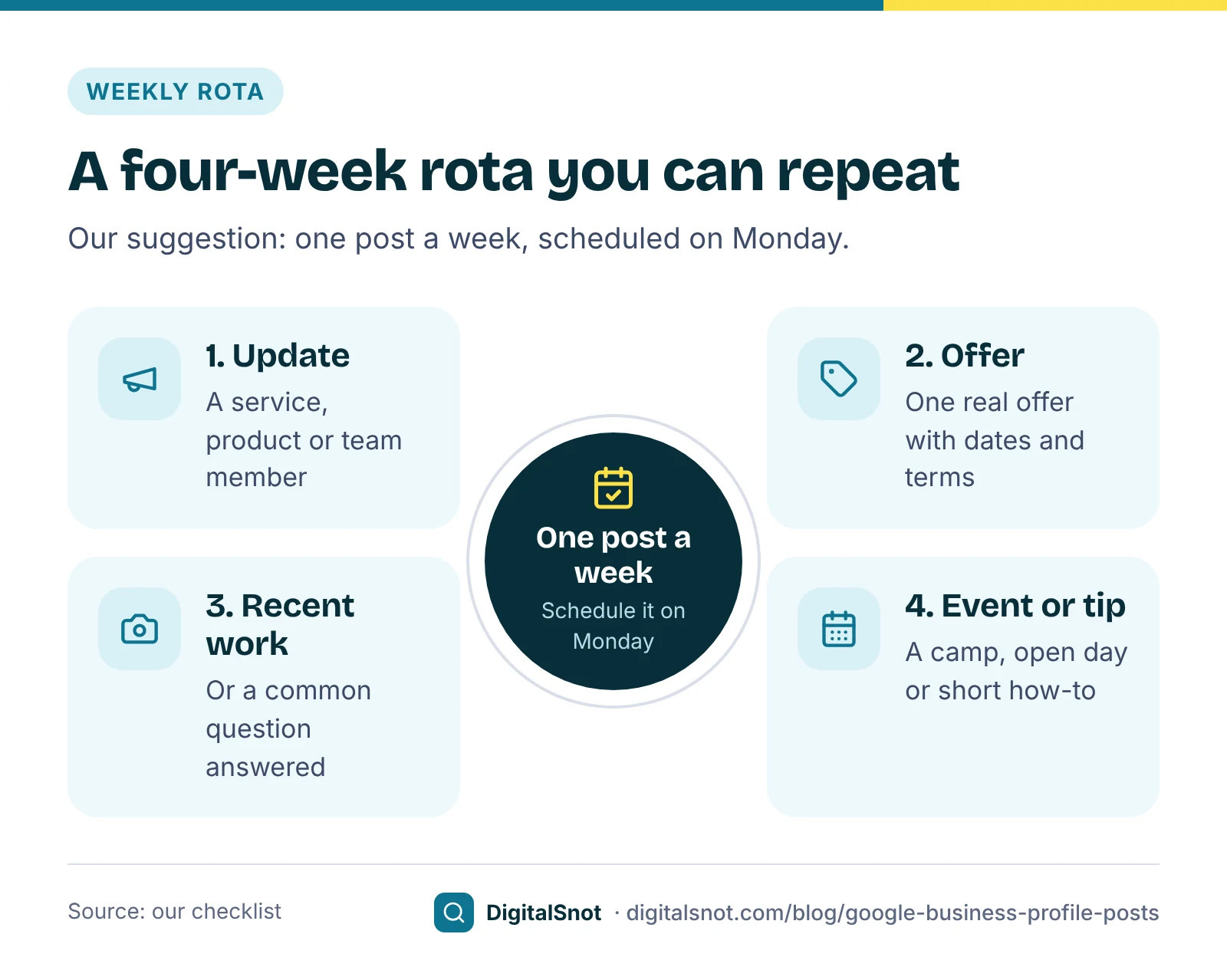
You do not need fresh ideas every week. You need a rota. This is our suggestion, not a Google rule:
- Week 1, update: introduce a service, a product or a member of the team, with a photo and a Book or Learn more button.
- Week 2, offer: one real offer with clear dates and terms. If you have nothing to offer, post another update.
- Week 3, update: show recent work, or answer a question customers often ask at the counter.
- Week 4, event or tip: a check-up camp, an open day, a workshop or a short how-to.
Then start again. When a festival is coming, swap that cycle's offer for a festival offer and post it a week or two ahead, so it is live while people are planning. Set it up on Monday with "Schedule this post" and the profile keeps moving while you work.
A worked plan: November 2026 for a sweet shop
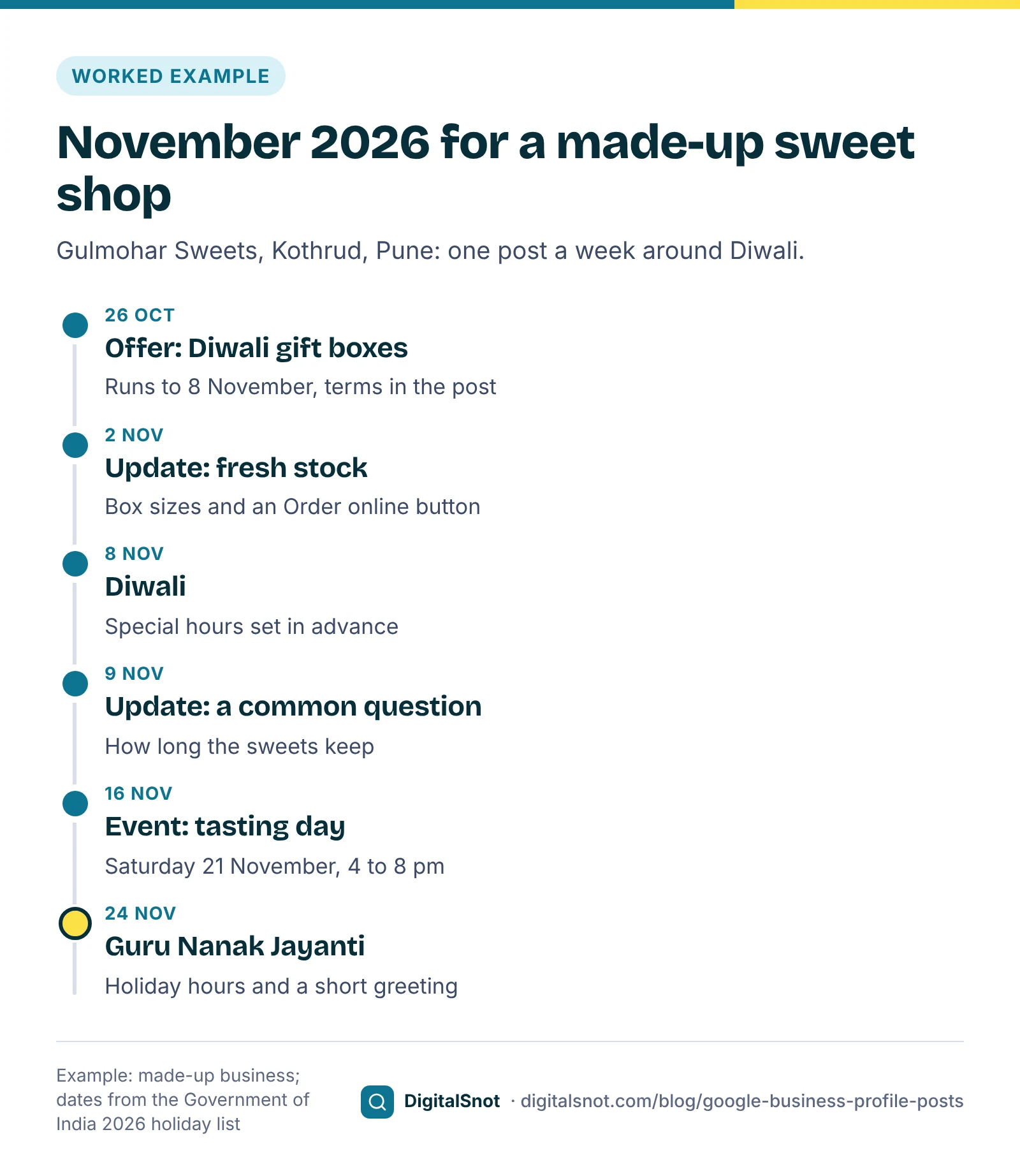
Gulmohar Sweets in Kothrud, Pune, a made-up shop, plans its posts from Monday 26 October. The Government of India's 2026 holiday list puts Diwali on Sunday 8 November and Guru Nanak's birthday on Tuesday 24 November.
- Week of 26 October, offer: "10% off Diwali gift boxes of 1 kg and above", from 26 October to 8 November, with the terms in the post. The text asks office buyers to order a day ahead, with no phone number typed in: customers can call from the profile itself.
- Week of 2 November, update: fresh kaju katli and the three box sizes, with a photo of the counter and an Order online button. The shop also sets special hours for Diwali, so its opening times are right on the day.
- Week of 9 November, update: a common question answered: how long its sweets keep and how to store them.
- Week of 16 November, event: a tasting day for a new dry fruit range on Saturday 21 November, 4 pm to 8 pm. Our India Seasonal Content Calendar, which takes Hindu festival dates from Drik Panchang, marks the start of the wedding season on 20 November, so the details also mention orders for weddings and functions.
- Week of 23 November, update: holiday hours for Guru Nanak Jayanti, if the shop closes, and a short greeting.
Making each post in 15 minutes
Three of our free tools cover the work. Start the month in the India Seasonal Content Calendar: choose your industry and city and you get the festivals, seasons and deadlines for the next 12 months that matter to your business and state, each with a suggested date to publish. Holiday dates come from the Government of India lists, and the lead times are our suggestion. You can add the dates to Google Calendar or Outlook, or download them as a CSV.
Then write each post in the Google Business Profile Post Maker. Choose update, offer or event, type the headline and details, and add dates, a button, your logo and a photo. You get the text for each box in your profile with a live count, checks against Google's post rules (such as a phone number in the text), six image designs to download as PNG or JPEG at 720 × 720 or 1440 × 1440 px, and four post ideas for the next four weeks. When a festival is coming within four weeks, the ideas include a festival offer the week before. It runs in your browser and never signs in to your profile, so you copy each field across yourself.
For the same festival on Instagram, Facebook and WhatsApp, the Festival Greeting Post Maker makes a greeting in English, Hindi or Hinglish with your name, logo and any offer, at 1080 × 1350, 1080 × 1080 or 1080 × 1920 px, with a caption to copy. It flags words such as "best", "free" or "last chance" so you can check every claim is true.
What to measure
Judge posts month by month, not one by one. Your profile's performance report, available for verified profiles, shows interactions such as calls, website clicks, direction requests and bookings, plus the searches that showed your profile. Google updates the searches figure at the start of each month, and it can take up to 5 days to appear. Write the main numbers down on the first Monday of each month and compare them with the month before.
For visits to your website, tag the button link. Google Analytics Help on campaign URLs says to always include utm_source, utm_medium and utm_campaign, and that values are case-sensitive. Our suggestion is to keep them lower case, for example ?utm_source=google&utm_medium=organic&utm_campaign=gbp_diwali_offer, so each post's visits show under its own campaign name.
Two offline checks help too. Put a coupon code in each offer post and count how many customers use it, and ask new customers how they found you.
Mistakes to avoid
- A phone number in the text. The most common reason a post is not approved. Use the Call now button.
- Offers only. A profile that only shouts discounts says little about the business. Mix in updates and events.
- The same photo every week. Take a new photo of real stock, work or the team each time.
- Offers that do not match the shop. If the counter does not know about the offer, the customer leaves unhappy, and may leave a review saying so.
- Stopping after Diwali. The rota only works if it keeps going in the quiet months.
Your next step
This Monday, open the Post Maker, make your first update and schedule it. Then plan the next three weeks from the rota. Posts work best on a profile that is complete and accurate, so check your details with our post on keeping your name, address and phone the same everywhere, keep replying with the help of our guide to replying to Google reviews, and work through our Google Business Profile optimisation guide. If you want us to run your profile, see our local SEO service.
Free tools in this article
- India Seasonal Content Calendar Festivals, wedding season, monsoon and year-end dates for your industry and city, with publish dates.
- Google Business Profile Post Maker Write an update, offer or event post, check it against Google's rules and download a matching image.
- Festival Greeting Post Maker Make a festival greeting post with your name, offer and logo, in English, Hindi or Hinglish.
Frequently asked questions
What types of posts can I add to my Google Business Profile?
Three: updates, offers and events. An update can carry text, a photo or video and a button. An offer needs a title, dates and times, and gets a "View offer" button by itself. An event needs a title and start and end dates; without times, it shows as lasting 24 hours on its dates.
How often should I post on my Google Business Profile?
Once a week is our suggestion, not a Google rule. It keeps your profile current without much work. Google archives posts older than 6 months unless they have a date range, so a profile that stops posting soon has nothing recent to show.
Can I put my phone number in a Google Business Profile post?
Not in the text. Google's posts content policy does not allow a phone number in post content, to prevent "phone stuffing". Add a Call now button instead, which uses the verified phone number on your profile.
What size should a Google Business Profile post photo be?
Google's photo guidelines ask for JPG or PNG files between 10 KB and 5 MB, with 720 × 720 px recommended and 250 × 250 px the minimum. Google publishes no separate size for post images, so a square image at 720 px or larger works.
Can I schedule Google Business Profile posts?
Yes. When you create a post, turn on "Schedule this post" and pick the date and time it should go live. The "Repeats" menu can show a post again weekly, monthly or on a custom schedule.
How do I know if my Google Business Profile posts are working?
Compare your performance report month by month: calls, website clicks, direction requests and bookings. Tag button links with utm_source, utm_medium and utm_campaign so visits show in Google Analytics, and use a coupon code in offer posts to count redemptions.
Sources
Every figure and claim in this article comes from the sources below. We checked each one when writing and link to the original so you can read it yourself. Credit belongs to the authors and publishers listed. How we write and check our articles.
-
1
Create & manage posts on your Business Profile
Google Business Profile Help · Updates, offers and events; offer and event requirements; 6-month archive; scheduling and repeats.
-
2
Business Profile photos, videos & posts content policy
Google Business Profile Help · No phone numbers in post content ("phone stuffing"); Call now button uses the verified number.
-
3
Manage your Business Profile photos & videos
Google Business Profile Help · JPG or PNG, 10 KB to 5 MB, 720 × 720 px recommended, 250 × 250 px minimum.
-
4
How to set Special hours
Google Business Profile Help · Special hours for holidays and temporary changes.
-
5
Understand your Business Profile performance & insights
Google Business Profile Help · Verified profiles only; interactions, views and searches; searches updated monthly, up to 5 days late.
-
6
URL builders: Collect campaign data with custom URLs
Google Analytics Help · Always include utm_source, utm_medium and utm_campaign; values are case-sensitive.
-
7
Holidays to be observed in Central Government offices during 2026
Department of Personnel and Training, Government of India · OM of 3 July 2025: Diwali on Sunday 8 November 2026; Guru Nanak's Birthday on Tuesday 24 November 2026.