What should a monthly SEO report include? A checklist for owners
A plain-English checklist of what a monthly SEO report should show, which numbers to question, and what to ask your agency when the figures move.
On this page (9 sections)
Every month your agency or in-house marketer sends an SEO report. It is often long, full of charts and hard to judge. Is the work paying off, or are you looking at numbers chosen because they went up?
This checklist explains what a monthly SEO report should include, where each number comes from, which metrics deserve scepticism and what to ask when you read it. It is based on Google's own Search Console and Analytics help documentation, linked throughout.
What a good monthly SEO report does
A good report answers three questions: did organic search bring in more business, why did the numbers change, and what happens next. Charts are supporting evidence, not the point.
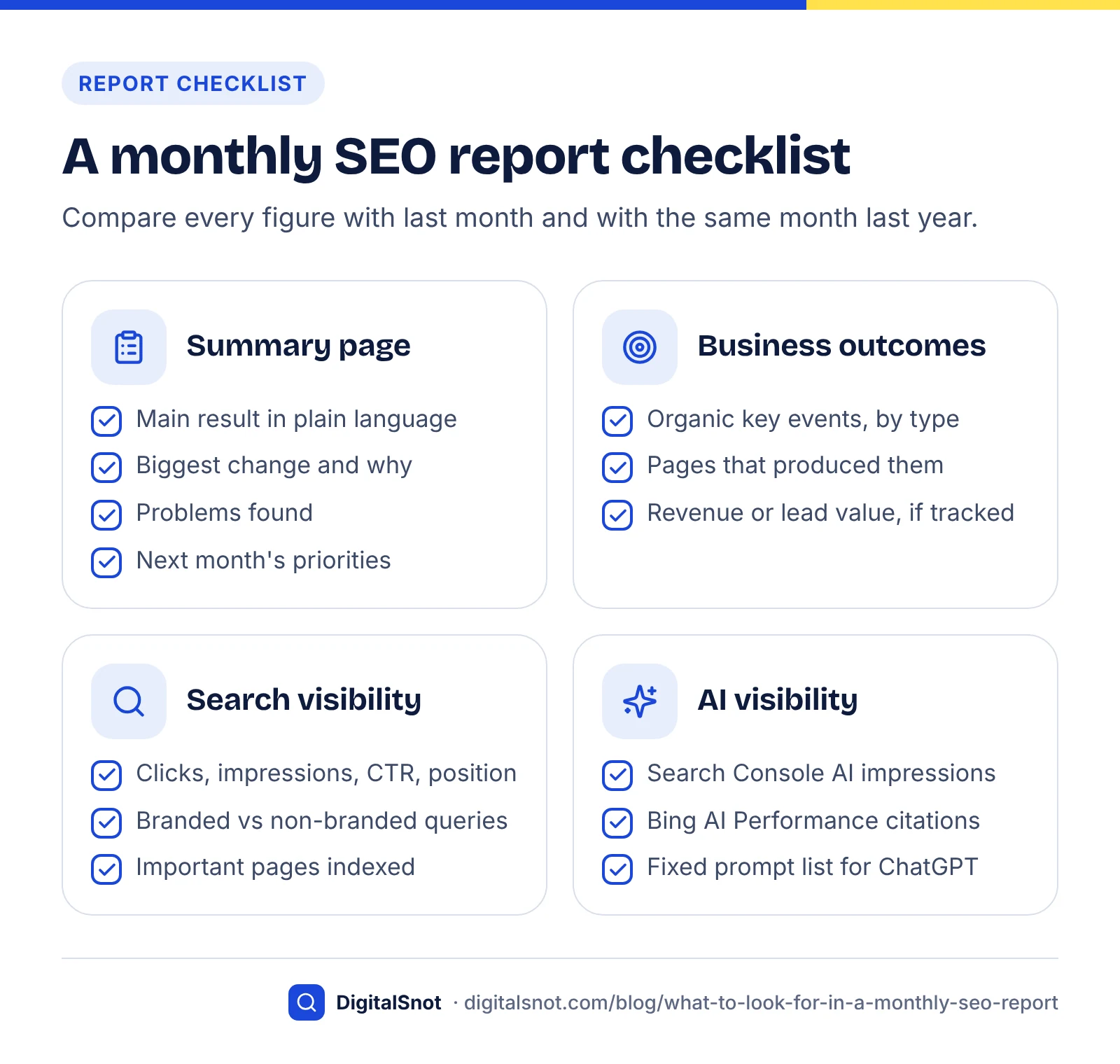
Look for a one-page summary at the top written in plain language. It should state the main result, the biggest change, any problems found and next month's priorities. If you have to work out the story yourself from forty screenshots, the report is not doing its job.
Business outcomes from GA4
The most important numbers are the leads, calls, bookings or sales that came from organic search. In Google Analytics 4 these are tracked as key events.
Google renamed GA4 "conversions" to "key events" so that the term "conversion" means the same thing in Analytics and Google Ads. Google Analytics Help explains that key events measure actions that matter to your business, while conversions are the subset used for ad measurement and bidding. Your report should therefore show:
- Key events from organic search, broken down by type (form submissions, phone clicks, purchases, bookings).
- The landing pages that produced them, so you can see which content earns business.
- Revenue or lead value, if your site records it.
Ask which events are marked as key events and when that was set up. If tracking changed mid-month, comparisons are unreliable until a full period has passed.
Engagement, used carefully
GA4 counts a session as engaged if it lasts longer than 10 seconds, has a key event, or has two or more page or screen views. Engagement rate is engaged sessions divided by all sessions (Google Analytics Help). It is a useful health check for landing pages, but it is not a business result.
Monthly results report
Search visibility from Search Console
Search Console is Google's own record of how your site appears in search, so it should be the main source for visibility metrics. Third-party rank trackers are estimates.
The four core metrics, as defined in Search Console Help, are:
- Clicks: the number of times someone clicked through to your site from Google Search results.
- Impressions: the number of times a link to your site appeared in results the user saw or could have seen.
- CTR: clicks divided by impressions.
- Average position: the topmost position your site held, averaged across the queries where it appeared.
Google notes that CTR and average position are generally higher when data is grouped by property than by page, so figures in a chart and a table can differ. Ask that the report states which view it used.
Branded and non-branded queries
Ask for the top queries split into branded and non-branded. Branded searches mostly reflect people who already know you; non-branded growth shows SEO winning new customers. Google announced a branded queries filter in Search Console in November 2025. It is available for top-level properties with enough impressions, and Google says its AI-assisted classification can occasionally mislabel a query.
Indexing health
The report should confirm that the pages you care about are indexed. The Page indexing report lists indexed and non-indexed URLs with reasons. Many non-indexed URLs are expected, such as redirects, duplicates or pages with a noindex tag. Google also says sites with fewer than 500 pages probably do not need this report and can use URL Inspection for specific pages instead. What matters is whether important service or product pages are missing.
AI visibility
A modern report should say whether your pages appear in AI answers, because more searches now end without a visit. SparkToro, using Similarweb panel data, found that 68% of US Google searches ended without a click in January to April 2026 (SparkToro, 2026).
Two first-party sources now exist:
- Google Search Console: Google introduced Search Generative AI performance reports in June 2026. They show impressions of your URLs in generative AI features such as AI Overviews and AI Mode, and Google's post says they were rolled out to all websites by 31 August 2026. This data is also included in the overall Performance report. Our guide to reading the Search Console generative AI report explains what it counts and what it leaves out.
- Bing Webmaster Tools: the AI Performance report shows how often your content is cited in Microsoft Copilot and Bing's AI summaries. Microsoft says citations do not represent traffic or clicks, and the data is sampled.
For ChatGPT, Perplexity and similar tools, there is no official report. Agencies usually run a fixed set of prompts each month and record whether your brand is mentioned or cited. Ask to see the prompt list so results are comparable over time. Our guide on how to get cited in AI search explains what influences those mentions.
AI assistant answer with citations
What we found comparing the help documentation
We read the Google and Microsoft help pages cited in this post side by side and noted every caveat that affects how a monthly figure should be read. The table summarises the ones most likely to mislead a business owner; you can repeat this by checking each metric's help page before trusting a trend.
| Metric | Where it comes from | Caveat from the documentation | What to ask |
|---|---|---|---|
| Impressions, CTR, position | Search Console | A logging error affected impressions from 13 May 2025 to 27 April 2026; clicks were not affected | Do year-on-year comparisons cross that period? |
| CTR and average position | Search Console | Usually higher when grouped by property than by page | Which view is this figure from? |
| Historical trend | Search Console | Only 16 months of data in the interface | Are you exporting data so we keep the history? |
| Branded vs non-branded | Search Console | AI-assisted classification; not available for low-impression sites or sub-properties | Have you checked the branded list looks right? |
| Key events | GA4 | Renaming an event removes its key event status | Did any tracking change this month? |
| AI citations | Bing Webmaster Tools | Sampled; citations are not clicks or traffic | How does this compare with last month? |
The impressions issue is listed on Google's Data anomalies in Search Console page. If your report compares impressions this year with the same months last year, that comparison may be distorted, so clicks and key events are the safer measure across that window.
Vanity metrics to question
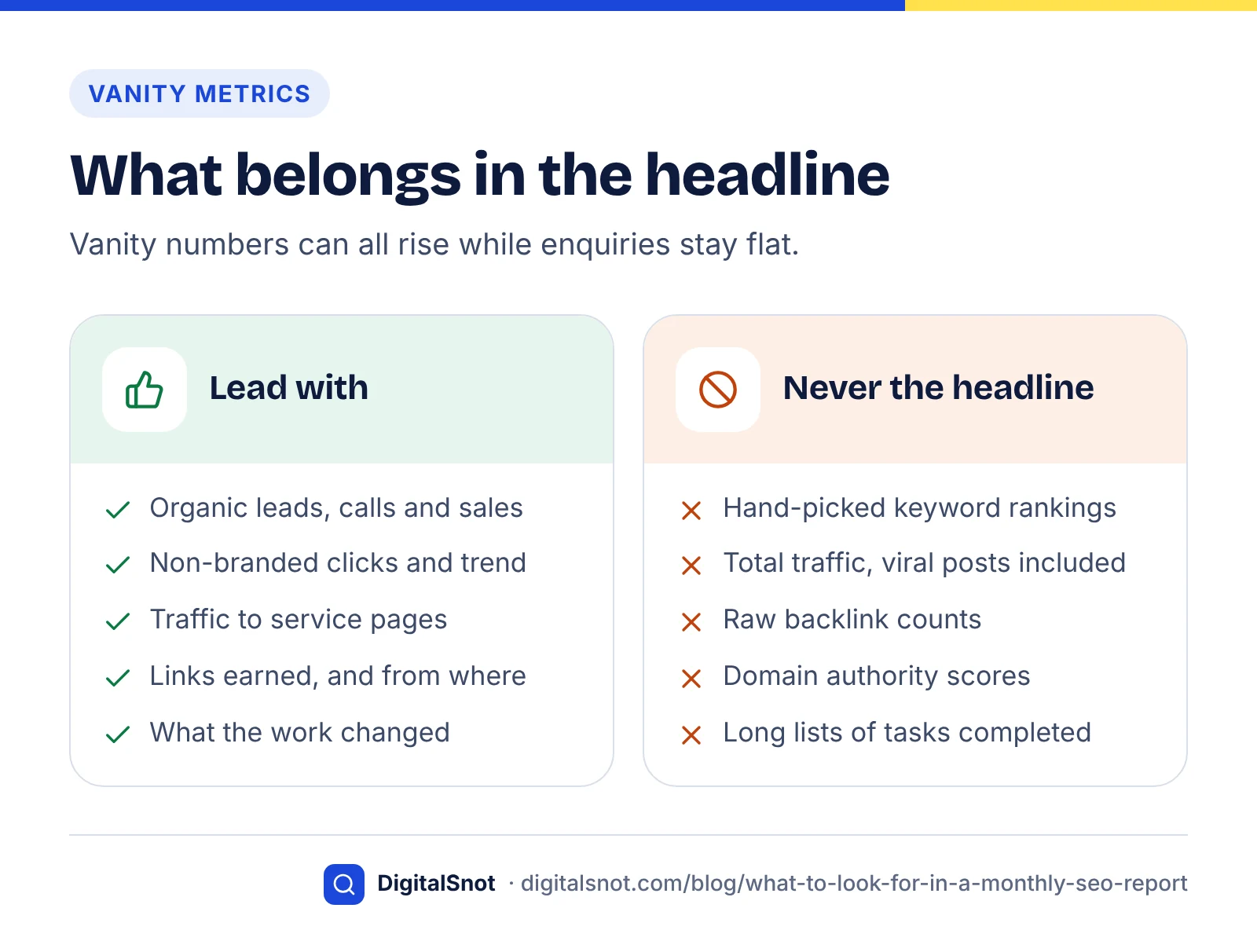
Some numbers are easy to make look good without any business effect. They are not useless, but they should never be the headline.
- Rankings for hand-picked keywords: ten keywords chosen by the agency can all rise while enquiries stay flat. Ask how the list was chosen and whether those terms bring buyers.
- Total traffic: a viral blog post can double sessions from people who will never buy. Ask for organic traffic to service and product pages separately.
- Backlink counts: hundreds of low-quality links are worth less than a few relevant ones. Ask which links were earned this month and from where.
- Domain authority scores: these are third-party estimates, not Google metrics.
- "Tasks completed": a long list of activity says nothing about results. Ask what changed because of the work.
How to read trends
Read every number against two baselines: the previous month and the same month last year. Month-on-month shows momentum; year-on-year removes seasonal swings such as festivals, holidays or financial year-end.
- Check clicks and key events first. If both are up year on year, the work is likely helping.
- If impressions rose but clicks did not, look for AI Overviews or other features absorbing clicks, or rankings on terms with low intent to visit.
- If clicks fell, ask whether it was a few pages or the whole site. A site-wide drop suggests a technical or algorithm issue; a few pages suggest content or competition.
- Look at a three-month trend before reacting. One month is often noise.
Technical problems often show up as sudden drops. Our technical SEO audit checklist covers how to investigate them. If a drop lines up with a Google update, our core update recovery guide shows how to confirm the cause and find the pages to fix.
Questions to ask your agency
A short set of questions will tell you quickly whether the report reflects real progress. A good agency will welcome them.
Your monthly SEO report checklist
- How many leads, calls or sales came from organic search this month, compared with last year?
- Which pages earned them, and what did you change on those pages?
- How are non-branded clicks trending?
- Are all our important pages indexed? If not, why?
- Are we appearing in AI Overviews or AI answers for our main topics?
- What are the three priorities for next month, and why those?
If you are comparing providers, our posts on how to choose an SEO agency and what SEO services cost in India give more questions to ask before you sign. Our technical SEO service includes monthly reporting built around the metrics above.
By the numbers
- of US Google searches ended without a click in January to April 2026 (Similarweb panel data)
- 68%
- Source: SparkToro
- of search performance data is available in the Search Console Performance report
- 16 months
- Source: Google Search Console Help
- default length after which a GA4 session counts as engaged, unless it already had a key event or 2+ page views
- 10 seconds
- Source: Google Analytics Help
Frequently asked questions
What should be included in a monthly SEO report?
A monthly SEO report should include organic leads or sales tracked as GA4 key events, Search Console clicks, impressions and top queries split into branded and non-branded, indexing health for important pages, and visibility in AI answers. Each figure should be compared with the previous month and the same month last year, followed by what was done and next month's priorities.
Which is more important in an SEO report, traffic or conversions?
Conversions, or key events as GA4 now calls them, matter more because they measure business results such as enquiries, calls and sales. Traffic is useful context, especially organic traffic to service and product pages, but total traffic can rise from visitors who never buy. A report should lead with outcomes and use traffic to explain them.
Why did my impressions go up but clicks stay flat?
Common reasons include ranking for more searches with low intent to click, AI Overviews or other search features answering the question on the results page, and lower positions on new terms. Also check Google's Data anomalies page: a logging error affected Search Console impressions from May 2025 to April 2026, which can distort comparisons across that period.
How far back can I see Search Console data?
The Search Console Performance report shows up to 16 months of data. If you want a longer history for year-on-year comparisons, ask your agency or developer to export the data regularly, or use the Search Console API or bulk data export to store it in your own systems before older months drop out.
Can an SEO report show visibility in ChatGPT or AI Overviews?
Partly. Search Console now has generative AI performance reports showing impressions in features such as AI Overviews and AI Mode, and Bing Webmaster Tools reports citations in Copilot and Bing AI summaries. For ChatGPT and Perplexity there is no official report, so agencies track a fixed set of prompts each month and record mentions.
Are keyword rankings a useful SEO metric?
Rankings are useful as supporting detail, but they are easy to cherry-pick. A report can show a few chosen keywords rising while enquiries stay flat. Ask how the tracked keywords were chosen, whether they bring buyers, and check Search Console average position and clicks alongside any third-party rank tracker.
Sources
Every figure and claim in this article comes from the sources below. We checked each one when writing and link to the original so you can read it yourself. Credit belongs to the authors and publishers listed. How we write and check our articles.
-
1
Conversions vs. key events in Google Analytics
Google Analytics Help · Why GA4 conversions were renamed key events and how they differ
-
2
[GA4] Engagement rate and bounce rate
Google Analytics Help · Definition of an engaged session and engagement rate
-
3
What are impressions, position, and clicks?
Google Search Console Help · Definitions of clicks, impressions, CTR and average position
-
4
Introducing the branded queries filter in Search Console
Google Search Central · Branded and non-branded query filter and its limits
-
5
Page indexing report
Google Search Console Help · Indexed vs non-indexed URLs and when small sites need the report
-
6
In 2026, Less than One Third of Google Searches Still Send a Click
SparkToro · 68% of US Google searches ended without a click, January to April 2026
-
7
Introducing Search Generative AI performance reports in Search Console
Google Search Central · Search Console reports for impressions in AI Overviews and AI Mode
-
8
Introducing AI Performance in Bing Webmaster Tools (public preview)
Bing Webmaster Blog · Citation metrics for Copilot and Bing AI summaries, and their limits
-
9
Rename and generate new events
Google Analytics Help · Renaming an event that is marked as a key event removes that status
-
10
Data anomalies in Search Console
Google Search Console Help · Impressions logging error from May 2025 to April 2026
-
11
Performance report (Search results): Overview and basic setup
Google Search Console Help · 16 months of data available in the Performance report