7 title tag mistakes that cost you clicks
Google rewrites most title tags it sees. These seven mistakes are the usual reasons, and each one has a simple fix you can make today.
On this page (8 sections)
Your title tag is usually the first thing a searcher reads about your page. When it is vague, repetitive or stuffed with keywords, Google may replace it, and people may scroll past. Here are seven common title tag mistakes, why each one costs clicks, and how to fix it.
How Google decides what title to show
Google does not always show your title tag. Its title link documentation explains that the title shown in results is generated automatically from several sources: the <title> element, the main visual title or heading on the page, og:title meta tags, anchor text on links pointing to the page, and other text on the page.
The title tag is still the main input. In a 2021 update, Google said content from HTML title tags was used more than 80% of the time. So a good title tag usually survives; a poor one is the most common reason Google looks elsewhere.
There is no character limit on the title element itself, but Google truncates the title link as needed to fit the device width. Changes can take days or weeks to appear, because the page has to be recrawled first.
How often does Google rewrite titles?
Often. A Zyppy study of 80,959 title tags across 2,370 sites, collected in early 2022, found Google changed 61.6% of them. Many changes were minor, such as dropping the brand name or a separator, but some replaced the whole title.
The same study found titles over 70 characters were rewritten nearly every time, very short titles of one to five characters were rewritten 96.6% of the time, and titles of about 51 to 60 characters had the lowest rewrite rate, around 39% to 42%. The data is from 2022, so treat the percentages as a guide rather than a current rate.
Search snippet being optimised
The 7 mistakes and how to fix them
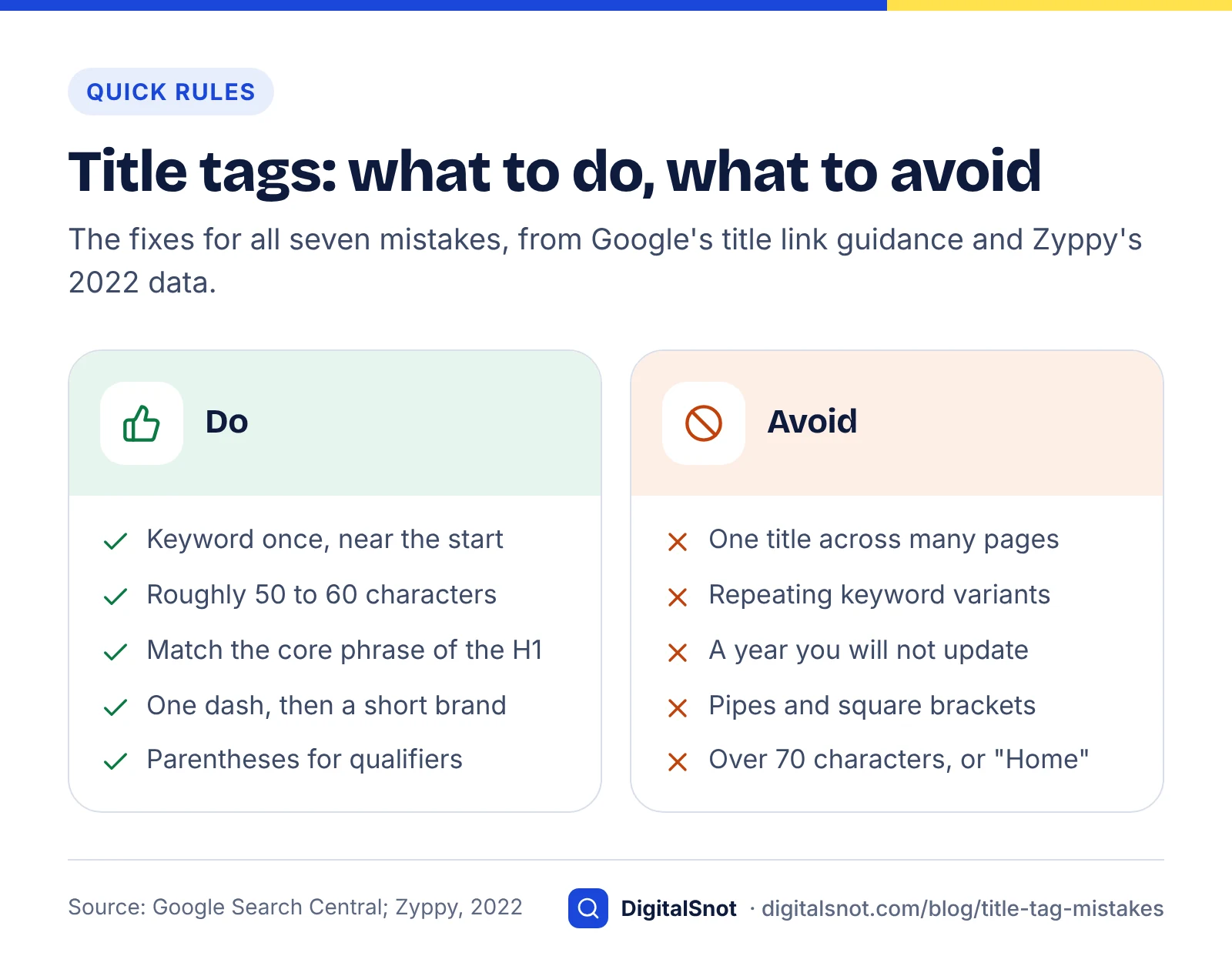
The first three make titles indistinct or spammy; the rest are about length, consistency and detail. Each comes with a fix you can apply straight away.
Mistake 1: boilerplate titles on many pages
Using the same title on many pages gives searchers no way to tell them apart. Google's documentation uses the example of a shop that titles every page "Cheap products for sale" and recommends titles that change to reflect each page's content.
A related problem Google describes in a September 2021 post is micro-boilerplate: the same title repeated across a subset of pages, such as every season page of a TV forum without the season number. Google may pull the missing detail from the page heading instead.
Fix: build titles from the page's own data, such as the product name, the city or the topic, rather than a fixed template phrase.
Mistake 2: duplicate titles across similar pages
Duplicates are boilerplate's quieter cousin. They often appear on filtered category pages, paginated archives or near-identical service pages for different locations. If two pages share a title, neither tells the searcher why it is the right result.
Fix: crawl your site, export titles and sort them alphabetically to spot repeats. Give each page a distinguishing detail, or merge pages that really are the same.
Mistake 3: keyword stuffing
Repeating the same keyword or close variants makes a title look spammy. Google's documentation gives the example "Foobar, foo bar, foobars, foo bars" and says this kind of repetition does not help users.
Fix: use your main keyword once, near the start, and spend the rest of the title on what makes the page worth clicking: the benefit, the format or the location.
Mistake 4: titles that are too long, or far too short
Long titles get cut off, and Zyppy's data suggests titles over 70 characters are almost always rewritten. Very short titles, such as "Home" or "Services", say almost nothing and are rewritten too.
Fix: aim for roughly 50 to 60 characters, put the most important words first, and keep the brand name short at the end. Pixel width varies, so check the result rather than counting characters alone: our free SERP preview tool measures it for desktop and mobile.
Mistake 5: a title that does not match the page heading
When the title tag says one thing and the visible H1 says another, Google has two competing signals. Zyppy found that matching the H1 to the title typically reduced rewriting across the board, often dramatically. Google's own guidance also asks you to make it clear which text is the main title of the page.
Fix: make the title tag and H1 say the same thing. They do not need to be identical, but the core phrase and any numbers should match.
Mistake 6: outdated details and inaccurate promises
An old year left in a title makes the page look stale. Google's documentation describes a page whose title said 2020 while the visible heading said 2021; Google used the year from the heading. The 2021 post also describes inaccurate titles, where a fixed title promises specific products the page no longer shows.
Fix: only put a year in the title if you will update it, and make sure the title describes what is on the page today.
Mistake 7: noisy separators and brackets
Separators and brackets are small, but Google treats them differently. In Zyppy's study, pipes were removed or replaced 41.0% of the time against 19.7% for dashes, and titles containing square brackets were rewritten 77.6% of the time against 61.9% for parentheses.
Fix: use one dash between the page title and the brand, and prefer parentheses to square brackets when you add a qualifier such as "(2026 guide)".
What we found when we compared Google's guidance with the Zyppy data
We set Google's title link documentation and its 2021 posts side by side with the Zyppy study, mistake by mistake, to see where official guidance and measured behaviour agree. The table below is the result. To repeat it, list each problem Google names, then look for a measured rewrite rate for the same pattern.
| Mistake | Named by Google? | Measured in Zyppy data? | Fix priority |
|---|---|---|---|
| Boilerplate and duplicates | Yes, with examples | Not quantified separately | High: affects many pages at once |
| Keyword stuffing | Yes | Not quantified separately | High: also looks spammy to people |
| Too long or too short | Truncation explained, no fixed limit | Yes: about 100% over 70 characters, 96.6% at 1 to 5 | High |
| Mismatch with H1 | Yes: make the main title clear | Yes: matching reduced rewrites | Medium |
| Outdated or inaccurate | Yes, with examples | Not measured | Medium: fix on recurring pages |
| Separators and brackets | Not addressed | Yes: pipes 41.0%, brackets 77.6% | Low: quick tidy-up |
The pattern is useful: Google's documentation focuses on whether a title is honest and distinct, while the measured data adds the mechanical details of length and punctuation. Fix the first group before you fine-tune the second.
Before and after: illustrative examples
These are hypothetical titles for a made-up dental clinic in Pune, written to show each fix. They are not results from a real site.
| Mistake | Before | After |
|---|---|---|
| Boilerplate | Best Dental Care | Smile Clinic | Teeth whitening in Pune: cost and process - Smile Clinic |
| Keyword stuffing | Dentist Pune, Pune Dentist, Best Dentist in Pune | Family dentist in Kothrud, Pune - open Sundays |
| Too short | Services | Dental services: implants, braces and check-ups |
| Outdated | Dental implant guide 2023 | Dental implants: a step-by-step guide for patients |
| Brackets and pipes | Root canal [FAQ] | Smile | Pune | Root canal treatment (FAQ) - Smile Clinic Pune |
Title tag mistakes to fix first
A quick title tag audit you can run this week
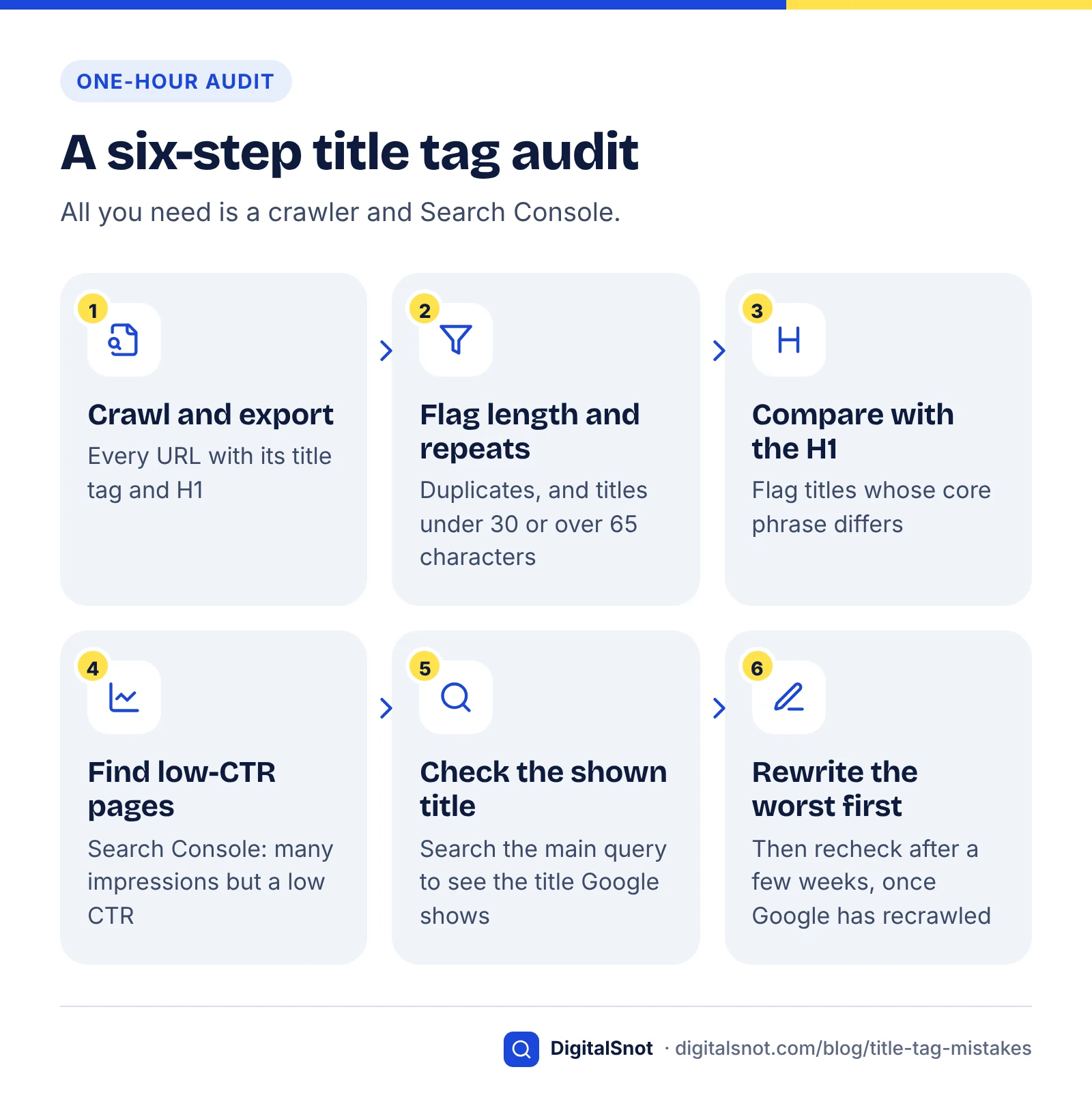
You can check most sites in an hour with a crawler and Search Console. Work in this order:
- Crawl the site and export every URL with its title tag and H1.
- Flag titles that are duplicated, under 30 characters or over 65 characters.
- Flag titles where the core phrase differs from the H1.
- In Search Console, find pages with plenty of impressions but a low click-through rate, and search their main query to see which title Google actually shows.
- Rewrite the worst pages first, then recheck after a few weeks.
Before you rewrite a low-CTR title, check whether the page also appears in AI Overviews or AI Mode: our guide to reading the Search Console generative AI report shows where to find those impressions and how to set them against clicks.
For the rest of the page, from headings to internal links, use our on-page SEO checklist. Titles also depend on choosing the right phrase, which our keyword research guide covers.
Answer-ready page checklist
When to get help
Fixing a handful of titles is quick. Fixing templates that generate thousands of titles on a shop or directory usually needs developer time and a careful plan. Our on-page SEO service handles this kind of work, and if you are comparing providers, read how to choose an SEO agency first. Titles can also affect how AI tools describe your pages, which our AI search optimisation work takes into account.
Free tools in this article
By the numbers
- of 80,959 title tags were rewritten by Google in Zyppy's early-2022 study of 2,370 sites
- 61.6%
- Source: Zyppy
- of the time, Google used the HTML title tag to generate the title link, per Google in 2021
- 80%+
- Source: Google Search Central
Frequently asked questions
Why does Google change my title tag?
Google generates the title shown in search results automatically and may use other sources, such as your main heading, og:title tag or anchor text, when it thinks your title tag does not describe the page well. Common triggers include boilerplate titles, keyword stuffing, outdated years and titles that are very long or very short.
How long should a title tag be?
There is no fixed limit, but titles longer than roughly 60 characters are often cut off in results. We keep the important words at the start.
Should my title tag and H1 be the same?
They should say the same thing, though they do not need to be word-for-word identical. Zyppy found that matching the H1 to the title typically reduced how much Google rewrote titles, and Google asks site owners to make the main title of the page clear. Keep the core phrase and any numbers consistent.
Can I stop Google from rewriting my titles?
There is no setting that stops it. Google generates title links automatically. The best you can do is write a unique, accurate and concise title that matches the visible heading, avoid repetition and boilerplate, and keep details such as years up to date. Changes appear after Google recrawls the page, which can take days or weeks.
Should I include my brand name in the title tag?
Google recommends branding titles concisely, so a short brand name at the end is fine. Avoid long taglines, because they push the important words out of view on small screens and give Google a reason to trim or rewrite the title.
Does a title tag rewrite hurt my rankings?
A rewrite changes what searchers see, not how the page is ranked. The risk is fewer clicks if Google's version is less appealing than a well-written title would be. Check pages with high impressions and low click-through rate in Search Console to find the titles worth improving first.
Sources
Every figure and claim in this article comes from the sources below. We checked each one when writing and link to the original so you can read it yourself. Credit belongs to the authors and publishers listed. How we write and check our articles.
-
1
Influencing Title Links in Google Search
Google Search Central · Title link sources, truncation, boilerplate, keyword stuffing and obsolete title examples
-
2
An update to how we generate web page titles
Google Search Central · HTML title tags used more than 80% of the time (2021)
-
3
Google Rewrites 61% of Page Title Tags [SEO Study]
Zyppy · Rewrite rates by length, separator, brackets and H1 match, early-2022 data
-
4
More information on how Google generates titles for web page results
Google Search Central · Micro-boilerplate and inaccurate title examples