Why customers return products: how to read your product return reasons
Export your returns, sort the reasons into a few themes, find the products behind most of them, and fix the cause with size charts, photos, packing and accurate listings.
On this page (9 sections)
Every return costs you twice: shipping both ways, and often a product you cannot sell again. Why customers return products comes down to a handful of causes, and your returns report already tells you which. This post shows you how to export your returns, sort the product return reasons into a few themes, find the products behind most of them, and fix the cause: size charts, photos, packing and listing accuracy. It also covers what India's E-Commerce Rules say about defective goods.
The numbers in the worked example are made up, and the fixes are our suggestions. This post is not legal or tax advice.
Start with the reports you already have
Download your returns from your seller panel, shop admin or courier as a CSV file. You want two kinds of rows:
- Customer returns: parcels the buyer received and sent back, usually with a reason code and sometimes a comment.
- Returns to origin (RTO): parcels that never reached the buyer and came back to you, because the buyer refused them, could not be reached or the address was wrong.
Take both for the same dates. Our suggestion is three months: enough rows to show a pattern, and recent enough to act on. Keep the columns that help: product or SKU, reason, buyer comment, quantity, refund or order value, date, return type, State and PIN code.
Then note how many orders each product had over the same dates. Thirty returns on 100 orders is a very different problem from thirty on 1,000. Without orders you only see which products come back most, which is often just which products sell most.
These reports can hold buyers' names, phone numbers and addresses, so keep them on your own device and share them only with people who need them.
Sort the reasons into a few themes
Marketplaces word their reason codes in their own way, and buyers write comments in English, Hindi or Hinglish: "size chhota hai", "colour alag hai", "parcel phata hua tha". Put every return into one theme, and read the comment as well as the code: a code picked from a list may not match what the buyer actually wrote.
- Size or fit: too tight, too loose, too short.
- Not as described: a different colour, thinner fabric, poor quality, not like the photo.
- Damaged or defective: broken, torn, leaking, not working.
- Wrong or missing item: the wrong size or colour, or an empty box.
- Changed mind: ordered by mistake, found it cheaper, no longer needed.
- Late delivery: it arrived after the occasion or after the date shown.
- Refused or not reachable, and address problems: the RTO themes, mostly on cash on delivery orders.
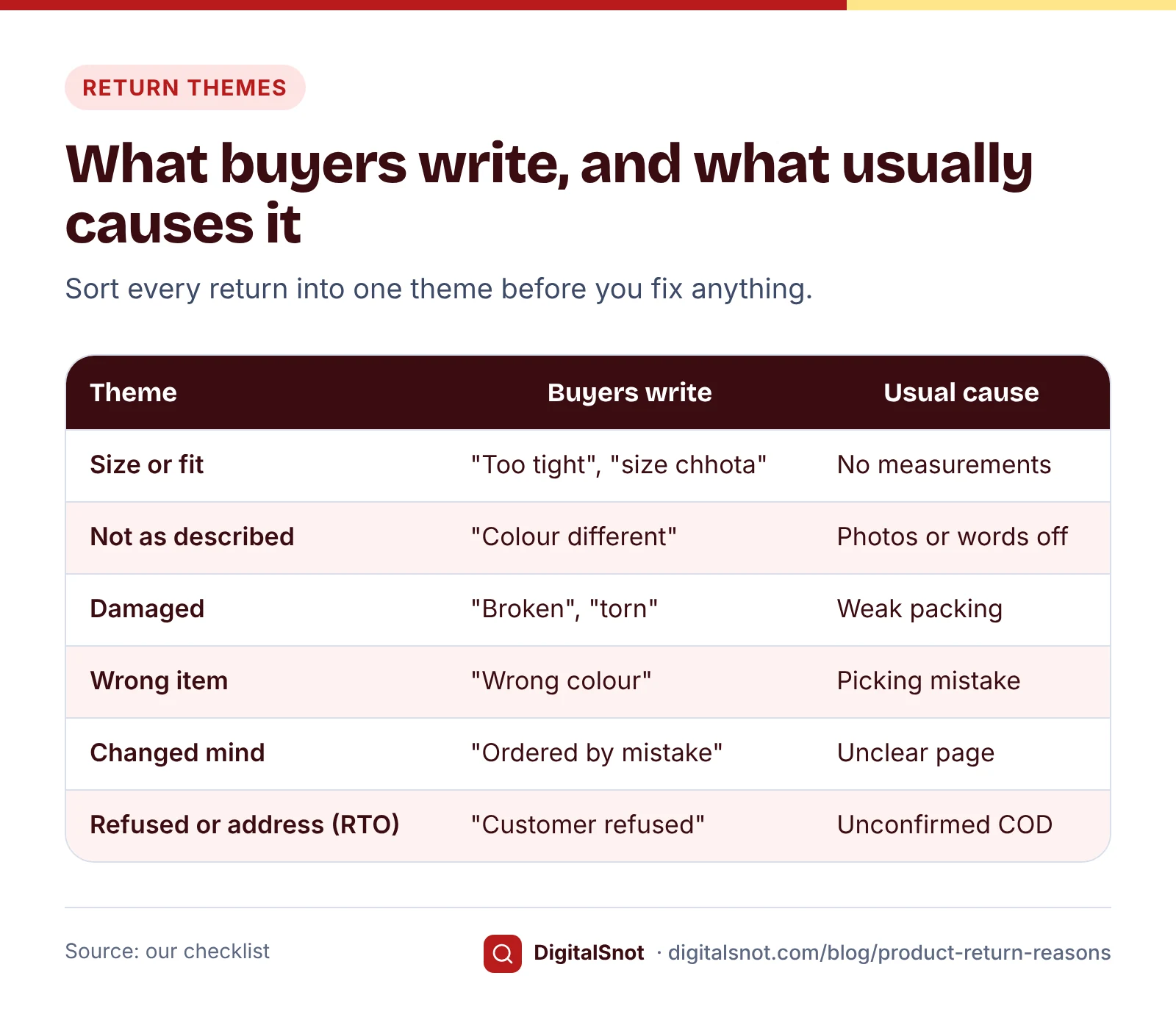
The Returns and RTO Reason Analyzer does this sorting for you. Paste or open your report and check the columns it matched. It reads each reason and comment, matches words such as "tight", "damaged", "wrong colour", "refused" or "pincode", in English and common Hinglish, and puts the return into a theme. The grouping is our measure, so look through it: you can move any reason to another theme and the tables update. It shows returns by theme and product, a theme-by-product table, a monthly trend and RTO by State. Add your orders per product to get return rates, and your return shipping cost to see roughly what returns cost you. It runs in your browser, and the report is not uploaded or saved.
A worked example: Saanjh Kurtis, Lucknow
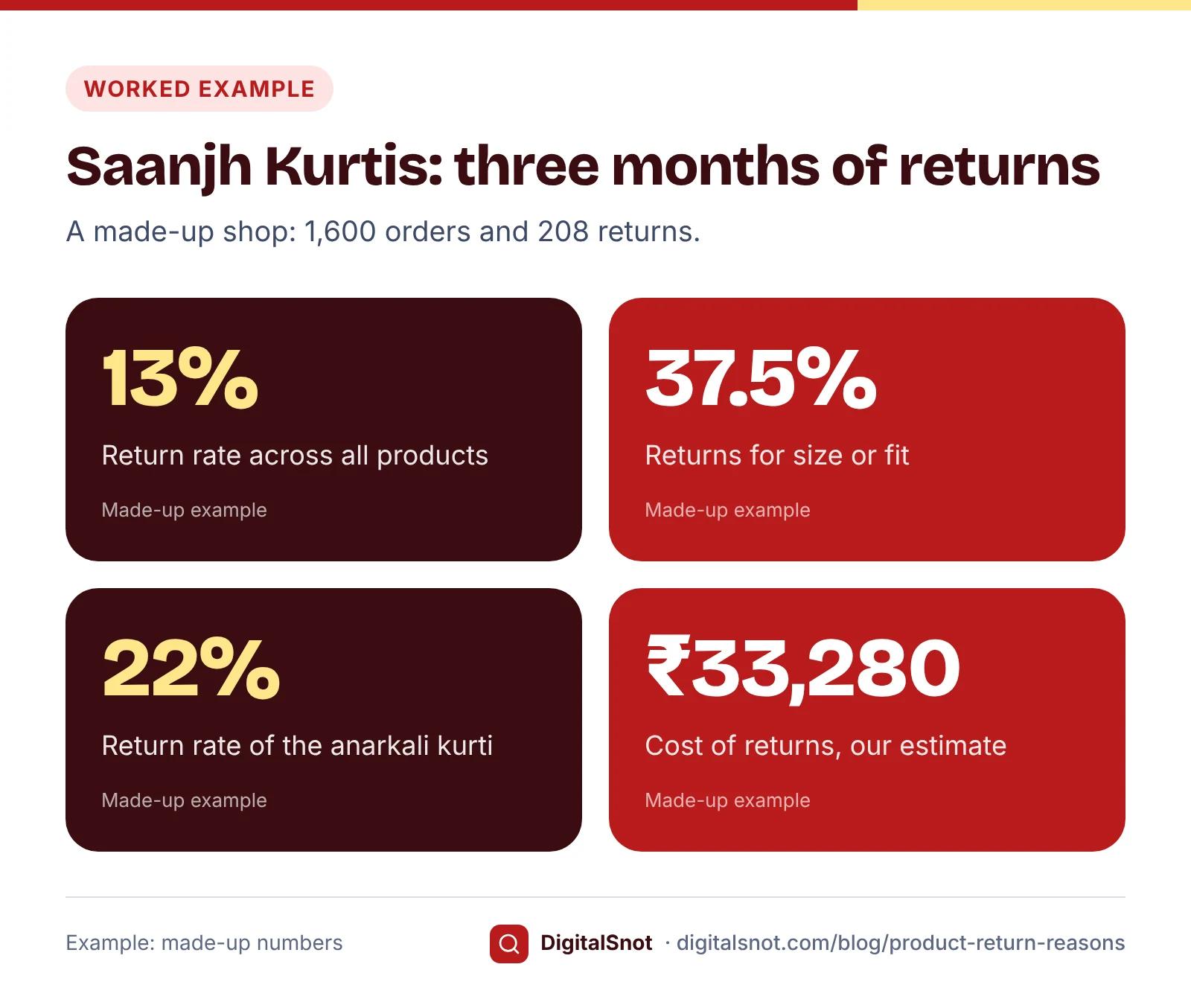
Saanjh Kurtis is a made-up shop selling three products on a marketplace and its own site. Over three months it sent 1,600 orders and had 208 returns, a return rate of 13%. The owner pasted the returns and RTO reports into the Returns and RTO Reason Analyzer and added the orders per product:
| Product | Orders | Returns | Return rate | Top theme |
|---|---|---|---|---|
| Anarkali kurti | 300 | 66 | 22% | Size or fit (41) |
| Palazzo set | 600 | 79 | 13.2% | Not as described (28) |
| Straight cotton kurti | 700 | 63 | 9% | Refused or not reachable (22) |
Across all three, size or fit was 78 of the 208 returns (37.5%), not as described 42 (20.2%) and refused or not reachable 34 (16.3%). The rest were damaged (18), changed mind (16), wrong item (10) and unclear (10). The tool flags a theme at 25% of returns or more as one to fix and at 10% as one to improve, and a product's return rate at 20% and 10% in the same way. These lines are our measures, not marketplace limits.
The comments made the causes plain. Most anarkali returns said "tight at the chest", and its listing showed sizes S to XXL with no measurements. The palazzo returns said the mustard colour looked orange in real life: the photos had been shot under warm indoor light. Most straight kurti refusals were cash on delivery orders that nobody had confirmed.
With a made-up ₹70 return shipping cost, ₹2,08,000 of refunds, 20% of returned goods that cannot be sold again and goods costing 45% of the price, the tool's estimate is ₹14,560 of return shipping plus ₹18,720 of unsellable stock: ₹33,280 in three months. That leaves out forward shipping and marketplace charges, so the real cost is higher.
Fix the cause, theme by theme
Start with the biggest theme on the product with the highest return rate, and change one thing at a time so next month's report shows what worked.
Size or fit
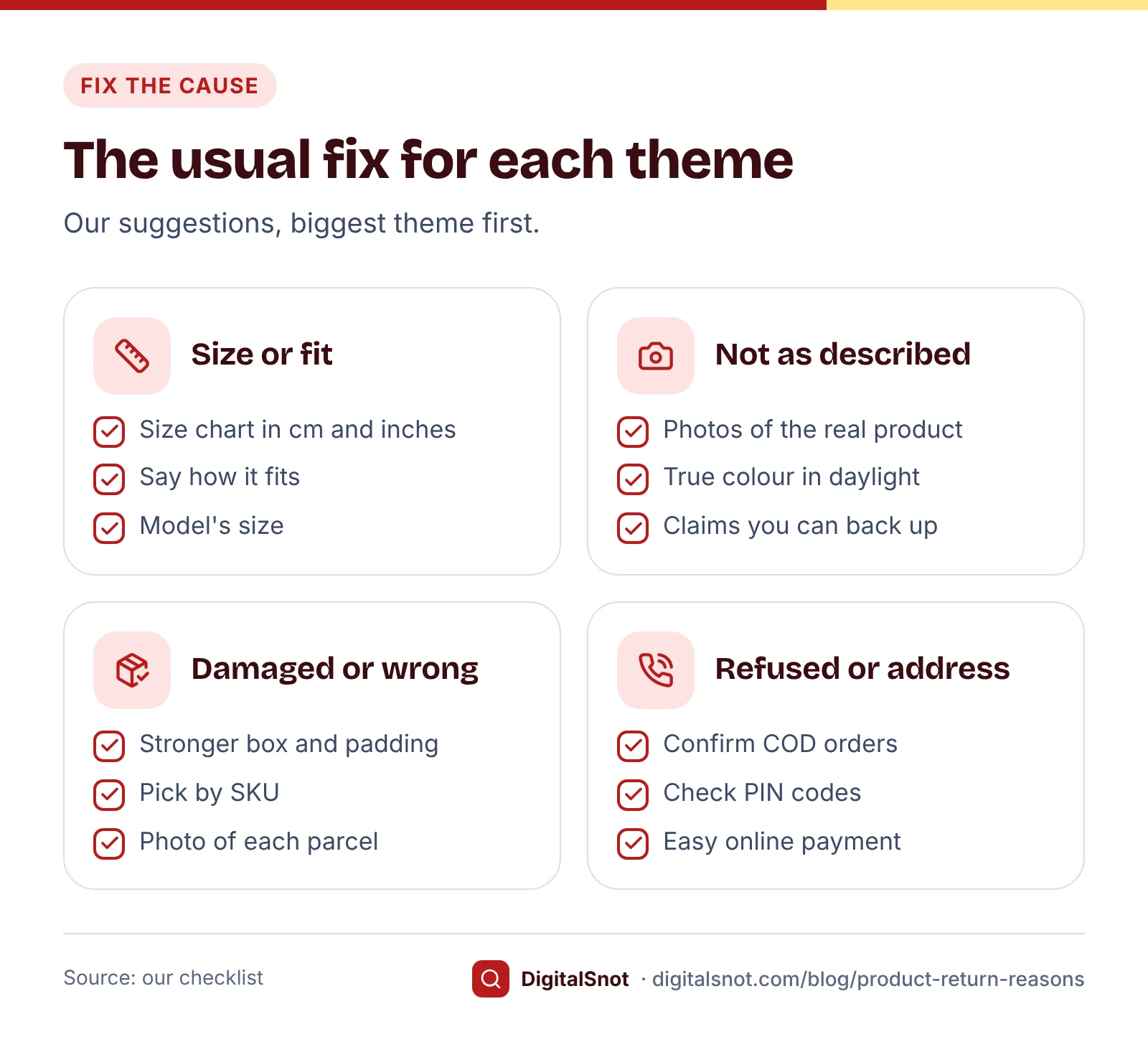
Measure your own samples and put a size chart on every listing. The Size Chart Builder takes your size labels and measurements in inches or centimetres, converts them exactly (one inch is 2.54 cm), and gives you an HTML table for a Shopify or WooCommerce description, plus Markdown, a CSV and an image for marketplaces that take a size chart picture. It flags missing figures, sizes that do not grow and figures that look like the wrong unit. Say whether the chart gives body or garment measurements, and add how the product fits and what size the model wears. Marketplaces have their own size chart templates in their seller panels, so check those too.
Not as described
Photograph the actual product in daylight, with close-ups of the fabric and the true colour, and make the words match: colour, material, size and what is in the box. The Product Photo Checker reads each photo's pixel size, file size and real format, and measures how white the background is and how much of the frame the product fills, for Amazon.in, Flipkart, Meesho, Merchant Center or your own shop. Amazon.in's beginner's guide asks for images 1,000 pixels or more in height and width so buyers can zoom, and its photography guide asks for a main image that shows the front of the product on a white background. Flipkart's listing guide asks for high-resolution photos from several angles, and Meesho's kurti selling page for JPEG images without logos or watermarks. The checker cannot judge whether the colour is true, so compare the photo with the product yourself. Our post on product photo rules covers each marketplace.
The words matter as much as the photos. Under the Consumer Protection Act, 2019, an advertisement that falsely describes a product is misleading. Take out claims you cannot back up, and run the title and description through the Marketplace Listing Checker.
Damaged or wrong item
For damage, look at how the products at the top of the list are packed: a stronger box or mailer, padding round fragile parts and sealed bags for liquids. Check stock from your supplier for defects before you ship it. For wrong items, label shelves and bags by SKU, including size and colour, pick against the SKU on the order, and check each parcel before you seal it. A photo or short video of each packed parcel also helps if you need to raise a claim.
Changed mind and late delivery
Some change-of-mind returns are normal. Many come from a page that set the wrong expectation, so make size, colour, material and what is included plain. For late deliveries, compare the delivery times you show with what your courier really manages, and send shipped and out-for-delivery messages.
Refused and address problems
These are RTO, and most come from cash on delivery orders. Confirm them on WhatsApp or by phone before you ship, check the address and PIN code, and offer an easy way to pay online. Our post on cutting COD returns goes through each step.
What the E-Commerce Rules say about defective goods
You can decide whether to take back items when a buyer simply changes their mind, as long as your policy says so plainly. Some returns you cannot refuse. The Consumer Protection (E-Commerce) Rules, 2020 say a seller on a marketplace, and an e-commerce business selling its own stock, shall not refuse to take back goods, or refuse a refund, if the goods are defective, deficient or spurious, if they do not have the characteristics or features advertised or agreed, or if they are delivered late from the stated delivery schedule. A late delivery caused by force majeure is the exception.
So the damaged, wrong item, not as described and late delivery themes are not ones a strict policy can push away. The cheaper fix is to stop them happening. The same Rules ask sellers to give buyers information on returns, refunds, exchanges, warranty and delivery. Our post on a return and refund policy customers trust covers what to write, and the Return and Refund Policy Builder helps you write it.
Check again every month
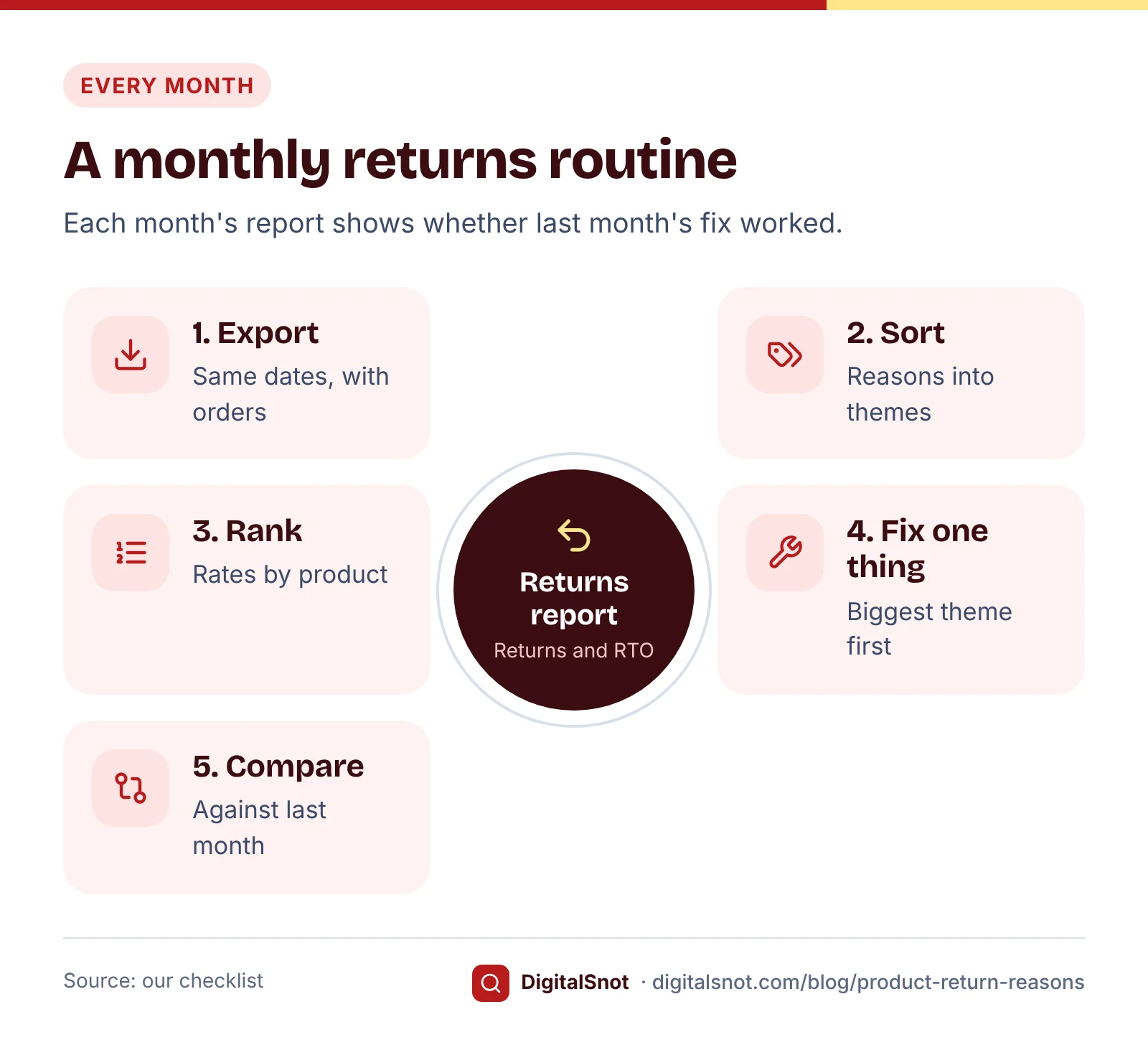
A returns report is most useful as a series. Our suggested routine:
- Download the same reports for the month just gone, with the orders per product.
- Run them through the tool and compare theme shares and return rates with last month. The CSV downloads make this easy.
- Look at the products you changed. Returns arrive after the orders they belong to, so give a change a few weeks before you judge it.
- Pick the next fix: the biggest theme left on the product with the highest return rate.
Mistakes to avoid
- Counting returns without orders. Your best-seller will always have the most returns. Compare rates.
- Trusting the reason code alone. The comment often tells a different story.
- Mixing RTO with customer returns. A refused parcel needs a COD fix, not a size chart.
- Changing everything at once. If you change the photos, size chart and price together, you will not know which one worked.
- Writing "no returns" to hide the problem. Defective, deficient or not-as-advertised goods still have to be taken back or refunded.
- Using a size chart copied from another brand. Measure your own samples.
Your next step
This week, download three months of returns and RTO, add the orders per product, and paste them into the Returns and RTO Reason Analyzer. Pick the one product with the highest return rate and fix its biggest theme. All our free tools for online sellers work in your browser and never sign in to your seller accounts. If you want help with your listings and product pages, get in touch.
Free tools in this article
- Returns and RTO Reason Analyzer Group return and RTO reasons into themes by product, month and state, and see what to fix first.
- Size Chart Builder Make a clear size chart in inches and cm, as an HTML table, CSV or image, with checks for gaps.
- Product Photo Checker Check product photos against Amazon.in, Flipkart, Meesho and Merchant Center image rules.
- Marketplace Listing Checker (Amazon, Flipkart, Meesho) Check titles, bullets, search terms and product photos against Amazon.in, Flipkart and Meesho rules.
Frequently asked questions
Why do customers return products bought online?
The usual themes are size or fit, a product that does not match its photos or description, damage in transit, a wrong or missing item, a change of mind and late delivery. Parcels refused at the door or sent to a wrong address come back as returns to origin (RTO). Your own returns report shows which of these matter most for your products.
What is the difference between a return and an RTO?
A return is a parcel the buyer received and sent back. An RTO, or return to origin, never reached the buyer and came back to you, for example because it was refused, the buyer could not be reached or the address was wrong. Both cost you shipping both ways, but they need different fixes.
What is a normal return rate?
There is no official figure, and it differs a lot by category. Compare each product with your own other products and with its own past months. Our Returns and RTO Reason Analyzer flags a product at a 20% return rate or more to fix and 10% or more to improve; these are our measures, not marketplace limits.
How do I cut size and fit returns?
Measure your own samples and add a size chart to every listing, in inches and centimetres, saying whether the figures are body or garment measurements. Say how the product fits and what size the model wears, and read buyer comments to see whether your sizes run small or large.
Can I refuse a return if my policy says no returns?
For a change of mind, you can choose not to take items back if your policy says so plainly. But the Consumer Protection (E-Commerce) Rules, 2020 say a seller shall not refuse to take back goods or refuse a refund if the goods are defective, deficient or spurious, not as advertised or agreed, or delivered late, except for late delivery caused by force majeure. This is not legal advice.
Is my returns report uploaded when I use the Returns and RTO Reason Analyzer?
No. The Returns and RTO Reason Analyzer reads the report in your browser, on your device, and buyer details in it are never saved or sent anywhere. Only your cost settings are kept in your browser for next time.
Sources
Every figure and claim in this article comes from the sources below. We checked each one when writing and link to the original so you can read it yourself. Credit belongs to the authors and publishers listed. How we write and check our articles.
-
1
Consumer Protection (E-Commerce) Rules, 2020 (Gazette)
Department of Consumer Affairs · Sellers and inventory e-commerce entities may not refuse to take back or refund goods that are defective, deficient, spurious, not as advertised or agreed, or delivered late (except for force majeure); information on returns, refunds, exchanges, warranty and delivery.
-
2
Consumer Protection Act, 2019
India Code · Section 2(28): an advertisement that falsely describes a product is misleading.
-
3
How to sell on Amazon.in: a beginner's guide
Amazon.in (sell.amazon.in) · Images with height and width of 1,000 pixels or more so buyers can zoom.
-
4
How to do product photography for Amazon
Amazon.in (sell.amazon.in) · The main image shows the front of the product on a white background, with no extra items.
-
5
Product listing optimisation guide
Flipkart Seller Hub · High-resolution images from several angles.
-
6
Sell kurtis online
Meesho Supplier Hub · JPEG images without logos or watermarks and a clear front image.
Want a second pair of eyes?
Tell us about your site. We reply within one business day.
Talk to us Try our free tools