Product photos for marketplaces: sizes, backgrounds and common rejections
The main image rules Amazon.in, Flipkart, Meesho and Google Merchant Center publish, the photo faults that break them, and a shoot checklist for a small seller.
On this page (9 sections)
Your product photos are the first thing a buyer sees, and a photo that breaks a marketplace's rules can hold a listing back. This post sets out the main image requirements that Amazon.in, Flipkart, Meesho and Google Merchant Center publish, explains the faults that most often break them, and gives you a shoot checklist you can follow with a phone and a white sheet.
Marketplaces change their rules and add more by category, so treat this as a starting point and read the image rules for your category in your seller panel before a big shoot. Where a figure below is our own suggestion rather than a marketplace's rule, it says so.
The main image and the rest
Every marketplace splits your photos into two kinds. Amazon.in's seller blog on product photography for Amazon calls the first image shown in search and on the product page the main image, and says it should show the front of the product, not the back. The other images are where you show the back, the details, the size and the product in use.
The strict rules apply to the main image. Keep it plain: the whole product, on its own, on white. Use the other images to explain and persuade.
Amazon.in: what the main image needs
The same Amazon.in post asks you to give all products a white background when you upload images, and suggests a slightly different tone of white behind white products so they stand out. The product should be neither so small that it leaves a lot of white space and loses its details, nor too large, and other items stay out of the frame.
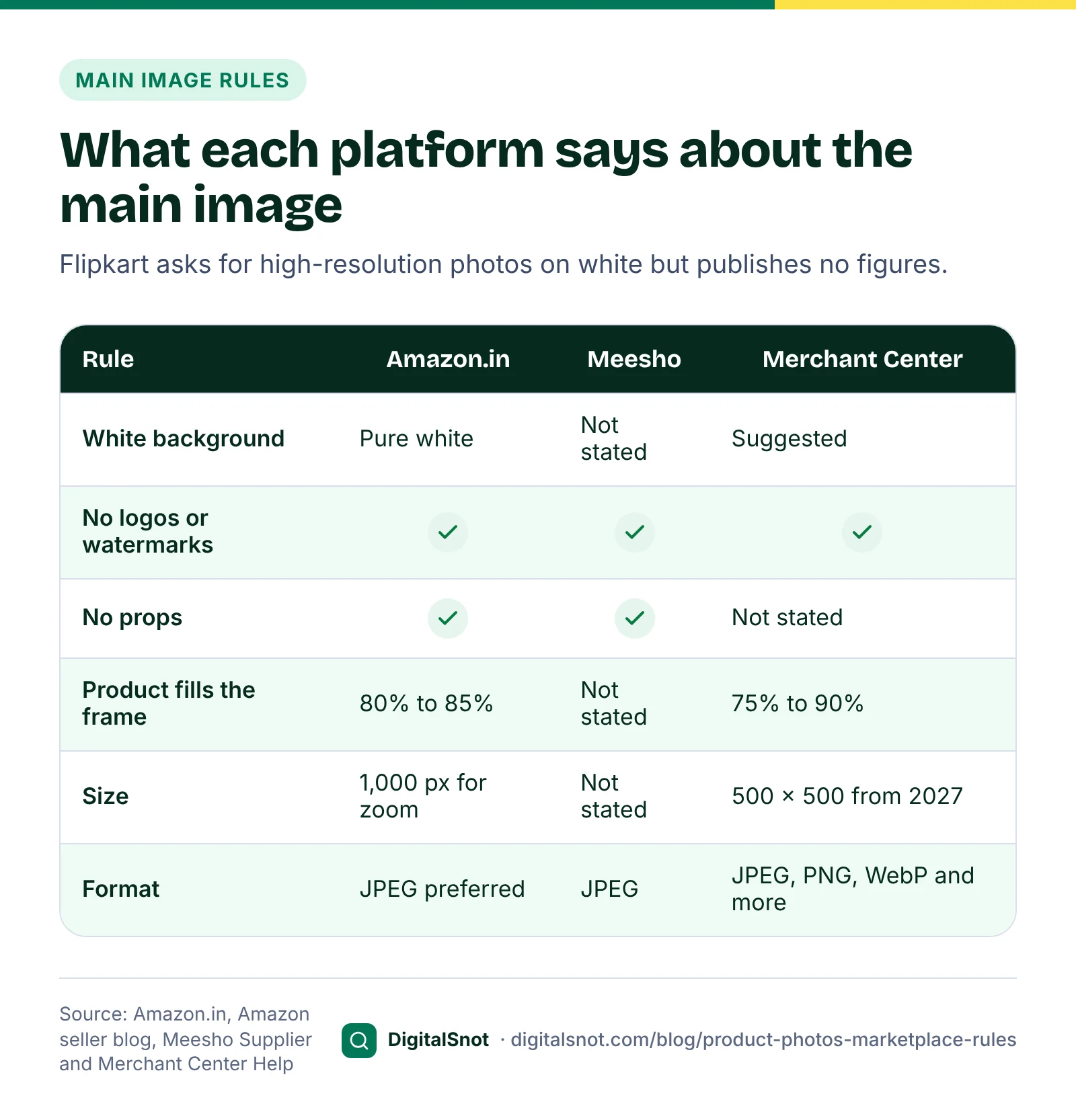
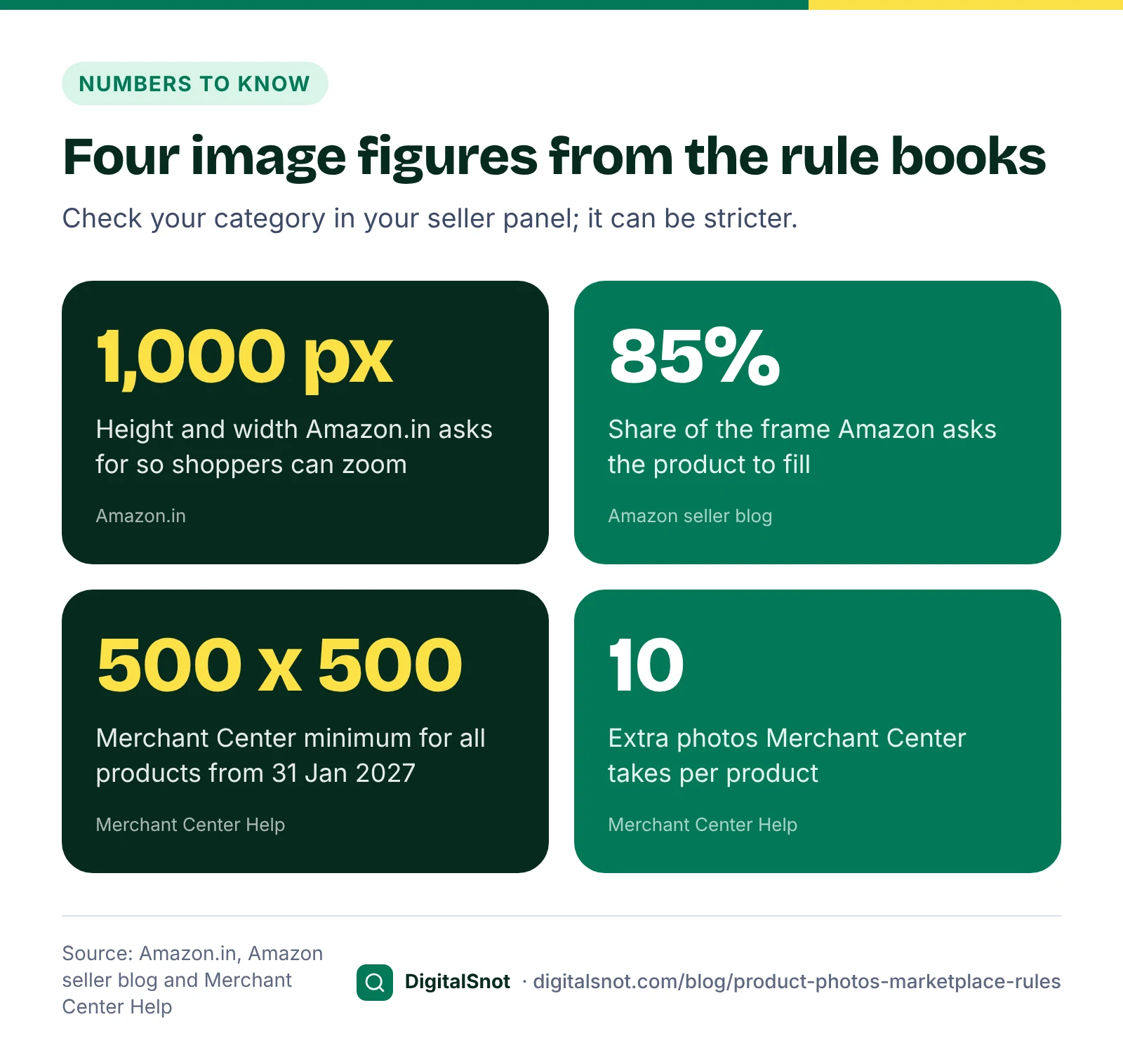
Amazon's guides add the numbers. Amazon's seller blog on product photos asks for a pure white background (RGB 255, 255, 255) and a product that fills 85% or more of the frame. Its Global Selling listing guide for Indian sellers says to show only the product, with no text, watermarks or props, covering at least 80% of the image. Aim for 85% and you meet both.
For size, Amazon.in's beginner's guide asks for a height and width of 1,000 pixels or more so shoppers can zoom, no more than 10,000 pixels on the longest side, and prefers JPEG. An older Amazon.in post on product discoverability gives 500 pixels on the longest side as the minimum. Treat 500 as the floor and 1,000 as the least you aim for.
Some categories add rules of their own. Amazon.in's fashion photography guidelines, for example, say the main image for shoes shows only one shoe, unless the listing is a combo pack.
Flipkart and Meesho
Flipkart's product listing optimisation guide asks for high-resolution images taken from several angles, and its guide on how to list products asks for photos on a white background, with lifestyle shots where you can. Flipkart's public pages give no pixel size, so check the image rules for your category in Seller Hub.
Meesho's supplier page on selling kurtis asks for JPEG images without any logo or watermark and a clear front image, recommends more than one image, and does not allow partial product images or images with props. It names no background colour and no pixel size. Our tools use 1,000 pixels on each side as our suggestion for Flipkart and Meesho.
Google Merchant Center, for your own shop
If you sell from your own website and list products on Google, your photos follow Merchant Center's rules. The image link help page covers the main image:
- At least 100 x 100 pixels, or 250 x 250 for clothing, today. Google's 2026 product data specification update raises this to 500 x 500 pixels for all products from 31 January 2027.
- No more than 64 megapixels or 16 MB, in JPEG, WebP, PNG, non-animated GIF, BMP or TIFF.
- Google recommends 1,500 x 1,500 pixels or more, and asks you not to enlarge small images or send thumbnails.
- No promotional text, watermarks or borders on the image.
- Frame the product so it takes up no less than 75% and no more than 90% of the image.
Merchant Center's best practices for clothing suggest a solid white or transparent background, and the additional image link attribute takes up to 10 more photos of each product. Our guide to product page SEO for small online shops covers the rest of the product page.
The faults that break the rules
Most problems come from the same few faults. Look for these before you upload:
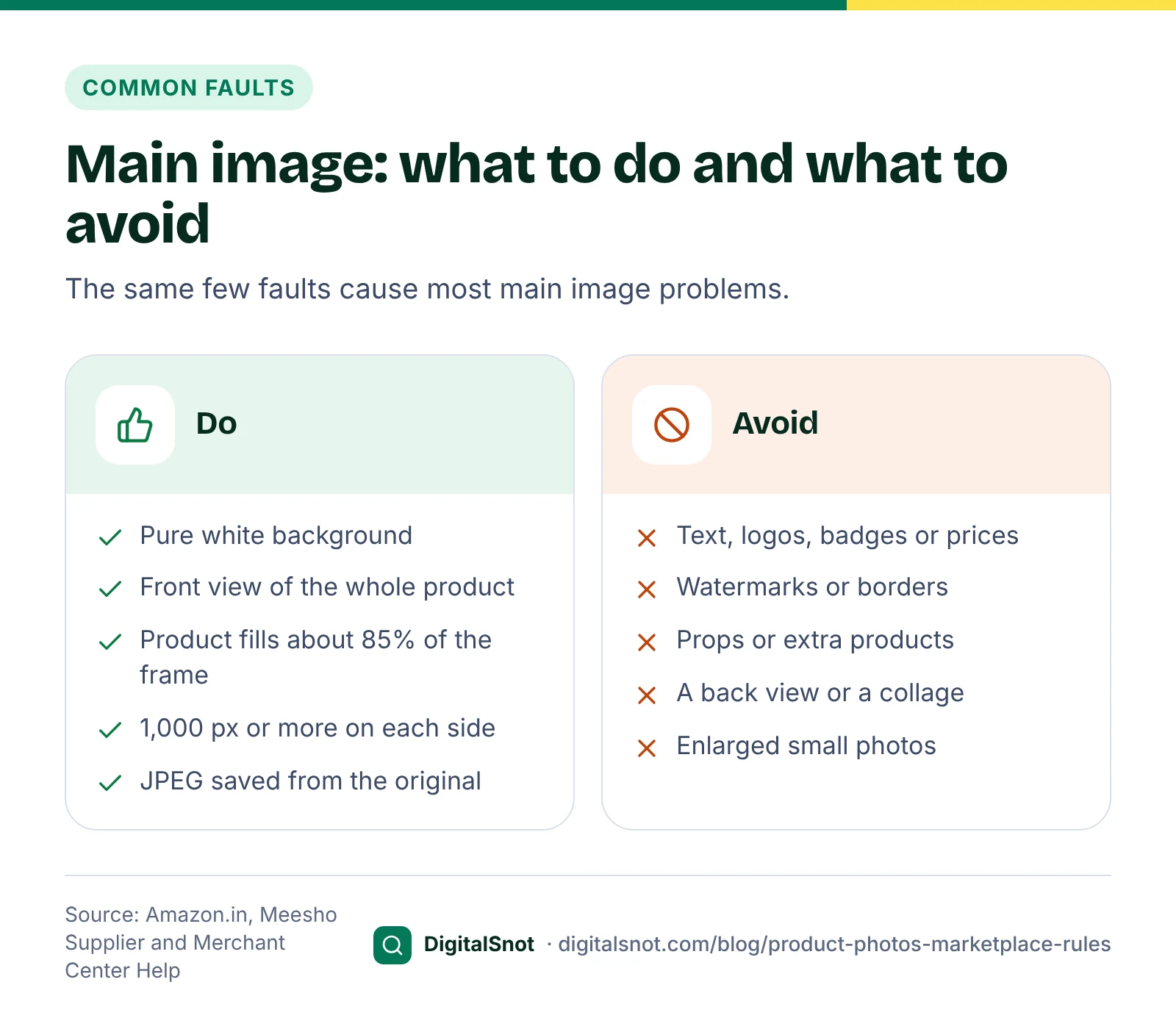
- A background that is nearly white. A white sheet in room light usually photographs as grey or cream. Amazon asks for pure white on the main image, and a phone rarely gets there without good light or editing.
- A small product in a big frame. A product filling half the frame is well short of Amazon's 80% to 85% and looks tiny in search results.
- Text, logos, stickers and badges. "Sale", "Best seller", a price, a watermark or your logo added on top of the main image. Every set of rules above asks you to keep them off it. Put offers in the price and promotion fields instead.
- Props and extra products. A cup beside the tea box, or three colours in one shot. Amazon's listing guide and Meesho both rule out props.
- Too few pixels. A screenshot, a cropped catalogue picture or a photo saved from a chat. Enlarging it adds no detail, and Google asks you not to do it.
- The wrong file type. Many phones save HEIC photos, which are not on Amazon's or Google's lists. A JPEG renamed to .png is another trap, because the name no longer matches the real format.
- A back view or a collage as the main image. Keep those for the other images.
A shoot checklist for a small seller
You do not need a studio. This is our checklist for a phone shoot at home:
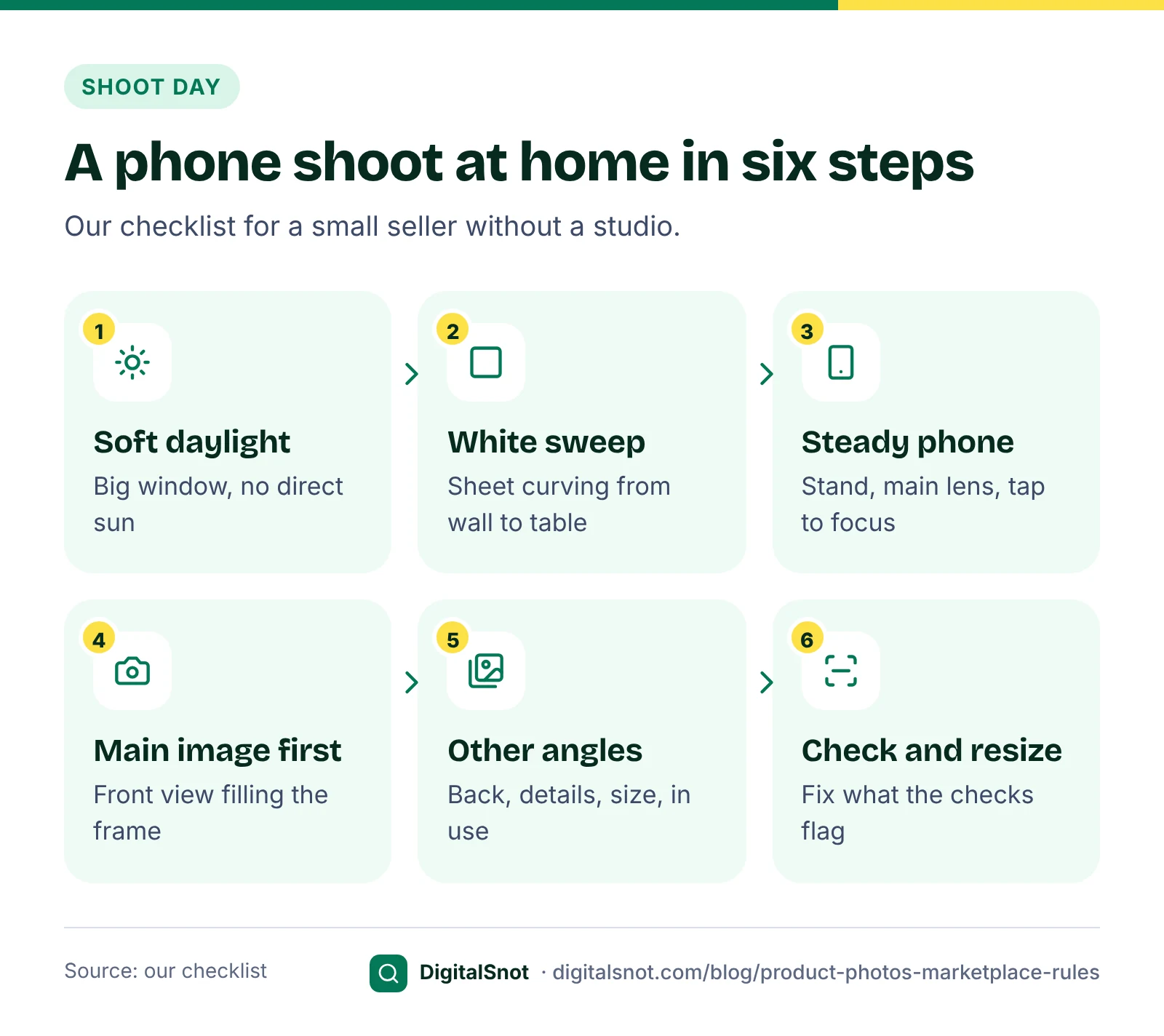
- Use soft daylight. Shoot near a big window, out of direct sun, with a white card or sheet on the other side to lift the shadows.
- Set up a white sweep. Clip a white sheet or chart paper to the wall and let it curve down onto the table, so there is no line behind the product.
- Steady the phone. Use a stand or a pile of books, use the main camera rather than digital zoom, and tap the product on the screen to focus.
- Prepare the product. Wipe off dust, peel off price stickers and iron out creases.
- Shoot the main image first. The front view of the whole product, filling most of the frame, with a little space round the edges for cropping.
- Then the other images. The back and sides, close-ups of the material and details, a shot that shows the size, the product in use, and what comes in the box.
- Check at full size. Zoom in on each photo for blur, dust and reflections before you edit anything.
A worked example: one tote bag, start to finish
Neel Block Prints in Sanganer, Jaipur, is a made-up seller listing a hand block-printed cotton tote bag on Amazon.in and Meesho. The figures below are made up to show the steps.
The owner shoots eight photos on her phone and opens them in the Product Photo Checker, with the Amazon.in main image picked. The checker reads each photo's pixel size, shape and real file format on her device, and measures how white the edges are and how much of the frame the bag fills. Those last two are our measures, not Amazon's own checks. Her front view has a cream background round the edges and the bag fills about 60% of the frame, and one photo turns out to be HEIC.
She reshoots the front view next to the window with a white card, closer to the bag, and saves the HEIC photo again as a JPEG. The checker now reads the edges as pure white. Then she puts all eight photos into the Product Photo Resizer with the Amazon.in preset. It trims the plain white border, fits each bag into a 2,000 x 2,000 pixel square with the product filling 85% of the frame, pads it with white and saves JPEGs named after her SKU. The square and the 2,000 pixel size are our suggestion. The resizer cannot turn a grey background white, which is why the reshoot came first.
Last, she pastes her title and bullet points into the Marketplace Listing Checker and opens the new main image there too, so the text and the photo are checked together. All three tools run in her browser: nothing is uploaded, and none of them signs in to her seller account.
Your next step
Pick your best-selling product and run its current main image through the Product Photo Checker today. If it fails on background or fill, reshoot the front view before you change anything else. Type the details buyers need, such as size, material and the declarations on the pack, into the listing itself rather than only into the photos; our post on what must be printed on a product package lists them.
All our free tools for online sellers are on one page. If you want help with your listings or your own shop's product pages, get in touch.
Free tools in this article
- Product Photo Checker Check product photos against Amazon.in, Flipkart, Meesho and Merchant Center image rules.
- Product Photo Resizer Resize product photos to marketplace sizes, with white padding, a trimmed border and one ZIP download.
- Marketplace Listing Checker (Amazon, Flipkart, Meesho) Check titles, bullets, search terms and product photos against Amazon.in, Flipkart and Meesho rules.
By the numbers
- the height and width Amazon.in asks for so shoppers can zoom into a product image
- 1,000 px
- Source: Amazon.in: beginner's guide to selling
- pixels: the minimum image size Google Merchant Center needs for all products from 31 January 2027
- 500 x 500
- Source: Google Merchant Center Help
Frequently asked questions
What background should the main image have on Amazon.in?
White. Amazon.in's seller blog asks for a white background for all products, and Amazon's guides ask for pure white, RGB 255, 255, 255, on the main image, with the product filling 85% or more of the frame. Shoot on white in good light and check the edges before you upload.
What size should product photos be for Amazon.in?
Amazon.in's beginner's guide asks for a height and width of 1,000 pixels or more so shoppers can zoom, and no more than 10,000 pixels on the longest side, and prefers JPEG. An older Amazon.in post gives 500 pixels on the longest side as the minimum. Our resizer's 2,000 x 2,000 pixel square is our suggestion.
Can I put my logo or a sale badge on the main image?
No. Amazon's Global Selling listing guide asks for no text or watermarks, Meesho asks for images without any logo or watermark, and Merchant Center asks for no promotional text, watermarks or borders. Put offers in the price and promotion fields instead.
What image size does Google Merchant Center need?
Today at least 100 x 100 pixels, or 250 x 250 for clothing, and no more than 64 megapixels or 16 MB. From 31 January 2027 it needs at least 500 x 500 pixels for all products. Google recommends 1,500 x 1,500 pixels or more and asks you not to enlarge small images.
How many photos should I upload for each product?
Merchant Center takes a main image and up to 10 more, Meesho recommends more than one image, and Flipkart asks for photos from several angles. Our suggestion is the main image plus the back, close-ups, a size shot, the product in use and the box contents. Check the limit for your category in your seller panel.
Does the Product Photo Checker upload my photos?
No. It opens and measures the photos in your browser, on your device. It reads the size, shape and real file format, and estimates the white background and fill (our measures). It cannot see text, logos or blur, and it does not sign in to any seller account.
Sources
Every figure and claim in this article comes from the sources below. We checked each one when writing and link to the original so you can read it yourself. Credit belongs to the authors and publishers listed. How we write and check our articles.
-
1
How to do product photography for Amazon
Amazon.in seller blog · The main image is the first image in search and on the product page, shows the front view, white background for all products, product neither too small nor too large, no extra items.
-
2
How to sell on Amazon.in: a beginner's guide
Amazon.in (sell.amazon.in) · Height and width of 1,000 pixels or more for zoom, up to 10,000 pixels on the longest side, JPEG preferred.
-
3
How to increase discoverability of your products on Amazon
Amazon.in seller blog · At least 500 pixels on the longest side (an older post).
-
4
How to take product photos
Amazon seller blog (sell.amazon.com) · Pure white background and the product filling 85% or more of the frame.
-
5
Amazon Global Selling listing guide
Amazon.in (sell.amazon.in) · White background, only the product with no text, watermarks or props, covering at least 80% of the image.
-
6
Category guidelines for fashion product photography
Amazon.in seller blog · Shoes: only one shoe in the main image unless it is a combo pack.
-
7
Product listing optimisation guide
Flipkart Seller Hub · High-resolution images from several angles.
-
8
How to list products on Flipkart
Flipkart Seller Hub · Photos on a white background, with lifestyle shots where possible.
-
9
Sell kurtis online
Meesho Supplier · JPEG images without logo or watermark, a clear front image, more than one image recommended, no partial images or props.
-
10
Image link [image_link]
Google Merchant Center Help · Minimum and maximum sizes, formats, 1,500 x 1,500 recommended, no enlarging, no promotional text or watermarks, product 75% to 90% of the image.
-
11
Merchant Center product data specification update 2026
Google Merchant Center Help · 500 x 500 pixel minimum for all products from 31 January 2027.
-
12
Additional image link [additional_image_link]
Google Merchant Center Help · Up to 10 additional product images.
-
13
Best practices for advertising clothing and accessories
Google Merchant Center Help · Use a solid white or transparent background.