Marketplace payment reconciliation: matching payouts to orders every month
Match your marketplace payments to your orders: what each order should pay after fees, GST on fees, TCS and TDS, how to spot short payments and raise claims, and a monthly routine.
On this page (10 sections)
A marketplace payout is one number in your bank account, but it covers dozens of orders, fees, taxes, returns and charges. If one order goes unpaid or one return is charged twice, you will not see it in the total. This post shows you a monthly marketplace payment reconciliation that matches your payments to your orders: the reports you need, what each order should pay, where GST on fees, TCS and TDS go, how to raise claims, and a routine that takes an afternoon.
The fee terms in the worked example are made up, because fees change by category and over time: copy yours from your own rate card. This post is not legal or tax advice. Check GST, TCS and TDS with your CA.
Why payouts and orders drift apart
Each payment can include or take away many things:
- Fees: commission or referral fee, fixed or closing fee, shipping and any other fee on your rate card, plus GST on those fees.
- Taxes held back: TCS under GST and TDS under income tax.
- Returns and RTO: the sale reversed, and return charges taken.
- Cancellations, which should cost you nothing unless your terms say otherwise.
- Charges with no order, such as ads or storage, and payments for orders from before the dates you are looking at.
Payments also arrive on a cycle. Amazon.in's seller FAQs say it pays every 7 days, Pay on Delivery orders included. Flipkart's fees and commission page counts its cycle from pickup or dispatch and gives different figures by seller tier, and Meesho's supplier pricing page describes a 7-day cycle from delivery, cash on delivery included. Use the cycle shown in your own seller panel or agreement.
The two reports you need
Download both from your seller panel, for the same dates:
- An orders report, with the order ID, order and delivery dates, status (delivered, returned, cancelled) and order value.
- A payments or settlement report, with the order ID and the net amount paid or charged on each line.
Keep your rate card, your fee invoices and your tax reports to hand for the next steps.
One trap catches many sellers. If you open a CSV in a spreadsheet and save it again, long order IDs can turn into numbers such as 4.08123E+17 and lose their last digits. Those orders then look unpaid. Use the file exactly as you downloaded it, or set the order ID column to text before you save.
Work out what each order should pay
For a delivered order, the payout under your terms is the order value, minus the fees on your rate card, minus the GST on those fees, minus TCS and TDS. A returned order should cost only the return charges your terms set, and a cancelled order nothing.
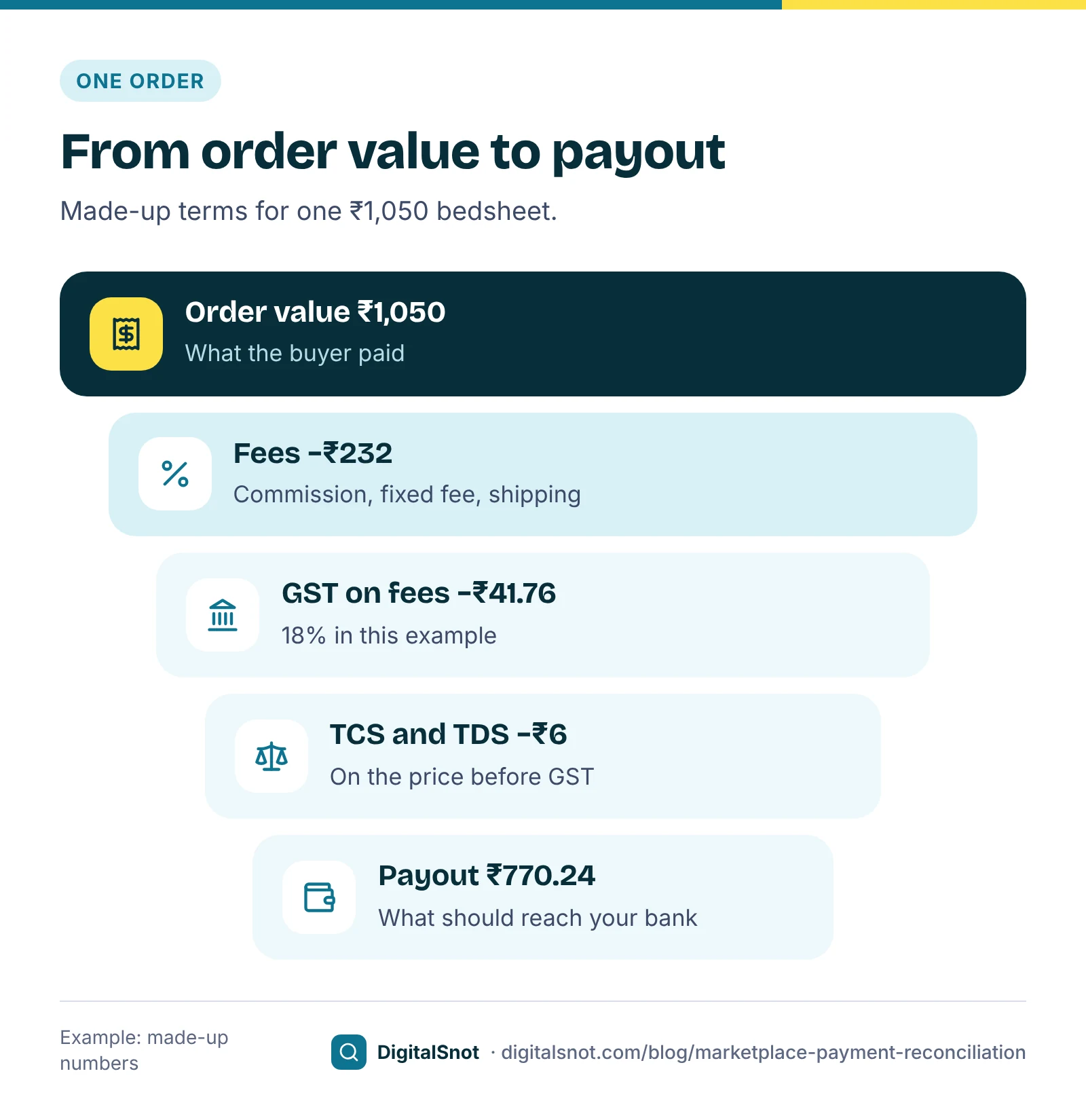
Chhaya Home Linen in Panipat is a made-up seller of cotton bedsheets. One bedsheet sells for ₹1,050 including GST, or ₹1,000 before GST. Its made-up terms are a 14% commission on the order value, a ₹20 fixed fee, ₹65 shipping, 18% GST on fees, and TCS at 0.5% and TDS at 0.1% of the price before GST, as its payment reports show:
| Line | Amount |
|---|---|
| Order value | ₹1,050.00 |
| Commission (14%), fixed fee and shipping | −₹232.00 |
| GST on those fees (18%) | −₹41.76 |
| TCS and TDS on ₹1,000 | −₹6.00 |
| Expected payout | ₹770.24 |
The Marketplace Fee and Profit Calculator does this sum for one product on Amazon.in, Flipkart, Meesho and your own shop side by side, and shows your profit and break-even price. No fee or tax rate is built in: you type the rates from your rate card and payment reports. Our post on your real profit per order goes through every fee line.
Check every order at once
Doing this by hand for hundreds of orders is slow. The Marketplace Payment Reconciliation tool takes both reports, pasted or opened as CSV, and matches them by order ID after evening out spaces, hyphens, quotes and case. You type your fee terms, your payment cycle and the date it counts from. It adds up all payment rows for each order, works out what your terms say it should pay, and lists:
- orders not paid after the cycle plus a few extra days (3 by default, our suggestion);
- orders paid less than your terms give, beyond an allowance you set;
- returns charged more than your terms, and lost parcels with no payment;
- charges on cancelled orders, and charges or payments for orders not in your orders report;
- returns still paid as a sale, which may be taken back later.
Each group shows the money at stake, with a do-these-first list, a claim message to copy and CSV files. It runs in your browser: the reports are not uploaded or saved, and it never signs in to your seller account. If your products have different fee rates, check one category at a time, or add an expected payout column to your orders report.
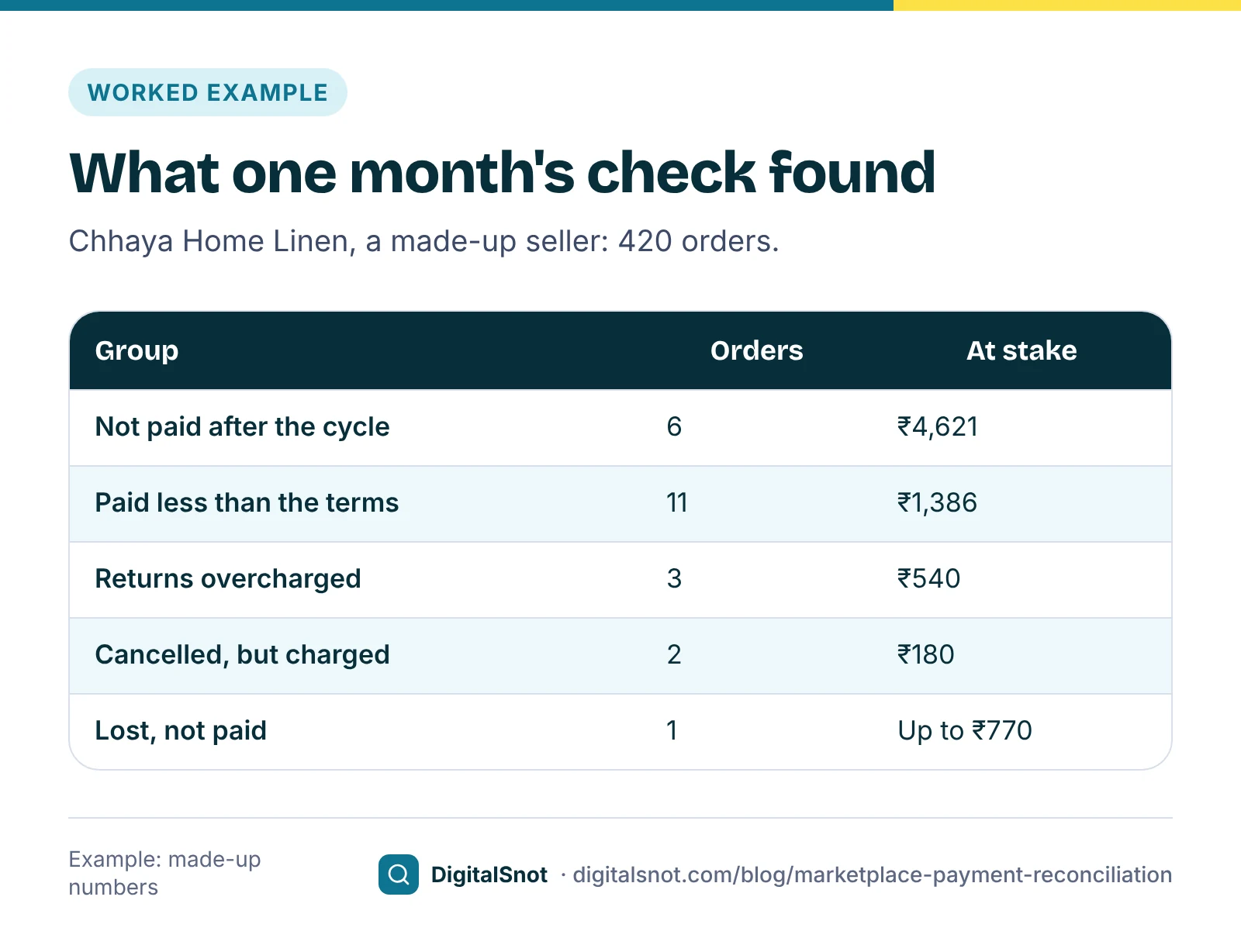
For Chhaya Home Linen's 420 September orders, the made-up result was 6 orders not paid after the cycle (₹4,621), 11 orders paid ₹1,386 less than its terms, 3 returns charged ₹540 too much, 2 cancelled orders charged ₹180 and one lost parcel worth up to ₹770: ₹7,497 to look into. The 11 short payments all had shipping charged at a heavier weight than the parcel. Our post on volumetric weight explains why that happens and how to dispute it.
GST on fees, TCS and TDS: getting the money back
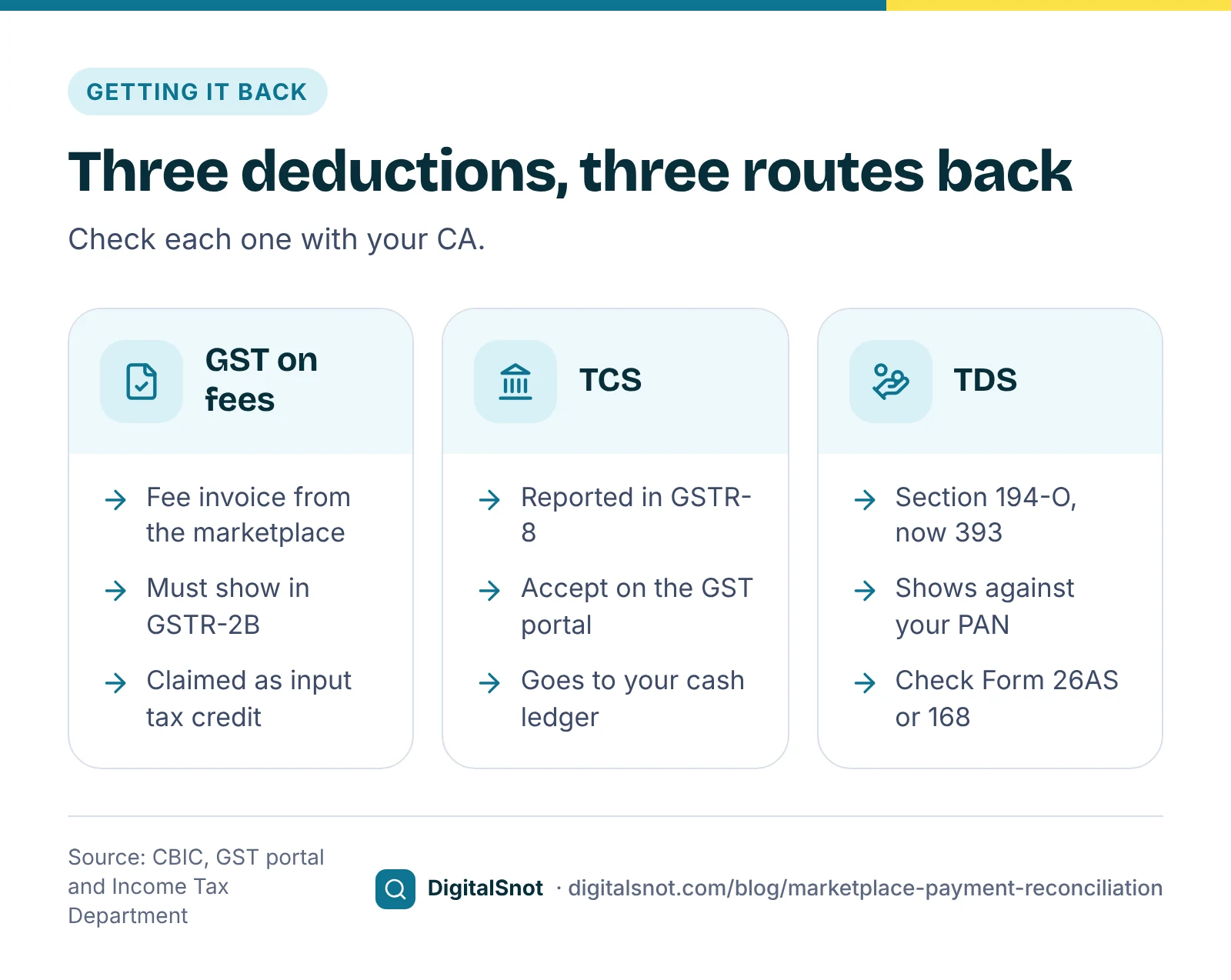
Three deductions in your payout can usually come back to you, each through a different route.
- GST on fees. The marketplace sends you fee invoices with GST. Under section 16 of the CGST Act, a registered seller can claim that GST as input tax credit only when the conditions are met, including the invoice showing in your GSTR-2B. Monthly filers get GSTR-2B on the 14th of the next month, according to the GST portal's advisory. The GSTR-2B Reconciliation Tool matches your purchase register, fee invoices included, with GSTR-2B and lists the credit at risk. Our post on GSTR-2B reconciliation explains the steps.
- TCS. Marketplaces collect it under section 52 of the CGST Act, and section 52(7) lets you claim it in your electronic cash ledger. The GST portal's TCS credit received page shows the amounts from the marketplace's GSTR-8. You accept or reject each one and file the statement; accepted amounts reach your cash ledger only after you file it, and rejected ones go back to the marketplace to correct.
- TDS. This is income tax, listed at 0.1% under section 194-O on the Income Tax Department's TDS rate chart, and under section 393 of the Income-tax Act, 2025 for payments from 1 April 2026. Check that it shows against your PAN in your annual tax statement, Form 26AS, which becomes Form 168 from tax year 2026-27.
If the TCS on the portal or the TDS in your statement is lower than your payment reports show, raise it with the marketplace's seller support. Your CA can tell you which of these you can claim.
Returns, lost parcels and claims
Returns are where most gaps hide. Check that each returned item came back to you, and in what condition, before you accept the charge. Photos or a video of the opened parcel help any claim. Our post on reading your return reasons shows how to cut returns in the first place.
Each marketplace has its own claim route and time limits:
- Flipkart: its seller terms of use ask sellers to reconcile regularly, and say a money claim that no Flipkart policy gives its own time limit should be raised within 180 days of the issue. Its payment, FBF and Seller Protection Fund policies can set their own limits.
- Amazon.in has its own claim process for some refunds, called SAFE-T. Check in Seller Central help which orders qualify and the time limit.
- Meesho's supplier learning hub says payment problems are raised from Support in the Supplier Panel.
Whatever the limit, our suggestion is to raise gaps in the same cycle you find them, with the order IDs, the amount you expected, the amount paid and your evidence. The claim message from the reconciliation tool lists one order a line, biggest first.
A monthly routine
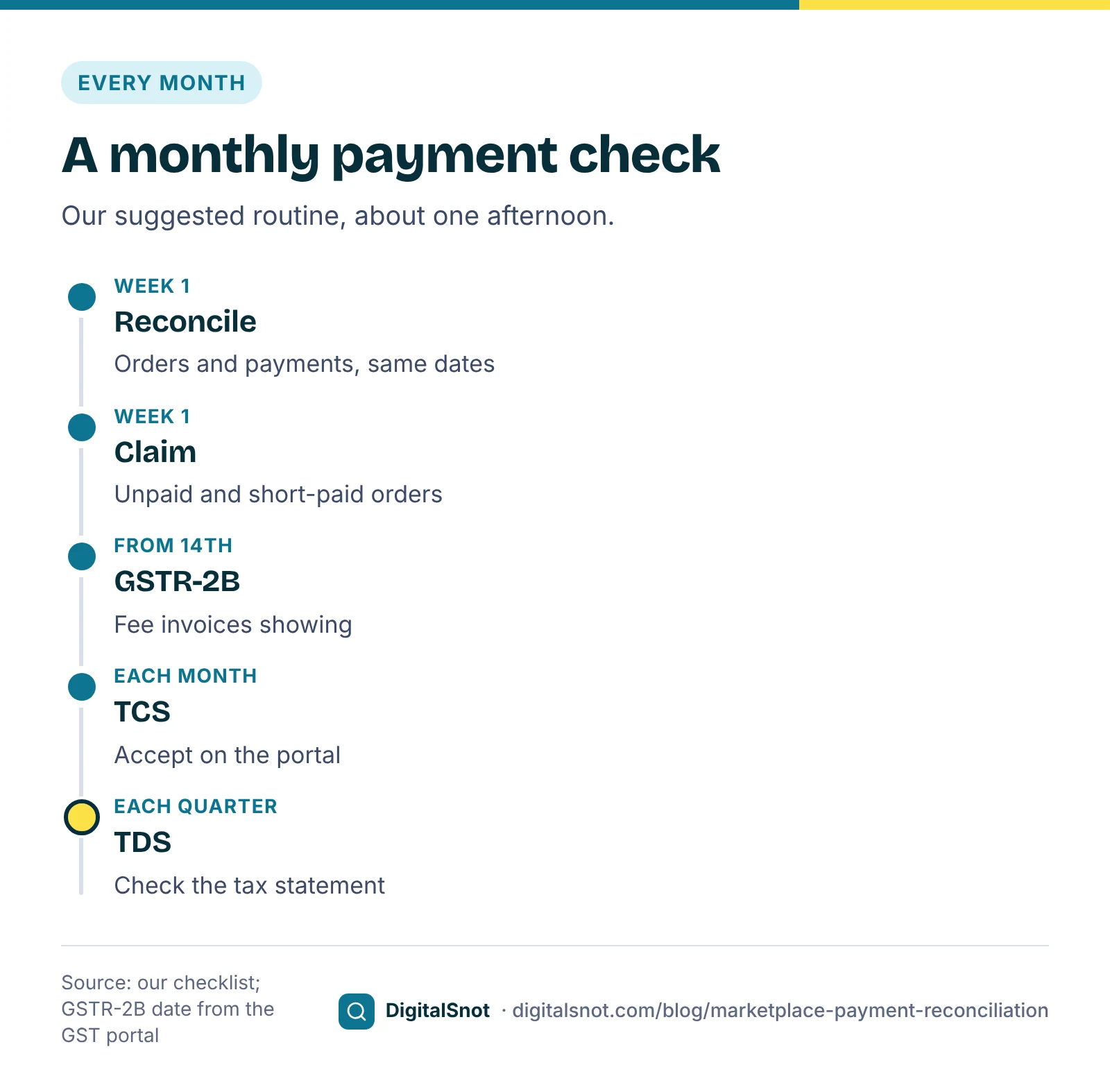
Our suggested routine, about one afternoon a month:
- In the first week: download last month's orders and payments reports for the same dates, and run the reconciliation.
- The same week: raise claims for unpaid, short-paid and overcharged orders, with evidence.
- From the 14th: check that the marketplace's fee invoices show in GSTR-2B.
- Each month: accept the TCS credit on the GST portal and file the statement, or ask your CA to.
- Every quarter: check the TDS in your annual tax statement against your payment reports.
- Next month: check the new payment report against last month's claim list.
Mistakes to avoid
- Checking only the bank total. One unpaid order hides easily in a payout of hundreds.
- Reports for different dates. Orders from last month paid this month look like unknown payments.
- Re-saving the CSV in a spreadsheet. Long order IDs can lose digits and stop matching.
- Using one fee rate for every category. Rates differ, so mixed products show false gaps.
- Treating TCS and TDS as lost money. Accept the TCS on the GST portal and check the TDS in your tax statement.
- Waiting to raise claims. Time limits apply, and evidence is easier to find while it is fresh.
Your next step
This week, download last month's orders and payments reports from one marketplace and put them into the Marketplace Payment Reconciliation tool with your rate card's terms. Start with the biggest group in the do-these-first list. All our free tools for online sellers work in your browser and never sign in to your seller accounts. If you want help with your margins and marketplace costs, get in touch.
Free tools in this article
- Marketplace Fee and Profit Calculator Compare payout, profit and break-even price per order on Amazon.in, Flipkart, Meesho and your own shop.
- Marketplace Payment Reconciliation Match orders with payments to find unpaid orders, short payments and extra charges, with a claim list.
- GSTR-2B Reconciliation Tool Match GSTR-2B with your purchase register: credit at risk, missing invoices and supplier follow-up messages.
By the numbers
- the central (CGST) part of TCS that e-commerce operators collect on net taxable supplies, from 10 July 2024
- 0.25%
- Source: GST Council: Notification 15/2024-Central Tax
- TDS on e-commerce payments under section 194-O from 1 October 2024, on the Income Tax Department's rate chart
- 0.1%
- Source: Income Tax Department
Frequently asked questions
What is marketplace payment reconciliation?
Matching every order in your orders report with the payments and charges for it in your payments or settlement report, and checking each against your fee terms. It shows orders not paid, orders paid less than your terms, returns charged too much and charges on cancelled or unknown orders.
Which reports do I need?
An orders report with the order ID, dates, status and order value, and a payments or settlement report with the order ID and the net amount paid or charged, both from the same marketplace and for the same dates. Use the CSV files as downloaded, so long order IDs are not changed by a spreadsheet.
How often do Amazon.in, Flipkart and Meesho pay sellers?
Amazon.in's seller pages say it pays every 7 days, Pay on Delivery orders included. Flipkart's pages count the cycle from pickup or dispatch and give different figures by seller tier. Meesho's supplier pages describe a 7-day cycle from delivery, cash on delivery included. Use the cycle in your own seller panel.
How do I get back the TCS deducted from my payouts?
The marketplace reports it in its GSTR-8, and it appears on the GST portal under TCS credit received. You accept or reject each amount and file the statement; accepted amounts are credited to your electronic cash ledger only after you file it. Ask your CA to confirm the steps for your business.
Where can I see the TDS a marketplace deducted?
In your annual tax statement on the income tax portal, Form 26AS, which becomes Form 168 from tax year 2026-27. The Income Tax Department's rate chart lists 0.1% under section 194-O for e-commerce payments, and from 1 April 2026 TDS comes under section 393 of the Income-tax Act, 2025.
Is there a time limit to claim a short payment?
It depends on the marketplace. Flipkart's seller terms of use say a money claim that no Flipkart policy gives its own limit should be raised within 180 days of the issue. Amazon.in's SAFE-T claims and Meesho's payment tickets have their own rules in their seller help. Reconcile every cycle and raise gaps straight away.
Sources
Every figure and claim in this article comes from the sources below. We checked each one when writing and link to the original so you can read it yourself. Credit belongs to the authors and publishers listed. How we write and check our articles.
-
1
Frequently asked questions about selling on Amazon
Amazon.in (sell.amazon.in) · Payments every 7 days, Pay on Delivery orders included.
-
2
Fees and commission
Flipkart Seller Hub · Payment cycle counted from pickup or dispatch, by seller tier.
-
3
Terms of use
Flipkart Seller Hub · Reconcile regularly; money claims within 180 days unless a policy sets its own limit.
-
4
Meesho commission rate and fee structure
Meesho Supplier Hub · A 7-day payment cycle from delivery, cash on delivery included.
-
5
How to handle incorrect penalties
Meesho Supplier Hub · Payment problems are raised from Support in the Supplier Panel.
-
6
Section 52: Collection of tax at source
CBIC · TCS by e-commerce operators; section 52(7) credit in the supplier's electronic cash ledger.
-
7
Notification No. 15/2024-Central Tax
GST Council · Central part of TCS cut to 0.25% from 10 July 2024.
-
8
Manual: TDS and TCS credit received
GST portal (tutorial.gst.gov.in) · Accept or reject TCS from Form GSTR-8; accepted amounts reach the electronic cash ledger after the statement is filed.
-
9
TDS rates
Income Tax Department · Section 194-O: 0.1% from 1 October 2024.
-
10
FAQs on the transition to the Income-tax Act, 2025
Income Tax Department · TDS comes under section 393 of the Income-tax Act, 2025 for payments from 1 April 2026.
-
11
Form 168 (earlier Form 26AS): view annual tax statement
Income Tax Department · Viewing TDS against your PAN; Form 168 replaces Form 26AS from tax year 2026-27.
-
12
Section 16: Eligibility and conditions for taking input tax credit
CBIC · Input tax credit only when the conditions are met, including section 16(2)(aa).
-
13
Advisory on GSTR-2B
GST portal (tutorial.gst.gov.in) · GSTR-2B is made available on the 14th of the next month.
Want a second pair of eyes?
Tell us about your site. We reply within one business day.
Talk to us Try our free tools