Work out your real marketplace profit per order on Amazon, Flipkart or Meesho
List every cost on a marketplace order, from referral and closing fees to GST, TCS, returns and ads, and find the products that quietly lose money.
On this page (10 sections)
- 1Payout is not profit
- 2Every cost line on a marketplace order
- 3Where to find each fee in your seller panel
- 4GST, TCS and TDS: what comes back to you
- 5A worked example: one kurti, every line
- 6Returns, RTO and ads: the costs most sums leave out
- 7Find the products that lose money
- 8Mistakes to avoid
- 9Your next step
- 10Sources
A product can look profitable on the listing page and still lose money once every fee, tax, return and ad rupee is counted. This post shows you how to work out your marketplace profit per order by listing every cost on one order, where to find each fee in Amazon Seller Central, Flipkart Seller Hub and the Meesho Supplier Panel, and how to spot the products that quietly lose money.
Keep your rate card, a month of payment reports and your product costs open. The numbers in the worked example are made up, because fees change by category and over time. This post is not legal or tax advice: check GST, TCS and TDS with your CA.
Payout is not profit
The payout is the money that reaches your bank for one order. Profit is what is left after you also take out the GST inside your price, the product, the packaging and your share of returns and ads.
Amazon's fees and pricing page works out profit as the selling price minus the referral fee, closing fee, weight handling fee, other applicable fees and the product cost. That is a good start. It leaves out the GST you owe on the sale, packaging, returns and advertising, and those are the lines that turn a "profitable" product into a loss.
Every cost line on a marketplace order
Write these down for one product before you change any price. Each marketplace names them a little differently.
| Cost line | What it is | Where your figure comes from |
|---|---|---|
| Referral fee or commission | A percentage of the sale that varies by category | Your rate card |
| Closing fee or fixed fee | A fixed amount per order, set by price band | Your rate card |
| Shipping or weight handling fee | What the marketplace charges to deliver the order | Your rate card, by weight and distance |
| Payment collection or other fees | Only where your rate card lists them | Your rate card |
| GST on fees | GST on the marketplace's own charges | The fee invoice |
| TCS and TDS | Taxes held back from your payout | Payment and tax reports |
| Packaging | Box, mailer, tape and label | Your purchase bills |
| Returns and RTO | Shipping both ways, lost packaging, damaged stock | Your returns report |
| Ads | Sponsored product spend | Your ads report |
Where to find each fee in your seller panel
Amazon.in
Amazon's fees page explains the referral fee (a percentage of the selling price that varies by category), the closing fee and the weight handling fee, which applies when Amazon delivers the order through Easy Ship or Fulfilment by Amazon. Its guide to the Revenue Calculator shows how to estimate the fees before you list, and says the results are estimates. For what you were really charged, use the payment reports in Seller Central, which break the fees down order by order.
Flipkart
Flipkart's fees and commission page says your fees depend on the category, the shipping method and the selling price. The commission is a percentage that varies by category, the fixed fee (also called the closing fee) depends on the price, and the shipping fee depends on the higher of the actual and volumetric weight of the packed product, and on whether the buyer is local, zonal or national. Your exact rates show in Seller Hub once you sign in.
Meesho
Meesho's supplier pricing page advertises a 0% commission rate across categories. Zero commission is not zero cost. Meesho explains its shipping and delivery charges on a separate page, and anything taken off an order shows in your payment statement.
Whichever marketplace you use, check the rate card again after every fee announcement. Amazon's own fees page says it can change its fees.
GST, TCS and TDS: what comes back to you
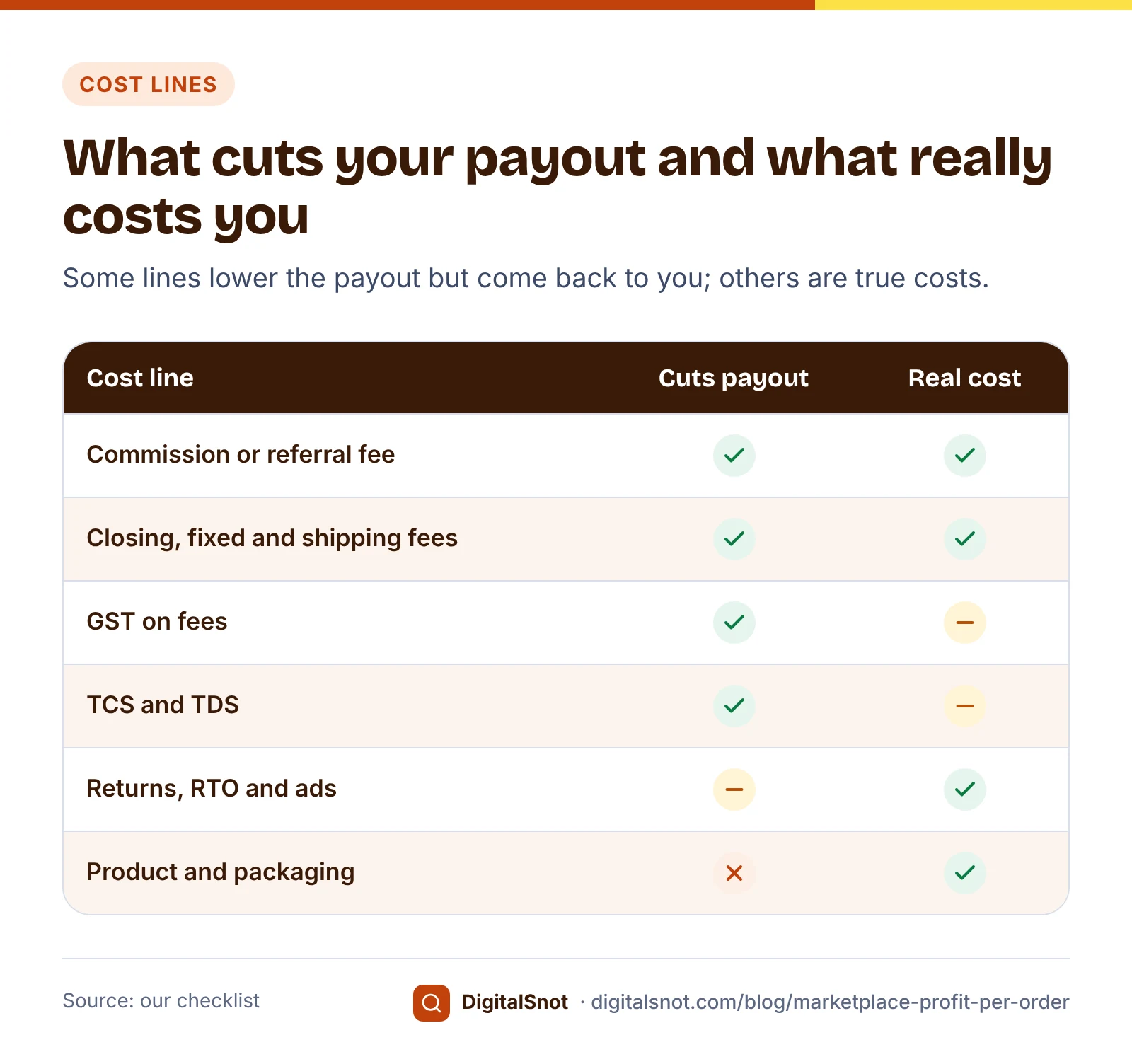
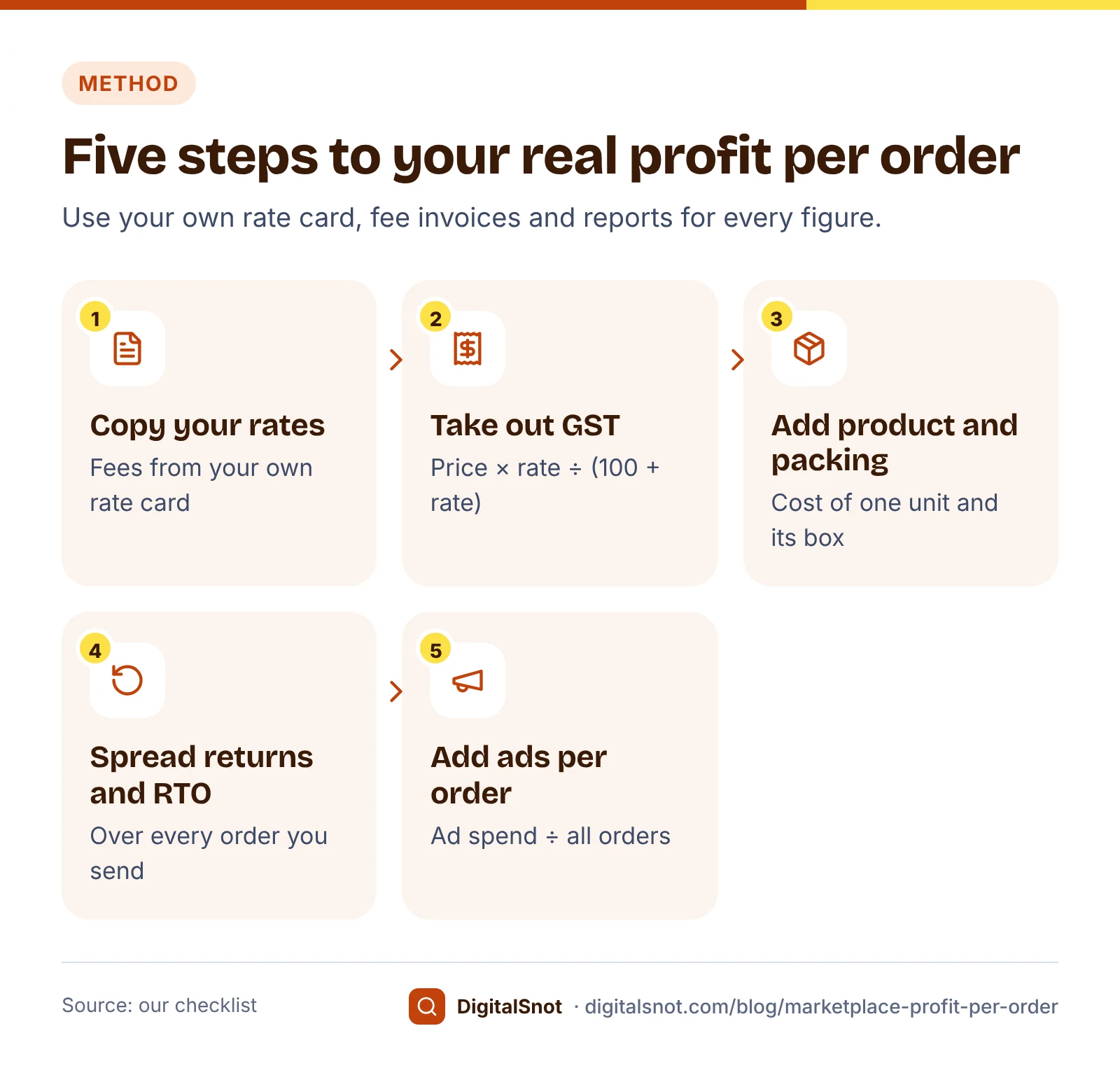
- GST in your selling price. If you are registered, the price the buyer pays includes GST at your product's rate. That GST is not your income. The GST inside a price is price × rate ÷ (100 + rate).
- GST on the marketplace's fees. It is printed on the fee invoice. A registered business can usually claim it as input tax credit when the conditions in the CGST Act are met. If you cannot claim it, count it as a cost.
- TCS. Marketplaces collect tax at source under section 52 of the CGST Act. From 10 July 2024 the central part is 0.25% of the net value of taxable supplies (Notification 15/2024-Central Tax). Section 52(7) lets you claim the amount in your electronic cash ledger.
- TDS. This is income tax. The Income Tax Department's TDS rate chart lists 0.1% under section 194-O for e-commerce payments from 1 October 2024, and from 1 April 2026 it falls under section 393 of the Income-tax Act, 2025.
So TCS and TDS lower your payout, but once you claim them back they are not a cost. GST on fees is a cost only if you cannot claim it. Your CA can tell you which applies to you.
A worked example: one kurti, every line
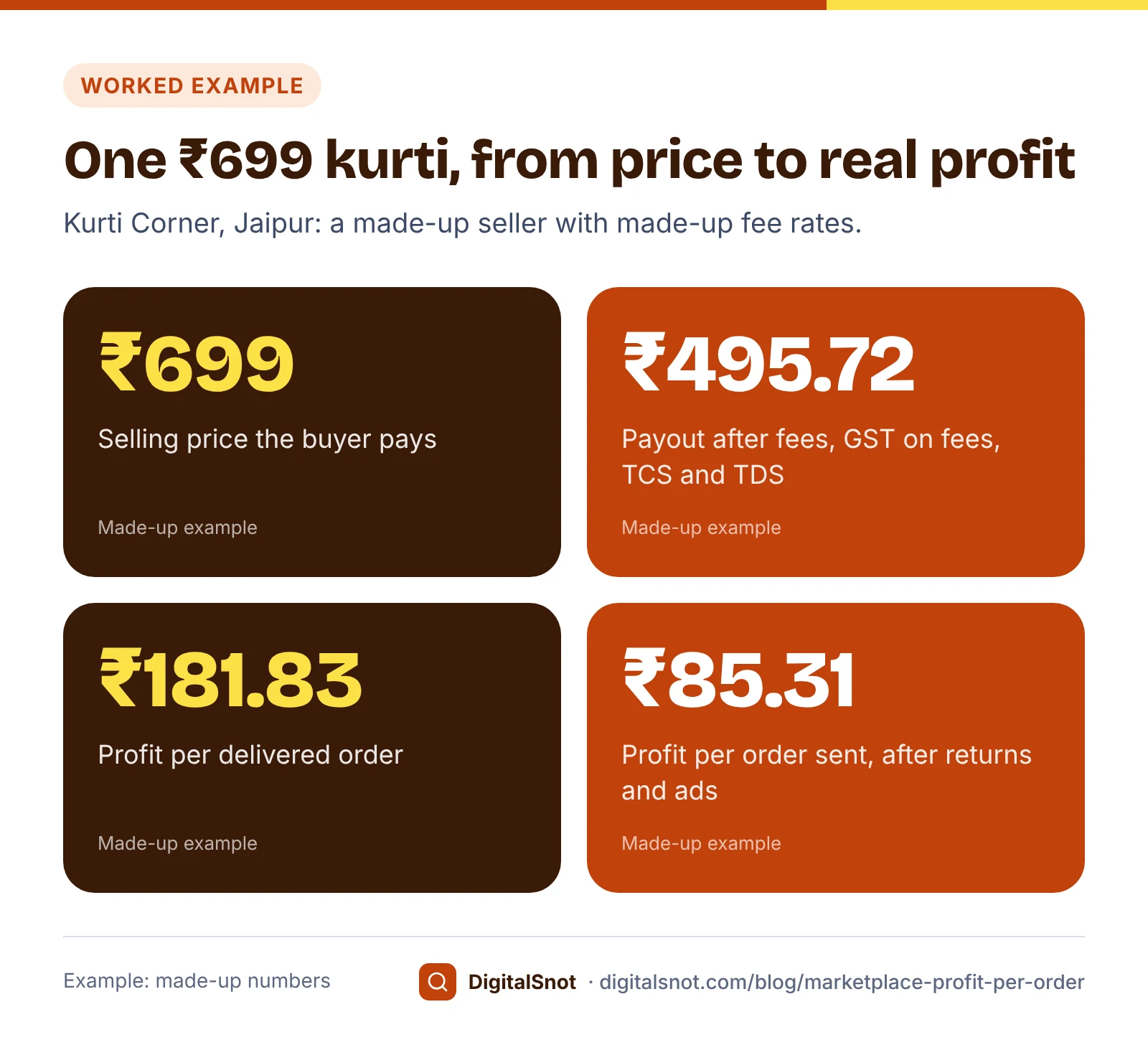
Kurti Corner in Jaipur is a made-up seller with a cotton kurti priced at ₹699. Every fee below is invented for the sum; none is a real marketplace fee, and the GST rate is not a ruling on your product.
The made-up inputs are GST on the kurti at 5%, a 12% commission on the price, a ₹25 closing fee, ₹60 shipping, GST on fees at 18%, TCS at 0.5% and TDS at 0.1% of the price before GST, a product cost of ₹300 and ₹15 of packaging. Kurti Corner is registered for GST and claims back the GST on fees, the TCS and the TDS.
| Line (made-up numbers) | Amount |
|---|---|
| Selling price (what the buyer pays) | ₹699.00 |
| Commission at 12% | −₹83.88 |
| Closing fee and shipping fee | −₹85.00 |
| GST on fees at 18% | −₹30.40 |
| TCS and TDS | −₹4.00 |
| Payout per order | ₹495.72 |
| GST you pay on the sale | −₹33.29 |
| GST on fees, TCS and TDS claimed back | +₹34.40 |
| Product and packaging | −₹315.00 |
| Profit per delivered order | ₹181.83 |
That is a 27.3% margin on the price before GST. Put your own numbers into the Marketplace Fee and Profit Calculator to get the same table for Amazon.in, Flipkart, Meesho and your own shop side by side. It also gives a break-even selling price: with these made-up fees it is ₹480.55, our measure. No fee or tax rate is built in, so the result is only as good as the rates you type.
Returns, RTO and ads: the costs most sums leave out
Not every order you send becomes a sale. A return is a parcel the buyer received and sent back. RTO (return to origin) is a parcel that never reached the buyer and came back to you. Either way you pay to ship it out and back, the packaging is gone, and some stock cannot be sold again.
So work out profit per order sent. Take 100 made-up Kurti Corner orders. 85 are delivered and kept, which earns 85 × ₹181.83, about ₹15,456. 15 come back: at ₹60 each way plus ₹15 of packaging, that is ₹2,025, and 3 of those kurtis come back damaged, another ₹900. The month's ads for these orders cost ₹4,000. In this example the marketplace refunds its commission and closing fee on returned orders but charges both shipping legs; check what your own rate card says. What is left is about ₹8,531, or ₹85.31 per order sent, less than half the first figure.
The COD and RTO Cost Calculator does this for your own cash on delivery and prepaid orders, and shows what RTO costs you each month.
For ads, Amazon Ads defines ACoS as ad spend divided by the sales the ads brought in, and says your ACoS needs to be lower than your profit margin to keep a profit. For the kurti, ₹181.83 ÷ ₹699 gives a break-even ACoS of about 26% before returns. Enter your price, fees and campaigns in the Amazon and Flipkart Ads ACoS Calculator to see which campaigns are above that line.
Find the products that lose money
Your average margin can hide a few products that lose money on every order. Two kinds are common. Low-priced products still pay a closing or fixed fee and shipping on every order, so those fees take a much bigger share of a small price. Products with high return rates, often clothes in the wrong size, pay for shipping twice on a large share of orders.
The SKU Profit Analyzer takes a sheet with one row per product and channel: price, cost, packing, shipping, your fee rates, GST, ads and return rate. It works out profit per order sent for every SKU, lists the loss-makers first and suggests a fix for each, such as raising the price, cutting ads or going prepaid only. In its own made-up example, a palazzo priced at ₹299 breaks even only at ₹328.

Before you raise a price to cover fees, check the pack. Rule 18(2) of the Legal Metrology (Packaged Commodities) Rules, 2011 says no one may sell a pre-packed product above its retail sale price, the MRP.
Mistakes to avoid
- Copying fee rates from a blog or a friend. Rates differ by category, price band and fulfilment method. Use your own rate card.
- Treating the payout as profit. The GST inside the price, the product and the packaging still come out of it.
- Counting the same tax twice. If you claim back the GST on fees, TCS and TDS, they lower your payout but not your profit.
- Leaving out returns and RTO. Work out profit per order sent, not per sale.
- Judging ads by ACoS alone. ACoS counts only the sales the ads brought. Also look at ad spend divided by all your orders for that product.
- Checking once a year. Recheck your numbers whenever the marketplace changes its fees or your courier changes its rates.
Your next step
Pick your three best-selling products and run them through the fee calculator this week, with the rates from your own rate card. Then put your whole catalogue into the SKU Profit Analyzer to find the loss-makers. All our free tools for online sellers work in your browser and never sign in to your seller accounts.
If you also sell from your own website, our guide to product page SEO for small online shops helps buyers find you without paying a marketplace fee. If you want help reading your numbers, get in touch.
Free tools in this article
- Marketplace Fee and Profit Calculator Compare payout, profit and break-even price per order on Amazon.in, Flipkart, Meesho and your own shop.
- COD and RTO Cost Calculator See what COD and returned parcels cost you each month, and the largest prepaid discount you can give.
- Amazon and Flipkart Ads ACoS Calculator Find your break-even ACoS and see which Amazon or Flipkart ad campaigns make or lose money.
- SKU Profit Analyzer Find the SKUs that lose money after fees, returns, ads and shipping, with the price or fix for each one.
By the numbers
- the central (CGST) part of TCS that e-commerce operators collect on net taxable supplies, from 10 July 2024
- 0.25%
- Source: GST Council: Notification 15/2024-Central Tax
- TDS on e-commerce payments under section 194-O from 1 October 2024, on the Income Tax Department's rate chart
- 0.1%
- Source: Income Tax Department
Frequently asked questions
What fees does Amazon.in charge sellers?
Amazon.in charges a referral fee, which is a percentage of the selling price that varies by category, a closing fee based on the price, and a weight handling fee when Amazon delivers the order through Easy Ship or Fulfilment by Amazon, plus other fees for some services. Amazon says it can change its fees, so check the current rate card in Seller Central.
Does Meesho charge sellers a commission?
Meesho's supplier pricing page advertises a 0% commission rate across categories. Shipping and any other charges still come off your payout, so read your payment statement for each order and count every deduction when you work out profit.
Is the GST on marketplace fees a cost for me?
Only if you cannot claim it back. A registered seller can usually claim the GST on fees as input tax credit when the conditions in the CGST Act are met. If you are not registered, or cannot claim it, count it as a cost. Ask your CA which applies to you.
What are TCS and TDS on marketplace payouts?
TCS is GST collected at source by the marketplace under section 52 of the CGST Act; from 10 July 2024 its central part is 0.25% of the net value of taxable supplies. TDS is income tax: the Income Tax Department's rate chart lists 0.1% under section 194-O from 1 October 2024, and it falls under section 393 of the Income-tax Act, 2025 from 1 April 2026. Both can usually be claimed back.
How do returns and RTO change my profit per order?
Every order you send costs shipping and packaging, but returned and RTO parcels earn nothing and cost a second shipping leg, and some stock comes back damaged. Divide your total profit by all the orders you sent, not only those delivered, to see your real profit per order.
What ACoS can I afford on Amazon or Flipkart ads?
Amazon Ads says your ACoS needs to be lower than your profit margin to keep a profit. Divide what one order leaves you before ads by the selling price to get your break-even ACoS, then take your target profit off it. Returns lower this figure further.
Sources
Every figure and claim in this article comes from the sources below. We checked each one when writing and link to the original so you can read it yourself. Credit belongs to the authors and publishers listed. How we write and check our articles.
-
1
Amazon pricing and seller fees
Amazon.in (sell.amazon.in) · Referral, closing and weight handling fees, the profit formula, and that Amazon can change its fees.
-
2
How to calculate revenue (Revenue Calculator)
Amazon.in seller blog · Estimating fees before listing; results are estimates.
-
3
Fees and commission
Flipkart Seller Hub · Commission by category, fixed (closing) fee by price, shipping by weight and local, zonal or national delivery.
-
4
Meesho commission rate and fee structure
Meesho Supplier · 0% commission rate across categories.
-
5
Shipping and delivery charges for Meesho suppliers
Meesho Supplier · Shipping charges are explained separately from commission.
-
6
Notification No. 15/2024-Central Tax
GST Council · Central part of TCS cut to 0.25% from 10 July 2024.
-
7
Section 52: Collection of tax at source
CBIC · TCS by e-commerce operators and the supplier's credit in the electronic cash ledger (section 52(7)).
-
8
TDS rates
Income Tax Department · Section 194-O: 0.1% from 1 October 2024.
-
9
FAQs on the transition to the Income-tax Act, 2025
Income Tax Department · TDS comes under section 393 of the Income-tax Act, 2025 for payments from 1 April 2026.
-
10
What is advertising cost of sales (ACOS)?
Amazon Ads · ACoS = ad spend ÷ attributed sales; ACoS must be lower than profit margin to keep a profit.
-
11
Legal Metrology (Packaged Commodities) Rules, 2011 with all amendments
Department of Consumer Affairs · Rule 18(2): no sale of a pre-packed product above its retail sale price.