GSTR-2B reconciliation: matching your purchase invoices every month
How to match your purchase register with GSTR-2B before you file GSTR-3B: what GSTR-2B is, the common mismatches, what to do about each and the credit rules behind it.
On this page (9 sections)
- 1What GSTR-2B is, and why it decides your credit
- 2The other conditions for input tax credit
- 3Step by step: a monthly reconciliation
- 4Common mismatches and what to do
- 5Accept, reject or keep pending: the Invoice Management System
- 6Worked example: Mehta Electricals, Rajkot
- 7Mistakes to avoid
- 8Your next step
- 9Sources
Every month, the input tax credit you claim in GSTR-3B has to line up with what your suppliers have reported. GSTR-2B is where you see that. This post explains what GSTR-2B is, how GSTR-2B reconciliation with your purchase register works, what each common mismatch means and what to do about it, with a worked example. It is general information, not tax advice: ask your CA before you claim, hold back or reverse any credit.
What GSTR-2B is, and why it decides your credit
GSTR-2B is an auto-drafted statement of input tax credit that the GST portal makes for every registered person from what their suppliers file, mainly in GSTR-1 or IFF. The GST portal's advisory on GSTR-2B calls it a static statement, made available for each month on the 14th day of the next month. You do not file it, and you cannot edit it or add a document to it. If something in it is wrong, the supplier has to correct it. Quarterly filers under QRMP get it after the quarter.
It matters because of one change in the law. Since 1 January 2022, section 16(2)(aa) of the CGST Act and rule 36(4) allow credit on a purchase only when your supplier has reported the invoice and it shows in your GSTR-2B. CBIC Circular 193/05/2023-GST explains that credit from that date is limited to what GSTR-2B shows.
GSTR-2B for a month holds what suppliers filed up to a cut-off. An invoice your supplier reports late shows in a later month's GSTR-2B, and you claim it then. That is why reconciliation is a monthly job, not a year-end one.
The other conditions for input tax credit
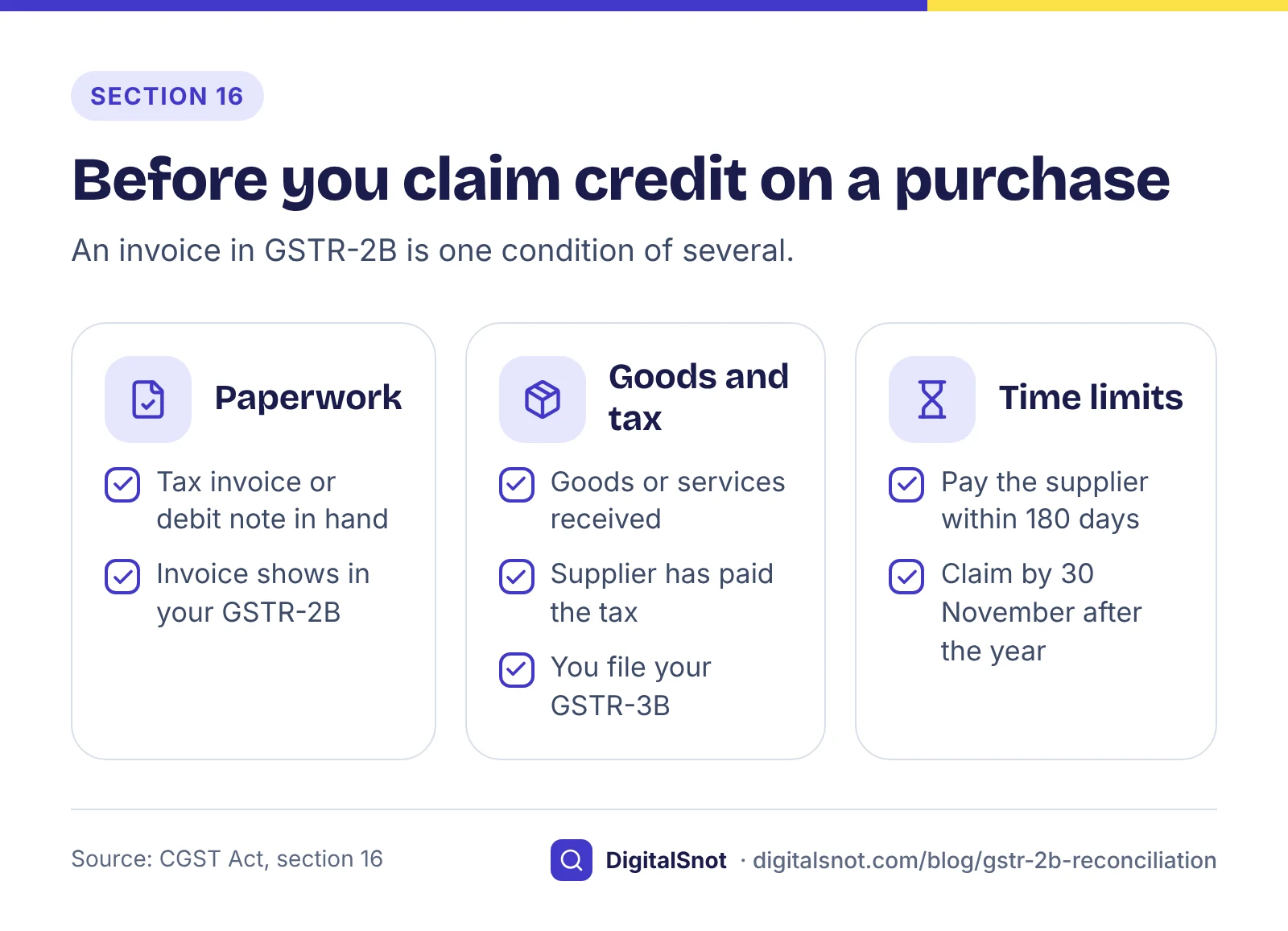
An invoice showing in GSTR-2B is only one of the conditions in section 16 of the CGST Act. To claim credit you also need:
- The paperwork. You hold the tax invoice or debit note issued by the supplier.
- The goods or services. You have received them.
- The tax paid. The supplier has actually paid the tax charged to the government, in cash or through their own credit.
- Your return. You have filed your own GSTR-3B.
- Payment to the supplier. If you do not pay the supplier the value and the tax within 180 days of the invoice date, the credit you took has to be reversed with interest. You can claim it again once you pay.
Two time limits sit on top. Under section 16(4), credit on an invoice must be claimed by 30 November after the end of the financial year the invoice belongs to, or by the date you file the annual return for that year, if that is earlier. And a match in GSTR-2B does not prove the supplier has paid the tax: under rule 37A, if a supplier has not filed GSTR-3B for the period by 30 September after the end of the financial year, you must reverse the credit on those invoices by 30 November, and you can claim it again once they file.
Step by step: a monthly reconciliation
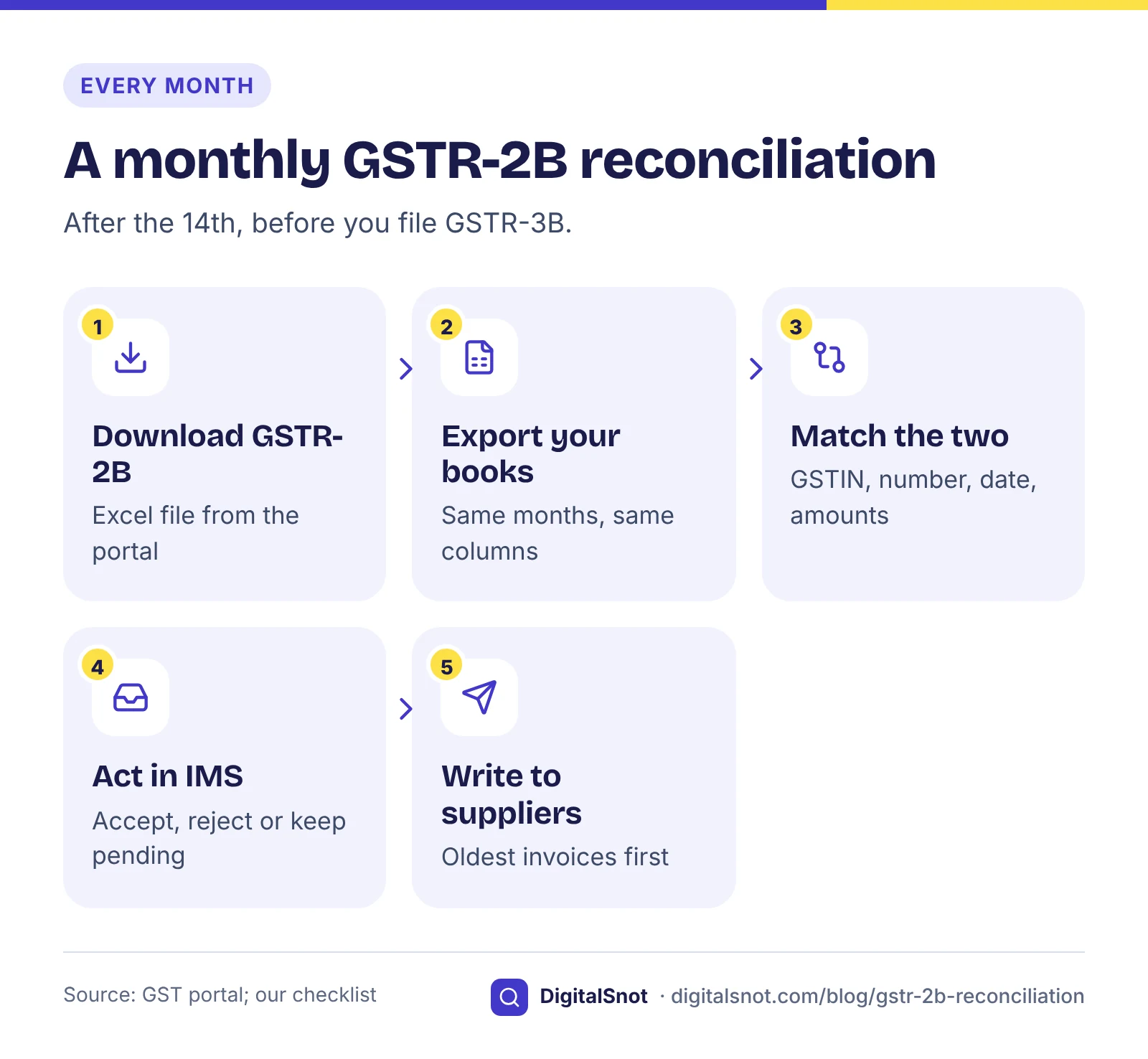
Set aside time each month after the 14th and before you file GSTR-3B. You need two files for the same period.
- Download GSTR-2B. On the GST portal, open the Returns Dashboard, pick the year and the period, and download GSTR-2B as an Excel file. The GST portal's manual on GSTR-2B shows each screen.
- Export your purchase register. Take the same months from Tally, Busy, Zoho or your own Excel sheet, with supplier GSTIN, invoice number, date, taxable value and the IGST, CGST, SGST and cess amounts.
- Match the two. Pair each invoice on the supplier GSTIN and the invoice number, then compare the date, the taxable value and the tax. Paste both into our GSTR-2B Reconciliation Tool. It matches invoice numbers even when they are written differently (GVP/0041/26-27 and GVP-41/2026-27 match), checks amounts within a tolerance you set (₹1 by default, our suggestion), and shows the credit at risk, invoices missing on either side, mismatches and double entries, with a message for each supplier and CSV files for your CA. It runs in your browser and never logs in to the GST portal. It reads the B2B invoices table only, not credit notes, amendments or imports, so check those separately. The GST portal also offers its own Matching Offline Tool, which works with its own template.
- Act in the Invoice Management System. Accept, reject or keep pending the records that need it (see below), and recompute GSTR-2B if you change anything after the 14th.
- Write to suppliers. Send each supplier a list of the invoices they need to report or correct, oldest first.
- File GSTR-3B. Claim credit only up to what GSTR-2B supports, and keep the reconciliation file with your return papers.
Common mismatches and what to do
Most differences fall into a few groups. Work through them in this order, because the first ones cost you credit.
| Mismatch | Usual cause | What to do |
|---|---|---|
| In your books, not in GSTR-2B | The supplier has not filed GSTR-1 or IFF, filed after the cut-off, or used a wrong GSTIN | Ask the supplier to report it; leave the credit out until it shows |
| Entered twice in your books | The same bill booked by two people | Delete the extra entry |
| Amounts or tax differ | A typing mistake on either side | Check the invoice copy; claim no more than GSTR-2B shows until it is corrected |
| CGST and SGST on one side, IGST on the other | The place of supply was read differently | Correct your books, or ask the supplier to correct the return |
| In GSTR-2B, not in your books | A bill you forgot to enter, or one you never received | Enter it, or reject it in the Invoice Management System |
| Different GSTIN, date or number | A supplier with several registrations, or a number typed without its prefix | Correct the supplier master and type numbers as printed |
The date matters more than it looks. It decides the invoice's financial year, and so the last date to claim its credit.
Accept, reject or keep pending: the Invoice Management System
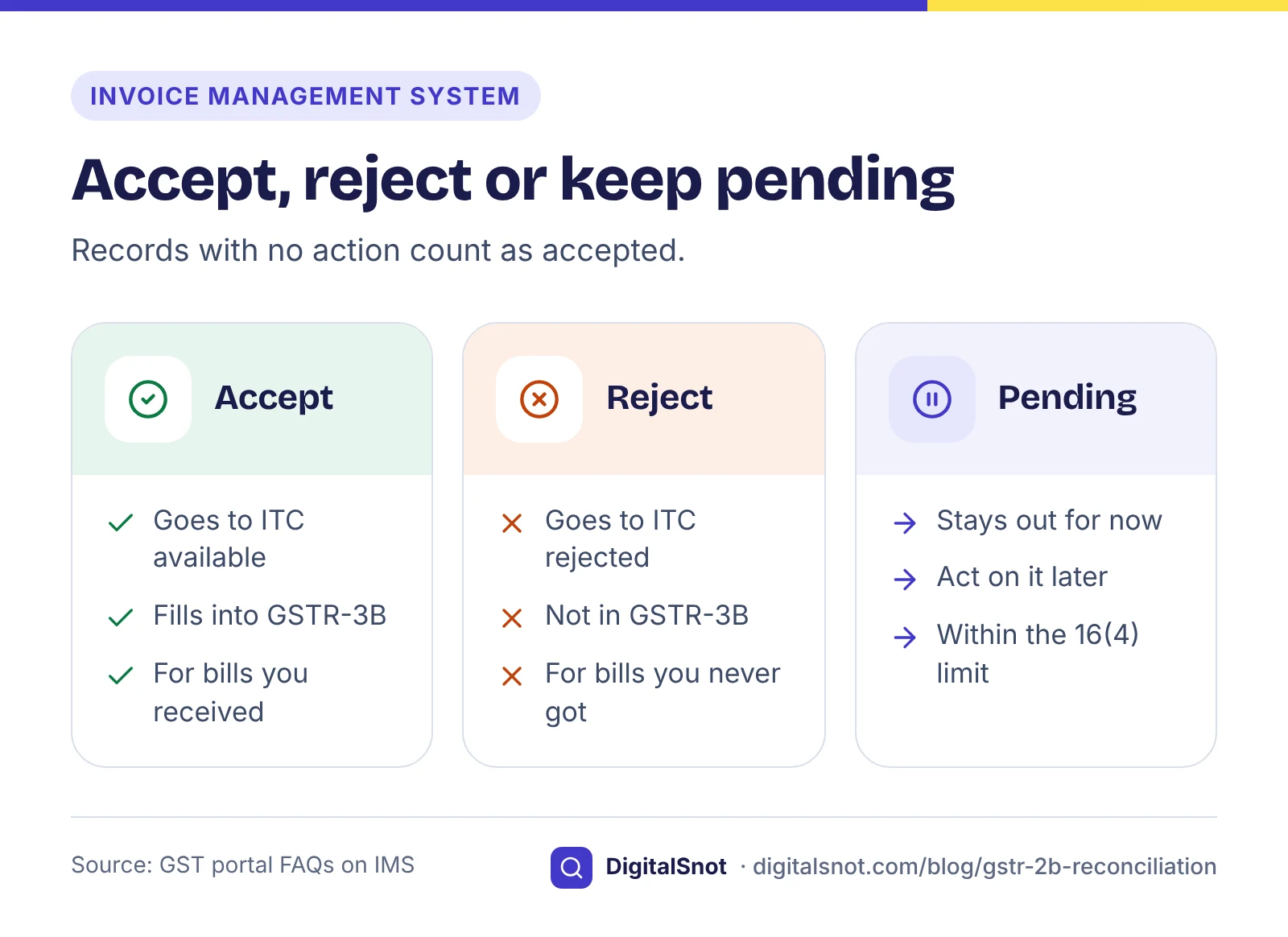
The Invoice Management System (IMS) on the GST portal shows the records your suppliers have saved or filed, before they reach your GSTR-2B. According to the GST portal's FAQs on IMS, you can take one of three actions on each record:
- Accept: the record goes into the "ITC available" part of GSTR-2B, and its credit fills into GSTR-3B.
- Reject: the record goes into the "ITC rejected" part and does not fill into GSTR-3B.
- Pending: the record stays out of GSTR-2B and GSTR-3B until you act on it, but only within the section 16(4) time limit.
A record you leave without any action is treated as accepted when GSTR-2B is generated. So doing nothing is a decision: an invoice you never received becomes part of your credit unless you reject it. The GSTR-2B made on the 14th is now a draft. You can change an action and recompute GSTR-2B at any time until you file GSTR-3B for that period. Our tool cannot act in IMS for you, and it does not know which records you kept pending there. The portal updates its IMS rules from time to time, so read the latest advisory on gst.gov.in before you rely on the pending option.
Worked example: Mehta Electricals, Rajkot
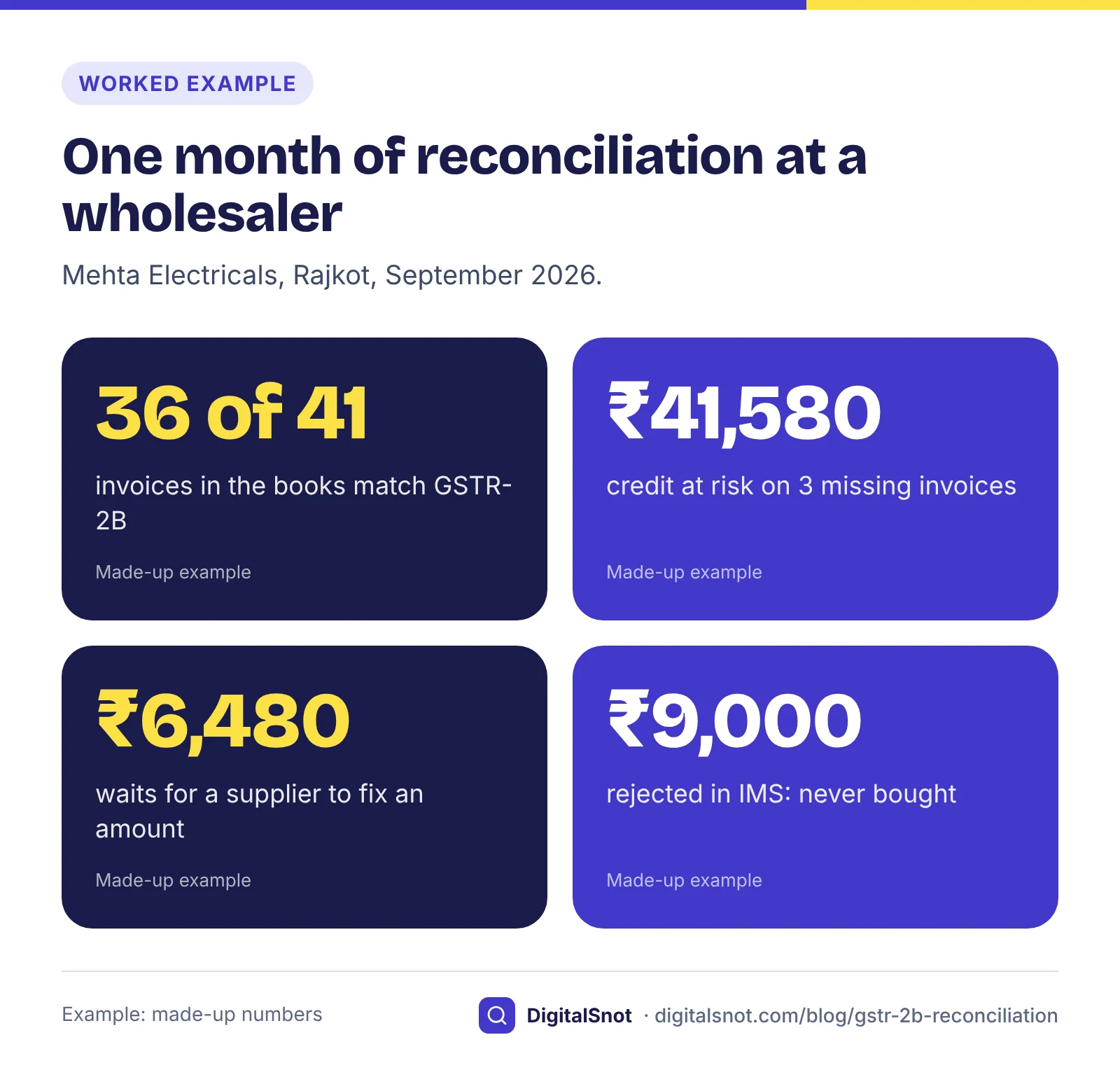
Mehta Electricals is a made-up wholesaler of wires and switchgear in Rajkot, filing GSTR-3B every month. For September 2026, its purchase register has 41 invoices, and the GSTR-2B made on 14 October 2026 has 40 records. The reconciliation shows:
- 36 invoices match on GSTIN, number, date, taxable value and tax.
- 3 invoices are only in the books: two from one supplier with ₹29,160 of GST, and one from another with ₹12,420. That is ₹41,580 of credit at risk. Mehta Electricals leaves it out of September's GSTR-3B and sends both suppliers their lists.
- 1 invoice has a different amount: the books show ₹84,000 plus ₹15,120 of GST, but the supplier reported ₹48,000 plus ₹8,640, with two digits swapped. It claims ₹8,640 now and asks the supplier to correct the return; the other ₹6,480 waits.
- 1 invoice has the wrong tax type in the books: the supplier is in Maharashtra and charged IGST of ₹5,400, but the bill was entered as CGST and SGST. The books are corrected.
- 2 records are only in GSTR-2B: one bill, with ₹2,160 of GST, turns up in an email and is entered. The other, with ₹9,000 of GST, is from a business Mehta Electricals never bought from. It is rejected in IMS, GSTR-2B is recomputed, and the supplier is told.
In all, ₹48,060 of credit waits for suppliers this month. None of it is lost yet: invoices dated in financial year 2026-27 can be claimed until 30 November 2027, or the annual return date if earlier, once they show in GSTR-2B.
Mistakes to avoid
- Claiming from your books. Your purchase register is what you bought; GSTR-2B is what you can claim. File GSTR-3B from the reconciled figure.
- Leaving it to the year end. Missing invoices pile up, suppliers forget, and the 30 November limit comes round. Chase each month's gaps in that month.
- Doing nothing in IMS. No action means accepted. Look at every record you do not recognise before the 14th or before you file.
- Forgetting the 180 days. Credit on a bill you have not paid within 180 days has to be reversed with interest. If the supplier is a micro or small enterprise, the MSMED Act sets a shorter limit of 45 days, explained in our post on MSME delayed payment interest.
- Holding GSTR-3B for one supplier. A late return costs a late fee for every day and interest at 18% a year on tax paid late in cash. Put your dates into the GST Late Fee and Interest Calculator to see what a delay costs before you decide.
- Accepting faulty bills. A bill without the details Rule 46 asks for can cause trouble later. Type a supplier's bill, or one of your own, into our GST Invoice Checker to see what is missing, and read what a GST invoice must show.
Your next step
Download last month's GSTR-2B and your purchase register, and put both into the GSTR-2B Reconciliation Tool. Send the supplier messages it writes, then take the CSV to your CA before you file. More tools for invoices, GST and receipts are on our free tools page, and if you want a second pair of eyes on your process, talk to us.
Free tools in this article
- GSTR-2B Reconciliation Tool Match GSTR-2B with your purchase register: credit at risk, missing invoices and supplier follow-up messages.
- GST Late Fee and Interest Calculator Late fee and interest on a late GSTR-3B or GSTR-1, with the cap for your turnover and the cost of each day.
- GST Invoice Checker Check an invoice for missing Rule 46 fields, the invoice number, GSTIN, tax split and totals.
By the numbers
- of the next month: the day the GST portal makes GSTR-2B available to a monthly filer
- 14th
- Source: GST portal: advisory on GSTR-2B
- after the end of the financial year: the last date to claim credit on an invoice of that year, or the annual return date if earlier
- 30 November
- Source: CGST Act, section 16(4)
Frequently asked questions
What is GSTR-2B?
An auto-drafted statement of input tax credit that the GST portal makes for each registered person from what their suppliers report, mainly in GSTR-1 or IFF. It is static, made available for each month on the 14th of the next month, and you cannot edit it or add documents to it.
Can I claim credit on an invoice that is not in my GSTR-2B?
Not yet. Since 1 January 2022, section 16(2)(aa) of the CGST Act and rule 36(4) allow credit only on invoices that the supplier has reported and that show in your GSTR-2B. Ask the supplier to report it, and claim it in the month it appears.
What should I do about an invoice in GSTR-2B that is not in my books?
Look for the bill first. If you bought the goods or services, enter it so the credit is claimed. If you did not, reject it in the Invoice Management System before you file GSTR-3B, recompute GSTR-2B and tell the supplier.
What happens if I take no action on a record in IMS?
According to the GST portal's FAQs on IMS, a record with no action is treated as accepted when GSTR-2B is generated, and its credit fills into GSTR-3B. Reject records you do not recognise, or keep them pending within the section 16(4) time limit.
How long do I have to claim credit on an invoice?
Under section 16(4) of the CGST Act, until 30 November after the end of the financial year the invoice belongs to, or the date you file the annual return for that year, if that is earlier. For an invoice dated September 2026, that is 30 November 2027 at the latest.
Does a match in GSTR-2B mean my supplier has paid the tax?
No. GSTR-2B shows what the supplier reported, not whether they paid. Under rule 37A, if a supplier has not filed GSTR-3B for the period by 30 September after the end of the financial year, the credit must be reversed by 30 November and can be claimed again once they file.
Sources
Every figure and claim in this article comes from the sources below. We checked each one when writing and link to the original so you can read it yourself. Credit belongs to the authors and publishers listed. How we write and check our articles.
-
1
Advisory on GSTR-2B
GST portal (GSTN) · GSTR-2B is an auto-drafted, static statement made available on the 14th of the next month
-
2
FAQs: viewing Form GSTR-2B
GST portal (GSTN) · No changes can be made to GSTR-2B; errors are corrected by suppliers; reconcile with your own records
-
3
Manual: viewing Form GSTR-2B
GST portal (GSTN) · How to open and download GSTR-2B from the Returns Dashboard
-
4
CGST Act, 2017: section 16
CBIC · Conditions for input tax credit, including 16(2)(aa), payment within 180 days and the 16(4) time limit
-
5
CGST Rules, 2017: rule 36
CBIC · Documents for claiming credit; credit only on invoices communicated in GSTR-2B
-
6
Circular 193/05/2023-GST
CBIC · Credit from 1 January 2022 limited to what GSTR-2B shows
-
7
FAQs on the Invoice Management System (IMS)
GST portal (GSTN) · Accept, reject and pending; no action treated as accepted; recompute GSTR-2B until GSTR-3B is filed
-
8
Matching Offline Tool: FAQs and user manual
GST portal (GSTN) · The portal's own offline tool for matching purchases with GSTR-2B
Want a second pair of eyes?
Tell us about your site. We reply within one business day.
Talk to us Try our free tools