ACoS on Amazon and Flipkart ads: which number is profitable for you
Work out your break-even and target ACoS from your own price, fees and costs, judge each Amazon or Flipkart campaign against them, and use TACoS to see the whole picture.

On this page (9 sections)
"What is a good ACoS?" has no single answer, because the same number can make one seller money and lose another seller money. This post shows you how to work out the break-even ACoS on Amazon and Flipkart ads for your own products, the level above which ads lose money, judge each campaign against it, and see what ads cost your whole business.
The prices, fees, GST rates and campaign numbers in the example are made up. Use your own rate card, ad reports and invoices. This post is not tax advice: check GST on your products and ads invoices with your CA.
What ACoS and ROAS measure
Amazon Ads defines ACoS (advertising cost of sales) as ad spend divided by attributed sales, the sales your ads brought. ROAS (return on ad spend) is the inverse: ad sales divided by ad spend.
- ACoS = ad spend ÷ ad sales × 100. ₹3,600 of spend that brought ₹19,176 of ad sales is an ACoS of 18.77%.
- ROAS = ad sales ÷ ad spend. The same campaign has a ROAS of 5.33. One is the inverse of the other: 100 ÷ 18.77 = 5.33.
- Cost per click (CPC) = spend ÷ clicks, what you paid on average for each click.
Amazon Ads says there is no general threshold for a good or bad ROAS: a good one is one that is profitable for you. It also says your ACoS needs to be lower than your profit margin to keep a profit. That is the number to find.
Flipkart Ads, on Flipkart Seller Hub, offers Cost per Click and Smart ROI campaigns. Flipkart says a Smart ROI campaign aims to maximise return on investment by ensuring sales for every rupee spent, and may not give as much visibility as a CPC campaign. Its public pages do not give the formula for its ROI figure, so check how your report works it out before you compare it with ROAS. The maths below works on your own numbers from either marketplace.
Find your break-even ACoS
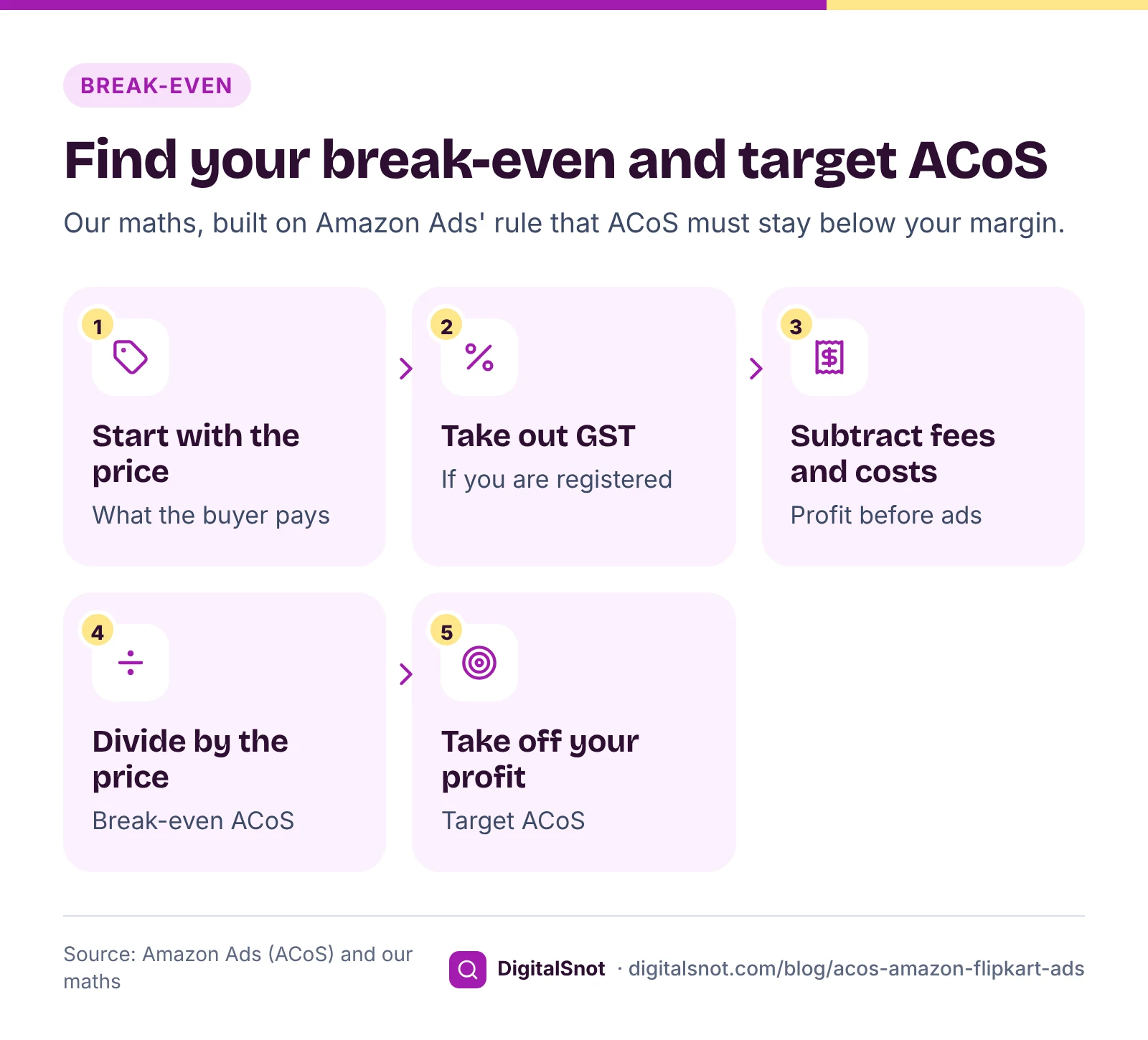
Your break-even ACoS is the ACoS at which the ads take everything one order leaves you. Above it, every ad sale loses money. To find it:
- Start with the selling price the buyer pays.
- Take out the GST inside it, if you are registered: price × rate ÷ (100 + rate).
- Subtract the marketplace fees per order from your rate card, the product cost and packing. What is left is your profit per order before ads.
- Divide that by the selling price. That share, as a percentage, is your break-even ACoS.
- Take your target profit, as a share of the price, off it. That is your target ACoS.
The formulas are our measure, built on Amazon Ads' rule that ACoS must stay below your margin. One more cost can count: if you cannot claim back the GST on your ads invoice, each ₹100 of reported spend costs ₹100 plus that GST, so divide your break-even ACoS by (1 + the GST rate). Under section 16 of the CGST Act, a registered business can claim input tax credit only when the conditions are met, so ask your CA.
A worked example: one steel bottle, four campaigns
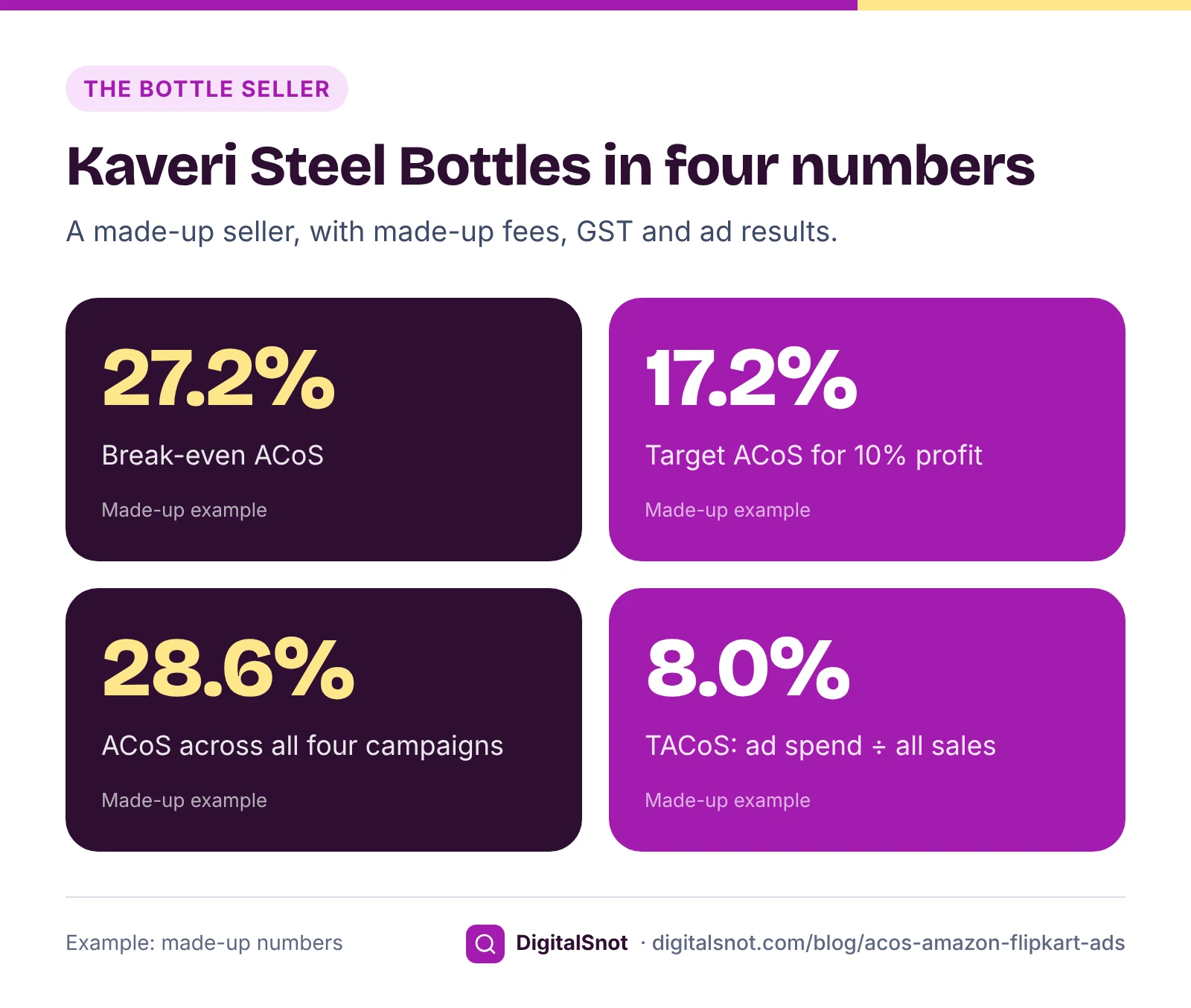
Kaveri Steel Bottles in Coimbatore is a made-up seller of a 1 litre steel bottle at ₹799 on Amazon.in. With a made-up GST rate of 18%, the price before GST is ₹677.12. Fees from its made-up rate card come to ₹170 an order, the bottle costs ₹260 and packing ₹30. One order leaves ₹217.12 before ads.
- Break-even ACoS: 217.12 ÷ 799 = 27.2%.
- Target ACoS for 10% profit on the price: 27.2% − 10% = 17.2%.
- If the seller could not claim back a made-up 18% GST on the ads invoice, break-even would fall to 27.17% ÷ 1.18 = 23.0%. Here the GST is claimed back.
Last month's four campaigns, from a made-up report:
- Exact keywords: ₹3,600 spent, 24 orders, ₹19,176 of ad sales. ACoS 18.8%, under break-even. After ads it made about ₹1,611 (our measure: ad sales × 27.17% − spend).
- Auto targeting: ₹5,200 spent, 20 orders, ₹15,980. ACoS 32.5%, above break-even: a loss of about ₹858.
- Broad keywords: ₹2,400 spent on 380 clicks, no orders. A loss of ₹2,400.
- Brand: ₹900 spent, 9 orders, ₹7,191. ACoS 12.5%, a profit of about ₹1,054.
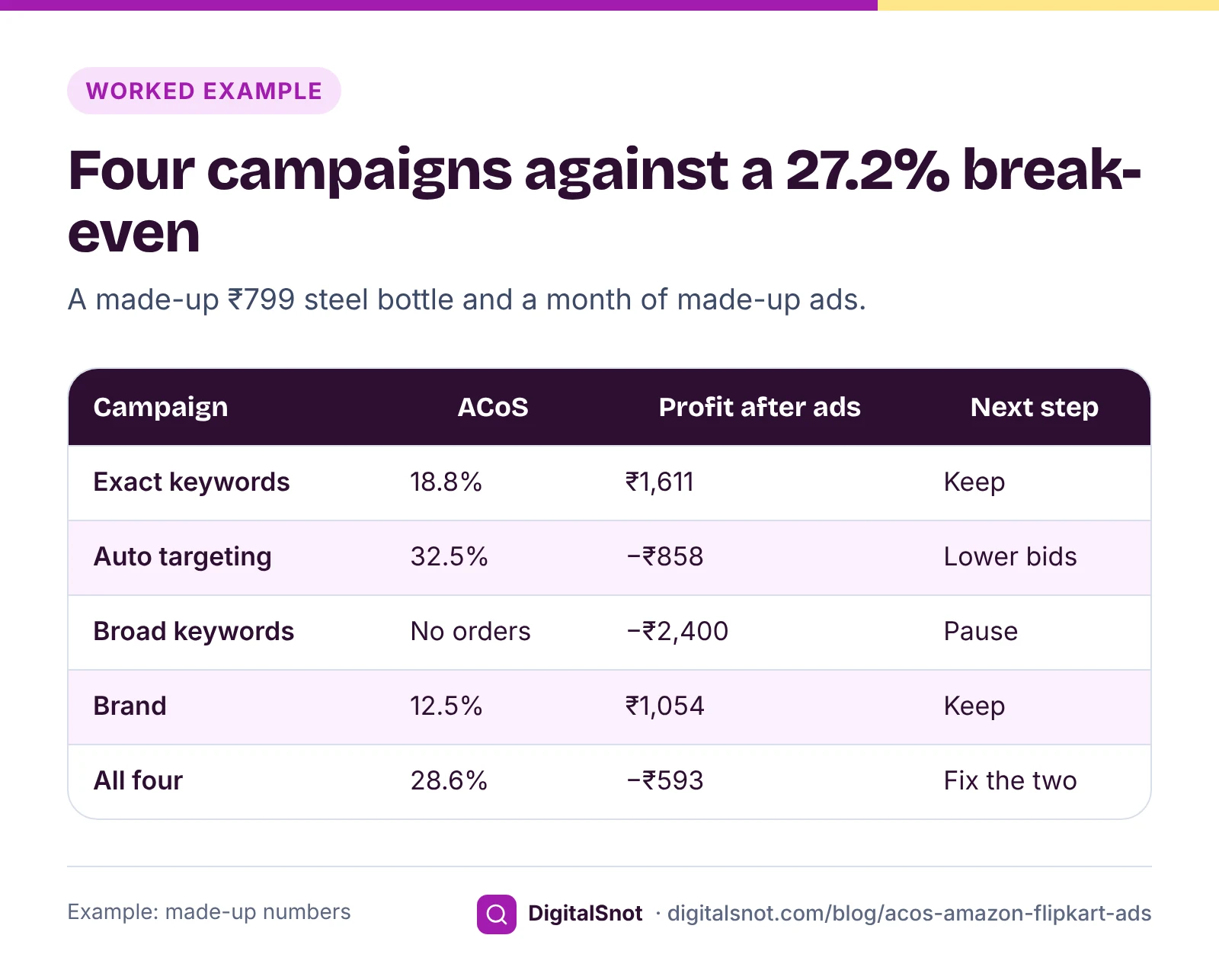
Together the four spent ₹12,100 for ₹42,347 of ad sales: an ACoS of 28.6%, just above break-even, and a loss of about ₹593. The average hides the story. Two campaigns make money, one loses a little and one spends with nothing to show. Pausing the broad campaign alone brings the total to an ACoS of 22.9% and a profit of about ₹1,807.
For the auto campaign, the highest average cost per click that stays within break-even is break-even ACoS × ad sales ÷ clicks: 27.2% × ₹15,980 ÷ 1,300 clicks, about ₹3.34, against ₹4.00 now. Within the 17.2% target it is about ₹2.11. That is our measure, and it assumes clicks keep turning into orders at the same rate.
Put your own price, fees and campaigns into the Amazon and Flipkart Ads ACoS Calculator. It works out what one order leaves you before ads, your break-even and target ACoS, and for each campaign you type or paste from a report, the ACoS, ROAS, cost per click, click-through rate, conversion rate, profit or loss after ads and the highest cost per click within your target. Campaigns above break-even and spend with no orders come first in a do-these-first list. It never signs in to Amazon Ads or Flipkart Ads, and no fee or tax rate is built in.
Why a "good ACoS" depends on your margin
Take a 25% ACoS. On a product that breaks even at 35%, the campaign keeps about 10% of its ad sales as profit. On a product that breaks even at 18%, the same campaign loses about 7% of its ad sales. Same ACoS, opposite result.
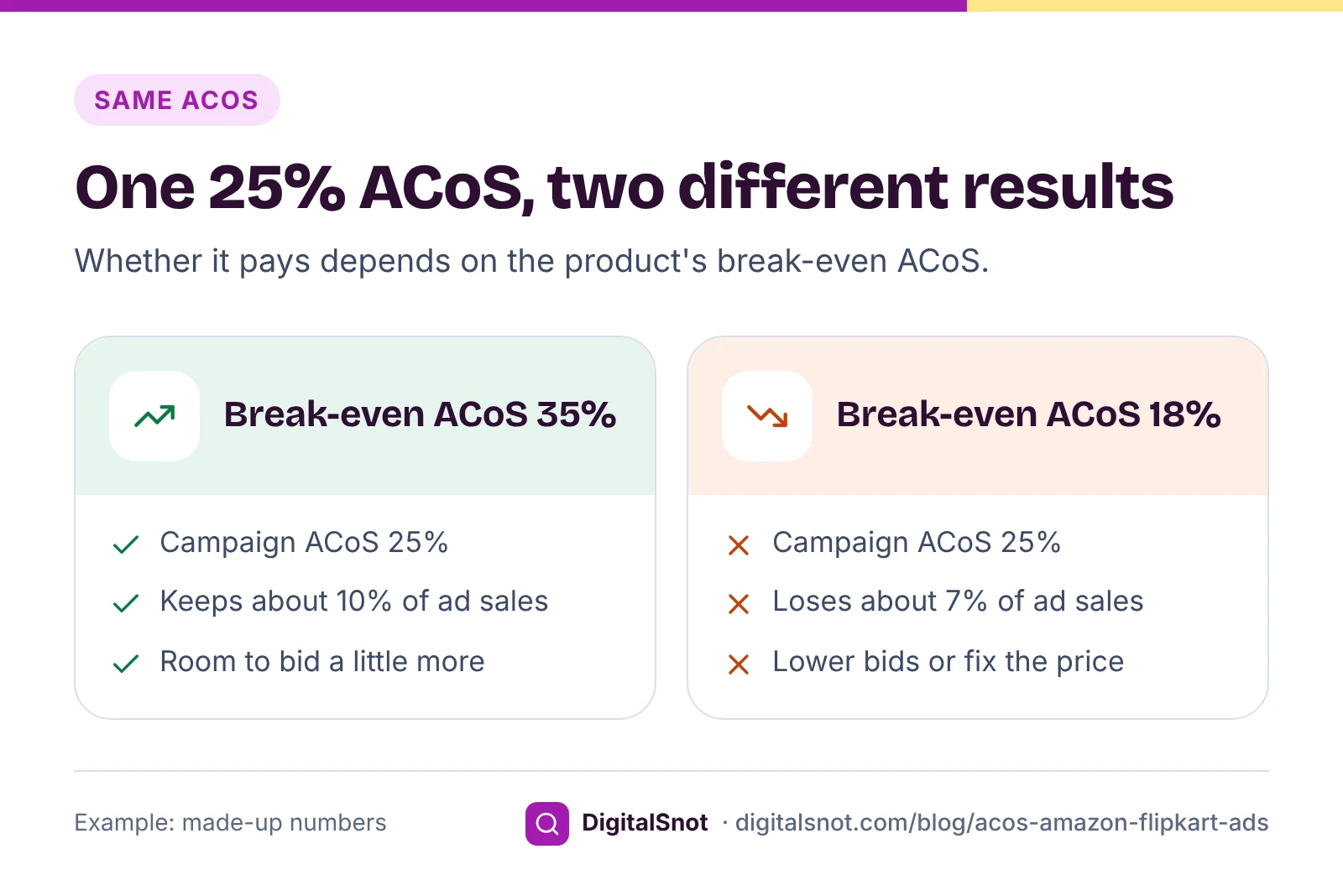
So compare each campaign with the break-even ACoS of the product it sells, not with a number from a forum. A few more points, all our suggestions:
- Thin margins leave little room for ads. If one order leaves almost nothing before ads, fix the price, the cost or the fees first. Ads can only add cost.
- Set a limit before you judge a new campaign, for example what one or two orders would earn you before ads, rather than stopping it after a handful of clicks or letting it run for weeks.
- Check the listing the ad sends buyers to. The price, photos and reviews decide whether a click becomes an order.
Our post on margin and markup explains why the margin, not the markup, is the number to compare with ACoS.
TACoS: what ads cost the whole business
ACoS judges campaigns. It cannot tell you what ads cost the business, because it counts only ad sales. For that we use TACoS (total advertising cost of sales) as our measure: ad spend ÷ total sales, ads and organic together, for the same period × 100. Amazon Ads mentions TACoS too, in its guide to common holiday advertising myths, as a way to see whether total sales grow in relation to ad spend.
The bottle seller sold 190 bottles last month, ₹1,51,810 in all, so ₹12,100 of ad spend is a TACoS of 8.0%. Our reading: if TACoS rises month after month while total sales stay flat, ads may be buying sales you would have made anyway.
TACoS also matters when you work out profit per product. ACoS treats every sale as an ad sale and shows a higher ad cost per order than you really pay. In the SKU Profit Analyzer, type ad spend per order (a month's spend for the SKU ÷ all its orders), or put TACoS in the "Ads % of sales" column. It works out profit per order and per month for every SKU and channel after fees, returns, ads and shipping, finds the loss-makers and lists fixes, with no fee rate or courier price built in.
Check your fees before you set a target
Your break-even ACoS is only as good as the fees behind it. Amazon.in's fees and pricing page says its referral fee is a percentage of the sale that varies by category, with a closing fee based on the price. Flipkart's fees and commission page says its commission varies by category and its fixed fee depends on the selling price. Copy yours from your own rate card into the Marketplace Fee and Profit Calculator to see the payout, profit and break-even price per order, then use that profit before ads in the ACoS sum. Our post on your real profit per order lists every fee line, returns included.
Mistakes to avoid
- Comparing ACoS with your gross margin. Take out GST, fees and packing first, or break-even looks higher than it is.
- Judging only the account average. A healthy average can hide a campaign that spends with no orders.
- Using ACoS as the ad cost in SKU profit. Use ad spend per order or TACoS.
- Forgetting GST on ads when you cannot claim it back.
- Reading Flipkart's ROI as ROAS without checking how your report works it out.
- Keeping the same targets during a sale. A discount lowers the profit per order, and with it your break-even ACoS, so work it out again at the sale price.
Your next step
Pick your three best-selling products and work out each one's break-even ACoS from your rate card. Then put last month's campaign report into the ACoS Calculator and start with what it flags first. If you are planning a sale, our post on sale discounts that do not eat your margin shows how a discount changes the profit your ads have to work with. All our free tools for online sellers work in your browser. If you want a second look at your numbers, get in touch.
Free tools in this article
- Amazon and Flipkart Ads ACoS Calculator Find your break-even ACoS and see which Amazon or Flipkart ad campaigns make or lose money.
- SKU Profit Analyzer Find the SKUs that lose money after fees, returns, ads and shipping, with the price or fix for each one.
- Marketplace Fee and Profit Calculator Compare payout, profit and break-even price per order on Amazon.in, Flipkart, Meesho and your own shop.
Frequently asked questions
What is a good ACoS on Amazon?
It depends on your margin. Amazon Ads says there is no general threshold for a good or bad ROAS, the inverse of ACoS, and that your ACoS needs to be lower than your profit margin to keep a profit. Work out your break-even ACoS from your own price, fees and costs, and judge each campaign against it.
How do I calculate ACoS and ROAS?
ACoS = ad spend ÷ ad sales × 100. ROAS = ad sales ÷ ad spend. ₹3,600 of spend that brought ₹19,176 of ad sales is an ACoS of 18.77% and a ROAS of 5.33. One is the inverse of the other.
How do I work out my break-even ACoS?
Take the GST, marketplace fees, product cost and packing out of your selling price to get the profit per order before ads, then divide it by the selling price. A ₹799 product that leaves ₹217.12 before ads breaks even at about 27.2%. If you cannot claim back the GST on your ads invoice, divide by (1 + that rate) as well.
What is TACoS?
Total advertising cost of sales: ad spend divided by total sales, organic and paid, for the same period. We use it as our measure of what ads cost the whole business. ₹12,100 of ad spend against ₹1,51,810 of total sales is a TACoS of 8.0%.
Is Flipkart Ads ROI the same as ROAS?
Not necessarily. Flipkart says its Smart ROI campaigns aim to ensure sales for every rupee spent, but its public pages do not give the formula for the ROI figure in its reports. Check how your report works it out before you compare it with ROAS or with your break-even ACoS.
Should I pause every campaign above break-even ACoS?
Not always at once. First lower bids on the targets that get clicks without orders, pause the ones that spend with no orders at all, and check the listing the ad points to. A new campaign may need time, so set a spending limit before you judge it.
Sources
Every figure and claim in this article comes from the sources below. We checked each one when writing and link to the original so you can read it yourself. Credit belongs to the authors and publishers listed. How we write and check our articles.
-
1
What is advertising cost of sales (ACOS)?
Amazon Ads · ACoS = ad spend ÷ attributed sales; ACoS needs to be lower than your profit margin to keep a profit.
-
2
What is return on ad spend (ROAS)?
Amazon Ads · ROAS = ad sales ÷ ad spend, the inverse of ACoS; no general threshold for a good or bad ROAS.
-
3
What is cost per click (CPC)?
Amazon Ads · What cost per click measures.
-
4
Common holiday advertising myths
Amazon Ads · TACoS as ad spend as a share of total sales, organic and paid.
-
5
Flipkart Ads
Flipkart Seller Hub · Cost per Click and Smart ROI campaigns.
-
6
Amazon pricing and seller fees
Amazon.in (sell.amazon.in) · Referral fee as a percentage that varies by category, and a closing fee based on the price.
-
7
Fees and commission
Flipkart Seller Hub · Commission varies by category; the fixed fee depends on the selling price.
-
8
Section 16: Eligibility and conditions for taking input tax credit (CGST Act, 2017)
CBIC · Input tax credit only when the conditions are met, which decides whether GST on ads is a cost.
Want a second pair of eyes?
Tell us about your site. We reply within one business day.
Talk to us Try our free tools