Meta ads budget for small businesses: how much to start with
Work out a starting budget for Facebook and Instagram ads from what a customer is worth, then plan for the learning phase, GST and the numbers to watch.

On this page (10 sections)
- 1Start from what a customer is worth
- 2Daily or lifetime budget
- 3The learning phase: why about 50 results a week matters
- 4Choose the objective that matches the result you want
- 5GST on Meta's invoices
- 6Reading your results
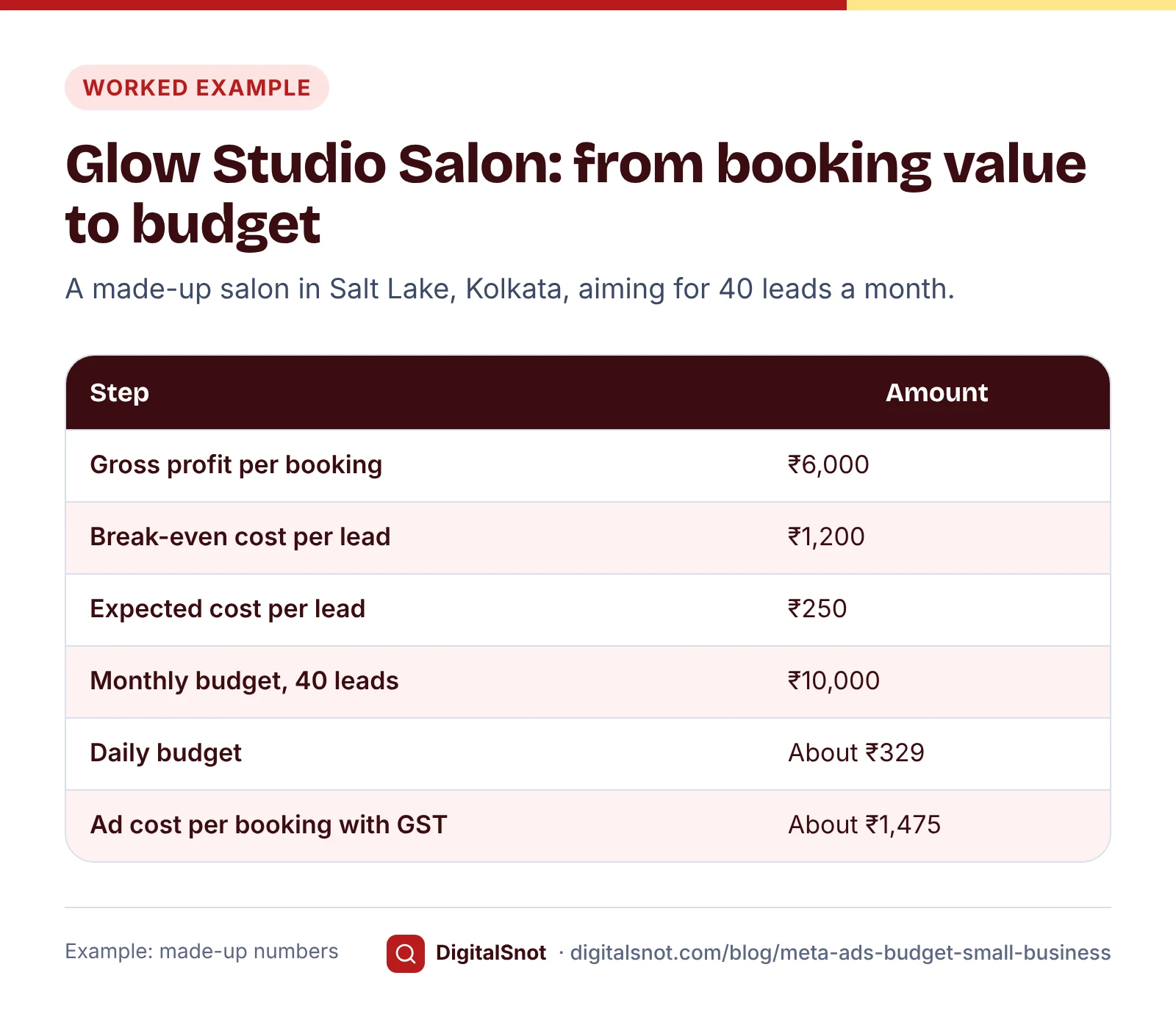
- 7Worked example: Glow Studio Salon, Salt Lake, Kolkata
- 8Mistakes to avoid
- 9Next step
- 10Sources
"How much should we spend on Facebook and Instagram ads?" has no single answer, but there is a method for setting a Meta ads budget for small businesses. You start from what a customer is worth, estimate what each lead will cost, and check the budget against how Meta's delivery system learns.
This post walks through that method with a made-up salon, explains daily and lifetime budgets, the learning phase, GST on Meta's invoices, and the numbers to read once your ads are running. Every cost here is an example: your own Ads Manager numbers are the ones to use.
Start from what a customer is worth
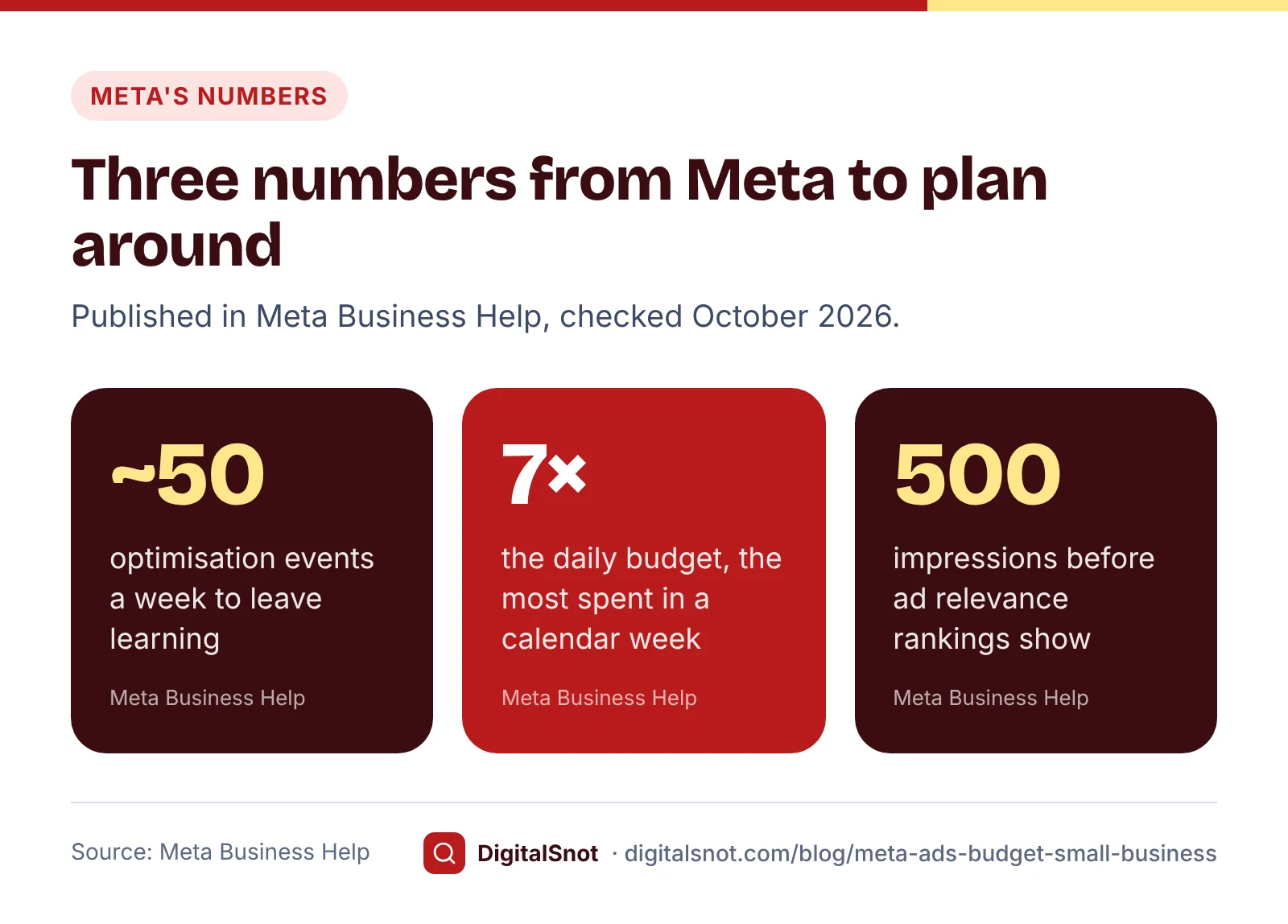
The most you can pay for a lead is the gross profit from one new customer multiplied by the share of leads who buy. If a customer brings ₹6,000 of gross profit and one lead in five books, a lead is worth up to ₹1,200 before the ads lose money. If you want to keep half of that as profit, aim for ₹600 a lead.
Next, estimate what a lead will actually cost. Meta's numbers link together:
- CPM is the average cost of 1,000 impressions.
- Link CTR is the share of impressions that led to a link click.
- Conversion rate is the share of clicks that became a lead or an order.
CPM ÷ 1,000 ÷ link CTR gives the cost of a link click, and dividing by the conversion rate gives the cost of a lead. At a ₹180 CPM and a 0.9% link CTR, a click costs ₹20; if 8% of clicks become leads, a lead costs ₹250. CPM and CTR change with the audience, the ad, the placement and the season, so take them from your own Ads Manager history, or run a small test for a week or two first.
Our Meta Ads Budget Calculator does these sums. Enter what a customer or order is worth, your margin, your close rate, and your CPM, link CTR and conversion rate, and it shows the cost per lead you can afford, the daily budget for the leads you want, the impressions, reach and clicks that buys, and the profit to expect. It also checks your plan against the learning phase, and has a box to add GST if you cannot claim it back.
Daily or lifetime budget
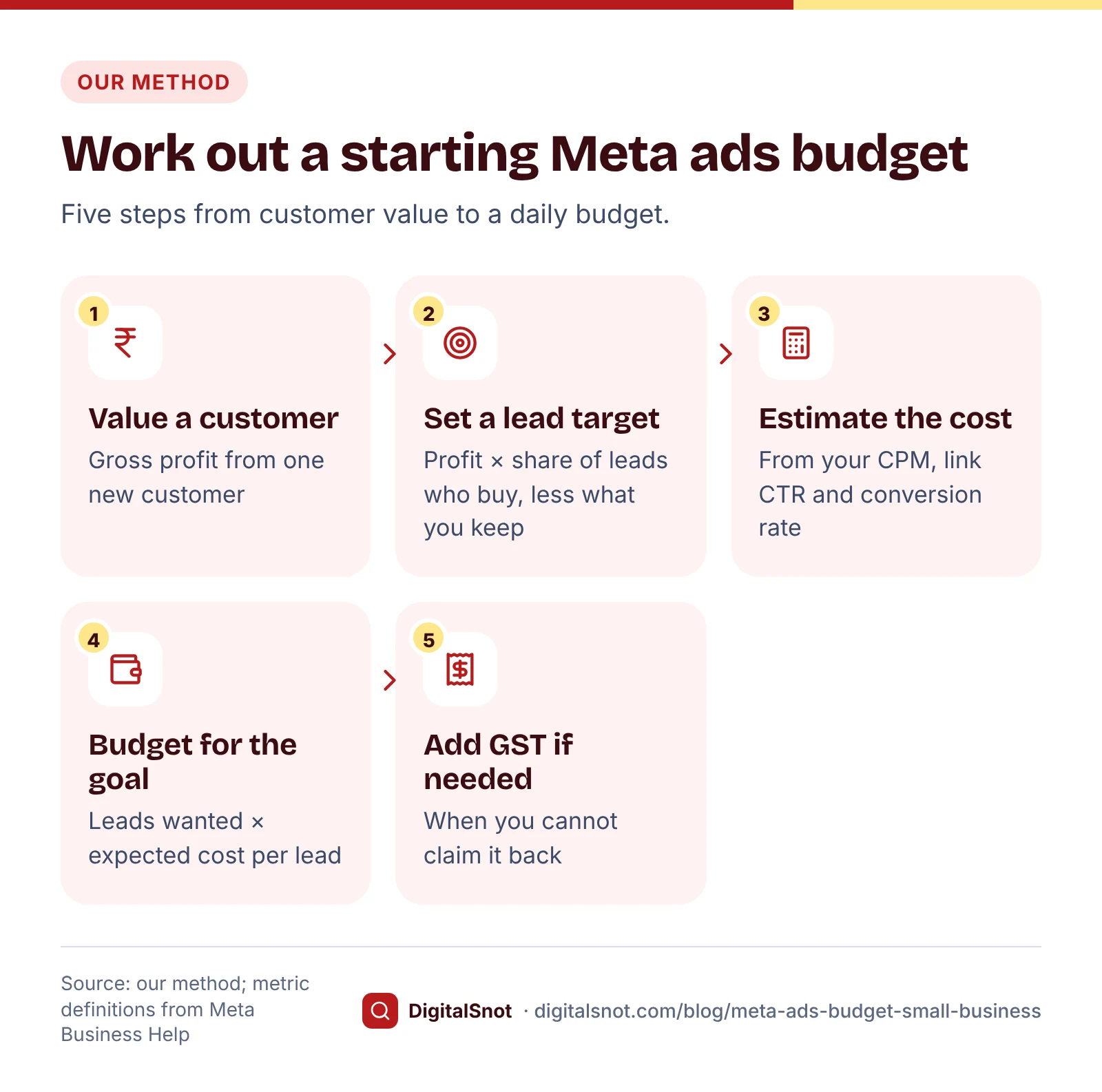
Meta gives you two ways to set a budget:
- A daily budget is the average you are willing to spend each day. Meta can spend more than the daily budget on some days and less on others, but its help pages say that over a calendar week, Sunday to Saturday, it will not spend more than seven times the daily budget.
- A lifetime budget is one amount for the whole run of the campaign or ad set, with an end date, and Meta spreads the spending across those dates.
Our suggestion: a daily budget for lead ads you run all year, and a lifetime budget for a sale with fixed dates, such as a festival offer.
Keep the budget in as few places as you can. Meta's page on reducing cost per result suggests combining similar ad sets and letting a campaign budget share spending across ad sets, and warns that a sharp budget increase can push costs up.
The learning phase: why about 50 results a week matters
When you create an ad set, or make a significant edit to one, it enters a learning phase while the delivery system works out how best to show it. Results are less stable during this time.
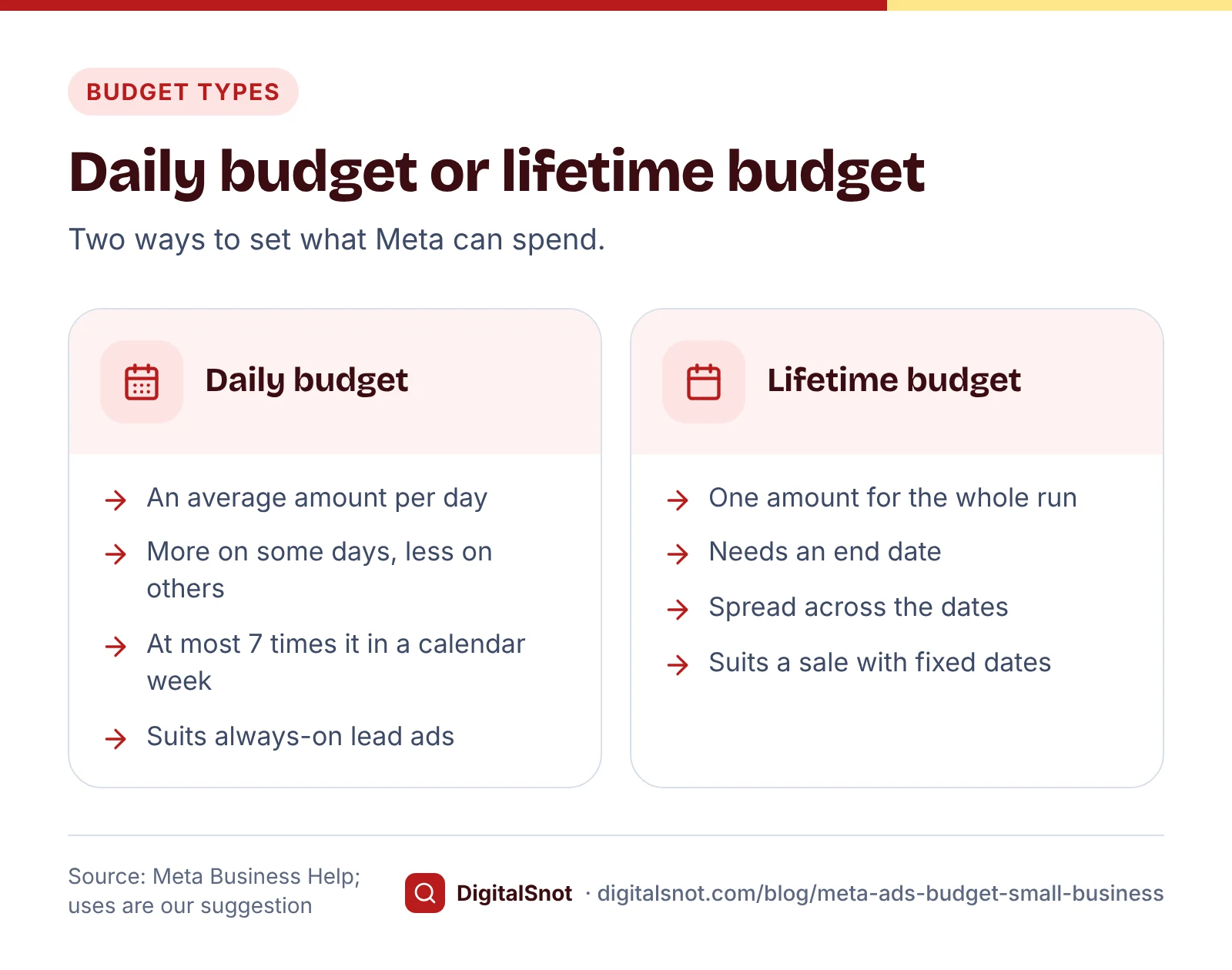
Meta's page on Learning limited says an ad set is shown as "Learning limited" when it is unlikely to get around 50 optimisation events in the week after its last significant edit. Meta says this is not a penalty. Its suggested fixes are to combine ad sets, broaden the audience, raise the budget or the bid, or optimise for an event that happens more often.
What counts as a significant edit? Meta's page on the last significant edit lists pausing the ad set and changing the optimisation event, the audience or the creative; budget and bid changes may count too, depending on their size. So frequent big edits keep an ad set in learning.
A rough way to see what 50 results a week costs is 50 × your cost per result. This is our estimate, not a Meta formula. At ₹250 a lead, 50 leads a week is ₹12,500 a week, or about ₹1,786 a day. Many small businesses start below that. That is fine for a test: accept "Learning limited", keep to one ad set, and leave it alone for at least a week before you judge it.
Choose the objective that matches the result you want
Ads Manager asks for an objective first, such as Awareness, Traffic, Engagement, Leads or Sales. The objective decides what Meta counts as a result, and so what it optimises for and what your cost per result means.
- Leads suits a service business that wants enquiries, for example through an instant form that opens inside Facebook or Instagram.
- Ads that open a WhatsApp chat work with the engagement, leads, sales and traffic objectives, according to Meta's page on ads that click to WhatsApp. Our post on WhatsApp Business for shops covers setting up the chat side.
- Sales suits an online shop, and needs tracking on your site; for example, Meta counts landing page views only with the Meta Pixel installed.
GST on Meta's invoices
Meta's help page on GST and TDS for ads in India says ads bought in India are sold by Facebook India, billed in rupees, and subject to GST and TDS. GST is added to your ad charges, and you can add your GSTIN in your ad account's payment settings when the business country is India.
The Meta pages we found do not state the GST rate. Our calculator assumes 18% and asks you to check the rate on your Meta invoice. If you are registered for GST and can claim the input tax credit, the GST may not be a cost to you; your CA can confirm. This is general information, not tax advice.
Reading your results
Once the ads run, a few numbers tell you most of the story:
- Cost per result is the amount spent divided by results. Meta notes that some results may be estimated.
- Frequency is impressions divided by reach, an estimate of how often each person saw your ad. Meta's frequency page says that if results start to drop as frequency rises, the audience may be getting tired of the ad.
- Ad relevance rankings (quality, engagement rate and conversion rate) compare your ad with ads competing for the same audience. Meta's page on ad relevance diagnostics says they show only for ads with at least 500 impressions and are not used in the auction.
Ads Manager counts results with its own attribution settings, so also count enquiries and bookings in your own records. The number that matters is cost per customer.
When you have a few weeks of data, export a report from Ads Manager and open it in our Meta Ads Results Analyzer. It finds spend with no results, compares each row's cost per result with the median of your own rows, spots frequency rising while link CTR falls, lists Learning limited ad sets and rankings below average, and gives a pause, fix or scale list ranked by the rupees at stake. Its thresholds are our measures, and it reads only the file you give it.
Worked example: Glow Studio Salon, Salt Lake, Kolkata
Glow Studio is a made-up salon that wants bridal and party make-up bookings. All numbers are examples.
- Value: an average booking of ₹12,000 at a 50% margin is ₹6,000 of gross profit. One lead in five books, so the break-even cost per lead is ₹1,200, and the owner aims for ₹600.
- Expected cost: a two-week test gave a ₹180 CPM, a 0.9% link CTR and 8% of clicks becoming leads: ₹250 a lead, well inside the target.
- Budget: 40 leads a month at ₹250 is ₹10,000, about ₹329 a day.
- Profit check: 40 leads should bring about 8 bookings, so each booking costs about ₹1,250 in ads against ₹6,000 of gross profit. If the salon cannot claim GST, ₹10,000 becomes ₹11,800 at 18%, about ₹1,475 a booking.
- Learning phase: 40 leads a month is about 9 a week, far short of 50, so the ad set will show Learning limited. The owner runs one ad set, makes no edits in the first week, and judges it on bookings after four weeks.
Before publishing, the owner pastes the ad text into our Meta Ad Policy Checker. It marks the first draft, "Want to hide your dark spots on the wedding day?", as needing care, because Meta's personal attributes policy does not allow ads that assert or imply things about the viewer. "Bridal make-up trials this month in Salt Lake" says the same thing safely. Meta still reviews every ad and makes the final decision.
Mistakes to avoid
- Splitting a small budget across many ad sets. Each one learns more slowly; Meta suggests combining them.
- Editing every day. Significant edits restart learning.
- Judging after two days. Give an ad set at least a week (our suggestion).
- Counting leads instead of customers. A cheap lead that never books is not cheap.
- Forgetting GST. Add it to your cost if you cannot claim it back.
- Doubling the budget overnight. Meta warns that a sharp increase can raise costs; raise it in steps.
Next step
Put your own numbers into the calculator, start with one ad set at a budget you can hold for a month, and review it weekly. If you also run Google Ads, our post on a Google Ads budget for a local business uses the same work-back method. Ads work better when people who check your profile find recent posts, so see our 30-day Instagram plan too. The tools here are free on our social media tools page, and none of them connect to your ad account. If you want help setting up your first campaign, talk to us.
Free tools in this article
- Meta Ads Budget Calculator Turn CPM, link CTR and conversion rate into a Facebook and Instagram budget and cost per lead.
- Meta Ads Results Analyzer Open your Ads Manager export and see which ads to pause, fix or scale, ranked by the rupees at stake.
- Meta Ad Policy Checker Check ad text for claims and words Meta may reject, with rewrites and a special ad category answer.
By the numbers
- optimisation events in the week after the last significant edit, about what an ad set needs to leave the learning phase
- 50
- Source: Meta Business Help Centre
- impressions an ad needs before Meta shows its quality, engagement rate and conversion rate rankings
- 500
- Source: Meta Business Help Centre
Frequently asked questions
How much should a small business spend on Facebook ads to start?
Work back from profit: the gross profit from a customer times the share of leads who buy is the most you can pay for a lead. Multiply the leads you want by your expected cost per lead, and start with an amount you can keep running for a month.
What is the difference between a daily and a lifetime budget on Meta?
A daily budget is the average you spend each day, and Meta can spend more on some days but not more than seven times it in a calendar week. A lifetime budget is one amount for a campaign or ad set with an end date, spread across the run.
What does Learning limited mean?
Meta shows Learning limited when an ad set is unlikely to get around 50 optimisation events in the week after its last significant edit. Meta says it is not a penalty; its fixes include combining ad sets, broadening the audience, raising the budget or optimising for a more frequent event.
Is GST charged on Facebook and Instagram ads in India?
Yes. Meta says ads bought in India are billed in rupees by Facebook India and are subject to GST and TDS, and you can add your GSTIN in payment settings. Meta's pages do not state the rate, so check your invoice and ask your CA about input tax credit.
Which objective should a local business choose?
Choose the objective that matches the result you want: Leads for enquiries, an objective that supports WhatsApp chats if customers order on WhatsApp, or Sales for an online shop with tracking on its site. The objective decides what Meta counts as a result.
What frequency is too high for Meta ads?
Meta does not publish a single limit. Its frequency page says that if results start to drop as frequency rises, the audience may be getting tired of the ad, so watch frequency alongside cost per result and refresh the ad when both move the wrong way.
Sources
Every figure and claim in this article comes from the sources below. We checked each one when writing and link to the original so you can read it yourself. Credit belongs to the authors and publishers listed. How we write and check our articles.
-
1
Cost per 1,000 impressions (CPM)
Meta Business Help Centre · CPM is the average cost of 1,000 impressions.
-
2
CTR (link click-through rate)
Meta Business Help Centre · Link clicks divided by impressions.
-
3
Best practices to potentially reduce cost per result
Meta Business Help Centre · Combine ad sets, use a campaign budget across ad sets, avoid sharp budget increases during learning.
-
4
About the learning phase
Meta Business Help Centre · New or significantly edited ad sets go through a learning phase with less stable results.
-
5
About Learning limited
Meta Business Help Centre · Around 50 optimisation events in the week after the last significant edit; not a penalty; Meta's fixes.
-
6
Last significant edit
Meta Business Help Centre · Edits that restart learning: pausing, optimisation event, audience, creative, and some budget or bid changes.
-
7
Results
Meta Business Help Centre · Results are counted based on the objective and settings you choose.
-
8
Ads that click to WhatsApp
Meta Business Help Centre · Objectives that support ads opening a WhatsApp chat.
-
9
Landing page views
Meta Business Help Centre · Landing page views need the Meta Pixel.
-
10
GST and TDS for ads in India
Meta Business Help Centre · Ads bought in India are sold by Facebook India, billed in rupees and subject to GST and TDS; adding a GSTIN.
-
11
Cost per result
Meta Business Help Centre · Amount spent divided by results; some results may be estimated.
-
12
Frequency
Meta Business Help Centre · Impressions divided by reach, an estimate; falling results as frequency rises can signal ad fatigue.
-
13
About ad relevance diagnostics
Meta Business Help Centre · Three rankings, shown for ads with at least 500 impressions, not used in the auction.
-
14
Privacy violations and personal attributes
Meta Transparency Centre · Ads must not assert or imply personal attributes about the viewer.