A 30-day Instagram plan for a local shop
Fix your Instagram profile, then follow a four-week plan of reels, carousels and stories, a simple weekly routine, better captions and a Sunday check of Insights.

On this page (9 sections)
It is easy to start Instagram with a burst of posts and then stop when the shop gets busy. An Instagram plan for a local shop fixes that: you know what to post each day, you shoot in one session, and you can see after a month what brings customers through the door.
This post gives you a four-week plan for a shop, a weekly routine of under four hours, caption and hashtag basics, and a short Sunday check of your numbers. The example is a made-up kurti shop in Jaipur, but the plan works for a bakery, a salon or a hardware store.
Before day 1: fix the profile
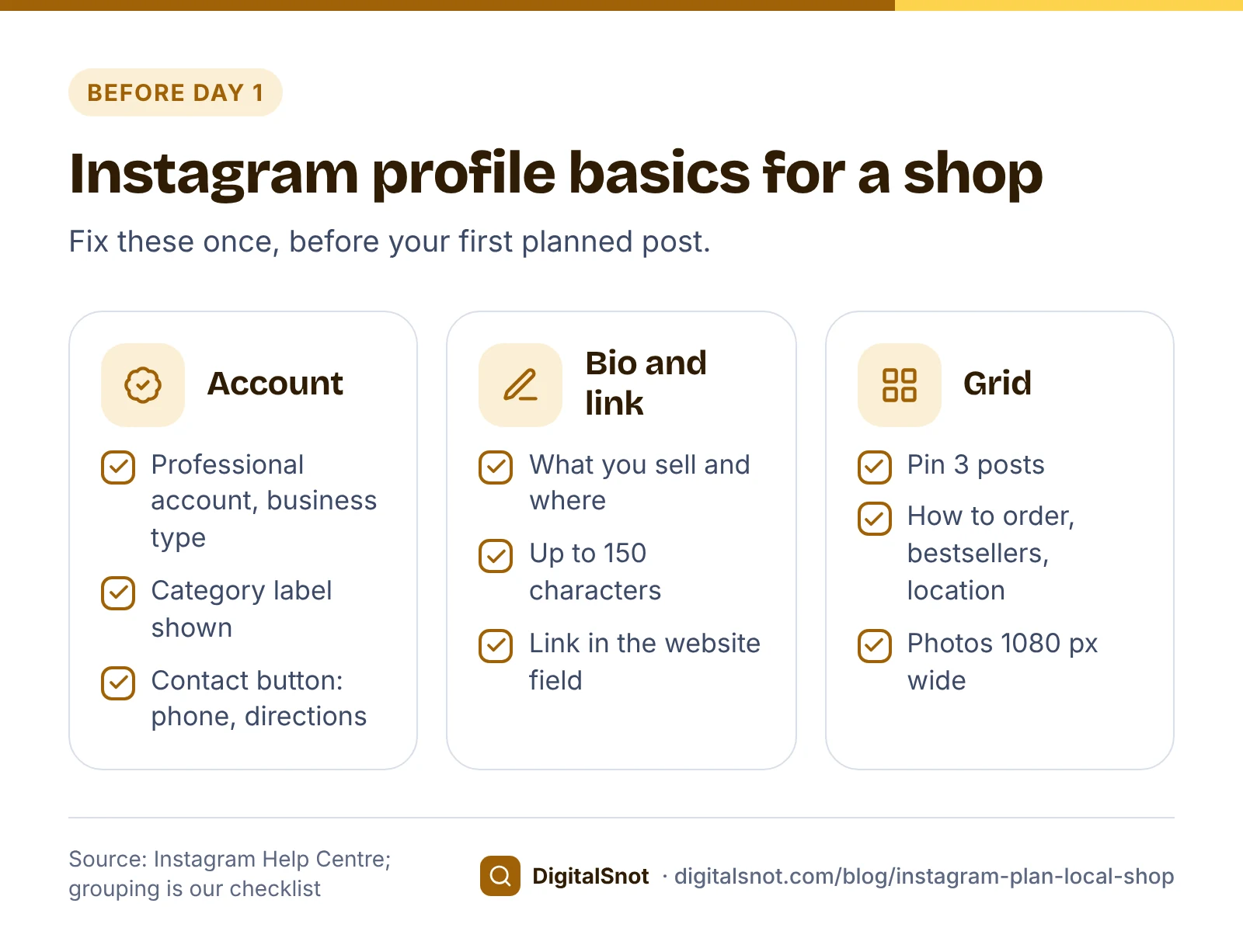
Your profile is what people see when they tap your name on a post. Get these right first.
Use a professional account
Instagram's professional accounts come in two types, and Instagram Help says business accounts suit retailers, local businesses and service providers. You can switch to a professional account in the app's settings. You need one for Insights, the numbers you will check every week.
Write a bio that answers three questions
A bio can have up to 150 characters. Use them to say what you sell, where you are and how to order. Add your website or a WhatsApp link in the website field of Edit profile, rather than typing it into the bio.
Show your category and contact details
A professional account can show its category under your name and a Contact button with directions, a phone number and an email address. Instagram's page on editing your business information shows where to turn both on, under Edit profile.
Pin three posts
You can pin up to 3 posts to the top of your profile. Our suggestion for a shop: how to order, your bestsellers with prices, and where to find you with your timings.
The 30-day plan
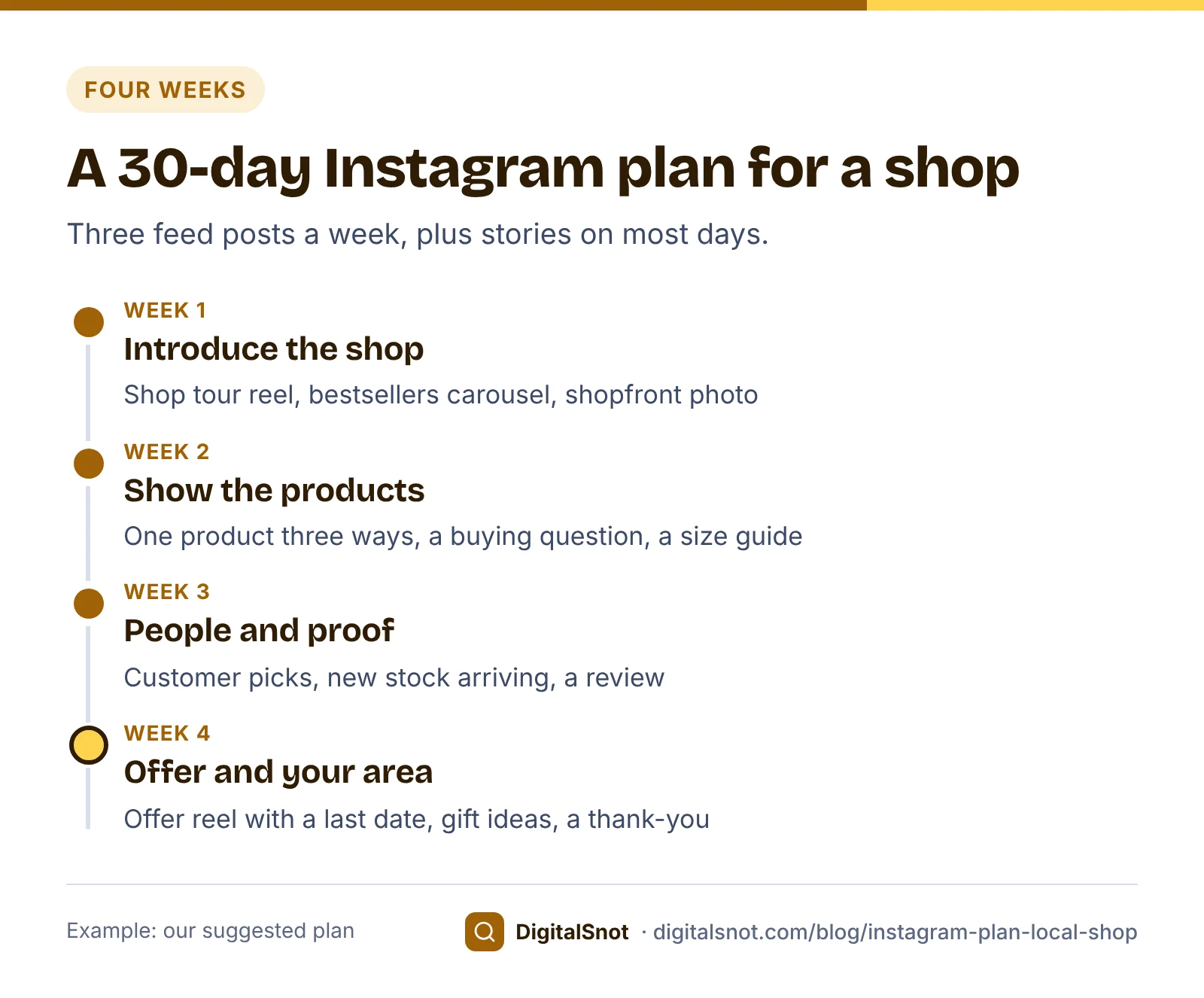
The plan below is our suggestion, not an Instagram rule: three feed posts a week, plus stories on most days. That is 12 feed posts in a month, which most shop owners can keep up while running the counter.
Mix three formats:
- Reels for movement: a shop tour, a product being used, a quick tip. Instagram Help says reels over 3 minutes won't be recommended to new audiences, so keep shop reels well under that. Reels can be from 1.91:1 to 9:16, at 30 frames a second or more, according to Instagram's reel size guidance.
- Carousels for detail: up to 20 photos and videos in one post, such as a size guide or five bestsellers with prices. The shape you choose applies to every slide.
- Single photos for simple news: new stock, your shopfront, a customer's pick. Instagram supports photo shapes from 1.91:1 to 4:5, so a portrait 1080 x 1350 photo is the tallest shape the feed takes.
Use stories for quick updates between posts: new arrivals, behind the counter, and questions to followers such as "Which colour should we restock?".
Week by week
- Week 1, introduce the shop. A 20-second shop tour reel, a carousel of your five bestsellers with prices, and a photo of the shopfront with your timings and landmark. Pin all three.
- Week 2, show the products. A "one product, three ways" reel, a carousel that answers a common question (for a kurti shop, cotton or rayon), and a reel on how to measure your size at home.
- Week 3, people and proof. A carousel of customer picks (ask first), a reel of new stock arriving, and a photo of a short customer review with their permission.
- Week 4, an offer and your area. A reel with a clear offer and its last date, a carousel of gift ideas for a coming festival, and a thank-you post that says what is coming next month.
Our Social Media Content Calendar lays this out for you. Pick the month, the days you post and your content pillars (such as offers, tips, behind the scenes and reviews), add your type of business and city, and it gives a post idea for every posting day, rotated through your pillars, with Indian festivals marked. Download it as a CSV or a calendar file, or print it. It uses fixed templates, not AI, and does not post anything for you.
A weekly routine you can keep
Our suggestion is to batch the work rather than post on the spot:
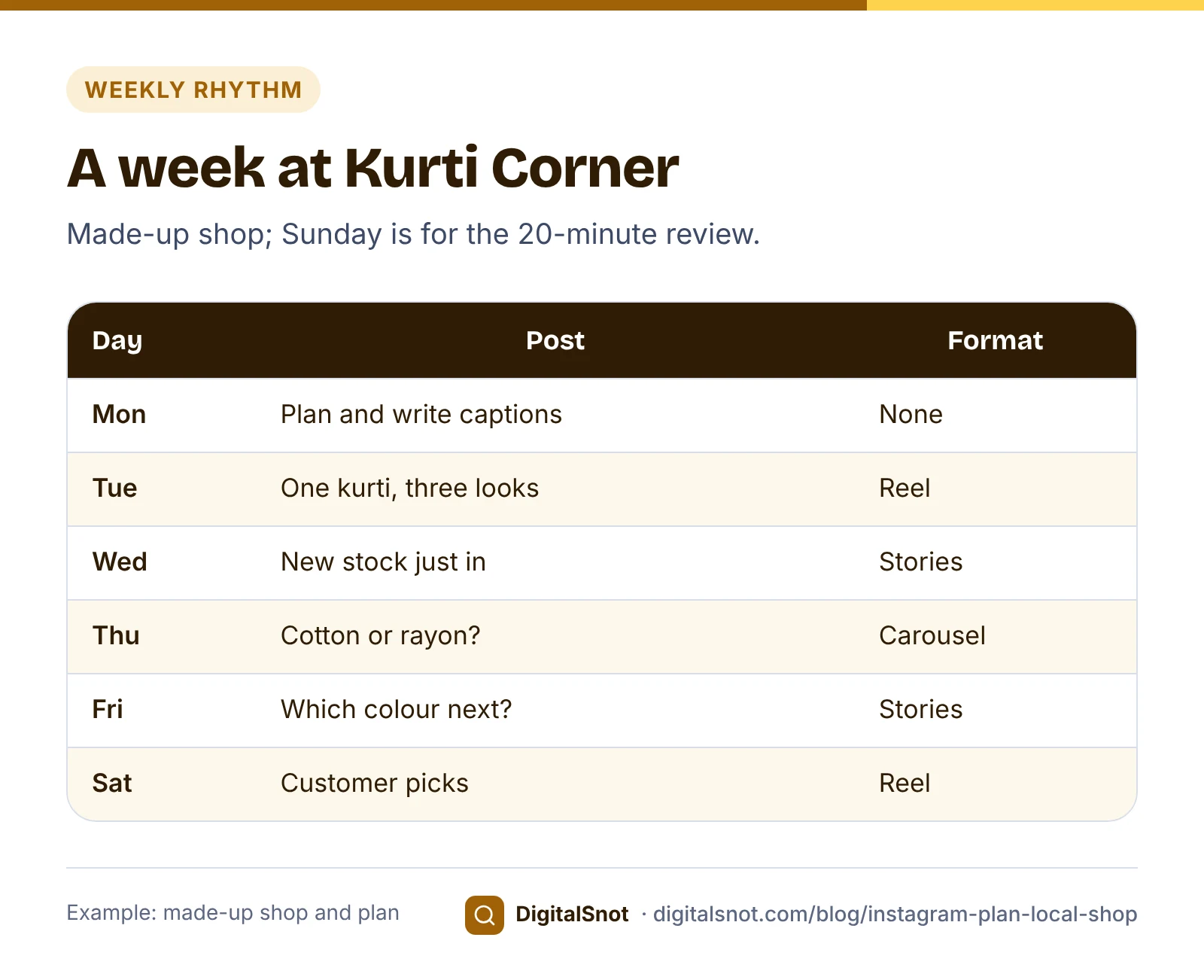
- Monday, 45 minutes: check the calendar, write the three captions, and plan the reels.
- Tuesday, one hour: shoot all three posts in one go, in good daylight, before the shop gets busy.
- Posting days, 10 minutes: post, then stay for a few minutes to answer the first comments.
- Every day, 10 minutes: answer comments and messages, and add a story or two.
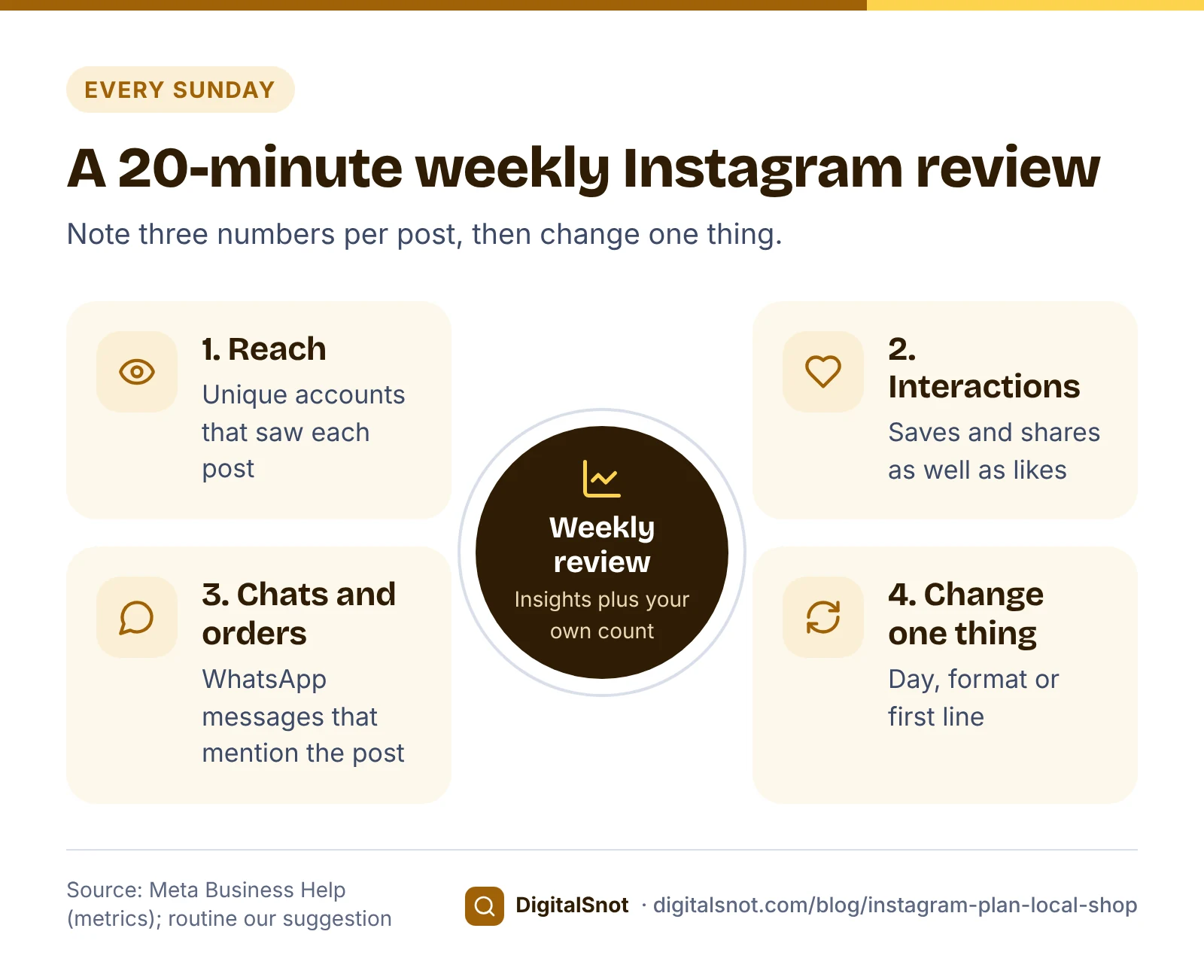
- Sunday, 20 minutes: note the week's numbers (see below).
For the reels, the Reels Script Builder turns a topic and your key points into a shot list for a 15, 30, 60 or 90-second reel: the hook for the first seconds, what to film in each scene, the words on screen, the line to say and the call to action, plus a caption and cover text. The lines can be in English, Hinglish or Hindi. Read the script aloud with a timer before you shoot.
One rule to know about music: Meta's Music Guidelines prohibit using music for commercial purposes without the right licences, and Instagram Help says a boosted reel cannot use licensed music. Your own voice, the shop's own sounds or Meta's Sound Collection are the safe choices for a business.
Captions and hashtags
The feed shows only the start of a caption before "more", and Instagram does not publish exactly where it cuts. So put the point in the first line: the product, the price or the offer. A caption can run to 2,200 characters, according to Meta's developer documentation, but a shop caption rarely needs more than four short lines: what it is, the price or size range, how to order, and where you are.
On hashtags, Instagram's hashtag help page says you can add them in the caption or the comments, that numbers work, and that spaces and special characters such as $ or % break a hashtag. Posts from public accounts show on the hashtag's page. Since December 2025 the same page says you can use up to 5 tags on a post (it used to be 30), and a comment with more won't post. So pick three to five specific hashtags, such as the product and the area, rather than a block of generic ones.
Before you post, paste the caption into our Instagram Caption and Hashtag Checker. It counts the caption against 2,200 characters, finds repeated hashtags and hashtags broken by a space or a symbol, shows a phone preview of where the feed may cut the caption (our estimate), and gives you a clean copy with the hashtags moved to the end.
Worked example: Kurti Corner, Malviya Nagar, Jaipur
Kurti Corner is a made-up shop selling cotton and rayon kurtis. Its owner sets up the profile in one evening. The bio has four short lines and uses 136 of the 150 characters:
- Cotton and rayon kurtis, sizes S to 3XL
- Malviya Nagar, Jaipur. Open 11 am to 9 pm
- Delivery across Jaipur
- Order on WhatsApp: tap the link
The link is a WhatsApp click-to-chat link whose first message reads "Hi, I came from Instagram", so the owner can count which orders started on Instagram. Our post on setting up WhatsApp Business for a shop shows how to make one.
The first reel, "One kurti, three looks", is 30 seconds: a three-second hook showing all three looks, three seven-second scenes, and a six-second call to action to message on WhatsApp for sizes. The caption's first line is "One ₹899 kurti, three ways to wear it", followed by the sizes, the order line and four hashtags. After four weeks, the owner's sheet shows which posts brought WhatsApp chats, and the format that brought the most is the one to repeat next month.
Measure every Sunday
Insights shows numbers for each post. Meta Business Help explains that in Instagram Insights, reach counts unique accounts that saw your content and interactions include likes, comments, saves, shares and replies. Note three things per post in a simple sheet:
- Reach: how many accounts saw it.
- Interactions: saves and shares usually say more about interest than likes (our suggestion).
- Chats and orders: WhatsApp messages or shop visits that mention the post, which you count yourself.
Change one thing at a time, such as the posting day or the first line of the caption, so you can see what made the difference.
A month gives you about 12 posts, which is too few to say which hour works best. After three months of steady posting, download a post-level export from Meta Business Suite and open it in our Best Time to Post Analyzer. It shows a day-by-hour heatmap of your own posts' engagement rate, marks slots with fewer than three posts as too thin to trust, and lists your best slots, days and post types. It describes your past posts, not a rule for every account.
Mistakes to avoid
- Posting daily for a week, then stopping. A pace you can keep matters more than a busy first week (our suggestion).
- A bio that does not say where you are. Local customers need the area and the timings.
- The offer hidden at the end of the caption. Put the price or offer in the first line.
- Popular film songs in a business reel. Use original audio or Meta's Sound Collection.
- Customer photos without permission. Ask, and keep the reply.
- Judging by likes alone. Count chats and orders too.
Next step
Fix the profile this week, then start week 1 on your next posting day. All the planning, writing and checking tools in this post are free on our social media tools page, and none of them sign in to your Instagram account. If you would rather have someone plan your local marketing with you, get in touch.
Free tools in this article
- Social Media Content Calendar A month of post ideas for each platform, rotated through your pillars, with Indian festivals marked.
- Reels Script Builder Turn a topic and key points into a timed shot list, with on-screen text, lines to say and a caption.
- Instagram Caption and Hashtag Checker Check a caption against Instagram's limits, fix repeated and broken hashtags and copy a clean version.
- Best Time to Post Analyzer A day-by-hour heatmap of your own posts' engagement, with the best slots and how many posts each is based on.
By the numbers
Frequently asked questions
How often should a local shop post on Instagram?
Instagram does not publish a right number. Our suggestion is three feed posts a week plus stories on most days, a pace most shop owners can keep. Posting steadily for months matters more than a busy first week.
How long can an Instagram bio be?
Instagram Help says a bio can have up to 150 characters. Use them to say what you sell, where you are and how to order, and put your link in the website field of Edit profile.
How many posts can I pin to my Instagram profile?
Instagram Help says you can pin up to 3 posts you have shared to the top of your profile. For a shop, pin how to order, your bestsellers with prices, and your location and timings.
How long should a reel be for a shop?
Instagram does not publish a best length, but its Help Centre says reels over 3 minutes are not recommended to new audiences, and a reel must be 90 seconds or less to be boosted. Our suggestion is 15 to 60 seconds for most shop reels.
How many hashtags should I use on Instagram?
Instagram's help page has long allowed up to 30 on a post, but Instagram has been reducing the number it accepts, so check what the app allows. Our suggestion is three to five specific hashtags, such as your product and your area.
Can I use popular songs in my shop's reels?
Meta's Music Guidelines prohibit using music for commercial purposes without the right licences, and boosted reels cannot use licensed music. Use your own voice, original audio or Meta's Sound Collection instead.
Sources
Every figure and claim in this article comes from the sources below. We checked each one when writing and link to the original so you can read it yourself. Credit belongs to the authors and publishers listed. How we write and check our articles.
-
1
Business and creator accounts on Instagram
Instagram Help Centre · Business accounts suit retailers and local businesses; the Contact button can show directions, phone and email.
-
2
Set up a professional Instagram account
Instagram Help Centre · How to switch to a professional account.
-
3
View insights on Instagram
Instagram Help Centre · Insights are available for professional accounts.
-
4
Add a bio to your Instagram profile
Instagram Help Centre · A bio can have up to 150 characters.
-
5
Add a website to your Instagram profile
Instagram Help Centre · The website link goes in Edit profile, with the bio.
-
6
How to edit your business information on Instagram
Instagram Help Centre · Showing or hiding the category label and contact details under Edit profile.
-
7
Pin a post to the top of your profile on Instagram
Instagram Help Centre · Up to 3 pinned posts.
-
8
Share multiple photos and videos in one post
Instagram Help Centre · Up to 20 photos and videos in one carousel; one shape for all.
-
9
Photo resolution on Instagram
Instagram Help Centre · Supported photo shapes from 1.91:1 to 4:5 at 1080 pixels wide.
-
10
Reel sizes on Instagram
Instagram Help Centre · Reels from 1.91:1 to 9:16, at 30 frames a second or more.
-
11
Record a reel on Instagram
Instagram Help Centre · Reels over 3 minutes are not recommended to new audiences.
-
12
Boost an Instagram reel
Instagram Help Centre · Boosted reels must be 90 seconds or less, 9:16, and cannot use licensed music.
-
13
Music Guidelines
Meta · Commercial use of music is prohibited without the right licences.
-
14
Use hashtags on Instagram
Instagram Help Centre · Up to 5 hashtags on a post; hashtags in captions or comments; spaces and special characters break them.
-
15
IG User Media reference
Meta for Developers · Captions of up to 2,200 characters.
-
16
About Instagram Insights
Meta Business Help Centre · Reach counts unique accounts; interactions include likes, comments, saves, shares and replies.