Meta ad rejected? Why it happened, and how to fix it
Find the reason Meta gave, fix the words, picture, audience or landing page that broke the rule, and ask for a review only when the ad really follows Meta's standards.

On this page (8 sections)
Having a Meta ad rejected is frustrating, especially when a sale or a festival offer is waiting. The good news is that most rejections for small businesses come from a short list of problems, and Meta tells you which one it found.
This post shows you where to read the reason, the policy areas that catch small businesses most often, when to edit and when to ask for a review, and what never to do. It ends with a worked example from a made-up tiffin service.
First, find the exact reason
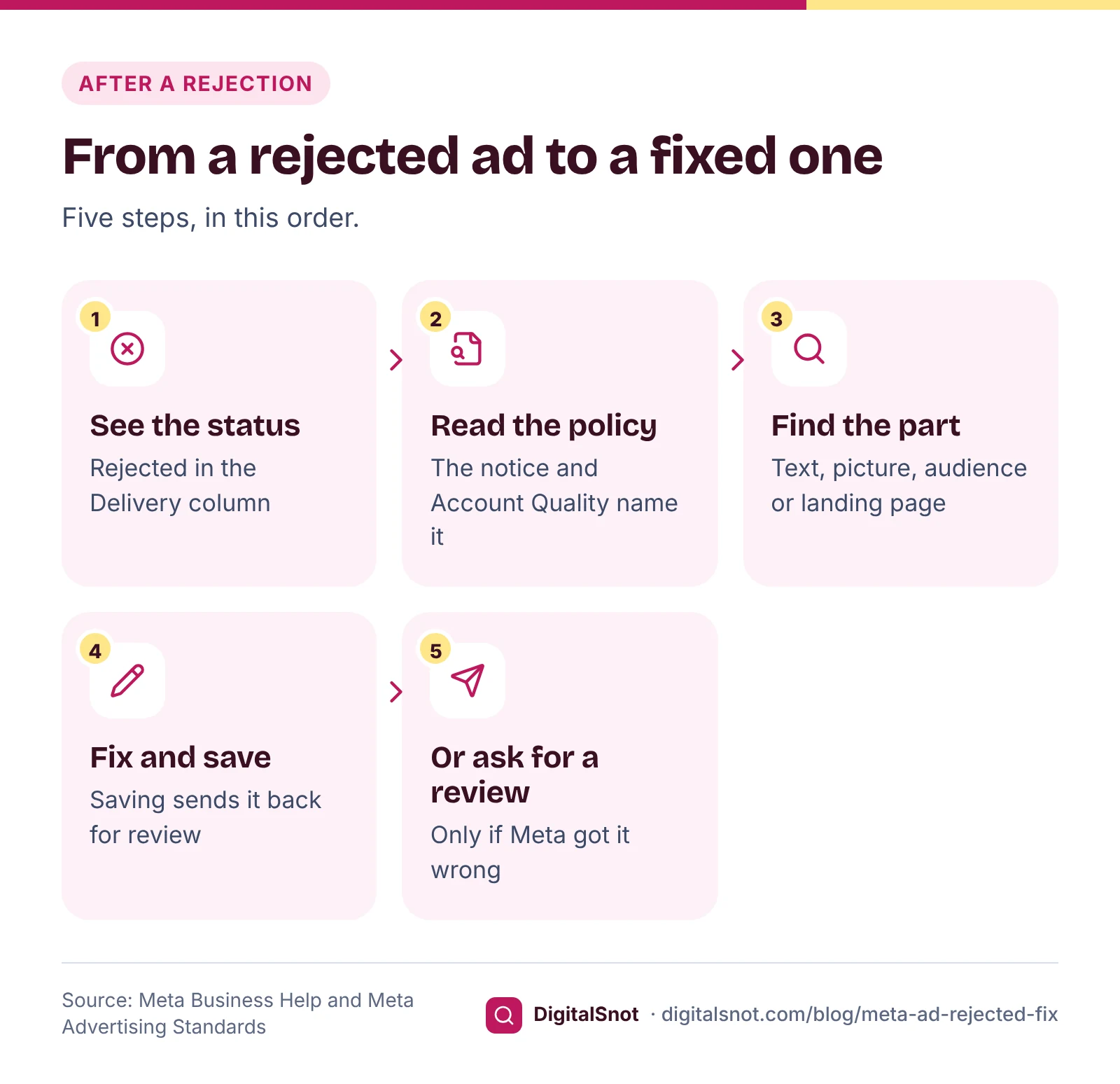
Do not start rewriting until you know what Meta objected to. There are three places to look:
- Ads Manager. The Delivery column shows the status of each campaign, ad set and ad. Meta's page on delivery statuses says Rejected means the ad cannot run because it does not comply with Meta's Advertising Standards.
- The rejection notice. Meta's help page on what to do when an ad is not approved says the notice explains the reason, which you can use to guide your edits.
- Account Quality. The same page points you to the Account Quality dashboard to learn more about why an ad was rejected. It also shows when the problem is bigger than one ad, for example a restriction on the ad account or Page.
Next, work out which part of the ad the policy applies to. Meta's Advertising Standards say the review checks the ad's images, video, text and targeting, and can also check the landing page. So the problem may be words written on your picture, an audience that includes people under 18, or the page your button opens, not only the primary text.
Meta also says review is typically completed within 24 hours, and that ads can be reviewed again after they go live. An ad that ran for a week can still be rejected later.
The policy areas that trip up small businesses
Personal attributes
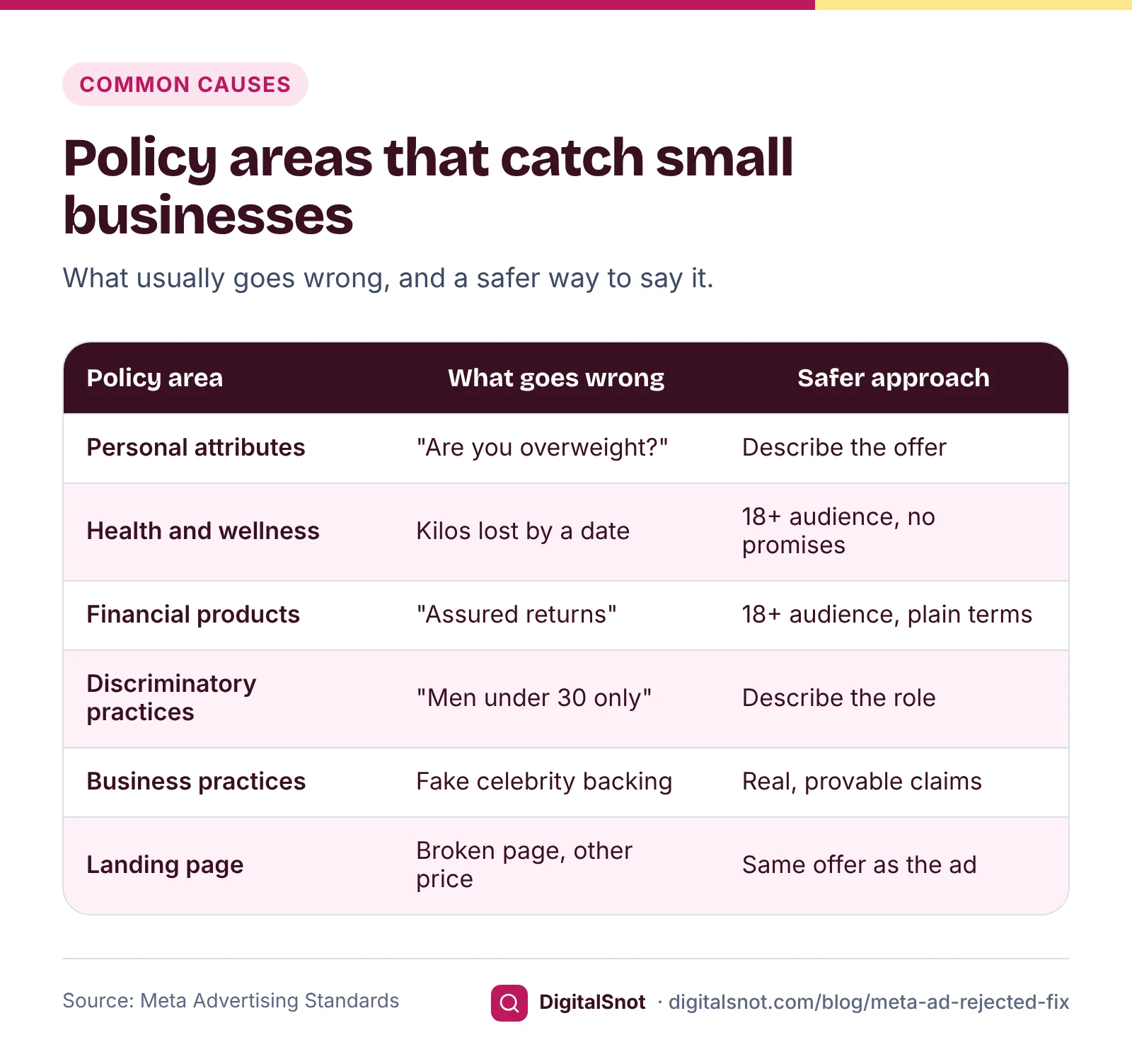
Start here, because this rule is easy to break by accident. Meta's personal attributes policy does not allow ads that assert or imply things about the viewer, such as their health, weight, age, religion, money troubles or relationship status. "Are you overweight?", "Struggling with debt?" and "Your hair fall ends today" all point at the person reading.
The fix is to talk about your offer instead: "Calorie-counted lunches delivered in Koramangala", "Personal loans for salaried staff, apply online", "Hair treatment consultations this week".
Health claims and before-and-after pictures
Meta's health and wellness standard says ads for weight loss products and cosmetic procedures must be shown only to people aged 18 or over, and it does not allow weight loss ads with close-ups of pinched fat. It also sets out when before-and-after pictures can be used in weight loss and cosmetic ads. Read the current version of that page before you use one.
Promises are the other half. Meta's unacceptable business practices policy covers deceptive or exaggerated claims about health benefits that mislead people into buying. "Lose 8 kg in 21 days" or "cures diabetes" invite rejection. In India, the ASCI Code also expects every claim of fact to be truthful and capable of proof.
Money claims and financial products
Meta's financial and insurance products policy says ads for credit cards, loans and insurance must be shown only to people aged 18 or over, and lists loans, insurance and investment products among those that may need a licence where you advertise. Some products cannot be advertised at all: Meta's list of prohibited financial products includes payday loans and binary options. Meta says the misleading ads it sees most often include investment and banking offers, so drop "assured returns" and "risk-free" from your copy.
Discriminatory practices
Meta's discriminatory practices policy covers both who sees the ad and what it says. A job ad that asks only men under 30 to apply treats people differently by sex and age. Describe the role and the skills instead.
Unacceptable business practices
Besides health claims, this policy covers exaggerated claims about a product's success, a famous person's picture used to bait clicks, and money offers that misrepresent a company or a news outlet. Meta lists free-product schemes and products with features that do not exist among the problems it sees most.
Landing page problems
Meta's non-functional landing page policy says the page must work, be accessible and accurately reflect what the ad promotes, and must not stop people leaving it. Its low-quality or disruptive experiences policy covers pages with little original content and mostly unrelated ads. A broken link, a page behind a login, or a price on the page that differs from the ad all count against you.
Special ad categories: when you need one
Some ads must be marked with a special ad category, which limits targeting. Meta's discriminatory practices policy says advertisers whose ads about financial products and services, housing or employment reach the United States, Canada or certain parts of Europe must choose the matching category. Meta's page on choosing a special ad category walks you through it.
For a loan, job or property ad shown only in India, these three categories are not needed, but the other rules for your product still apply, such as the 18+ audience for loans, credit cards and insurance. Ads about social issues, elections or politics are different: Meta asks for authorisation and a "Paid for by" disclaimer where it requires one, and rejects such ads without the disclaimer.
Edit the ad, or request a review
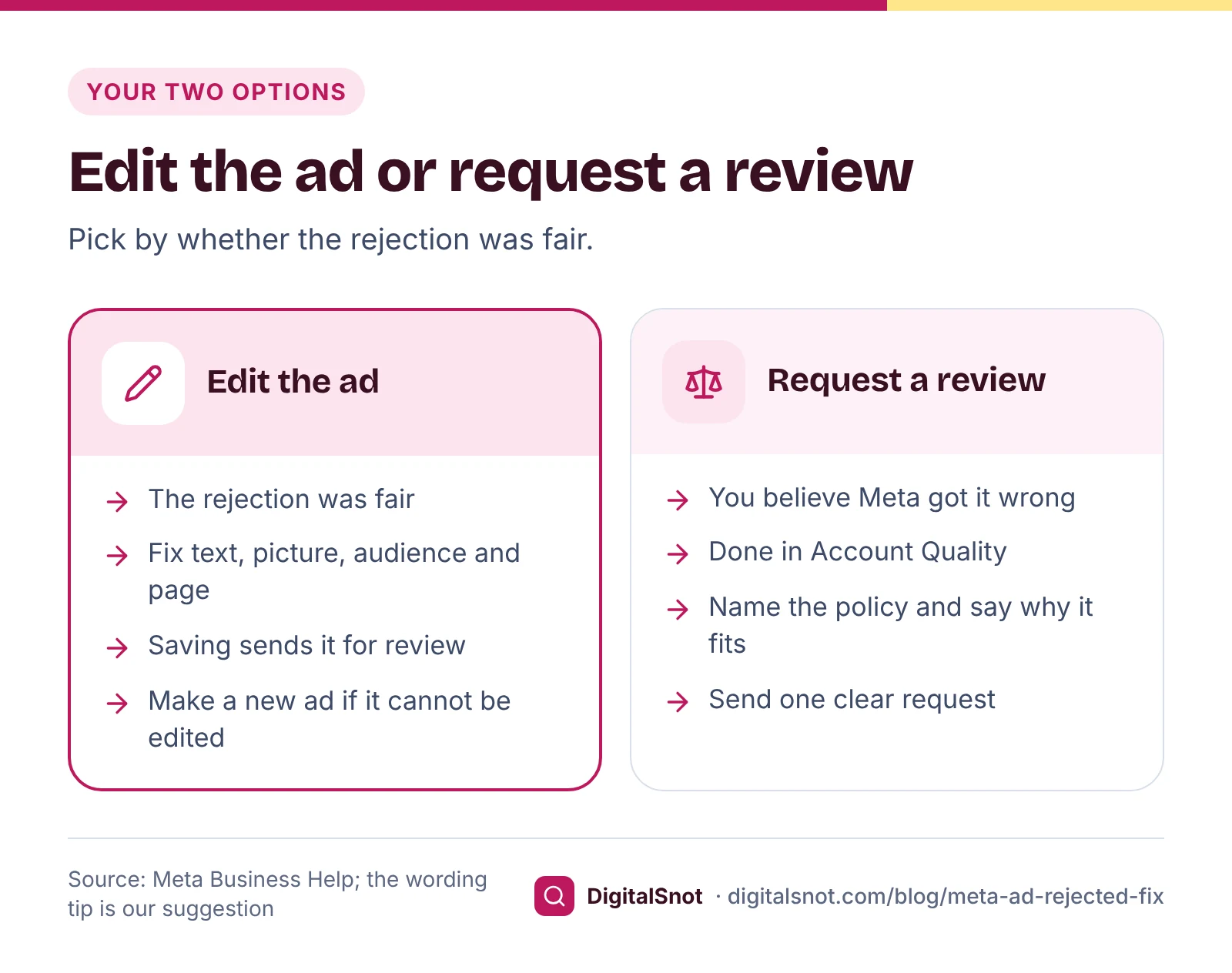
Once you know the reason, you have two choices.
Edit the ad when the rejection is fair, or when you can remove the doubt. Meta says that saving your edits sends the ad back for review. Fix every part the policy touches: the primary text, the headline, words on the image or video, the audience and the landing page. Some rejections cannot be fixed by editing, and then you create a new ad.
Request a review when you are confident the ad follows the standards, for example when a word was read out of context. Meta's Advertising Standards say you can request a review of the decision in Account Quality, and Meta's ad review guidelines describe the same three options: a new ad, a revised ad or another review. Our suggestion: name the policy, say in two or three sentences why the ad meets it, and send one request.
Worked example: FitBite Diet Kitchen, Koramangala, Bengaluru
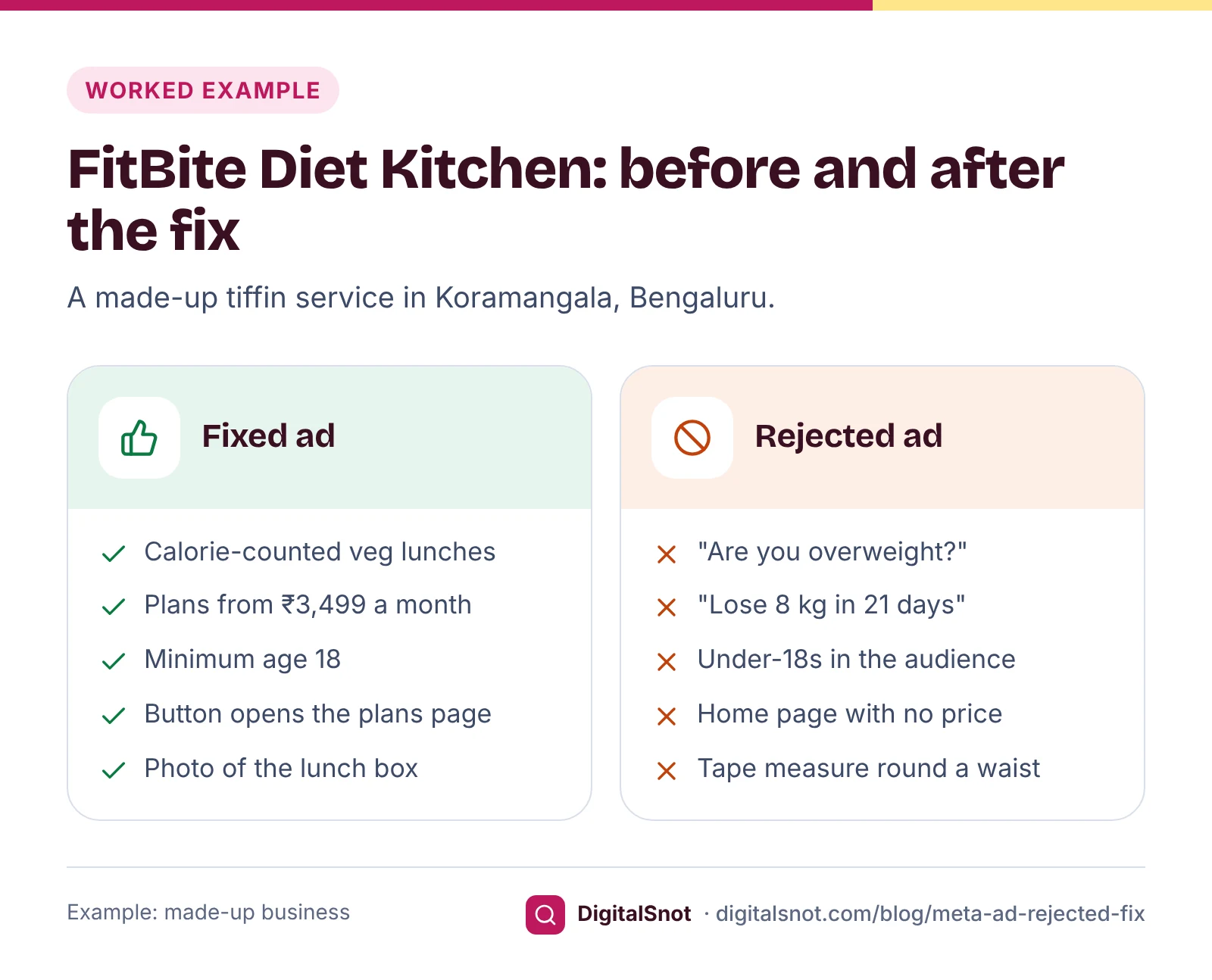
FitBite is a made-up tiffin service that delivers calorie-counted lunches. Its first Instagram ad said: "Are you overweight? Lose 8 kg in 21 days with our tiffin plan. Results promised." The audience included people under 18, and the button opened the home page, which showed no price. The ad was rejected under personal attributes.
Before editing, the owner pasted the text into our Meta Ad Policy Checker, chose the "Gym, fitness or weight loss" category and ticked that the audience included people under 18. It marked the opening question and the "8 kg in 21 days" promise as likely rejections, and flagged the audience, because Meta says weight loss ads must be shown only to people aged 18 or over. The checker reads only the words you paste and the boxes you tick, in your browser, and Meta still makes the final decision.
The fixed ad:
- New text: "Calorie-counted veg lunches, delivered in Koramangala. Monthly plans from ₹3,499. See this week's menu."
- Audience: minimum age set to 18.
- Landing page: the button now opens the plans page, which shows the same ₹3,499 price and the menu.
- Picture: a photo of the lunch box instead of a tape measure round a waist, checked in our Meta Ad Specs Checker for the Feed and Stories sizes and the Stories safe zones.
The owner saved the edits, which sent the ad back for review. There was no need for a review request, because the first rejection was fair.
What not to do
- Resubmitting the same ad unchanged. Fix the cause first; the same words will meet the same policy.
- Showing reviewers a different page from customers. Meta's circumventing systems policy does not allow ads designed to get around review, including hiding the real content or destination.
- Opening a new ad account after a restriction. Meta's evading enforcement policy covers new business assets created to get round enforcement.
- Moving the claim into the picture. Review covers images and video too, so text on a picture is read like the caption.
- Ignoring repeat rejections. Meta's Advertising Standards say a violation can lead to the Business Account or its assets being restricted, not only the ad.
Next step
Run every new ad through the policy checker before you publish, and make your landing page show the same offer, price and terms as the ad. Our Landing Page Checklist for Ads is built on Google's policies, but several of its questions (the page opens without errors and needs no login, the back button works, and the page gives people what the ad promised) are good checks for a Meta ad too. Once your ads run, our post on a Meta ads budget for small businesses covers what to spend and the numbers to watch. If you also advertise on Google, see what to check when a Google ad is disapproved, and if a creator promotes you, read our post on ASCI disclosure labels. All our social media tools are free and none of them sign in to your ad account. Stuck on a rejection? Talk to us.
Free tools in this article
- Meta Ad Policy Checker Check ad text for claims and words Meta may reject, with rewrites and a special ad category answer.
- Meta Ad Specs Checker Check ad images and videos for Feed, Stories, Reels and carousels, with Stories and Reels safe zones.
- Landing Page Checklist for Ads Check the page your ads send people to against Google's policies, its guidance and our conversion checklist.
By the numbers
- the time Meta says its ad review is typically completed in, though some ads take longer
- 24 hours
- Source: Meta Advertising Standards
Frequently asked questions
Why was my Facebook ad rejected?
Meta rejects an ad when its review finds something that does not follow the Advertising Standards in the text, images, video, targeting or landing page. Common causes for small businesses are words that imply something personal about the viewer, exaggerated health or money claims, restricted products shown to under-18s and landing pages that do not work or do not match the ad.
Where can I see why my Meta ad was rejected?
Ads Manager shows Rejected in the Delivery column, the rejection notice explains the reason, and Account Quality gives more detail. Note the policy name and which part of the ad it applies to before you edit anything.
How do I request a review of a rejected Meta ad?
Meta says you can request a review of the decision in Account Quality if you believe the ad was rejected by mistake. If the rejection was fair, edit the ad instead: saving the edits sends it back for review.
How long does Meta take to review an ad?
Meta says review is typically completed within 24 hours, although some ads take longer. Ads can also be reviewed again after they go live, so an ad that is already running can still be rejected.
Do I need a special ad category for a loan, job or property ad in India?
Meta requires the financial products and services, employment and housing categories for ads that reach the United States, Canada or certain parts of Europe. For an ad shown only in India they are not needed, but other rules still apply, such as an 18+ audience for loans, credit cards and insurance.
Can I open a new ad account if my ads keep getting rejected?
No. Meta's evading enforcement policy covers new business assets created to get round enforcement, and repeated violations can lead to restrictions on the Business Account. Find the policy each rejection names and fix the cause instead.
Sources
Every figure and claim in this article comes from the sources below. We checked each one when writing and link to the original so you can read it yourself. Credit belongs to the authors and publishers listed. How we write and check our articles.
-
1
Introduction to the Advertising Standards
Meta Transparency Centre · Review usually within 24 hours; covers images, video, text, targeting and landing page; re-review after going live; review requests in Account Quality; restrictions.
-
2
View campaign, ad set or ad delivery status
Meta Business Help Centre · Rejected means the ad cannot run because it does not comply with the Advertising Standards.
-
3
What can I do if my ad isn't approved?
Meta Business Help Centre · The notice explains the reason; saving edits sends the ad for review; Account Quality for more detail.
-
4
Ads review policy guidelines
Meta for Business · After a rejection: create a new ad, revise the rejected one or request another review.
-
5
Privacy violations and personal attributes
Meta Transparency Centre · Ads must not assert or imply personal attributes about the viewer.
-
6
Health and wellness
Meta Transparency Centre · 18+ audience for weight loss and cosmetic procedure ads; no pinched-fat close-ups; rules on before-and-after pictures.
-
7
Unacceptable business practices
Meta Transparency Centre · Deceptive or exaggerated claims about success or health benefits; the most common misleading ads.
-
8
Financial and insurance products and services
Meta Transparency Centre · Loans, credit cards, insurance and investment products may need a licence where you advertise.
-
9
Prohibited financial products and services
Meta Transparency Centre · Payday loans and binary options cannot be advertised.
-
10
Discriminatory practices
Meta Transparency Centre · Covers targeting and content; special ad categories for housing, employment and financial ads reaching the US, Canada or parts of Europe.
-
11
Non-functional landing page
Meta Transparency Centre · Landing pages must be functional, accessible and accurate, and must not stop people leaving.
-
12
Low-quality or disruptive experiences
Meta Transparency Centre · Pages with minimal original content and mostly unrelated or low-quality ads.
-
13
How to choose a special ad category
Meta Business Help Centre · Choosing the category in the campaign settings.
-
14
Get authorised to run ads about social issues, elections or politics
Meta Business Help Centre · Authorisation and the "Paid for by" disclaimer.
-
15
Circumventing systems
Meta Transparency Centre · Ads designed to get around review, including hiding content or the destination, are not allowed.
-
16
Evading enforcement
Meta Transparency Centre · New business assets created to get round enforcement.
-
17
The ASCI Code
Advertising Standards Council of India · Claims of fact must be truthful and capable of proof.