Local SEO for coaching institutes and tuition centres
Set up your Business Profile, build course and branch pages without doorway pages, ask students and parents for reviews within the rules, and keep results claims honest.

On this page (8 sections)
When a parent searches "maths tuition near me" or a student types "NEET coaching in Gomti Nagar", the map and the first few results decide which institutes get the calls. Most of those calls come in a few weeks around admissions, so being found then matters more than at any other time, and that is the job of local SEO for coaching institutes.
This post shows you how to set up your Business Profile, plan course and branch pages that help rather than spam, collect reviews from students and parents within Google's rules, use posts for admissions, and keep your results claims within the Consumer Protection rules for coaching. The example is a made-up institute, Vidya Path Classes in Gomti Nagar, Lucknow.
Set up the Business Profile properly
Google's guidelines for representing your business say a business must make in-person contact with customers during its stated hours. A classroom students attend qualifies. An online-only course with no place to visit does not.
- Name. Use your real-world name, as on your signboard, website and fee receipts. "Vidya Path Classes" is fine. "Vidya Path Classes - Best IIT JEE NEET Coaching Gomti Nagar" is not: Google says adding unnecessary information, such as service or location details, could lead to suspension.
- Category. Google's page on business categories says your categories affect your local ranking. Type "coaching" or "tutoring" in the category box and pick the option that describes the institute as a whole, as specifically as the list allows. Add as few extra categories as possible, and only true ones.
- Services. List each course as a service: "JEE Main and Advanced, two-year course", "Class 9 and 10 maths", "Spoken English for adults", with a line on who it is for and how batches run.
- Description. Up to 750 characters and no links, according to Google's page on editing your profile. Say what you teach, for which classes and exams, and how long you have been teaching. Keep fee offers for posts.
- Hours. Set the hours your front desk is open to parents and students, then special hours for exam breaks and festivals.
- Branches. Each staffed branch with its own signboard can have its own profile. Do not make extra profiles for each course or each nearby area.
Our Google Business Profile Audit Checklist checks your name and description against these rules as you type, then walks through categories, hours, photos, posts and reviews one item at a time.
Course and branch pages, without doorway pages
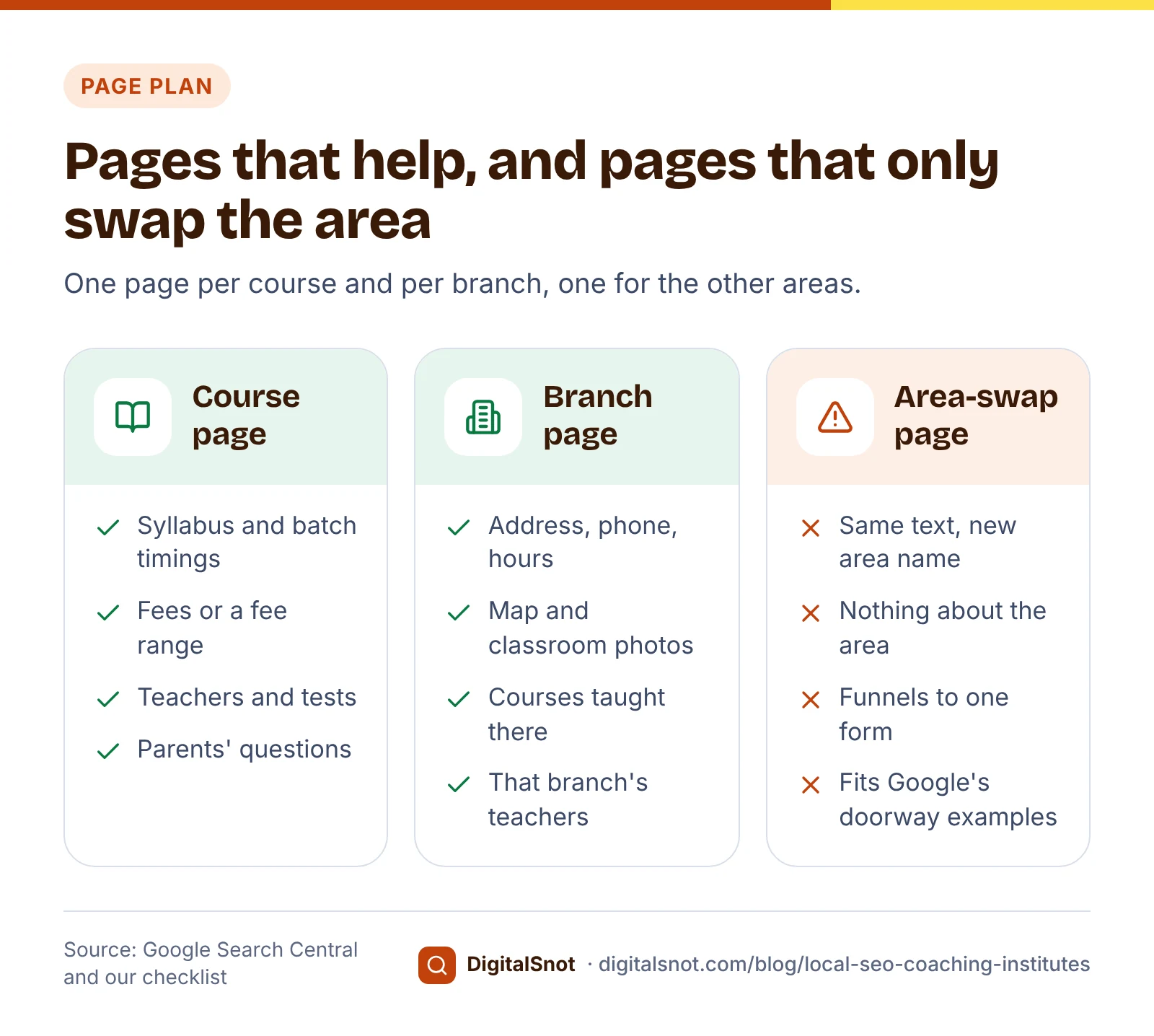
Many institutes publish one page per area: "JEE coaching in Gomti Nagar", "JEE coaching in Indira Nagar", "JEE coaching in Aliganj", each the same page with the area name changed. Google's spam policies call this doorway abuse: pages created to rank for specific, similar searches, including "pages targeted at specific regions or cities that funnel users to one page".
A better plan has three kinds of page:
- One page per course. Syllabus, batch timings, batch size, fees or a fee range, the teachers, how tests and doubt sessions run, and the questions parents ask before joining.
- One page per branch. The branch address, phone, hours, a map, photos of the classrooms, the courses taught there and that branch's teachers.
- One "where our students come from" page. Name the areas, with travel times or a school van route if you run one. Give an area its own page only when you have something real to say about it, such as a separate batch for students from one school.
Then check each branch page with our Local Landing Page Checker. Enter the page and the area it is for. It reads the page once and checks LocalBusiness markup, a phone number people can tap, the address, opening hours, the area in the title, heading and text, a map or directions and a way to get in touch. It also flags thin pages: our checklist looks for at least 300 words specific to the place. The score is our checklist, not Google's. For the wider method, see our guide to location pages without doorway pages.
Reviews from students and parents, within the rules
Both students and parents are real customers, and both can leave honest reviews. For school-age students, our suggestion is to ask the parent, who paid the fees and saw the progress.
Google's prohibited content policy sets the limits:
- No payment, discounts or free goods or services for a review. That rules out a fee discount, free notes, a free test series or a free crash course.
- Do not ask only happy students or only toppers, and do not discourage negative reviews.
- Do not require or pressure people to review while they are on your premises. Asking a whole batch to write reviews during class is pressure.
- Do not ask for specific content, such as "please mention Sharma Sir" or "please write 100% results".
- Teachers, staff and the owner should not review the institute: Google can remove reviews from anyone with a conflict of interest.
Ask at natural moments: after the first month, after a test series, after results, and when a student leaves. Google's page on getting more reviews explains where to find your review link and QR code. Our Google Review Link & QR Generator turns that link into a QR code, ready WhatsApp, SMS and email messages in English, Hinglish or Hindi, and printable cards, posters and stickers for the reception desk or the back of fee receipts.
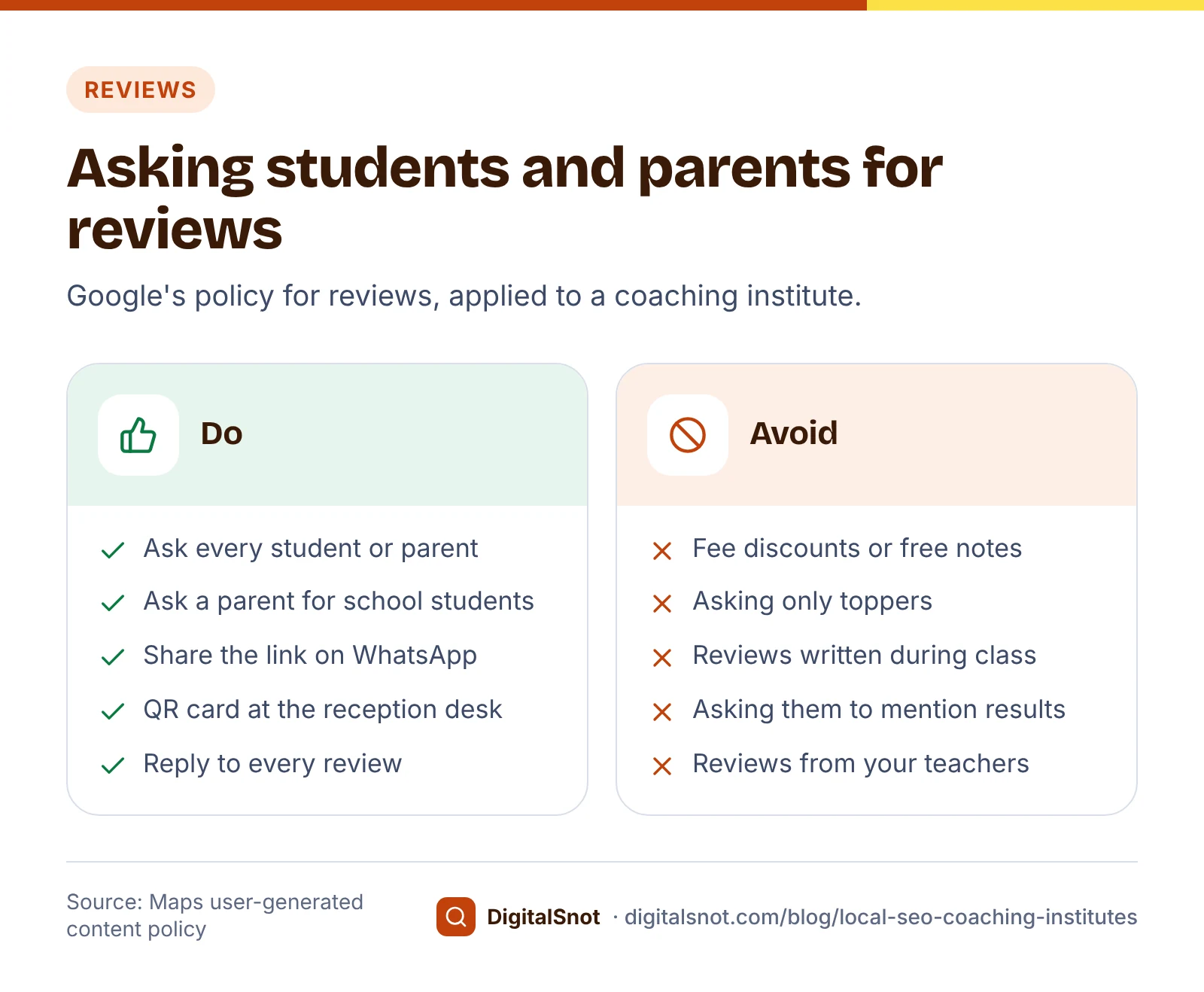
Reply to every review, good and bad, without sharing a student's marks or personal details. Our post on replying to Google reviews has wording for each case.
Results claims: the CCPA's coaching guidelines
Topper posters are the most common advert in this trade, and since November 2024 they have their own rules. The Central Consumer Protection Authority issued the Guidelines for Prevention of Misleading Advertisement in Coaching Sector, 2024 on 13 November 2024. The press release says they cover coaching online and in person, and advertisements in any form or medium. Among the points:
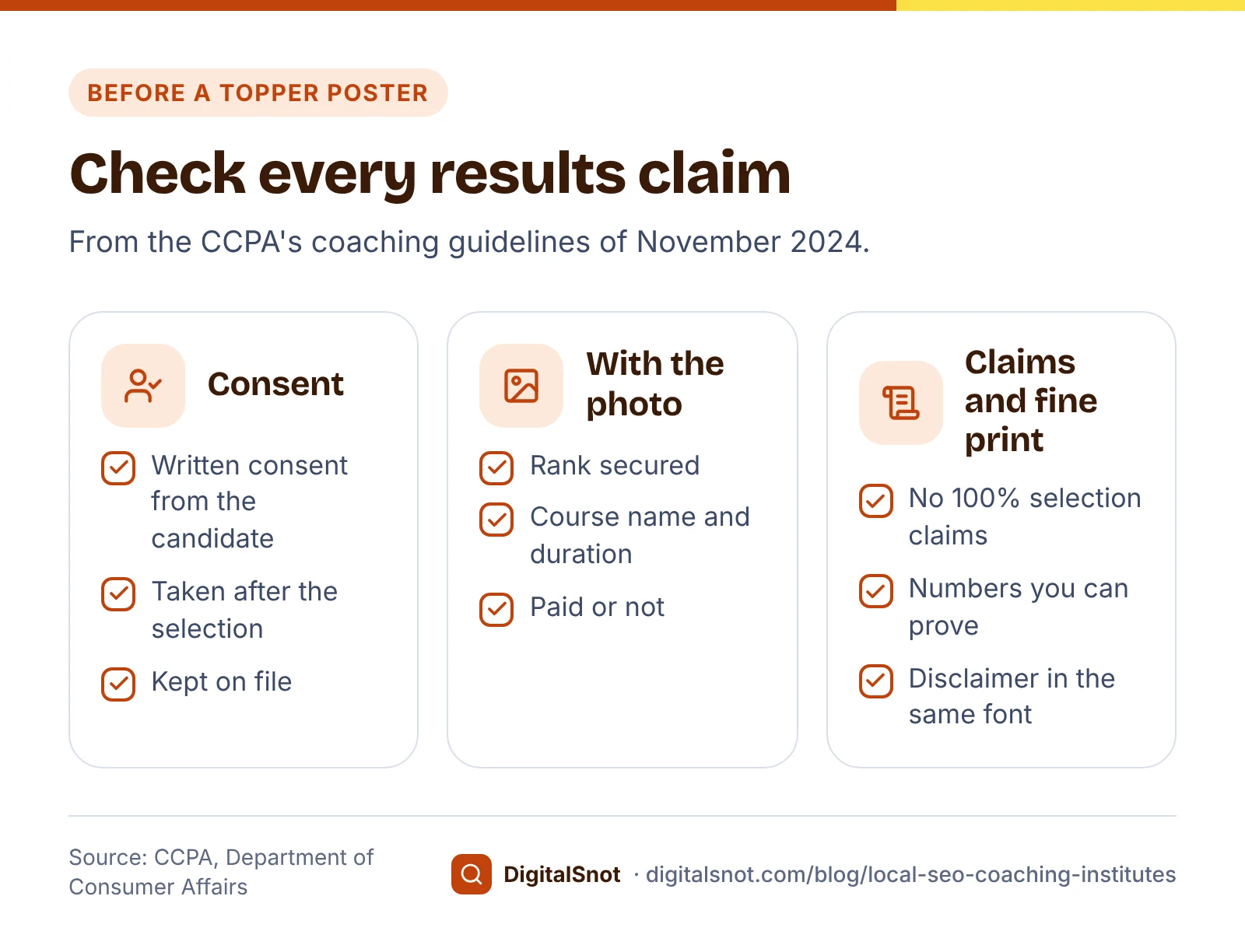
- No claims such as 100% selection or 100% job placement, and no false claims about selections, ranks or success rates.
- No use of a successful candidate's name, photo, testimonial or video without their written consent, and that consent must be taken after the selection.
- With a successful candidate's photo, show the rank secured, the name and duration of the course they took, and whether it was paid.
- Disclaimers and important information must be in the same font as the claim, in a prominent place.
The CCPA enforces this under the Consumer Protection Act, 2019. In one order announced in October 2025, it fined a UPSC coaching institute ₹5 lakh after finding that 162 of the 216 successful candidates it advertised had taken only its free interview guidance course, which the advert did not say.
These rules apply to your website, banners, Instagram, newspaper ads and Business Profile posts alike. Read the full text on the CCPA's guidelines page before your next results campaign. This post is not legal advice.
Business Profile posts for admissions
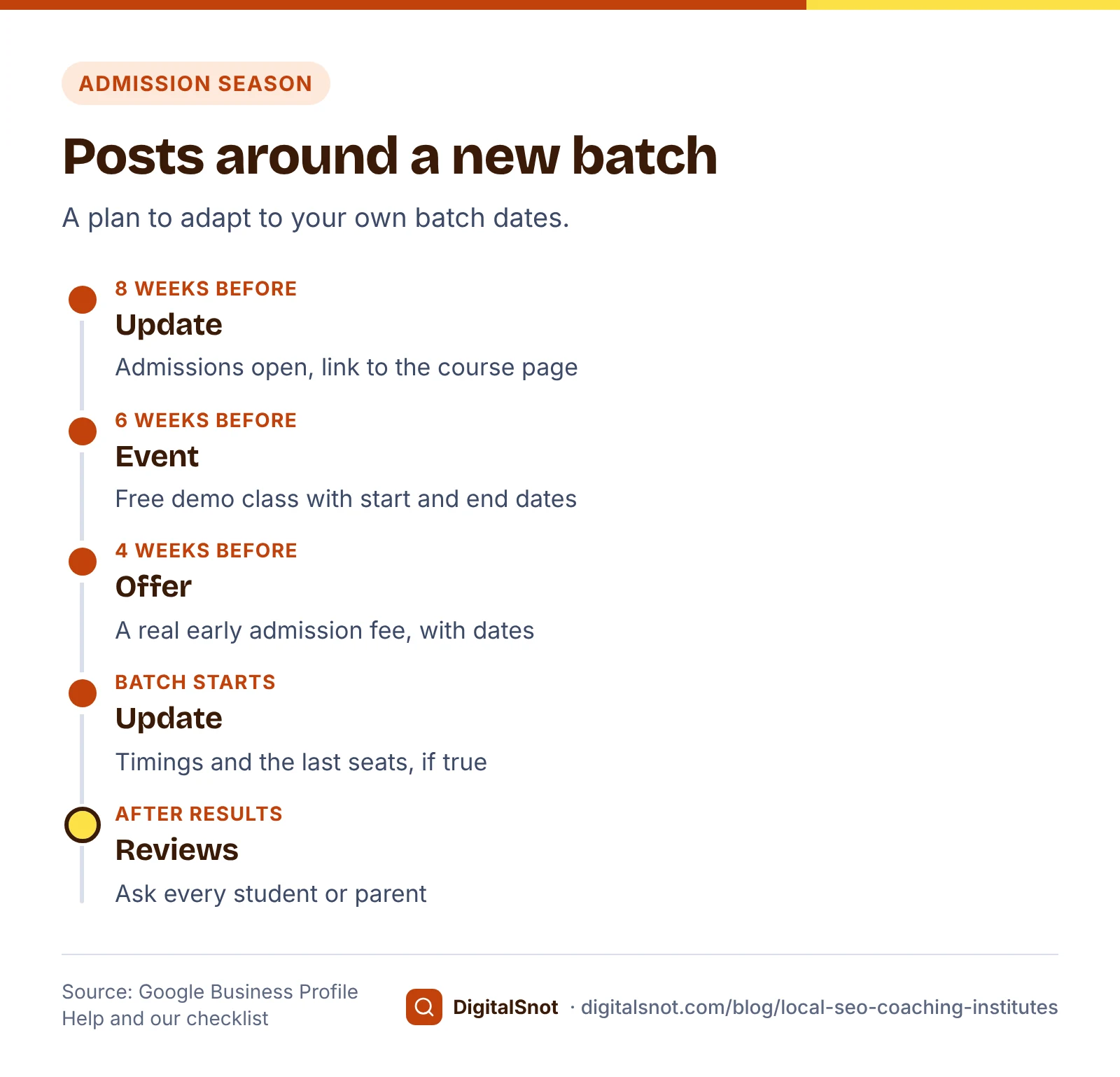
Google's page on posts describes three types, and each has an admissions use:
- Update: "Admissions open for the new Class 11 batch", with the batch timings and a link to the course page.
- Event: a free demo class or parent orientation, which needs a title and start and end dates.
- Offer: a real early admission fee, which needs a title and dates. Do not invent a deadline you will extend.
Google's posts content policy does not allow a phone number in the post text; use the "Call now" button, which uses your profile's number. Google archives posts older than 6 months unless they have a date range, so post again as each batch opens.
Our Google Business Profile Post Maker has a "Tuition, coaching or school" business type with ideas such as admissions open, a free demo class and an early admission offer. It gives you the text for each box with checks against Google's post rules, square images to download, and four post ideas for the coming weeks, in English, Hindi or Hinglish. It never signs in to your profile; you copy each field across. For more ideas, see what to post on your Business Profile every week.
Mistakes to avoid
- "Best", "No. 1" or exam names added to the profile name.
- Twenty area pages with the same text and a different area name.
- Free notes or a fee discount in return for a review.
- Using a topper's photo without written consent taken after their result.
- Showing a topper who took only a short test series as if they did your full course.
- Posting an "offer" with a deadline that never ends.
Your next step
Before the next admission season, fix your profile name and services, check one branch page in the Local Landing Page Checker, print a review QR card for the reception desk, and check every results poster against the CCPA's points. If you would like help planning your pages, see our local SEO service or start with a free SEO audit.
Free tools in this article
- Google Business Profile Audit Checklist Go through your Business Profile item by item, and check your name and description against Google's rules.
- Local Landing Page Checker Check a branch or area page: LocalBusiness markup, phone, address, hours and the area it names.
- Google Review Link & QR Generator Make a QR code and printable card for your Google review link.
- Google Business Profile Post Maker Write an update, offer or event post, check it against Google's rules and download a matching image.
Frequently asked questions
Can an online-only coaching institute have a Google Business Profile?
No. Google's guidelines say a business must make in-person contact with customers during its stated hours. An institute with a classroom students attend is eligible; a course taught only online, with no place to visit, is not.
Can I add "Best IIT JEE Coaching" to my institute's name on Google?
Only if it is part of your real-world name on your signboard, website and receipts. Google's guidelines say adding unnecessary information, such as service or location details, to the name is not allowed and could lead to suspension.
Can I offer a fee discount to students who leave a Google review?
No. Google's policy does not allow payment, discounts or free goods or services in return for reviews. That covers fee discounts, free notes and free test series. Ask every student or parent for an honest review and offer nothing in return.
Can I use a topper's photo in my advertisements?
Under the CCPA's 2024 coaching guidelines, only with the candidate's written consent taken after their selection, and the advert must show the rank, the name and duration of the course they took and whether it was paid. This is not legal advice; read the full guidelines.
Should I make a separate page for every area my students come from?
Only where you have something real to say about that area, such as a branch or a separate batch. Pages that only swap the area name fit Google's description of doorway abuse. Make one page per course and per branch, and list the other areas on one page.
What should a coaching institute post on its Business Profile?
An update when admissions open, an event for a demo class or parent orientation with start and end dates, and an offer only for a real early admission fee with dates. Keep phone numbers out of the text and use the Call now button.
Sources
Every figure and claim in this article comes from the sources below. We checked each one when writing and link to the original so you can read it yourself. Credit belongs to the authors and publishers listed. How we write and check our articles.
-
1
Guidelines for representing your business on Google
Google Business Profile Help · In-person contact during stated hours; real-world name with no added service or location details.
-
2
Manage your business category
Google Business Profile Help · Categories affect local ranking; specific primary category; as few as possible.
-
3
Manage your services on your Business Profile
Google Business Profile Help · Adding services with descriptions.
-
4
Edit your Business Profile
Google Business Profile Help · Description of up to 750 characters, no links.
-
5
Spam policies for Google web search
Google Search Central · Doorway abuse, including pages targeted at specific regions or cities that funnel users to one page.
-
6
Prohibited & restricted content
Maps User Generated Content Policy Help · No incentives, selective asking, pressure at the premises, requested content or conflicts of interest.
-
7
Tips to get more reviews
Google Business Profile Help · Review link and QR code from the profile.
-
8
Central Consumer Protection Authority issues Guidelines for "Prevention of Misleading Advertisement in Coaching Sector"
Press Information Bureau, Government of India · Issued 13 November 2024: no 100% selection claims, written consent after selection, rank, course, duration and fee status, disclaimer font.
-
9
Central Consumer Protection Authority (CCPA) fines Drishti IAS ₹5 lakh for misleading UPSC 2022 result ads
Press Information Bureau, Government of India · October 2025 order: 162 of 216 advertised candidates had taken only the free interview guidance course.
-
10
Guidelines and advisories
Central Consumer Protection Authority · Full text of the CCPA's guidelines, including the coaching sector guidelines.
-
11
Create & manage posts on your Business Profile
Google Business Profile Help · Update, offer and event posts; offer and event dates; archived after 6 months without a date range.
-
12
Business Profile photos, videos & posts content policy
Google Business Profile Help · No phone numbers in post text; use the Call now button.