AI Max for Search: should a small Google Ads account turn it on?
What AI Max adds to a Search campaign, how to read its search terms and ad combinations report, which controls to set first, and when a small account should wait.

On this page (10 sections)
- 1What AI Max adds to a Search campaign
- 2Was your campaign upgraded already?
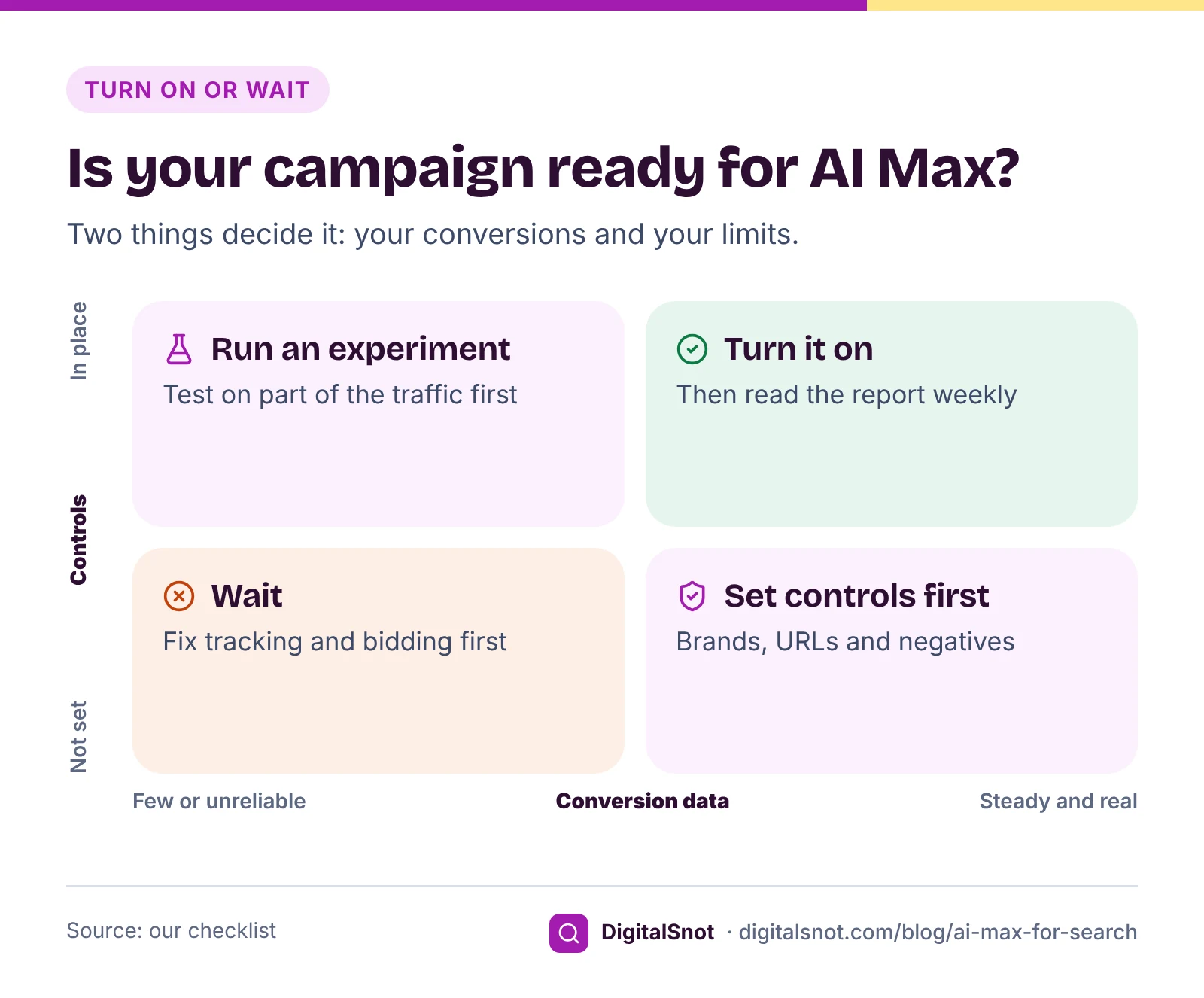
- 3Is your account ready? Five questions
- 4Set the controls before you switch it on
- 5Reading the "Search terms and ad combinations" report
- 6A worked example: a packers and movers firm in Bengaluru
- 7When to wait
- 8Mistakes to avoid
- 9Your next step
- 10Sources
If you run a Search campaign, Google may already have asked you to turn on AI Max for Search, or switched parts of it on for you. It offers more searches, ad text written for each search and landing pages picked from your site. For a small account with a tight budget, that can mean new customers. It can also mean spend drifting into searches and pages you never chose.
This post explains what AI Max adds, how to tell whether your campaign is ready, which controls to set before you switch it on, and how to read its report in the first weeks. It assumes you know the basics; our posts on broad, phrase and exact match and finding wasted spend in search terms cover those.
What AI Max adds to a Search campaign
AI Max is a set of features inside a normal Search campaign, not a new campaign type. Google's page on how AI Max for Search campaigns works describes three parts:
- Search term matching uses broad match and keywordless technology to show your ads on searches beyond your keywords, with your keywords, ads and landing pages as signals. You can turn it off for single ad groups.
- Text customization, formerly called automatically created assets, adapts headlines and descriptions to each search, using your ads, landing pages and assets. Google's page on turning text customization on or off shows the switch.
- Final URL expansion sends people to the page on your site that best fits their search, instead of the final URL you set. Google's page about final URL expansion in Search says it depends on text customization, so switching that off turns it off too. Pinned assets are not used when a more relevant page is chosen.
Google's set-up guide explains that turning AI Max on switches text customization and final URL expansion on for the campaign, and you can turn each one off separately. All three lean on Smart Bidding. Google's AI Max FAQ says search term matching does not work with Manual CPC, and recommends a conversion or conversion value-based strategy such as Maximise conversions, Target CPA or Target ROAS.
Was your campaign upgraded already?
Some accounts never chose AI Max; it arrived. Google's page about the broad match keywords campaign setting says Search campaigns that used that setting or automatically created assets were upgraded to AI Max during September 2026, and broad match campaigns moved with search term matching switched on. Google's page on Dynamic Search Ads says those campaigns will be upgraded from February 2027, after Google moved the date back from September 2026.
So start by opening each Search campaign's settings and looking at the AI Max section. If features are on that you did not choose, decide now whether to keep them, using the checks below.
Is your account ready? Five questions
AI Max decides which new searches are worth paying for by looking at your conversions. If those are wrong or few, it has nothing sound to aim at. Answer these honestly before you switch it on:
- Are real leads or sales your primary conversions? If page views or button taps are primary, the campaign learns to find people who tap buttons. Our post on fixing conversion tracking covers the checks.
- Do you bid for conversions? Manual CPC and Maximise clicks do not fit. Move to Maximise conversions or Target CPA first.
- Is the campaign already limited by budget? New searches can pull spend away from keywords that already work.
- Are your landing pages good enough to write ads from? Text customization and final URL expansion use your site. Thin, old or off-topic pages make weak ads and wrong landing pages.
- Do you have negatives for searches you never want? Jobs, free, courses and services you do not offer, for example.
The AI Max for Search Readiness Checker turns these and nine more questions into our readiness score and a verdict: Ready, Ready with guardrails, or Fix these first. It then gives a settings plan for each AI Max control, which you can copy as a checklist. It does not connect to your account, so it only knows what you tell it.
If you get few conversions a month, our suggestion is to test before you switch the whole campaign. Google offers AI Max experiments, which compare your campaign as it is with a version using AI Max. Brand inclusions or exclusions you add while setting up the experiment apply to both versions.
Set the controls before you switch it on
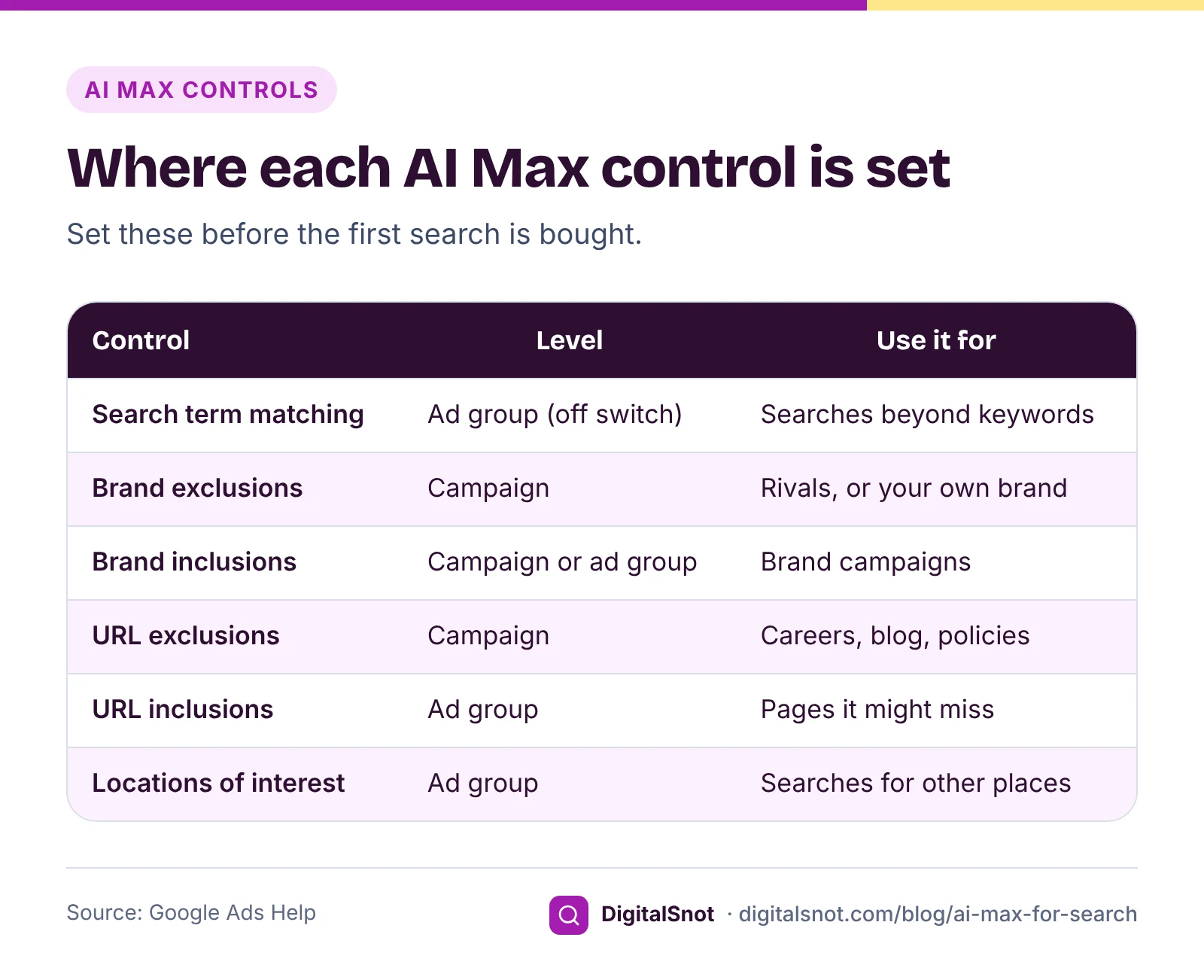
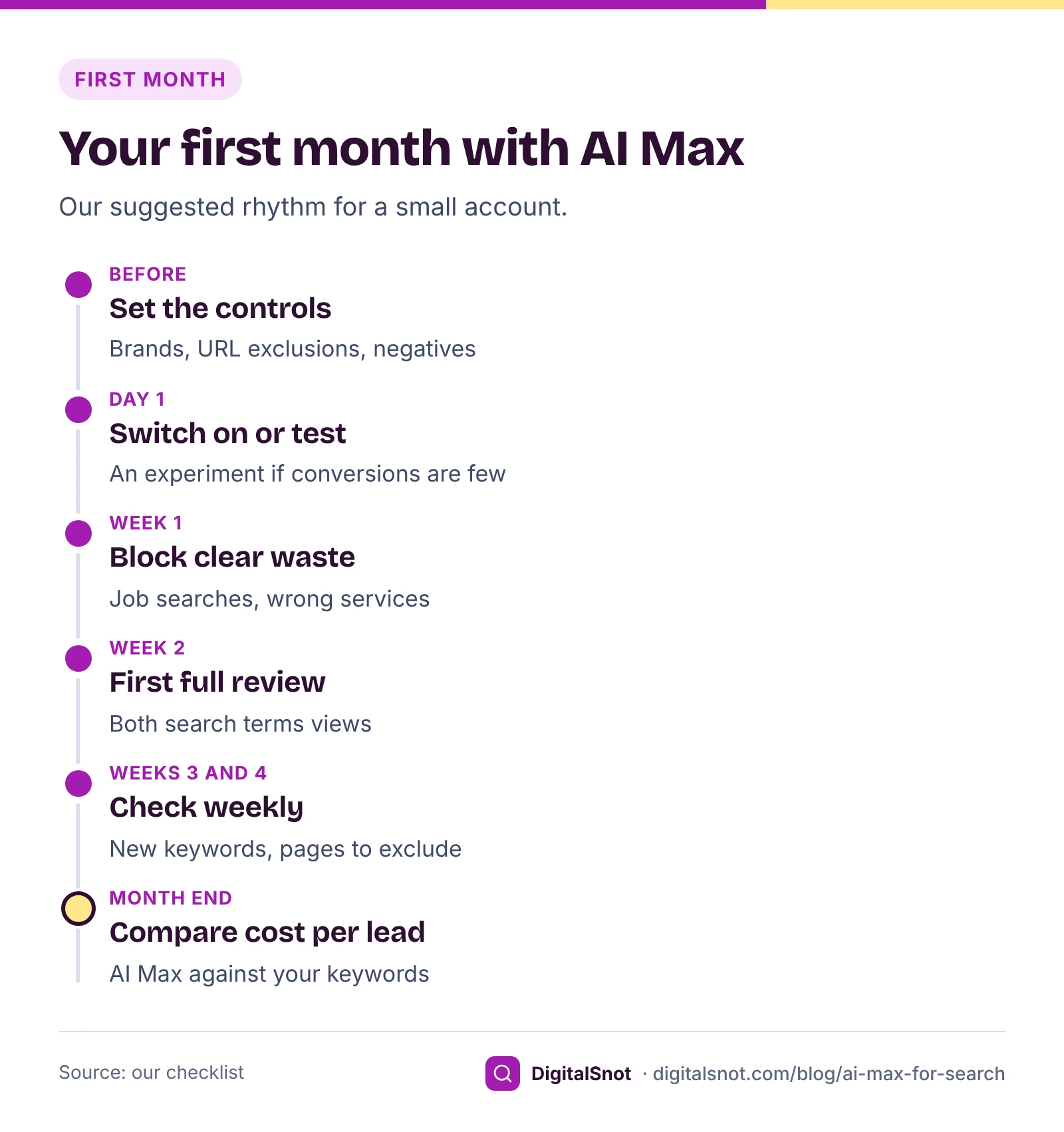
The first weeks of data are spent on whatever you allowed, so set the limits first.
- Brand exclusions and inclusions. Google's page about brand settings lists brand exclusions at campaign level and brand inclusions at campaign or ad group level. Exclude brands you must not appear for, and your own brand if it has its own campaign. In a brand campaign, use inclusions so it stays on searches that name your brand.
- URL exclusions and inclusions. URL exclusions are set for the whole campaign and stop final URL expansion from using the pages you list: careers, privacy, login, old offers and often blog posts. Add them in the campaign settings under AI Max, then Final URL expansion, as pages or as rules. URL inclusions are set per ad group and add pages it might miss. Both work only while text customization and final URL expansion are on.
- Locations of interest. Set per ad group, and only in AI Max campaigns, they reach people searching for a place they are not in yet, such as someone in Bengaluru searching for movers in Hyderabad. Your campaign's location targeting still applies.
- Text guidelines. Google's page about text guidelines covers term exclusions and messaging restrictions, which steer the text AI Max writes: up to 25 and 40 per campaign. Use them if you must never mention prices, or your category has strict ad rules.
- Negative keywords. They still apply. Check that none blocks your own keywords: the Negative Keyword Conflict Checker tests every negative against your keywords level by level, using Google's matching rules for negatives, and offers starter lists for Indian businesses. Google's page about negative keywords says negatives do not match close variants, so "job" does not block "jobs".
Reading the "Search terms and ad combinations" report
Google's page about reporting in AI Max explains where to look. In Google Ads, open Campaigns, then Insights and reports, then Search terms. Above the table, open the drop-down and choose "Search terms and ad combinations", which used to be called "Search terms and landing pages from AI Max". Each row is a search with the headline and landing page AI Max used. In the standard view, add the Source column; AI Max searches show "AI Max" in the Match type column.
Three things to know before you read the numbers:
- Many searches appear in both views, because they are two views of the same traffic. Google's developer documentation on AI Max reporting says never to add their numbers together.
- Google's page about the search terms report says searches with too little activity are left out for privacy, so the reports add up to less than your campaign totals.
- In the AI Max view you can tick a search or a landing page and add it as a negative keyword or a negative URL.
Comparing both downloads by hand takes time. The AI Max Search Terms Analyzer reads them in your browser and shows how spend and conversions split between AI Max searches and your keywords, the new searches that converted (keyword ideas), the searches that spent with no conversions (negative ideas) and the landing pages AI Max chose, with our flags for careers, policy, blog, contact and home pages. It never suggests a negative word that appears in a search that converted or in one of your keywords.
Give the data time. The same AI Max reporting page suggests waiting at least two weeks after you turn AI Max on before making changes such as adding negative keywords. After that, our suggestion is a check every week for the first month. Searches that clearly never fit your business, such as job searches, can be blocked at once.
A worked example: a packers and movers firm in Bengaluru
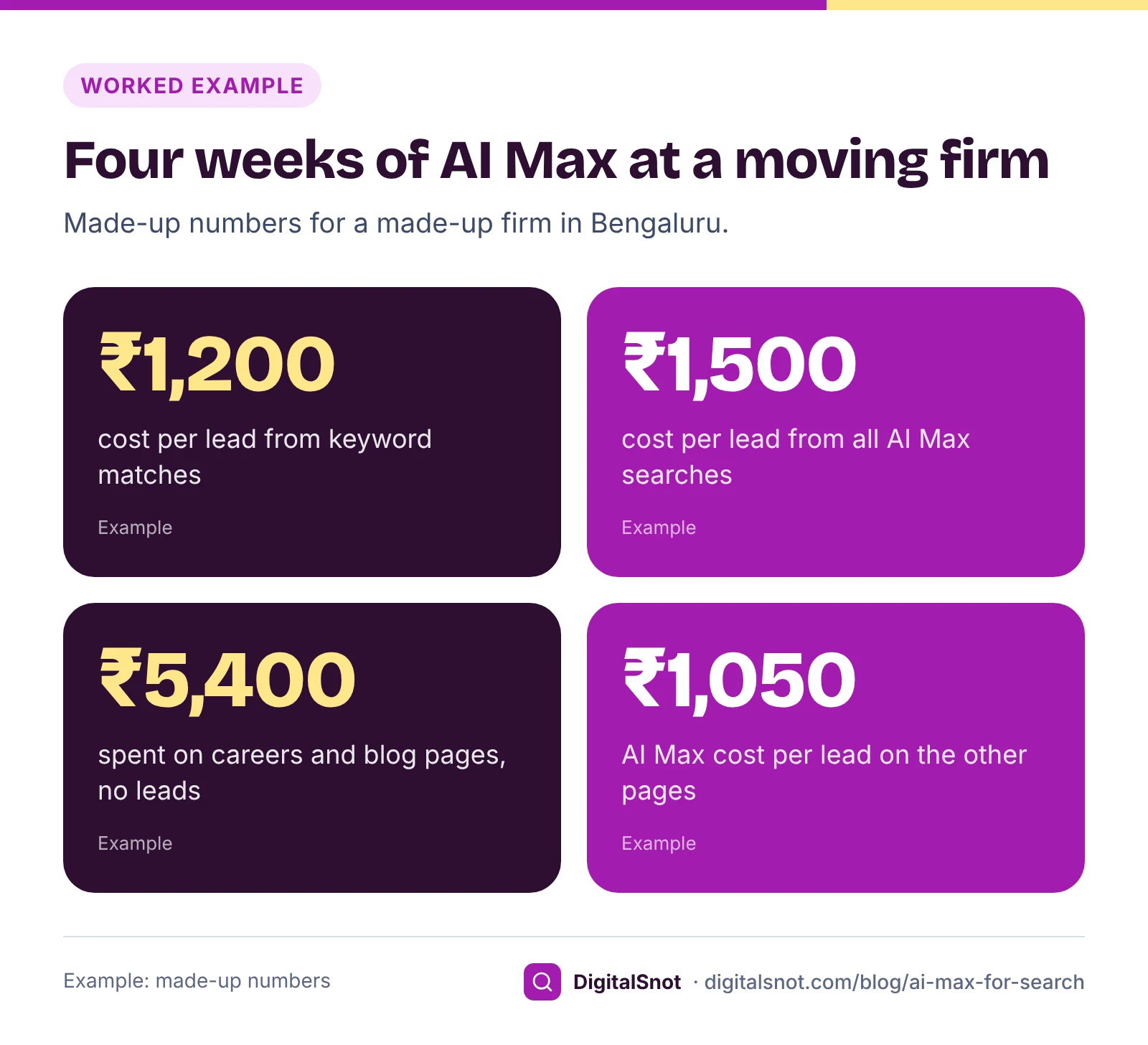
Kaveri Packers and Movers in Whitefield, Bengaluru, is a made-up business, and these are made-up numbers. Its Search campaign bids with Target CPA and counts quote forms and calls as primary conversions. The owner turned AI Max on with brand exclusions for two rivals and no URL exclusions. After four weeks, the AI Max Search Terms Analyzer showed this:
| Searches | Spend | Leads | Cost per lead |
|---|---|---|---|
| Matched by keywords | ₹42,000 | 35 | ₹1,200 |
| AI Max, all | ₹18,000 | 12 | ₹1,500 |
| AI Max, careers page and blog | ₹5,400 | 0 | None |
| AI Max, other pages | ₹12,600 | 12 | ₹1,050 |
Two problems stood out. Final URL expansion had sent job seekers searching "packers and movers job whitefield" to the careers page, and people searching "how to pack glass for shifting" to a blog post. Neither brought a lead. The useful part: AI Max found "bike transport bangalore to hyderabad", a service the firm offered but had no keyword for, and it brought 5 of the 12 leads.
The owner made three changes. URL exclusions for the careers page and the blog. Phrase match negatives for "job", "jobs" and "salary", checked first in the Negative Keyword Conflict Checker, which found no clash with the firm's keywords. And an exact match keyword for bike transport in its own ad group, with an ad that names it. On the other pages, AI Max leads cost about ₹1,050, below the keyword average. Whether that holds is a question for next month's report, not a promise.
When to wait
AI Max does not suit every account today. Our suggestion is to leave it off, or keep it to an experiment, when:
- conversions are not tracked, or soft actions such as page views are primary;
- you bid with Manual CPC or Maximise clicks;
- the campaign is limited by budget most days;
- your site is thin or out of date, so text customization has little to work from;
- every ad needs sign-off because your category has strict ad rules. If you use it anyway, add text guidelines, and keep final URL expansion off if your ads rely on a pinned disclaimer.
Waiting is not falling behind. A campaign with tracked leads and tidy negatives will get more from AI Max later than a messy one gets from it now. Our post on Performance Max for small businesses uses the same test for Google's other automated campaign type.
Mistakes to avoid
- Not checking upgraded campaigns. Features may be on that you never chose.
- Adding the two reports together. The AI Max view and the search terms report overlap.
- Leaving the careers page and blog open. Add URL exclusions before final URL expansion picks them.
- Negatives that block your own keywords. A broad negative added in a hurry can stop a keyword that converts.
- Judging after three days. Read the trend over weeks, and use campaign totals for spend.
Your next step
Answer the questions in the AI Max for Search Readiness Checker for your main Search campaign, and set the controls it suggests before anything else. If AI Max is already on, download both search terms views this week and put them into the AI Max Search Terms Analyzer. Text customization starts from your own ads, so our responsive search ads guide is worth a read too. More tools are on our Google Ads tools page, or talk to us about your account.
Free tools in this article
- AI Max for Search Readiness Checker Answer 14 questions and get a readiness score, a verdict and the AI Max settings to use.
- Negative Keyword Conflict Checker Find negative keywords that block your own keywords, fix them by level and add starter lists for India.
- AI Max Search Terms Analyzer See what AI Max spends on, the new searches worth keeping, the waste to block and the pages to exclude.
By the numbers
- when Google starts upgrading Dynamic Search Ads campaigns to AI Max automatically
- Feb 2027
- Source: Google Ads Help
- term exclusions and messaging restrictions you can add per campaign as text guidelines
- 25 and 40
- Source: Google Ads Help
Frequently asked questions
What is AI Max for Search?
A set of features for Google Search campaigns. Search term matching reaches searches beyond your keywords, text customization adapts ad text using your ads and site, and final URL expansion can send people to a more relevant page on your site. Brand, URL and location controls set the limits.
Does AI Max work with Manual CPC?
Not fully. Google's AI Max FAQ says search term matching does not work with Manual CPC, and recommends a conversion or conversion value-based bid strategy such as Maximise conversions, Target CPA or Target ROAS.
Was my campaign switched to AI Max automatically?
If it used the campaign-level broad match setting or automatically created assets, Google says it was upgraded during September 2026. Dynamic Search Ads campaigns are upgraded from February 2027. Open the campaign settings to see which AI Max features are on.
Where do I find the AI Max search terms report?
Open Campaigns, then Insights and reports, then Search terms. In the drop-down above the table, choose "Search terms and ad combinations", formerly "Search terms and landing pages from AI Max". Do not add its numbers to the standard search terms report, as the two views overlap.
How do I stop AI Max sending people to the wrong page?
Add URL exclusions in the campaign's AI Max settings, under final URL expansion, for pages such as careers, privacy and blog posts. They work only while text customization and final URL expansion are on. You can also turn final URL expansion off.
Should a small account turn on AI Max?
Our suggestion: only once real leads or sales are tracked as primary conversions, you bid for conversions, the budget is not already limited and your controls are set. With few conversions a month, start with an AI Max experiment rather than the whole campaign.
Sources
Every figure and claim in this article comes from the sources below. We checked each one when writing and link to the original so you can read it yourself. Credit belongs to the authors and publishers listed. How we write and check our articles.
-
1
How AI Max for Search campaigns works
Google Ads Help · Search term matching, text customization, final URL expansion and locations of interest at ad group level.
-
2
Set up AI Max for Search campaigns
Google Ads Help · Turning AI Max on switches text customization and final URL expansion on; each can be turned off.
-
3
Turn text customization on or off in Search campaigns
Google Ads Help · Text customization, formerly automatically created assets.
-
4
About Final URL expansion in Search
Google Ads Help · Depends on text customization; URL exclusions at campaign level, inclusions at ad group level; pinned assets not used when another page is chosen.
-
5
AI Max for Search campaigns FAQ
Google Ads Help · Search term matching does not work with Manual CPC; conversion-based bidding recommended.
-
6
About the broad match keywords campaign setting
Google Ads Help · Campaigns with the broad match setting or automatically created assets upgraded to AI Max during September 2026.
-
7
About Dynamic Search Ads
Google Ads Help · Dynamic Search Ads campaigns upgraded to AI Max from February 2027.
-
8
About brand settings for Search and Performance Max
Google Ads Help · Brand exclusions at campaign level, brand inclusions at campaign or ad group level.
-
9
About text guidelines
Google Ads Help · Up to 25 term exclusions and 40 messaging restrictions per campaign.
-
10
About AI Max experiments
Google Ads Help · Testing AI Max against the current campaign; brand settings apply to both arms.
-
11
About reporting in AI Max for Search campaigns
Google Ads Help · Where to find the AI Max view of the search terms report, and the advice to wait at least two weeks before changes.
-
12
AI Max reporting
Google Ads API documentation · The search term and ad combination view overlaps the search term view; never sum the two.
-
13
About the search terms report
Google Ads Help · Searches with too little activity are left out for privacy.
-
14
About negative keywords
Google Ads Help · Negative keywords do not match close variants.
Want a second pair of eyes?
Tell us about your site. We reply within one business day.
Talk to us Try our free tools