Performance Max for small businesses: what to set up before you start
What a small business needs before running Performance Max: the assets and sizes, audience signals, search themes, brand exclusions, final URL expansion and how to read the channel report.
On this page (11 sections)
- 1What Performance Max does, in plain words
- 2When Performance Max is not a good first campaign
- 3The assets you need first
- 4Audience signals and search themes: hints, not fences
- 5Keep it off your brand searches
- 6Final URL expansion: decide which pages it may use
- 7Read the channel report the way Google intends
- 8A worked example: a plant nursery in Bengaluru
- 9Mistakes to avoid
- 10Your next step
- 11Sources
Performance Max promises a lot from one campaign: ads on Search, YouTube, Display, Discover, Gmail and Maps, chosen and bid by Google. Performance Max for small businesses can work well, or it can spend your budget in places you never see. The difference is mostly in what you set up before you press publish.
This post helps you decide whether Performance Max should be your first campaign, then walks through the assets you need, the signals you can give, how to keep it off your brand searches and unsuitable pages, and how to read the channel report once it runs.
What Performance Max does, in plain words
Google's page about Performance Max campaigns describes it as a goal-based campaign type that reaches Google's inventory from a single campaign. You give it conversion goals, a budget, assets (text, images, a logo and videos) and some optional hints. Google's systems decide where to show ads, which assets to combine and what to bid.
Two points matter most for a small business. First, Google's page on creating a Performance Max campaign says you should use conversion tracking and set the right conversion actions as campaign goals: the campaign bids towards those goals, so wrong goals mean wrong bids. Second, Google presents Performance Max as a complement to keyword-based Search campaigns, not a replacement for them.
The two can run side by side. Google's page on ad group and asset group prioritisation explains that when a search is identical to an exact match keyword in a Search campaign, that keyword is preferred. So the searches you care most about can stay in a Search campaign you control.
When Performance Max is not a good first campaign
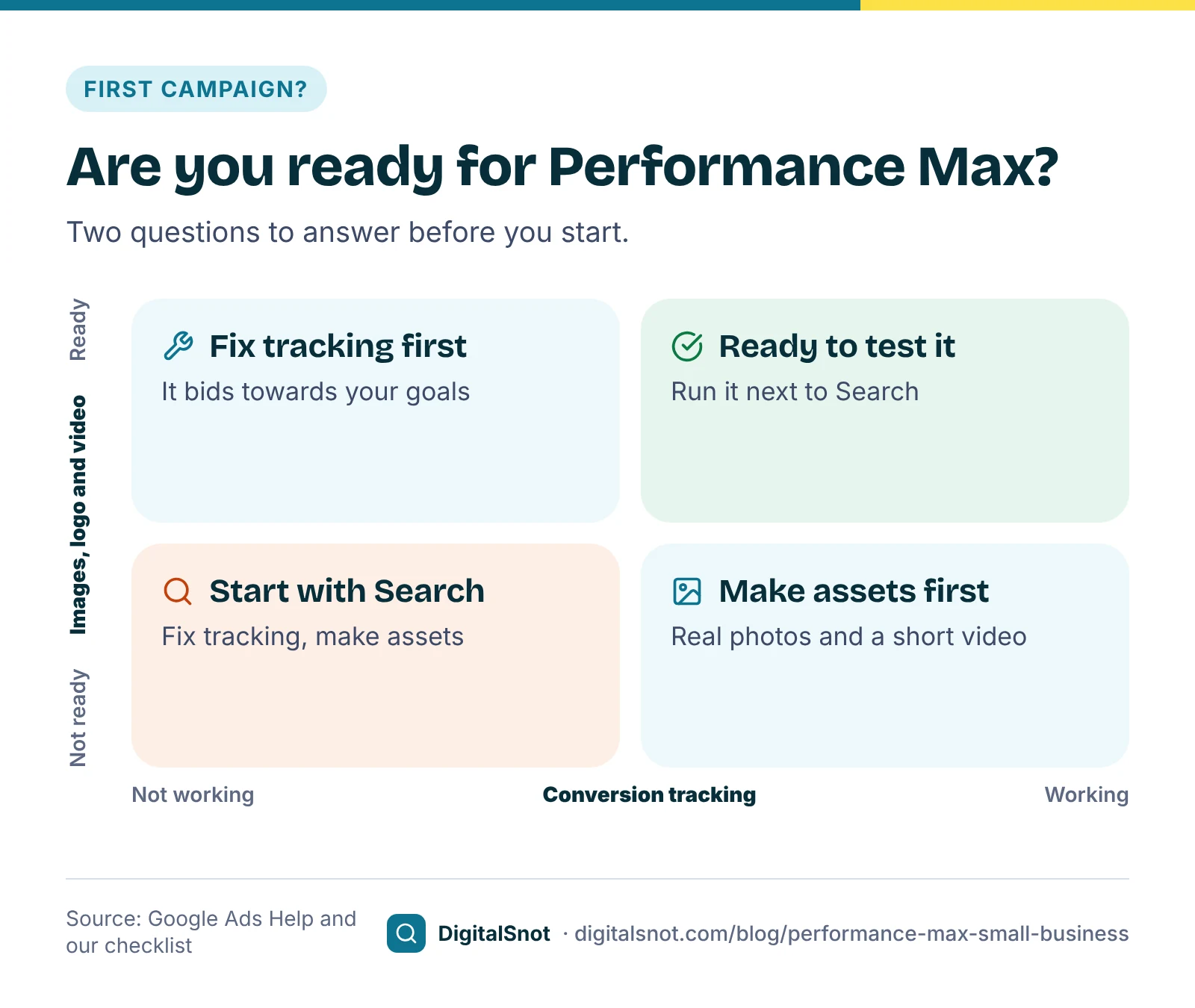
Our suggestion is to start with a Search campaign, and add Performance Max later, when any of these is true:
- Your conversion tracking is not working, or counts the wrong things. Fix it first; our post on conversion tracking that does not work has a checklist.
- You have no images or video yet. Horizontal and square images and a square logo are required. If you have no video, Google may make one from your images and text.
- You sell one service in one area on a small budget. A few exact and phrase match keywords give you more control over every rupee.
- You need to see and control each search. Search campaigns give you the most direct control over which searches you pay for.
Performance Max fits better once tracking records real enquiries or sales, you have assets for its formats, and you want to reach people beyond the searches your keywords cover.
The assets you need first
Google's page on Performance Max specs and format requirements lists what an asset group takes. The text:
- 3 to 15 headlines of up to 30 characters, with at least one of 15 characters or fewer. Google recommends 11 or more.
- 1 to 5 long headlines of up to 90 characters.
- 2 to 5 descriptions of up to 90 characters. Google recommends 4 or more.
- A business name of up to 25 characters.
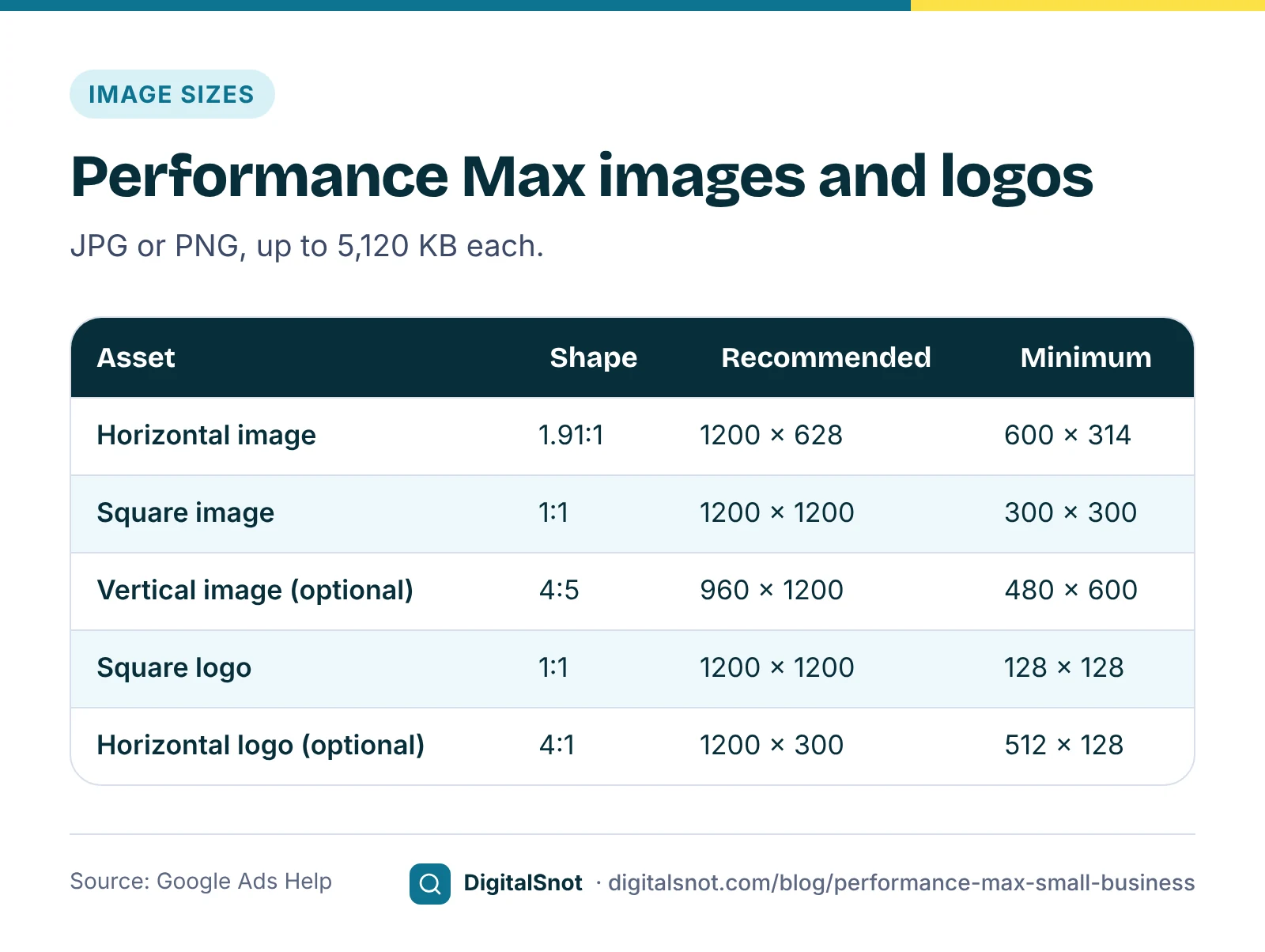
The images, as JPG or PNG files of up to 5,120 KB each, with the key content in the centre 80% of the image:
- Horizontal 1.91:1 (required): 1200 × 628 recommended, 600 × 314 at least.
- Square 1:1 (required): 1200 × 1200 recommended, 300 × 300 at least.
- Vertical 4:5 (optional): 960 × 1200 recommended, 480 × 600 at least.
- Logo: a square 1:1 logo is required, 1200 × 1200 recommended and 128 × 128 at least; a horizontal 4:1 logo is optional. A logo with a transparent background may be shown on white, so avoid a mostly white logo.
Videos can be horizontal, square or vertical, at least 10 seconds long, up to 15 per asset group, uploaded to YouTube. If you add none, Google may generate videos from your images and text. A short video shot on a phone, showing your real shop or work, is usually better than an automatic one (our view).
Put everything into the Performance Max Asset Checker before you build the asset group. It checks counts, character limits, image shapes and sizes, file sizes, logos, video links and search themes against these specs, flags repeats and text that may break Google's ad policies, and gives you a do-these-first list. Images are measured in your browser and nothing is uploaded. Its coverage figure is our measure, not Google's ad strength. For the headlines themselves, the advice in our post on responsive search ads applies here too: give each one a different job.
Audience signals and search themes: hints, not fences
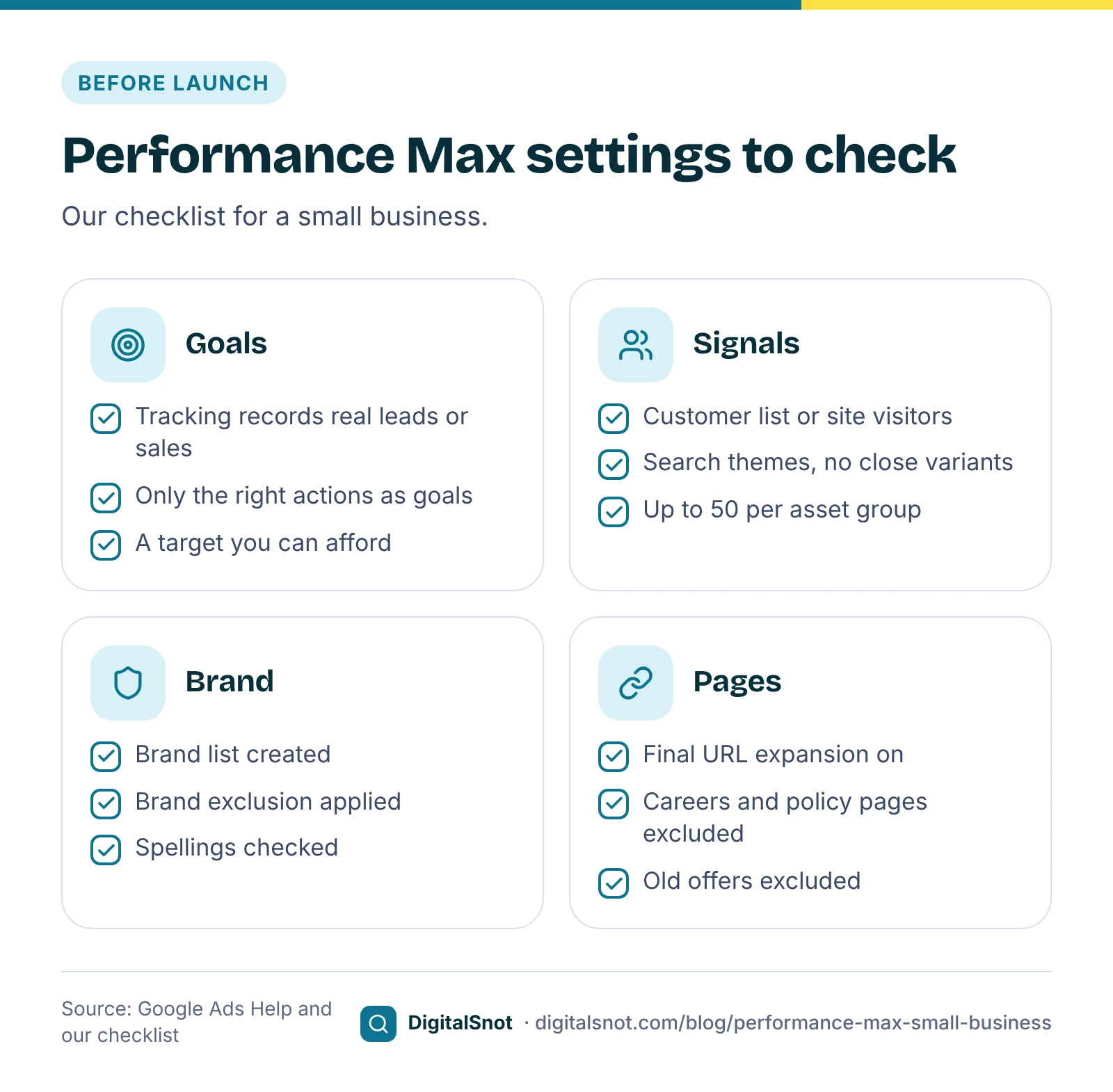
Each asset group can carry an audience signal. Google's page on adding audience signals says they are optional and describe the demographics, interests and behaviours of your customers, to help Google's systems find the most relevant people. Google adds that new signals can take up to 2 weeks to be fully used. Performance Max can still show ads to people outside the signal, so treat it as a starting point. Our suggestion: start with your own data, such as a customer list or website visitors, then add a custom segment built from searches your customers make.
Search themes do the same job for Search. Google's page on using search themes says you can add up to 50 per asset group. They are optional and add to the searches Performance Max would find anyway, and your exclusions and negative keywords still apply. Google advises against close variants such as "car" and "automobile", which reach the same people, so write themes that each cover a different need.
Keep it off your brand searches
People who search for your business by name would often find you anyway. If Performance Max takes those searches, its results look better than the new customers it really brings. Google's page about brand exclusions explains the fix: create a brand list and apply it to the campaign as an exclusion. In Performance Max, brand exclusions apply to Search and Shopping ads, with an option to let Shopping ads still show for your brand. Google says they also catch clear misspellings and other scripts that negative keywords miss.
To see how much your brand searches flatter your numbers, download a search terms report with cost and conversions and drop it into the Brand vs Non-brand Splitter. Type your brand name and it splits every search into brand, competitor and non-brand, shows your blended numbers next to the numbers without brand searches, suggests spellings of your brand you missed, and builds brand negatives you can paste or import. For the rest of the report, our post on wasted spend in search terms shows what to block.
Final URL expansion: decide which pages it may use
By default, Performance Max can send people to pages on your site other than the final URL you entered, when it expects a better match. Google's page about final URL expansion says it is on by default, can be turned off in the campaign settings, and that URL exclusions keep chosen pages out. With it off, ads go only to the URLs in your asset groups and page feed. Google does not recommend turning it off, as it may limit the ads your campaign can serve.
Our suggestion for a small site: leave it on, and exclude pages that should never be a landing page, such as careers, privacy policy, old offers and blog posts that do not sell anything.
Read the channel report the way Google intends
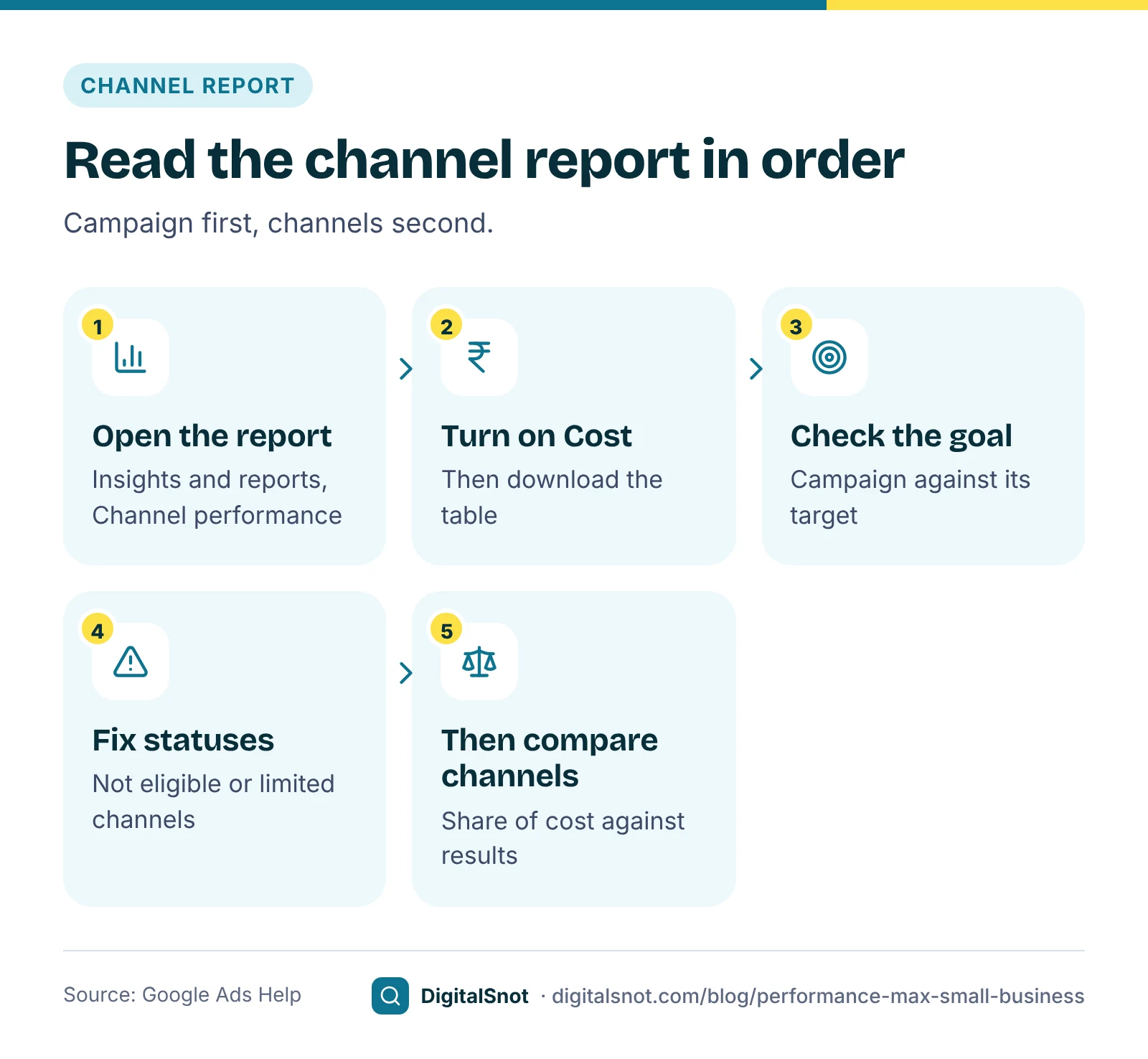
Once the campaign has run for a few weeks, open it and go to Insights and reports, then Channel performance. Google's page about the channel performance report describes three parts: a performance summary, a channels-to-goals chart and a channel distribution table, with a Status column that flags channels that are not eligible or limited. Switch on the Cost toggle before you download the table, so each channel's cost is included.
Google's main advice is to judge the campaign against its goal first. Performance Max aims for the best return on the next rupee, not the best average, so a channel with a weaker average can still be where the next sale is cheapest. Google also says the placement report covers only part of performance and should be used for brand safety, not to judge results.
Drop the table into the Performance Max Channel Analyzer with your target ROAS or cost per conversion. It checks the campaign against the target first, then shows each channel's share of cost, conversions and value, the status of each channel, and flags of our own, such as a channel taking 10% or more of the cost with less than half that share of results. It runs in your browser.
A worked example: a plant nursery in Bengaluru
GreenLeaf Plant Nursery in Whitefield, Bengaluru, is a made-up shop that sells plants online and from its nursery. It ran a Search campaign for a year with tracked online orders, then added Performance Max with a target ROAS of 250%. Before launch, the Asset Checker flagged that it had no square logo and only one square photo, so the owner added a logo and three square photos of real plants. Six weeks later, with made-up numbers:
| Channel | Cost | Conversions | Conv. value |
|---|---|---|---|
| Search | ₹33,000 | 31 | ₹1,12,000 |
| YouTube | ₹9,000 | 4 | ₹12,000 |
| Display | ₹8,400 | 5 | ₹15,000 |
| Discover | ₹6,000 | 5 | ₹18,000 |
| Gmail | ₹3,600 | 3 | ₹11,000 |
| Maps | ₹0 | 0 | ₹0 |
The campaign brought ₹1,68,000 of conversion value for ₹60,000, a ROAS of 280%, above its target. YouTube took 15% of the cost for about 7% of the value, which the Channel Analyzer flags as our measure. Following Google's advice, the owner did not try to cut YouTube while the campaign met its target. Maps showed "Not eligible" in the Status column, and hovering over it named a missing location asset. So the owner added a location asset by linking the nursery's Business Profile, replaced the automatic video with a 30-second vertical clip shot at the nursery, and, after the Brand vs Non-brand Splitter showed searches for "greenleaf nursery" among the converting terms, added a brand exclusion. The next check is in four weeks.
Mistakes to avoid
- Launching without tracking. The campaign bids towards your goals, so broken goals mean blind bidding.
- Judging single channels first. Check the campaign against its target before you worry about YouTube or Display.
- Leaving your brand searches in. They make the campaign look cheaper than the new customers it finds.
- Stock photos and no video. Real photos of your work, and a short video of your own, beat an automatic one.
- Changing everything at once. Change one thing, note the date and give it a few weeks.
Your next step
Gather your text, images, logo and a video, and run them through the Performance Max Asset Checker. Check your brand searches with the Brand vs Non-brand Splitter, and after a few weeks read the channel table with the Performance Max Channel Analyzer. More tools are on our Google Ads tools page, or talk to us if you want a second opinion before you launch.
Free tools in this article
- Performance Max Asset Checker Check headlines, images, logos and videos against Performance Max specs before you build the asset group.
- Brand vs Non-brand Splitter Split search terms into brand, competitor and non-brand, and see what a new customer really costs.
- Performance Max Channel Analyzer See how your Performance Max budget splits across Search, YouTube, Display, Discover, Gmail and Maps.
By the numbers
Frequently asked questions
Is Performance Max good for a small business?
It can be, once conversion tracking works and you have the images, logo and ideally a video it needs. Google presents it as a complement to keyword-based Search campaigns. Our suggestion is to start with Search if your tracking is not working or you serve one narrow service on a small budget.
What images does Performance Max need?
A horizontal 1.91:1 image (1200 × 628 recommended, 600 × 314 at least) and a square 1:1 image (1200 × 1200 recommended, 300 × 300 at least) are required, plus a square logo. A vertical 4:5 image is optional. Each file can be up to 5,120 KB, as JPG or PNG.
What happens if I do not add a video to Performance Max?
Google may generate one or more videos from the images and text in your asset group. To avoid that, upload your own video to YouTube and add the link. Videos can be horizontal, square or vertical and must be at least 10 seconds long.
Do audience signals limit who sees my Performance Max ads?
No. Audience signals are optional hints about your customers that help Google's systems find relevant people, and Performance Max can still show ads to people outside them. Google says new signals can take up to 2 weeks to be fully used.
How do I stop Performance Max showing ads on my brand name?
Create a brand list and apply it to the campaign as a brand exclusion. In Performance Max it covers Search and Shopping ads, with an option to let Shopping ads still show. Google says brand exclusions also catch misspellings that negative keywords miss.
Should I turn off final URL expansion?
Google does not recommend it, as it may limit the ads your campaign can serve. Our suggestion is to leave it on and add URL exclusions for pages that should never be a landing page, such as careers, privacy policy and old offers.
Sources
Every figure and claim in this article comes from the sources below. We checked each one when writing and link to the original so you can read it yourself. Credit belongs to the authors and publishers listed. How we write and check our articles.
-
1
About Performance Max campaigns
Google Ads Help · A goal-based campaign across Google's inventory, and a complement to keyword-based Search campaigns.
-
2
Create a Performance Max campaign
Google Ads Help · Use conversion tracking and set the right conversion actions as campaign goals.
-
3
About ad group and asset group prioritisation within a Google Ads account
Google Ads Help · An exact match keyword identical to the search is preferred.
-
4
Performance Max campaigns specs and format requirements
Google Ads Help · Text limits, image and logo shapes and sizes, file size and videos.
-
5
Add audience signals
Google Ads Help · Optional signals about your customers; up to 2 weeks to be fully used.
-
6
Use search themes with your Performance Max campaign
Google Ads Help · Up to 50 search themes per asset group; avoid close variants.
-
7
About brand exclusions
Google Ads Help · Brand lists, Search and Shopping coverage in Performance Max, and misspellings.
-
8
About Final URL expansion in Performance Max
Google Ads Help · On by default, URL exclusions, and the effect of turning it off.
-
9
About the channel performance report for Performance Max
Google Ads Help · Summary, channels-to-goals chart, distribution table, statuses and judging the campaign as a whole.
-
10
Find or create placement reports for your Performance Max campaigns
Google Ads Help · The placement report does not cover all performance and is for brand safety.
Want a second pair of eyes?
Tell us about your site. We reply within one business day.
Talk to us Try our free tools