Find wasted spend in your Google Ads search terms report
Read your search terms report, spot the searches that cost money and never bring enquiries, and block them with the right negative keywords at the right level.

On this page (10 sections)
Your keywords are not the searches you pay for. Google matches each keyword to many searches, and some of them come from people who will never buy from you: job seekers, students, people looking for a free fix or a company's customer care number. The Google Ads search terms report shows exactly which searches you paid for.
This post shows you where to find the report, what to look for, how to block bad searches with negative keywords at the right level, how to avoid blocking your own ads, and a routine to repeat every month.
Where to find the search terms report
In Google Ads, select Campaigns, then Insights and reports, then Search terms. Pick a date range of at least 30 days so patterns have time to show, and add the Conversions and Cost columns if they are hidden.
Google's page about the search terms report explains that it lists the searches that triggered your ads, with the keyword that matched. It also says some searches that do not have enough activity are left out to protect privacy, so the report never shows every search. What it does show is usually enough to find the expensive patterns.
Performance Max campaigns have their own search terms report, which you can review in the same way.
What wasted spend looks like
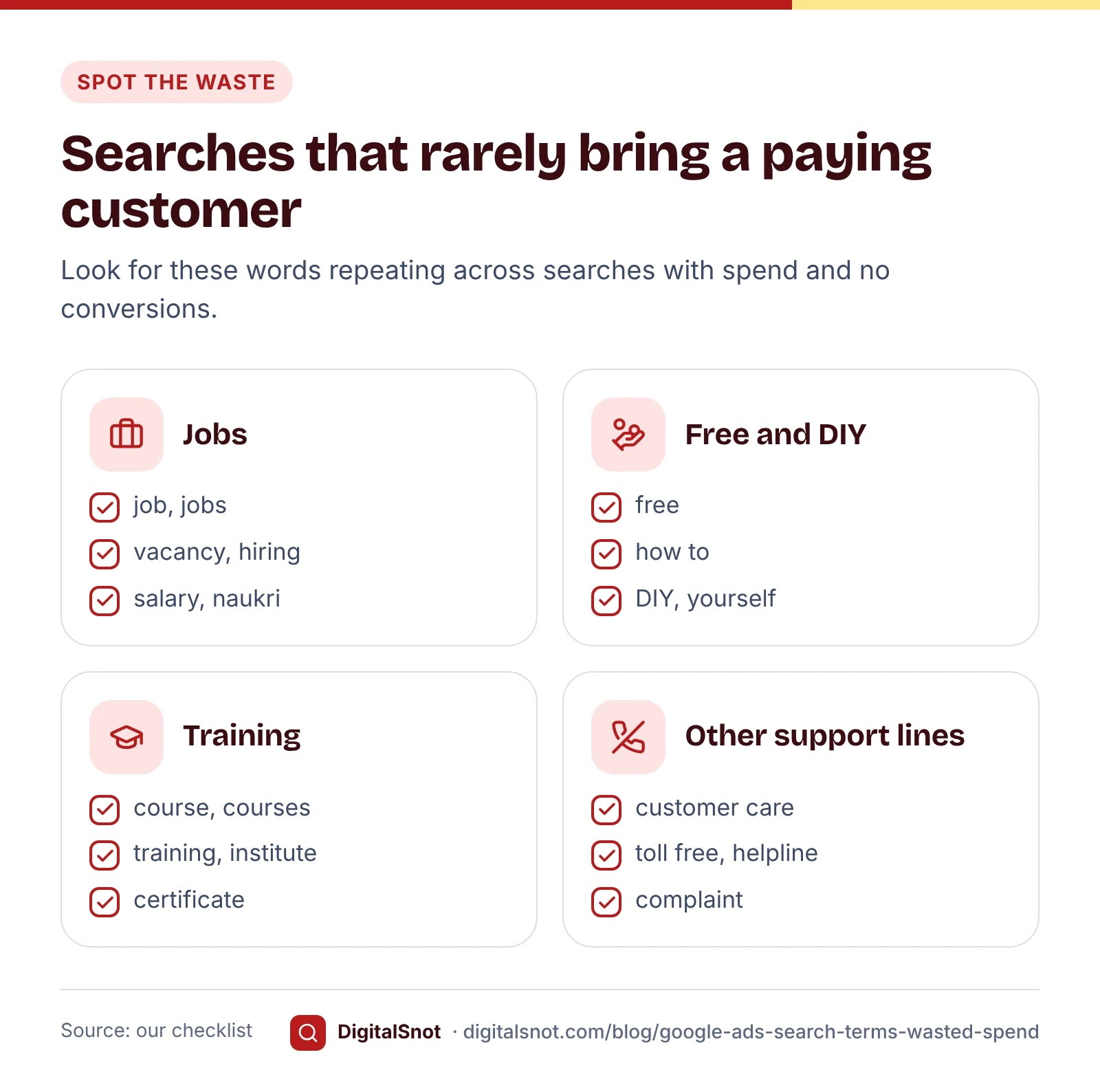
Sort the report by cost, highest first, and look at searches with spend and no conversions. Most wasted searches for a local business fall into a few groups:
- Job and career searches: job, jobs, vacancy, salary, naukri, hiring.
- Free and do-it-yourself searches: free, how to, at home yourself, DIY, YouTube.
- Training: course, training, institute, certificate.
- Someone else's support line: customer care, toll free, helpline, complaint, with a manufacturer's name.
- Services you do not offer, or places you do not serve.
- Competitor names: a search for another business by name. Some of these convert and some do not, so decide from your own numbers.
Single searches can look cheap. The waste shows when one word repeats across dozens of searches. The Google Ads Search Terms Analyzer does this for you: drop in the report you downloaded and it splits every search into one, two and three-word groups, adds up their cost and conversions, and suggests phrase and exact match negatives. It only suggests a word when no search containing it converted and it would not block one of your keywords. The report is read in your browser and never uploaded.
A worked example: an AC repair business in Pune
CoolFix AC Services in Wakad, Pune, is a made-up business running one Search campaign. Here is part of a month's search terms report, with made-up numbers.
| Search term | Cost | Conversions | Decision |
|---|---|---|---|
| ac repair wakad | ₹2,140 | 9 | Keep |
| ac service at home pune | ₹1,860 | 6 | Keep |
| ac technician job pune | ₹780 | 0 | Block "job" and "jobs" |
| split ac company customer care number | ₹690 | 0 | Block "customer care" |
| ac repair course pune | ₹540 | 0 | Block "course" and "courses" |
| chillpro ac services wakad | ₹420 | 1 | Watch for another month |
| how to clean split ac filter | ₹310 | 0 | Block "how to clean" |
| free ac gas check | ₹260 | 0 | Block "free" |
Of ₹7,000 spent on these eight searches, ₹2,580 went on searches that could not bring a paying customer. Note what the owner did not block: "at home". It looks like a do-it-yourself word, but "ac service at home pune" is one of his best searches. Blocking a word because it appears in one bad search can cut off good ones, which is why it pays to check every word against the searches that converted.
The competitor search, "chillpro" (another made-up business), brought one conversion for ₹420. Whether to keep paying for it is a business decision: compare that cost with what you can pay for a lead. Our post on setting a starting Google Ads budget shows how to work out that number.
How negative match types work
Negative keywords follow stricter rules than normal keywords. Google's page about negative keywords describes three match types:
- Negative broad match, written as a plain word such as job: your ad will not show when the search contains all of the words, in any order.
- Negative phrase match, written in quotes such as "how to clean": your ad will not show when the search contains the words in that order, with or without other words around them.
- Negative exact match, written in brackets such as [free ac gas check]: your ad will not show only for that exact search, with no extra words.
The most important difference: negative keywords do not match close variants. Google's own example is that the negative "flowers" blocks "red flowers" but not "red flower". So "job" does not block "jobs", and "course" does not block "courses". Add the singular, the plural and any synonyms yourself.
To see how a negative will behave before you add it, put your keywords, negatives and some real searches into the Keyword Match Type Simulator. It shows, search by search, which keywords may match and which negative blocks it. Its rules for negatives follow Google's documentation; for normal broad and phrase keywords, Google's systems decide, so treat its answer there as our measure.

Add each negative at the right level
Where you add a negative decides which ads it blocks. Use the narrowest level that covers the problem.
- Ad group: for a search that belongs in a different ad group of yours. "gas filling" might be wrong for your repair ad group but right for your gas refill ad group.
- Campaign: for searches that are wrong for everything in one campaign.
- Negative keyword list: a shared list you apply to several campaigns. Google's page about negative keyword lists allows up to 20 lists per account, each with up to 5,000 negatives. A list only works in the campaigns it is applied to, as Google's page on fixing issues with negative keywords points out.
- Account level: for words that are never right for your business, such as "job". Google's page about account-level negative keywords allows up to 1,000, applied to the Search and Shopping inventory of eligible campaigns.
You can add negatives straight from the report: tick the searches, choose "Add as negative keyword" and pick the ad group, campaign or a list. Google's page on getting negative keyword ideas from the search terms report says negatives added this way to a Search campaign are added as negative exact match by default. That blocks only that one search. For a word that repeats, such as "jobs", change it to phrase match.

Check that no negative blocks your own keywords
The same Google page warns that your negative keywords must not overlap your keywords, or your ad will not show. This happens more often than you would think. Someone adds "free" at account level to stop "free ac gas check", and months later a new campaign bids on "free ac inspection wakad". That keyword can never show, and nothing in the campaign tells you why at a glance.
Paste your keywords and negatives, or the reports you downloaded, into the Negative Keyword Conflict Checker. It follows Google's matching rules for negatives level by level, so an ad group negative is only checked against its own ad group and a list only against the campaigns you say use it. For each conflict it suggests a fix, often moving the negative down to the campaigns where it blocks nothing. It also offers starter lists of common wasted words for Indian businesses; they are our suggestion, so untick anything you actually sell.
A monthly routine
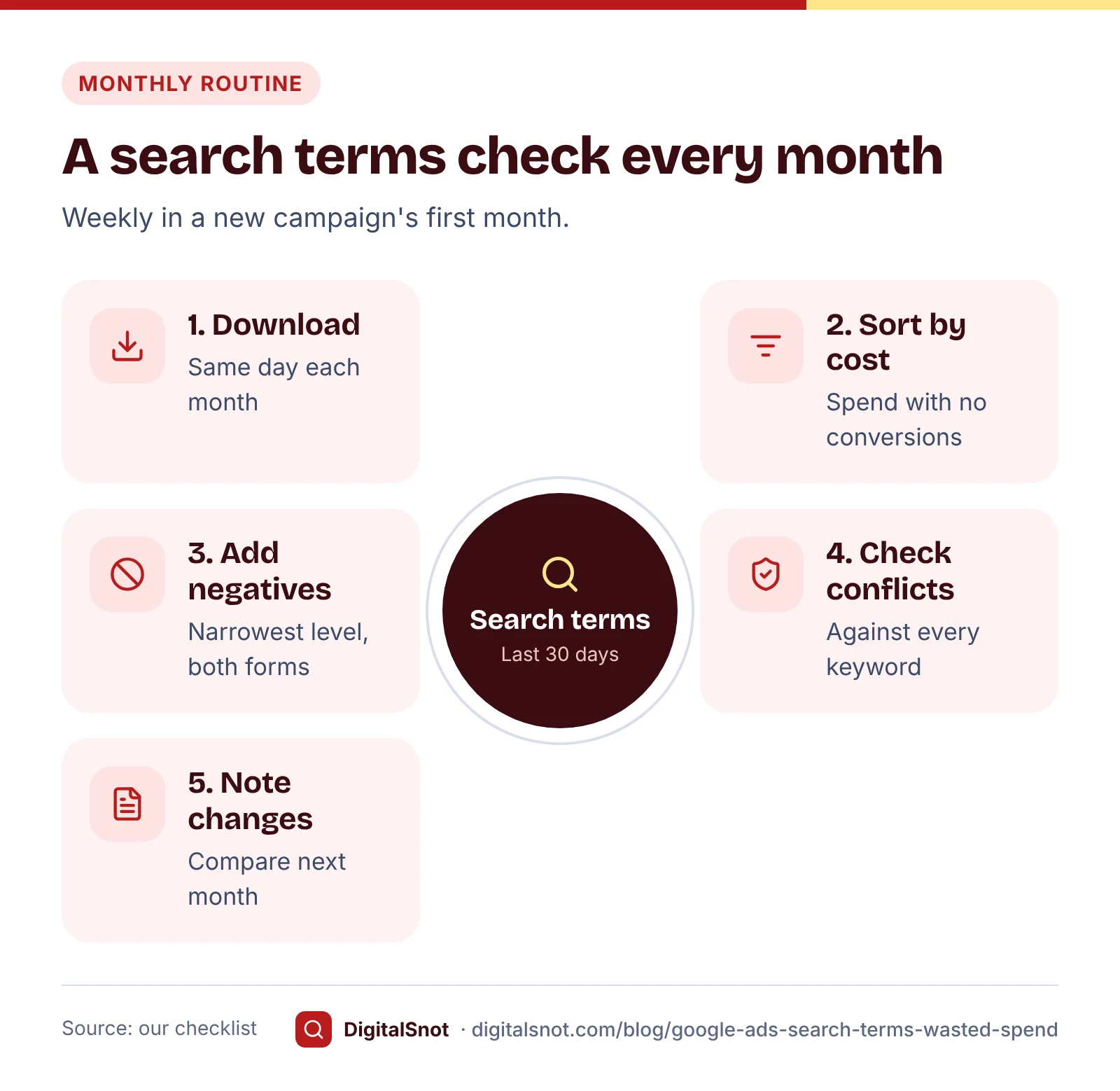
Search terms change with the season, your keywords and Google's matching. A short routine keeps waste from building up again. This is our suggestion:
- Download the last 30 days of search terms on the same day each month.
- Sort by cost and run the report through the Search Terms Analyzer to find repeated words with no conversions.
- Decide each word: block it, watch it or keep it. Never block a word that appears in searches that converted.
- Add negatives at the narrowest level that works, with singular and plural forms.
- Check conflicts against all your keywords before you post the changes.
- Note what you changed, so next month you can see whether the waste went down.
In the first month of a new campaign, do it every week. New campaigns often match more unexpected searches while you build your negative lists.
Mistakes to avoid
- Blocking good words by accident. "Home", "near me" and "price" appear in good and bad searches alike. Check before you block.
- Using one-word broad negatives for everything. A broad negative "repair" would stop every repair search you pay for.
- Forgetting plurals. Negatives do not cover close variants, so add both forms.
- Making a shared list and never applying it. A list does nothing until it is applied to campaigns.
- Judging on one week. A search with one click and no enquiry is not yet waste. Look for patterns over a month.
Your next step
Download last month's search terms report today and drop it into the Google Ads Search Terms Analyzer. Then check the negatives you plan to add with the Negative Keyword Conflict Checker before you post them. You will find more free tools for each step of a campaign on our Google Ads tools page, and if you want a second pair of eyes on your account, get in touch.
Free tools in this article
- Google Ads Search Terms Analyzer Upload a search terms report to find wasted spend, n-gram patterns and safe negative keywords.
- Keyword Match Type Simulator Test broad, "phrase" and [exact] keywords and negatives against the searches people might type.
- Negative Keyword Conflict Checker Find negative keywords that block your own keywords, fix them by level and add starter lists for India.
By the numbers
- negative keywords you can add at account level, applied to Search and Shopping inventory
- 1,000
- Source: Google Ads Help
- negative keyword lists per account, each holding up to 5,000 negatives
- 20 × 5,000
- Source: Google Ads Help
Frequently asked questions
Where is the search terms report in Google Ads?
Select Campaigns, then Insights and reports, then Search terms. Pick a date range of at least 30 days and add the Cost and Conversions columns. Performance Max campaigns have their own search terms report.
Why does the search terms report not show every search?
Google leaves out searches that did not have enough activity, to protect people's privacy. The report still shows the searches that make up most of your spend, which is where wasted money usually hides.
Do negative keywords block plurals and synonyms?
No. Google says negative keywords do not match close variants or other expansions. The negative "job" does not block "jobs", so add singular, plural and synonym forms yourself.
What match type is used when I add a negative from the search terms report?
Google adds negatives from the search terms report to a Search campaign as negative exact match by default, which blocks only that one search. For a word that repeats across many searches, change it to phrase match.
Should I add competitor names as negative keywords?
It depends on your results. If searches for a competitor bring enquiries at a cost per lead you can afford, keep them; if they cost money and bring nothing over a month or two, block them. There is no single rule for every business.
How often should I check my search terms report?
Our suggestion is every week in the first month of a new campaign, then once a month. Look at the last 30 days, sorted by cost, and check new negatives for conflicts with your keywords before you add them.
Sources
Every figure and claim in this article comes from the sources below. We checked each one when writing and link to the original so you can read it yourself. Credit belongs to the authors and publishers listed. How we write and check our articles.
-
1
About the search terms report
Google Ads Help · What the report shows, and that low-activity searches are left out for privacy.
-
2
About the search terms report in Performance Max
Google Ads Help · Performance Max campaigns have their own search terms report.
-
3
About negative keywords
Google Ads Help · Negative broad, phrase and exact match, and no close variants for negatives.
-
4
Get negative keyword ideas using the search terms report
Google Ads Help · Add as negative keyword, exact match by default, and the warning against overlapping your keywords.
-
5
About negative keyword lists
Google Ads Help · Up to 20 lists per account, each with up to 5,000 negatives, applied to campaigns.
-
6
About account-level negative keywords
Google Ads Help · Up to 1,000 account-level negatives for Search and Shopping inventory.
-
7
Fix issues with negative keywords
Google Ads Help · A negative keyword list must be applied to campaigns to take effect.