Tracking calls and WhatsApp leads from Google Ads
Count phone calls and WhatsApp enquiries from Google Ads as conversions, give each a value, and send real sales back so bidding aims for customers, not clicks.

On this page (9 sections)
Many local businesses in India get most of their leads by phone or WhatsApp, not through a website form. If you do not track calls and WhatsApp leads from Google Ads, the account reports clicks and nothing else, and automated bidding aims for whatever it can count. You end up judging ads by visits instead of customers.
This post shows you how to count calls and WhatsApp enquiries as conversions, give each one a value, send the leads that became sales back to Google Ads, and set up consent mode so your tracking respects visitors' choices.
Why clicks are not leads
A click means someone visited your page. It does not tell you whether they called, messaged, booked or left. Google Ads only counts the actions you set up as conversions, and only primary conversion actions in the goals a campaign uses guide bidding. Google's page about primary and secondary conversion actions explains that secondary actions are for observation and do not steer bids.
So the first job is to decide which actions are real leads, track each one, and make the best signal primary.
Three ways to track phone calls
Google Ads Help describes several kinds of call conversion. For a local business, these matter most:
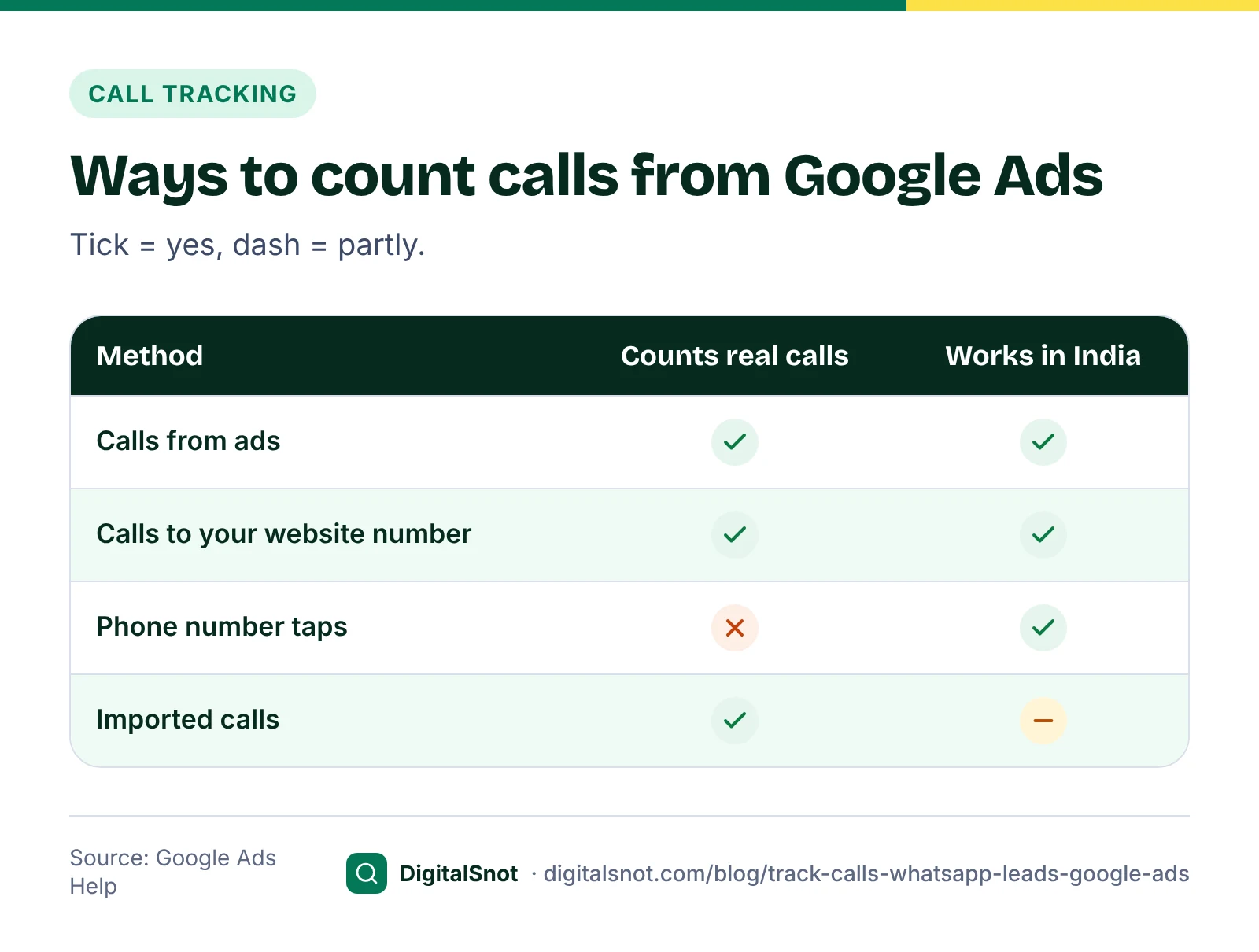
- Calls from ads. People call from the call button on your ad, added as a call asset. Google's page on measuring calls from ads explains that these calls go through a Google forwarding number, so Google knows they came from an ad.
- Calls to the number on your website. A small snippet on your site shows a Google forwarding number to people who arrived from an ad. Google's page on tracking calls to a phone number on a website covers the setup, and notes that the number in the snippet must match your site exactly.
- Calls you import. You upload calls from your own records. Google's page on importing phone call conversions says this works for only a portion of calls in India, so treat it as a later step.
India is on Google's list of countries with Google forwarding numbers. One limit to know: Google's page on viewing call details says the caller's phone number is not shown for calls in India.
You can also count taps on your phone number on a mobile site, as Google's page on phone number clicks explains. A tap is a click, not a call, so people who tap and do not call are counted too. Our suggestion: keep it as a secondary action if you also track real calls.
A call counts as a conversion only if it lasts at least the call length you set. Google's documentation gives 60 seconds as the default. Shorter calls are still reported, just not counted, so set the length to the shortest call that is usually a real enquiry for you.
If you still run call-only ads, now called call ads: Google's page on moving from call ads to call assets says new ones could not be created from February 2026, and existing ones stop getting impressions in February 2027. Add your number as a call asset instead.
The Call Conversion Planner puts this together. Enter your monthly calls, how many are real enquiries, your close rate, average sale and opening hours, and it recommends which call conversion actions to set up, which to make primary, the call length to count and a value per call. It runs in your browser and never signs in to your account.
Count WhatsApp taps, and know their limits
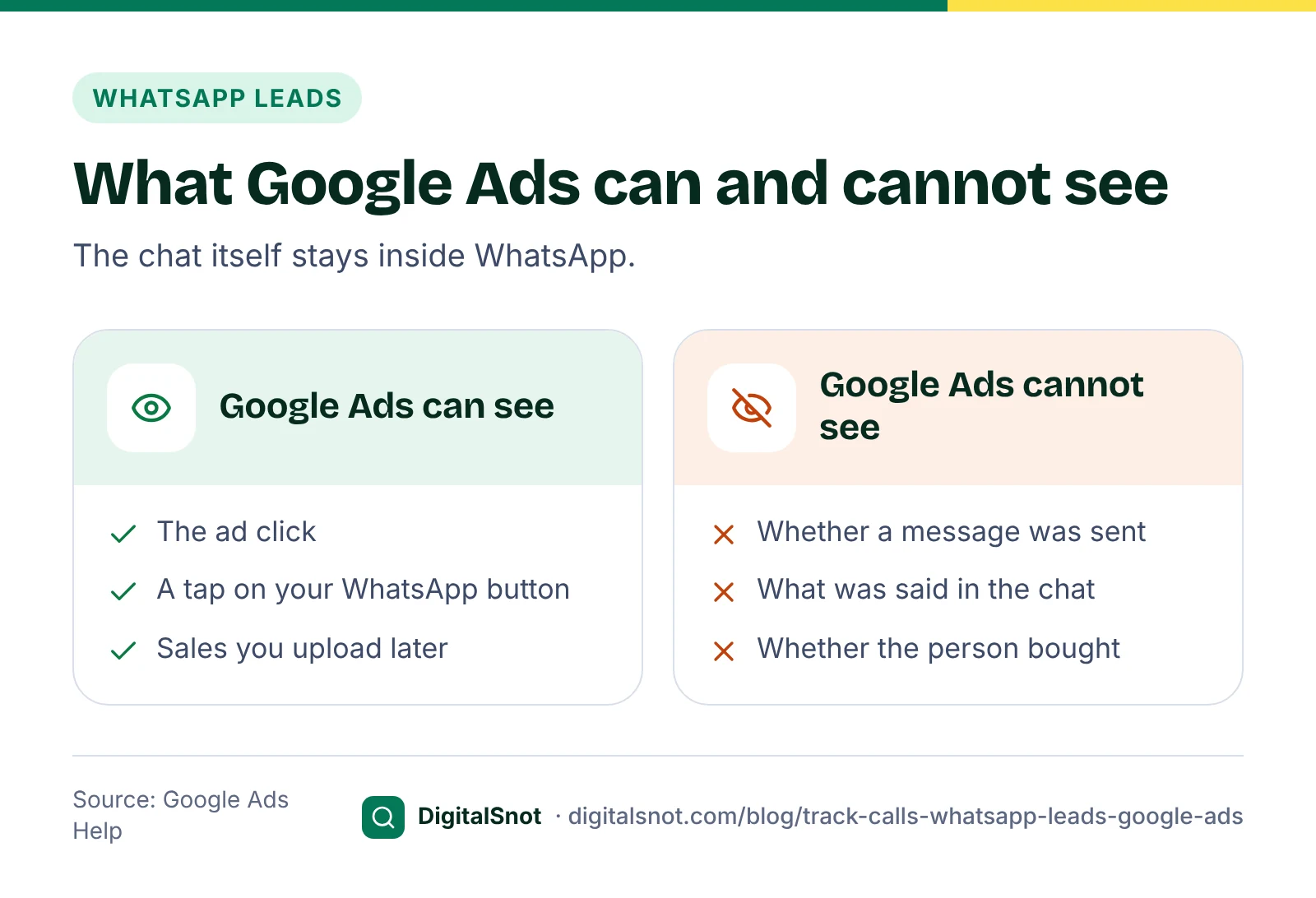
A WhatsApp chat happens inside WhatsApp, where the Google tag cannot see it. What Google Ads can count is the tap on the WhatsApp button on your website. Google's page on tracking clicks on your website as conversions shows how to count a click on a button or link, with the Google tag or with Google Tag Manager.
A tap is not a conversation. Some people tap and never send a message. That is why a WhatsApp tap needs a lower value than a real chat, and why it should count once per click: Google's page on conversion counting options suggests "One" for leads, because several taps from one person are still one lead.
Two practical points. First, a WhatsApp click-to-chat link can carry a pre-filled message; using a different message on your ad landing pages, such as "Hi, I saw your ad", helps you spot which chats came from ads (our suggestion). Second, Google's message assets, which put a message button on the ad itself, are in beta, so your account may not have them yet.
The WhatsApp Lead Tracking Planner asks where your button is, what it links to and whether you use Tag Manager. It gives you the tap conversion to set up, a Tag Manager trigger description, a value per tap and a plan for uploading real sales later, with a list of what Google cannot see.
A worked example: a pest control service in Mumbai
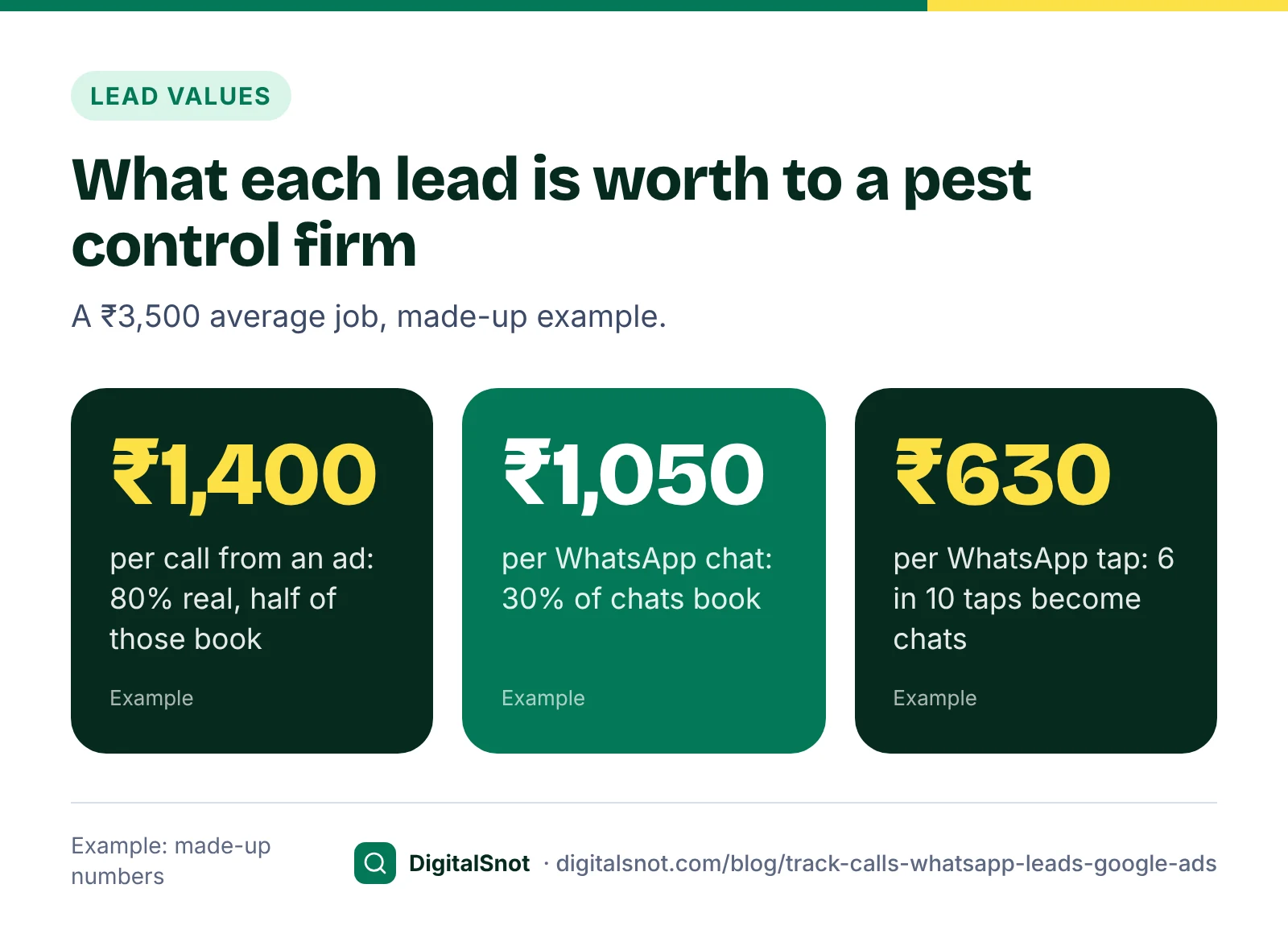
SafeHome Pest Control in Andheri, Mumbai, is a made-up business. An average job is worth ₹3,500. The owner gives each lead type its own value, using Google's method for estimating conversion value: the sale, times the share of leads that buy. These are made-up numbers.
| Lead type | Her numbers | Value per conversion |
|---|---|---|
| Call from an ad (60 seconds or more) | 80% are real enquiries; half of those book | ₹3,500 × 80% × 50% = ₹1,400 |
| WhatsApp chat | 30% of chats book | ₹3,500 × 30% = ₹1,050 |
| Tap on the WhatsApp button | 6 in 10 taps become chats | ₹1,050 × 60% = ₹630 |
She enters ₹1,400 on the calls from ads action and ₹630 on the WhatsApp tap action, both primary. Bidding now knows that one call is worth more than one tap. Our post on working out a starting budget uses the same lead values to decide what you can pay per lead.
Send real sales back to Google Ads
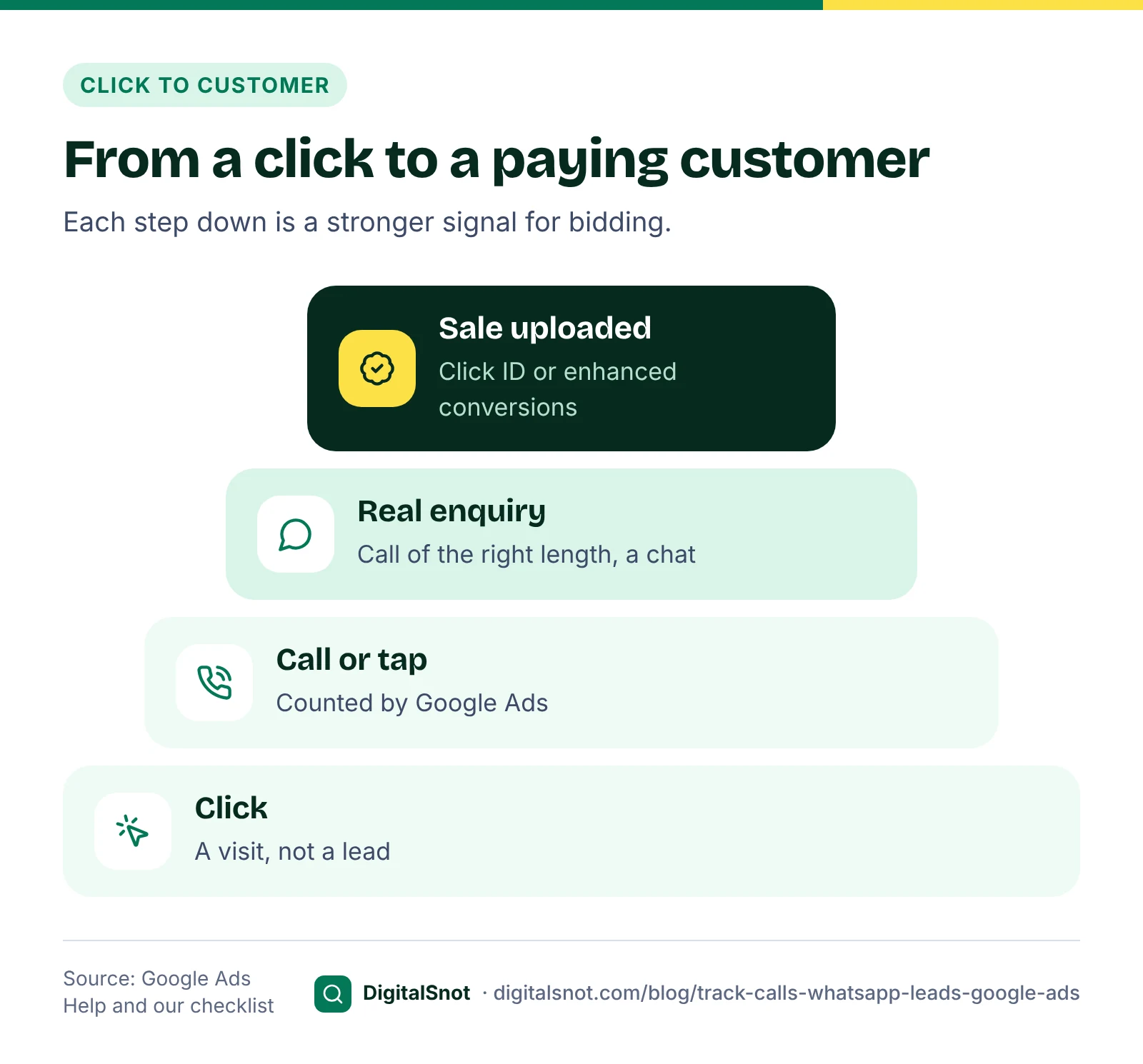
Calls and taps are still enquiries. The strongest signal is which enquiries became paying customers, and only you know that. Google gives two ways to send it back.
- Offline conversion import with the click ID. Your form saves the GCLID, the click ID that auto-tagging adds to the ad click. When the lead buys, you upload the click ID, the conversion name and the time. Google's guidelines for importing offline conversions say conversions uploaded more than 90 days after the click are not imported, and enhanced conversions for leads have a 63-day limit.
- Enhanced conversions for leads. Google's page about enhanced conversions for leads explains that the Google tag sends a hashed email or phone number from your form, and you later upload the sales with the same details. Google's page on file imports now calls GCLID-only imports a legacy feature and points you to Data Manager.
A plain WhatsApp button gives Google neither a click ID nor a form. If you want to upload sales from chats, you need a short form before the chat, or a developer or chat tool that keeps the click ID.
If your records hold click IDs, the Offline Conversion Import Builder turns a CRM or spreadsheet export into an upload file. It checks every row for missing or damaged click IDs, unreadable times and sales more than 90 days after the click, and writes each time with its time zone, such as +05:30. The file is read in your browser and never uploaded. Once sales flow in, make the sales action primary and move calls and taps to secondary.
Consent mode in plain words
Consent mode passes each visitor's cookie banner choice to Google tags. Google's consent mode reference lists four signals: ad_storage and analytics_storage for cookies, ad_user_data for sending advertising data to Google, and ad_personalization for personalised ads. It says ad_user_data is needed for measurement such as enhanced conversions and tag-based conversion tracking. Google's page on consent mode for traffic in the EEA explains that advertisers must send these signals for visitors in the European Economic Area and the UK.
To see what your page sends, enter its address in the Google Ads Tag and Consent Checker. It reads the page's HTML and public Tag Manager container to find your Google tag, conversion events and consent mode defaults. It cannot see tags that load after the page opens, so confirm what really fires with Google Tag Assistant.
Mistakes to avoid
- Counting every page view. A page-load conversion snippet on your landing page counts every visit as a lead. Load-based snippets belong on a thank-you page.
- Counting the same lead twice. Phone number taps and calls from your website can both fire for one caller. Keep only one of them primary.
- One value for every lead. A call and a button tap are rarely worth the same.
- Uploading sales too late. Upload at least weekly so no sale passes the 90-day limit.
- Trusting the numbers without a test. Make a test call and tap your own button after any website change.
Your next step
List how your leads reach you today: calls, WhatsApp, forms, walk-ins. Put your call numbers into the Call Conversion Planner and your WhatsApp numbers into the WhatsApp Lead Tracking Planner, and set up the actions they recommend this week. More free tools are on our Google Ads tools page. If your tracking needs a developer's hand, talk to us.
Free tools in this article
- Call Conversion Planner Plan call tracking in Google Ads: which conversions to set up, call length, value per call and hours.
- WhatsApp Lead Tracking Planner Plan how to count WhatsApp leads from Google Ads: button taps, value per chat and real sales later.
- Offline Conversion Import Builder Turn leads that became sales into a Google Ads offline conversion file, with checks on every row.
- Google Ads Tag and Consent Checker Check the Google tag, Tag Manager, conversion events and Consent Mode v2 on any page.
By the numbers
- Google's default call length for a call to count as a conversion
- 60 seconds
- Source: Google Ads API documentation
- how long Google keeps the click ID: offline conversions uploaded later are not imported
- 90 days
- Source: Google Ads Help
Frequently asked questions
Can Google Ads track phone calls in India?
Yes. India is on Google's list of countries with Google forwarding numbers, which calls from ads and website call tracking use. Google notes that the caller's number is not shown in call details for calls in India, and that importing call conversions works for only a portion of calls there.
What is the default call length for a call conversion?
Google's default is 60 seconds: a call counts as a conversion if it lasts at least that long. You can change it in the conversion action. Shorter calls are still reported as calls, just not counted as conversions.
Can Google Ads track WhatsApp chats?
Not the chat itself. Google Ads can count a tap on the WhatsApp button on your website as a conversion, with the Google tag or Google Tag Manager. Whether the person wrote and whether they bought stays in WhatsApp until you upload sales yourself.
Should a WhatsApp button tap be a primary conversion?
While it is your only WhatsApp signal, making it primary lets bidding aim for chats. Give it a lower value than a real chat, because not every tap becomes a message. Once you upload real sales, make the sales action primary and the tap secondary.
How long do I have to upload offline conversions?
Google keeps the click ID for 90 days, so conversions uploaded more than 90 days after the click are not imported. For enhanced conversions for leads the limit is 63 days. Upload at least once a week to stay well inside both.
Do I need consent mode for Google Ads?
Google requires consent signals for visitors in the European Economic Area and the UK. Consent mode passes each visitor's choice to Google tags, and its ad_user_data signal covers measurement such as enhanced conversions. Check what your own site needs to do under the laws that apply to you.
Sources
Every figure and claim in this article comes from the sources below. We checked each one when writing and link to the original so you can read it yourself. Credit belongs to the authors and publishers listed. How we write and check our articles.
-
1
About primary and secondary conversion actions
Google Ads Help · Primary actions guide bidding; secondary actions are for observation.
-
2
Measure calls from ads
Google Ads Help · Calls from call assets tracked through a Google forwarding number.
-
3
Set up tracking calls to a phone number on a website
Google Ads Help · Website call tracking with a forwarding number; the number must match the site.
-
4
Google forwarding number
Google Ads Help · India is among the countries with Google forwarding numbers.
-
5
View details of each call
Google Ads Help · Caller phone numbers are not shown for calls in India.
-
6
Import phone call conversions
Google Ads Help · Call imports work for only a portion of calls in India.
-
7
Conversion action categories
Google Ads API documentation · Default call length of 60 seconds for call conversions.
-
8
Action required: transition from call ads to call assets
Google Ads Help · No new call ads from February 2026; existing ones stop in February 2027.
-
9
Track clicks on your website as conversions
Google Ads Help · Counting a button or link click as a conversion.
-
10
About message assets
Google Ads Help · Message assets are in beta.
-
11
Guidelines for importing offline conversions
Google Ads Help · 90-day limit for click ID imports, 63 days for enhanced conversions for leads.
-
12
About enhanced conversions for leads
Google Ads Help · Hashed form details used to match uploaded sales.
-
13
Consent mode reference
Google Ads Help · The four consent signals and what ad_user_data covers.
-
14
Updates to consent mode for traffic in the EEA
Google Ads Help · Consent signals needed for visitors in the EEA and the UK.