Hinglish keywords in Google Ads: what to add and how to test them
How Google Ads matches ads to languages since September 2026, which Hinglish, Hindi and misspelt keywords to test, how to write the ads, and how to read the results.

On this page (9 sections)
Many people in India do not search the way an English keyword list expects. A customer in Ghaziabad may type "ac theek karna", "एसी रिपेयर" or "acrepair" with no space. If your account only has "ac repair service" and no Hinglish keywords in Google Ads to match those searches, you may be missing some of them, or paying for them through broad match without knowing.
This post shows how Google Ads decides which language an ad suits, which Hinglish and Hindi keywords are worth testing, how close variants and misspellings work, how to write the ads and how to test without wasting money. One made-up example runs through it: CoolCare AC Repair in Indirapuram, Ghaziabad.
How Google Ads handles language now
Google's page about language targeting explains that on the Search Network, Google uses the language of the search, the person's language settings and other signals to work out which languages they know, and tries to show the best ad in a language they understand. People who know more than one language can see an ad in a different language from their search, when Google is confident they understand it.
The same page says that from September 2026, language targeting changed for Search campaigns and the Search part of Performance Max: a campaign language setting is no longer needed, and Google matches your ads to the languages people understand. You do not need to do anything. In practice, the language your ad is written in now does the work the setting used to do. In Performance Max, the setting still applies on YouTube, Display, Discover and Gmail, so add Hindi there if those ads are in Hindi.
Two more rules matter. Hindi is on Google's list of available languages for ads, along with other Indian languages such as Bengali, Tamil and Telugu, and ads in a language Google does not support are disapproved under its unsupported language policy. But Google does not say how it treats Hindi typed in Roman letters. That is why Hinglish keywords are something to test, not a rule to follow.
Three kinds of local-language search
When you list how customers really type, the searches fall into three groups:
- Hinglish: Hindi in Roman letters, often mixed with English service words, such as "ac ki service" or "ac gas filling kahan hai".
- Hindi in Devanagari: typed on a Hindi keyboard or spoken into a phone, such as "एसी रिपेयर".
- Misspellings and spacing: "acrepair", or "ac thik karna" for "ac theek karna".
On top of these, people add words that show they are close to choosing: the area, "near me", "mere paas", "kharcha" (cost), "sasta" (cheap) and "best". These words often say more about intent than the language does.
Close variants, misspellings and negatives
Before you add hundreds of keywords, know what Google already does. Its page on close variants says every match type can match close variants: misspellings, singular and plural forms, reordered words, dropped words such as "for", synonyms and searches with the same intent. Its page about keyword matching options adds that broad match can reach related searches, even ones without your words. So your English keywords may already reach some local-language searches, misspellings above all.
That has two results:
- Misspelt keywords are mainly for reading reports. Close variants already cover misspellings, so you rarely need "acrepair" as a keyword. Keep such ideas to compare with what the search terms report shows.
- Negatives need every form. Google's page about negative keywords says negatives do not match close variants or other expansions. An English negative such as "jobs" does nothing against "naukri" or "नौकरी", and "free" does nothing against "muft". Add the local-language forms yourself.
Build the list: a worked example
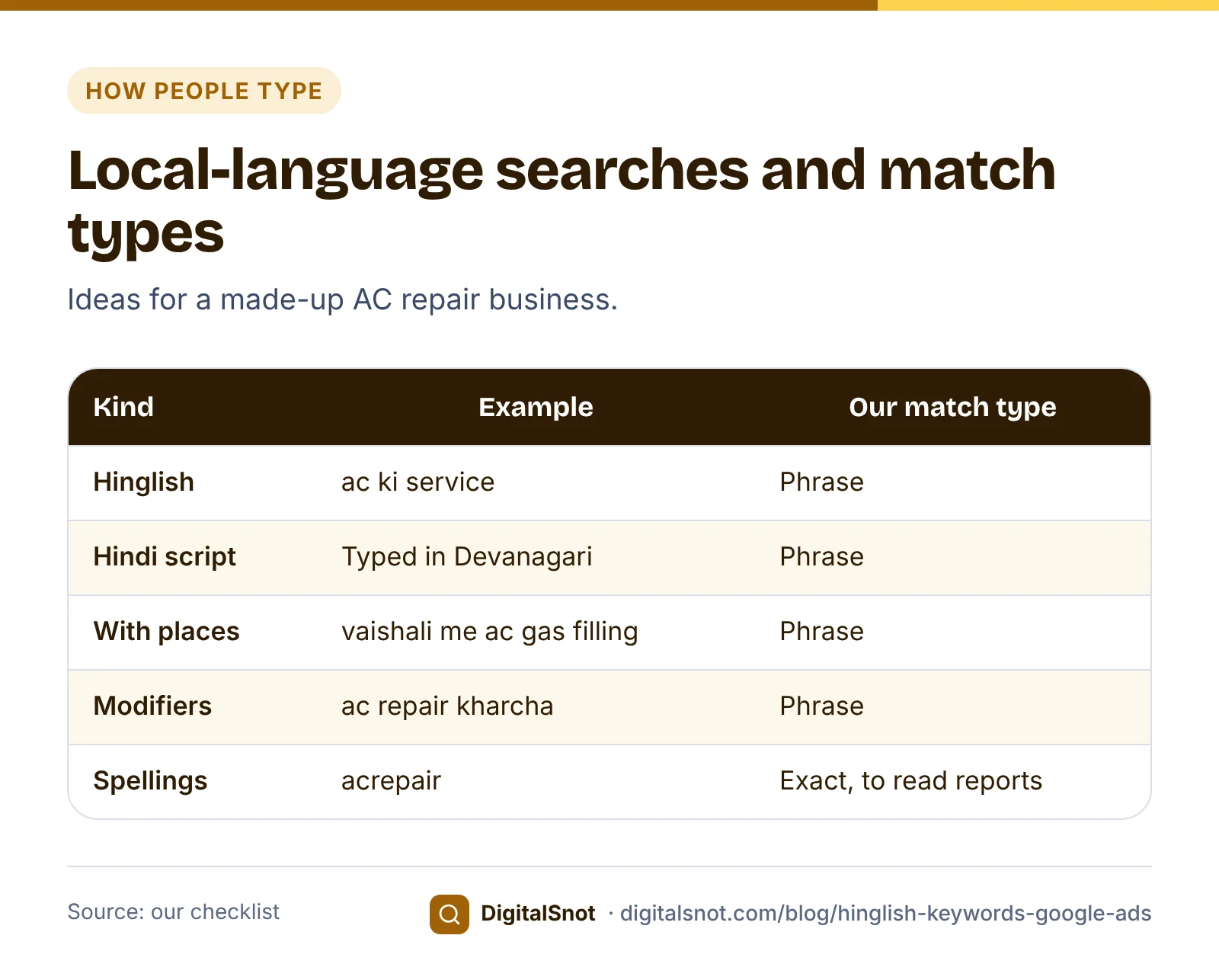
CoolCare AC Repair is a made-up business in Indirapuram, Ghaziabad. Its English campaign bids on "ac repair", "ac service" and "ac gas filling" in Ghaziabad, Indirapuram and Vaishali. The owner put those three services, the three places and the business type, home services and repairs, into the Hinglish Keyword Expander. It gave 32 ideas in five groups, each with a suggested match type:
- Hinglish: "ac ki service" and "ac theek karna".
- Hindi in Devanagari: "एसी रिपेयर" and "एसी सर्विस".
- With places: "ac repair indirapuram", "vaishali me ac gas filling" and ten more.
- Modifiers: "ac repair kharcha", "ac gas filling kahan hai" and "ac service near me", among others, with "sasta" marked as a word to keep only if you compete on price.
- Misspellings and spacing: "acrepair", "acservice" and "ac thik karna", as exact match, mainly for reading the search terms report.
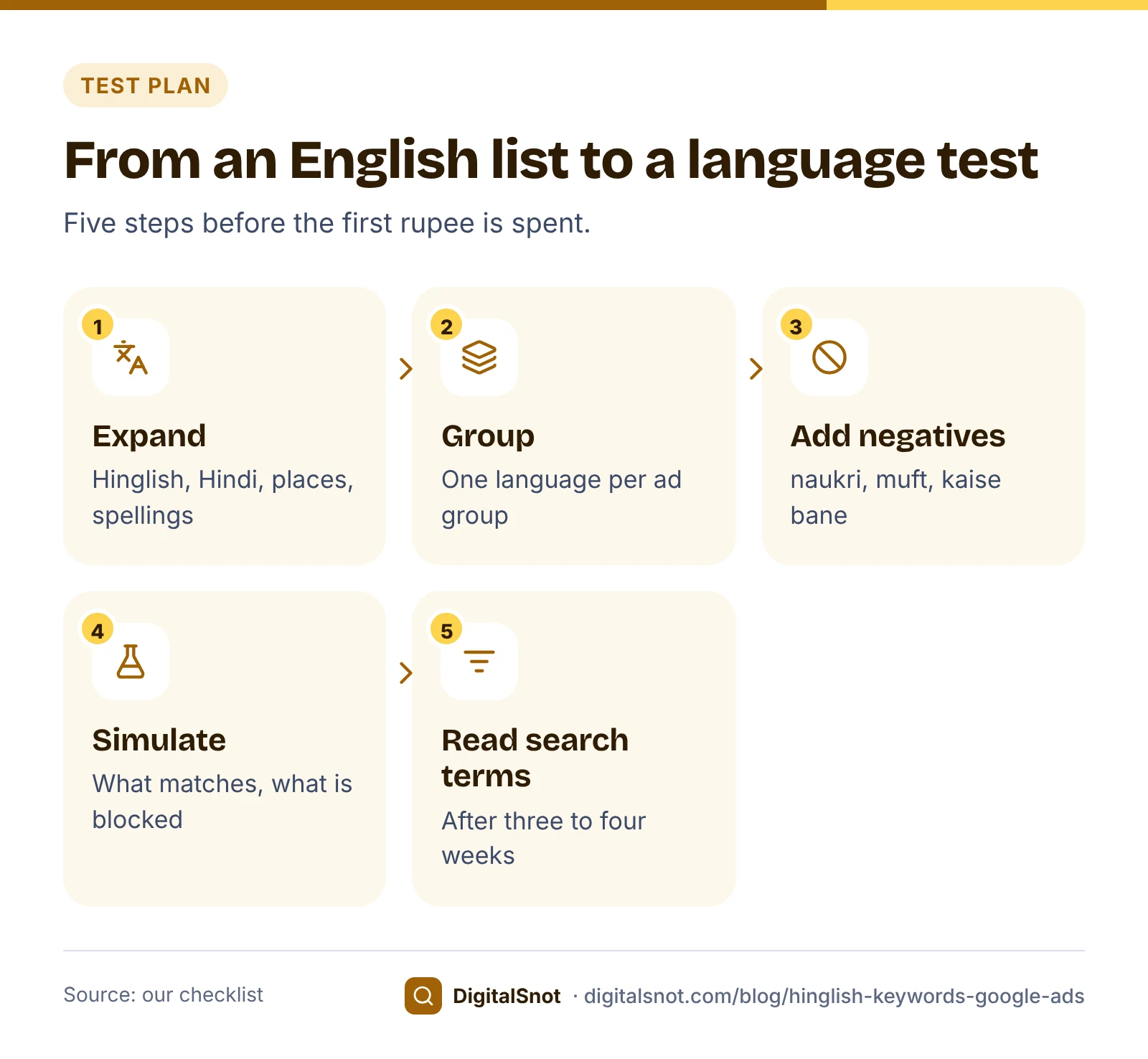
It also listed 35 negative ideas in Hinglish and Hindi, such as "naukri", "bharti", "muft", "kaise bane" (how to become one) and "gharelu upay" (home remedy), plus a few words to check first because they cut both ways. The expander uses a small built-in dictionary and simple rules, not AI or search volumes, and runs in your browser. So these are ideas to test, not proof that anyone searches them.
For the English keywords, the Keyword Theme Grouper turned the list into tight ad groups by service and city, and set words such as jobs and course aside as negative ideas. The Hinglish and Hindi ideas stayed in their own ad groups, as the expander's Google Ads Editor file already arranges them.
Before adding anything, the owner pasted the keywords, the negatives and a list of searches customers might type into the Keyword Match Type Simulator. Phrase match "ac ki service" would match "ac ki service kitne ki hai", the Hindi keyword "एसी रिपेयर" would match "एसी रिपेयर गाजियाबाद", and the negative "course" would block "ac repair course". "ac theek karne wala" matched none of the keywords under the simulator's word-by-word rules. The simulator says plainly that it cannot see synonyms, other languages or Hinglish, so Google may still match that search through broad match. Only the search terms report will tell.
Write ads in the language people search in
A Hindi keyword with an English ad is only half a test. If some of your customers search in Hindi, write a Hindi ad for that ad group, and make sure the page it opens explains the offer in Hindi too, so people who click can act on it. With no language setting in Search campaigns, the language you write the ad in is the part you control.
For Hinglish ad groups, think about the reader. Google's editorial policy does not allow ads without commonly accepted spelling, so never copy misspelt searches into headlines. Our suggestion is to write those ads in plain English or in Hindi, and let the keywords carry the Hinglish.
A few more suggestions of ours for local-language ad groups:
- Name the area in the ad's own language: "इंदिरापुरम" in a Hindi ad, "Indirapuram" in an English one.
- Use the words customers use for timing and price, such as "same day" or "आज ही".
- Have someone who writes Hindi every day read the ad; machine translation often reads stiffly.
Our responsive search ads guide covers headlines, descriptions and pinning for any language.
Test it properly
A local-language test needs a clean set-up, or you cannot read the result:
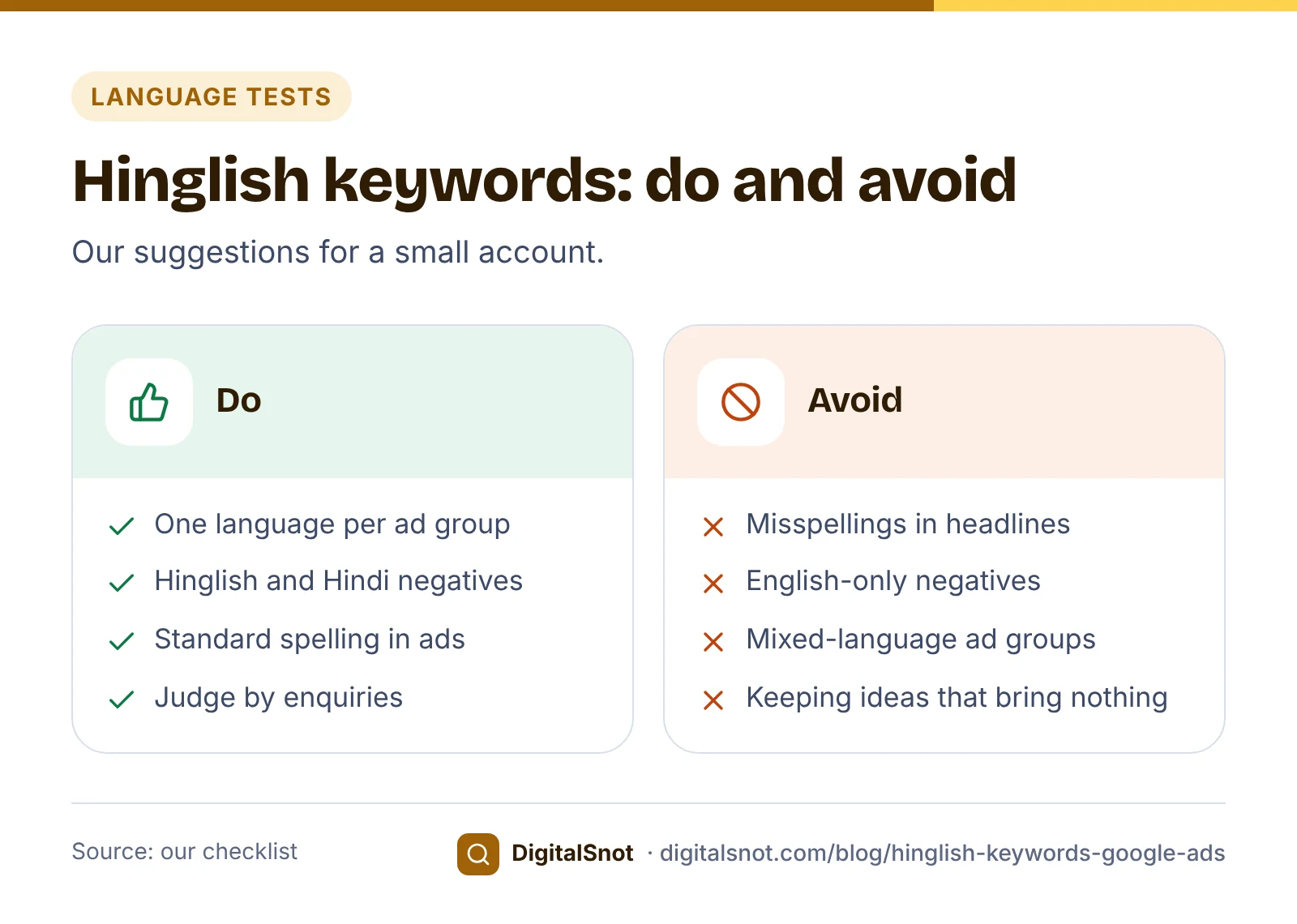
- One language per ad group. Hinglish, Hindi and English keywords in separate ad groups, each with its own ads, so the report shows which language brought the enquiries.
- Phrase match to start. The expander suggests phrase match for most groups and exact for misspellings. That is our suggestion, so adjust it to your budget; our post on match types explains the choice.
- Negatives before launch. Add the Hinglish and Hindi negatives that suit you, and check they do not block your own keywords.
- Read the search terms report after three to four weeks. If your English keywords already brought the same Hinglish searches, the extra keywords add nothing. Our post on search terms and wasted spend shows how to read it.
- Judge by enquiries, not clicks. Cheap clicks only help if they turn into calls or bookings.
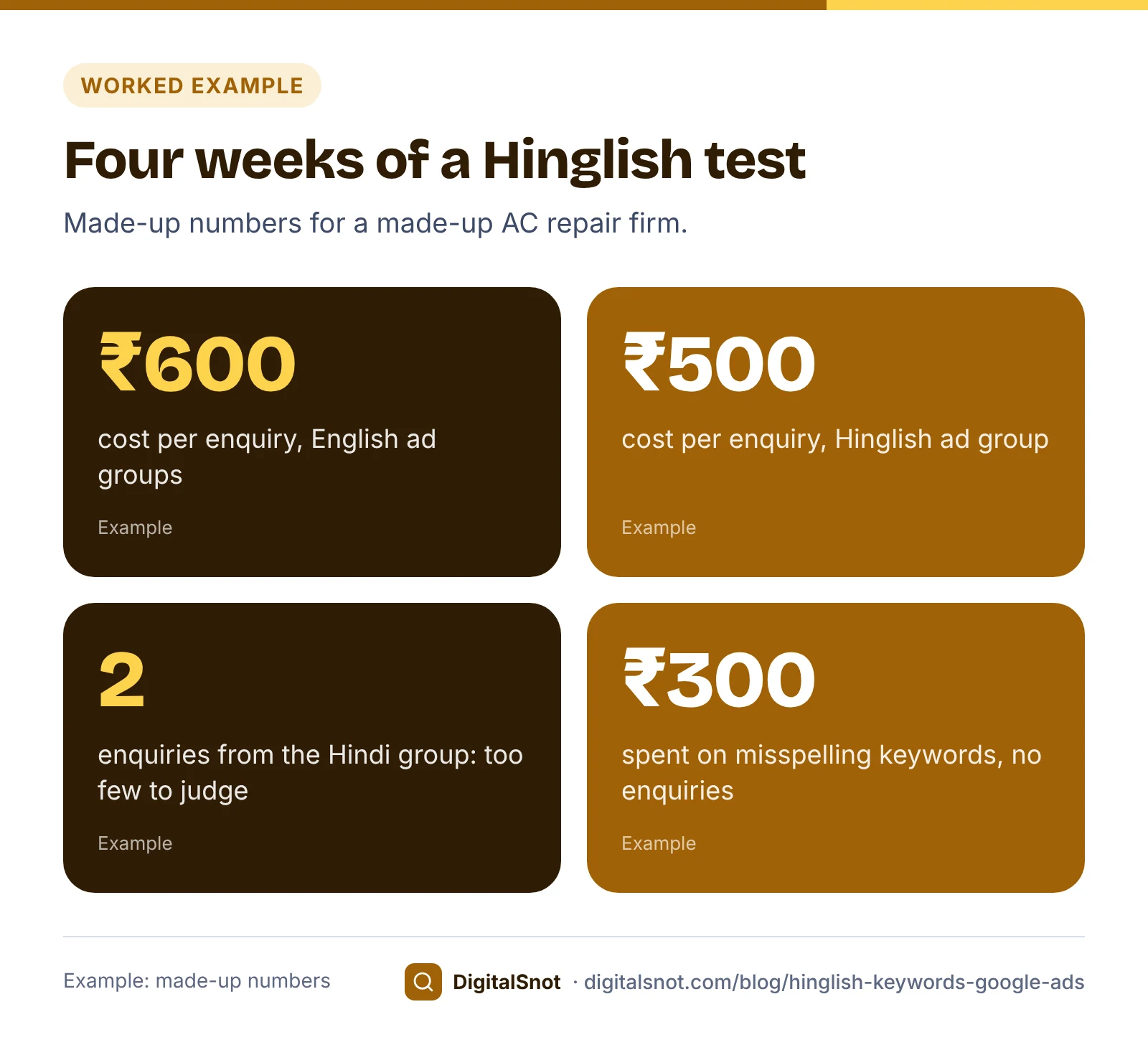
After four weeks, CoolCare's made-up numbers looked like this. The Hinglish ad group brought 12 enquiries for ₹6,000, about ₹500 each, against ₹600 each in the English groups. The Hindi group brought 2 enquiries for ₹2,000, too few to judge, so it kept running at a low budget. The misspelling keywords spent ₹300 with no enquiries, and the search terms report showed the English keywords already caught those searches, so they were paused.
Mistakes to avoid
- Assuming Hinglish works like Hindi. Google does not say how it treats Hindi in Roman letters; test it.
- Misspellings in ad text. Use them as keywords if at all, never in headlines.
- English-only negatives. "jobs" does not block "naukri".
- Mixing languages in one ad group. You cannot tell which one worked.
- Keeping ideas that bring nothing. Every idea is a test; remove what does not bring enquiries.
Your next step
Put your main services, city and areas into the Hinglish Keyword Expander, and pick the groups that fit how your customers talk. Test the keywords and negatives in the Keyword Match Type Simulator, then launch them in their own ad groups. To find the phrases customers use in the first place, see our local keyword research guide. If you are weighing up broader matching, read our post on AI Max for Search first. More tools are on our Google Ads tools page.
Free tools in this article
- Hinglish Keyword Expander Turn English service keywords into Hinglish, Hindi and misspelt keyword ideas and negatives to test.
- Keyword Theme Grouper Turn a keyword list into themed ad groups, Performance Max search themes and negatives.
- Keyword Match Type Simulator Test broad, "phrase" and [exact] keywords and negatives against the searches people might type.
By the numbers
Frequently asked questions
Do I need Hinglish keywords if I already use broad match?
Maybe not all of them. Close variants, which include misspellings and synonyms, apply to every match type, and broad match can reach related searches. Add Hinglish ideas in their own ad group and check the search terms report: if your English keywords already bring those searches, you do not need the extra keywords.
Does Google treat Hinglish as English or as Hindi?
Google does not say. Its help pages explain that it uses the language of the search, the person's settings and other signals to work out which languages they understand, but not how it treats Hindi typed in Roman letters. Test Hinglish keywords and read the search terms report.
Do I still set a language in my Search campaign?
No. Google says that from September 2026 campaign language settings are no longer needed for Search campaigns and the Search part of Performance Max, and it matches ads to the languages people understand. Write each ad in the language of the people you want to reach.
Should my ad be in Hindi if I add Hindi keywords?
If some of your customers search in Hindi, test a Hindi ad in that ad group, with a landing page they can read. Hindi is a supported ad language. Keep each language in its own ad group so you can see which one brings enquiries.
Do English negative keywords block Hinglish words?
No. Negative keywords do not match close variants or other expansions, so "jobs" does not block "naukri" and "free" does not block "muft". Add the Hinglish and Hindi forms you want to block, and check they do not block your own keywords.
Can I use misspellings in my ad text?
No. Google's editorial policy does not allow ads without commonly accepted spelling. Use misspellings as keywords if at all, mainly to read the search terms report, and write the ad itself with standard spelling.
Sources
Every figure and claim in this article comes from the sources below. We checked each one when writing and link to the original so you can read it yourself. Credit belongs to the authors and publishers listed. How we write and check our articles.
-
1
About language targeting
Google Ads Help · How Google judges the languages a person understands; campaign language settings no longer needed for Search from September 2026.
-
2
About available languages in the Google Ads interface
Google Ads Help · Hindi and other Indian languages available for ad language targeting.
-
3
Unsupported language
Advertising Policies Help · Ads in a language Google Ads does not support are not allowed.
-
4
Editorial
Advertising Policies Help · Ads need commonly accepted spelling.
-
5
Keyword close variants
Google Ads Help · Every match type can match close variants, including misspellings and synonyms.
-
6
About keyword matching options
Google Ads Help · Broad match can reach related searches without your keyword's words.
-
7
About negative keywords
Google Ads Help · Negative keywords do not match close variants or other expansions.
-
8
About the search terms report
Google Ads Help · The real searches that triggered your ads.
Want a second pair of eyes?
Tell us about your site. We reply within one business day.
Talk to us Try our free tools