Responsive search ads that pass review and earn clicks
How to write a Google Ads responsive search ad: the headline and description limits, what ad strength does and does not tell you, when to pin, the editorial rules and how to test.
On this page (11 sections)
- 1The limits: headlines, descriptions and paths
- 2Give every headline a different job
- 3Ad strength: what it tells you and what it does not
- 4Pinning: when it helps and what it costs
- 5Pass review the first time
- 6Put the extras in assets, not in the ad text
- 7Test with the asset report, not guesswork
- 8A worked example: a home cleaning service in Hyderabad
- 9Mistakes to avoid
- 10Your next step
- 11Sources
Responsive search ads are the standard text ads in Google Ads Search campaigns. You write a set of headlines and descriptions, and Google puts them together in different ways for each search. That gives you plenty of room, and plenty of ways to waste it: fifteen headlines that say the same thing, a pin that stops all testing, or a phone number that gets the ad disapproved.
This post shows you how to write an ad that passes review, how to read ad strength without chasing it, when pinning is worth its cost, and how to replace weak headlines using numbers instead of guesses.
The limits: headlines, descriptions and paths
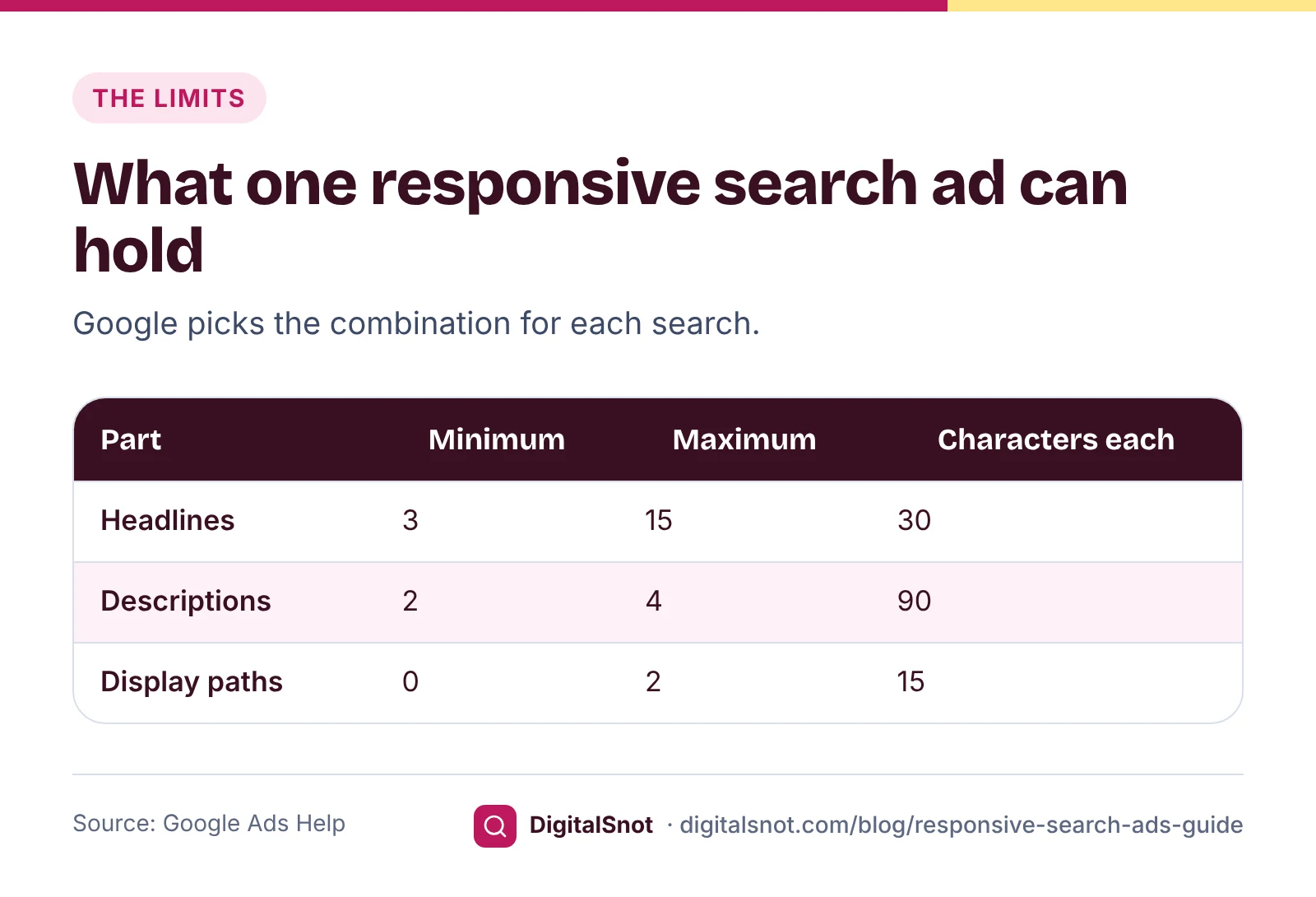
Google's page about responsive search ads sets the limits. Each ad needs at least 3 headlines and 2 descriptions, and takes up to 15 headlines and 4 descriptions. A headline can have up to 30 characters and a description up to 90. The two optional display paths, the words shown after your domain in the ad's web address, take up to 15 characters each.
Google decides which headlines and descriptions to show for each search, and in which order. So every headline has to make sense next to any other headline, and every description has to stand on its own.
How many should you write? Google's page on setting up your ads for success suggests at least 5 headlines that do not repeat the same or similar phrases, a keyword in 2 of them and at least 3 headlines without your keywords. More distinct headlines give Google more combinations to try. Our suggestion is to fill most of the 15 headline slots, and all 4 descriptions, with lines that each say something new.
Give every headline a different job
The quickest way to write a full set is to plan headlines by job, rather than writing fifteen versions of your service name. A plan that suits most local businesses:
- Service and place (3 or 4): "Deep Cleaning in Gachibowli", "Home Cleaning Hyderabad". These carry your keywords.
- Offer or price (2 or 3): "2BHK Deep Clean from ₹3,499", "Free Re-clean Within 48 Hours".
- Proof (2 or 3): "Trained, Verified Staff", "Serving Hyderabad Since 2019". Only what your website can show.
- Call to action (2 or 3): "Book a Slot on WhatsApp", "Get a Fixed Quote Today".
- Benefit (2 or 3): "Same-Week Slots Available", "Fixed Price, No Extra Charges".
Keep the focus on what the customer gets: a price, an offer, a time saved and a specific next step. Whatever the ad promises must also be on the landing page. Write four descriptions that can each stand alone: one about the service, one about the offer, one with proof and one that ends with a clear next step.
Draft the whole set in the Google Ads Ad Copy Checker. It counts characters as you type, shows a rough mobile and desktop preview you can shuffle, and runs our checklist: limits, minimum counts, duplicates, missing keywords, headlines that all say the same thing, a call to action, an offer and policy flags. Then copy the text or download a CSV for Google Ads Editor. The checklist is ours, not Google's ad strength.
Ad strength: what it tells you and what it does not
Ad strength is the rating Google shows for each responsive search ad, while you write it and in the Ads table. Google's definition says it measures the relevance, quantity and diversity of your ad's content. Google's advice for a better rating is to add more headlines and descriptions, make them unique, include popular keywords and pin only when needed.
It helps to know what ad strength is not:
- Not a gate. Google's page about ad strength for responsive search ads says ad strength does not determine whether your ad is eligible to serve. An ad with a low rating can still run; a disapproved ad cannot.
- Not Quality Score. Quality Score is a separate diagnostic for each keyword. Our post on Quality Score explains its three parts.
- Not a result. It rates your text before anyone sees it. It does not count clicks or enquiries.
Google's best practice is at least two responsive search ads with Good or Excellent ad strength in each ad group. Use the rating as a writing prompt: a low rating usually wants more headlines or more variety. Then judge the ad by what it brings in.
Pinning: when it helps and what it costs
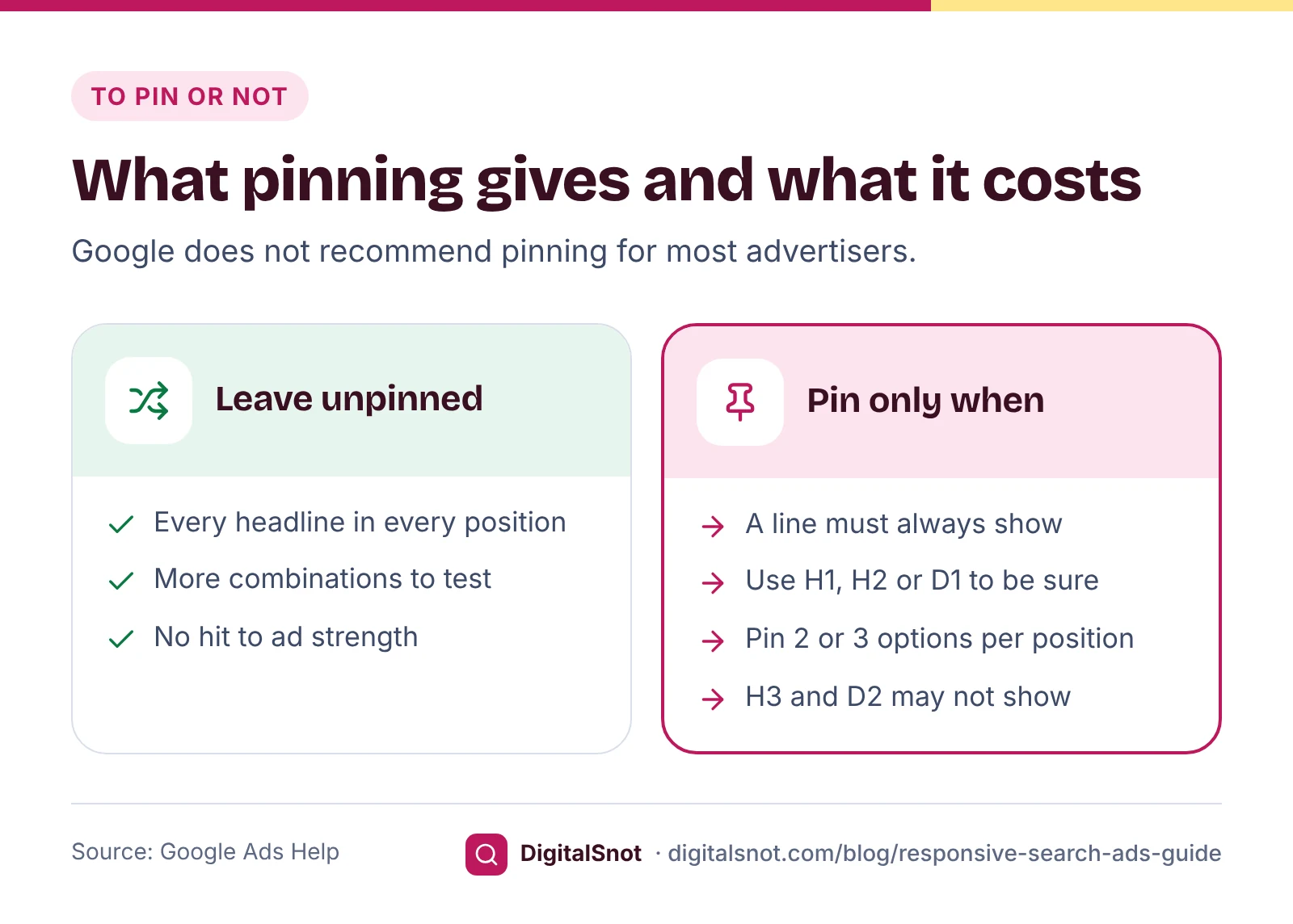
Pinning fixes a headline or description to one position. It is useful for text that must show every time, such as a line your industry requires. But it has a cost. Google says pinning reduces the number of headlines or descriptions that can show, limits testing and is not recommended for most advertisers, and its ad strength page says pinning can affect the rating.
- Text pinned to headline position 1 or 2, or description position 1, always shows. Text pinned to headline position 3 or description position 2 is not guaranteed to show in every ad.
- If you must pin, pin 2 or 3 different options to the same position, so Google can still choose between them.
- Do not pin near-identical lines to one position. Google says that blocks testing and lowers ad strength.
Our suggestion for a small account: pin nothing at first. If a line truly must always appear, pin two versions of it to headline position 1 and leave everything else free.
Pass review the first time
Every new or edited ad is reviewed. Google's page about the ad review process says most ads are reviewed within one business day, though some take longer. These editorial rules are the easiest to break by accident:
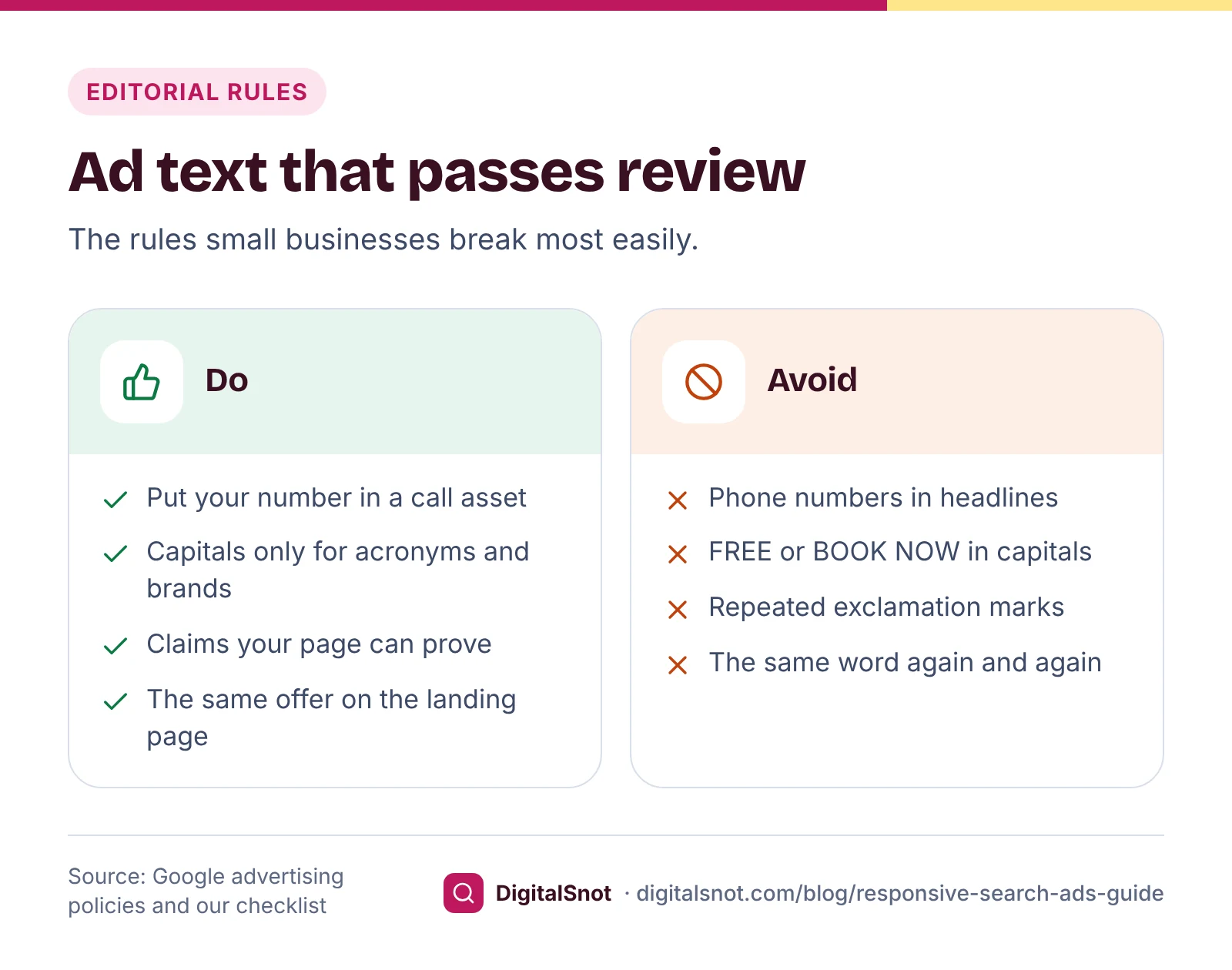
- Phone numbers in the text. Google's policy on phone numbers in ad text does not allow them. Add your number as a call asset instead.
- Capitals used for effect. "FREE" or "BOOK NOW" can be disapproved under the capitalisation rule, although acronyms, coupon codes and brand names can be allowed.
- Punctuation and symbols. Repeated exclamation marks and decorative symbols fall under punctuation and symbols.
- Repetition. The same word several times in a row breaks the repetition rule.
Paste your lines into the Google Ads Policy Pre-check before you publish. It highlights capitals, repeated punctuation, symbols, phone numbers, "#1" and "best" claims and guarantees, with a rewrite where the fix is mechanical. It checks the text only; Google's review also looks at your landing page and decides. If an ad is already disapproved, our post on disapproved ads and suspended accounts covers what to check before you appeal.
Put the extras in assets, not in the ad text
Your phone number, extra services and offers fit better in assets that show around the ad. In the Google Ads Assets Builder, fill in a short brief and edit draft sitelinks, callouts, structured snippets, prices and a promotion against Google's limits: sitelink text up to 25 characters with two description lines of up to 35, callouts up to 25, and structured snippets with a header from Google's list and 3 to 10 values. Sitelinks show only when there are at least 2, and Google recommends at least 4 sitelinks and 4 callouts. Google still decides when assets show: only when it predicts they will help and the ad ranks high enough.
Test with the asset report, not guesswork
Google used to label each asset Best, Good or Low. Its page on campaign level asset reporting says that column has been deprecated, because full statistics for each asset are now available for dates from 5 June 2025. Each headline and description now has its own impressions, clicks and conversions.
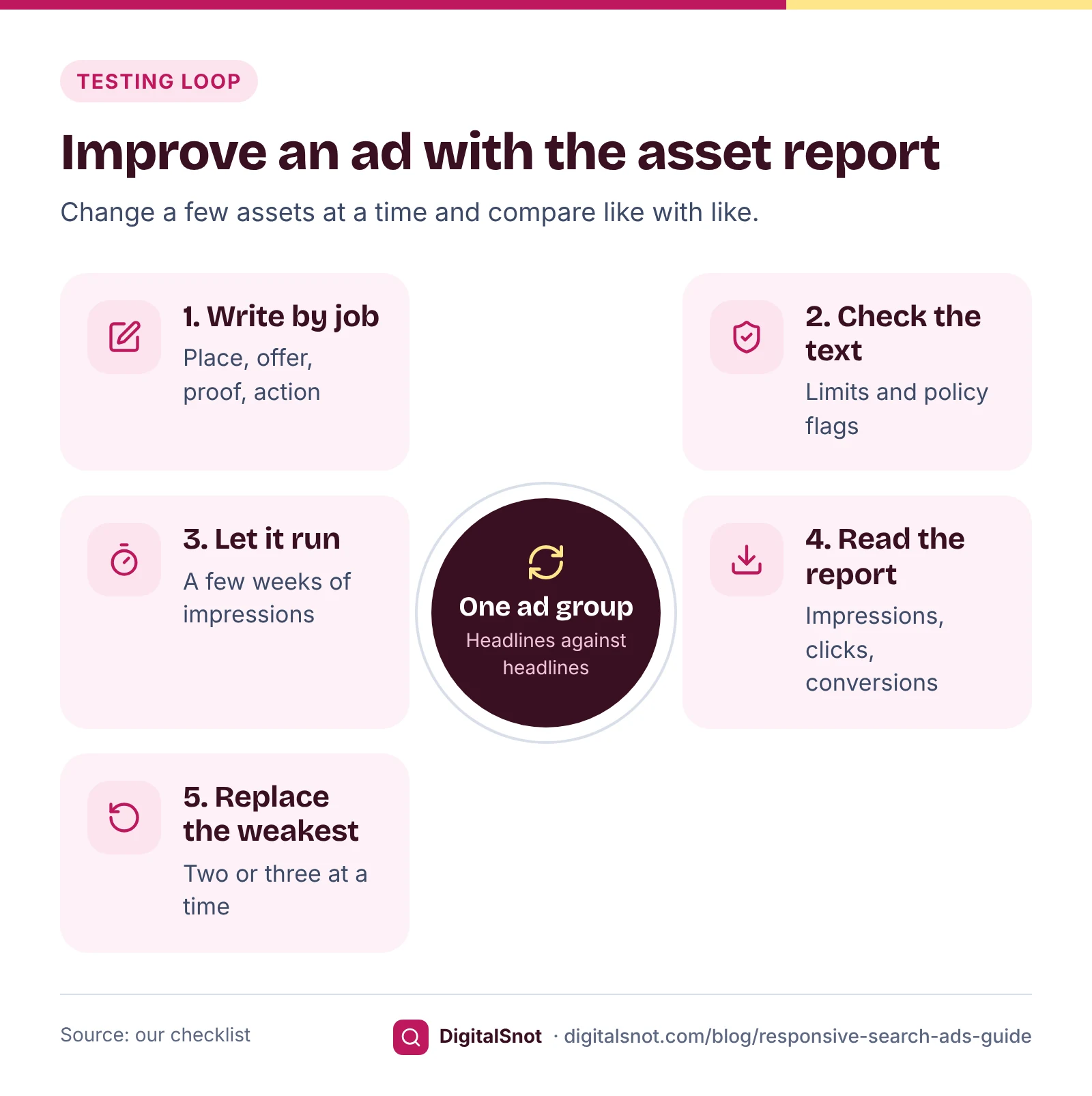
Read those numbers with care. Google counts an impression for every asset shown, so asset rows do not add up to the ad's total. Its page on the ad-level asset report adds that rates for a single asset are only a guide, because each asset was shown alongside others. Compare headlines with headlines in the same ad group.
In Google Ads, open Ads and select View asset details under the ad, add Impr., Clicks and Conversions, and download the table. Drop it into the RSA Asset Performance Analyzer. For each ad group it ranks headlines and descriptions by our measure: conversions per 1,000 impressions once the assets of that type have 30 or more conversions, otherwise click-through rate. It waits for 300 impressions before judging an asset, marks the weakest ones to replace and the ones Google rarely shows, checks pins, near-duplicates and policy flags, and gives fill-in ideas. The file stays in your browser.
Then replace only the weakest two or three assets at a time, note the date, and leave the ad for a few weeks before you judge again.
A worked example: a home cleaning service in Hyderabad
Sparkle Home Cleaning in Gachibowli, Hyderabad, is a made-up business with one Search campaign. Its first ad had six headlines: four versions of "Home Cleaning Hyderabad", one in capitals with two exclamation marks, and one with the owner's mobile number. The ad was disapproved for the phone number.
The owner rebuilt it in three steps:
- Rewrite: 14 headlines planned by job, as in the list above, and four descriptions, checked in the Ad Copy Checker. The capitals became "Trained, Verified Staff".
- No pins: nothing in the ad had to show every time.
- Assets: the number moved to a call asset, with four sitelinks (deep cleaning, kitchen, sofa and prices) and four callouts from the Assets Builder.
Six weeks later, the RSA Asset Performance Analyzer read the asset report like this. The numbers are made up, and the verdicts are our measure.
| Headline | Impr. | Clicks | Conv. | Verdict |
|---|---|---|---|---|
| 2BHK Deep Clean from ₹3,499 | 4,100 | 260 | 21 | Top performer |
| Deep Cleaning in Gachibowli | 3,800 | 205 | 14 | Top performer |
| Home Cleaning Hyderabad | 3,600 | 190 | 12 | Average |
| Same-Week Slots Available | 2,900 | 115 | 4 | Weakest |
| Eco-Friendly Products Used | 1,800 | 50 | 1 | Weakest |
| Serving Hyderabad Since 2019 | 140 | 4 | 0 | Rarely shown |
The price headline earned the most enquiries, so the owner wrote two more price lines to replace the two weakest headlines, and swapped the rarely shown one for "Deep Cleaning in Kondapur", a nearby area the business serves. The next check is in four to six weeks.
Mistakes to avoid
- Fifteen versions of one headline. They count towards the limit but give Google nothing new to test.
- Chasing Excellent. Ad strength rates the text, not the enquiries.
- Pinning everything. A fully pinned ad shows almost the same text every time, so there is little left to test.
- Offers that are not on the page. If the ad says ₹3,499, the landing page must too.
- Judging assets after a few days. Wait for enough impressions, and compare like with like.
Your next step
Open your busiest ad group and write a fresh set of headlines by job in the Ad Copy Checker. Move your phone number and extras into assets with the Assets Builder. After a few weeks, download the asset report and let the RSA Asset Performance Analyzer show you what to replace. Find more on our Google Ads tools page, or talk to us about your account.
Free tools in this article
- Google Ads Ad Copy Checker Write RSAs and Performance Max text with live counts, a preview, policy flags and an Editor CSV.
- Google Ads Policy Pre-check Find capitals, symbols, phone numbers and claims in your ad text that may get it disapproved.
- Google Ads Assets Builder Write sitelinks, callouts, snippets, prices, promotions and call assets with live counts and checks.
- RSA Asset Performance Analyzer Rank responsive search ad headlines and descriptions from your asset report: keep, test or replace.
By the numbers
- the most headlines and descriptions one responsive search ad can hold
- 15 and 4
- Source: Google Ads Help
Frequently asked questions
How many headlines and descriptions can a responsive search ad have?
Google requires at least 3 headlines and 2 descriptions, and allows up to 15 headlines of 30 characters and 4 descriptions of 90 characters. The two display paths take up to 15 characters each. Google suggests at least 5 headlines that do not repeat the same or similar phrases.
Does ad strength affect whether my ad shows?
Google says ad strength does not determine whether an ad is eligible to serve. It rates the relevance, quantity and diversity of your text. Use it as a writing prompt, and judge the ad by clicks and enquiries.
Should I pin headlines in a responsive search ad?
Only when a line must always show. Google says pinning reduces the headlines or descriptions that can show and is not recommended for most advertisers. If you pin, pin 2 or 3 options to the same position; positions H1, H2 and D1 always show, while H3 and D2 are not guaranteed.
Why was my ad disapproved for a phone number?
Google's editorial policies do not allow phone numbers in ad text. Remove the number from the headlines and descriptions and add it as a call asset instead, then save the ad so it is reviewed again.
Where did the Best, Good and Low labels for my headlines go?
Google has deprecated the performance label column for responsive search ad assets, because full statistics for each asset are available for dates from 5 June 2025. Add impressions, clicks and conversions to the asset report and compare headlines with headlines in the same ad group.
How long should I wait before replacing headlines?
Our suggestion is to wait until each headline has a few hundred impressions, often a few weeks for a small account. Replace two or three of the weakest at a time and note the date, so you can tell which change helped.
Sources
Every figure and claim in this article comes from the sources below. We checked each one when writing and link to the original so you can read it yourself. Credit belongs to the authors and publishers listed. How we write and check our articles.
-
1
About responsive search ads
Google Ads Help · Headline and description limits, and which pinned positions always show.
-
2
Set up your ads for success
Google Ads Help · At least 5 distinct headlines, a keyword in 2 and at least 3 without keywords.
-
3
Ad Strength: Definition
Google Ads Help · Ad strength measures the relevance, quantity and diversity of an ad's content.
-
4
About Ad Strength for responsive search ads
Google Ads Help · Ad strength does not decide eligibility to serve; advice on pinning and at least two ads with Good or Excellent ad strength.
-
5
About campaign level asset reporting for responsive search ads
Google Ads Help · The performance label column is deprecated; full asset statistics from 5 June 2025.
-
6
About the ad-level asset report for responsive search ads
Google Ads Help · Rates for a single asset are directional, because assets show together.
-
7
About the ad review process
Google Ads Help · Most ads are reviewed within one business day.
-
8
Phone number in ad text
Advertising Policies Help · Phone numbers are not allowed in ad text.
-
9
Capitalisation
Advertising Policies Help · Capitals used for effect can be disapproved.
-
10
Punctuation and symbols
Advertising Policies Help · Repeated punctuation and decorative symbols.
-
11
Repetition
Advertising Policies Help · Repeating words or phrases in ad text.
Want a second pair of eyes?
Tell us about your site. We reply within one business day.
Talk to us Try our free tools