Google Ads Quality Score: what you can improve and what you cannot
What Google Ads Quality Score really measures, how to read its three parts, what to change for each one, and the things that will not move it, including the "—".

On this page (8 sections)
Google Ads Quality Score gets more attention than it deserves, and often the wrong kind. Some advertisers chase a 10 as if it were a goal. Others ignore the score completely and miss what it is telling them about their ads and pages. Used properly, it is a quick way to find which part of a campaign needs work.
This post explains what the score measures, how to read its three parts, what Google suggests for each one, and the things you cannot change however hard you try.
What Quality Score is, and what it is not
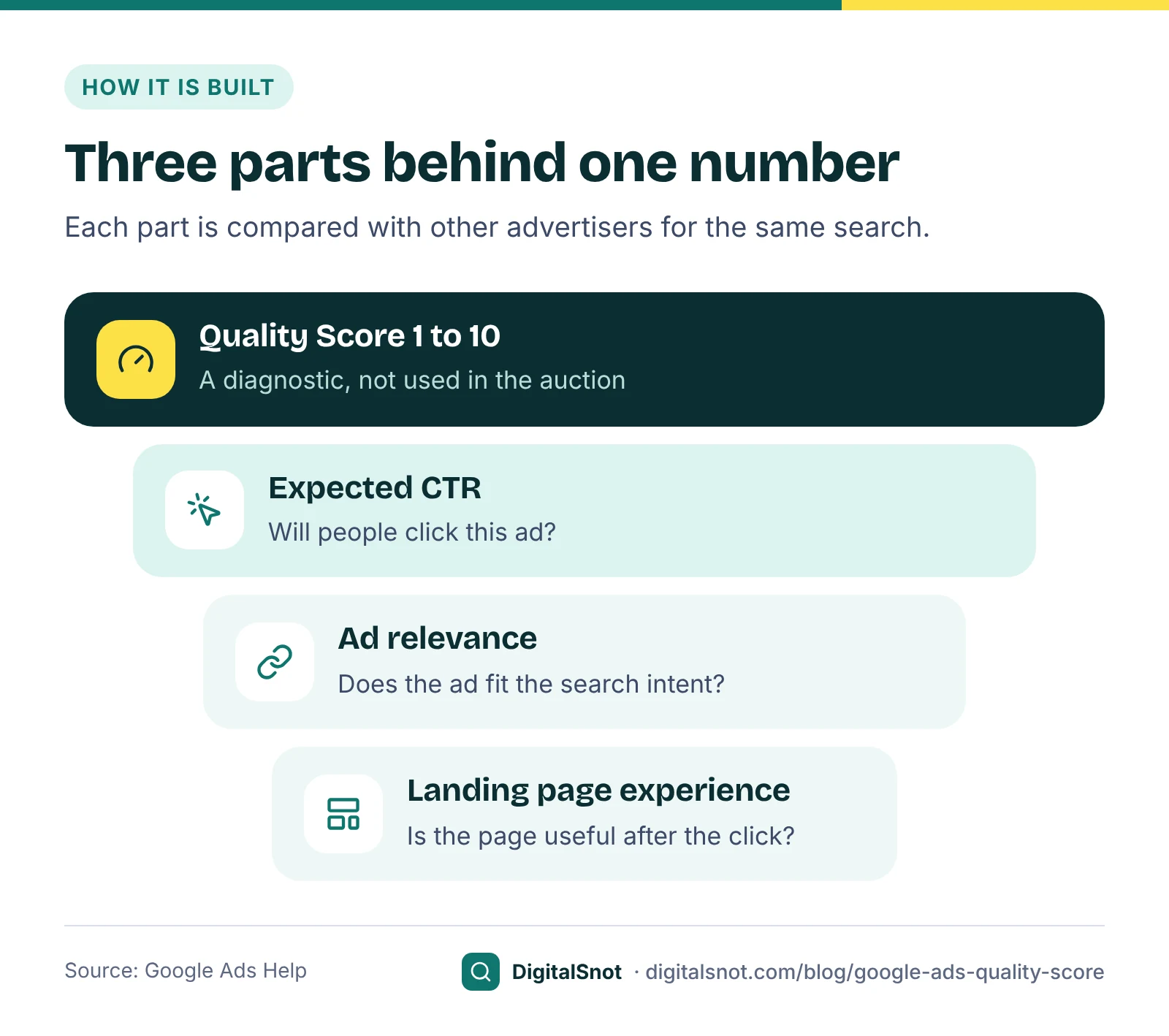
Google's page about Quality Score for Search campaigns calls it a diagnostic tool. It is a rating from 1 to 10 for each keyword, based on three parts:
- Expected clickthrough rate: how likely people are to click your ad when it shows for that keyword.
- Ad relevance: how closely your ad matches the intent behind the search.
- Landing page experience: how relevant and useful your page is to people who click your ad.
Each part is rated above average, average or below average. The rating compares you with other advertisers whose ads showed for the exact same search over the last 90 days.
The same page is clear that Quality Score is not an input in the ad auction. Google's page about Ad Rank explains that each auction uses your bid and auction-time measures of quality, such as expected CTR, ad relevance and landing page experience, among other factors. So the score in your account is a summary of how those parts have gone, not the number that decides your position. Google's page about ad quality puts it plainly: use Quality Score to find low-quality ads, rather than trying to raise the number itself.
Find the weak part, not the low number
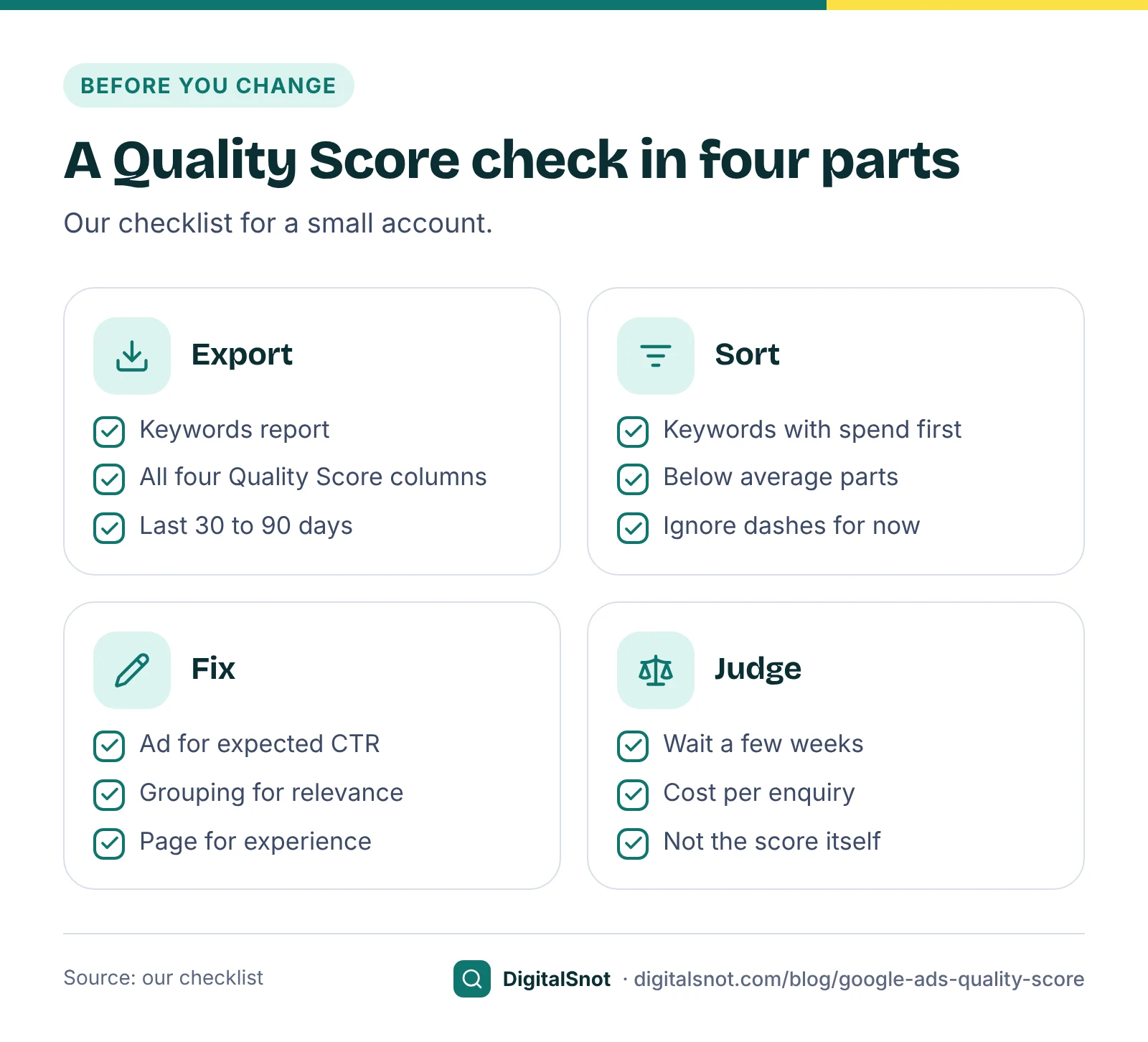
In Google Ads, open Keywords, select the columns icon and add Quality Score, Exp. CTR, Ad relevance and Landing page exp. from the Quality Score section. Then download the table.
A list of hundreds of keywords is hard to read by eye. Drop the file into the Quality Score Checker. It shows how your scores spread across keywords and spend, a spend-weighted average (our measure), which of the three parts is below average most often, and Google's advice for that part. A worst-first table and an ad group summary show where to start, and you can download a CSV with a "what to fix" column for every keyword. The file is read in your browser and not uploaded.
Start with keywords that have real spend. A score of 3 on a keyword that cost ₹200 last month matters less than a 5 on one that cost ₹20,000.
What to change for each part
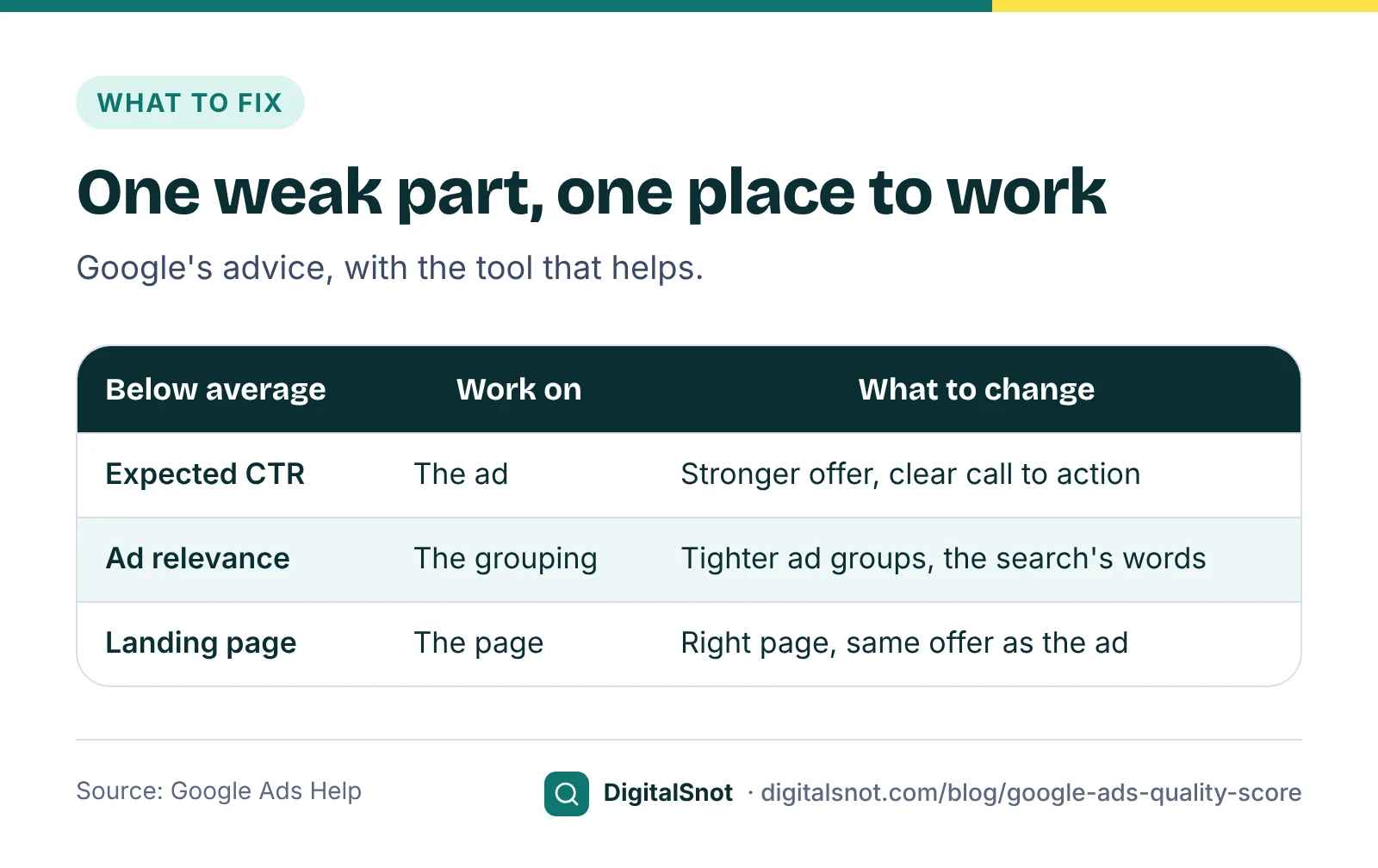
Google's page on using Quality Score to improve performance gives advice for each part. Here it is in plain words, with the tools that help.
Expected CTR below average: work on the ad
Make the offer in your ad more compelling, make sure the details match what the keyword is after, show what makes you different and end with a clear call to action. Google also notes that a very specific ad can get fewer clicks but more conversions, so judge the change by enquiries, not clicks alone.
Write and check your headlines in the Google Ads Ad Copy Checker. It counts characters as you type, flags duplicates, missing keywords and headlines that all say the same thing, and shows a rough preview. Its checklist is ours, not Google's Ad Strength.
Ad relevance below average: work on the grouping
Google suggests using the language of the search in your ad, and splitting ad groups that hold keywords one ad cannot answer. If "modular kitchen" and "full home interiors" share one ad group, one ad cannot speak to both. Give each theme its own ad group with ads that use its words. The Keyword Theme Grouper can split a mixed keyword list into themed ad groups for you.
Landing page experience below average: work on the page
Google's advice is that the page should give people what the ad promised, with the same message from ad to page. In practice: send each ad group to the page about that exact service, not the home page, and show the same offer and price. We would add a page that works well on a phone and loads quickly; our post on checking website speed covers that part.
The Landing Page Message-Match Checker fetches your page and compares it with your keyword and each line of your ad: the keyword in the title, H1 and opening text, the same price or offer, the call to action, form length and mobile set-up. It is our checklist for these two parts, not Google's own score.
What you cannot improve, or need not chase
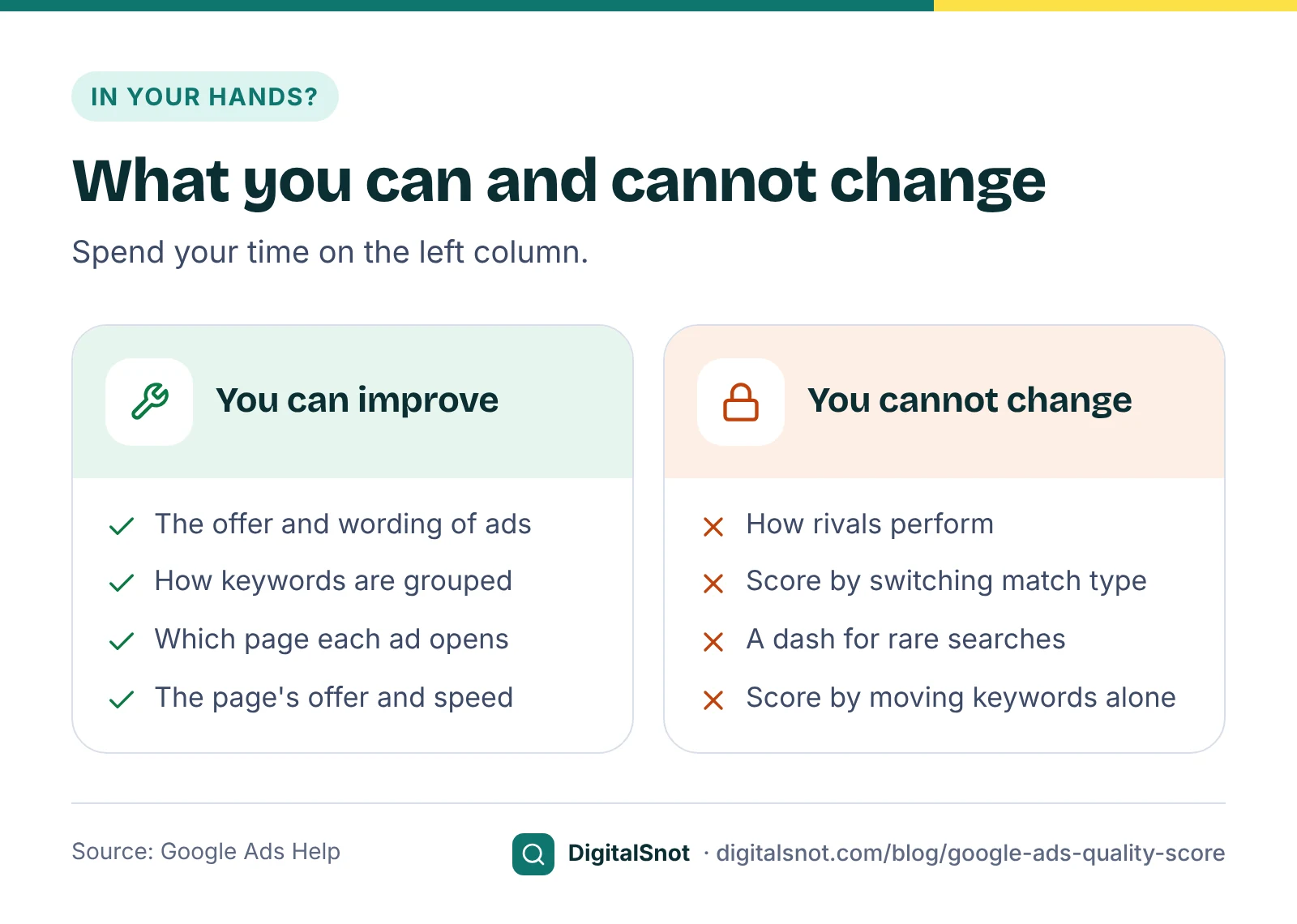
- Other advertisers. Each part is rated against advertisers who showed for the same search. If they improve, your rating can fall even when nothing on your side changed.
- Match types. Google says Quality Score is based on past impressions for exact searches of your keyword, so changing a keyword's match type will not change its score.
- Account structure alone. Google's page on what matters for ads quality says moving keywords into new ad groups or campaigns, without changing the ad text or landing page, has no effect on their quality. The move only helps when the new ad group has better-matched ads.
- The "—". A dash means there are not enough searches that exactly match the keyword to work out a score. New keywords start this way. A keyword can have plenty of impressions and still show a dash if few were exact matches. If it gets almost no searches at all, Google suggests Keyword Planner to find keywords more people use.
- A perfect 10. The score is not a key performance indicator. A keyword at 6 that brings enquiries at a cost you can afford is doing its job.
A worked example: an interior design firm in Navi Mumbai
Nest Interiors in Vashi, Navi Mumbai, is a made-up firm with one Search campaign. Here is part of its keywords export, with made-up numbers, as the Quality Score Checker would sort it.
| Keyword | QS | Exp. CTR | Ad relevance | Landing page | Cost last month |
|---|---|---|---|---|---|
| interior designer navi mumbai | 4 | Below average | Average | Below average | ₹18,400 |
| 2bhk interior cost | 3 | Average | Below average | Below average | ₹7,900 |
| modular kitchen vashi | 7 | Average | Above average | Average | ₹6,200 |
| wardrobe design ideas | — | — | — | — | ₹310 |
The biggest spend sits on a keyword with two weak parts. All of these ads sent people to the home page, and the main ad said only "Trusted interior designers". The owner made three changes:
- New ad groups: full home interiors, kitchens and wardrobes, each with its own ads.
- Specific ads: "2BHK interiors from ₹3.5 lakh, free site visit in Navi Mumbai", with a call to action to book the visit.
- Matching pages: a full home interiors page that shows package prices, and the existing kitchen page for the kitchen ad group.
"Wardrobe design ideas" was left alone. It has too few exact searches for a score, and it is an ideas search, better answered by a blog post than an ad. The owner will judge the changes in four to six weeks by cost per enquiry, not by the score.
Patience matters here. Each part is compared over the last 90 days, so a better ad or page shows in the ratings gradually, not the next morning. Changing the ads again every few days makes it impossible to tell which change helped. Make one round of changes per ad group, note the date, and compare the cost per enquiry of the weeks before with the weeks after.
Mistakes to avoid
- Pausing keywords only because the score is low. Check whether they bring enquiries first.
- Stuffing the keyword into every headline. Relevance is about meaning and intent, and the ad still has to read well.
- Sending every ad to the home page. It is the most common cause of a below average landing page rating in small accounts.
- Changing match types to fix the score. It does not move it.
- Averaging scores across the account. A plain average hides where the money goes. Look at the keywords with spend.
Your next step
Download your keywords report with the four Quality Score columns and drop it into the Quality Score Checker. Pick the ad group with the most spend and a below average part, fix that part with the Ad Copy Checker or the Landing Page Message-Match Checker, and leave it a few weeks before you judge. If your keywords match searches you did not expect, read our post on broad, phrase and exact match first. Find more on our Google Ads tools page, or talk to us about your account.
Free tools in this article
- Quality Score Checker Drop a keywords export to see Quality Score by spend, each keyword's weakest part and how to fix it.
- Google Ads Ad Copy Checker Write RSAs and Performance Max text with live counts, a preview, policy flags and an Editor CSV.
- Keyword Theme Grouper Turn a keyword list into themed ad groups, Performance Max search themes and negatives.
- Landing Page Message-Match Checker Check that a landing page matches the keyword, the ad text and its offer, side by side.
By the numbers
- the Quality Score scale, reported for each keyword in Search campaigns
- 1 to 10
- Source: Google Ads Help
- the period over which each part is compared with other advertisers for the exact same search
- 90 days
- Source: Google Ads Help
Frequently asked questions
What is a good Quality Score in Google Ads?
Google does not set a target. It calls Quality Score a diagnostic, not a key performance indicator. Look at the three parts instead: a below average rating tells you whether to work on the ad, the keyword grouping or the landing page. Judge changes by conversions and cost per conversion.
Is Quality Score used in the Google Ads auction?
No. Google says Quality Score is not an input in the ad auction. Each auction uses your bid and real-time measures of quality, such as expected CTR, ad relevance and landing page experience, among other factors. The score in your account summarises how those parts have gone.
Why does my keyword show "—" instead of a Quality Score?
Google shows a dash when there are not enough searches that exactly match the keyword to work out a score. New keywords start this way, and a keyword with plenty of impressions can still show a dash if few were exact matches.
Will changing match types improve my Quality Score?
No. Google says Quality Score is based on past impressions for exact searches of your keyword, so changing the match type does not change it. Improve the ad, the keyword grouping or the landing page instead.
How do I improve landing page experience?
Send each ad group to the page about that exact service or product, not your home page, and keep the offer, price and wording of the ad on the page. Our checklist also looks at a clear call to action, a short form and a page that works well on a phone.
Why did my Quality Score drop when I changed nothing?
Each part is rated against other advertisers whose ads showed for the same search over the last 90 days. If they improve their ads or pages, your rating can fall even though your own ads did not change.
Sources
Every figure and claim in this article comes from the sources below. We checked each one when writing and link to the original so you can read it yourself. Credit belongs to the authors and publishers listed. How we write and check our articles.
-
1
About Quality Score for Search campaigns
Google Ads Help · The 1 to 10 diagnostic, its three parts and ratings, the 90-day comparison, not an auction input, match types and the "—".
-
2
About Ad Rank
Google Ads Help · Ad Rank uses your bid and auction-time quality, including expected CTR, ad relevance and landing page experience.
-
3
About ad quality
Google Ads Help · Use Quality Score to diagnose low-quality ads rather than optimise the number.
-
4
Using Quality Score to improve your performance
Google Ads Help · Advice for a below average expected CTR, ad relevance and landing page experience.
-
5
What matters (and what doesn't) when it comes to ads quality
Google Ads Help · Moving keywords to new ad groups without changing ads or landing pages does not change their quality.
-
6
About keyword matching options
Google Ads Help · How match types work, for the link between match types and the searches behind the score.