Guide · Technical SEO
JavaScript SEO for AI crawlers: make content visible to every bot
Why ChatGPT, Claude and Perplexity may miss JavaScript content that Google indexes, how to see what each bot gets in five minutes, and which rendering fix to pick.

On this page (10 sections)
- 1Why JavaScript affects AI crawlers differently from Googlebot
- 2Test what bots see: raw HTML vs the rendered page
- 3What must be in the initial HTML
- 4Rendering options compared: CSR, SSR, static generation and prerendering
- 5Decision table: which fix to choose
- 6Website builders and CMSs: what to check
- 7Links, lazy loading and content behind clicks
- 8Structured data and metadata in JavaScript apps
- 9Monitor rendering after each release
- 10Sources
If ChatGPT, Claude or Perplexity describe your business vaguely, get your prices wrong or never cite your pages, the cause may be a JavaScript SEO problem: how your site is built rather than what it says. Googlebot runs JavaScript before it indexes a page. The most detailed published test of AI crawlers, by Vercel and MERJ in December 2024, found that the crawlers behind ChatGPT, Claude, Perplexity and Meta's AI downloaded JavaScript files but did not run them, so anything scripts added after the page loaded never reached those systems.
This guide is for owners of React, Vue, Wix, Webflow, Shopify and headless sites, and for their developers. You will learn to see a page the way a non-rendering bot does in about five minutes, what must be in the initial HTML, how to choose between server-side rendering, static generation and prerendering, and how to stop the problem coming back. Crawler behaviour and Google's documentation were checked in October 2026.
Two terms run through the guide. The initial HTML (or raw HTML) is the document your server sends before any JavaScript runs. The rendered HTML is the page after a browser, or a rendering crawler such as Googlebot, has run the scripts. JavaScript SEO is the work of making sure the content that matters is in the version each crawler actually reads.
Why JavaScript affects AI crawlers differently from Googlebot
Googlebot renders pages: it runs your JavaScript in a headless Chromium browser and indexes the result. The AI crawlers measured so far do not. They read the initial HTML, so text, links and tags that scripts add later are missing from what they collect.
Google's JavaScript SEO basics describe three phases: crawling, rendering and indexing. Pages that return a 200 status code are queued for rendering and, once Google's resources allow, a headless Chromium executes the JavaScript. The same page still recommends server-side rendering or prerendering, because it makes a site faster for users and crawlers, and because not all bots can run JavaScript.
What the Vercel and MERJ study found
The rise of the AI crawler, published by Vercel with MERJ in December 2024, analysed crawler traffic across Vercel's hosting network and tested which bots execute JavaScript. None of the major AI crawlers did: OpenAI's OAI-SearchBot, ChatGPT-User and GPTBot, Anthropic's ClaudeBot, Meta-ExternalAgent, ByteDance's Bytespider and PerplexityBot.
They did download script files. JavaScript made up 11.50% of ChatGPT's fetches and 23.84% of Claude's, but the files were never executed. Google's Gemini, which uses Googlebot's infrastructure, and Applebot both rendered pages. The volumes are no longer small: in one month GPTBot made 569 million requests across Vercel's network and Claude made 370 million, together about 20% of Googlebot's 4.5 billion.
How much weight to put on it
Treat the study as strong but dated evidence. It comes from a hosting company that sells server-rendering frameworks, it measured one network, and the data is from late 2024. We found no newer published measurement and no statement from OpenAI, Anthropic or Perplexity that their crawlers now render JavaScript (checked October 2026). OpenAI's overview of its crawlers, for example, explains what each bot is for without promising script execution.
The safe working assumption is that AI crawlers read only your initial HTML until an operator documents otherwise. Vercel adds that data embedded in the initial HTML, such as JSON, may still be indexed, but plain visible HTML is the only version every system can read.
Why AI Overviews and Copilot behave differently
Google's AI Overviews and AI Mode draw on Google's Search index, so they inherit Googlebot's rendering. Google's guide to generative AI features says a page needs to be indexed and eligible to show with a snippet, with no additional technical requirements. Microsoft Copilot grounds its answers in Bing, which is more cautious: Bing's Webmaster Guidelines warn against hiding critical content behind client-side rendering and say content that cannot be reliably rendered may not be indexed or selected for grounding results.
Which crawlers run JavaScript: our evidence table
Method: in October 2026 we compared what each operator documents with the one named measurement (Vercel and MERJ, December 2024) and recorded the source behind each answer. Where nothing is published, the table says so.
| Crawler | Operator and main job | Runs JavaScript? | Evidence |
|---|---|---|---|
Googlebot | Google Search, which feeds AI Overviews and AI Mode | Yes, after a rendering queue | Google's JavaScript SEO basics |
Gemini (via Googlebot) and Applebot | Google's Gemini; Apple | Yes | Vercel and MERJ, December 2024 |
Bingbot | Bing, which grounds Microsoft Copilot | Not guaranteed | Bing Webmaster Guidelines (checked October 2026) |
OAI-SearchBot, ChatGPT-User | OpenAI: ChatGPT search, and fetches when a user asks | No | Vercel and MERJ, December 2024 |
GPTBot | OpenAI: content that may be used for model training | No | Vercel and MERJ, December 2024 |
ClaudeBot, PerplexityBot | Anthropic; Perplexity | No | Vercel and MERJ, December 2024 |
Meta-ExternalAgent, Bytespider | Meta; ByteDance | No | Vercel and MERJ, December 2024 |
| Bots added since, such as Anthropic's search and user bots | Various | Not measured | Nothing published; treat as no |
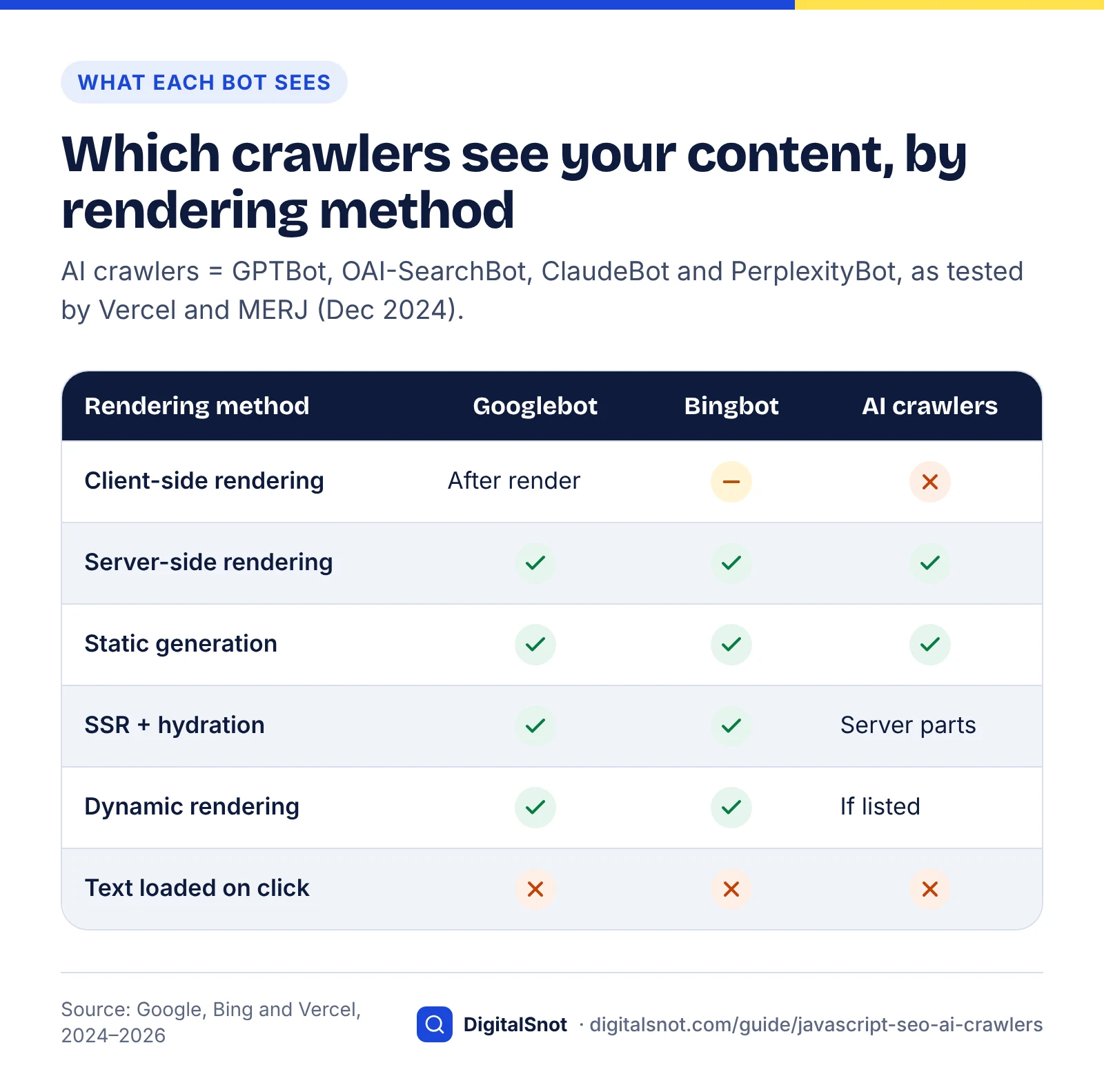
The pattern is simple. If your content is client-rendered, Google can usually still see it, Bing may or may not, and ChatGPT search, Claude and Perplexity almost certainly do not. Our guide to blocking or allowing AI crawlers explains each bot's token and job.
Test what bots see: raw HTML vs the rendered page
To see what a non-rendering crawler sees, look at the initial HTML instead of the page in your browser. Four free checks, from a two-minute look to Google's own rendering test, cover almost every case.
The page on your screen is rendered, and so is the Elements panel in DevTools ("inspect element"), which is why content can look present to a developer when bots never receive it. View source shows the initial HTML. First, though, confirm the bots are allowed in at all: run the page through the free AI Crawler Checker to see, crawler by crawler, whether robots.txt lets ChatGPT search, Perplexity, Claude and Google fetch it.
The four checks
- View the source. In Chrome, type
view-source:before the page address, or press Ctrl+U. Use Find to search for the main heading, the first sentence of your answer, a price or key fact, your phone number and the text of one internal link. A phrase missing from the source is missing for non-rendering crawlers. - Turn JavaScript off. Open DevTools, open the Command Menu, type "JavaScript", choose Disable JavaScript and reload. What remains is roughly what an AI crawler gets; blank sections, spinners and "Loading" messages mark content that depends on scripts. JavaScript stays off only while DevTools is open.
- Fetch the page with a bot's user agent. In a terminal, run
curl -s -A "GPTBot" https://www.example.com/teeth-whitening/ | grep -c "teeth whitening". A result of 0 means the phrase is not in the HTML that user agent receives. Repeat withOAI-SearchBotandPerplexityBot. This tests what your server, CDN or firewall sends to that user agent, so it catches bot blocking and bot-specific pages; it does not imitate the bot itself. - Check Google's rendered version. In Search Console, inspect the URL, choose Test live URL, then View tested page. According to Google's URL Inspection tool help, this view includes a screenshot, the page's HTML, HTTP headers and JavaScript console output, and Google's own JavaScript guides point to the same tool for checking rendered HTML. Content that appears here but not in view source is visible to Google and invisible to most AI crawlers.
Also run curl -s -o /dev/null -w "%{http_code}" https://www.example.com/no-such-page. It should print 404. If it prints 200, your site returns soft 404s, a single-page-app problem covered later in this guide.
View source vs inspect element in 15 seconds
Score it: the five-phrase visibility test
To compare pages and track them over time, turn the first check into a score. This is our own method, not a published standard, and it needs nothing but a browser.
- Pick one URL per template: home, service or product, blog post, location and category page.
- For each, list five phrases an AI answer would need: the main heading, the opening answer sentence, one hard fact (a price, opening hours or a specification), the business name with phone number, and the anchor text of one internal link.
- Score a point for each phrase you find in view source.
- Read the score: 5 means the template is visible to every crawler; 3 or 4 means specific widgets need fixing; 0 to 2 means the template needs a rendering fix.
Example (hypothetical): a dental clinic in Pune runs its site as a React single-page app. View source on its teeth-whitening page shows an empty container and a few script tags, so it scores 0 out of 5, while URL Inspection shows the full page with prices and reviews. Google can index the page, but ChatGPT search and Perplexity are working from almost nothing.
Where our free tools fit
Our free tools fetch the HTML your server returns without running JavaScript, so they read a page roughly as a non-rendering crawler does. If the AI Extractability Checker finds almost no text on a page that looks full in your browser, suspect rendering before you rewrite anything. The Website SEO Audit crawls up to 50 pages from your sitemap and robots.txt; missing titles, empty headings or thin pages across one template usually share this cause.
What must be in the initial HTML
Anything you want an AI system to read, quote, cite or follow must be in the initial HTML: the main content, the links to your other pages and the tags that describe the page. JavaScript can still add interactivity on top.
| Element | What to look for in view source | Common trap |
|---|---|---|
| Main heading and opening answer | The H1 text and first sentence as plain text | Hero text injected by a slider script |
| Body copy, prices, hours, reviews, FAQs | A price, an opening time, one review, one answer | Content pulled from an API or widget after load |
| Internal links | <a href> elements in menus and text | Buttons or spans with click handlers |
| Title and meta description | <title> and the description meta tag inside the head | Tags set by JavaScript after load |
| Canonical tag | Exactly one rel="canonical" link | A canonical that JavaScript changes |
| Robots meta tag | No noindex on pages you want found | A noindex that JavaScript is meant to remove |
| Structured data | application/ld+json script blocks | JSON-LD added by Google Tag Manager |
| HTTP status code | 404 for missing pages, 301 for moved ones | Single-page apps that answer 200 to everything |
Google clarified three rules for JavaScript sites in December 2025, recorded in its log of Search documentation updates. On 15 December it said Google may skip rendering when it finds a noindex tag, so JavaScript that removes noindex may not work. On 17 December it said to keep the canonical in the original HTML and not change it with JavaScript, or, if that is impossible, to leave it out of the HTML and set it only with JavaScript. On 18 December it noted that pages returning a non-200 status code, such as 404 pages, may not be rendered at all.
Write the content itself so it can be lifted cleanly. Our guide to getting cited in AI search covers answer-first writing, and the on-page SEO checklist covers titles, headings and descriptions.
Keep the important parts near the top
Server rendering can backfire if it bloats the HTML. Google's March 2026 post Inside Googlebot says Googlebot currently fetches up to 2MB per HTML URL, headers included; anything beyond that is not fetched, rendered or indexed, while JavaScript and CSS files have separate limits. Google suggests keeping inline base64 images and large inline CSS or JavaScript out of the HTML, and placing meta tags, canonical tags and structured data near the top.
Frameworks that embed large blocks of hydration data in the page should check their biggest templates and keep the main content above that data. We found no published size limits for AI crawlers, so the same discipline is a sensible default for them too.
Why ChatGPT can't see your React page
Rendering options compared: CSR, SSR, static generation and prerendering
Server-side rendering and static generation put the full content in the initial HTML, so every crawler sees it. Client-side rendering leaves the initial HTML nearly empty, so only rendering crawlers such as Googlebot see the content. Hydration and prerendering sit in between, depending on how they are set up.
- Client-side rendering (CSR) is when the server sends a near-empty HTML shell and the browser builds the page with JavaScript.
- Server-side rendering (SSR) is when the server builds the complete HTML for each request.
- Static site generation (SSG) builds every page's HTML in advance. Incremental static regeneration (ISR) rebuilds individual pages on a schedule or on demand.
- Hydration is the step in which JavaScript attaches to server-rendered HTML in the browser to make it interactive.
- Prerendering runs a client-side app ahead of time and saves the HTML it produces. Dynamic rendering serves that saved HTML only to bots.
The table is our assessment, built from Google's and Bing's documentation and the Vercel and MERJ results; the effort column assumes a small site with a developer available.
| Method | Initial HTML contains | Googlebot (and AI Overviews) | Bingbot (and Copilot) | GPTBot, ClaudeBot, PerplexityBot | Effort to adopt | Watch out for |
|---|---|---|---|---|---|---|
| Client-side rendering | A shell and script tags | Sees content after rendering | Not guaranteed | Little or nothing | None (the starting point) | Soft 404s, fragment URLs, identical titles |
| Server-side rendering | The full page | Yes | Yes | Yes | Medium to high for an existing single-page app | Server load and response time |
| Static generation (and ISR) | The full page, built in advance | Yes | Yes | Yes | Medium | Rebuilding when content changes |
| SSR or SSG with hydration | The full page, then made interactive | Yes | Yes | Yes, except client-only parts | Low if your framework already renders on the server | Components that render only in the browser |
| Build-time prerendering | The full page for prerendered routes | Yes | Yes | Yes, for those routes | Low to medium | Routes left off the prerender list |
| Dynamic rendering (bots only) | The full page for listed bots, a shell for everyone else | Yes | Yes | Only bots on your list | Medium, plus upkeep | New bots missing from the list; bot content drifting from what users see |
Dynamic rendering is a stopgap, not a destination
Google's page on dynamic rendering as a workaround calls it a workaround and not a recommended solution, because it adds complexity and resource demands, and recommends server-side rendering, static rendering or hydration instead. For AI crawlers it has a further weakness: it works only for the user agents you list, so each new bot must be added by hand. If you need it while you rebuild, keep the bot version identical in content to what users see.
Framework defaults worth knowing
- React. The React team deprecated Create React App for new apps on 14 February 2025 and recommends frameworks such as Next.js, React Router and Expo. A React or Vue app built with a plain bundler such as Vite renders in the browser unless you add prerendering or a framework.
- Next.js. Pages can render on the server or at build time, but components can opt out with
ssr: false, and data fetched in the browser after load is not in the initial HTML. Metadata can also be streamed, which is covered in the metadata section below. - Nuxt and Angular. Nuxt renders on the server by default, and Angular offers server-rendered and prerendered output through its SSR package. Both let you switch individual routes to client-only rendering, which is exactly where content goes missing.
Google notes that server-side rendering and prerendering also make sites faster. The checks in our post on website speed checks show whether yours improved after the change.
Decision table: which fix to choose
Choose the fix by platform and by how much content is missing from the initial HTML. Most small sites do not need a rebuild: they need a few widgets replaced, or their public pages prerendered.
How we built it: we mapped common site set-ups against the rendering options above and ranked the fixes by how much missing content each restores for the effort involved. It is a prioritisation framework, not a measured result.
| If this describes your site | Do this | Effort |
|---|---|---|
| Builder or CMS site (Wix, Squarespace, Webflow, WordPress) that scores 5 on every template | No rendering project. Re-test whenever you add apps, plugins or embeds. | None |
| Same, but reviews, FAQs, prices or menus are missing from view source | Replace the script-loaded widget with native content, or choose an app or plugin that prints its content into the HTML | Low |
| Shopify theme with app widgets missing from view source | Move essential content into Liquid sections or blocks; keep apps for interactivity | Low to medium |
| React or Vue single-page app with a small set of public marketing pages | Prerender or statically generate those pages at build time; leave the logged-in app as it is | Medium |
| Single-page app where most public pages matter (a shop, directory or publisher) | Move to a framework with server rendering or static generation, template by template | High |
| Next.js, Nuxt or Angular site that still scores below 5 | Find client-only components, browser-side data fetching and streamed metadata, and render them on the server | Low to medium |
| Headless CMS with a JavaScript front end | Generate pages at build time and rebuild on publish, or render on the server | Medium |
| Large legacy app you cannot rebuild this year | Use dynamic rendering for named bots as a stopgap, with identical content, and plan the migration | Medium, plus upkeep |
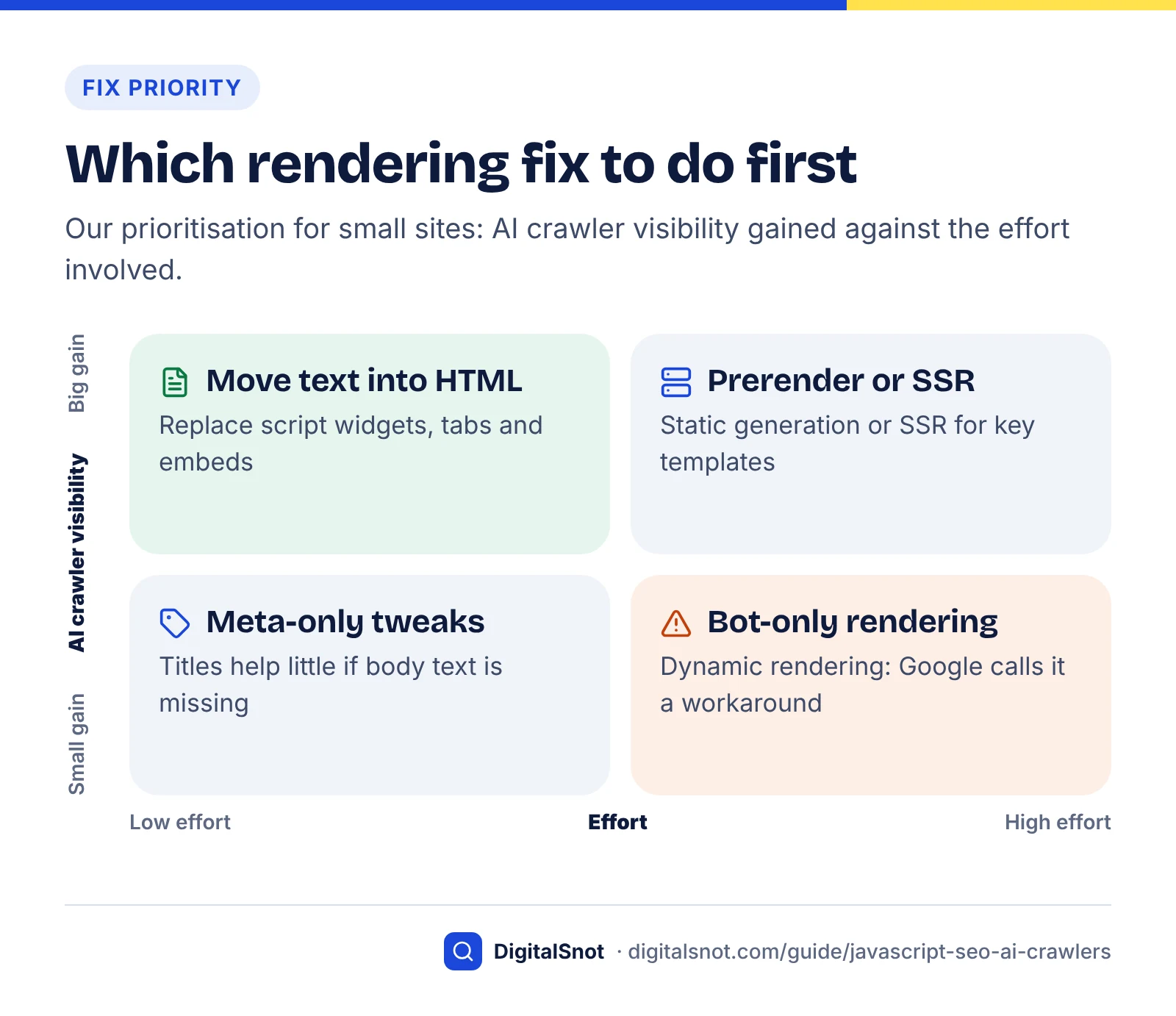
Fix order for a small site
- Allow the bots in robots.txt and at your CDN or firewall.
- Get the main content of every important template into the initial HTML.
- Make every navigation and in-text link a real
<a href>element pointing at a real URL. - Put the title, meta description, canonical and robots tags in the initial HTML.
- Move JSON-LD into the initial HTML, and make missing pages return 404.
- Add the raw-HTML check to your release process.
What not to do
- Do not serve bots different content from what people see.
- Do not block JavaScript or CSS files in robots.txt; Google's URL Inspection help notes that blocked resources can change how Google renders the page.
- Do not treat Google's rendered view as proof that GPTBot saw the same thing, and do not rebuild a whole site when three widgets are the problem.
Website builders and CMSs: what to check
Wix, Shopify themes and WordPress build pages on the server, so their core pages usually pass. The gaps come from what you add: apps, plugins, embeds and widgets that load content with JavaScript after the page arrives.
| Platform | How pages are built | Usual gaps to look for in view source |
|---|---|---|
| Wix | Wix's developer documentation says it renders page components on the server and returns them as HTML | Embedded HTML iframes, third-party apps, custom code that builds content in the browser |
| Squarespace, Webflow, Framer | Hosted: the platform controls rendering, so test rather than assume | Booking, review and map embeds; collection lists loaded by script |
| WordPress | The theme builds each page on your server, so post text is normally in the HTML | Page-builder tabs and sliders, review and FAQ plugins that load by script, "load more" lists |
| Shopify (theme) | Liquid runs on Shopify's servers; Shopify's own guidance is titled Render essential content in Liquid and HTML, not JavaScript | Review, size-guide, FAQ and upsell apps injected by script |
| Headless CMS (Contentful, Sanity, Strapi and similar) | Depends entirely on the front end | Front ends that fetch CMS content in the browser instead of at build time or on the server |
Two questions settle most builder sites: is the text typed into the platform's own elements or pulled in from an embed, and does each app print its content into the page or draw it afterwards? If you cannot change a widget, copy its key content into native text, such as your five most common questions with their answers, so every crawler gets it while the widget stays for visitors.
Links, lazy loading and content behind clicks
Crawlers discover pages through real links and read content that is present without interaction. Click-handler navigation, content that loads on scroll or click, and views that change only after a # in the URL all hide pages, and AI crawlers are less forgiving than Googlebot.
Use real links
Google's link best practices say Google can only crawl a link that is an <a> element with an href attribute, and cannot reliably extract URLs from links that work through script events. Google can follow links that JavaScript inserts, because it finds them after rendering; a non-rendering crawler cannot. Compare <a href="/teeth-whitening/">Teeth whitening</a>, which every crawler can follow, with <span onclick="goTo('/teeth-whitening/')">, which none can rely on.
Single-page apps should also give every view its own URL. Google's JavaScript SEO basics say you cannot rely on URL fragments such as /#/services to work with Googlebot, and recommend the History API instead.
Lazy loading and infinite scroll
Google's guide to fixing lazy-loaded content says content should load when it becomes visible in the viewport, without relying on user actions such as scrolling or clicking. For infinite scroll it asks for a persistent, unique URL for each chunk, with the address bar updated through the History API as each chunk becomes the main content.
AI crawlers set a higher bar, because they never run the script that fills the viewport. An image with the HTML loading="lazy" attribute keeps its URL and alt text in the initial HTML; text that a script inserts on scroll does not. Lazy-load images and media, not the text that answers the question.
Tabs, accordions and "read more"
Text in tabs and accordions is in the initial HTML if it is only hidden with CSS, and invisible to non-rendering crawlers if a script fetches it on click. The HTML <details> and <summary> elements give you an accordion with no script at all. Check by searching view source for a sentence from inside a closed tab.
Soft 404s in single-page apps
Single-page apps often answer every URL with a 200 status code and draw an error message in the browser, so error pages can be indexed as real pages. Google's JavaScript SEO basics suggest redirecting to a URL where the server returns a 404, or adding a noindex tag to error pages. Because Google may skip rendering non-200 pages, a real 404 from the server is the cleanest signal for every crawler.
Structured data and metadata in JavaScript apps
Put titles, meta descriptions, canonical tags and JSON-LD structured data in the initial HTML. Google can read most of them after rendering, but non-rendering crawlers cannot, and Google treats some JavaScript changes to these tags as unreliable.
Structured data added with JavaScript
Google's page on generating structured data with JavaScript names Google Tag Manager and custom JavaScript as the common methods, and Google can read JSON-LD injected this way. A crawler that does not run JavaScript never sees it, so move Tag Manager JSON-LD into the page template.
Keep expectations realistic. Google's generative AI guide says no special schema.org markup is needed to appear in AI Overviews or AI Mode. Structured data earns its place through the rich results that remain and by describing your business unambiguously; our schema markup guide covers which types are still worth adding.
Titles, descriptions and social tags
Many single-page apps set the title and meta description with a script once the route loads. Googlebot sees the result after rendering; a non-rendering crawler sees the placeholder in the initial HTML, often the same title on every page. Open Graph tags have the same problem: the Next.js documentation gives Facebook's link-preview crawler as an example of a bot that cannot execute JavaScript.
The Next.js streaming metadata setting
Since version 15.2, Next.js can stream metadata from generateMetadata after the first part of the page has been sent. For bots that match its htmlLimitedBots setting, it waits for the metadata before sending the page instead; the documented default list includes Google crawlers, Bingbot, Twitterbot and Slackbot. If your bot test shows a missing or misplaced title for GPTBot or OAI-SearchBot, add the AI crawler tokens to htmlLimitedBots in next.config.js. The setting replaces the default list, so include any default bots you still need.
Monitor rendering after each release
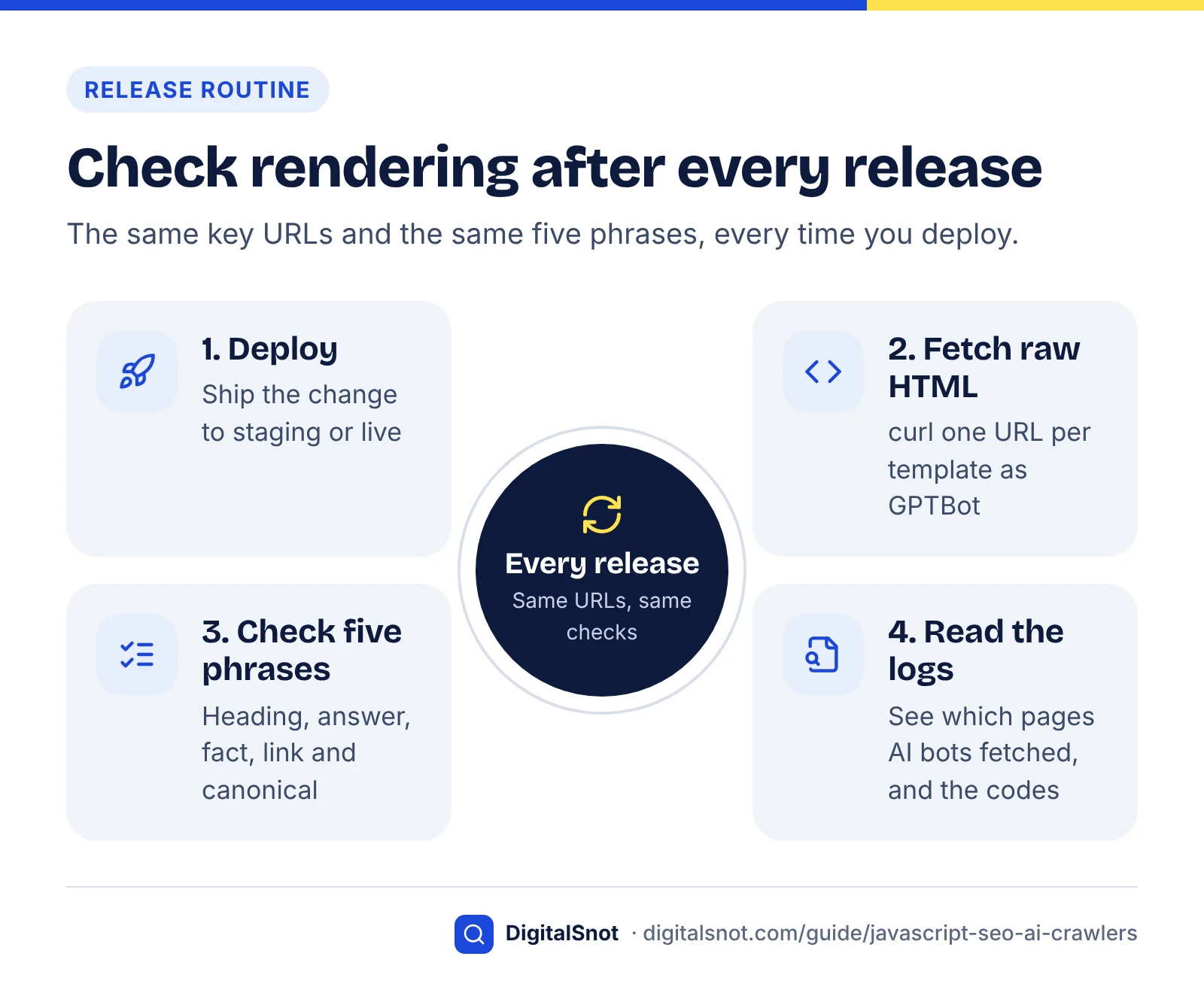
Rendering breaks quietly. A new plugin, a framework upgrade or a CDN rule can empty your initial HTML without changing how the page looks in a browser, so check the raw HTML on every release and review crawler activity every month.
- Keep a key URL list: one URL per template plus your ten most valuable pages, with five phrases for each.
- Check after every deploy: fetch each URL with curl and confirm the phrases, title, canonical and status code. A developer can script this to fail the release when a phrase disappears.
- Re-run URL Inspection monthly on each template to confirm Google still renders the full page.
- Read your logs monthly: upload an access log to the free AI Bot Log Analyzer to see which pages GPTBot, OAI-SearchBot, ClaudeBot and PerplexityBot fetched. Important pages that never appear, or that return errors, are your next fixes.
- Crawl quarterly with the Website SEO Audit and compare titles, headings and word counts template by template.
- Watch the outcome: AI Overviews and AI Mode impressions in Search Console's generative AI performance report, and referrals from chatgpt.com and perplexity.ai in your analytics.
Logs also show waste. Vercel and MERJ found that 34.82% of ChatGPT's crawler fetches and 34.16% of Claude's hit 404 pages, against 8.22% for Googlebot. The study could not say exactly why, so keep redirects in place when URLs change and limit your sitemap to live, canonical URLs.
Once the text is reliably in the HTML, make it more quotable. The AI Answer Snippet Extractor scores every paragraph out of 100 as a quotable snippet, which shows which sections to tighten first. For the wider crawl, index and speed checks, work through our technical SEO audit checklist.
If you would rather not scope a rendering change alone, our technical SEO service covers rendering audits and fixes, and you can get in touch with the URLs you have already tested.
Free tools in this guide
- AI Crawler Checker See which AI crawlers can read your page, and what they see without JavaScript.
- AI Extractability Checker Score how easily AI answers can quote each section of your page.
- Website SEO Audit Crawl up to 50 pages and get a health score, every issue and a 30-day plan.
- AI Bot Log Analyzer See how AI crawlers crawl your site from your server access log.
- AI Answer Snippet Extractor Score every paragraph as an AI answer snippet and fix the near misses.
By the numbers
- of the AI crawlers Vercel and MERJ tested (OpenAI, Anthropic, Meta, ByteDance, Perplexity) executed JavaScript (Dec 2024)
- None
- Source: Vercel
- of ChatGPT crawler fetches were JavaScript files it downloaded but did not run; for Claude it was 23.84% (Dec 2024)
- 11.50%
- Source: Vercel
- GPTBot requests across Vercel's network in one month, against 370M for Claude and 4.5bn for Googlebot (Dec 2024)
- 569M
- Source: Vercel
- of HTML per URL that Googlebot fetches for Search; bytes past the cut-off are not rendered or indexed (Google, March 2026)
- 2 MB
- Source: Google Search Central Blog
Frequently asked questions
Does ChatGPT render JavaScript?
Not as far as published evidence shows. In Vercel and MERJ's December 2024 tests, OpenAI's crawlers, OAI-SearchBot, GPTBot and ChatGPT-User, downloaded JavaScript files but did not execute them, so they read only the initial HTML. We found no statement from OpenAI that this has changed (checked October 2026). Put the content you want ChatGPT search to use in the HTML your server sends, and test with view source or a curl request using the OAI-SearchBot user agent.
Can Google AI Overviews see content loaded with JavaScript?
Usually, yes. AI Overviews and AI Mode use Google's Search index, and Googlebot renders pages in a headless Chromium browser before indexing them. Google says a page only needs to be indexed and eligible for a snippet to appear. Rendering can still fail, so check the rendered HTML with the live test in Search Console's URL Inspection tool, and remember that content which needs a click or scroll to load may never be seen.
Is client-side rendering bad for SEO?
It is riskier rather than automatically bad. Googlebot can index client-rendered pages after rendering them, but Bing warns against hiding critical content behind client-side rendering, and the AI crawlers tested by Vercel and MERJ did not run JavaScript at all. For public pages you want found and cited, server-side rendering or static generation is safer. Logged-in app screens can stay client-rendered because they do not need to be crawled.
How do I see what GPTBot sees on my page?
Look at the initial HTML. Open the page with view-source: in front of the URL and search for your key sentences, or run curl with the GPTBot user agent and count a key phrase in the response. If the phrase is missing, GPTBot does not receive it. A curl request tests what your server, CDN or firewall sends to that user agent; it does not reproduce every detail of the real crawler.
Should I use dynamic rendering for AI crawlers?
Only as a temporary measure. Google describes dynamic rendering as a workaround and not a recommended solution, and recommends server-side rendering, static rendering or hydration instead. Dynamic rendering also works only for the bots you list, so each new AI crawler must be added by hand. If you use it while you rebuild, make sure bots receive the same content that users see.
Do AI crawlers read JSON-LD added through Google Tag Manager?
Not if they do not run JavaScript. Tag Manager injects JSON-LD with a script, which Google can read after rendering, but a crawler that reads only the initial HTML never sees it. Put structured data in the page template instead. Bear in mind that Google says no special schema is needed for AI Overviews or AI Mode, so structured data supports AI visibility rather than driving it.
Are Wix and Shopify sites visible to AI crawlers?
Their core pages usually are. Wix says it renders pages on the server and returns HTML, and Shopify themes are built from Liquid templates on Shopify's servers. The gaps come from apps, embeds and widgets that load content with JavaScript, such as review, FAQ and booking tools. Check a product or service page in view source and search for review text, prices and answers.
Does using Next.js fix JavaScript SEO automatically?
No, but it makes it easier. Next.js can render pages on the server or at build time, which puts content in the initial HTML. Content still goes missing when components are loaded with ssr: false, when data is fetched in the browser after load, or when streamed metadata reaches bots late. Test each template with curl and an AI crawler user agent after every release.
Will server-side rendering improve my Google rankings?
Not directly. Google can render most JavaScript pages, so switching to server-side rendering does not guarantee better rankings. Google notes that server-side rendering and prerendering make sites faster for users and crawlers, and they make your content readable by crawlers that do not render, including the AI crawlers behind ChatGPT search, Claude and Perplexity. The bigger gain is usually visibility outside Google.
Does Bing or Microsoft Copilot render JavaScript?
Not reliably enough to depend on. Bing's Webmaster Guidelines warn against hiding critical content behind client-side rendering and say content that cannot be reliably rendered may not be indexed or selected for grounding results, which is how Copilot answers draw on Bing. Treat Bing like the AI crawlers: keep critical content in the initial HTML and check important pages with URL inspection in Bing Webmaster Tools.
Sources
Every figure and claim in this guide comes from the sources below. We checked each one when writing and link to the original so you can read it yourself. Credit belongs to the authors and publishers listed. How we write and check our articles.
-
1
Understand JavaScript SEO Basics
Google Search Central · Crawl, render, index phases; not all bots run JavaScript; History API; soft 404s in single-page apps.
-
2
The rise of the AI crawler
Vercel (with MERJ) · Dec 2024: AI crawlers fetch but do not run JavaScript; request volumes; JS and 404 shares.
-
3
Overview of OpenAI Crawlers
OpenAI · Roles of OAI-SearchBot, GPTBot and ChatGPT-User; user-agent tokens for testing.
-
4
Optimizing your website for generative AI features on Google Search
Google Search Central · AI features need indexed, snippet-eligible pages; no extra requirements or special schema.
-
5
Bing Webmaster Guidelines
Bing Webmaster Tools · Warns against client-side rendering for critical content; rendering and grounding results.
-
6
URL Inspection tool
Search Console Help · Live test: screenshot, rendered HTML, headers, console output; blocked resources.
-
7
Latest Google Search Documentation Updates
Google Search Central · December 2025 clarifications on noindex, canonical tags and non-200 pages for JavaScript sites.
-
8
Inside Googlebot: demystifying crawling, fetching, and the bytes we process
Google Search Central Blog · March 2026: 2MB HTML fetch limit for Googlebot; keep critical tags near the top.
-
9
Dynamic Rendering as a workaround
Google Search Central · Dynamic rendering is a workaround, not a recommended solution; SSR, static or hydration preferred.
-
10
Sunsetting Create React App
React · Create React App deprecated for new apps on 14 Feb 2025; frameworks recommended.
-
11
SEO Best Practices
Wix Developers · Wix renders page components on the server and returns HTML.
-
12
Render essential content in Liquid and HTML, not JavaScript
Shopify · Shopify theme guidance to render essential content server-side.
-
13
SEO Link Best Practices for Google
Google Search Central · Links must be a elements with href; script-event links not reliably crawled.
-
14
Fix Lazy-Loaded Website Content
Google Search Central · Viewport-based loading without user actions; infinite scroll with unique URLs.
-
15
Generate Structured Data with JavaScript
Google Search Central · Google Tag Manager and custom JavaScript as ways to inject JSON-LD.
-
16
next.config.js: htmlLimitedBots
Next.js · Streaming metadata, default HTML-limited bot list and how overriding it works.