True ROAS: work out the profit your ads really make
Why the ROAS in Google Ads looks better than your bank account, how to take out GST, RTO, returns, product cost, shipping and fees, and how to find the break-even Target ROAS.
On this page (10 sections)
- 1What the ROAS in Google Ads counts
- 2The Cost column and GST
- 3True ROAS and POAS: two measures that follow the money
- 4Every cost between the order and your profit
- 5Break-even ROAS and the Target ROAS to set
- 6A worked example: a home decor shop in Lucknow
- 7Tell Google Ads what really happened
- 8Mistakes to avoid
- 9Your next step
- 10Sources
A ROAS of 4 sounds healthy: ₹4 of sales for every ₹1 of ads. Then the month ends, and the bank balance tells a different story. Parcels came back, customers returned things, and the courier, the payment gateway and the supplier all took their share. True ROAS, our measure, counts only the revenue you kept.
This post shows you how to turn the ROAS Google Ads reports into the profit your ads really make, step by step, and how to set a Target ROAS that does not lose money. You need one month of numbers from Google Ads and your own order records. Everything here is maths on your own numbers; it is not tax advice, so check GST questions with your accountant.
What the ROAS in Google Ads counts
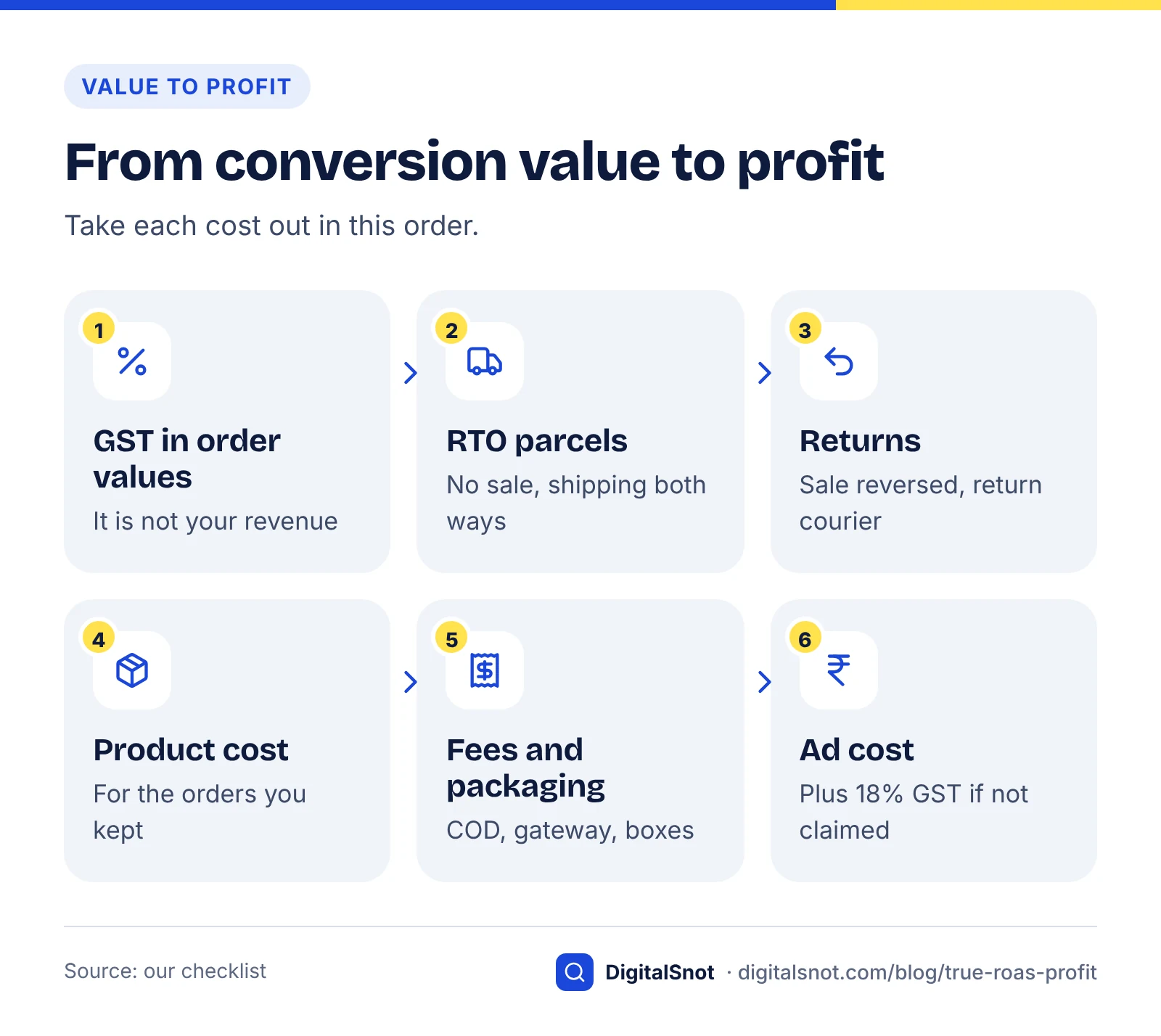
Google Ads shows ROAS as Conv. value / cost: the value of the conversions your tag recorded, divided by your ad cost. When you bid with Target ROAS, Google's page about Target ROAS bidding explains that you enter it as a percentage: conversion value ÷ ad spend × 100. So ₹5 of conversion value for each ₹1 of ads is a Target ROAS of 500%.
The tag counts an order when it is placed. It does not know that a cash on delivery parcel was refused at the door (RTO, return to origin), that a customer sent the goods back, or what you paid for the product, the courier and the payment gateway. Google Ads is not wrong; it simply measures orders, not profit.
This post uses an online shop, because shops lose the most between order and profit. If you take enquiries rather than orders, the same idea applies to the value you give each lead; our post on how much to spend on Google Ads to start shows how to estimate it.
The Cost column and GST
GST touches both sides of the sum. On the cost side, Google's page on taxes in your country lists 18% GST when Google India bills you, as IGST, or as CGST and SGST at 9% each when your bill-to state matches the state Google bills from. It says tax is added to your advertising costs and shown in the transaction history and on the invoice. So the Cost column in your reports is the cost before GST, and that is how our tools treat it.
- If your business can claim that GST back as input tax credit, the Cost column is your real ad cost.
- If it cannot, add 18% to the ad cost before you work out profit.
On the sales side, check whether the conversion values your shop sends include the GST you collect. That GST is not your revenue. To take it out, divide by 1 plus your rate; our post on GST-inclusive and exclusive prices shows the formula with examples.
True ROAS and POAS: two measures that follow the money
We use two measures of our own, both worked out from your numbers:
- True ROAS is the revenue from orders that were delivered and kept, before GST, divided by your ad cost. It answers: how much in sales did I really keep for each rupee of ads?
- POAS (profit on ad spend) is your profit before ads, divided by your ad cost. At 1, the ads exactly paid for themselves. Above 1, they made money.
Neither is a Google metric, and Google Ads does not show them. They exist to answer the owner's question: after everything, did the ads make a profit?
Every cost between the order and your profit
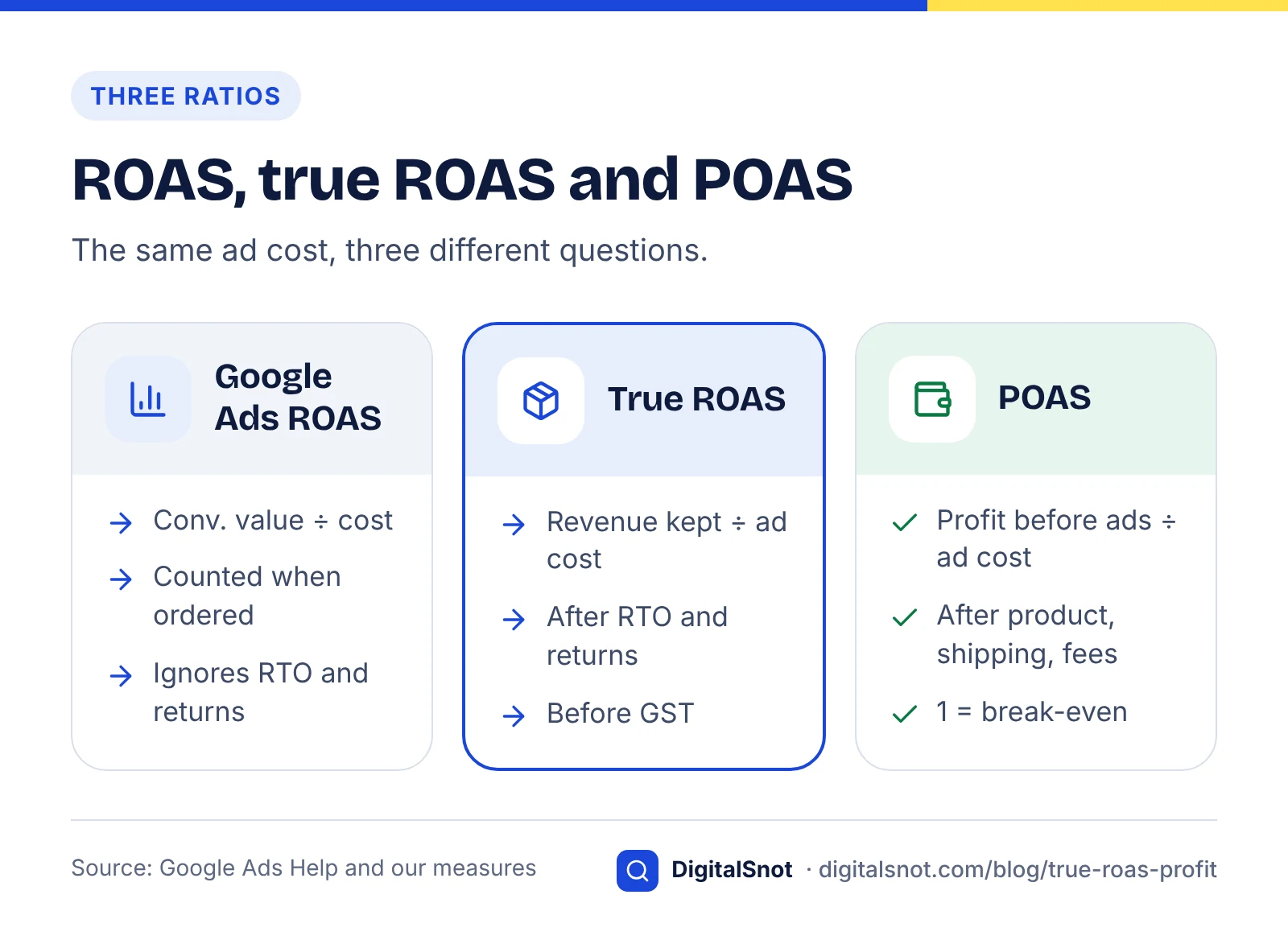
Start from the conversion value in Google Ads and take out, in order:
- GST inside order values, if your tag sends prices with GST.
- RTO parcels. No sale, but you paid shipping both ways and the packaging. Our post on COD and RTO covers how to bring the rate down.
- Returns after delivery. The sale is reversed, the return shipping is yours, and some stock cannot be sold again.
- Product cost of the orders you kept. If you only know your margin, our post on margin and markup helps you turn it into a cost.
- Shipping, fees and packaging: forward and return courier charges, COD fees, payment gateway fees and boxes.
- The ad cost, with 18% GST added if you cannot claim it back.
Use your own rates for all of these. Courier, COD and gateway charges differ from one contract to the next, so there is no "typical" figure worth copying.
Break-even ROAS and the Target ROAS to set
The simple version: if every sale left the same gross margin and nothing came back, break-even ROAS would be 1 ÷ margin. At a 25% margin you need ₹4 of sales for every ₹1 of ads, a ROAS of 4 or 400%, before the ads make any money. The Ad Metrics Calculator works this out from your margin, alongside ROAS, ROMI, cost per conversion, CPC, CPM and CTR, with an option to add 18% GST to the cost.
With RTO and returns, use the fuller version. Work out your profit before ads as a share of the conversion value Google Ads reports. Break-even ROAS is 1 divided by that share; multiply by 1.18 if GST on ads is a cost for you. Because it is stated in Google's own terms, you can set it straight in Google Ads as a Target ROAS percentage. A target that leaves a profit sits above it.
Google's page on Target ROAS suggests basing the target on your past conversion value per cost, and warns that a target set too high can reduce your traffic. So if the profitable target is far above what the campaign achieves today, move towards it in steps.
A worked example: a home decor shop in Lucknow
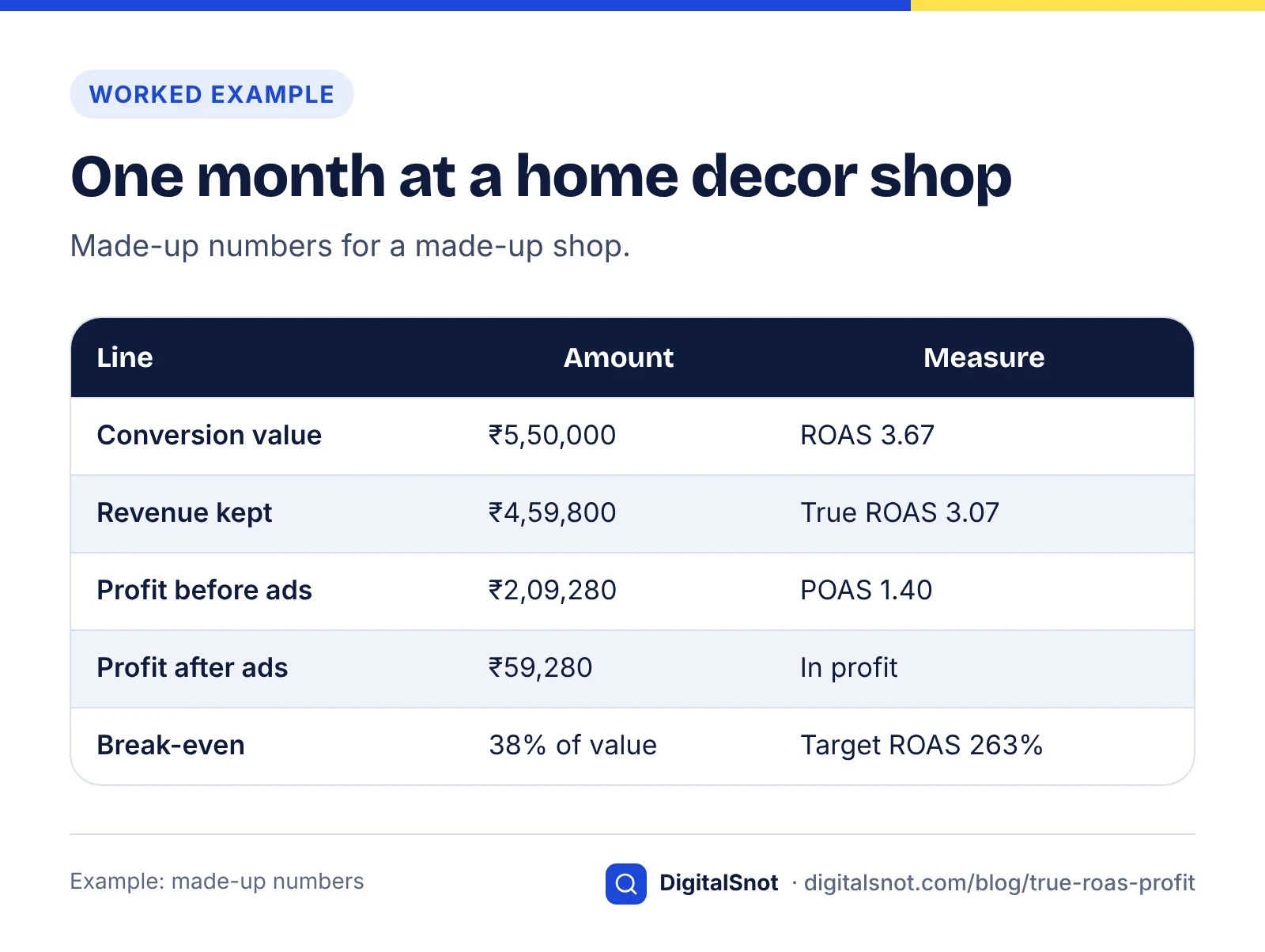
Mehfil Home Decor in Hazratganj, Lucknow, is a made-up online shop selling cushion covers and bedsheets. Its rates below are its own made-up numbers, not typical figures. Last month, Google Ads showed ₹1,50,000 of cost and 500 orders worth ₹5,50,000, before GST: a ROAS of 3.67, or 367%. The owner entered the month in the True ROAS Calculator:
- Half the orders were COD. 20% of COD orders and 4% of prepaid orders came back as RTO: 60 parcels.
- Of the 440 delivered, 5% were returned: 22 orders. All returned stock could be sold again.
- Product cost ₹450 an order, courier ₹70 out and ₹60 back, COD fee ₹35, gateway fee 2%, packaging ₹20.
- The business claims back the GST on its ads, so cost is taken without GST.
| Step | Amount | Measure |
|---|---|---|
| Conversion value in Google Ads | ₹5,50,000 | ROAS 3.67 |
| Revenue kept after RTO and returns (418 orders) | ₹4,59,800 | True ROAS 3.07 |
| Less product cost | ₹1,88,100 | |
| Less shipping both ways | ₹39,920 | |
| Less COD and gateway fees | ₹12,500 | |
| Less packaging | ₹10,000 | |
| Profit before ads | ₹2,09,280 | POAS 1.40 |
| Profit after ₹1,50,000 of ads | ₹59,280 |
The ads made money, but far less than 367% suggested. Profit before ads is about 38% of the conversion value Google reports, so break-even ROAS is about 2.63: a Target ROAS of 263%. If the business could not claim back the GST on its ads, profit after ads would fall to ₹32,280 and break-even would rise to about 310%. The calculator also gives the target that leaves the profit share the owner wants. Its what-ifs showed that cutting COD RTO from 20% to 10% would add ₹15,988 of profit at the same ad spend and bring break-even down to about 245%. So the owner's next job was confirming COD orders before dispatch, not changing bids.
Tell Google Ads what really happened
Smart Bidding learns from the conversion values you send. If refused and returned orders stay in, it learns from sales you never kept. Google's page about conversion adjustments describes two fixes: a retraction removes a conversion and its value, for an order that was refused or fully returned, and a restatement changes the value, for a partial return. Adjustments are matched by the order ID, so your tag must send a transaction ID with each purchase. Upload them regularly, so bidding sees the cleaner numbers.
If repeat customers matter to your profit, Google's customer lifecycle goals let you bid higher for new customers. With New Customer Value, Google adds an extra value to each new customer's purchase, which raises your reported ROAS although sales do not change. The New Customer Value Calculator works out that extra value from your first order, margin and repeat purchases, and the Target ROAS to use so future orders are not counted twice. It needs a purchase conversion goal and Target ROAS or Maximise conversion value bidding.
The same maths applies to every campaign type. Our post on Performance Max for small businesses covers reading results by channel.
Mistakes to avoid
- Treating 3× as profit. ROAS is a sales ratio; profit depends on your margin, RTO and returns.
- Leaving GST in order values. It makes revenue, and ROAS, look higher than it is.
- Forgetting GST on ads when your business cannot claim it back.
- Using one margin for very different products. Work out products with different costs or return rates separately.
- Jumping straight to the profitable target. Move Target ROAS in steps, or traffic can drop sharply.
Your next step
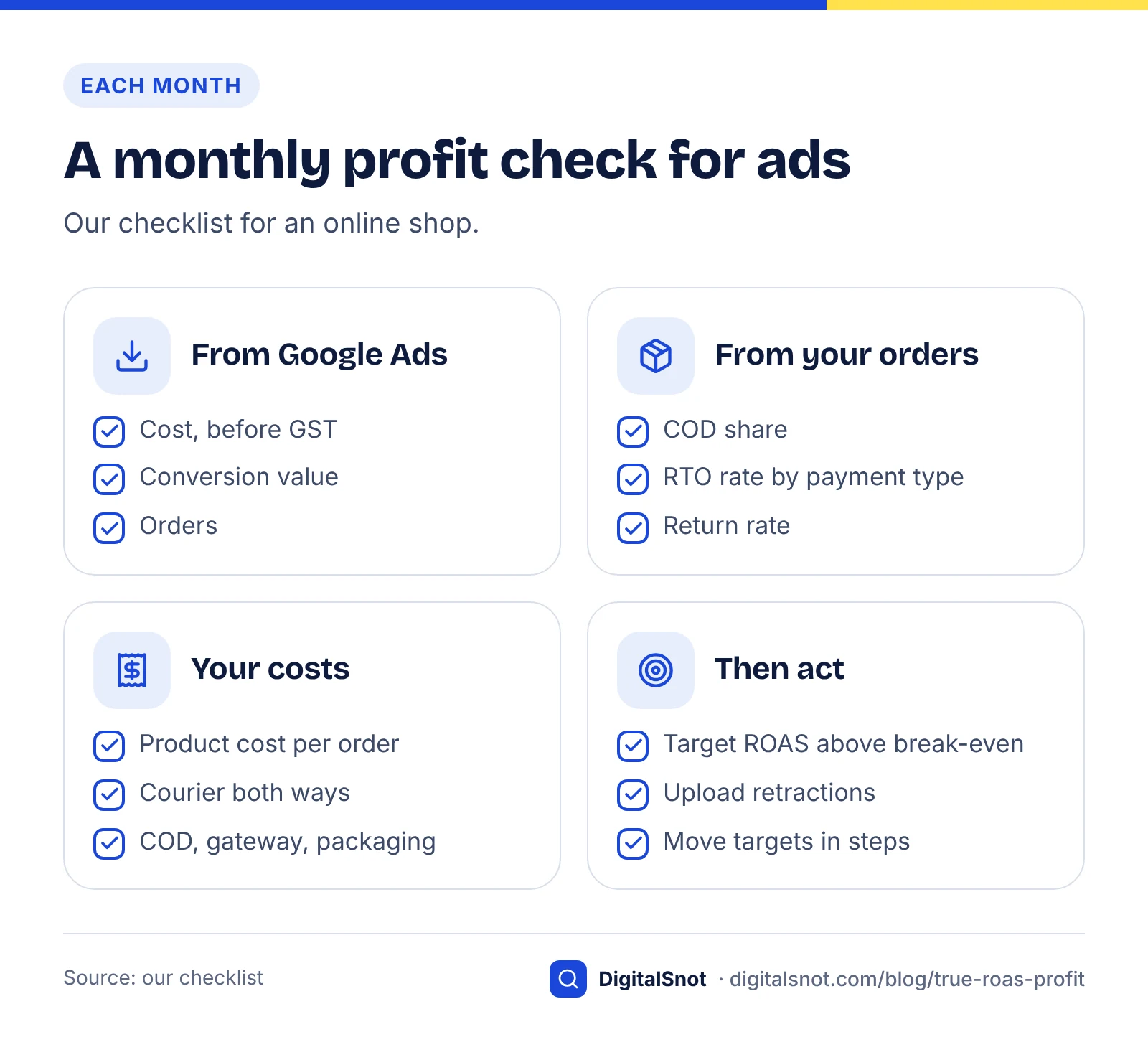
Take last month's cost and conversion value from Google Ads, add your COD share, RTO and return rates and your costs per order, and put them into the True ROAS Calculator. Compare its break-even Target ROAS with the target you use today. Use the Ad Metrics Calculator for quick checks on other campaigns. Find more on our Google Ads tools page, or talk to us about your account.
Free tools in this article
- Ad Metrics Calculator ROAS, ROMI, CPA, CPC, CPM, CTR and CPV from your ads report, with break-even ROAS and GST.
- True ROAS Calculator See what your Google Ads ROAS is worth after COD, RTO, returns, shipping, fees and GST.
- New Customer Value Calculator Work out the extra value for new customers in Google Ads, its effect on ROAS and the target to use.
By the numbers
- GST added to Google Ads costs when Google India bills you, as IGST or CGST plus SGST
- 18%
- Source: Google Ads Help
- the Target ROAS for ₹5 of conversion value for every ₹1 of ad spend (value ÷ cost × 100)
- 500%
- Source: Google Ads Help
Frequently asked questions
What is true ROAS?
It is our measure of return on ad spend that counts only the orders that were delivered and kept: the revenue you kept, before GST, divided by your ad cost. Google Ads divides the conversion value it recorded by the ad cost, including orders that later came back as RTO or returns.
What is the difference between ROAS and POAS?
ROAS divides sales by ad cost. POAS, profit on ad spend, divides your profit before ads by your ad cost, after product cost, shipping, fees, RTO and returns. A POAS of 1 means the ads exactly paid for themselves.
Does the Cost column in Google Ads include GST?
No. Google adds tax to your advertising costs and shows it in the transaction history and on your invoice, which in India means 18% GST. If your business cannot claim that GST back, add 18% to the cost when you work out profit. Check with your accountant.
How do I work out break-even ROAS?
Work out your profit before ads as a share of the conversion value Google Ads reports. Break-even ROAS is 1 divided by that share. For example, if ₹5,50,000 of reported value leaves ₹2,09,280 before ads, break-even ROAS is about 2.63, a Target ROAS of 263%.
Can Google Ads remove returned or refused orders?
Yes, with conversion adjustments. A retraction removes a conversion and its value, and a restatement changes the value for a partial return. They are matched by order ID, so your tag must send a transaction ID with each purchase.
Why does my ROAS go up when I bid higher for new customers?
With New Customer Value, Google adds an extra value to each new customer's purchase, so conversion value and ROAS rise although sales do not. Raise your Target ROAS to match, or you count future orders twice.
Sources
Every figure and claim in this article comes from the sources below. We checked each one when writing and link to the original so you can read it yourself. Credit belongs to the authors and publishers listed. How we write and check our articles.
-
1
About Target ROAS bidding
Google Ads Help · Target ROAS as conversion value ÷ ad spend × 100; base it on history; a high target can reduce traffic.
-
2
Taxes in your country
Google Ads Help · 18% GST in India, as IGST or CGST and SGST; tax added to advertising costs on the invoice.
-
3
About conversion adjustments
Google Ads Help · Retractions and restatements, matched by order ID.
-
4
Use a transaction ID to minimize duplicate conversions
Google Ads Help · Sending a transaction ID with each purchase.
-
5
About customer lifecycle goals
Google Ads Help · Bidding higher for new customers with New Customer Value.
-
6
Troubleshooting the new customer acquisition goal
Google Ads Help · Requirements for the new customer acquisition goal.
Want a second pair of eyes?
Tell us about your site. We reply within one business day.
Talk to us Try our free tools