Is ChatGPT giving wrong business facts? How to check and fix the sources
Find out what AI assistants say about your business, compare it with your real phone, hours and prices, and fix the pages and listings those answers are built from.
On this page (9 sections)
- 1Where AI assistants get your business facts
- 2Step 1: ask the assistants yourself
- 3Step 2: compare the answers with your real facts
- 4Step 3: find the source that disagrees
- 5Step 4: fix the sources, in this order
- 6Step 5: report the answer, then check again
- 7Mistakes to avoid
- 8Your next step
- 9Sources
A customer asks ChatGPT for your clinic's timings and gets last year's hours. Another asks an assistant for your phone number and gets a line you closed. When ChatGPT gives wrong business facts like these, you cannot edit those answers directly. You can find out what they say, work out which source they came from, and fix that source.
This post shows you how, in five steps, with the official documentation on where the answers come from.
Where AI assistants get your business facts
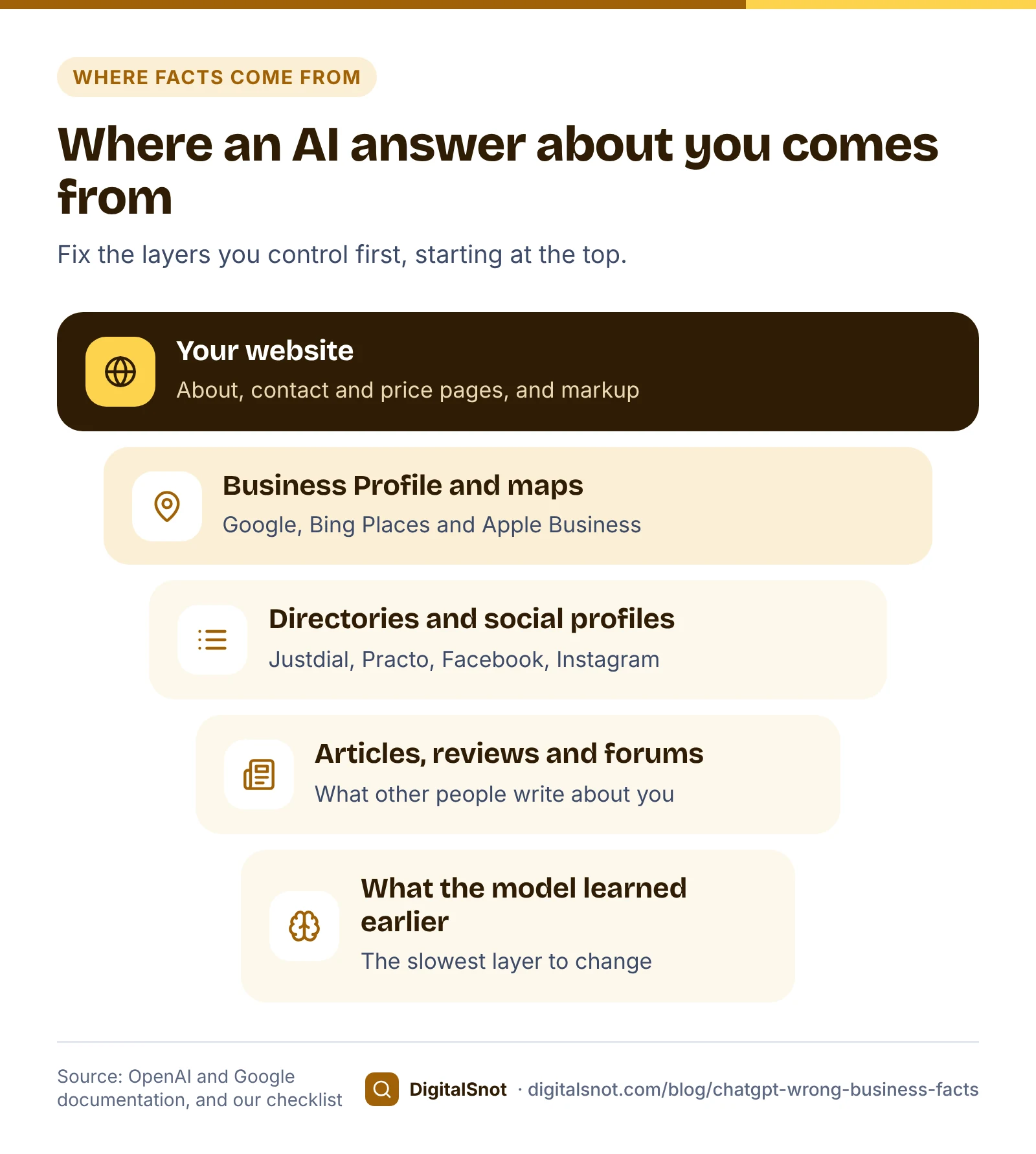
An assistant answers from two places: what its model learned in training, and pages it looks up for the question. OpenAI's help page on searching the web with ChatGPT explains the second. For questions that need current information, ChatGPT rewrites the request into search queries, reads the results and writes an answer with citations. OpenAI also warns that results and citations can be incomplete or wrong.
When OpenAI introduced ChatGPT search, it said results come from third-party search providers and partner content. Its own crawler counts too. OpenAI's crawler documentation says OAI-SearchBot is used to surface websites in ChatGPT search, and that sites which block it are not shown in search answers, though they can still appear as navigational links.
Google's AI Overviews and AI Mode work from Google's own index. Google's page on AI features and your website says that to be shown as a supporting link, a page must be indexed and eligible to appear in Google Search with a snippet, with no extra technical requirements.
So a wrong fact almost always has a source: an old page on your own site, an outdated directory listing, a social profile nobody updated, or a business with a similar name. Facts a model learned in training can be older still, and slower to change.
Step 1: ask the assistants yourself
We never query ChatGPT, Gemini or Perplexity ourselves, and none of our tools do. You ask, so you see exactly what a customer sees. Write five or six questions a customer might ask. For Smile Studio Dental, a made-up clinic in Kothrud, Pune, they could be:
- "What are the timings of Smile Studio Dental in Kothrud, Pune?"
- "What is the phone number for Smile Studio Dental, Kothrud?"
- "How much does a root canal cost at Smile Studio Dental?"
- "Is Smile Studio Dental in Kothrud still open?"
- "Tell me about Smile Studio Dental: address, phone, timings and prices."
Ask each question in more than one assistant, and more than once, because answers change from run to run. Copy each full answer with the date, the assistant's name and any sources it cites. One wrong answer is a clue. The same wrong fact in several answers is a problem worth fixing.
Step 2: compare the answers with your real facts
Paste the answers into our AI Brand Fact Checker, with a line of three dashes between them, and enter your website. Add any facts your site does not show, one per line; what you type wins over your site. It reads your homepage and up to three linked pages (contact, About and prices) and checks every claim it can: phone numbers, emails, address and PIN code, opening days and hours, prices in rupees, founding year, years of experience, ratings, names and "permanently closed" claims.
Each claim is marked as matching, different, impossible to check from your site, or a reputation risk, such as the word "scam" near your name. You also get what to fix first, where wrong facts of that kind usually come from, and a key facts block and LocalBusiness markup to publish. The score is our measure of the claims it could check, not a score from any assistant.

In the example, the phone number, the timings and a "closed" claim differ from the clinic's site, and the founding year cannot be checked because the site never states it. That last result matters as much as the others. If your site does not say when you started, an assistant has to find it somewhere else, or guess.
Step 3: find the source that disagrees
A wrong number in an answer usually still exists somewhere on the web. Our AI Answer Consistency Checker compares the facts on 2 to 6 pages you enter, such as your homepage, pricing, About and contact pages, and listings. It reads each page, including the footer and structured data, and lists every mismatch in name, phone, email, city and postal code, founding year, prices, "500+ clients" style claims, rating and social profiles, with the value to use everywhere. Many directories, and Google's own pages, block automated visits, so copy those details by hand and compare them with the table.
For your name, address and phone across Google, Justdial, Facebook and the rest, follow our post on checking your name, address and phone everywhere. You can also ask the assistant which sources it used, or search your old phone number in quotes to find pages that still show it.
Sometimes the answer is not about you at all, but about a business with a similar name in another area. Note its details. The fix is to make your own name, area and services unmistakable on your site, your profile and your listings, so the two are harder to mix up.
Step 4: fix the sources, in this order
- Your About and contact pages. State your facts in plain text: full name, address, phone, opening hours, the year you started, your main services, and prices or price ranges. Text on your own site gives every assistant a source to use.
- Organization or LocalBusiness markup. Google's LocalBusiness structured data page requires name and address and recommends properties such as telephone, url and opening hours. Its Organization structured data page explains sameAs, for listing your official profiles. Google's guide to its generative AI features says structured data is not required to appear in them and that markup must reflect what the page shows, so treat it as a tidy copy of your visible facts, not a substitute. Our Brand Knowledge Graph Builder reads your homepage and key pages, shows the connections they give search engines and AI tools (what you are, your services, places, people and profiles) and the ones missing, and writes Organization markup to copy.
- Your Google Business Profile. Check the hours, phone and address. If it shows the business as closed by mistake, reopen it from Edit profile, then Hours, then "Open with main hours". Google's page on marking a business as closed explains temporary and permanent closure.
- Directory listings and social profiles. Justdial, Practo, IndiaMART, Facebook, Instagram and LinkedIn: claim and correct each one.
- Crawler access. If you want to appear in ChatGPT search, make sure robots.txt does not block OAI-SearchBot. OpenAI's publisher FAQ adds that your host or CDN must allow traffic from its published crawler IP addresses. Our guide to blocking AI crawlers explains which bots to allow.

Keep an old phone number forwarding to the new one while answers still quote it, so customers who call it still reach you.
Step 5: report the answer, then check again
Once the sources are right, report the wrong answer with the assistant's own feedback option. For Google, the help page on AI Overviews explains the thumbs down and "Report a problem" options. Arguing with an assistant in a chat is not the same as fixing the source.
There is no fixed time for answers to change, and no guarantee they will. Assistants that search the web can pick up a change once they read your updated pages and listings; facts a model learned earlier can take longer. Ask the same questions again every few weeks, in more than one assistant, and paste the new answers into the fact checker to see what has moved.

Mistakes to avoid
- Different facts on your own pages. An About page that still says "10 years of experience" when the homepage says 15 gives assistants two answers to choose from.
- Markup that disagrees with the page. Change both together, or neither.
- Blocking OAI-SearchBot by accident. GPTBot, OpenAI's training crawler, is a separate setting: blocking it does not remove you from ChatGPT search.
- Trusting one answer. Answers vary between runs and people, so judge from several.
- Paying for promised placement. OpenAI's publisher FAQ says it does not guarantee placement, so anyone who promises it is claiming more than OpenAI does.
Your next step
This week, ask three assistants the five questions above about your own business, paste the answers into the AI Brand Fact Checker, and fix the first source it points to. For the wider work of making your business one clearly described entity, read our entity SEO guide and our post on how ChatGPT recommends businesses. If you would like help, see our AI search optimisation service or ask us a question.
Free tools in this article
- AI Brand Fact Checker Check AI answers about your business against your site: wrong phone, prices, timings or "closed" claims.
- AI Answer Consistency Checker Find brand facts that differ between your pages and listings.
- Brand Knowledge Graph Builder Map your brand entity, find missing links and get the schema.
Frequently asked questions
Why does ChatGPT give the wrong phone number for my business?
ChatGPT builds answers from what its model learned and from web searches, so if an old page, directory listing or social profile still shows an old number, the answer can repeat it. Find the old number on your site and listings, replace it with one main number written the same way everywhere, and keep the old line forwarding for a while.
Can I edit what ChatGPT says about my business?
Not directly. Fix the sources it reads: your About and contact pages, your markup, your Google Business Profile and your listings. Then use the feedback option under the wrong answer. Nothing guarantees a change, so ask the same questions again every few weeks.
Does the AI Brand Fact Checker ask ChatGPT itself?
No. We never query ChatGPT, Gemini or Perplexity. You ask the assistant, copy the answer and paste it in, and the tool compares each claim with your website and the facts you type. That way it checks exactly what you and your customers saw.
Does schema markup make AI assistants use my facts?
Not on its own. Google says structured data is not required to appear in its generative AI features and that markup must match what the page shows. Publish your facts in plain text first, and use LocalBusiness or Organization markup as a matching, machine-readable copy.
How long does it take for AI answers to change after I fix my facts?
There is no fixed time and no guarantee. Assistants that search the web can pick up a change once they read your updated pages and listings, while facts a model learned earlier can take longer. Check again every few weeks, in more than one assistant.
Should I block AI crawlers to stop wrong answers?
Blocking does not correct what is already known, and OpenAI says sites that block OAI-SearchBot are not shown in ChatGPT search answers, apart from navigational links. GPTBot, OpenAI's training crawler, is a separate setting. Fixing your sources is usually the better route.
Sources
Every figure and claim in this article comes from the sources below. We checked each one when writing and link to the original so you can read it yourself. Credit belongs to the authors and publishers listed. How we write and check our articles.
-
1
Searching the web with ChatGPT
OpenAI Help Center · Query rewriting, answers with citations, results and citations can be incomplete or wrong.
-
2
Introducing ChatGPT search
OpenAI · Results from third-party search providers and partner content.
-
3
Overview of OpenAI Crawlers
OpenAI · OAI-SearchBot surfaces sites in ChatGPT search; blocked sites only as navigational links; GPTBot separate.
-
4
Publishers and Developers - FAQ
OpenAI Help Center · Do not block OAI-SearchBot; allow crawler IPs at the host or CDN; placement not guaranteed.
-
5
AI features and your website
Google Search Central · Supporting links must be indexed and snippet-eligible; no extra technical requirements.
-
6
Optimizing your website for generative AI features on Google Search
Google Search Central · Structured data not required for generative AI features; markup must reflect visible content.
-
7
Local Business (LocalBusiness) structured data
Google Search Central · Required name and address; recommended telephone, url and opening hours.
-
8
Organization structured data
Google Search Central · sameAs for official profiles and other organisation properties.
-
9
Mark your business as closed
Google Business Profile Help · Temporary and permanent closure on a Business Profile.
-
10
Find information in faster & easier ways with AI Overviews in Google Search
Google Search Help · Thumbs down and Report a problem feedback for AI Overviews.