Marketing budget for a small business: how to set it and split it
Set a marketing budget from your sales goal and what a customer is worth, split it into fixed, proven and test money across channels, and review it every month.

On this page (10 sections)
- 1Why a "share of revenue" rule does not help
- 2Start from a goal and what a customer is worth
- 3Work the budget back from your goal
- 4Fixed money, proven money and test money
- 5The channels: what each one costs you
- 6A worked example: Iron Lotus Fitness, Bengaluru
- 7Review it every month
- 8Mistakes to avoid
- 9Your next step
- 10Sources
Most small businesses set a marketing budget by feel: what is left at the end of the month, or what a competitor seems to spend. This post shows a sounder way to set a marketing budget for a small business. You will work out a budget from the customers you want and what each one is worth to you, split it into fixed, proven and test money across search, your Google Business Profile, social media and ads, and review it once a month so the money moves to what works. A made-up gym in Bengaluru runs the numbers with you.
Why a "share of revenue" rule does not help
You will often hear that a business should spend a set share of its revenue on marketing. We found no official source, from a government body or an ad platform, that sets such a share for small businesses, and a percentage cannot tell you whether the money will come back. A shop with a high margin and loyal customers can afford to pay far more for a new customer than one with a thin margin and one-off sales, even at the same revenue.
So start from the other end: what you want marketing to bring, and what you can afford to pay for it. Two numbers do most of the work: how many enquiries become customers, and what a customer is worth to you over time.
Start from a goal and what a customer is worth
Google Ads Help suggests a simple way to estimate the value of a lead: your average sale, times your profit margin, times the share of leads that become customers. The same page notes that repeat business can raise that value. A customer who buys once is worth one sale's profit; one who comes back every month for a year is worth much more.
Put your own numbers into our LTV & CAC Calculator: average order value (it takes GST out if your prices include it), orders a year, gross margin and how long customers stay. It shows the customer lifetime value as gross profit and, with a target ratio you choose, the most you can spend to win one customer. Its starting target of 3, meaning ₹3 of gross profit back for every ₹1 spent winning a customer, is only our suggestion; set your own from your margins and cash.
Write down three numbers before you plan anything: the new customers you want each month, your close rate (the share of enquiries that become customers, from your sales register or WhatsApp chats), and the most you can pay to win one customer.
Work the budget back from your goal
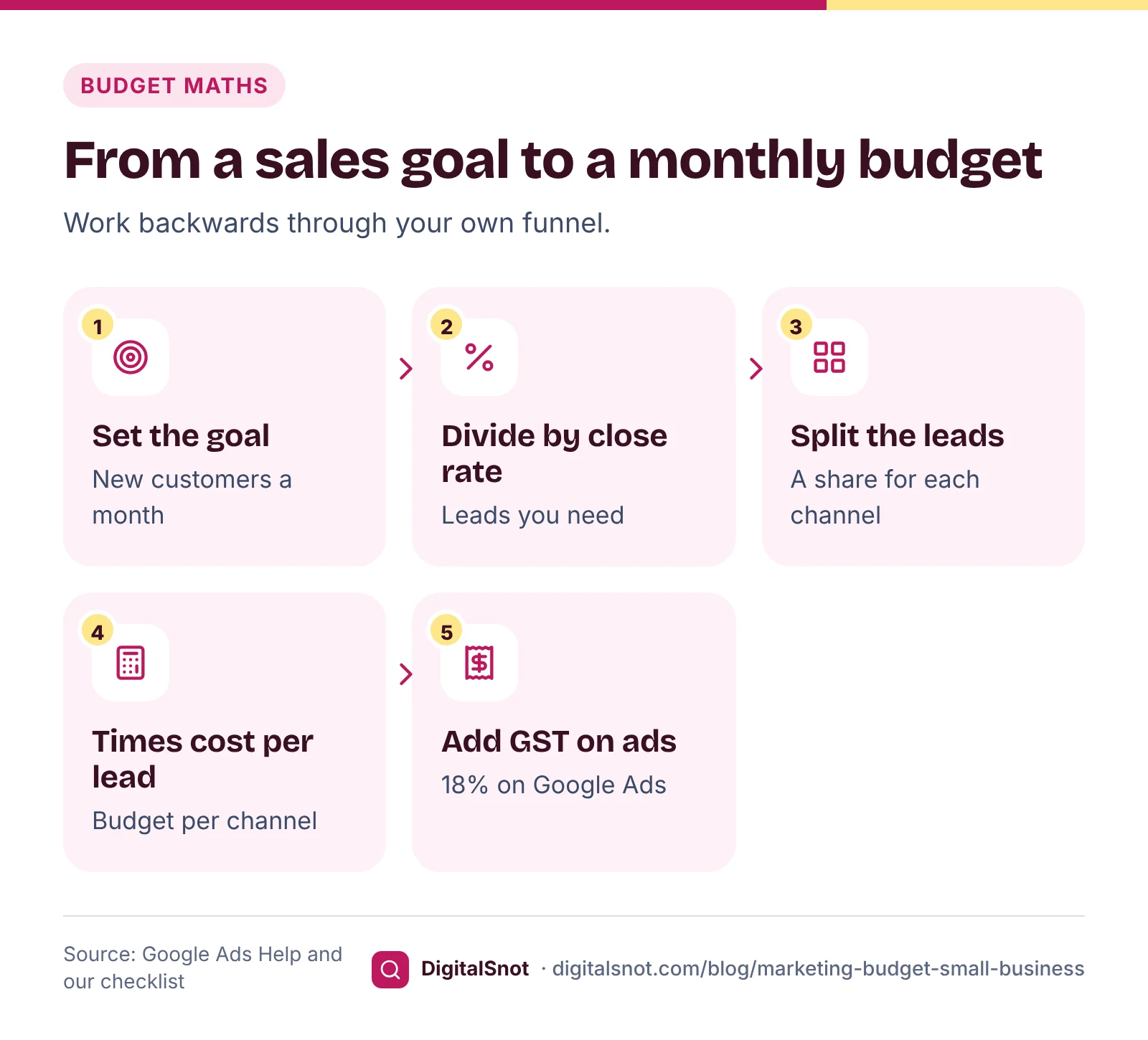
Our Marketing Budget Planner works backwards through your funnel. Choose a goal in new customers or revenue, enter the average value of a first sale and your close rate, then list your channels with the share of leads each should bring and what a lead costs there. You get:
- the leads you need: new customers ÷ close rate;
- the budget for each channel: its leads × its cost per lead;
- 18% GST added to the rows you mark as ad platforms;
- the cost per customer and the revenue to expect;
- an optional 12-month plan with your busier months raised, which you can download as a CSV file.
Use your own cost per lead from past campaigns where you have it. If you have never run ads, our posts on a starting Google Ads budget and a Meta ads budget show how to estimate one before you spend.
Remember tax. Google's page on taxes in your country lists 18% GST when Google India bills you, and Meta's page on ads bought in India says they are billed in rupees and subject to GST, so check the rate on your Meta invoice. The budget you set in either platform is before tax. A GST-registered business can often claim the GST back as input tax credit; ask your accountant, as this post is not tax advice.
Fixed money, proven money and test money
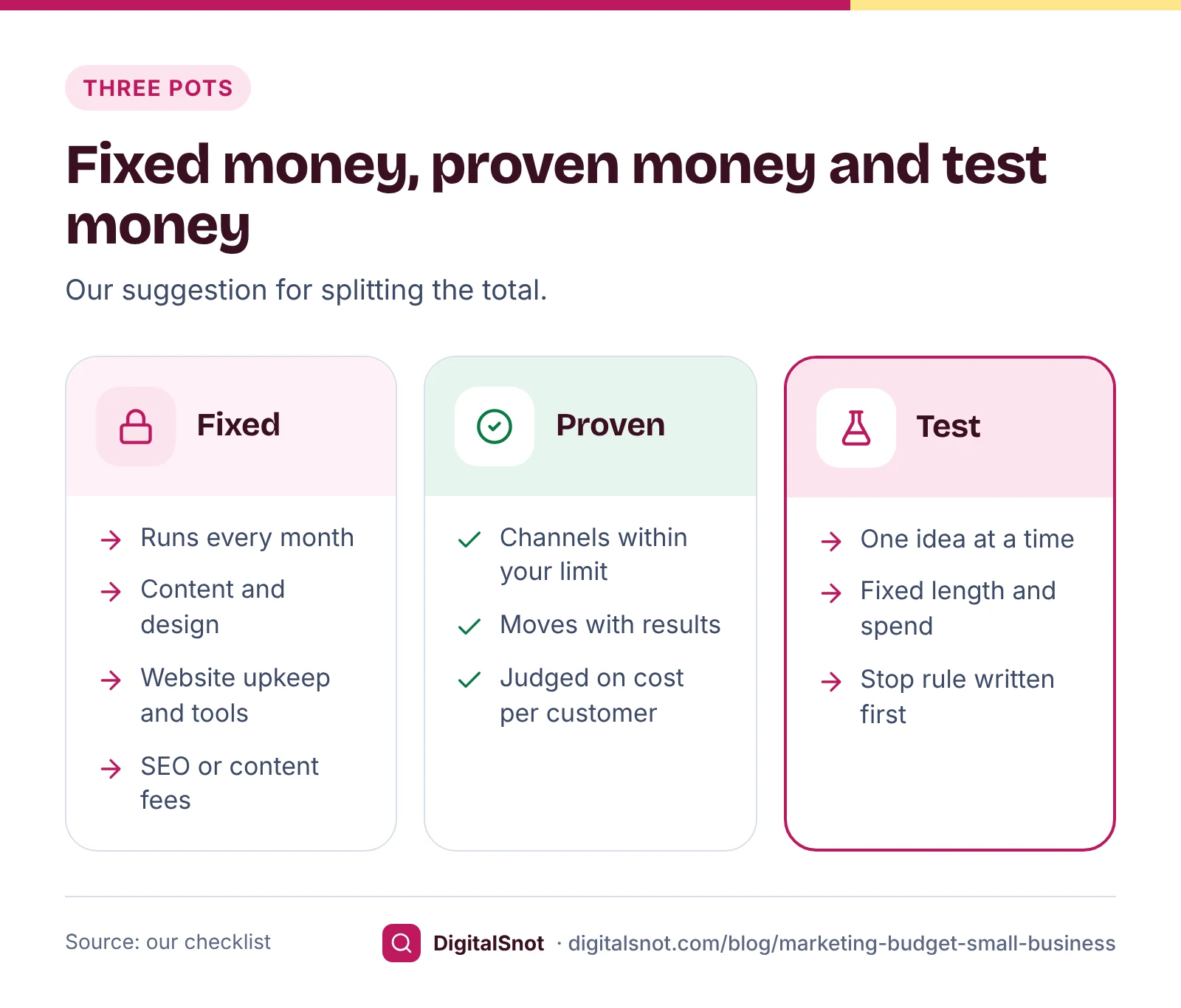
Once you know the total, split it into three pots (our suggestion):
- Fixed money pays for what runs every month whatever the results: website hosting and upkeep, photos and design for your posts, the tools you pay for, and any monthly fees for SEO or content.
- Proven money goes to the channels whose cost per customer you already know is within your limit. It rises or falls each month with their results.
- Test money is a small, separate amount for one new idea at a time: a new channel, a new audience or a new offer. Before the test starts, write down how long it runs, what it can spend and the cost per customer at which you stop it.
How big the test pot is depends on your cash and your margins, not on a rule. Keep it small enough that losing all of it would not hurt the month, and run each test long enough to judge it, because ad platforms need time to learn.
The channels: what each one costs you
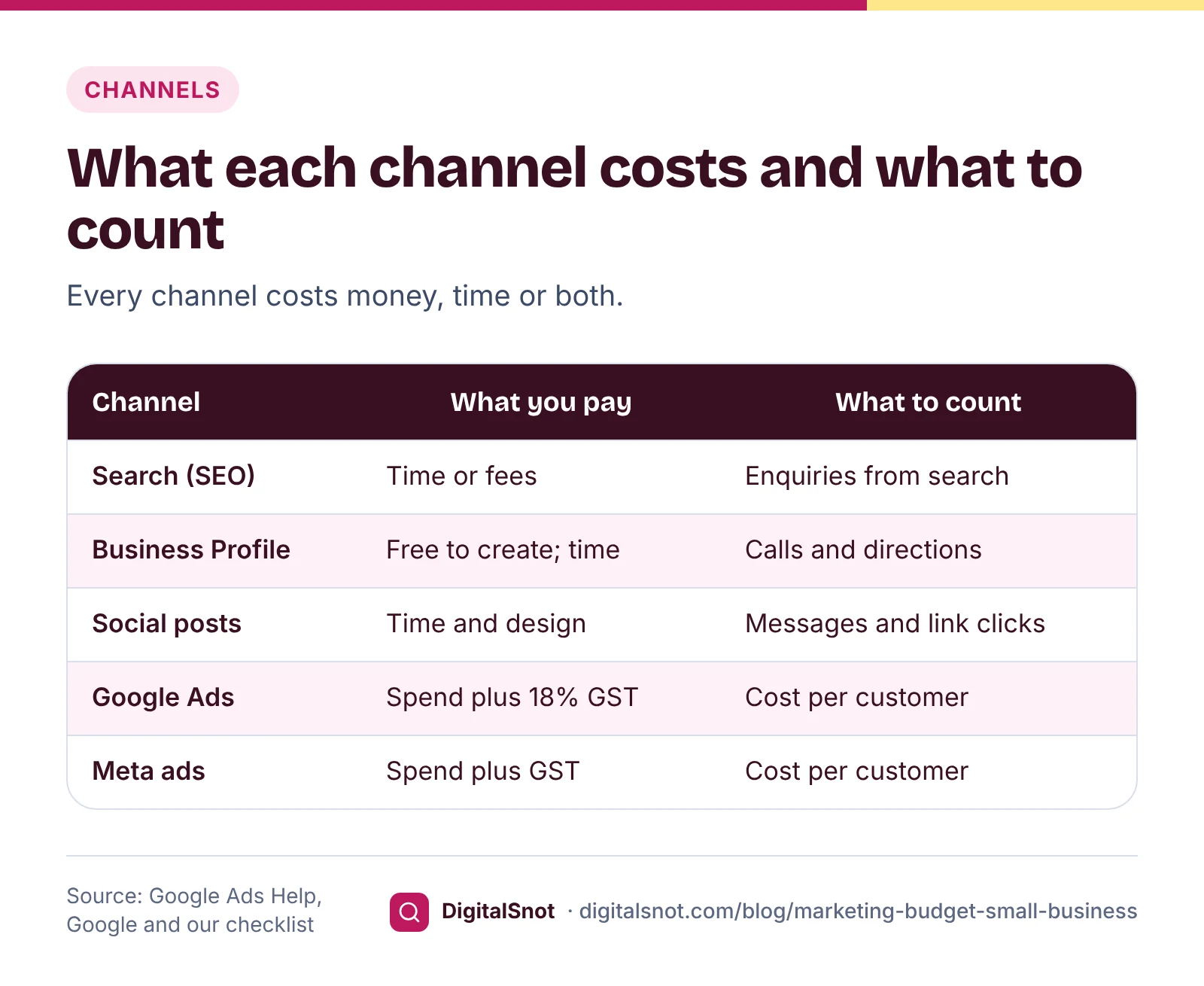
Every channel costs something, even when it sends no bill. The difference is whether you pay in money, in time or both, and how soon you can tell whether it works.
Search (SEO)
Showing in Google search for what customers type costs time or fees for pages, content and fixes, but nothing per click. It is slow: Google's SEO Starter Guide says some changes take effect in a few hours and others could take several months, as our post on how long SEO takes explains. Budget for it as fixed money, and judge it on enquiries from search over months, not on next month's sales.
Local: your Google Business Profile
Google's Business Profile page says creating a profile and listing your business on Google is free of cost. What it needs is time: accurate details, photos, posts, review requests and replies. For a business that meets customers in person, this is often the cheapest place to start, so give it a few hours a week before you buy ads.
Social media
Organic posts on Instagram, Facebook, LinkedIn or WhatsApp cost time, photos and design. Count the enquiries they bring (direct messages, calls and link clicks tagged with UTM codes) rather than likes, so you can compare them with the other channels.
Ads: Google and Meta
Ads cost money for every click or view, plus GST, and start bringing visits as soon as they run, so they are the easiest channel to measure and to move money in or out of. Google treats your budget as a daily average: its page on average daily budgets says a campaign can spend up to twice the average daily budget on a busy day, and its page on spending limits says you are not charged more than 30.4 times your average daily budget in a month, for most campaigns. So divide your monthly Google Ads budget by 30.4 to get the daily one.
A worked example: Iron Lotus Fitness, Bengaluru
Iron Lotus Fitness is a made-up gym in Indiranagar, Bengaluru. Every number below is made up to show the method; use your own.
The owner wants 30 new members a month. A first sale is a three-month membership at ₹9,000 before GST, and 25% of enquiries join, so the planner says the gym needs 30 ÷ 0.25 = 120 enquiries a month. The owner splits them like this:
| Channel | Share of leads | Cost per lead | Budget with 18% GST | New members |
|---|---|---|---|---|
| Google Ads | 40% (48 leads) | ₹300 | ₹16,992 | 12 |
| Meta Ads | 30% (36 leads) | ₹200 | ₹8,496 | 9 |
| Business Profile and referrals | 30% (36 leads) | No ad cost | ₹0 | 9 |
The ads come to ₹21,600 before GST and ₹25,488 with it. Google Ads wins a member for ₹16,992 ÷ 12 = ₹1,416, and Meta Ads for ₹8,496 ÷ 9 = ₹944.
Are those costs safe? In the LTV & CAC Calculator the owner enters a monthly fee of ₹3,000 before GST, 12 payments a year, a 40% gross margin and 12.5% monthly churn, which means members stay 100 ÷ 12.5 = 8 months on average. A member is worth ₹3,000 × 8 × 40% = ₹9,600 in gross profit. At the suggested target of 3, the most the gym should spend to win a member is ₹3,200, so both ad channels are well inside the limit.
On top, the owner keeps ₹10,000 a month of fixed money for a part-time designer and website upkeep, and ₹6,000 plus GST of test money for four weeks of Meta ads for a new women-only morning batch, to be stopped if its cost per member goes above ₹3,200. The whole plan: ₹10,000 fixed, ₹25,488 proven and ₹7,080 test, or ₹42,568 a month.
Review it every month
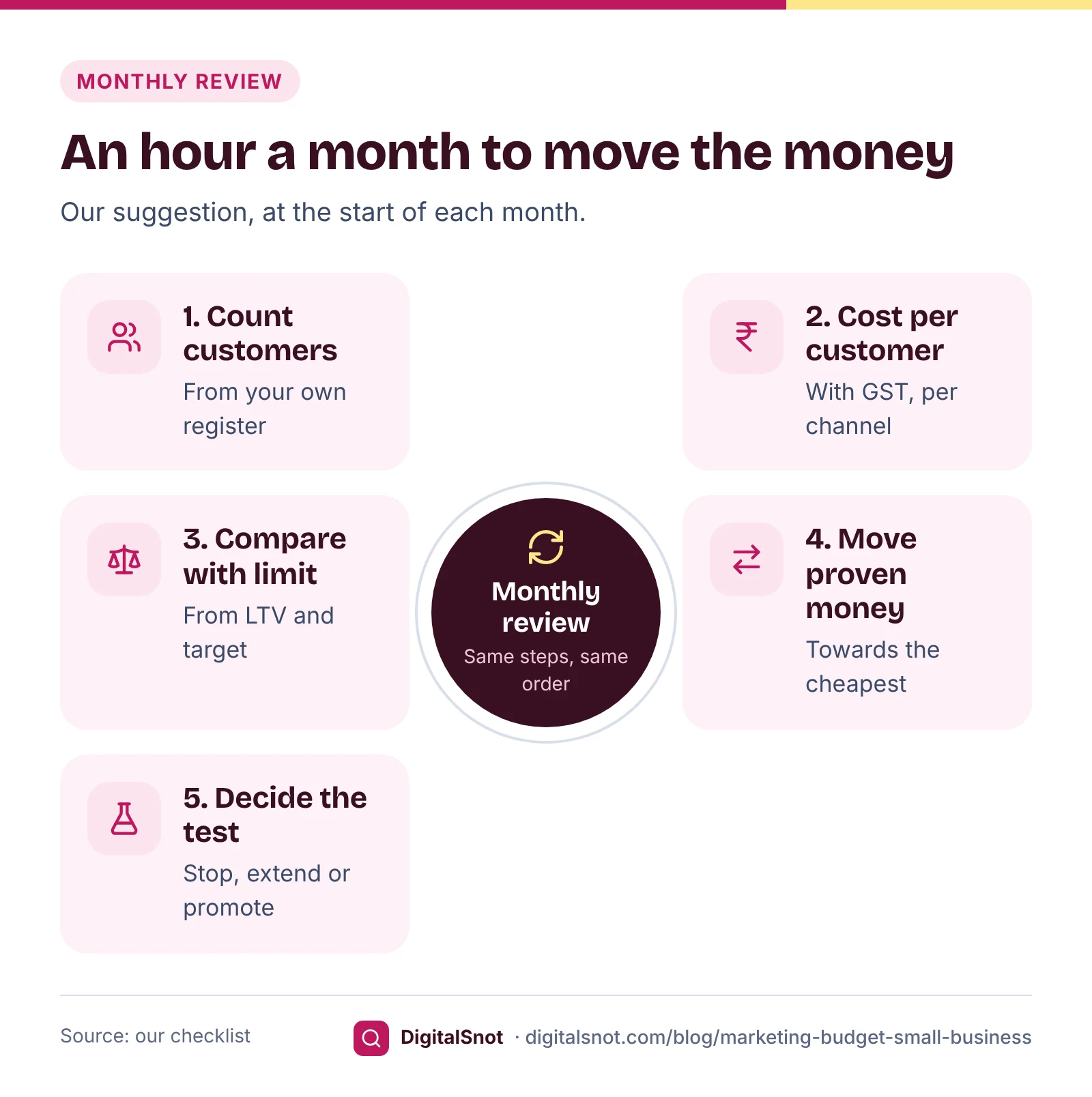
A budget is a guess until the first month's results come in. Set aside an hour at the start of each month (our suggestion) and go through the same steps:
- Count the enquiries and new customers from each channel. Use your own register, not only the platforms' reports: a click is not a customer.
- Work out each channel's cost per customer, with GST, and compare it with the most you can pay.
- Move proven money from the channel with the highest cost per customer to the one with the lowest.
- End, extend or promote the test, using the stop rule you wrote down at the start.
- Update your close rate and customer value in the calculators, because both change with seasons and offers.
Do not judge new campaigns too early. Google's page on bid strategy statuses explains that an automated bid strategy shows "Learning" when it is new or after its settings change. Meta's page on Learning limited says an ad set is shown that way when it is unlikely to get around 50 optimisation events in the week after its last significant edit, and that this is not a penalty. A small test may stay in learning, so judge it on cost per customer over its full run.
To count enquiries properly, track calls and WhatsApp taps from your ads, as our post on tracking calls and WhatsApp leads shows, and use our monthly Google Ads check-up for the account itself.
Mistakes to avoid
- Copying a share of revenue, or a competitor's spend, instead of working from your own close rate and customer value.
- Comparing channels on cost per click or likes rather than cost per customer.
- Forgetting GST on ad invoices, so the plan runs out before the month ends.
- Judging SEO and your Business Profile on one month, or ads on their first week.
- Running several tests at once, so you cannot tell which change worked.
- Counting only the first sale for a business whose customers come back.
Your next step
Open the Marketing Budget Planner with your goal and close rate, then check the cost per customer it gives against the LTV & CAC Calculator. If you are weighing whether to hire help, our SEO & Marketing Cost Calculator shows which of our plans fits your answers, its starting price as published on our service pages and your Google Ads budget with GST; it is a starting point, not a quote. To see where your website stands first, run a free SEO audit.
Free tools in this article
- LTV & CAC Calculator Customer lifetime value, the cost to win a customer, the LTV:CAC ratio and payback in months.
- Marketing Budget Planner Turn a sales goal into leads and a monthly budget by channel, with GST and a 12-month plan.
- SEO & Marketing Cost Calculator Answer a few questions and see which of our SEO plans fits, its starting price and what it includes.
By the numbers
- your average daily budget: the most Google Ads charges in a month for most campaigns
- 30.4×
- Source: Google Ads Help
Frequently asked questions
How much should a small business spend on marketing?
There is no single right amount. Work back from your goal: the new customers you want, divided by your close rate, gives the leads you need, and each channel's cost per lead gives its budget. Then check that the cost per customer stays below what a customer is worth to you over time.
Is there a rule for what share of revenue to spend on marketing?
We found no official rule, from a government body or an ad platform, that sets one for small businesses. A share of revenue also ignores your margins and how often customers come back, so two businesses with the same revenue can afford very different budgets.
How do I split a marketing budget between channels?
Our suggestion: keep fixed money for what runs every month, such as content and website upkeep, put proven money into the channels whose cost per customer is within your limit, and keep a small test pot for one new idea at a time with a stop rule written down first.
Should I include GST in my ad budget?
Plan for it. Google India adds 18% GST to Google Ads costs, and Meta bills ads bought in India in rupees with GST added, so check the rate on your invoice. The budget you set in either platform is before tax. A GST-registered business can often claim it back; ask your accountant.
How often should I change my marketing budget?
Review it once a month (our suggestion): count customers from each channel, compare each cost per customer with your limit and move money towards the cheapest. Give new ad campaigns time to leave their learning period, and judge SEO over months rather than weeks.
Is a Google Business Profile free?
Google says creating a Business Profile and listing your business on Google is free of cost. It still takes time: accurate details, photos, posts, review requests and replies. Check Google's guidelines for representing your business before you create one.
Sources
Every figure and claim in this article comes from the sources below. We checked each one when writing and link to the original so you can read it yourself. Credit belongs to the authors and publishers listed. How we write and check our articles.
-
1
How to estimate conversion value
Google Ads Help · Lead value as average sale × profit margin × share of leads that become customers; repeat business can raise it.
-
2
Taxes in your country
Google Ads Help · 18% GST when Google India bills you, as IGST or CGST and SGST.
-
3
Ads bought in India
Meta Business Help Centre · Ads bought in India are billed in rupees and subject to GST.
-
4
Google Business Profile
Google · Creating a Business Profile and listing your business on Google is free of cost.
-
5
SEO Starter Guide
Google Search Central · Some changes take effect in a few hours, others could take several months.
-
6
About average daily budgets
Google Ads Help · Daily spend can reach twice the average daily budget for most campaigns.
-
7
About spending limits
Google Ads Help · Monthly charging limit of 30.4 times the average daily budget for most campaigns.
-
8
Bid strategy statuses
Google Ads Help · An automated bid strategy shows Learning when it is new or after its settings change.
-
9
About Learning limited
Meta Business Help Centre · Around 50 optimisation events in the week after the last significant edit; not a penalty.
Want a second pair of eyes?
Tell us about your site. We reply within one business day.
Talk to us Try our free tools