Guide · On-page SEO
Internal linking strategy for small websites (20–500 pages)
A simple internal linking system for 20–500 page sites: Google's link rules, a hub-and-service page model, a free orphan-page audit, a spreadsheet template and a 30-page example.

On this page (11 sections)
- 1What internal links do for crawling, ranking and visitors
- 2What Google's documentation says about internal links: our comparison
- 3Map your site: home, hubs, service pages and supporting content
- 4Find orphan and buried pages with free tools
- 5Choose anchor text that is descriptive, varied and natural
- 6Navigation, footers and breadcrumbs
- 7Link new posts to service pages, and back
- 8Worked example: a 30-page dental clinic site (hypothetical)
- 9Decision table: what to do with each problem you find
- 10The link audit spreadsheet and a monthly routine
- 11Sources
An internal linking strategy is a plan for which pages on your site link to which, and with what words, so that search engines can find and understand every page that matters and visitors can reach the next useful step. On a small site you do not need a plugin or a complicated silo diagram. You need clear page roles, plain HTML links, honest anchor text and a short monthly check.
This guide is for owners and in-house marketers of sites with roughly 20 to 500 pages: clinics, trades, consultancies, agencies and small shops. By the end you will be able to sort your pages into hubs, service pages and supporting content, decide how many links each type should receive, find orphan pages with free tools, fix weak anchors and run a monthly routine from a spreadsheet template. It goes much further than the single internal links step in our on-page SEO checklist. Google guidance quoted here was checked in October 2026.
What internal links do for crawling, ranking and visitors
Internal links do three jobs: they let search engines discover your pages, they signal which pages are related and which matter most, and they move visitors towards the page that answers their question or wins you the business. A page that nothing links to is hard for all three to reach.
An internal link is a link from one page on your website to another page on the same website; an external link points to a different site. Google's link best practices state that Google uses links "as a signal when determining the relevancy of pages and to find new pages to crawl" (checked October 2026).
Discovery: on small sites, links do most of the work
Google's sitemap documentation says you might not need a sitemap if your site is "small", which it defines as about 500 pages or fewer that should appear in search, and comprehensively linked internally, so Googlebot can reach every important page by following links from the home page. The same page says a sitemap does not guarantee that every listed URL will be crawled and indexed, and that most sites still benefit from having one.
For most small business sites, then, the sitemap is a backup list. Internal links are the main route by which crawlers reach your pages and learn how they fit together.
Understanding: links tell Google how pages relate
Google's SEO Starter Guide describes link text as the visible part of a link, which tells people and Google something about the page being linked to. A link from your "Cosmetic dentistry" page to "Teeth whitening" with the words "teeth whitening treatment" says more than a menu item or a "read more" button can.
Weak linking holds pages back. Google's link best practices say every page you care about should have a link from at least one other page on your site. A page with few internal links pointing to it is harder for visitors and crawlers to reach and, in our reading, gives Google less context about how it fits with the rest of the site.
Visitors, and crawlers that do not run JavaScript
For a visitor, a good internal link is a shortcut to the next question, such as from a guide to the service it explains. For some AI crawlers, plain links matter even more. Vercel's December 2024 analysis found that OpenAI's and Anthropic's crawlers fetched JavaScript files but did not execute them, while Googlebot rendered pages, so a menu that appears only after JavaScript runs is invisible to crawlers like those. Our guide to getting cited in AI search covers the rest of that picture.
Know the limits, too. Internal links help good pages get found and understood; they do not fix thin or unhelpful content. If a page lost rankings in a core update, see our core update recovery guide instead.
What Google's documentation says about internal links: our comparison
Google's rules for internal links are short: use real HTML links, make sure every page you care about is linked from at least one other page, and write anchor text that describes the destination. There is no ideal number of links, and repeating the same anchor in a menu is normal.
Method: in October 2026 we read Google's link best practices, SEO Starter Guide, sitemap documentation and the November 2022 office-hours transcript, plus John Mueller's answers on internal linking reported by Search Engine Journal, and recorded every statement about internal links. You can repeat this; all the pages are in the sources list.
| What Google says | Where | What it means for a small site |
|---|---|---|
Google can generally crawl a link only if it is an <a> element with an href attribute | Link best practices | Menus, buttons and "related" blocks must output real <a href> links in the HTML |
| Every page you care about should have a link from at least one other page on your site | Link best practices | No orphan pages among the pages you want found |
| Good anchor text is "descriptive, reasonably concise, and relevant" to the page it is on and the page it links to, and should make sense read on its own | Link best practices | Replace "read more" and "click here"; do not stuff keywords in |
| For image links, the image's alt attribute is used as the anchor text | Link best practices | Logo, icon and banner links need descriptive alt text |
| "There's no magical ideal number of links a given page should contain" | Link best practices | No quota; remove links that do not help the reader |
| Do not chain links next to each other; readers struggle to tell them apart and each link loses its surrounding text | Link best practices | Put body links inside sentences, not in lists of bare links |
| A site of about 500 pages or fewer that is comprehensively linked may not need a sitemap | Sitemap documentation | Internal links carry discovery; keep a sitemap as a backup |
| The same anchor text across many internal links, as in menus, is normal; below about a million pages, crawl budget is not a concern | Office hours, Nov 2022 | Do not rewrite menus for SEO or worry about "wasting" crawl budget |
| If every page links to every other page, there is no real structure and Google cannot tell which pages matter most | Mueller, July 2021 | Link selectively; a clear hierarchy beats "link everything" |
| On a site of 10–20 pages, reaching every page from the home page is normal | Mueller, via SEJ | Very small sites can link everything from the home page and menu |
In Google's November 2022 SEO office hours, Google's answer called identical internal anchors "fine" and "normal even", and said removing unnecessary internal links on small and medium sites is "more of a site hygiene topic than an SEO one". The structure points come from a July 2021 hangout, where he warned that too many internal links can dilute their value, and an answer on linking every page from the home page.
Where the sources seem to disagree
- Descriptive anchors versus repeated anchors. Google asks for descriptive anchors, yet says identical menu anchors are fine. They fit together once you separate navigation, which repeats by design, from links in body copy, where you should describe the destination in the words of that sentence.
- No ideal number versus studies with a peak. Google says there is no magic number, while the Zyppy study covered below found clicks peaked at around 40–44 internal links per URL. The study measured correlation, and its count includes menu links, so treat it as a sign that more is not always better, not as a target.
What a crawlable link looks like
- Crawlable:
<a href="/teeth-whitening">teeth whitening treatment</a> - Risky:
<span onclick="go('/teeth-whitening')">Whitening</span>, because there is no<a>element and nohref - Risky:
<a onclick="go('/teeth-whitening')">Whitening</a>, because the element has nohreffor a crawler to follow - Image link:
<a href="/"><img src="logo.svg" alt="Smile Dental Pune home"></a>, where the alt text acts as the anchor
Internal links in 15 seconds
If your theme or app builds menus with JavaScript, ask your developer to check the raw HTML, not just the rendered page. Our technical SEO audit checklist covers rendering, redirects and crawl errors in more depth.
Map your site: home, hubs, service pages and supporting content
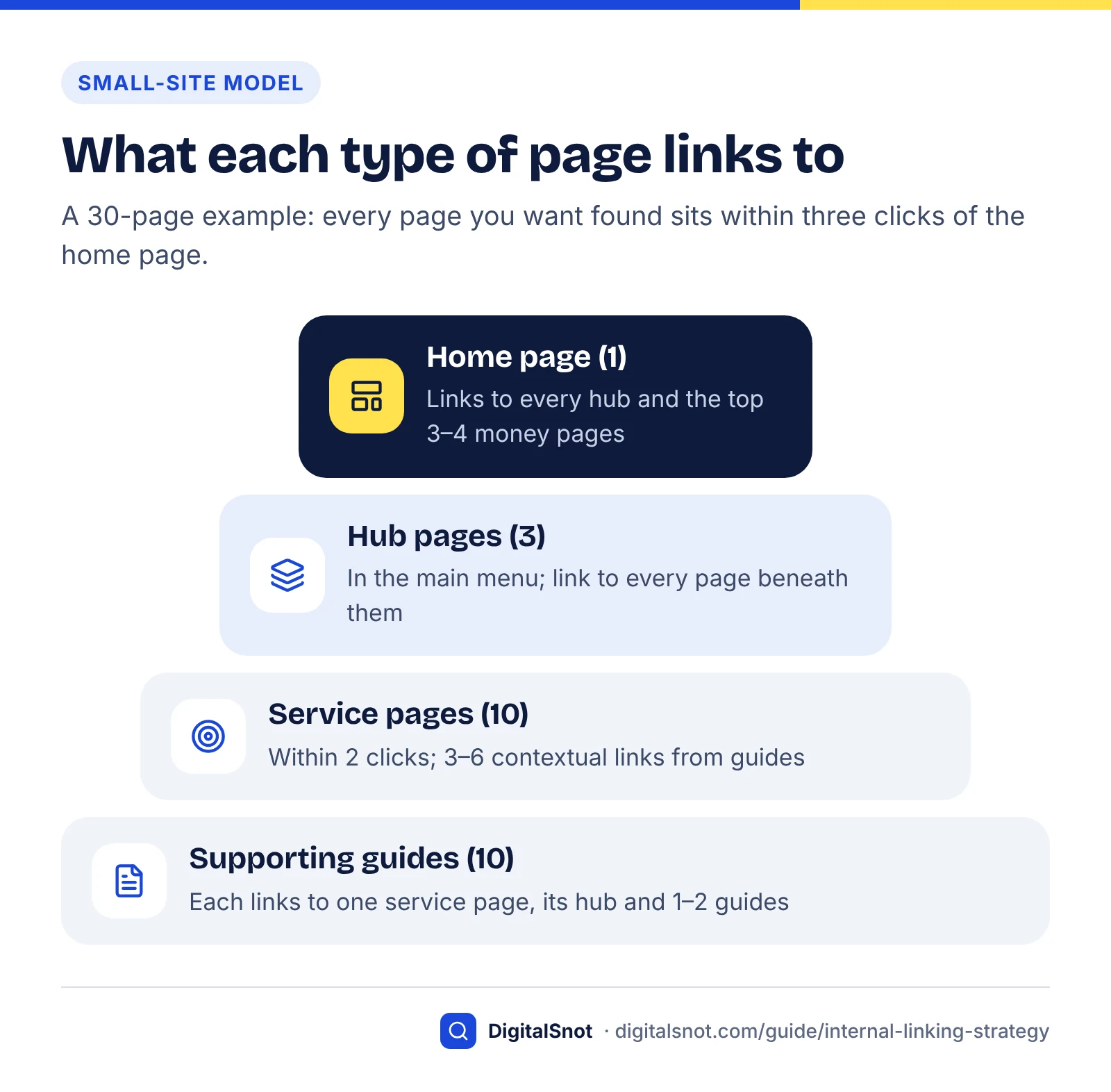
Give every page one role before you add a single link. Five roles cover almost every small site, and each role decides where a page is linked from, how many contextual links it receives and where it sends readers next.
- Home page: the entry point. It links to every hub and to the few money pages that matter most.
- Hub page: an overview page that introduces a topic and links to every page beneath it, such as a "Cosmetic dentistry" page linking to whitening, veneers, bonding and the guides about them.
- Service page (money page): a page built to win a customer, such as a service or product category. Your linking should favour these.
- Supporting page: a guide or blog post that answers a question customers ask before they buy, then passes them to the right service page. Our post on service pages versus blog posts explains how to split topics between the two.
- Utility and trust pages: contact, about, reviews, fees, privacy. Menu and footer links are usually enough.
How many links each page type should get
The targets below are our starting rules of thumb for sites of 20 to 500 pages, not Google figures. Google sets no number. They rest on three things Google does say (every important page linked, a visible hierarchy, no linking of everything to everything) and on Zyppy's finding that URLs with 0–4 internal links averaged far fewer clicks.
| Page role | Linked from | Contextual links in (body copy) | Should link out to | Max clicks from home |
|---|---|---|---|---|
| Home | Every page (logo and menu) | Not needed | Every hub, top 3–4 money pages, contact | 0 |
| Hub | Main menu, home page, every child page | Every child links back once | Every service page and guide beneath it | 1 |
| Service (money) page | Its hub, the menu or home page, related services, guides | 3–6; the highest-priority pages get the most | Its hub, 1–2 guides that answer objections, booking or contact | 2 |
| Supporting guide | Its hub, the blog index, 1–3 related guides, the service page it supports | 2–4 | One primary service page, its hub, 1–2 related guides | 3 |
| Utility and trust | Footer, menu, relevant service pages | 0–2 | Home, booking or contact | 2 |
Two numbers do most of the work. Keep money pages within two clicks of the home page and every indexable page within three; our free audit tool flags anything deeper than three clicks. Then make sure each money page receives contextual links from several relevant pages, not just a menu entry.
Decide which money pages get the most links
Not every service deserves equal support. Score each money page on two things, from 1 to 3, and multiply:
- Business value (1–3): margin, lifetime value or strategic importance. Implants for a dental clinic might score 3; a free check-up offer might score 1.
- Search demand (1–3): how many people search for it in your area. Our keyword research guide shows how to estimate this with free tools.
- Act on the score (1–9): pages scoring 7–9 get a home page link, a menu or hub link and a link from every relevant guide. Pages scoring 4–6 get their hub plus the guides that truly relate. Pages scoring 1–3 get their hub link and nothing forced.
Find orphan and buried pages with free tools
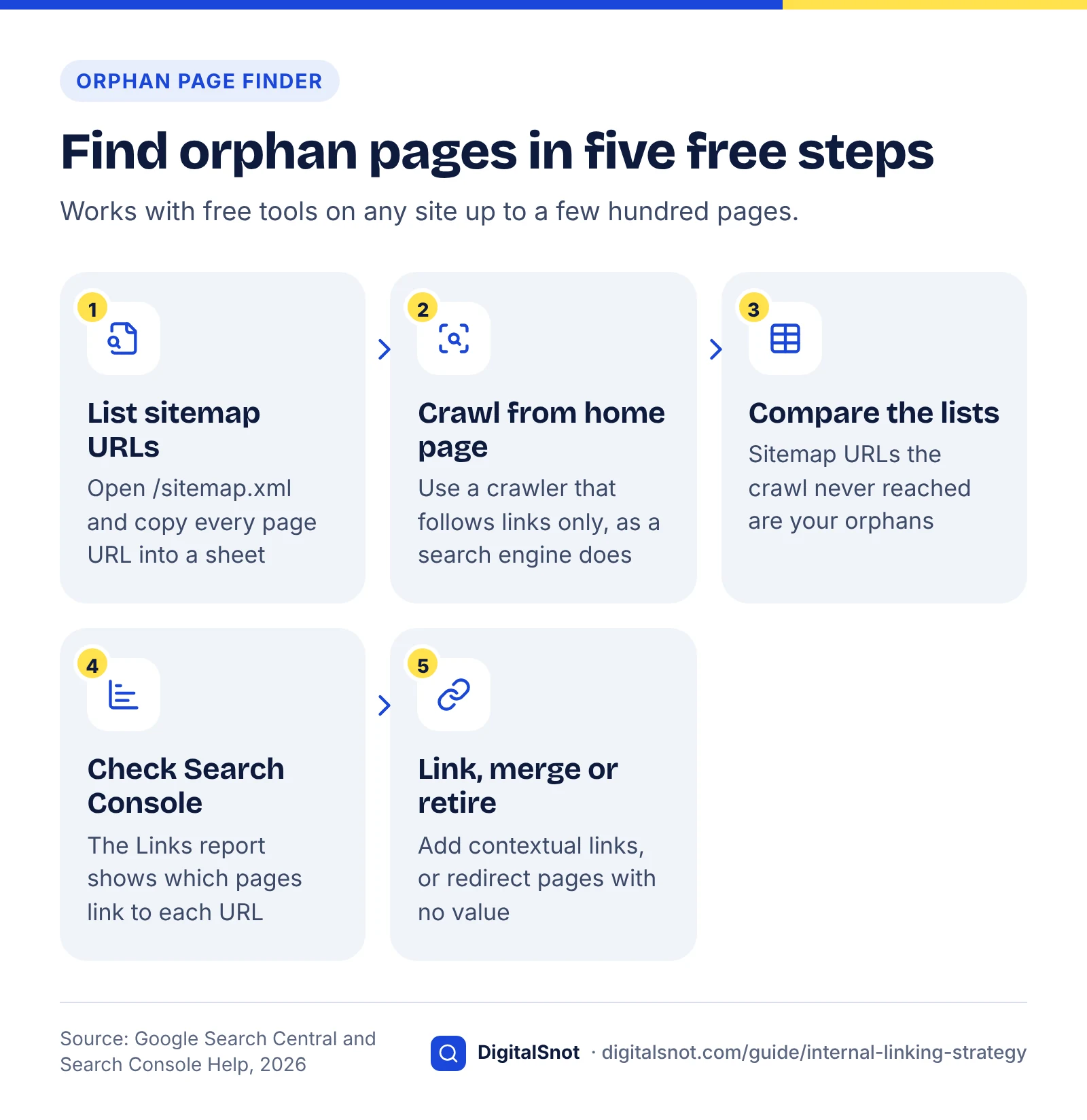
An orphan page is a page that exists, often in your sitemap, but that no other page on your site links to. Find orphans by comparing the URLs in your sitemap with the URLs a crawler reaches by following links from the home page: anything in the first list but not the second is an orphan.
- List your sitemap URLs. Your sitemap is usually at
/sitemap.xmlor listed inrobots.txt. Copy every page URL into column A of a spreadsheet. If your CMS splits it into several sitemaps, include them all. - Crawl from the home page. Run the free Website SEO Audit. It crawls up to 50 pages by following links, the way a search engine does, reads your sitemap and robots.txt, and lists orphan pages (in the sitemap, but linked from no crawled page), pages more than three clicks deep, broken pages with the page that links to them, and links to redirects. If it stops at the page limit, confirm each orphan before acting. For sites over 50 pages, Screaming Frog's SEO Spider crawls 500 URLs for free.
- Compare the two lists. Paste the crawled URLs into column B and flag sitemap URLs the crawl never reached, for example with
=IF(COUNTIF(B:B,A2)=0,"ORPHAN",""). Make sure both lists use the same format (https, trailing slash) before comparing. - Check Search Console's Links report. The internal links table in the Links report lists your most-linked pages, and selecting a URL shows which of your pages link to it. Google notes it is a sample, tables stop at 1,000 rows and it can include links that have since been removed, so use it to confirm, not as a full inventory.
- Decide for each orphan: link it, merge it or retire it, using the decision table later in this guide.
Buried pages
A buried page is linked, but only from deep inside the site. Click depth is the number of clicks from the home page to reach a page by its shortest route. Sort your crawl by depth and look for money pages at three clicks or more and guides at four or more. The usual fixes are adding the page's hub to the main menu, linking the page from its hub and, for top-priority pages, linking it from the home page.
Broken links and links to redirects
While you have the crawl open, collect two more lists: internal links that return an error, and internal links that go through a redirect. Update each one to point straight at the final URL that returns a 200 status. If you are unsure where an old URL now ends up, the free Redirect Checker shows every hop with its status code and tests the http, https and www versions.
Find orphan pages for free
Repeat the orphan check after any redesign, migration or menu change. Those are the moments when pages quietly lose their only link.
Choose anchor text that is descriptive, varied and natural
Anchor text is the visible, clickable text of a link. Write anchors that tell the reader exactly where the link goes, in words that fit the sentence, and let the wording vary naturally from page to page rather than repeating one keyword everywhere.
Google's test is simple: "Try reading only the anchor text (out of context) and check if it's specific enough to make sense by itself." "Read more" fails. "Our guide to aftercare following a root canal" passes. Google's link best practices also warn against stuffing keywords into anchors, and they list generic phrases such as "click here" as poor examples.
What the data says, and its limits
Zyppy's study of 23 million internal links across 1,800 websites, about 520,000 URLs matched against Search Console click data, found that URLs with more anchor text variations were strongly correlated with more Google search traffic. The study dates from 2022. Very few URLs had 25 or more variations, and the author calls the results directional.
The same page now carries an update warning that some sites with high anchor-text diversity may suffer under Google's algorithm. A later Zyppy case study of 50 sites found that sites losing Google traffic tended to use more varied anchor text per page, while raw internal link counts showed no significant correlation. The author describes it as a small sample.
The fair reading: do not chase an anchor diversity target in either direction. Write the anchor a careful editor would write for that sentence; natural writing varies on its own.
Five rules for small-site anchors
- Describe the destination in 2–6 words, using the name customers use for the service: "clear aligner treatment", not "orthodontic solutions".
- Let wording follow the sentence. One guide might say "clear aligners for adults", another "how much aligner treatment involves". Both point to the same page and both are honest.
- Keep one topic, one target. Do not point the anchor "teeth whitening" at two different pages. Choose the page that best matches the intent and send that anchor there.
- Give image links alt text that names the destination, because Google uses it as the anchor.
- Do not chain or force links. Three links in a row lose their context, and a link that only fits by bending the sentence is better left out.
| Weak anchor | Better anchor | Why |
|---|---|---|
| Click here for our services | see our dental implant treatment | Names the destination |
| best dentist Pune cheap implants | dental implants at our Kothrud clinic | Reads naturally; no stuffing |
| https://example.com/root-canal | what happens during a root canal | Bare URLs say little to readers |
| Read more | how long teeth whitening lasts | Passes the out-of-context test |

To check anchors on a single page, run it through the free On-Page SEO Checker. Among its checks, it counts the internal and external links in the page's HTML, flags pages with very few internal links, and flags links with no text or label, such as icon links without an accessible name.
Navigation, footers and breadcrumbs
Your menu, footer and breadcrumbs repeat on every page, so they shape the link structure more than any single article. Keep the menu to hubs and top money pages, keep the footer to utility pages and a few key services, and use breadcrumbs to show each page's place in the hierarchy.
Main menu
For most small sites, a menu of five to eight items works: your hubs or top services, plus about or contact. Mega menus that list 60 pages on every page flatten the structure Google is trying to read; Google's own line applies: "if you think it's too much, then it probably is." In Zyppy's data, traffic started to decline once URLs had more than about 45–50 internal links, which the author attributes largely to sitewide navigation links pointing to low-traffic pages.
Does link position matter?
Mueller has said there is nothing quantifiably different about internal links in different parts of the page, as reported in Search Engine Journal. Contextual links still earn their place for another reason: the sentence around a body link explains why the two pages are related, which a menu item cannot do. Use the menu for structure and body links for meaning.
Footer
Use the footer for pages people look for at the bottom of a page: contact, address, fees, privacy, perhaps your top three services. Avoid rows of keyword-stuffed links such as "dentist Pune, best dentist Pune, cheap dentist Pune"; they help nobody and go against Google's anchor text guidance.
Internal links between pages
Breadcrumbs
Breadcrumbs are a row of links, such as Home › Cosmetic dentistry › Teeth whitening, that show where a page sits and link every child page back up to its hub automatically. Google stopped showing breadcrumbs in mobile search results in January 2025, where results now show only the domain, but it still supports breadcrumb markup for desktop results (checked October 2026). The on-page links themselves still help visitors and crawlers on every device. If you add the markup, our schema markup guide explains how.
JavaScript menus
Check that menu items are real <a href> links in the HTML your server sends. Some themes render menus with click handlers on buttons, or only after scripts run; Google can render JavaScript, but crawlers that do not will see no menu at all. Fixing templates like this is part of our technical SEO work.
Link new posts to service pages, and back
Every new guide or blog post should link to the one service page it supports and to its hub, and it should receive links from two or three older related pages within a day of publishing. Without those inbound links, a new post is reachable only from the blog index and slips deeper with every post you publish.
- Before writing, name the service page the post supports. If a post supports no service and no hub, ask whether it belongs on the site.
- In the post, link to that service page once, where it genuinely helps the reader, with a descriptive anchor. Add a link to the hub and to one or two related guides.
- After publishing, link into the new post from two or three older pages that mention the topic. Search your own site for the topic phrase to find them.
- Add the post to its hub page, with a one-line description of what it answers.
- Link back from the service page if the post answers a common objection, such as "How long does whitening last?" on the whitening page. This keeps buyers on the page instead of sending them back to search.
What not to do: link every post to every service, rely on a "recent posts" sidebar (its links change as you publish and carry no context), or let a plugin choose related links by shared tags alone. Planning a library of guides around your services is the core of our content SEO service.
Worked example: a 30-page dental clinic site (hypothetical)
Example (hypothetical, built to show the method end to end): a dental clinic in Pune with 30 pages it wants found, plus one expired offer page still in its sitemap.
| Role | Pages | Examples |
|---|---|---|
| Home | 1 | Home page |
| Hubs | 3 | Cosmetic dentistry; Orthodontics; General and restorative dentistry |
| Service pages | 10 | Teeth whitening, veneers, bonding; braces, clear aligners; implants, root canal, crowns, check-up and cleaning, emergency dentist |
| Supporting guides | 10 | How long does whitening last?; Veneers or bonding?; Braces or aligners for adults?; What happens during a root canal?; Crown or filling?; and five more |
| Utility and trust | 6 | About the dentists; Contact and directions; Fees; Patient reviews; Book an appointment; Privacy |
What the audit found
- Four orphans. The sitemap listed 31 URLs; a crawl from the home page reached 27. Emergency dentist and Fees sat behind a JavaScript button and dropdown with no
href. The "Crown or filling?" guide had lost its only link when an old page was deleted. The expired aligner offer page was linked from nowhere. - One buried money page. Implants sat four clicks deep, because the General and restorative hub was missing from the menu.
- Seven links to redirects, left over from a change from
.htmlURLs. - Generic anchors. 13 of the 34 contextual links said "read more" or "click here".
- Weak support for priority pages. The three pages scoring 9 (implants, clear aligners, emergency dentist) had 2, 1 and 0 contextual links in. Implants was linked only from the crowns page and the root canal guide.
The fix plan, in order
- Replace the JavaScript button and dropdown with real links in the header:
<a href="/emergency-dentist">Emergency dentist</a>and a Fees link. - Add the General and restorative hub to the main menu. Implants moves from four clicks to two.
- Add a "Popular treatments" paragraph to the home page linking to implants, clear aligners and emergency dentist, each with a one-line description.
- Link guides to each priority page: the two orthodontic guides and the veneers guide to clear aligners ("clear aligners for adults"); the General and restorative hub and the implant recovery guide to implants; the hub, the root canal guide and "What counts as a dental emergency?" to emergency dentist.
- Link "Crown or filling?" from the crowns page and the root canal guide, and list it on the General and restorative hub.
- Redirect the expired offer page with a 301 to the clear aligners page and remove it from the sitemap.
- Update the seven links so they point at the final URLs, and rewrite the 13 generic anchors.
- Link each service page to the guide that answers its most common objection.
| Measure | Before | After |
|---|---|---|
| Orphan pages | 4 | 0 (one redirected) |
| Deepest money page | 4 clicks | 2 clicks |
| Contextual links in: implants / aligners / emergency | 2 / 1 / 0 | 5 / 5 / 4 |
| Links to redirects | 7 | 0 |
| Generic anchors | 13 of 34 | 0 |
The plan comes to roughly 30 link edits, a morning's work on a 30-page site. No result is guaranteed: note the date of the changes, then compare impressions and clicks for the affected pages in Search Console over the following four to eight weeks, since recrawling takes time.
Decision table: what to do with each problem you find
Most internal linking problems have one sensible fix. Find your situation on the left, do what the middle column says, and avoid the mistake on the right.
| If you find | Do this | Avoid |
|---|---|---|
| An orphan page with traffic, leads or a target search | Add 2–4 contextual links from related pages and list it on its hub | Linking it only from the footer or relying on the sitemap |
| An orphan page that is outdated, thin or a near duplicate | Merge its useful content into the stronger page, 301 redirect it, remove it from the sitemap | Leaving it in the sitemap "just in case" |
| An orphan landing page for ads or email only | Add noindex and keep it out of the sitemap; leaving it unlinked is fine | Adding it to the menu to "help" it |
| A money page three or more clicks deep | Link it from its hub and the menu; if it scores 7–9, from the home page too | Adding it to a long footer list |
| An internal link that goes through a redirect | Change the href to the final 200 URL | Leaving it; chains build up after each redesign |
| An internal link to a page that returns 404 | Point it at the replacement page, or remove it; restore or redirect the old URL if it had links or traffic | Redirecting every missing page to the home page |
| Two pages competing for the same search | Point anchors for that topic at the page that best matches intent; merge them if they are near duplicates | Using the same anchor for both pages |
Menu or "related" links built with JavaScript and no href | Output real <a href> links in the HTML | Assuming the sitemap will make up for it |
| Pages with hundreds of links (mega menus, tag clouds) | Trim the menu to hubs and top services; remove tag clouds | Adding nofollow to internal links to "sculpt" them |
| Anchors that are mostly "read more" or "click here" | Rewrite each one to describe its destination | Replacing them all with the same exact keyword |
On nofollow: Google's link best practices describe nofollow, sponsored and ugc as ways to qualify links you do not trust, paid links and user-submitted links. For your own pages that should stay out of search, use noindex or remove them rather than nofollowing the links to them.
The link audit spreadsheet and a monthly routine
A single spreadsheet with one row per URL is enough to manage internal links on a site of up to 500 pages. Fill it once from a crawl, then spend 30 to 60 minutes a month updating it and closing the biggest gaps.
Template: one row per URL
| Column | What to record | Where it comes from |
|---|---|---|
| A. URL | The final URL that returns a 200 status | Sitemap and crawl export |
| B. Role | Home, hub, service, guide or utility | Your site map (previous sections) |
| C. Priority | Business value (1–3) × search demand (1–3) | Your judgement plus keyword research |
| D. In sitemap | Y or N | sitemap.xml |
| E. Reached by crawl | Y or N | Crawler export |
| F. Click depth | Clicks from the home page | Crawler |
| G. Contextual links in | Links from the body copy of other pages, excluding menu and footer | Links report or crawler, checked by hand |
| H. Target links in | From the page-role table | This guide's model |
| I. Gap | =MAX(0,H2-G2) | Formula |
| J. Links to its service page | Y or N (guides only) | Manual check |
| K. Problems | Broken links, redirects, generic anchors | Audit tool and on-page checker |
| L. Action and date | What you changed and when | You |
Two more formulas make the sheet sort itself. Orphan flag: =IF(AND(D2="Y",E2="N"),"ORPHAN",""). Depth flag: =IF(OR(AND(B2="service",F2>2),F2>3),"TOO DEEP",""). Sort by priority (C) from high to low, then by gap (I) from high to low, and work from the top.
The monthly routine
- Re-crawl the site with the Website SEO Audit or your crawler (10 minutes).
- Update columns D to G and filter for ORPHAN and TOO DEEP (10 minutes).
- Fix broken links and links to redirects, starting with high-priority pages (10 minutes).
- Check this month's new pages: each links to its service page and hub, and has two or three links in from older pages (15 minutes).
- Close the biggest gaps: add two or three contextual links to the top-priority page with the largest gap (15 minutes).
- Log every change with its date in column L, so you can compare Search Console data later.
Once a quarter, review the menu, hubs and footer as a whole: retire hubs that have grown stale, add hubs for topics that now have three or more pages, and remove links that no longer help anyone.
Internal linking is one of the few SEO jobs that is entirely in your control and needs no budget. Give every page a role, link with plain HTML and honest words, and check the structure monthly. If you would like the audit and fixes done for you, that is part of our on-page SEO service, and you can contact us to talk through your site.
Free tools in this guide
By the numbers
- Google's definition of a "small" site, which may not need a sitemap if it is comprehensively linked internally
- ≤500 pages
- Source: Google Search Central
- more Google clicks for URLs with 40–44 internal links than for URLs with 0–4 (Zyppy, 2022; 23M links, 1,800 sites)
- 4x
- Source: Zyppy
- Below about a million pages, Google says crawl budget is not a worry and trimming internal links is site hygiene (2022)
- ~1M pages
- Source: Google Search Central Blog
- Google stopped showing breadcrumbs in mobile results; desktop results still use breadcrumb markup
- Jan 2025
- Source: Google Search Central Blog
Frequently asked questions
How many internal links should a page have?
There is no fixed number. Google's link best practices say there is no magical ideal number of links, but if you think a page has too many, it probably does. As a starting point for small sites, give each service page three to six contextual links from related pages and each guide two to four. Zyppy's 2022 study saw clicks peak at around 40–44 internal links per URL, menu links included, but that is correlation, not a target.
What is an orphan page?
An orphan page is a page on your site that no other page links to. It may still be listed in your sitemap, but visitors cannot reach it by clicking, and crawlers find it only through the sitemap, if at all. Google says every page you care about should be linked from at least one other page. Find orphans by comparing your sitemap URLs with the URLs a link-following crawl reaches.
Should internal links use exact-match anchor text?
Use anchor text that describes the destination in natural words, which often includes the service name. Google asks for anchors that are descriptive, reasonably concise and relevant, and warns against keyword stuffing. Repeated anchors in menus are normal, Google said in 2022. In body copy, let the wording follow the sentence instead of forcing one exact keyword into every link.
Do footer and menu links count for SEO?
Yes. Menu and footer links are crawlable links like any other, as long as they are HTML anchor elements with an href. John Mueller has said there is nothing quantifiably different about internal links in different parts of a page. Contextual links in body copy add something menus cannot: a sentence that explains why the pages are related. Use menus for structure and body links for meaning.
Should I use nofollow on internal links?
Usually not. Google describes nofollow, sponsored and ugc as ways to qualify outbound links you do not trust, links you were paid for and user-submitted links. If a page on your own site should not appear in search, use noindex or remove the page instead of nofollowing the links to it. Trying to steer ranking signals by nofollowing internal links adds complexity with little to show for it.
Is a sitemap enough if my pages are not linked?
No. A sitemap helps Google discover URLs, but Google says it does not guarantee that every listed URL will be crawled and indexed. Internal links also tell search engines how pages relate and which ones matter, and they let visitors reach the page at all. Keep a sitemap as a backup, and make sure every page you want found is linked from at least one other page.
How often should I audit internal links?
Run a light check monthly and a fuller review quarterly. Each month, re-crawl the site, look for new orphans, broken links and links to redirects, and make sure new posts link to their service page and receive links from older pages. Each quarter, review your menu, hubs and footer as a whole. Always re-check after a redesign, migration or URL change, when pages most often lose links.
Do internal links help with AI search such as ChatGPT?
They help crawlers reach your pages, which comes before any citation. Vercel's December 2024 analysis found OpenAI's and Anthropic's crawlers fetched JavaScript files but did not run them, so links that exist only after scripts run may be invisible to them. Use plain HTML links in menus and body copy so that every crawler, not just Googlebot, can follow your site's structure.
What is a hub page?
A hub page is an overview page that introduces a topic and links to every page beneath it, such as a Cosmetic dentistry page linking to whitening, veneers and bonding plus related guides. Each child page links back to the hub. On small sites, hubs are often the top-level menu items. They give search engines and visitors a clear hierarchy without forcing every page to link to every other page.
Should I link to every page from my home page?
Only on very small sites. John Mueller has said that on a site of 10 to 20 pages it is normal to reach every page from the home page, but on larger sites linking everything from the home page makes the structure harder to understand. On a 20–500 page site, link the home page to your hubs and your three or four most valuable service pages.
Sources
Every figure and claim in this guide comes from the sources below. We checked each one when writing and link to the original so you can read it yourself. Credit belongs to the authors and publishers listed. How we write and check our articles.
-
1
Link best practices for Google
Google Search Central · Crawlable <a href> links, anchor text test, image links, no ideal link count, every page linked, nofollow.
-
2
What is a sitemap
Google Search Central · Small sites (about 500 pages or fewer) that are well linked may not need a sitemap; no indexing guarantee.
-
3
SEO Starter Guide: The Basics
Google Search Central · Link text tells people and Google about the linked page.
-
4
The rise of the AI crawler
Vercel · December 2024: OpenAI and Anthropic crawlers fetch but do not execute JavaScript; Googlebot renders.
-
5
November Google SEO Office Hours
Google Search Central Blog · Identical internal anchors are normal; crawl budget not a concern below about a million pages (2022).
-
6
Google Cautions Against Using Too Many Internal Links
Search Engine Journal · Mueller, July 2021: too many internal links dilute value and hide the site structure.
-
7
Google Discourages Linking to Every Page From a Site's Home Page
Search Engine Journal · Mueller: linking every page from the home page is normal for 10–20 pages, not for larger sites.
-
8
23 Million Internal Links
Zyppy · 1,800 sites: clicks by internal link count (peak at 40–44), anchor variety correlation, later caveat.
-
9
How Recent Google Updates Punish Good SEO: 50-Site Case Study
Zyppy · Sites losing traffic used more varied anchors per page; raw link counts not significantly correlated.
-
10
Screaming Frog SEO Spider Website Crawler
Screaming Frog · Free version crawls up to 500 URLs.
-
11
Links report
Search Console Help · Top internally linked pages, linking pages per URL, sample data and 1,000-row limit.
-
12
Does Value of Internal Links Differ Based on Page Location?
Search Engine Journal · Mueller: nothing quantifiably different about internal links in different parts of a page.
-
13
Simplifying the visible URL element on mobile search results
Google Search Central Blog · January 2025: breadcrumbs dropped from mobile results; markup still supported for desktop.