YouTube Studio analytics for a small channel: what to read each month
What views, engaged views, watch time, average view duration, impressions CTR, returning viewers and traffic sources mean, how to export them and a 30-minute monthly review.

On this page (8 sections)
YouTube Studio analytics show dozens of numbers, and a small channel can spend an hour looking at them without knowing what to change. You need only a handful, read once a month, each with a question behind it: did people find the video, did they click, did they stay, and did they come back?
This post explains the key reports in plain words, using the definitions in YouTube Help, shows you how to export your data, and gives you a 30-minute monthly review. The example is a made-up cooking channel, Annapurna Rasoi Classes in Indore, with made-up numbers.
Views and engaged views: what changed in August 2026
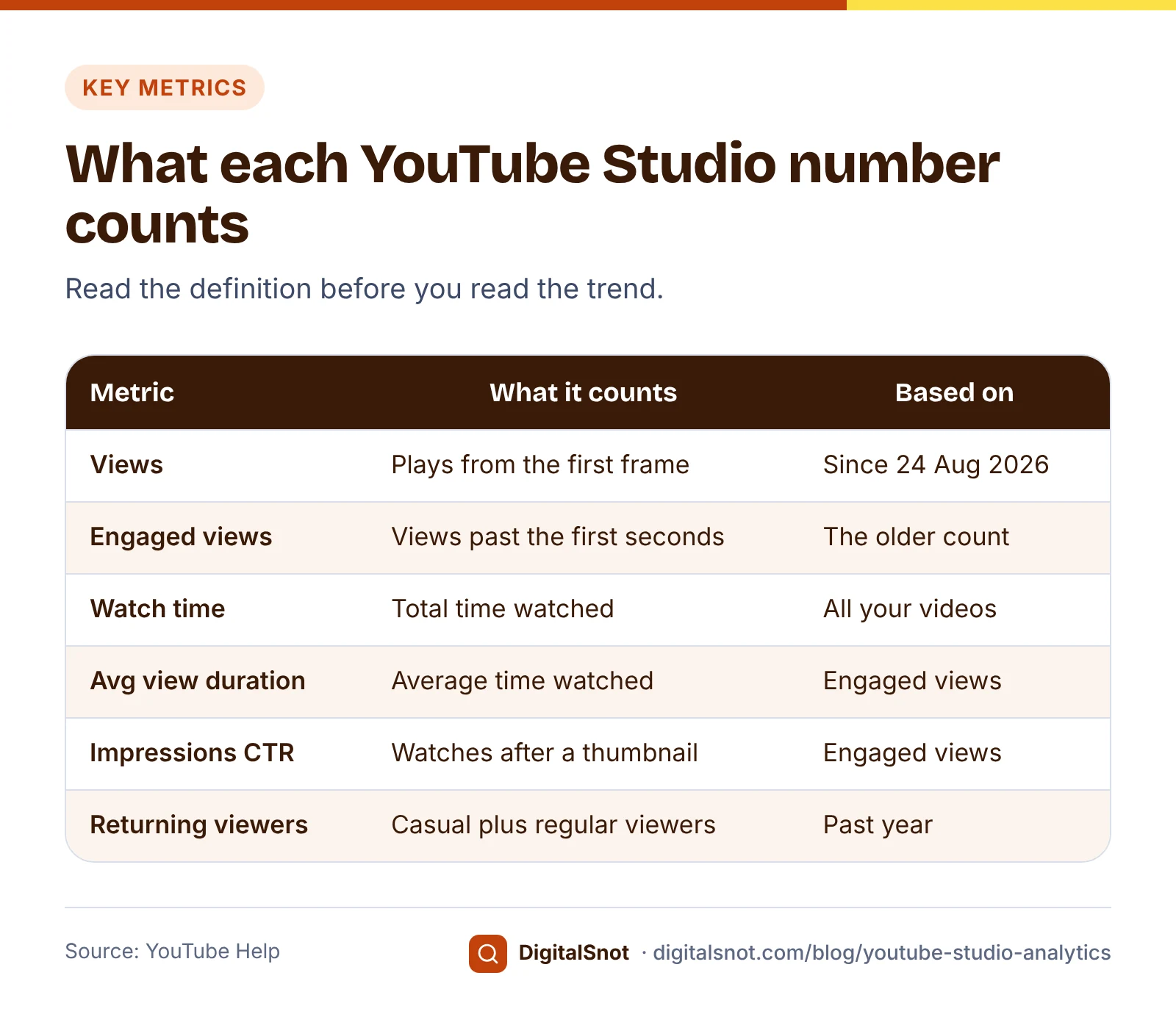
Start with the change that affects every number. YouTube's page on understanding your content performance says that since 24 August 2026, views are counted the moment a video starts to play, across all formats. The older count is kept as engaged views: views where the viewer stayed past the first few seconds, and for Shorts, without loops.
YouTube's explainer on engaged views says most of Analytics stays anchored on engaged views, so the way metrics such as click-through rate, average view duration and retention are worked out has not changed. Three things follow for you:
- Views from after 24 August 2026 can look higher than views from before it, because quick plays now count too. Compare months on the same side of that date, or compare engaged views.
- Views divided by impressions no longer equals your click-through rate.
- When a number looks odd, check whether it is based on views or engaged views before you worry.
The five numbers that matter for a small channel
Watch time is the total time viewers spent watching your videos. It tells you whether the channel as a whole holds attention, and it feeds the Partner Program thresholds explained in our post on how close your channel is to earning.
Average view duration is the average time watched, worked out from engaged views and their watch time. A 10-minute recipe with an average of 2 minutes tells you most people left early. Look at the retention graph of that video to see where.
Impressions and click-through rate. YouTube's page on impressions and click-through rate counts an impression when your thumbnail is shown for more than 1 second with at least 50% of it on screen. The impressions click-through rate (CTR) is how often viewers watched after seeing the thumbnail. YouTube says half of all channels and videos have an impressions CTR between 2% and 10%, and gives an example of a video whose CTR fell from 9% to 3.5% as it reached a wider audience. Its page on decoding CTR and impressions adds that the home page tends to bring many impressions with a lower CTR, while search brings fewer impressions with a higher CTR. So a falling CTR on a video that is being shown more is not always bad news.
Returning viewers. YouTube's page on new, casual and regular viewers splits your audience three ways. New viewers watched your channel for the first time in the period. Casual viewers have watched at least once a month for 1 to 5 months in the past year, and regular viewers for longer than that. Casual and regular viewers together are your returning viewers. For a business channel, a growing regular group means people come back for more than one video.
Traffic sources. YouTube's page on understanding your video reach lists where views come from, including browse features (the home page, subscriptions and other browsing), suggested videos shown next to or after other videos, YouTube search, and external sources: websites and apps that embed or link your video. Search traffic shows the words people typed, which are ideas for your next titles. External traffic shows how well your videos travel outside YouTube, for example from your own website.
Export the table of your videos
Studio's charts are good for a quick look; a table is better for comparing videos. YouTube's page on Advanced mode explains how: open Analytics, choose Advanced mode, set the date range and the metrics, then use Export current view and pick a file format. Downloaded reports are limited to 500 rows, so for a big channel choose a date range that covers the videos you want.
Add these columns before you export: views, engaged views if shown, watch time, average view duration, average percentage viewed, impressions, impressions click-through rate, subscribers, duration and publish date.
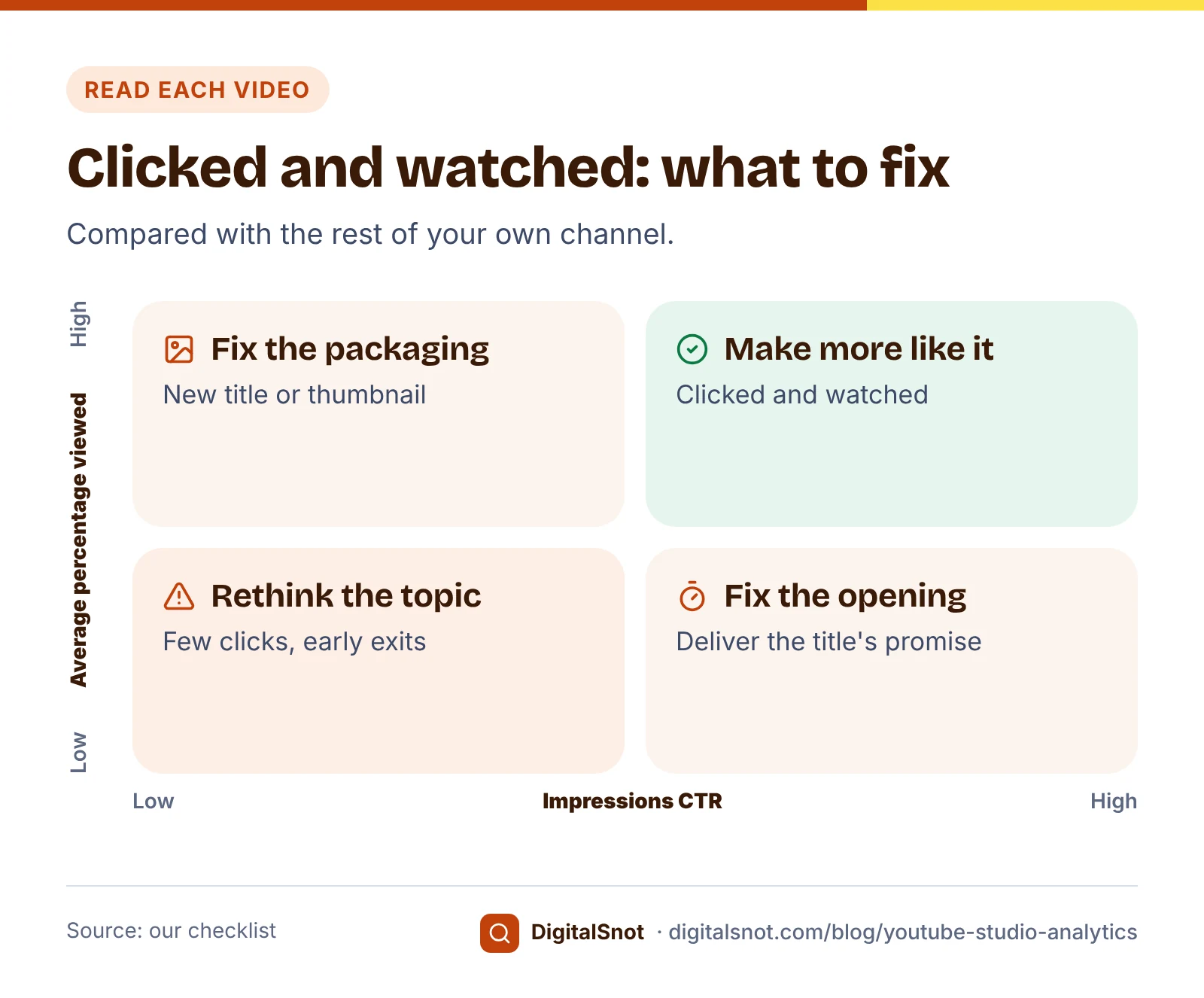
Then open the file in our YouTube Studio Export Analyzer. It finds the columns by their headings and shows your totals, top videos by views and by watch time, the videos shown often but clicked least, subscribers per 1,000 views, short videos against longer ones and the weekdays you publish, with a list of what to do next. Our checklist compares each video with the rest of your channel: a video with many impressions but a CTR in the bottom quarter of your channel is a candidate for a new title or thumbnail, and one with a high CTR but a low average percentage viewed may not deliver what its title promises. Videos with fewer than 100 views are left out of these comparisons, because YouTube says their CTR varies more. The file is read in your browser and never uploaded.
A 30-minute monthly review
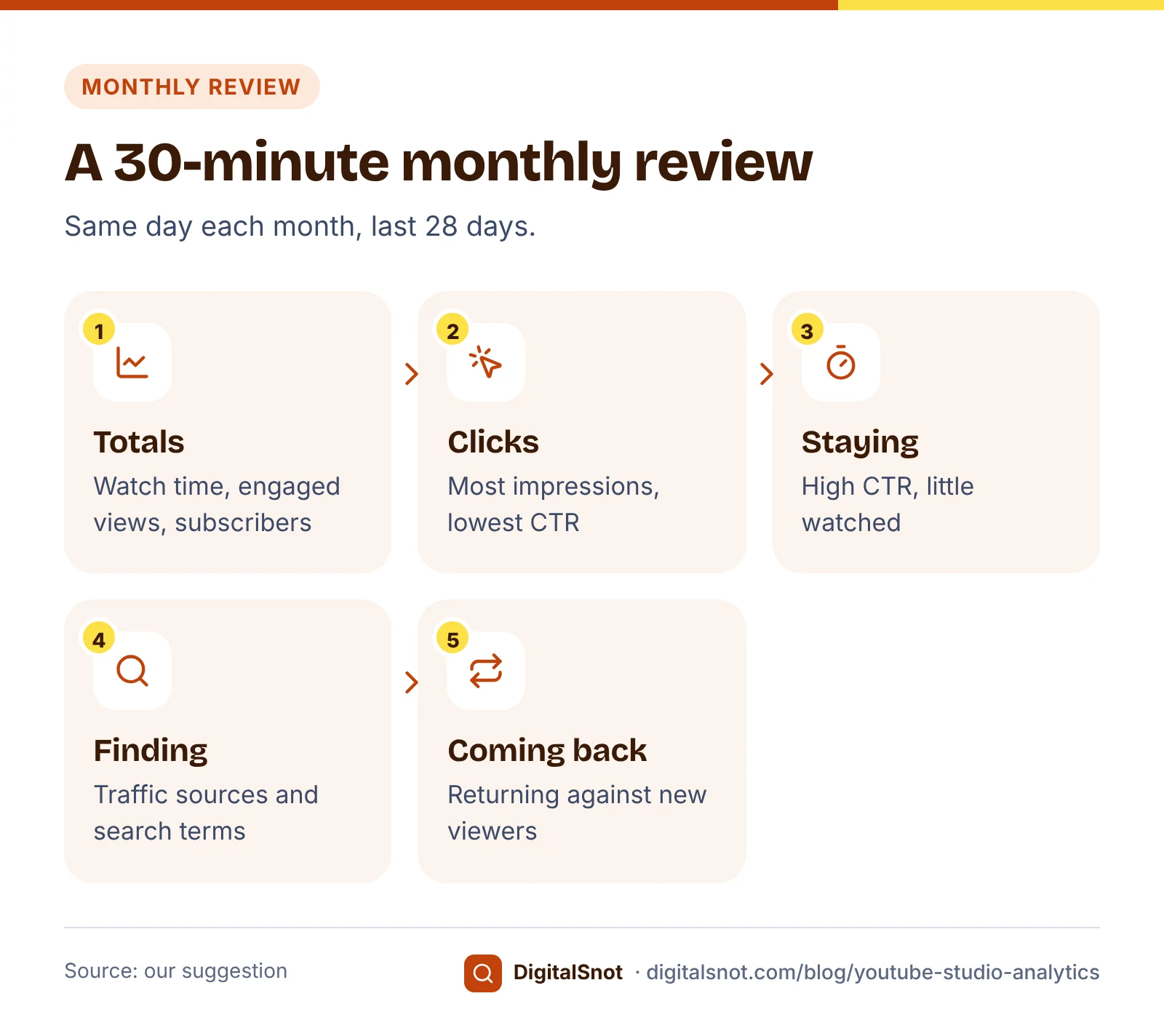
Our suggestion is to read Analytics on the same day each month, for the last 28 days, and write down five numbers so you can see the trend over a year:
- Totals. Watch time, engaged views and subscribers gained, next to last month's.
- Clicks. The two videos with the most impressions and the lowest CTR on your channel. Plan a new title or thumbnail for one of them; our post on YouTube thumbnail size and rules covers the checks.
- Staying. The video with the highest CTR but a low average percentage viewed. Watch its first 30 seconds and ask whether the opening matches the title.
- Finding. Traffic sources for the month, and the top YouTube search terms. Note one search term you could answer in a new video.
- Coming back. Returning viewers against new viewers. If almost everyone is new, end each video by pointing to the next one in a playlist.
Change one thing at a time, and judge it next month. A thumbnail swapped on Monday and a title changed on Wednesday cannot be told apart.
Use our YouTube Channel Growth Calculator to turn the totals into a plan. It works out when you reach a subscriber goal at your usual pace, how many watch hours your views and average view duration add up to, how many views your impressions and CTR bring, and what an upload plan adds up to. It is straight-line arithmetic on the numbers you type, not a forecast YouTube makes.
Once a quarter, go through our YouTube Channel Audit Checklist as well: the name, handle and images, profile and links, the Home tab, feature access, upload defaults and team access. Analytics tells you what happened; the audit makes sure the channel itself is not holding you back.
A worked example: Annapurna Rasoi Classes
Annapurna Rasoi Classes, a made-up cooking school in Indore, posts two recipe videos a week to bring students to its weekend classes. Its October review, with made-up numbers for the last 28 days:
- Totals. 9,400 engaged views at an average view duration of 3 minutes 58 seconds, about 620 watch hours, and 48 subscribers gained, about 5 per 1,000 views.
- Clicks. "Paneer tikka without a tandoor" had 31,000 impressions and a 1.4% CTR, the lowest on the channel. Its thumbnail shows the whole kitchen; the new one shows the finished tikka close up.
- Staying. "Dal baati in a cooker" had a 7.9% CTR but only 22% average percentage viewed. The first minute was about the history of the dish; the new edit starts with the cooker on the stove.
- Finding. Search terms included "eggless cake in kadhai", which is next month's video.
- Coming back. Most viewers were new, so each video now ends with a link to the matching playlist.
The growth calculator showed that at 48 subscribers a month, the channel's goal of 1,000 is about 8 months away from its current 640.

Mistakes to avoid
- Comparing views from before and after 24 August 2026 as if they were the same count.
- Judging your CTR against a big creator's channel instead of your own videos.
- Panicking when CTR falls on a video that is suddenly getting many more impressions.
- Reading Analytics every day and changing titles on one day's numbers.
- Exporting a long date range from a big channel and missing videos past the 500-row limit.
- Counting likes as customers. For a business channel, also track enquiries that mention a video.
Your next step
Pick a review day, export last month's table and run it through the analyzer. Fix one title or thumbnail and one opening, and check them next month. If you are still planning which videos to make, our post on your first 10 YouTube videos as a local business is a good place to start, and every YouTube tool we offer is on our YouTube tools page. For help with a business channel, contact us.
Free tools in this article
- YouTube Studio Export Analyzer Open a YouTube Studio analytics export to see top videos, low-CTR thumbnails and what to do next.
- YouTube Channel Growth Calculator Plan subscriber and watch-hour goals, and see what your CTR and upload plan add up to.
- YouTube Channel Audit Checklist Tick through your channel's branding, profile, Home tab, features, defaults and team access.
Frequently asked questions
What is the difference between views and engaged views on YouTube?
Since 24 August 2026, YouTube counts a view as soon as a video starts to play. Engaged views are the older count: views where the viewer stayed past the first few seconds, and for Shorts, without loops. Average view duration and impressions CTR are based on engaged views.
What is a good impressions click-through rate on YouTube?
YouTube says half of all channels and videos have an impressions CTR between 2% and 10%. CTR often falls as a video reaches a wider audience, and the home page tends to bring a lower CTR than search, so compare each video with your own channel.
How does YouTube count an impression?
An impression counts when your thumbnail is shown on YouTube for more than 1 second with at least 50% of it on screen. Views from other websites and apps, where no thumbnail impression is counted, can make views higher than impressions times CTR.
What are returning viewers on YouTube?
Viewers who had watched your channel before and came back in the period. YouTube splits them into casual viewers, who watched at least once a month for 1 to 5 months in the past year, and regular viewers, who watched for longer than that.
How do I export YouTube Studio analytics?
Open Analytics, choose Advanced mode, set the date range and metrics, then use Export current view and choose a file format. Downloaded reports are limited to 500 rows, so choose a date range that covers the videos you need.
How often should a small channel check YouTube analytics?
Our suggestion is once a month, on the same day, for the last 28 days, plus a channel audit once a quarter. Change one title, thumbnail or opening at a time, and judge the change at the next review.
Sources
Every figure and claim in this article comes from the sources below. We checked each one when writing and link to the original so you can read it yourself. Credit belongs to the authors and publishers listed. How we write and check our articles.
-
1
Understand your YouTube content performance
YouTube Help · Views counted from the start of play since 24 August 2026; engaged views; watch time; average view duration from engaged views.
-
2
What are engaged views on YouTube?
YouTube Blog · Most analytics stay anchored on engaged views; CTR, average view duration and retention calculated as before.
-
3
Check your impressions and click-through rate
YouTube Help · Impression: thumbnail shown more than 1 second with at least 50% visible; CTR definition; half of channels between 2% and 10%; CTR falling as reach grows.
-
4
Decoding CTR & impressions in your Analytics
YouTube Help · CTR varies by surface: the home page brings many impressions at a lower CTR, search fewer at a higher CTR.
-
5
Understand new, casual and regular viewers
YouTube Help · Definitions of new, casual, regular and returning viewers.
-
6
Understand your YouTube video reach
YouTube Help · Traffic sources: browse features, suggested videos, YouTube search, external and others.
-
7
Learn how to use Advanced mode for analytics reports
YouTube Help · Export current view; downloaded reports limited to 500 rows.
Want a second pair of eyes?
Tell us about your site. We reply within one business day.
Talk to us Try our free tools