UPI QR code for business: static, dynamic and what to check
What a UPI payment QR code holds, when to fix the amount, how to add a code to GST invoices and receipts, and the checks that keep your counter safe from payment tricks.
On this page (9 sections)
A UPI QR code for business, on your counter or your invoice, lets customers pay in seconds without asking for your bank details. This post explains what a UPI payment QR code holds, when to fix the amount and when to leave it open, how to add a code to GST invoices and receipts, and the checks that keep you safe from common payment tricks.
This post is not tax or legal advice: check the invoice rules for your business with your CA.
What a UPI payment QR code holds
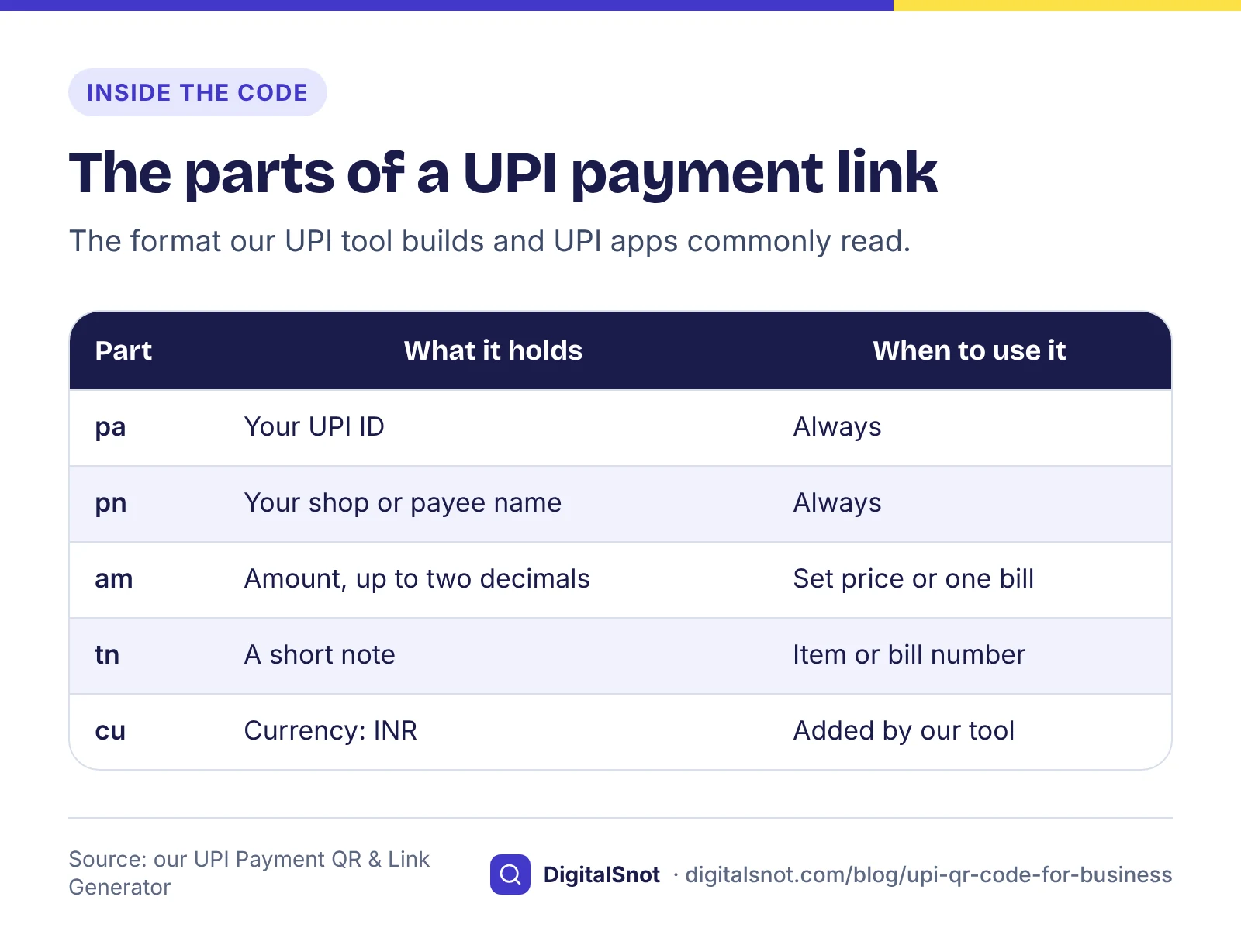
A UPI payment QR code is a picture of a short payment link. When a customer scans it, their UPI app reads the link and fills in the payment for them. The link our UPI Payment QR & Link Generator builds for a made-up sweet shop looks like this:
upi://pay?pa=sharmasweets@examplebank&pn=Sharma%20Sweets&am=240.00&tn=Kaju%20katli&cu=INR
- pa is your UPI ID: a name part, an "@" and the handle of your bank or app. Copy it from your UPI app, usually from your profile, where the app also shows its own QR code.
- pn is your shop or payee name.
- am is a fixed amount in rupees, with at most two decimals for paise. Leave it out and the customer types the amount.
- tn is a short note, such as an item or a bill number. Our suggestion is 50 characters or fewer, because a long note makes the code dense and some apps cut it short.
- cu is the currency, INR.
This is the common format UPI apps read, and the one our tools use. We have not found NPCI's specification for these links on its public website, so we do not present these field names as NPCI's rules. Test every code with the UPI apps your customers use before you print it.
Static or dynamic: which code you need
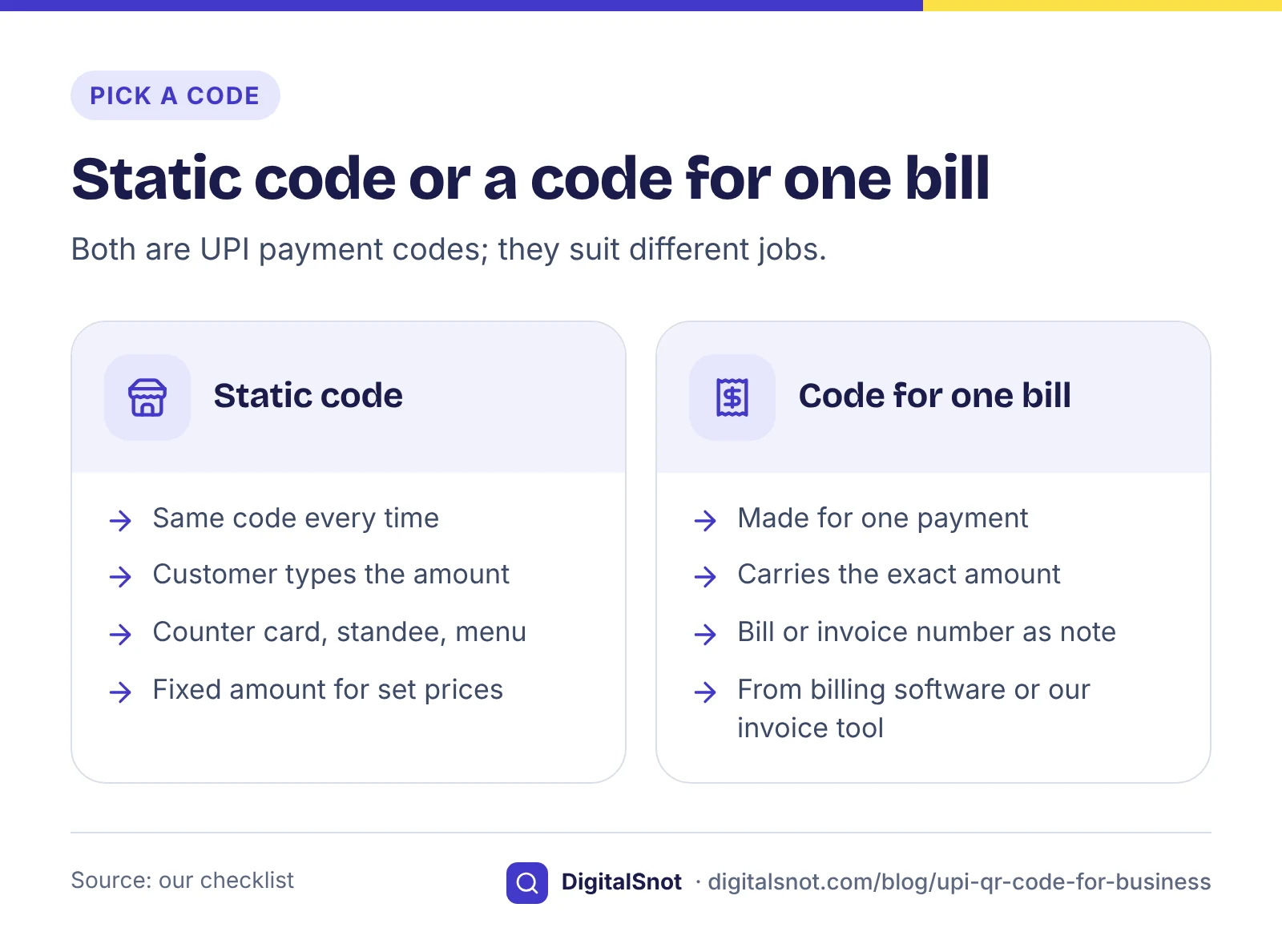
A static code is the same every time. It suits a counter card, a standee, a menu or a delivery bag. Most static codes carry no amount, so the customer types what the bill says. A static code with a fixed amount suits a price that never changes, such as a ₹50 parking fee, a set thali or one item on a price list.
A dynamic code is made for one payment. It carries that bill's exact amount and a reference, so the customer does not type anything and the payment matches the bill. Billing software and payment providers make them for each bill.
Our tools sit in between. The UPI Payment QR & Link Generator makes static codes, with an open or a fixed amount, and a sheet with one code per item for a price list. The GST Invoice and Quotation Generator prints a code for one invoice's total, and the Payment Receipt Maker prints one for the balance due on a receipt. Those codes are made for one document, but they are still plain UPI links: none of our tools can see whether a payment arrived.
Make and test your counter card
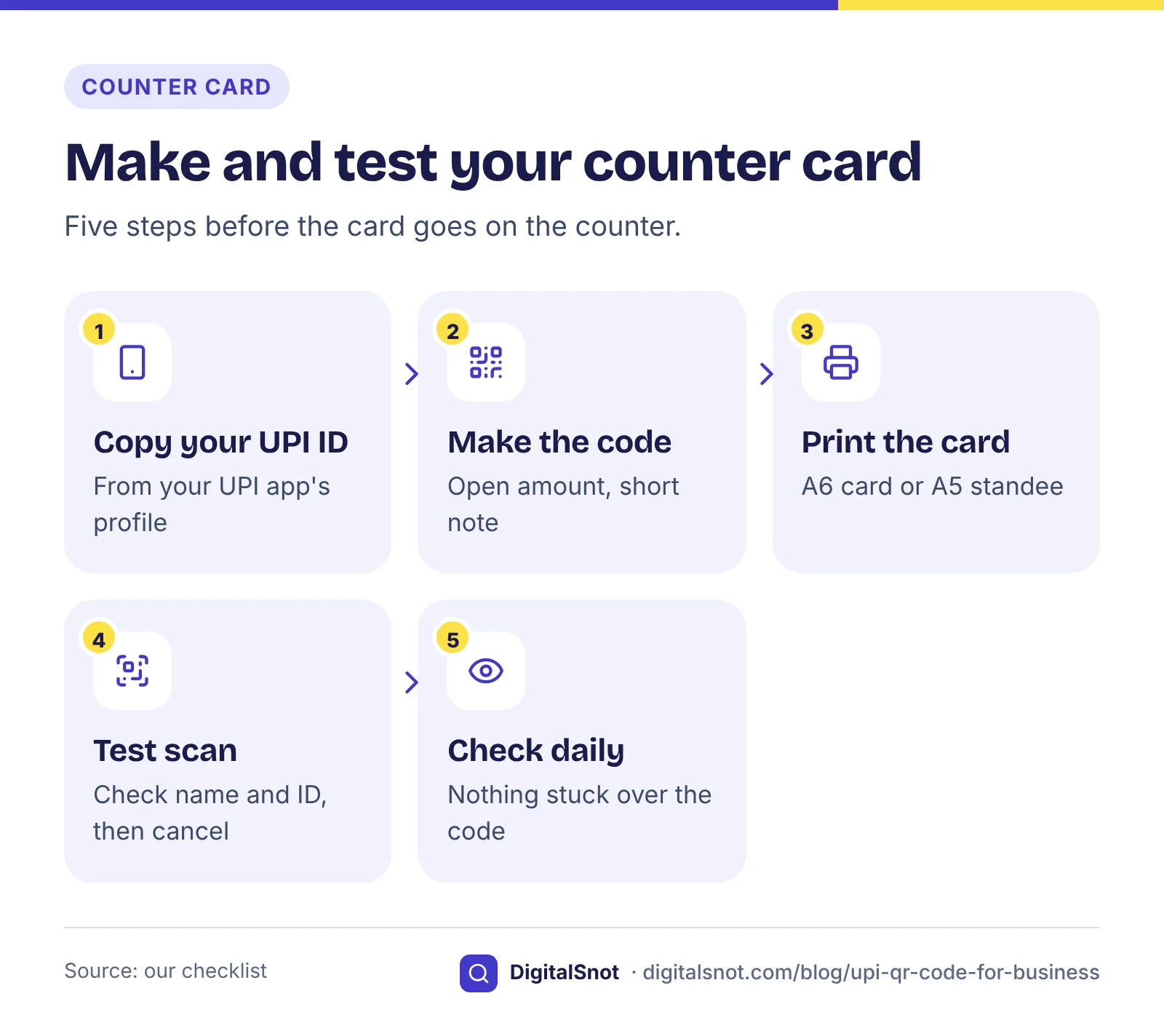
For a shop counter, these steps take a few minutes:
- Type your UPI ID and your shop name into the UPI Payment QR & Link Generator.
- Leave the amount for the payer to type, or fix one amount, and add a short note if you like, such as "Counter 1".
- Download the code as a PNG or an SVG, or print the A6 counter card or the A5 standee. The SVG stays sharp at any size for a print shop.
- Scan the printed card with your own UPI app. Check that the name, the UPI ID and any amount are right, then cancel without paying.
- Ask a friend with a different UPI app to scan it too.
The tool checks the shape of your UPI ID, the amount and the note. It cannot tell whether the UPI ID exists or is yours, which is why the test scan matters. Keep the white border round the code when you print it. Our suggestion: look at your counter card each morning to check that nothing has been stuck over it.
A QR code on your GST invoice
Rule 46 of the CGST Rules lists what a tax invoice must show, from your GSTIN and a serial number to the taxable value and the tax. A payment code for a small business is an extra you choose to add, and it helps customers pay the exact total. Our post on what a GST invoice must show walks through every required detail.
In the GST Invoice and Quotation Generator, add your UPI ID once with your business details and tick the QR option. The invoice then prints a code for the total, with the document and its number as the note, so the payment in your app shows which invoice it was for. Quotations get no code, because nothing is due yet.
Bigger businesses have stricter rules. Since 1 August 2023, under Notification 10/2023-Central Tax, a business whose aggregate turnover has exceeded ₹5 crore in any financial year from 2017-18 must report its invoices to registered buyers, and its exports, on the Invoice Registration Portal, and print the IRN and QR code it gets back. That code is not a payment code. Rule 48 says an invoice such a business issues any other way is not treated as an invoice, and a GSTN advisory stops businesses with turnover of ₹10 crore or more from reporting an invoice more than 30 days after its date. Our invoice tool does not do e-invoicing.
The largest businesses also have separate QR code rules for invoices to consumers. If your turnover is anywhere near that size, check the current rule with your CA.
Receipts for UPI and part payments
Your UPI app records the payment, but the customer often wants a receipt, and a part payment needs a record of what is left. The Payment Receipt Maker makes a receipt for a full payment, a part payment with the balance left, or an advance. It writes the amount in figures and in words, records the UPI reference, can print a UPI code for the balance, and keeps a log of your receipts in your browser that you can download as a CSV file.
Two limits to know. A GST-registered business that receives an advance issues a receipt voucher under section 31(3)(d) of the CGST Act, which this tool does not make. And for cash, the tool warns you at ₹2 lakh or more from one person, the limit in section 269ST of the Income-tax Act, 1961. The Income-tax Act, 2025 applies from 1 April 2026, so ask your CA about the rule now in force.
Stay safe at the counter
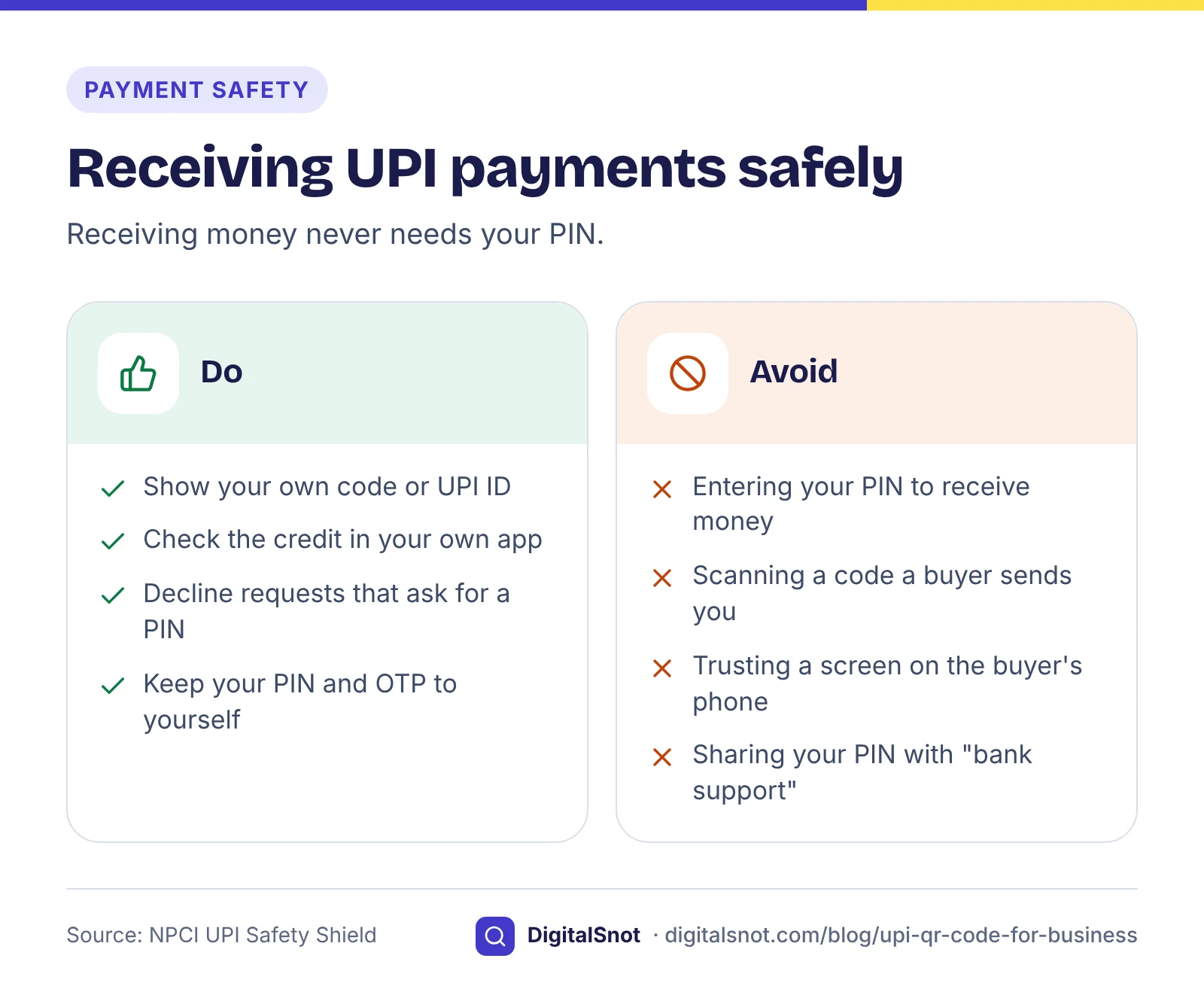
Most UPI tricks aimed at shopkeepers rely on one confusion: that you need to do something to receive money. You do not. NPCI's UPI Safety Shield says it plainly: enter your UPI PIN only to send money, because a PIN is not needed to receive it. Our UPI tool prints these safety notes on every counter card:
- You never need your UPI PIN to receive money. If an app asks for your PIN, you are sending money, not receiving it.
- Never scan a code a "buyer" sends you to receive money, and decline a "request money" that asks for your PIN.
- Never share your UPI PIN or OTP with anyone. Your bank's customer support will never ask for it.
- Check the credit in your own UPI app or bank account before you hand over goods. A payment screen on the buyer's phone is not proof (our suggestion).
A worked example: one sweet shop
Sharma Sweets in Sarafa Bazaar, Indore, is a made-up shop with a made-up UPI ID. At the counter it puts an A6 card with an open amount and the note "Counter 1", so every customer pays what the bill says. For Diwali gift boxes it prints a price list sheet with one code per box, each with its own fixed amount, such as kaju katli 250 g at ₹240.
A company orders 60 gift boxes for its staff. Sharma Sweets makes a tax invoice in the GST Invoice and Quotation Generator with a code for the total. The company pays part on delivery, so the owner makes a receipt in the Payment Receipt Maker showing the total, the amount paid and the balance, with a code for the balance. When the balance arrives, she checks it in her own UPI app before she marks it paid.
Your next step
Make your counter card in the UPI Payment QR & Link Generator today, scan it with two different UPI apps, and put it out. Then add your UPI ID to your invoice and receipt templates. For other codes, such as your Wi-Fi or a link to your website, use the QR Code Generator. All these tools run in your browser and send nothing to a bank or to NPCI. If you want help with your shop's payments page or invoices online, get in touch.
Free tools in this article
- UPI Payment QR & Link Generator Turn your UPI ID into a payment QR code, a link to copy and a printable counter card.
- GST Invoice and Quotation Generator Make a GST tax invoice, bill of supply or quotation, check it against Rule 46, and print it or save a PDF.
- Payment Receipt Maker Make a receipt for a full payment, part payment or advance, with the balance left, and print it on A4 or A5.
- QR Code Generator QR codes for links, Wi-Fi, contact cards, calls, SMS, email and maps, as PNG, SVG or a print sheet.
By the numbers
- aggregate turnover above which a business must issue e-invoices, from 1 August 2023
- ₹5 crore
- Source: GST Council: Notification 10/2023-Central Tax
Frequently asked questions
What does a UPI QR code contain?
A upi://pay link with your UPI ID (pa) and your name (pn) and, if you add them, a fixed amount (am), a short note (tn) and the currency, INR (cu). This is the common format UPI apps read and the one our tools use; test your code with the apps your customers use before you print it.
What is the difference between a static and a dynamic UPI QR code?
A static code is the same every time, which suits a counter card: the customer usually types the amount. A dynamic code is made for one payment and carries that bill's exact amount and a reference. Billing software and payment providers make dynamic codes; our UPI tool makes static ones.
Should I put a fixed amount in my counter QR code?
Only when the price never changes, such as a ₹50 parking fee or a set thali. For a shop counter, leave the amount open so the customer pays what the bill says. For a few set prices, make one code per item with the price list option.
Can I print a UPI QR code on my GST invoice?
Yes. Rule 46 of the CGST Rules lists what a tax invoice must show, and a payment code is an extra you can add. If your aggregate turnover has exceeded ₹5 crore, you must also issue e-invoices through the Invoice Registration Portal, which returns an IRN and its own QR code.
Do I need to enter my UPI PIN to receive money?
No. You never need your UPI PIN to receive money. If an app asks for your PIN, you are sending money. Decline any "request money" that asks for your PIN, and never scan a code a buyer sends you to receive a payment.
How do I know a customer has really paid?
Check the credit in your own UPI app or bank account before you hand over the goods. A payment screen on the customer's phone is not proof. Our tools cannot see payments: they only make the codes and the documents.
Sources
Every figure and claim in this article comes from the sources below. We checked each one when writing and link to the original so you can read it yourself. Credit belongs to the authors and publishers listed. How we write and check our articles.
-
1
UPI Safety Shield
NPCI · Enter your UPI PIN only to send money; a PIN is not needed to receive money; check the receiver's name before paying
-
2
Rule 46: Tax invoice
CBIC · The details a tax invoice must show.
-
3
Rule 48: Manner of issuing invoice
CBIC · An invoice issued by an e-invoicing business in any other way is not treated as an invoice.
-
4
Section 31: Tax invoice
CBIC · Section 31(3)(d): a receipt voucher for an advance.
-
5
Notification 10/2023-Central Tax
GST Council · E-invoicing for aggregate turnover above ₹5 crore from 1 August 2023.
-
6
Time limit for reporting e-invoices on the IRP portal (GSTN advisory)
GSTN, via the Maharashtra GST Department · 30-day reporting limit for turnover of ₹10 crore or more from 1 April 2025.
-
7
FAQs on the transition to the Income-tax Act, 2025
Income Tax Department · The Income-tax Act, 2025 applies from 1 April 2026.