A content brief your writer can actually follow
What to put in a brief so the writer gets it right first time: the reader, search intent, outline, sources, facts to check, internal links and a note on AI use.
On this page (10 sections)
- 1Start with the reader and the task
- 2Read the search intent from the results
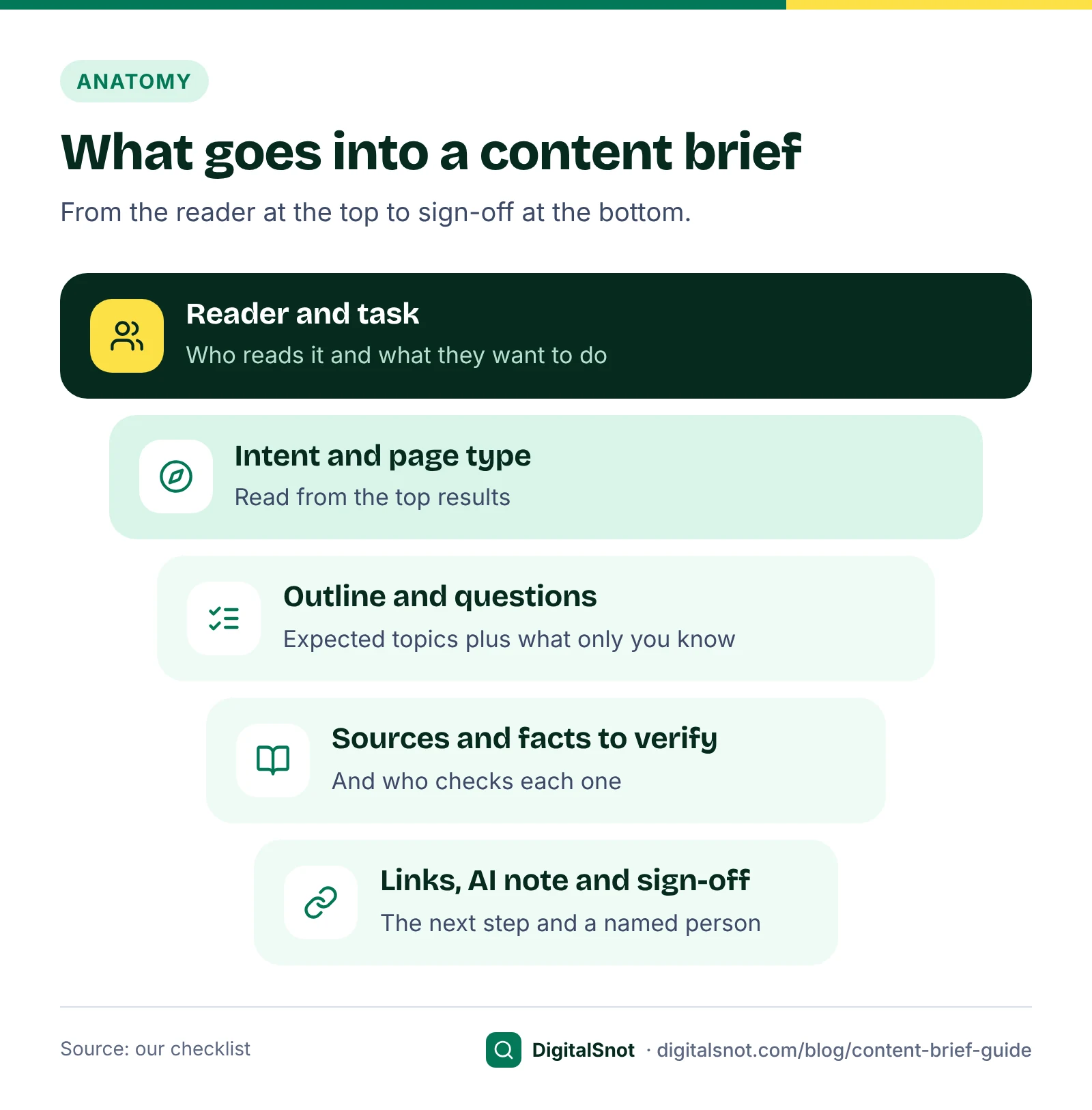
- 3Build the outline from what readers expect, then add what only you know
- 4Sources to use and facts to verify
- 5Internal links and the next step
- 6The AI-use note
- 7A worked example: Kurti Corner, Jaipur
- 8Mistakes to avoid
- 9Your next step
- 10Sources
"Write 1,500 words on kurti care" is not a content brief. It leaves the writer to guess who the reader is, what they need and what your business knows that the top results do not, so you get a tidy rewrite of the first page of Google and spend the week fixing it. A good brief takes less time than one round of rewrites. This post shows what to put in one: the reader and their task, the search intent, an outline, the sources to use, the facts to verify, the internal links and a note on AI use, with Google's guidance behind each part and a worked example from a made-up clothing shop in Jaipur.
Start with the reader and the task
Every brief should open with two lines: who will read the page, and what they are trying to do when they find it. "A woman who has just bought her first hand block-printed cotton kurti and wants to wash it without the colour running" gives a writer far more to work with than a keyword alone. Add one more line for the next step you want the reader to take: book, call, buy or read another page.
Google's guidance on helpful, reliable, people-first content asks the same kind of question. Among its self-assessment questions are whether you have an existing or intended audience that would find the content useful if they came to you directly, and whether someone will leave feeling they have learned enough about a topic to help achieve their goal. A reader and a task at the top of the brief keep the writer pointed at that goal.
Read the search intent from the results
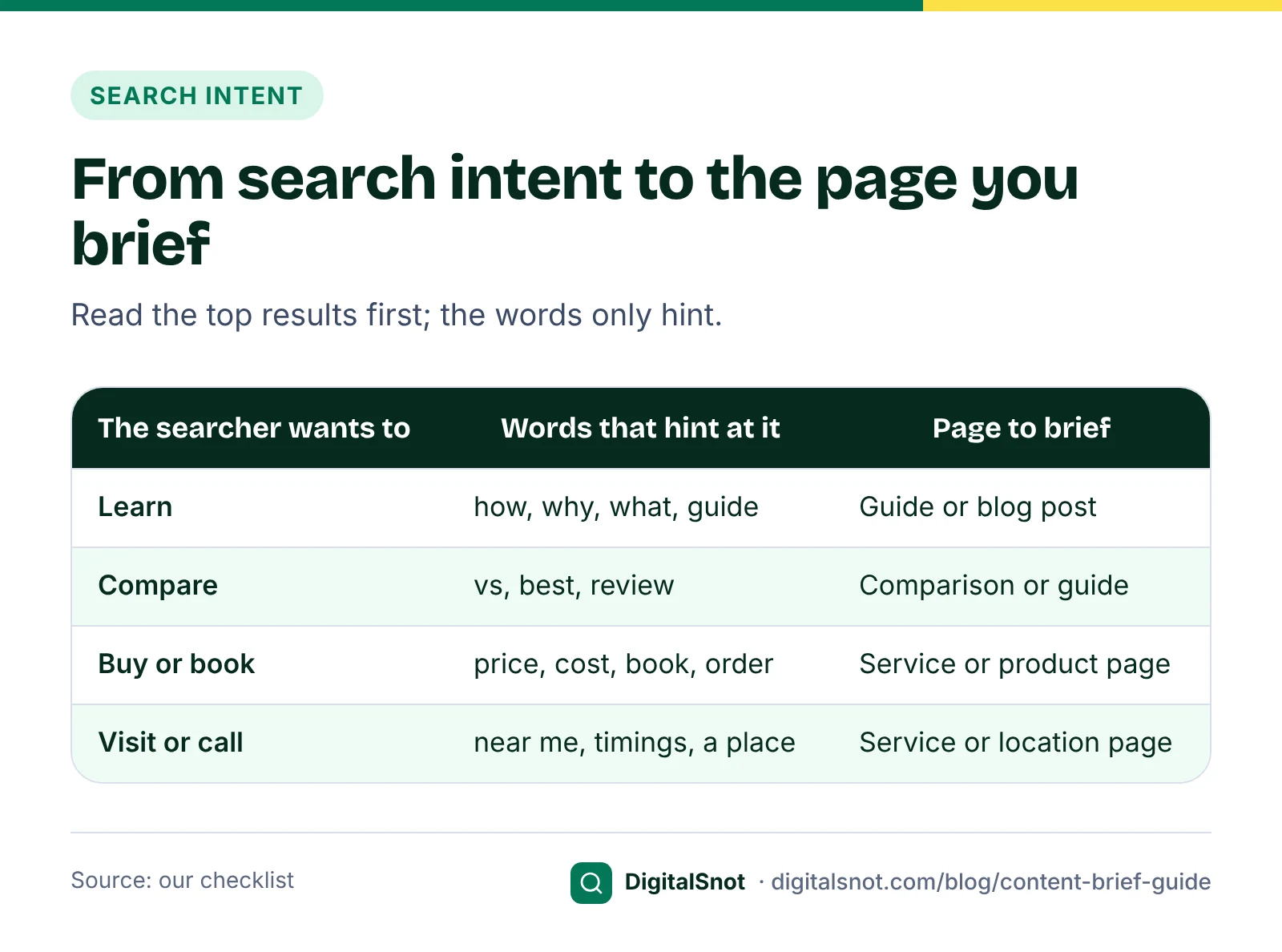
The keyword hints at what the searcher wants; the results show it. Search the keyword from where your customers are and look at what comes up: guides, product pages, local listings, videos or forum threads. Google's page on how Search works notes that results depend on things like the searcher's location, language and device, so a search from your own city tells you more than one from somewhere else.
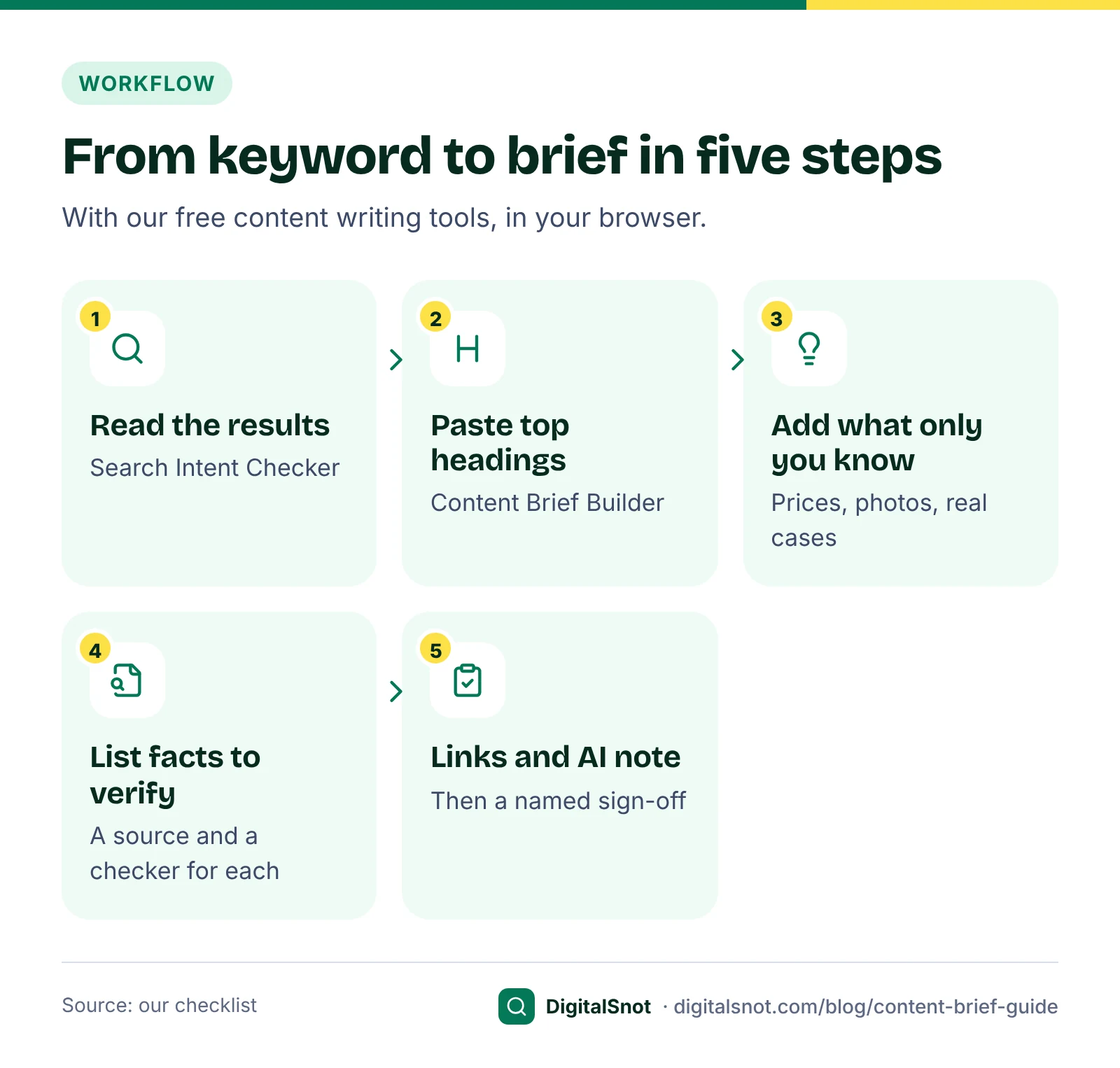
Paste the titles of the top 10 results, with their addresses and snippets if you have them, into our Search Intent Checker. It sorts each result into a page type, reads whether searchers want to learn, compare, buy or visit, and suggests the page to make, along with the words the titles share and whether the results look local or fresh. Every reading is our measure, made with word lists and patterns, not AI, and the tool reads only what you paste. Put its answer at the top of the brief, for example "Intent: learn. Page type: guide."
Build the outline from what readers expect, then add what only you know
A writer needs to know which topics the page must cover. The top pages show what readers expect to find, but copying their structure produces a page like all the others. Google's people-first questions ask whether content provides original information, reporting, research or analysis, and whether content that draws on other sources adds substantial value and originality instead of simply copying or rewriting them.
Our Content Brief Builder handles both halves. Type the keyword, the reader and what they want to do, choose the page type, then paste the H2 and H3 headings of up to five top pages. Topics that at least half the pages cover go into the outline, and topics only one page covers are listed as gaps you can choose to add. It then prompts for what only your business can add, built on Google's questions: first-hand experience, your own figures, the questions customers ask you, and who wrote the page. It writes no new sentences itself, does not use AI and does not visit the pages: you paste their headings.
On length, give a range, not a target. Google's helpful content page asks whether you are writing to a particular word count because you have heard Google has a preferred one, and says it does not. Its SEO Starter Guide adds that the length of the content alone does not matter for ranking. The builder's range is the middle of the word counts you paste from the top pages: our rough measure of how much ground they cover.
If your keyword list is long, plan the pages before the briefs. Our Topic Cluster and Pillar Page Planner groups keywords into one pillar page and cluster pages, with the links between them, and shows which keywords belong on one page rather than two, so two briefs do not ask for the same article. Our post on service pages and blog posts helps you decide which kind of page each keyword needs.
Sources to use and facts to verify
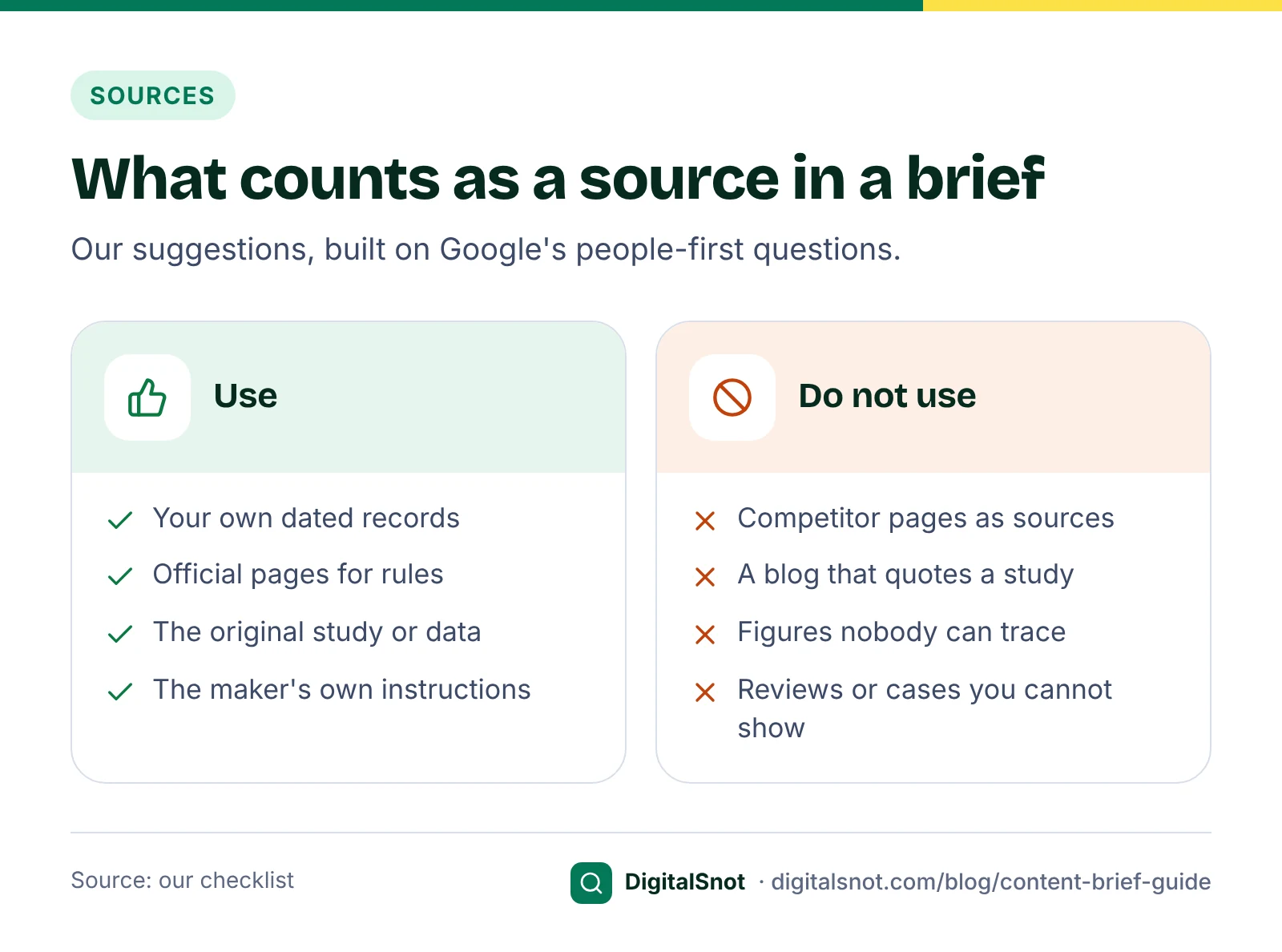
Most weak articles go wrong at the facts, not the writing. Google's people-first questions ask whether content presents information in a way that makes you want to trust it, such as clear sourcing and evidence of the expertise involved. Give the writer two short lists.
Sources to use
- Your own records: prices with the date, photos of your own work, notes from real jobs (with permission from anyone shown).
- The official page for every rule, rate or deadline, linked next to the rule.
- The original study or data for any figure, not a blog that quotes it.
- The maker's or supplier's own instructions for product details.
The competitor pages you used for the outline are research, not sources. Say so in the brief.
Facts to verify
List every figure, rule, date and claim the page will need, and who checks each one before it goes live. Anything that cannot be traced to a source is left out, however often other sites repeat it.
Internal links and the next step
List the pages on your own site that the new page should link to, and where each link belongs: the product or service page, a related guide, the contact page. Google's link best practices ask for links Google can crawl, written as standard HTML links with an href, and for anchor text that is descriptive and reasonably concise. Tell the writer to avoid "click here" and "read more".
Paste your own pages into the Content Brief Builder and it suggests which section each link fits, with anchor text taken from that page's title. End the brief with the one next step the reader should take.
The AI-use note
Every brief should now say whether the writer may use AI, for what, and how its output is checked. Two pieces of Google guidance matter here:
- Who, How and Why. Google's helpful content page asks you to think about who created the content, how and why. One of its "How" questions is whether the use of automation, including AI generation, is self-evident to visitors through disclosures or in other ways. It says disclosures are most useful for content where someone might think, "How was this created?"
- Fact-check everything. Since 1 October 2026, Google's guidance on using generative AI content says it is critical to manually fact-check and review all AI-generated content for accuracy and trustworthiness before publishing, including title elements, meta descriptions, structured data and image alt text.
A plain note does the job: "AI may be used for an outline and a first draft. Every fact, figure, title, meta description and alt text is checked by hand against the sources above. Signed off by [name]." Our guide on using AI without breaking Google's spam policies covers disclosure wording and the review steps in detail.
A worked example: Kurti Corner, Jaipur
Kurti Corner, a made-up shop in Jaipur that sells hand block-printed cotton kurtis online, wants a guide for the keyword "how to wash block print kurti". The owner's brief, built with the tools above:
- Reader and task: a buyer who has just received her first block-printed cotton kurti and wants to wash it without the colour running. Next step: browse the new collection.
- Intent: the Search Intent Checker reads the top 10 as mostly guides and videos, so the intent is to learn and the page is a guide.
- Outline: from four top pages' headings, the Content Brief Builder finds the topics most of them cover: the first wash, water temperature, hand or machine washing, drying in shade and ironing. Removing stains appears on one page only, so it lands on the gap list, and the owner adds it.
- What only we can add: photos from the shop's own test of washing one kurti five times, and the care label sewn into every kurti.
- Sources: the shop's test notes and the dye house's written care instructions.
- Facts to verify: a supplier's line that "natural dyes never fade" has no source behind it, so it stays out.
- Internal links: the cotton kurtis collection, the size guide and the WhatsApp contact page.
- AI note: AI may suggest headings only; Priya, the owner, writes the care steps from the test and signs the page off.
The writer gets one page with everything on it, and the owner knows exactly what to check when the draft comes back.
Mistakes to avoid
- A keyword and a word count, with nothing about the reader.
- Asking the writer to "cover what the top pages cover", which invites a rewrite.
- Asking for the keyword a set number of times. Google's spam policies treat keyword stuffing as spam.
- Treating competitor pages as sources.
- Leaving out the facts to verify, so nobody checks them.
- Saying nothing about AI, so nobody knows what was checked.
- No named person who signs the page off.
Your next step
Write your next brief with the Content Brief Builder and hand it over as Markdown or a printout. All our content writing tools run in your browser, and none of them uses AI. If you would rather have a team plan and write the pages, see our content SEO service or get in touch.
Free tools in this article
- Search Intent Checker Paste the top 10 results for a keyword and see what searchers want and which page to make.
- Content Brief Builder Turn a keyword and the top pages' headings into a writer's brief with an outline, questions and links.
- Topic Cluster and Pillar Page Planner Group keywords into a pillar page and cluster pages, with URLs and the internal links between them.
By the numbers
- date from which Google's guidance on generative AI content calls manual fact-checking of all AI-generated content critical
- 1 Oct 2026
- Source: Google Search Central
Frequently asked questions
What is a content brief?
A content brief is what a writer gets before writing a page: who the reader is and what they want to do, the search intent, the outline, the questions to answer, the sources and facts to check, the internal links and the next step. A good brief saves rewrites because the writer knows what the page must cover.
What should a content brief include?
The reader and their task, the intent and page type, an outline of the topics readers expect plus what only your business can add, the sources to use, the facts to verify and who checks them, the internal links, a note on AI use and the name of the person who signs the page off.
How long should the article be?
As long as the reader needs. Google says it has no preferred word count, and its SEO Starter Guide says the length of the content alone does not matter for ranking. Give the writer a range based on how much ground the top pages cover, not a target to fill.
Should the brief copy the headings of the top-ranking pages?
No. Use them to see which topics readers expect, then write your own headings in your readers' words. Google's people-first questions ask whether content that draws on other sources adds substantial value and originality instead of simply copying or rewriting them.
Should a content brief say whether the writer can use AI?
Yes. Say what AI may be used for and how its output is checked. Since 1 October 2026, Google's guidance calls it critical to fact-check and review all AI-generated content by hand before publishing, including titles, meta descriptions, structured data and image alt text.
Who should write the brief?
Our suggestion: someone who knows the customers and the business, such as the owner or the person who answers customer calls, with an editor who checks it. The writer then does the writing, and the brief carries the knowledge the writer does not have.
Sources
Every figure and claim in this article comes from the sources below. We checked each one when writing and link to the original so you can read it yourself. Credit belongs to the authors and publishers listed. How we write and check our articles.
-
1
Creating helpful, reliable, people-first content
Google Search Central · Self-assessment questions on audience, original information and copying; clear sourcing; no preferred word count; Who, How and Why, and disclosing automation
-
2
Google Search's guidance on using generative AI content on your website
Google Search Central · From 1 October 2026: critical to manually fact-check and review all AI-generated content, including titles, meta descriptions, structured data and alt text
-
3
In-depth guide to how Google Search works
Google Search Central · Results depend on factors such as the searcher's location, language and device
-
4
SEO Starter Guide: The Basics
Google Search Central · The length of the content alone does not matter for ranking
-
5
Link best practices for Google
Google Search Central · Crawlable links with an href; descriptive, reasonably concise anchor text
-
6
Spam policies for Google web search
Google Search Central · Keyword stuffing is a spam practice
Want a second pair of eyes?
Tell us about your site. We reply within one business day.
Talk to us Try our free tools