A YouTube Shorts checklist for businesses to use before you post
What counts as a Short, titles and hashtags, music a business can use, how to point viewers to a longer video, how Shorts count for the Partner Program, and what to measure.
On this page (10 sections)
Shorts are the quickest videos a business can make: a phone, a few minutes and something worth showing. They are also easy to get slightly wrong, with a song a business cannot use, a link nobody can click, or a video that turns out not to be a Short at all. This post is a YouTube Shorts checklist to go through before you post, with YouTube's rule for each step, a worked example from a made-up sweet shop in Indore, how Shorts count for the Partner Program, and what to measure afterwards.
What counts as a Short
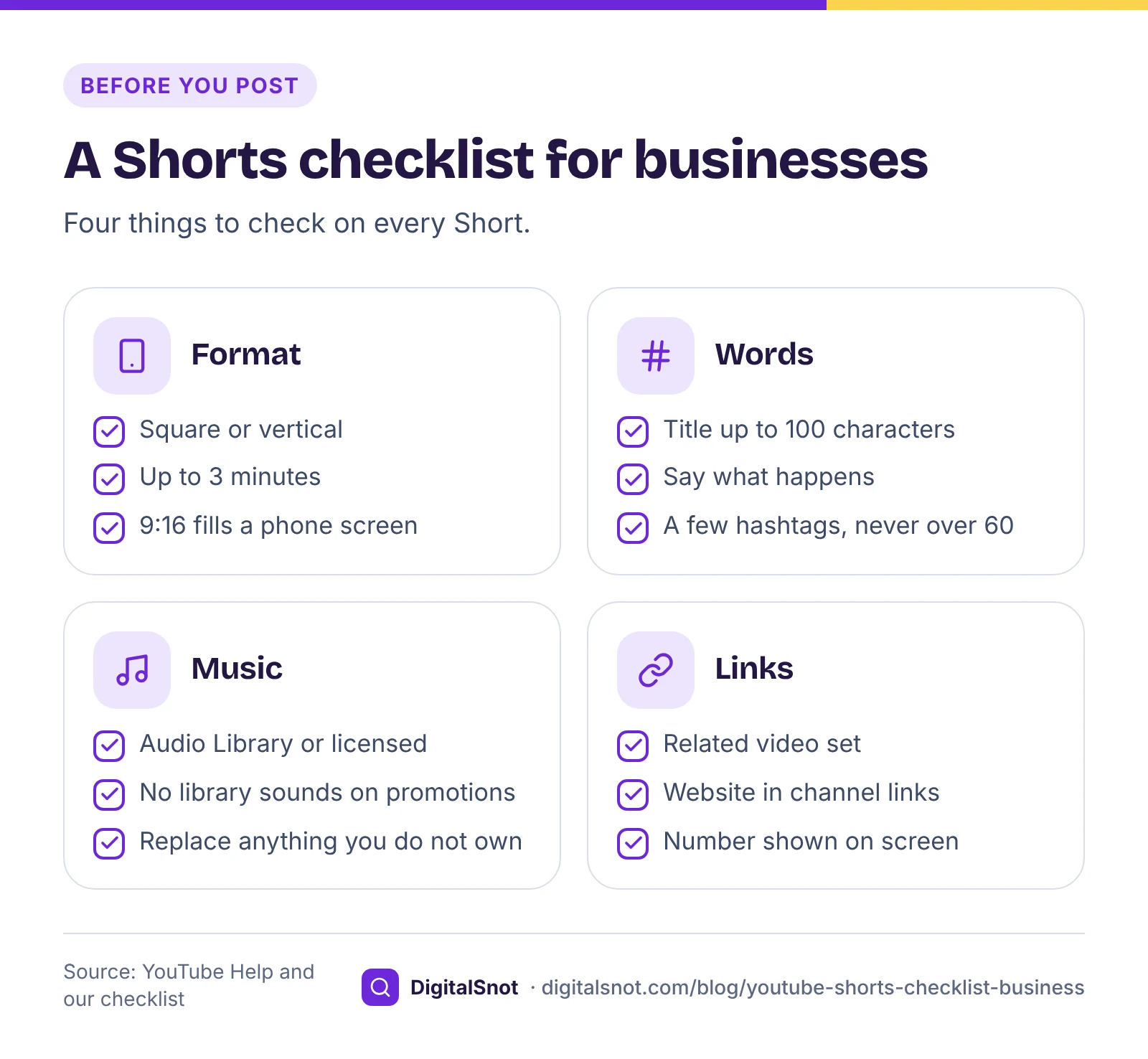
YouTube's page on three-minute Shorts says that, for videos uploaded from 15 October 2024, square or vertical videos of up to 3 minutes are Shorts. A horizontal 16:9 video stays a regular video whatever its length, and so does anything longer than 3 minutes.
Our suggestion is a vertical 9:16 video, such as 1080 × 1920 pixels, because it fills a phone screen, and one clear point per Short. Length is your choice within the 3 minutes.
Put the length and the shape, or the pixel size, into our YouTube Shorts Checklist and it tells you whether the video counts as a Short. Tick what the Short uses, such as Shorts audio library music, other music, clips you did not film, a business promotion or a link, and it warns about music limits, copyright claims and links, with tips for the related video link and the thumbnail frame. It runs in your browser and never signs in to YouTube.
Before you post: the checklist
Title and hashtags
A Short's title follows the same rules as any video. YouTube's help on editing video settings allows up to 100 characters, without invalid characters such as < and >. Our suggestion: say what happens in the Short, in the words a customer would search for, such as "How we pack kaju katli for courier".
Hashtags go in the title or the description. YouTube's hashtag rules say that if a video has more than 60 hashtags, YouTube ignores all of them, and that over-tagging can get a video removed from uploads or search. A few relevant ones are enough.
Music a business can use
This is where business Shorts trip up most often. YouTube's page on common upload errors says agreements with some music partners restrict music in Shorts to personal, non-commercial use, so channels that upload for commercial purposes, including Shorts with paid product placement, may see errors with sounds from the Shorts audio library. The fixes it lists include uploading again without that music, or with royalty-free tracks from the YouTube Audio Library. It also warns that a Short without cleared rights can face enforcement, including copyright takedowns.
Our suggestion for a business: use tracks from the YouTube Audio Library, which YouTube says are copyright-safe and will not be claimed through Content ID, or music you have licensed for commercial use. If a Short does get a claim, our post on copyright claims and strikes sets out your options.
Claims on Shorts over a minute
Length matters when a Short is claimed. Until 24 September 2026, a Short over 1 minute with an active Content ID claim was blocked worldwide. YouTube's three-minute Shorts page now says that, from that date, new Shorts over 1 minute with a claim are no longer blocked automatically and may stay playable, but the claim still applies. Our suggestion: if a Short uses anything you do not own, replace it before you post.
Upload settings
A Short goes through the same settings as any upload, including the audience setting and, where it applies, the disclosure for realistic AI or altered content. Our YouTube Upload Checklist gives YouTube's rule for each step and keeps your ticks in your browser.
Point viewers to your longer video
Links typed into Shorts descriptions and comments cannot be clicked, which is why YouTube offers a related video link instead. Its page on adding a related video to your Shorts explains how: in YouTube Studio, open Content, click the Short, choose a related video from your channel and save. Viewers then see a clickable link below your channel handle. You need advanced features for this, and the linked video must be public or unlisted.
The second route is your channel itself. YouTube's help on managing your channel's profile lets you add up to 14 links, with the first shown near the subscribe button. Put your website or a WhatsApp chat link there, and say your number on screen if you want calls.
A Short that answers one quick question and links to a full how-to video is a pattern we suggest for most businesses: the Short gets found, and the long video does the explaining.
Make Shorts from a video you already have
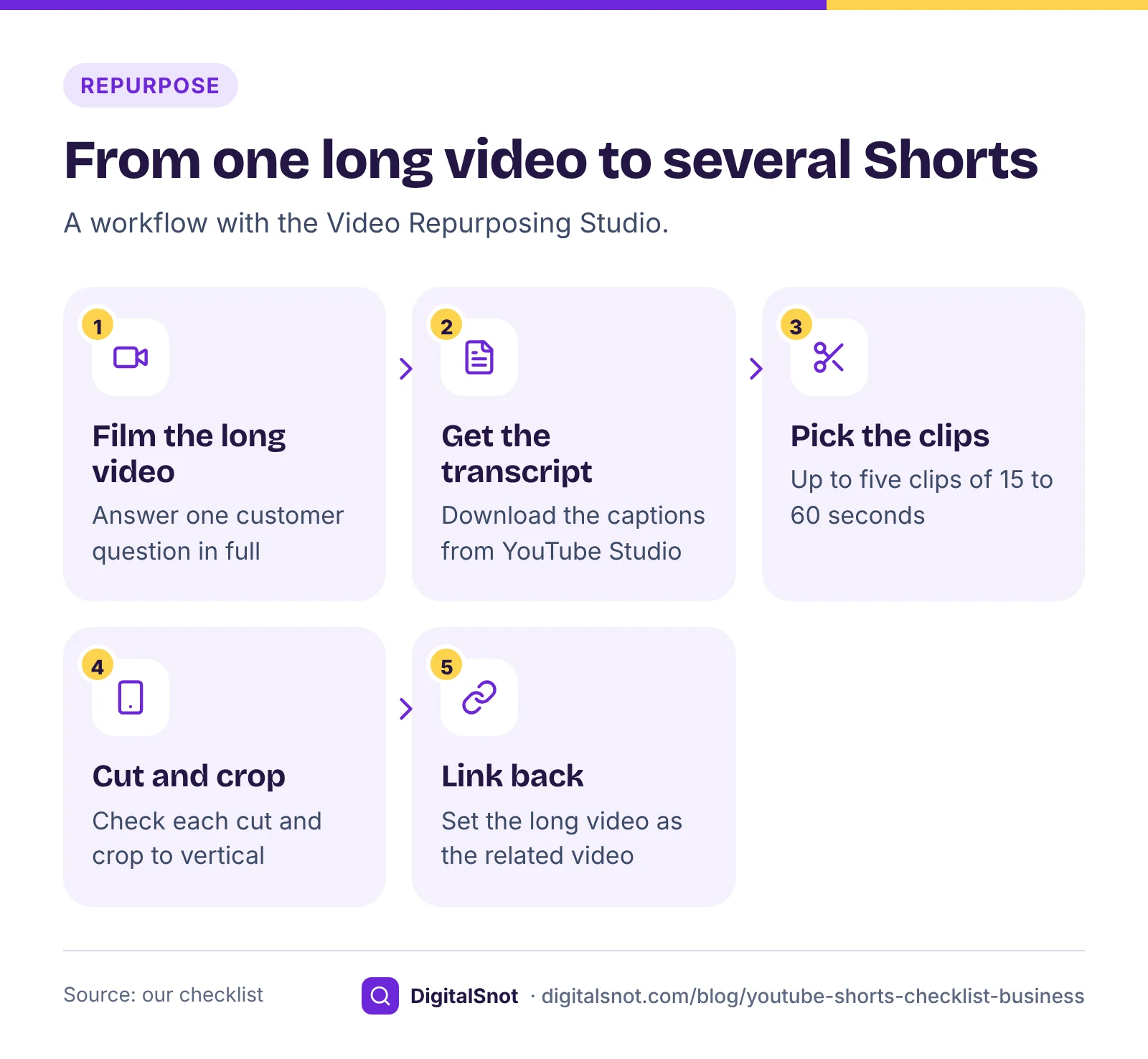
The cheapest Shorts come from a long video you have already filmed. Paste its transcript with timestamps, or open its caption file (SRT, VTT or SBV), in our Video Repurposing Studio. It suggests up to five clips with their start and end times, a hook line, a working title and caption files re-timed to start at zero, as well as chapters, a description and posts for other platforms. It picks clips of 15 to 60 seconds by our measure, scoring questions, numbers and action words. It uses templates, not AI, and it only reads the words, so check every cut in your editor and crop it to vertical yourself.
A worked example: Sharma Sweets, Indore
Sharma Sweets, a made-up sweet shop in Indore, wants a Diwali Short showing how it packs gift boxes for courier. The first cut is 1 minute 20 seconds long, vertical at 1080 × 1920, with a song from the Shorts audio library and "Order at the link below" in the description. The Shorts Checklist's "Try an example" uses this same made-up shop, and it flags three things:
- It is a Short: vertical and under 3 minutes.
- Library music on a business Short: some music partners restrict it to non-commercial use, so the shop swaps in a YouTube Audio Library track.
- The link cannot be clicked: the shop deletes "link below", shows its WhatsApp number on screen, and sets its longer "How we make kaju katli" video as the related video.
The owner also trims the Short to 55 seconds by cutting a slow shot of the shop front. That is our suggestion, not a rule: a packing demo does not need 80 seconds. Then she ticks through the checklist's before and after lists, and starts it again for the next Short.
Shorts views and the Partner Program
If you hope to earn from the channel, Shorts count in their own way. Our post on YouTube Partner Program eligibility has the full detail; for Shorts, the key points are these:
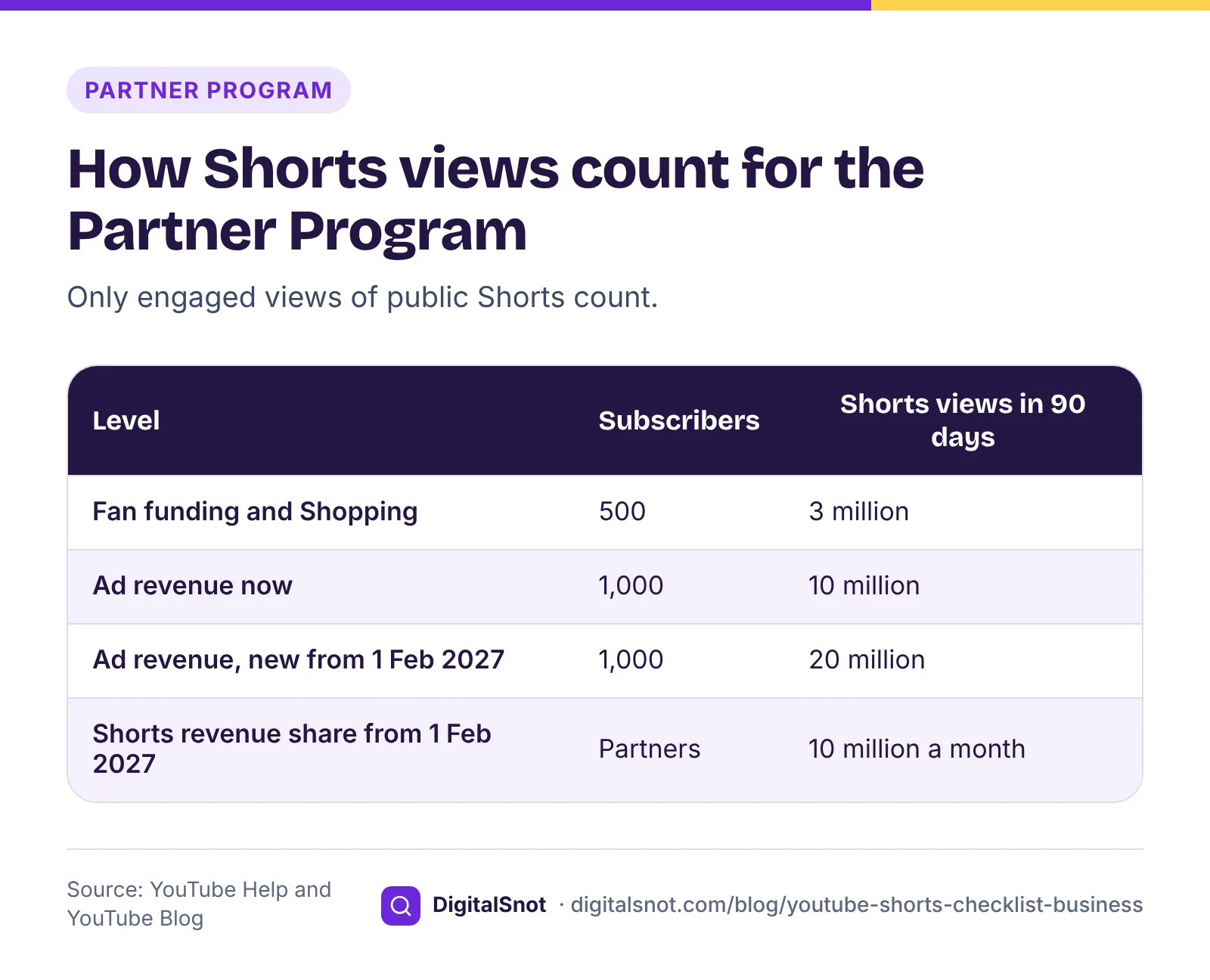
- Watch time in the Shorts feed does not count towards the watch-hour threshold. Shorts have their own route instead: 500 subscribers and 3 million public Shorts views in 90 days for fan funding and Shopping (with 3 public uploads in 90 days), or 1,000 subscribers and 10 million for ad revenue, according to YouTube's Partner Program overview.
- YouTube's explanation of qualified views says a Shorts view counts only if it comes from a public Short and is an engaged view: the viewer stayed past the first few seconds, and loops do not count. YouTube Analytics shows engaged views for each video.
- From 1 February 2027, new applicants for ad revenue need 20 million Shorts views in 90 days, and under YouTube's Shorts monetisation policies a partner needs at least 10 million qualified Shorts views in 90 days to share in Shorts revenue for a month.
For most local businesses those numbers are a long way off, and that is fine. A Short that brings an enquiry is worth more to a shop than a share of Shorts ad revenue.
What to measure after you post
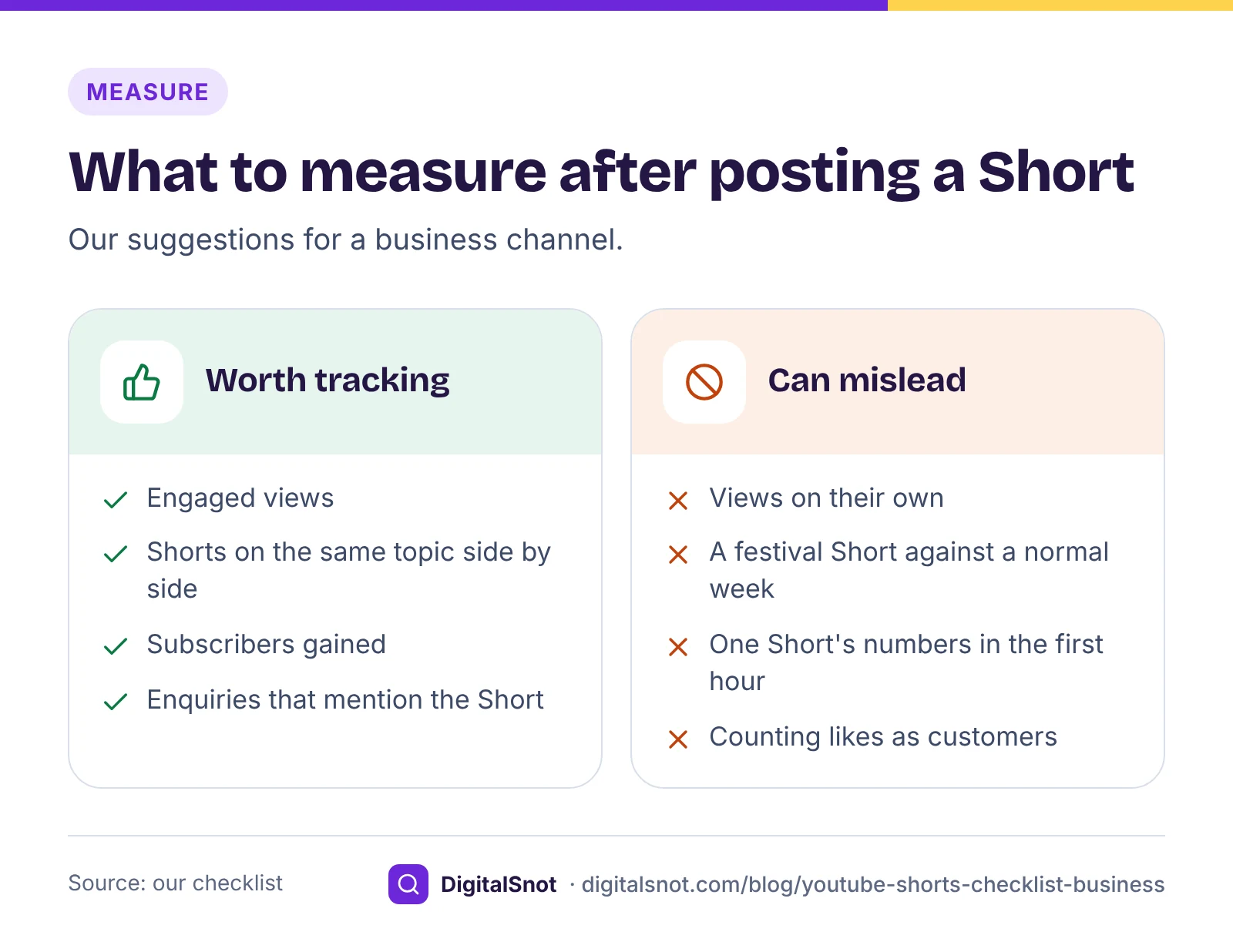
View counts on Shorts can look large and mean little. Our suggestions, read in YouTube Analytics a week or two after posting:
- Engaged views, not just views. Engaged views count the people who stayed past the opening seconds, which is also the count the Partner Program uses.
- Like with like. Compare Shorts on the same topic, such as two packing demos, rather than a festival Short with an ordinary week.
- Subscribers gained. Note which Shorts bring subscribers, not only viewers.
- What happens off YouTube. Count WhatsApp messages and calls that mention a Short, and ask new customers where they saw you.
Review once a month, and make more of what brought enquiries rather than what brought the biggest number.
Mistakes to avoid
- Uploading a 16:9 clip and expecting it to be a Short.
- Using Shorts audio library sounds on a business promotion.
- Writing "link in description" when the link cannot be clicked.
- Leaving a claimed song in a Short over a minute long.
- Filling the title and description with hashtags.
- Judging a Short by views alone.
Your next step
Before your next Short, open the Shorts Checklist and go through it once; your ticks stay in your browser for the next one. If you are planning what to film, our post on your first 10 YouTube videos as a local business shows which customer questions suit Shorts and which suit longer videos. All these tools are in our YouTube tools, and none of them signs in to your channel. If you would like help planning a channel, get in touch.
Free tools in this article
- YouTube Shorts Checklist Check your video counts as a Short, see the music, claim and link rules, and tick through each step.
- YouTube Upload Checklist Tick through every step of a YouTube upload, from file and thumbnail to audience, captions and end screen.
- Video Repurposing Studio Turn one video's transcript into Shorts clips, chapters, a description, a blog outline, posts and quotes.
Frequently asked questions
How long can a YouTube Short be?
Up to 3 minutes, in a square or vertical shape, for Shorts uploaded from 15 October 2024. A longer video, or a horizontal 16:9 one, is a regular video. Our suggestion is a vertical 9:16 video, such as 1080 × 1920 pixels, with one clear point.
Can a business use music from the Shorts audio library?
Not always. YouTube says agreements with some music partners restrict Shorts music to personal, non-commercial use, so commercial Shorts may get upload errors with those sounds. Use tracks from the YouTube Audio Library, which YouTube says are copyright-safe, or music you have licensed for business use.
Why can viewers not click the link in my Short's description?
Links in Shorts descriptions and comments cannot be clicked. Instead, set one of your public or unlisted videos as the related video in YouTube Studio, which shows as a clickable link below your channel handle, and add your website to your channel's links.
How many hashtags should a Short have?
YouTube sets no minimum, but if a video has more than 60 hashtags, YouTube ignores all of them, and over-tagging can get a video removed from uploads or search. Our suggestion is a few relevant hashtags in the title or description.
Do Shorts count towards the YouTube Partner Program?
Yes, through Shorts views rather than watch hours: 3 million public Shorts views in 90 days for fan funding with 500 subscribers, or 10 million for ad revenue with 1,000. Only engaged views of public Shorts count, and watch time in the Shorts feed does not count towards watch hours.
What happens if my Short over 1 minute gets a copyright claim?
Until 24 September 2026 such Shorts were blocked worldwide. From that date, new Shorts over 1 minute with a claim are no longer blocked automatically and may stay playable, but the claim still applies. You can remove the claimed music, or dispute the claim if you have the rights.
Sources
Every figure and claim in this article comes from the sources below. We checked each one when writing and link to the original so you can read it yourself. Credit belongs to the authors and publishers listed. How we write and check our articles.
-
1
Understand three-minute YouTube Shorts
YouTube Help · Square or vertical videos up to 3 minutes uploaded from 15 October 2024 are Shorts; claims on Shorts over 1 minute from 24 September 2026
-
2
Edit video settings
YouTube Help · Titles up to 100 characters without invalid characters
-
3
Use hashtags for YouTube search
YouTube Help · More than 60 hashtags and YouTube ignores all of them; over-tagging can lead to removal from uploads or search
-
4
Common uploading errors
YouTube Help · Shorts music restricted to personal, non-commercial use by some music partners, and the fixes
-
5
Use music and sound effects from the Audio Library
YouTube Help · Copyright-safe tracks that will not be claimed through Content ID
-
6
Add a related video to your YouTube Shorts
YouTube Help · Choose a related video in YouTube Studio; it shows as a clickable link below the channel handle
-
7
Manage your YouTube channel's profile
YouTube Help · Up to 14 channel links, the first shown near the subscribe button
-
8
YouTube Partner Program overview & eligibility
YouTube Help · Shorts views route to the Partner Program; Shorts feed watch time does not count towards watch hours
-
9
YouTube monetization: qualified watch hours and Shorts views
YouTube Blog · Qualified Shorts views come from public Shorts and are engaged views, without loops
-
10
YouTube Shorts monetization policies
YouTube Help · From 1 February 2027, 10 million qualified Shorts views in 90 days to share in Shorts revenue for a month